模型微調
基於 DevPod 的功能,我們提供專門用於模型微調的映像,方便使用者微調自己的模型。
建立微調任務的流程基本上與 DevPod 相同。您可以參考 DevPod 的建立流程。以下是幾個不同之處:
- 您需要在建立頁面上輸入用於微調的基礎模型,例如:Qwen/Qwen3-8B。
- 如果模型需要存取權杖,您還需要填寫 Hugging Face token(選用)。
- 在 Dataset 欄位中輸入您選擇的資料集識別符,例如:tatsu-lab/alpaca。
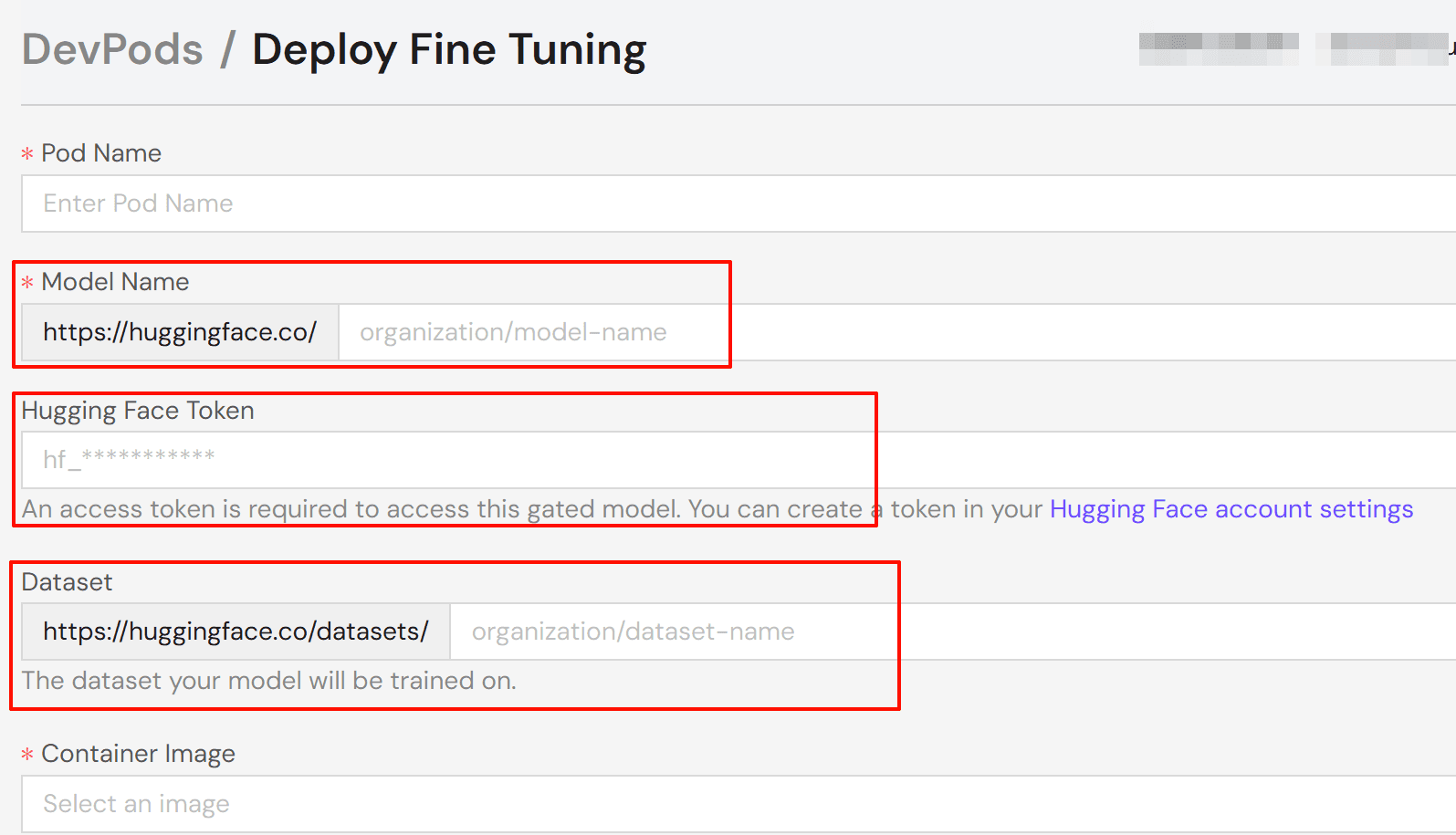
選擇任務資源的配置後,部署 pod 並等待任務狀態變為「執行中」。點擊 Connect 並選擇您偏好的連線方式:
- Jupyter Notebook:基於瀏覽器的筆記本介面(建議)。
- Web Terminal:基於瀏覽器的終端機。
- SSH:本機終端機連線。
注意:
若要使用 SSH,請在帳戶設定中新增您的 SSH 公開金鑰。系統會自動將您的金鑰新增到 pod 的 authorized_keys 檔案中。
目前,我們精心準備了兩個工具映像,分別基於 Axolotl 和 Torchtune 開發,旨在為使用者微調模型提供便利。接下來,我們將詳細介紹這兩個映像的使用流程。
基於 Axolotl
配置您的環境
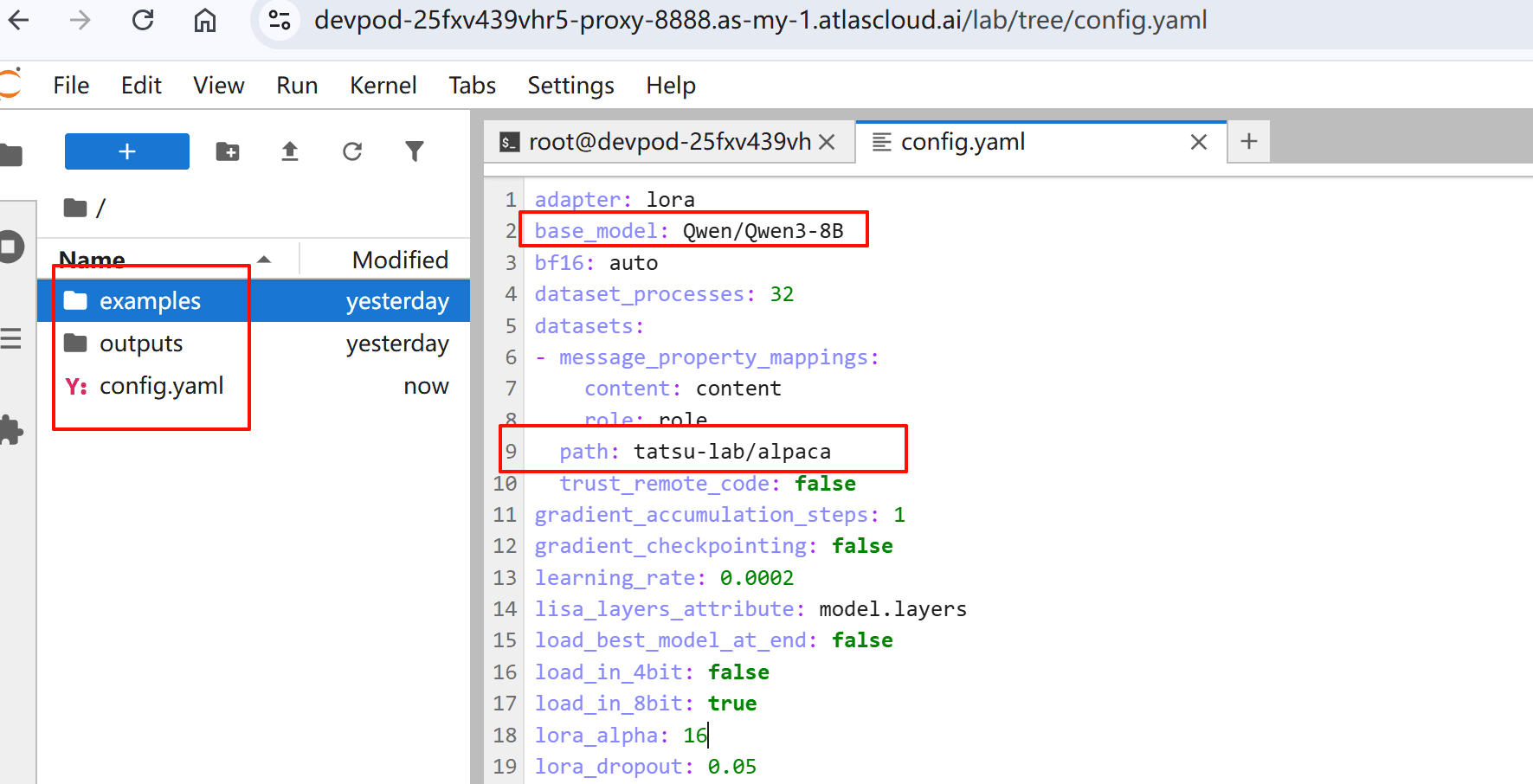
在瀏覽器中開啟 Jupyter Notebook。您可以看到工作目錄中有三個檔案:
- examples/:範例配置和指令碼
- outputs/:訓練結果和模型輸出
- config.yaml:您模型的訓練參數 系統會根據您選擇的基礎模型和資料集生成初始 config.yaml。
檢視和修改配置
根據您的具體使用案例檢視和調整參數。以下是包含常用參數的範例配置:
base_model: Qwen/Qwen3-32B
# Automatically upload checkpoint and final model to HF
# hub_model_id: username/custom_model_name

plugins:
  - axolotl.integrations.cut_cross_entropy.CutCrossEntropyPlugin
strict: false

chat_template: qwen3
datasets:
  - path: mlabonne/FineTome-100k
    type: chat_template
    split: train[:20%]
    field_messages: conversations
    message_property_mappings:
      role: from
      content: value
val_set_size: 0.0
output_dir: ./outputs/out
dataset_prepared_path: last_run_prepared

sequence_len: 2048
sample_packing: true
eval_sample_packing: true
pad_to_sequence_len: true

load_in_4bit: true
adapter: qlora
lora_r: 16
lora_alpha: 32
lora_target_modules:
  - q_proj
  - k_proj
  - v_proj
  - o_proj
  - down_proj
  - up_proj
lora_mlp_kernel: true
lora_qkv_kernel: true
lora_o_kernel: true

wandb_project:
wandb_entity:
wandb_watch:
wandb_name:
wandb_log_model:

gradient_accumulation_steps: 2
micro_batch_size: 1
num_epochs: 1
optimizer: adamw_torch_4bit
lr_scheduler: cosine
learning_rate: 0.0002

bf16: auto
tf32: true

gradient_checkpointing: offload
gradient_checkpointing_kwargs:
  use_reentrant: false
resume_from_checkpoint:
logging_steps: 1
flash_attention: true

warmup_steps: 10
evals_per_epoch: 4
saves_per_epoch: 1
weight_decay: 0.0
special_tokens:
更多配置範例,請造訪 Axolotl 範例儲存庫。
開始微調程序
配置準備就緒後,請按照以下步驟操作:
- 啟動訓練程序:
axolotl train config.yaml- 在終端機中監控訓練進度。
基於 Torchtune
配置您的環境
在瀏覽器中開啟 Jupyter Notebook。您可以使用 tune ls 列出 torchtune 支援的完整微調配方集。
RECIPE CONFIG
full_finetune_single_device llama2/7B_full_low_memory
code_llama2/7B_full_low_memory
llama3/8B_full_single_device
llama3_1/8B_full_single_device
llama3_2/1B_full_single_device
llama3_2/3B_full_single_device
mistral/7B_full_low_memory
phi3/mini_full_low_memory
phi4/14B_full_low_memory
qwen2/7B_full_single_device
qwen2/0.5B_full_single_device
qwen2/1.5B_full_single_device
qwen2_5/0.5B_full_single_device
qwen2_5/1.5B_full_single_device
qwen2_5/3B_full_single_device
qwen2_5/7B_full_single_device
llama3_2_vision/11B_full_single_device
full_finetune_distributed llama2/7B_full
llama2/13B_full
llama3/8B_full
llama3_1/8B_full
llama3_2/1B_full
llama3_2/3B_full
llama3/70B_full
llama3_1/70B_full
llama3_3/70B_full
llama3_3/70B_full_multinode
mistral/7B_full
gemma/2B_full
gemma/7B_full
gemma2/2B_full
gemma2/9B_full
gemma2/27B_full
phi3/mini_full
phi4/14B_full
qwen2/7B_full
qwen2/0.5B_full
qwen2/1.5B_full
qwen2_5/0.5B_full
qwen2_5/1.5B_full
qwen2_5/3B_full
qwen2_5/7B_full
llama3_2_vision/11B_full
llama3_2_vision/90B_full
lora_finetune_single_device llama2/7B_lora_single_device
llama2/7B_qlora_single_device
code_llama2/7B_lora_single_device
code_llama2/7B_qlora_single_device
llama3/8B_lora_single_device
llama3_1/8B_lora_single_device
llama3/8B_qlora_single_device
llama3_2/1B_lora_single_device
llama3_2/3B_lora_single_device
llama3/8B_dora_single_device
llama3/8B_qdora_single_device
llama3_1/8B_qlora_single_device
llama3_2/1B_qlora_single_device
llama3_2/3B_qlora_single_device
llama2/13B_qlora_single_device
mistral/7B_lora_single_device
mistral/7B_qlora_single_device
gemma/2B_lora_single_device
gemma/2B_qlora_single_device
gemma/7B_lora_single_device
gemma/7B_qlora_single_device
gemma2/2B_lora_single_device
gemma2/2B_qlora_single_device
gemma2/9B_lora_single_device
gemma2/9B_qlora_single_device
gemma2/27B_lora_single_device
gemma2/27B_qlora_single_device
phi3/mini_lora_single_device
phi3/mini_qlora_single_device
phi4/14B_lora_single_device
phi4/14B_qlora_single_device
qwen2/7B_lora_single_device
qwen2/0.5B_lora_single_device
qwen2/1.5B_lora_single_device
qwen2_5/0.5B_lora_single_device
qwen2_5/1.5B_lora_single_device
qwen2_5/3B_lora_single_device
qwen2_5/7B_lora_single_device
qwen2_5/14B_lora_single_device
llama3_2_vision/11B_lora_single_device
llama3_2_vision/11B_qlora_single_device
lora_dpo_single_device llama2/7B_lora_dpo_single_device
llama3_1/8B_lora_dpo_single_device
lora_dpo_distributed llama2/7B_lora_dpo
llama3_1/8B_lora_dpo
full_dpo_distributed llama3_1/8B_full_dpo
ppo_full_finetune_single_device mistral/7B_full_ppo_low_memory
lora_finetune_distributed llama2/7B_lora
llama2/13B_lora
llama2/70B_lora
llama2/7B_qlora
llama2/70B_qlora
llama3/8B_dora
llama3/70B_lora
llama3_1/70B_lora
llama3_3/70B_lora
llama3_3/70B_qlora
llama3/8B_lora
llama3_1/8B_lora
llama3_2/1B_lora
llama3_2/3B_lora
llama3_1/405B_qlora
mistral/7B_lora
gemma/2B_lora
gemma/7B_lora
gemma2/2B_lora
gemma2/9B_lora
gemma2/27B_lora
phi3/mini_lora
phi4/14B_lora
qwen2/7B_lora
qwen2/0.5B_lora
qwen2/1.5B_lora
qwen2_5/0.5B_lora
qwen2_5/1.5B_lora
qwen2_5/3B_lora
qwen2_5/7B_lora
qwen2_5/32B_lora
qwen2_5/72B_lora
llama3_2_vision/11B_lora
llama3_2_vision/11B_qlora
llama3_2_vision/90B_lora
llama3_2_vision/90B_qlora
dev/lora_finetune_distributed_multi_dataset dev/11B_lora_multi_dataset
generate generation
dev/generate_v2 llama2/generation_v2
llama3_2_vision/11B_generation_v2
dev/generate_v2_distributed llama3/70B_generation_distributed
llama3_1/70B_generation_distributed
llama3_3/70B_generation_distributed
dev/early_exit_finetune_distributed llama2/7B_full_early_exit
eleuther_eval eleuther_evaluation
llama3_2_vision/11B_evaluation
qwen2/evaluation
qwen2_5/evaluation
gemma/evaluation
phi4/evaluation
phi3/evaluation
mistral/evaluation
llama3_2/evaluation
code_llama2/evaluation
quantize quantization
qat_distributed llama2/7B_qat_full
llama3/8B_qat_full
qat_lora_finetune_distributed llama3/8B_qat_lora
llama3_1/8B_qat_lora
llama3_2/1B_qat_lora
llama3_2/3B_qat_lora
knowledge_distillation_single_device qwen2/1.5_to_0.5B_KD_lora_single_device
llama3_2/8B_to_1B_KD_lora_single_device
knowledge_distillation_distributed qwen2/1.5_to_0.5B_KD_lora_distributed
llama3_2/8B_to_1B_KD_lora_distributed檢視和修改配置
- 將配置檔案複製到本機裝置。例如:
tune cp qwen2_5/3B_lora_single_device config.yaml- 根據您的具體使用案例修改、檢視和調整參數。
開始微調程序
配置準備就緒後,請按照以下步驟操作:
- 啟動訓練程序:
tune run lora_finetune_single_device --config config.yaml- 在終端機中監控訓練進度。
相關文件
有關使用 Axolotl 進行微調的更多資訊,請參閱:
有關使用 Torchtune 進行微調的更多資訊,請參閱:
有關更自由和靈活的微調課程的更多資訊,請參閱: