模型微调
基于 DevPod 的功能,我们提供了专门用于模型微调的镜像,方便用户微调自己的模型。
创建微调任务的过程与 DevPod 基本相同。您可以参考 DevPod 的创建流程。以下是几点不同之处:
- 您需要在创建页面输入用于微调的基础模型,例如: Qwen/Qwen3-8B。
- 如果模型需要访问令牌,您还需要填写 Hugging Face token(可选)。
- 在 Dataset 字段中输入您选择的数据集标识符,例如: tatsu-lab/alpaca。
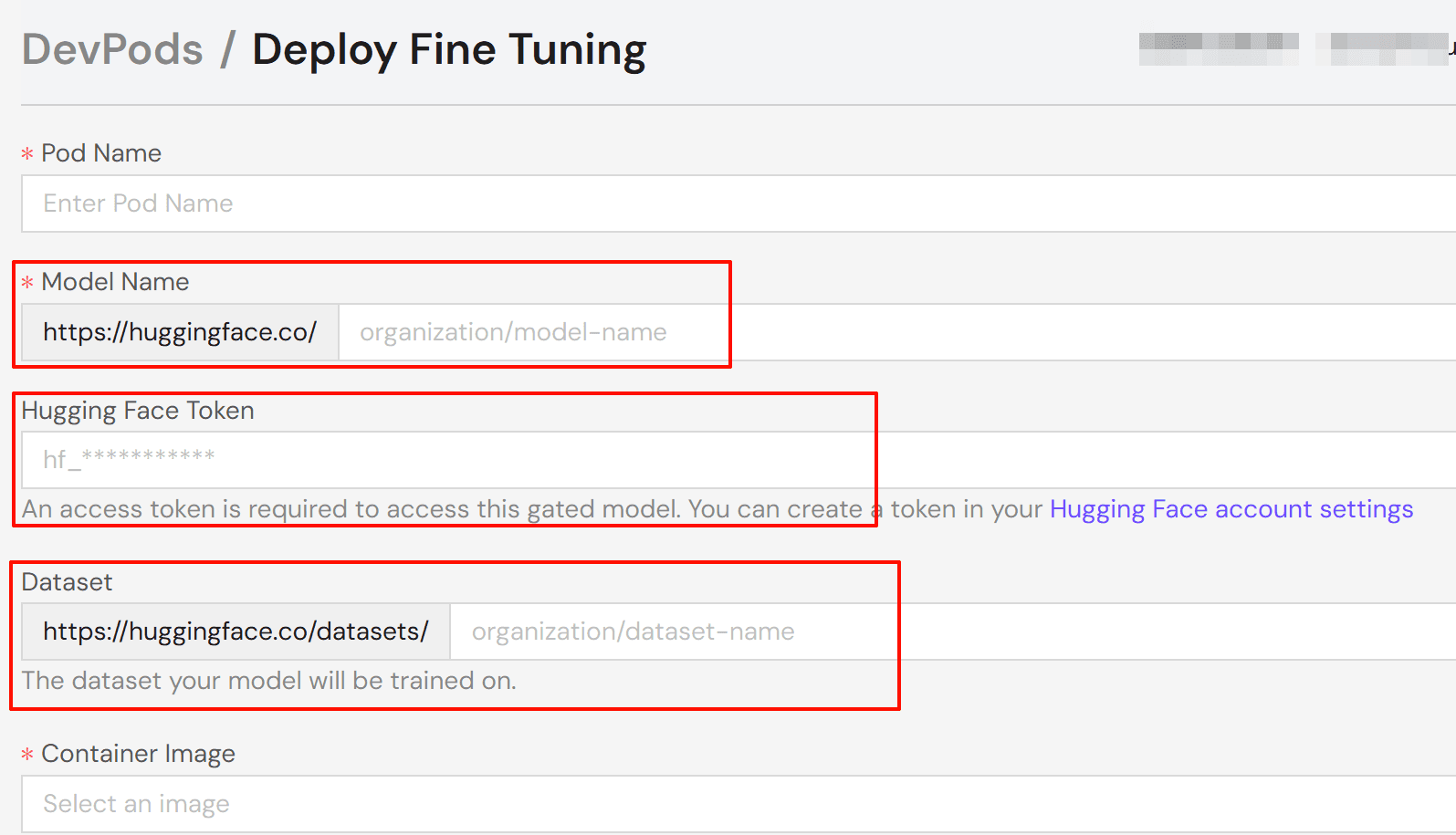
选择任务资源配置后,部署 pod 并等待任务状态变为"运行中"。点击 Connect 并选择您偏好的连接方式:
- Jupyter Notebook: 基于浏览器的 notebook 界面(推荐)。
- Web Terminal: 基于浏览器的终端。
- SSH: 本地机器终端连接。
注意:
要使用 SSH,请在账户设置中添加您的公共 SSH 密钥。系统会自动将您的密钥添加到 pod 的 authorized_keys 文件中。
目前,我们精心准备了两个工具镜像,分别基于 Axolotl 和 Torchtune 开发,旨在为用户微调模型提供便利。接下来,我们将详细介绍这两个镜像的使用流程。
基于 Axolotl
配置环境
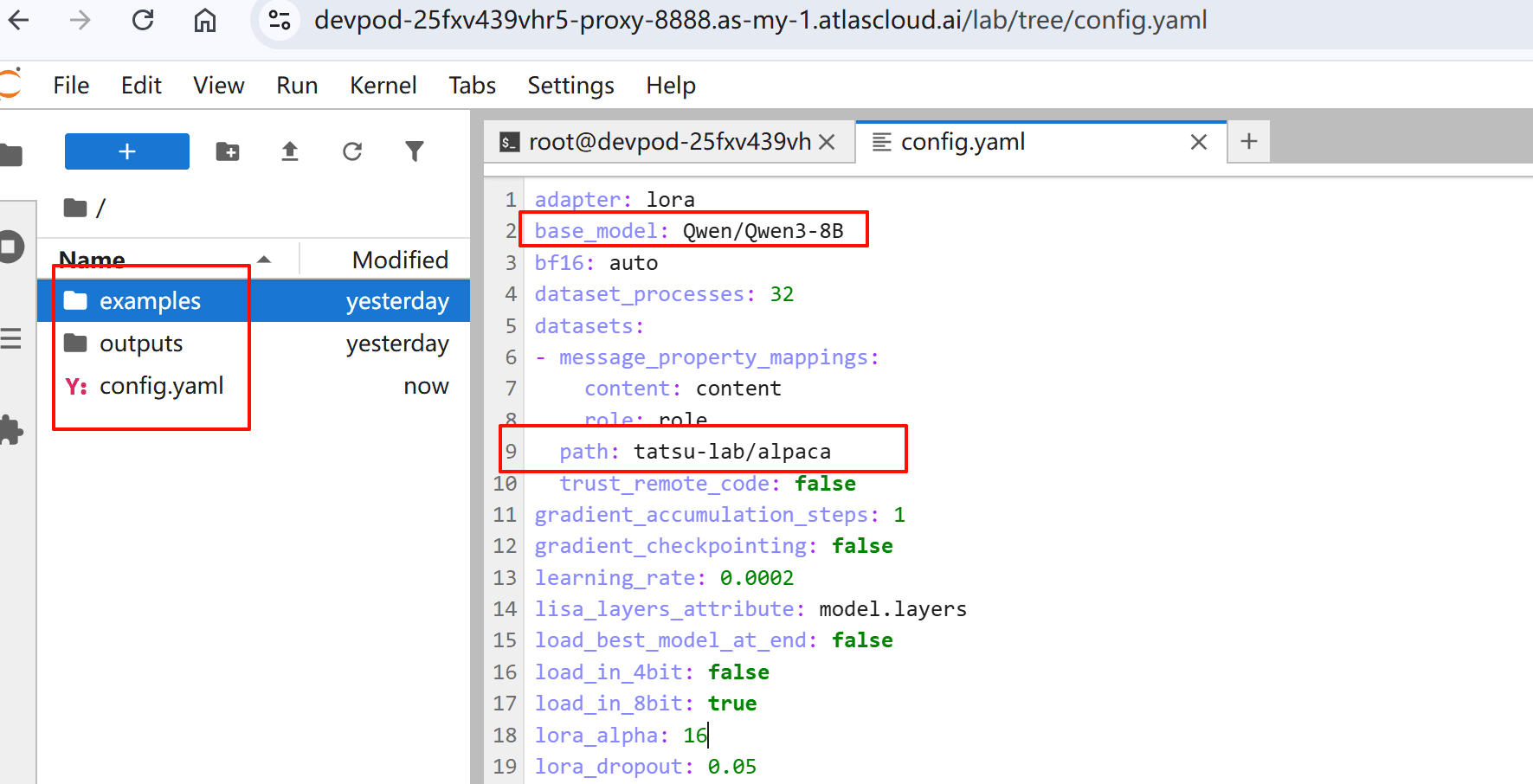
在浏览器中打开 Jupyter Notebook。您可以看到工作目录中有三个文件:
- examples/: 示例配置和脚本
- outputs/: 训练结果和模型输出
- config.yaml: 模型的训练参数 系统会根据您选择的基础模型和数据集生成初始 config.yaml。
查看和修改配置
根据您的具体用例查看和调整参数。以下是包含常用参数的示例配置:
base_model: Qwen/Qwen3-32B
# 自动将 checkpoint 和最终模型上传到 HF
# hub_model_id: username/custom_model_name

plugins:
  - axolotl.integrations.cut_cross_entropy.CutCrossEntropyPlugin
strict: false

chat_template: qwen3
datasets:
  - path: mlabonne/FineTome-100k
    type: chat_template
    split: train[:20%]
    field_messages: conversations
    message_property_mappings:
      role: from
      content: value
val_set_size: 0.0
output_dir: ./outputs/out
dataset_prepared_path: last_run_prepared

sequence_len: 2048
sample_packing: true
eval_sample_packing: true
pad_to_sequence_len: true

load_in_4bit: true
adapter: qlora
lora_r: 16
lora_alpha: 32
lora_target_modules:
  - q_proj
  - k_proj
  - v_proj
  - o_proj
  - down_proj
  - up_proj
lora_mlp_kernel: true
lora_qkv_kernel: true
lora_o_kernel: true

wandb_project:
wandb_entity:
wandb_watch:
wandb_name:
wandb_log_model:

gradient_accumulation_steps: 2
micro_batch_size: 1
num_epochs: 1
optimizer: adamw_torch_4bit
lr_scheduler: cosine
learning_rate: 0.0002

bf16: auto
tf32: true

gradient_checkpointing: offload
gradient_checkpointing_kwargs:
  use_reentrant: false
resume_from_checkpoint:
logging_steps: 1
flash_attention: true

warmup_steps: 10
evals_per_epoch: 4
saves_per_epoch: 1
weight_decay: 0.0
special_tokens:
更多配置示例,请访问 Axolotl 示例仓库。
开始微调过程
配置准备就绪后,按以下步骤操作:
- 启动训练过程:
axolotl train config.yaml- 在终端中监控训练进度。
基于 Torchtune
配置环境
在浏览器中打开 Jupyter Notebook。您可以使用 tune ls 列出 torchtune 支持的完整微调配方集。
RECIPE                                   CONFIG
full_finetune_single_device              llama2/7B_full_low_memory
                                         code_llama2/7B_full_low_memory
                                         llama3/8B_full_single_device
                                         llama3_1/8B_full_single_device
                                         llama3_2/1B_full_single_device
                                         llama3_2/3B_full_single_device
                                         mistral/7B_full_low_memory
                                         phi3/mini_full_low_memory
                                         phi4/14B_full_low_memory
                                         qwen2/7B_full_single_device
                                         qwen2/0.5B_full_single_device
                                         qwen2/1.5B_full_single_device
                                         qwen2_5/0.5B_full_single_device
                                         qwen2_5/1.5B_full_single_device
                                         qwen2_5/3B_full_single_device
                                         qwen2_5/7B_full_single_device
                                         llama3_2_vision/11B_full_single_device
...
查看和修改配置
- 将配置文件复制到本地设备,例如:
tune cp qwen2_5/3B_lora_single_device config.yaml- 根据您的具体用例修改、查看和调整参数。
开始微调过程
配置准备就绪后,按以下步骤操作:
- 启动训练过程:
tune run lora_finetune_single_device --config config.yaml- 在终端中监控训练进度。
相关文档
有关使用 Axolotl 进行微调的更多信息,请参阅:
有关使用 Torchtune 进行微调的更多信息,请参阅:
有关更自由、更灵活的微调课程的更多信息,请参阅: