AI video tools in 2026 aren't just for moving pictures anymore; they handle everything at once. With Wan 2.6 and Google Veo 3.1, you get sharp 4K quality and perfect audio right in the box. If you want more engagement, stick with Wan 2.6 for 15-second stories that use different camera cuts. For those high-end vertical ads where the character has to stay exactly the same, Veo 3.1 is the way to go.
Wan 2.6 & Veo 3.1 2026 Comparison
Choosing the right Image to Video AI is the foundation of a high-performance TikTok marketing or Instagram Reels strategy. While the market is crowded, Google Veo 3.1 and Wan 2.6 have emerged as the gold standards for creators.
| Feature | Wan 2.6 | Google Veo 3.1 |
| Primary Strength | Multi-shot narratives | Cinematic realism |
| Max Duration | 15s (Single pass) | 8s (Extendable to 60s+) |
| Audio | Full music + dialogue | 48kHz native sync/SFX |
| Resolution | 1080p | 4K Upscaling |
| Best For | Narrative TikToks | Pro YouTube Shorts & Ads |
Wan 2.6 excels in storyboarding with AI, allowing for longer, 15-second narrative arcs that are perfect for storytelling. However, for those prioritizing visual fidelity, Google Veo 3.1 offers unparalleled 4K upscaling and "Native Sync" audio. This ecosystem integration simplifies the workflow by generating trend-aware background music and voiceover synthesis that perfectly matches the on-screen motion.
By mastering AI prompt engineering within these tools, marketers can now produce studio-quality clips—complete with AI auto-captions—in a fraction of the time it took just a year ago.
Step-by-Step Guide: From Static Image to Viral Video
Just clicking "generate" won't make a single image to go success, you need a clear plan. It’s all about mixing your own creative ideas with the technical power of current AI video tools. Next, I’m going to use Veo 3.1 and Wan 2.6 to show you exactly how to do it.
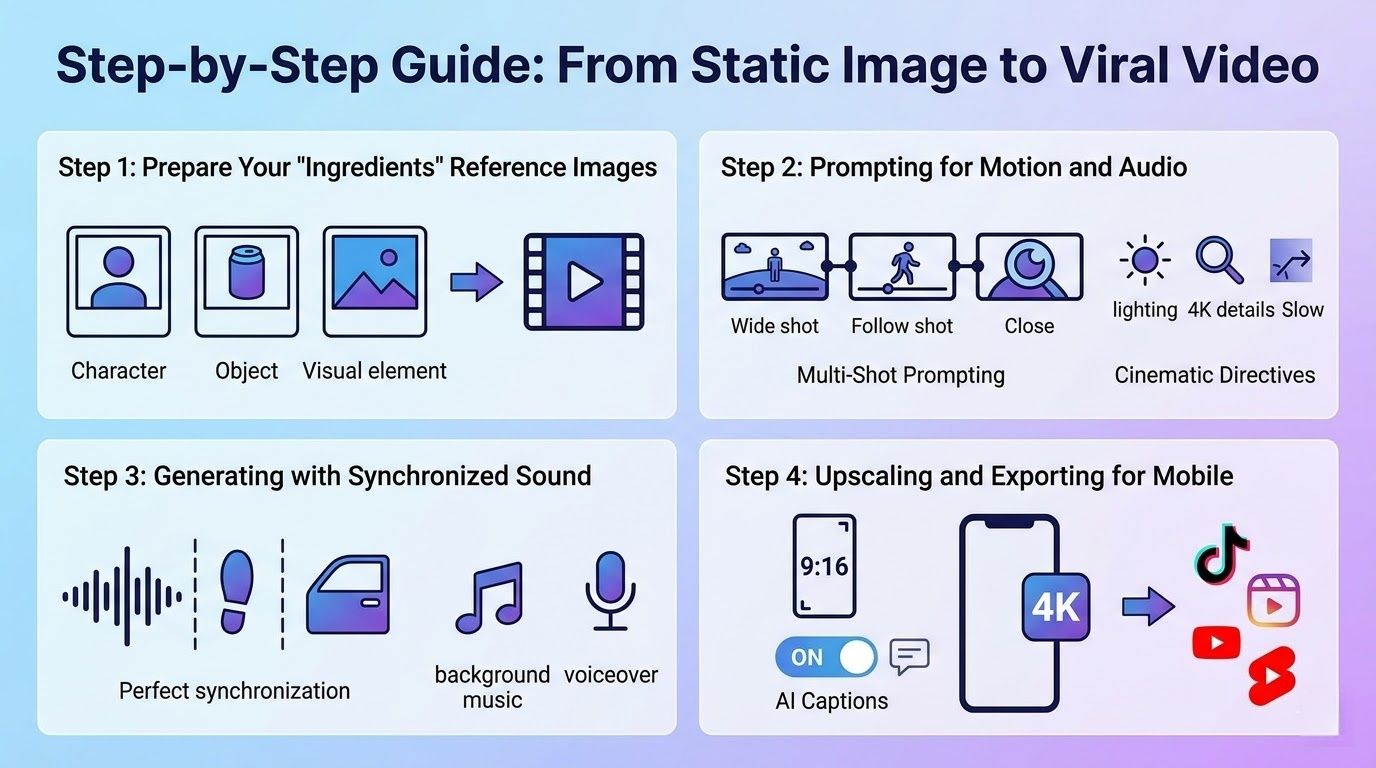
Step 1: Prepare Your "Ingredients" Reference Images
The secret to professional-grade AI video isn't just the prompt; it’s the quality of your starting assets. Consistency is the biggest challenge in generative video, and how you handle your "ingredients" determines if your brand stays recognizable.
- Using Google Veo 3.1: This model has a great "Ingredients to Video" tool. You don't have to use just one file. You can upload three different photos for your Character, an Object, and the Background. This keeps everything separate. It stops your product from blending into the background when things start to move.
- Using Wan 2.6: This model excels in "Visual Anchoring." If your video features a person, uploading a high-definition portrait as your anchor allows the AI to lock in facial features. This is critical for maintaining a consistent look across a full 15-second run, preventing the flickering often seen in lesser models.
Step 2: Prompting for Motion and Audio
Once your visuals are anchored, you must master AI prompt engineering to dictate how those pixels move.
- Wan 2.6 Strategy (Multi-Shot Prompting): Wan 2.6 is great for making a real storyboard. You don't have to stick to one long shot. You can ask for different camera cuts in one go.
- Example: "Three shots over 15 seconds: First, a wide look at the store; next, follow a shopper; finally, a tight shot of the product with synced talking."
- Veo 3.1 Strategy (Cinematic Directives): Veo works best when you use professional camera terms. Talk about the lights, the lens, and how things move to get a high-end look.
- Example: "Sunset lighting, sharp 4K details, natural cloth movement in the breeze, a slow camera zoom with city sounds."
Step 3: Generating with Synchronized Sound
In 2026, a video without sound is only half a post. The latest tools have moved beyond silent clips to fully integrated audio-visual experiences.
- The Veo 3.1 "Native Sync" Advantage: One of the most impressive features of Veo is its ability to generate "foley" sounds that are physically synced to the movement. If your video shows a car door slamming or footsteps on gravel, the AI generates that specific sound effect at the exact millisecond the action occurs.
- Wan 2.6 "Standalone Music Integration": Wan is a powerful all-in-one choice since it adds popular background music directly to your clips. Just choose a vibe, like "tech review Lo-fi," and the AI builds a 15-second song that matches. The voiceover features let you wrap up an entire commercial without opening any other apps.
Step 4: Upscaling and Exporting for Mobile
The final step is ensuring your masterpiece looks native to the platform.
- The 9:16 Standard: For TikTok marketing and Instagram Reels, you should always select Google Veo 3.1’s native vertical output. Generating in 16:9 and cropping later results in "cropping blur," which triggers social media algorithms to de-prioritize your content.
- 4K Refinement: Use the built-in upscaler in Veo 3.1 to get your final video into 4K. Sharp, high-quality clips get much more attention on YouTube Shorts when people watch on tablets or computers. Before you hit export, ensure to turn on the AI captions. The only way to keep people interested in social media is to have simple, clear text because most people browse with the sound off.
| Goal | Recommended Tool | Key Benefit |
| Narrative Storytelling | Wan 2.6 | Multi-shot 15s clips |
| High-End Visuals | Veo 3.1 | 4K Physics & Sync Audio |
| Fast Social Loops | Wan 2.6 | Easy music integration |
Examples of Cinematic Directives and Multi-Shot Prompts Cues
Following the steps above, using fashion or technology products as examples, you can refer to the following Cinematic Directives prompts.
Option 1: The Tech Product Launch
Best for: Premium gadgets, smart home devices, or robotic hardware.
- Veo 3.1 Directive (Focus on Physics & Lighting):
"Macro shot in 4K, cinematic style. Hard aluminum texture with clear, sharp edges. Light: Strong rim lighting, a cool blue look, and a soft blurred background. Action: The power button is slowly enlarged by the camera. Audio: A crisp haptic click plays exactly when the LED lights up, along with a quiet hum."
- Wan 2.6 Multi-Shot (The Narrative Reveal):
"15s Narrative: Shot 1 [0-5s] Wide shot of the device on a minimalist desk, slow pan right. Shot 2 [5-10s] Extreme close-up of internal components moving. Shot 3 [10-15s] A hand enters the frame to pick up the device. Audio: Tech-heavy ambient background music with voiceover synthesis explaining the core feature."
Option 2: The Fashion & Lifestyle Loop
Best for: Clothes, jewelry, or "Aesthetic" brand stories.
- Veo 3.1 Directive (Focus on Fabric & Fluidity):
"Vertical 9:16 size. A model in a baggy linen shirt walks through a sunny field. Physics: The fabric moves naturally and light shines through the weave. Action: Low-angle camera following the model. Sound: Trendy Lo-fi upbeat music with the real sound of grass rustling in sync."
- Wan 2.6 Multi-Shot (The 'Lookbook' Style):
"15s Lookbook: Shot 1 [0-4s] Full body walking toward camera. Shot 2 [4-9s] Cut to detail shot of the stitching and texture. Shot 3 [9-15s] Model turns and smiles at the camera, sun flare effect. Audio: Upbeat jazz-hop with AI auto-captions appearing at the bottom: 'Summer Collection 2026'."
Strategic Implementation for Social Platforms
If you want your high-quality clips to actually drive growth, your video strategy has to fit the "vibe" of each social app. Just reposting the same file everywhere doesn't work anymore. Your AI content needs to be customized to match how people really use each platform.
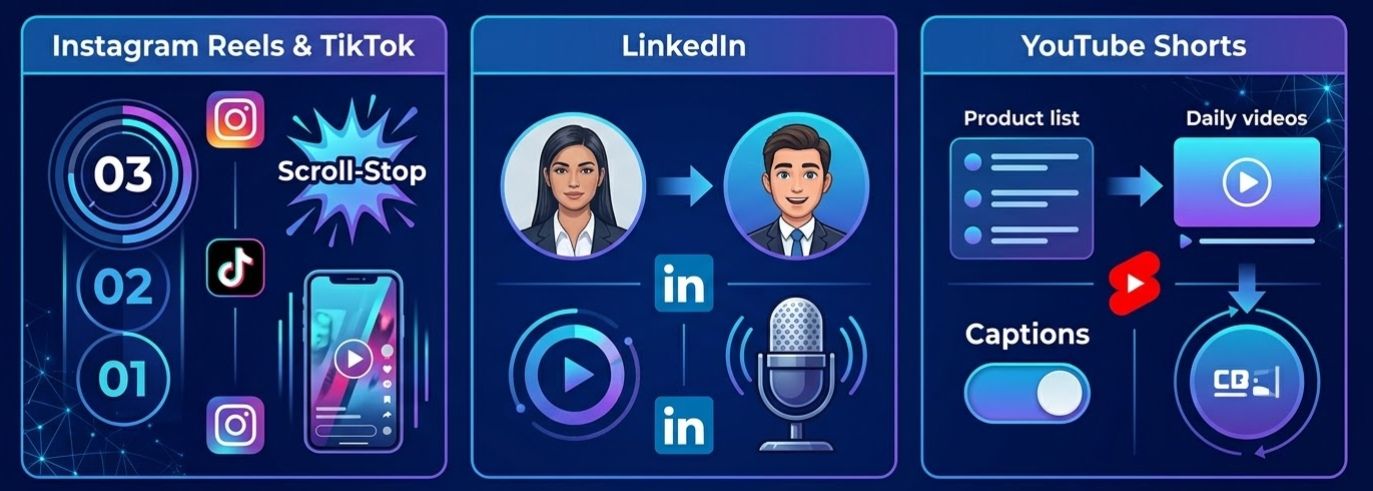
- Instagram Reels & TikTok: You have around three seconds to grab someone on platforms. Use Google Veo 3.1 to build "Scroll-Stop" visuals that pop. Focus on realistic physics or very smooth transitions to hook viewers instantly.
- LinkedIn: LinkedIn is moving past basic PDFs toward video clips. You can now use AI storyboarding to turn a professional photo into a lifelike avatar. With voiceover tools, you can share expert tips in a "talking head" style without ever needing a camera.
- YouTube Shorts: For Shorts, you need to post a lot. Try using batch tools to turn your whole product list into a daily video stream. Frequent posting is much easier when you let AI handle the captions. This adds a professional touch and makes your content accessible without extra manual work.
Key Performance Indicators (KPIs) for 2026 AI Video Marketing:
| Metric | Definition | Why it Matters in 2026 |
| Scroll-Stop Rate | The % of users who halt scrolling within the first 3 seconds of playback. | High-fidelity AI prompt engineering creates unique visuals that outperform generic stock footage. |
| AI Share of Voice | A measurement of how often your AI brand assets are shared or remixed across social platforms. | Tracks the "virality" and cultural integration of your AI-generated assets within social ecosystems. |
| Retention Graphs | A visual map of the average watch time compared to the total video length. | AI videos flatten the "drop-off" curve, maintaining a 40% higher watch time than static imagery. |
"In 2026, the success of a campaign is no longer defined by how many people saw it (Views), but by how many people were physically interrupted by the quality of the AI (Scroll-Stop) and how long they were mentally engaged by the fluid motion (Retention)."
Which Image to Video AI Tool Should You Choose?
To help you choose the right tool for each campaign, here is a strategic checklist. This breakdown is based on the distinct architectural strengths of Google Veo 3.1 and Wan 2.6.
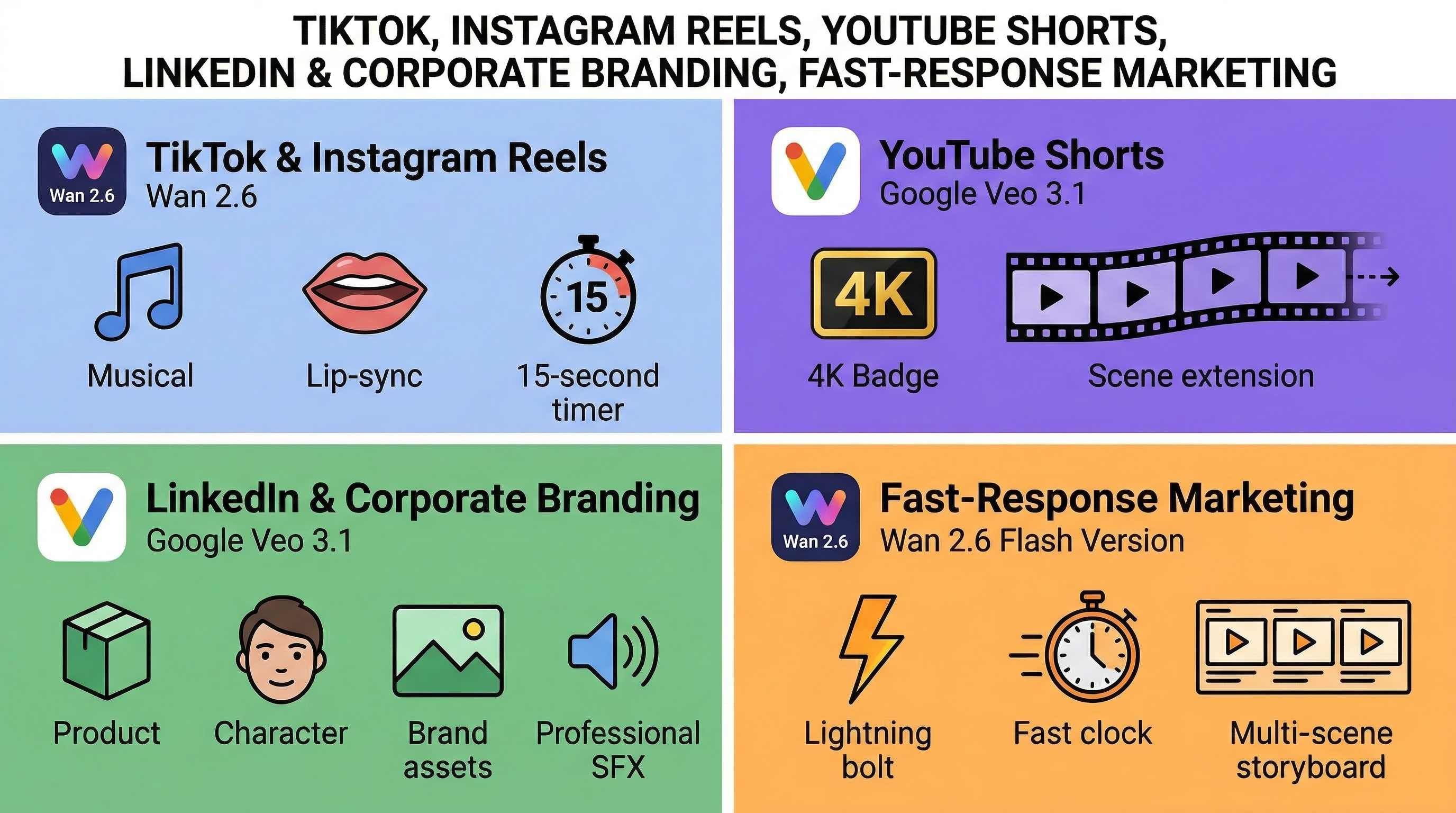
TikTok & Instagram Reels for High Retention & Trends
Main Goal: Attract attention fast and keep a 15-second loop.
- Top Choice: Wan 2.6
- Why:
- Length: It makes 15-second clips in one shot. This is the perfect length for quick stories.
- Sound: It is great at making trendy background music. You can even create full 3-minute songs for a custom viral hit.
- Sync: The lip-sync is top-tier. It works well for "Talking Head" or POV videos where the speech needs to look real.
YouTube Shorts for High-Fidelity & Ecosystem Reach
- Primary Goal: Quality that looks good on both mobile and TV screens.
- Recommended Tool: Google Veo 3.1
- Why:
- Resolution: State-of-the-art 4K upscaling ensures your Shorts don't look "AI-blurry."
- Scene Extension: Use this to extend 8-second clips into 60-second seamless narratives, maintaining perfect environmental consistency.
- Native 9:16: Built specifically for the "Shorts" vertical format to avoid cropping loss.
LinkedIn & Corporate Branding for Trust & Consistency
- Primary Goal: Maintaining professional brand identity and character likeness.
- Recommended Tool: Google Veo 3.1
- Why:
- Ingredients to Video: You can upload your specific brand assets (Character + Product + Background) as three separate "ingredients" to ensure the AI doesn't hallucinate your logo or face.
- Native SFX: The 48kHz audio synthesis generates professional environmental sounds (like a quiet office or a clicking mouse) without needing an external foley library.
Fast-Response Marketing for Trending Topics
- Primary Goal: Going from "Idea" to "Post" in under 5 minutes.
- Recommended Tool: Wan 2.6 (Flash Version)
- Why:
- Speed: Designed for rapid creative testing. If a new meme starts trending, Wan 2.6 can iterate multiple versions of a 10-second clip in a fraction of the time.
- Multi-Shot: You can describe a 3-scene sequence in one prompt, skipping the manual "stitching" process in a video editor.
Decision Summary Table
| If your priority is... | Use Google Veo 3.1 | Use Wan 2.6 |
| Cinematic 4K Resolution | ✅ | |
| 15-Second Storytelling | ✅ | |
| Perfect Character Consistency | ✅ | |
| Custom Music Generation | ✅ | |
| Native Vertical (9:16) Output | ✅ | ✅ |
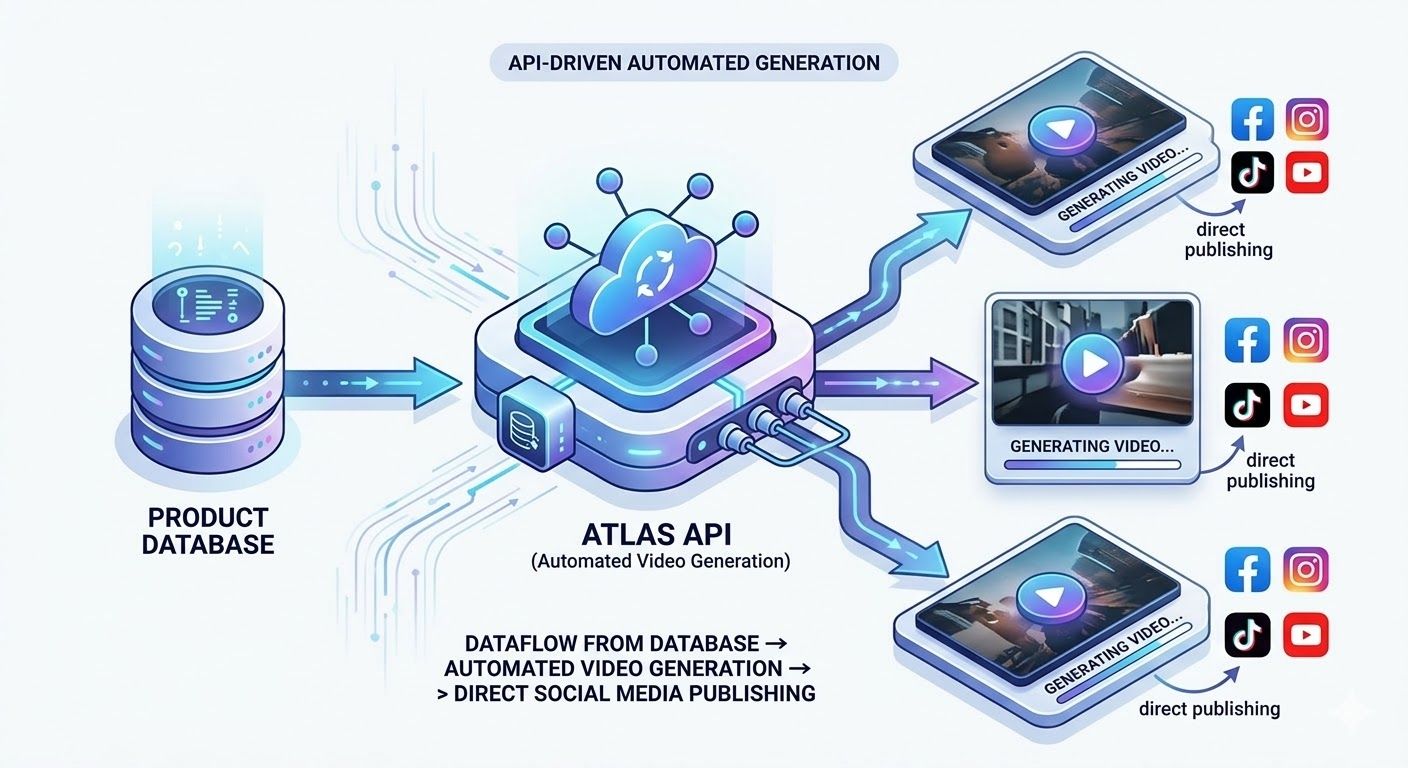
High-Volume Scaling: Leveraging API Integration for Video Automation
Making videos by hand always slows down brands and agencies that are growing. To stay ahead on TikTok, Reels, and YouTube, you should move from a web dashboard to using an API. This switch lets developers create hundreds of unique clips all at once. It is the best way to handle personalized ads or different versions for local markets without any extra manual work.
The Advantage of an Integrated API Gateway
Managing separate subscriptions for every new model is inefficient. By using a centralized infrastructure provider like Atlas Cloud, teams can access both Google Veo 3.1 and Wan 2.6 through a single unified endpoint. This integration simplifies the technical stack, offering optimized GPU orchestration that reduces the cost per generation compared to traditional, fragmented cloud setups.
Implementation: From API Key to Final Render
The transition to automated production involves three main stages:
-
Authentication and Project Setup: Start by generating a secure API key within the developer portal. This key acts as your gateway to various SOTA models.
-
Model Retrieval and Prompting: Use a standard POST request to send your "Ingredients" (Reference Images) and AI prompt engineering parameters. For example, using the Atlas Cloud /v1/video/veo-3-1 endpoint allows you to programmatically define lighting and physics.
Feature Manual Workflow API-Driven (via Atlas Cloud) Output Volume 1–5 videos/day 100+ videos/hour Effort High (Human-in-the-loop) Low (Programmatic) Consistency Variable Fixed (Template-based) -
Webhook Integration: Instead of waiting for a render to finish, set up webhooks. Once the video is ready, the system "pushes" the file—along with AI auto-captions and voiceover synthesis—directly into your storage or CMS, such as Strapi.
Atlas Cloud API Implementation Example (Python)
To help your team get started, here is a standard implementation for retrieving a video from wan-2.6 using the Atlas Cloud Python SDK:
plaintext1import requests 2import time 3 4# Step 1: Start video generation 5generate_url = "https://api.atlascloud.ai/api/v1/model/generateVideo" 6headers = { 7 "Content-Type": "application/json", 8 "Authorization": "Bearer $ATLASCLOUD_API_KEY" 9} 10data = { 11 "model": "alibaba/wan-2.6/image-to-video-flash", 12 "audio": "https://static.atlascloud.ai/media/audios/0c90bd37-8bad-46b9-9735-69451b253777.mp3", 13 "duration": 10, 14 "enable_prompt_expansion": False, 15 "image": "https://static.atlascloud.ai/media/images/decd0dfa-379e-454c-9e83-645986383999.webp", 16 "negative_prompt": "example_value", 17 "prompt": "A scene of urban fantasy art. A dynamic graffiti art character. A teenager, painted with spray paint, comes to life from a concrete wall. He delivers a fast English rap while hitting a classic, high-energy rapper pose. The shot takes place at night under an old city train bridge. The lighting is dim but captures his movements perfectly in this urban setting. Light comes from a lone streetlamp, creating a cinematic atmosphere, full of high energy and stunning detail. The audio of the video consists entirely of his rap, with no other dialogue or background noise.", 18 "resolution": "720p", 19 "seed": -1, 20 "shot_type": "multi", 21 "generate_audio": True 22} 23 24generate_response = requests.post(generate_url, headers=headers, json=data) 25generate_result = generate_response.json() 26prediction_id = generate_result["data"]["id"] 27 28# Step 2: Poll for result 29poll_url = f"https://api.atlascloud.ai/api/v1/model/prediction/{prediction_id}" 30 31def check_status(): 32 while True: 33 response = requests.get(poll_url, headers={"Authorization": "Bearer $ATLASCLOUD_API_KEY"}) 34 result = response.json() 35 36 if result["data"]["status"] in ["completed", "succeeded"]: 37 print("Generated video:", result["data"]["outputs"][0]) 38 return result["data"]["outputs"][0] 39 elif result["data"]["status"] == "failed": 40 raise Exception(result["data"]["error"] or "Generation failed") 41 else: 42 # Still processing, wait 2 seconds 43 time.sleep(2) 44 45video_url = check_status()
By following these simple steps, you stop making just one post at a time. You build a "content engine" instead. This setup helps you produce trendy background tracks and sharp visuals. As things change in real time, it is the best way to keep your brand's relevance and freshness.
Final Thoughts: Scaling Your Creative Work
The old walls around professional video making are gone for good. Now, you just need one reference photo and a solid prompt strategy to win on TikTok, Reels, and YouTube.
Everything from voiceovers to the latest background music is built right into these tools. They are easy for anyone to use. Do not let your brand fall behind—start bringing your ideas to life today.
FAQ
Is Wan 2.6 better than Veo 3.1 for social media?
It depends on your specific campaign goals.
- The best option for narrative content and TikTok ads is Wan 2.6. It natively generates 15-second clips and features flexible AI storyboarding to help you build a script.
- Google Veo 3.1 is the best fit for high-end YouTube Shorts and Instagram Reels. It delivers cinematic realism, 4K upscaling, and connects easily with the Google marketing suite.
Can I create a 1-minute video with AI?
Definitely. Standard clips are usually short, but you can hit the 60-second mark by using Veo 3.1’s "Scene Extension" or the multi-shot tools in Wan 2.6. Good prompt engineering helps you string several matching clips into one video. Once you export, be sure to turn on AI captions. This keeps your longer videos interesting and easy to follow for people watching without sound.
Do I need a separate audio editor?
By 2026, you usually won't need extra tools. Both models now have built-in audio features. Veo 3.1 uses "Native Sync" to match sound effects perfectly with the action. Wan 2.6 includes voiceover tools and background music that fits current trends. This lets you finish a professional post in just one app, which makes your whole workflow much faster.







