You have seen the version that does not work. Someone drops a painted portrait into a video tool, waits, and gets three seconds of Live Photo wobble: hair shivers, clouds frozen, no sound, loop.
Hand-drawn cinema never moved like that. And it was never that quiet.
So here is what we did instead. One painted keyframe, one MiniMax H3 Ghibli style render at 15 seconds, and the grass waves, a tram crosses a viaduct, cicadas sit under everything, and four piano notes resolve. All of it out of a single job, in one file, with stereo audio baked in.
Below: the finished shot first, then the exact prompts, the settings that actually commit, real operated playground screenshots, and a line-by-line bill.
Key takeaways
- One 15-second 2K job delivers 2560x1440, 24fps, AAC stereo 32kHz, no watermark.
- Hand-drawn look is a cadence problem, not a palette problem. Ask for "on twos", not smoothness.
- Wind, cicadas and piano come out of the same render. There is no second scoring pass.
- 3 steps: paint a keyframe, animate it, match shot two with reference-to-video.
- Keep studio and director names out of the prompt. Describe the craft instead.
Here is the finished shot, before any of the theory.
0ewchq5dcTc
Turn the sound on. One continuous 15-second image-to-video job on MiniMax H3, 2K, no cuts, no post: the grass gust, the tram bell, the cicada bed and the piano all arrived inside this single mp4.
Cannot play video where you are reading this? Here are the four beats that matter, pulled straight out of the file above.
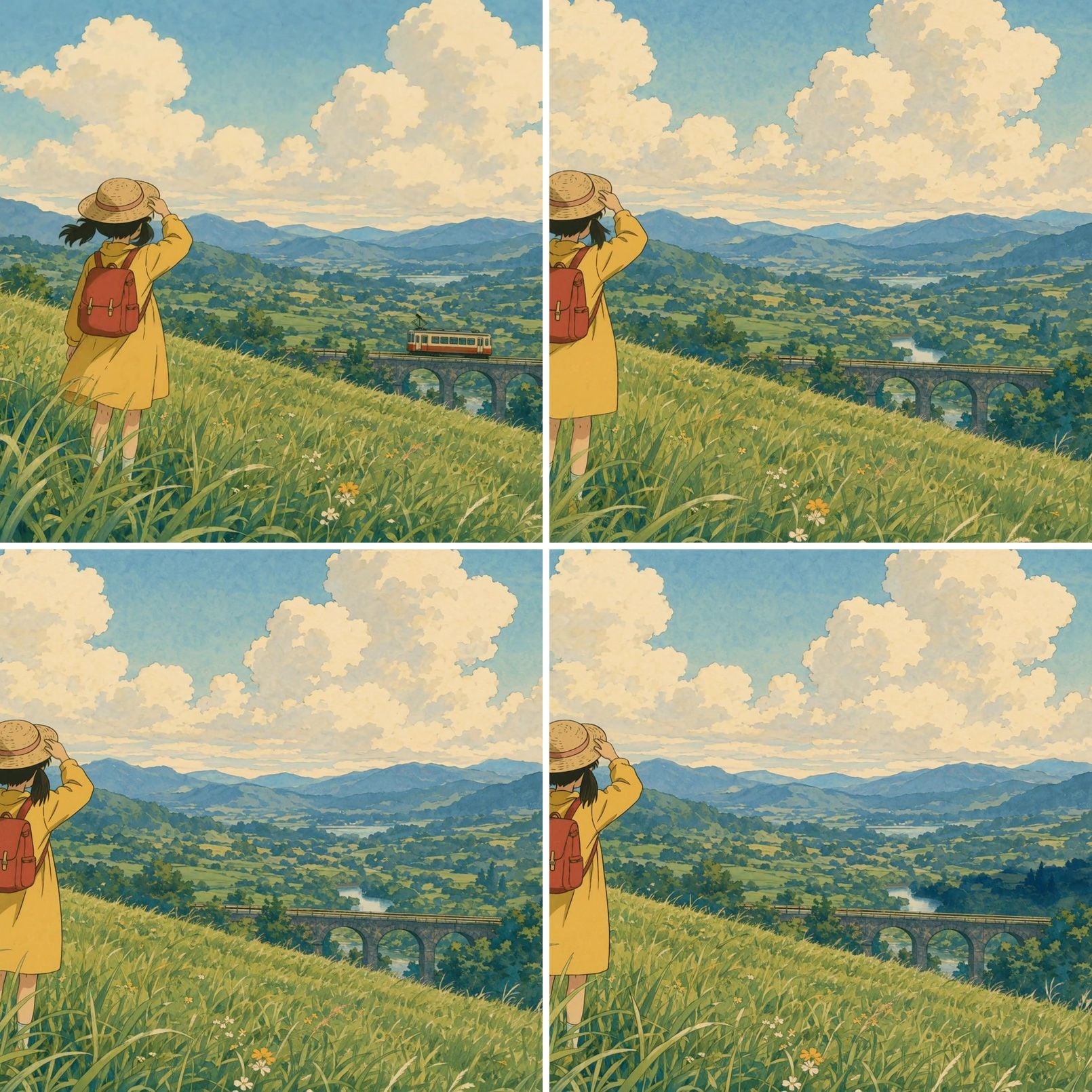
Four frames from the MiniMax H3 Ghibli style hillside render at 0s, 5s, 10s and 15s, showing the first grass gust, the tram crossing the viaduct, the second gust and the held final beat
The same render sampled at 0s, 5s, 10s and 15s. Watch the last card: nothing new enters the frame, on purpose.
Why Most MiniMax H3 Ghibli Style Attempts Look Like a Filter
Verdict first: the filter look is almost never the colour. It is the timing, the sound, and the length.
Here is the evidence. Painted-cel films are not animated at 24 unique drawings a second. Breaking down one of Miyazaki's running cycles, Animation Obsessive calls it "a run drawn 'on twos'" at "12 drawings per second", where "Each drawing stays on screen for two frames." (Animation Obsessive, March 2023)
Now think about what a video model does by default. It interpolates. Smoothly. Silkily. At full frame rate.
That is the whole tell. Your palette was fine. Your motion was too good.
Question is: can the model hold a drawn layer for a full 15 seconds without it melting? Yes, and this is what that looks like.
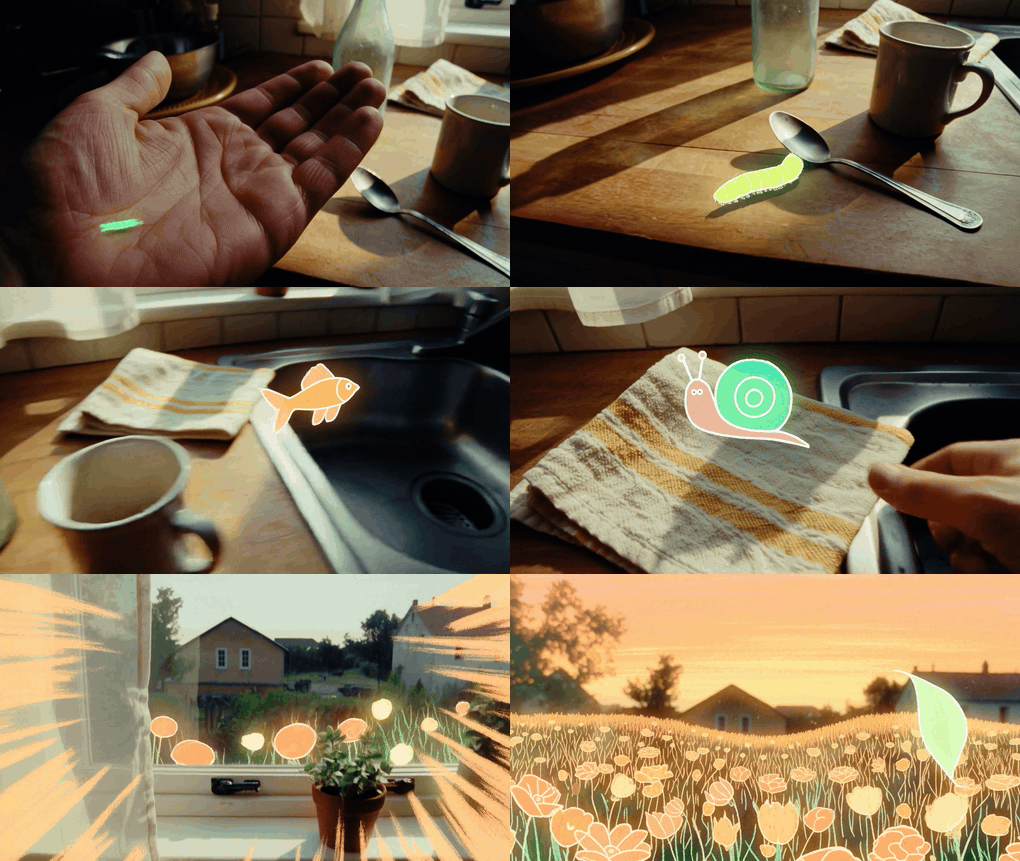
Hand-drawn goldfish and seaweed animated over a real sunlit kitchen counter, from a MiniMax H3 15-second render
A MiniMax H3 sample run: a crayon-outlined goldfish and green seaweed strokes drawn over live-action kitchen footage, held for the full 15.08 seconds without the line work smearing. Shown here as a silent GIF ; the delivered file carries 24 fps video and 32kHz stereo audio.
Second death cause: mixed style promises. Writing "photorealistic anime watercolour" gives you a model trying to satisfy three contracts at once, and the result is the mush people call "AI slop". Commit to one medium and it holds.
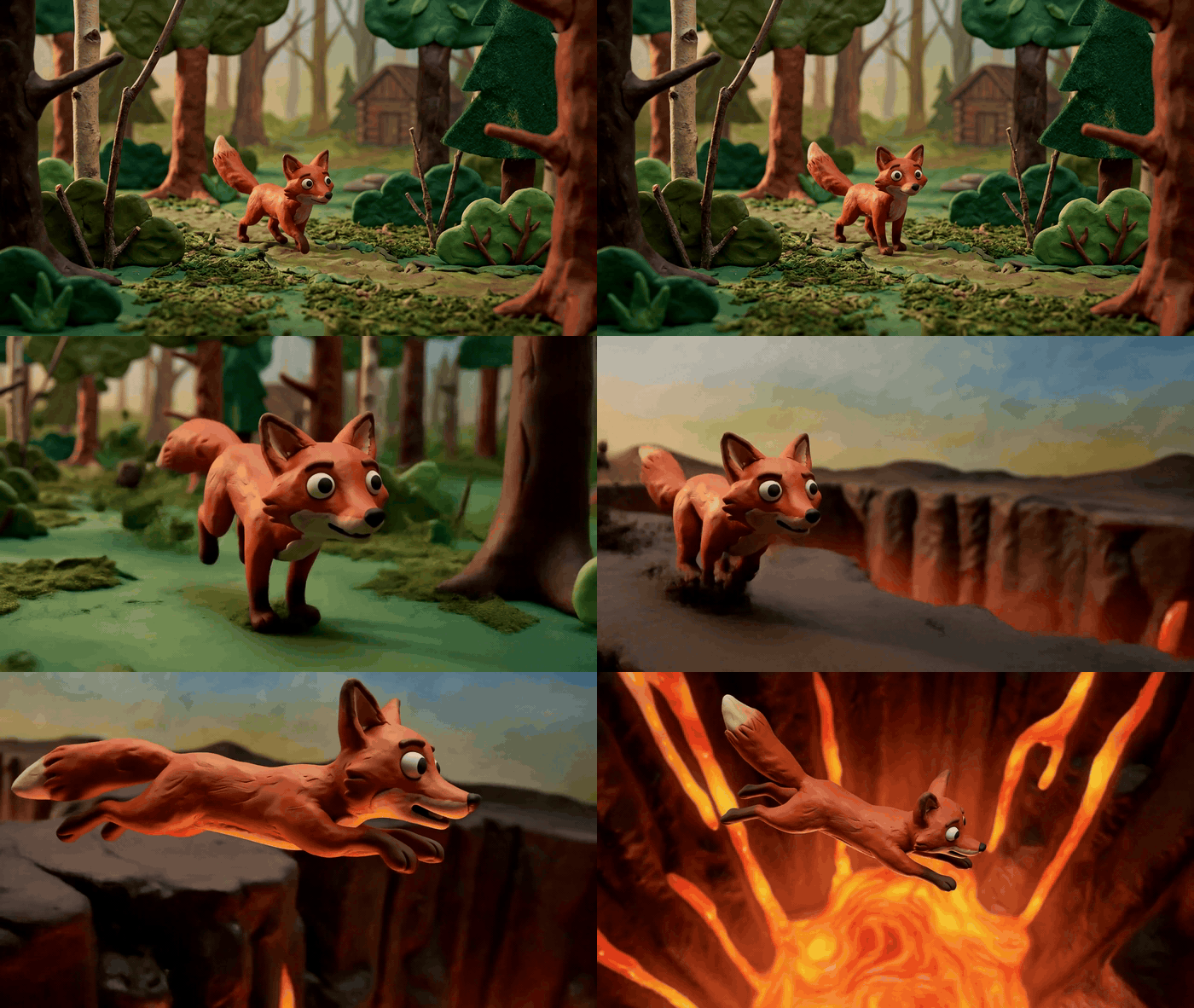
Claymation fox mid-leap on cracked rock beside a glowing lava fissure, plasticine thumbprint texture visible, from a MiniMax H3 render
Same principle, different medium: one single-style promise ("stop-motion plasticine") produces real thumbprint texture and stop-motion weight across 10 seconds. Silent GIF ; the source file is 2560x1440 with stereo audio.
And the third and fourth: silence, and no room to breathe. Roughly half of what people mean by this style is sound design, wind and a sparse piano. And the pauses need real seconds. A 5-second clip physically cannot hold three seconds of nothing happening.
Here is the diagnostic table we keep coming back to.
| Symptom in your output | Real cause | Add this to the prompt |
|---|---|---|
| Silky, gliding, "too smooth" motion | Model interpolating at full rate | hand-drawn on twos, held drawings, slight frame-to-frame line wobble, no interpolated silky motion |
| Outlines melt or crawl | Competing style promises | Name one medium only: flat colour fills, hand-inked outlines, painted watercolour background |
| Face or outfit changes mid-shot | Too much action in too long a take | One action per gust; no new characters, no costume change |
| Photographic haze, bokeh, lens flare | Photo priors leaking in | no photographic depth of field, no bokeh, no lens flare, no 3D render |
| Dead silent output | No audio clause written | Write an explicit Audio: paragraph with layers and timings |
| Ending feels rushed | No held beat | From second twelve to fifteen nothing moves except the grass: hold the stillness, do not add new action |
Which endpoint you use matters just as much as the prompt. There are three, and they do different jobs.
| Endpoint | What it controls | Aspect ratio | Use it for |
|---|---|---|---|
| minimax/h3/text-to-video | Prompt only, no frame lock | Explicit ratio required, adaptive rejected | Exploring a look before you have art |
| minimax/h3/image-to-video | First frame locks composition, palette, paper grain | Enum is adaptive only; your frame decides the shape | The main animate-a-painting step |
| minimax/h3/reference-to-video | Multiple tagged references steer style across a new shot | All 7 ratios accepted, pass 16:9 explicitly | Shot two, shot three, matching a series |
One trap worth writing on your hand: sending image and refers in the same call does not error. The job completes, bills in full, and silently discards one of the two inputs. We measured it on both endpoints, and the direction it drops varies. Pick one endpoint per call.
The MiniMax H3 Ghibli Style Workflow: Three Models, One Tab
This section gives you the whole chain and what each link costs. It runs end to end in one browser tab on Atlas Cloud, which is where every screenshot below was operated, so you never export a file just to re-upload it somewhere else.
Why that matters for this particular job: the painting model and the video model have to agree on the frame. Keeping them on the same platform means the keyframe you generate is already a file the next playground can take as its first frame, and the reference-to-video step can reach both the keyframe and a still pulled from your finished clip.
| Job in this chain | Model / endpoint | Resolution | Price (verified 21 Aug 2026) |
|---|---|---|---|
| Paint the keyframe | openai/gpt-image-2/text-to-image | 2048x1152, quality high | $0.1745 per image (the $0.009 list figure is a token-tier floor) |
| Animate the keyframe | minimax/h3/image-to-video | 2K | $0.14/s, so $2.10 at 15s |
| Draft cheaply first | same endpoint | 768P | $0.10/s, so $0.80 at 8s |
| Match shot two | minimax/h3/reference-to-video | 2K | $0.14/s, references billed at $0 |
| Repaint a photo as art | google/nano-banana-2/edit | 2k tier | $0.12 (list says $0.08; the tier moves it) |
| Optional extra music cue | minimax/music-2.6 | n/a | $0.15 flat per track |
One habit that saves arguments with your own spreadsheet: the headline figure on a model page is a floor, not your bill. The H3 pages list $0.10 per second, which is the 768P tier; 2K is $0.14. GPT Image 2 lists $0.009, which is a token-tier floor, and quality high at 2048x1152 actually quotes $0.1745. Read the Run button, every time, because it is the number you get charged.
No discount is live on the H3 endpoints as of August 2026. Only the -developer variants of the image models are marked down, which is worth knowing for drafts and irrelevant for delivery.
Let's get started.
Step 1: Paint the Keyframe
The frame does the heavy lifting. Everything the video step cannot invent, composition, palette, line quality, paper grain, has to already be in this PNG.
Open the GPT Image 2 text-to-image playground and paste this verbatim.
plaintext1Hand-painted 2D animation background in the style of 1990s Japanese cel animation: a wide summer hillside in late afternoon. Tall green grass fills the lower two thirds, painted in soft gouache with visible brush texture and hand-inked blade edges. A girl about ten years old stands in the middle distance seen from behind, wearing a plain yellow raincoat and a red backpack, one hand holding down a straw hat. Beyond the hill a narrow single-car tram crosses a green valley on a low stone viaduct; distant blue mountains fade into a pale cream sky with towering cumulus clouds painted as flat layered shapes. Warm 4pm light, soft ambient shadows, no harsh contrast, limited palette of grass green, cream, sky blue and one yellow accent. Cel-animation line quality: clean confident outlines, flat colour fills, hand-painted watercolour background, subtle paper grain. No text, no logos, no watermark, no photorealism, no 3D render, no lens flare, no modern buildings.
Settings: quality high, size 2048x1152 (16:9), one image. Do not drop to medium here. The paper grain and the inked blade edges are exactly the detail that a lower tier smooths away, and those two things are what sell the whole shot later.
Notice what the prompt does not say. No studio name, no director name. Every stylistic instruction is a description of craft: gouache, hand-inked edges, flat colour fills, cel-animation line quality. That is not squeamishness, it is a better prompt, because "cel animation with flat fills and visible paper grain" is a specific instruction and a studio name is a vague one.
Here is the run.
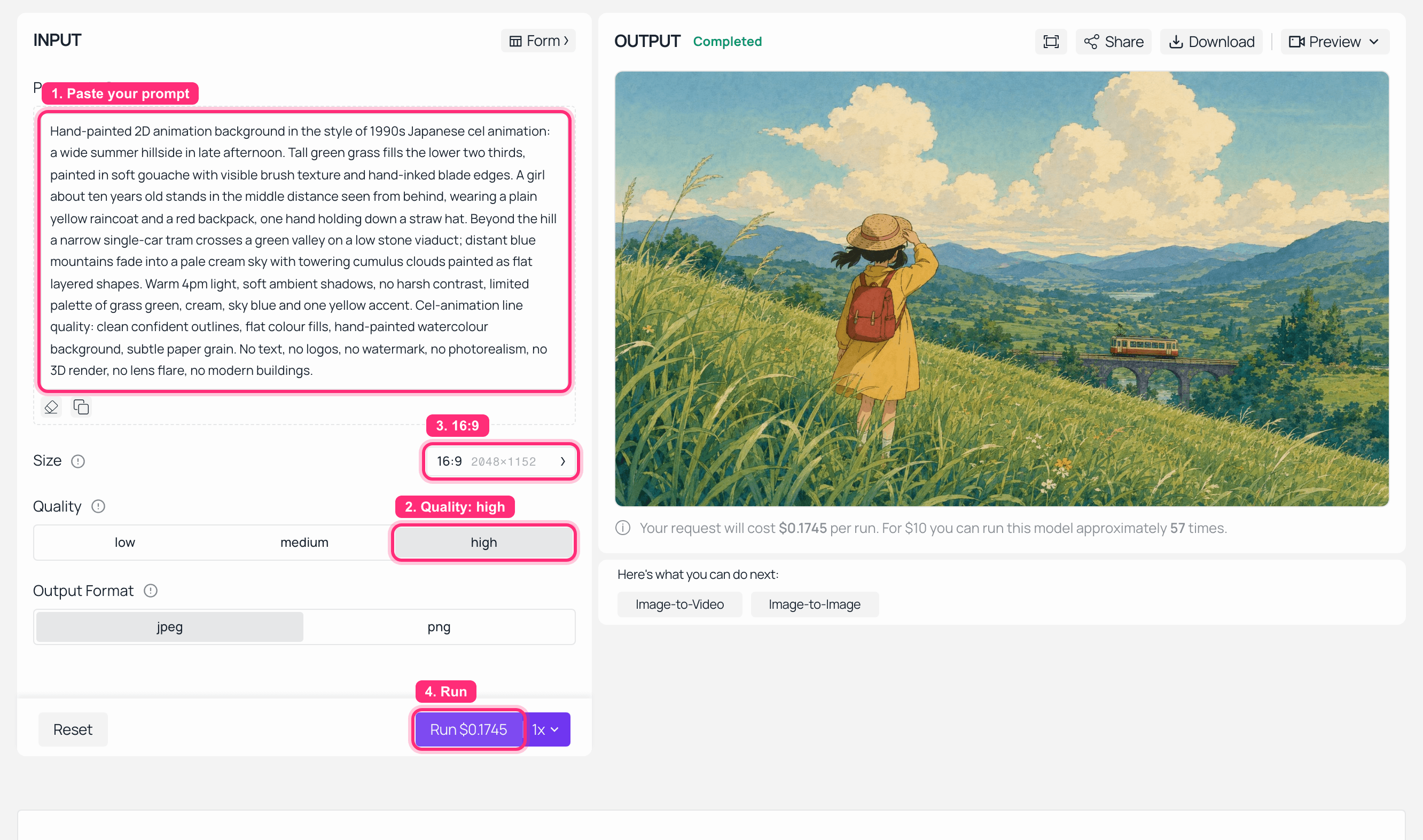
GPT Image 2 playground on Atlas Cloud with the hand-painted hillside prompt loaded at quality high and 16:9, and the finished Ghibli style keyframe rendered in the output panel
GPT Image 2 at quality high , 2048x1152, run on Atlas Cloud. Note the Run button: $0.1745, not the $0.009 on the pricing page.
And the keyframe on its own, because you are about to feed this exact file to the next step:
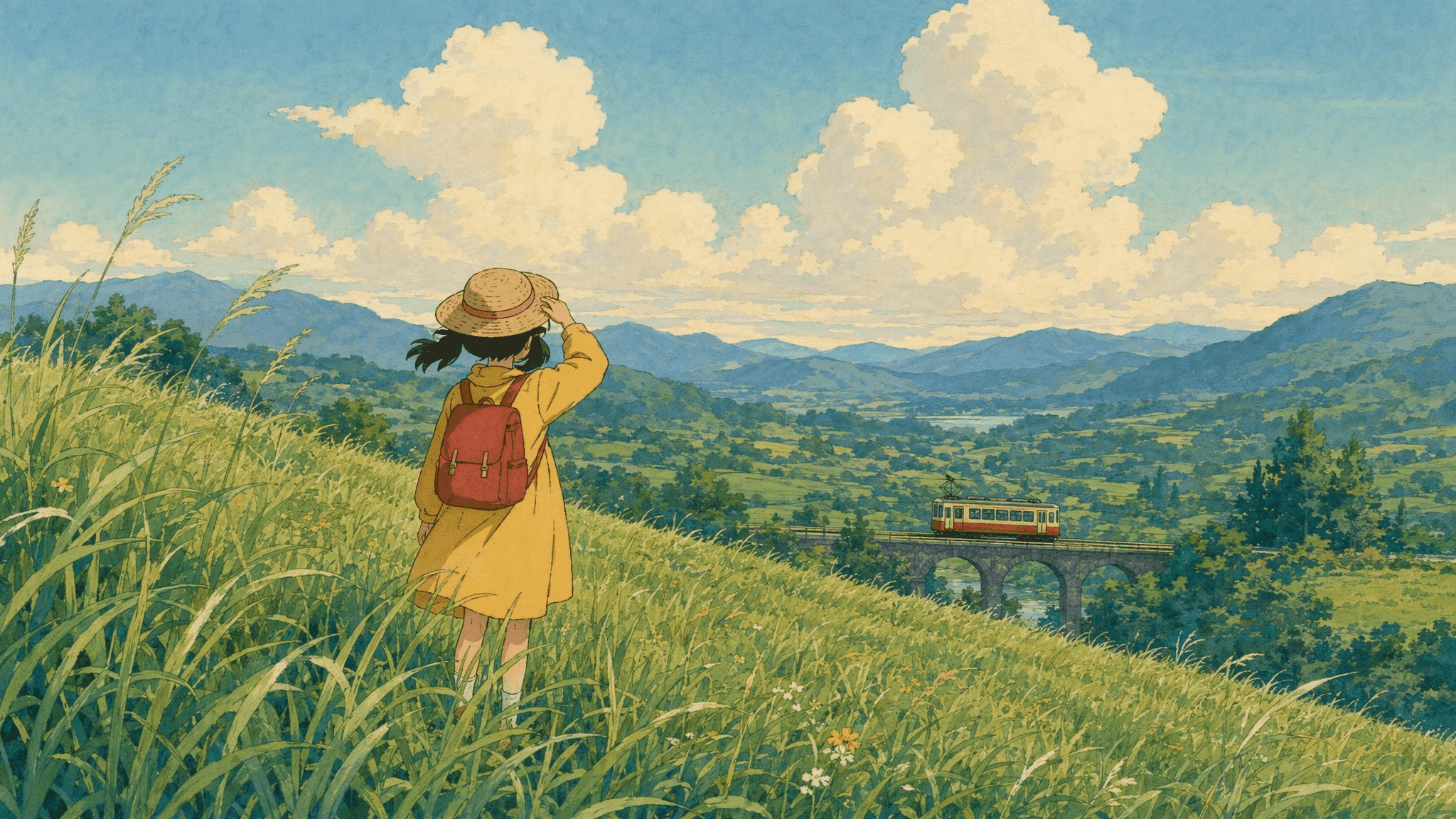
Hand-painted summer hillside keyframe: a girl in a yellow raincoat seen from behind in tall grass, a single-car tram on a stone viaduct beyond the valley, flat layered cumulus clouds
Generated with openai/gpt-image-2/text-to-image . This PNG is the first frame of the finished shot at the top of the article.
Step 2: Animate It Into MiniMax H3 Ghibli Style Motion
Now the interesting part. This prompt is longer than most people write, and that is deliberate: you are writing a timing sheet, not a vibe.
Four things it specifies that a typical prompt does not: when each gust starts, when the tram enters and leaves, that the cadence is on twos, and a full audio paragraph with entry times per layer.
Load your Step 1 PNG on the MiniMax H3 image-to-video page and paste this.
plaintext1Animate this painting as one continuous hand-drawn shot, 15 seconds, no cuts. 2Camera: a very slow push in, barely perceptible, plus a gentle drift right of about five percent of frame width. No zoom snap, no handheld shake. 3Motion: wind moves through the tall grass in two long travelling waves, one starting at second two and one at second nine, bending the blades the same direction each time. The girl's raincoat hem and hair lift with each gust; her straw hat brim flexes. Clouds drift almost imperceptibly. At second seven a single-car tram crosses the viaduct left to right and leaves frame at second eleven. From second twelve to fifteen nothing moves except the grass and one cloud shadow crossing the hill: hold the stillness, do not add new action. 4Animation cadence: hand-drawn on twos, held drawings, slight frame-to-frame line wobble. No interpolated silky motion, no morphing, no melting edges. Keep flat colour fills and painted paper texture. Do not add photographic depth of field, bokeh or lens flare. 5Audio: continuous summer cicadas at a steady mid level; layered grass rustle that swells with each gust; one distant tram bell at second seven with faint wheel rumble fading out by second eleven; and a sparse solo piano line of four notes entering at second three and resolving at second thirteen. No voice, no narration, no dialogue, no on-screen text, no music beyond that piano line.
Settings: image = your Step 1 PNG, resolution 2K, duration 15, ratio stays adaptive. That last one is not laziness. The enum on this endpoint contains only adaptive, and the uploaded frame decides the output shape, so a 16:9 keyframe gives you a 16:9 clip.
Now read the Run button before you click it, because this is exactly where we lost a take.
At 2K and 15 seconds the quote should say $2.10. Ours said $1.12. The duration slider never took our 15, the job ran at the 8-second default, and every other field on the form still looked perfectly correct. Here is that run, with the trap sitting right in the frame.
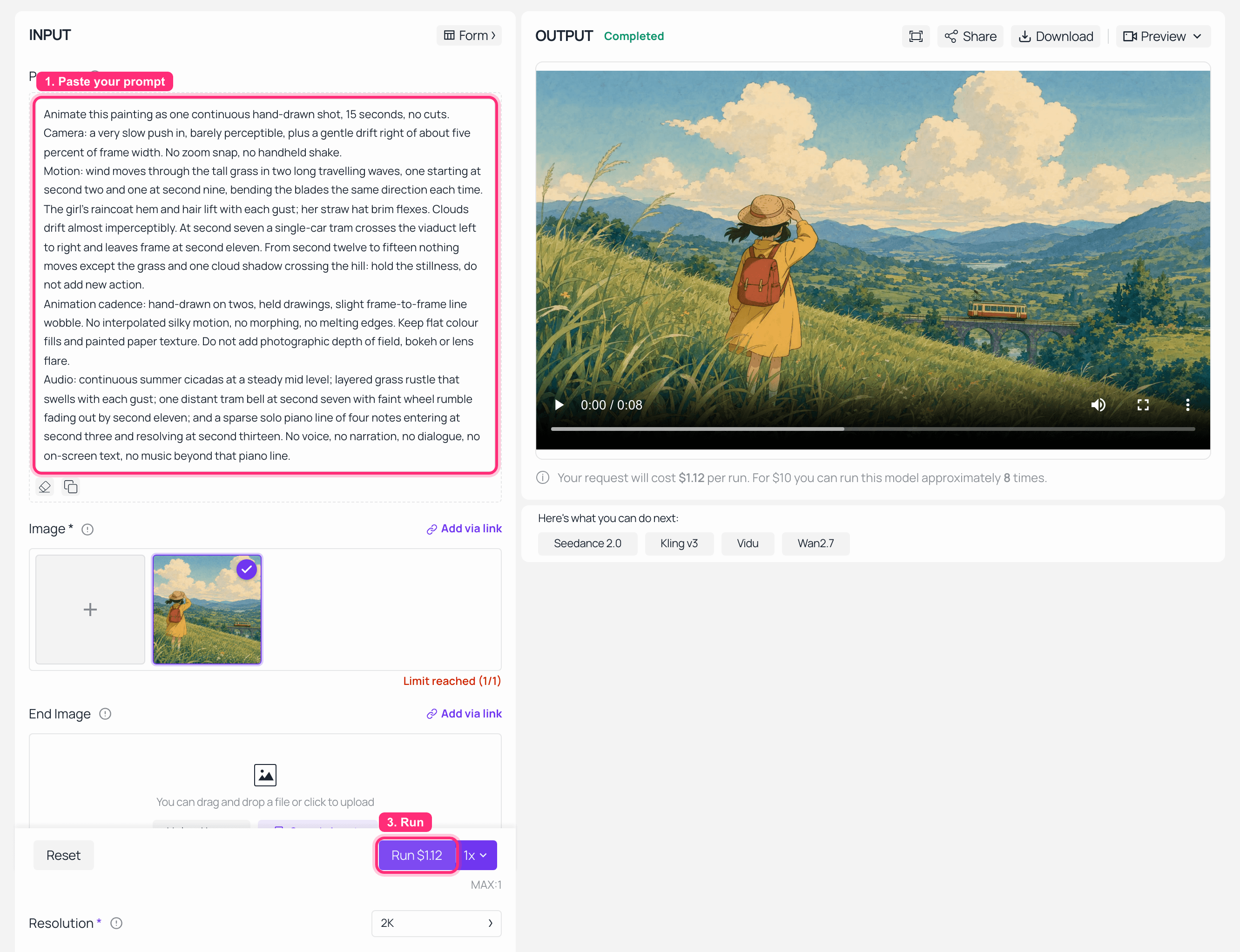
MiniMax H3 image-to-video playground on Atlas Cloud with the painted keyframe loaded, resolution 2K, and the finished Ghibli style hillside clip playing in the output panel
The prompt asks for 15 seconds. The player reads 0:08. The Run button reads $1.12. Resolution 2K committed, duration did not. Read the price, never the slider.
Fix it one of two ways: drag the slider and confirm the quote flips to $2.10 before submitting, or send the job through the API where duration: 15 is just a field that cannot silently miss. The clip at the top of this article is the second route, same endpoint and same prompt, resolution: 2K, duration: 15.
Delivered that way: a 15.08-second container, 2560x1440, 24fps, H.264 with AAC stereo audio at 32kHz, no watermark anywhere. The accidental 8-second version came back at exactly 8.00 seconds with identical geometry. Budget 5 to 10 minutes of wall clock; 8-second 2K jobs land at 310 to 400 seconds in our runs, and a 2K job carrying three references took 557 seconds.
Step 3: Match a Second Shot With Reference-to-Video
One shot is a demo. Two shots that belong to the same world is a sequence, and this is where most people's Ghibli-style experiments fall apart: the character's face drifts, the palette warms up, the paper grain vanishes.
The fix is not a better prompt. It is a different endpoint. Reference-to-video takes tagged reference material and carries its look into a new camera setup.
Feed it your Step 1 keyframe as the reference. That single frame carries the palette, the line quality and the paper grain, and on this shot it held the look on its own, as the result below shows. If your own run drifts once motion starts, add a still exported from near the end of your Step 2 clip as a second reference, which carries what the model did to the line work once it started moving. Then paste this on the reference-to-video endpoint.
plaintext1Match the painted look, palette, line quality and paper grain of the reference images exactly, then film a different shot in the same world: a low camera at grass height on the same hillside, looking up at the same girl in the yellow raincoat as she crouches to touch one tall stalk, then stands and looks off toward the valley. 2One continuous shot. Hand-drawn on twos, held drawings, flat colour fills, hand-painted watercolour background. No photorealism, no new characters, no costume change, no text, no watermark. 3Camera: static for the first four seconds, then a slow tilt up following her as she stands, ending on her profile against the cream sky. 4Audio: the same summer cicada bed and grass rustle as the reference; one soft cloth movement as she stands; the same sparse solo piano continuing without restarting. No dialogue, no narration.
Settings: refers = your keyframe, resolution 2K, ratio adaptive (the reference frame sets the output shape), and pick your duration. Our run came back 8 seconds at 2K, quoted at $1.12 with the reference billed at $0. Three notes from real runs:
- Reference files are free. Ten reference images billed exactly the same as one at the same length and resolution.
- If you pass a data URL, declare its
typeexplicitly. The endpoint infers type from the file extension, and a data URL has none. - Never hand an
.mp4to this page's uploader in an automated capture. It makes every upload silently fail and greys the Run button out.
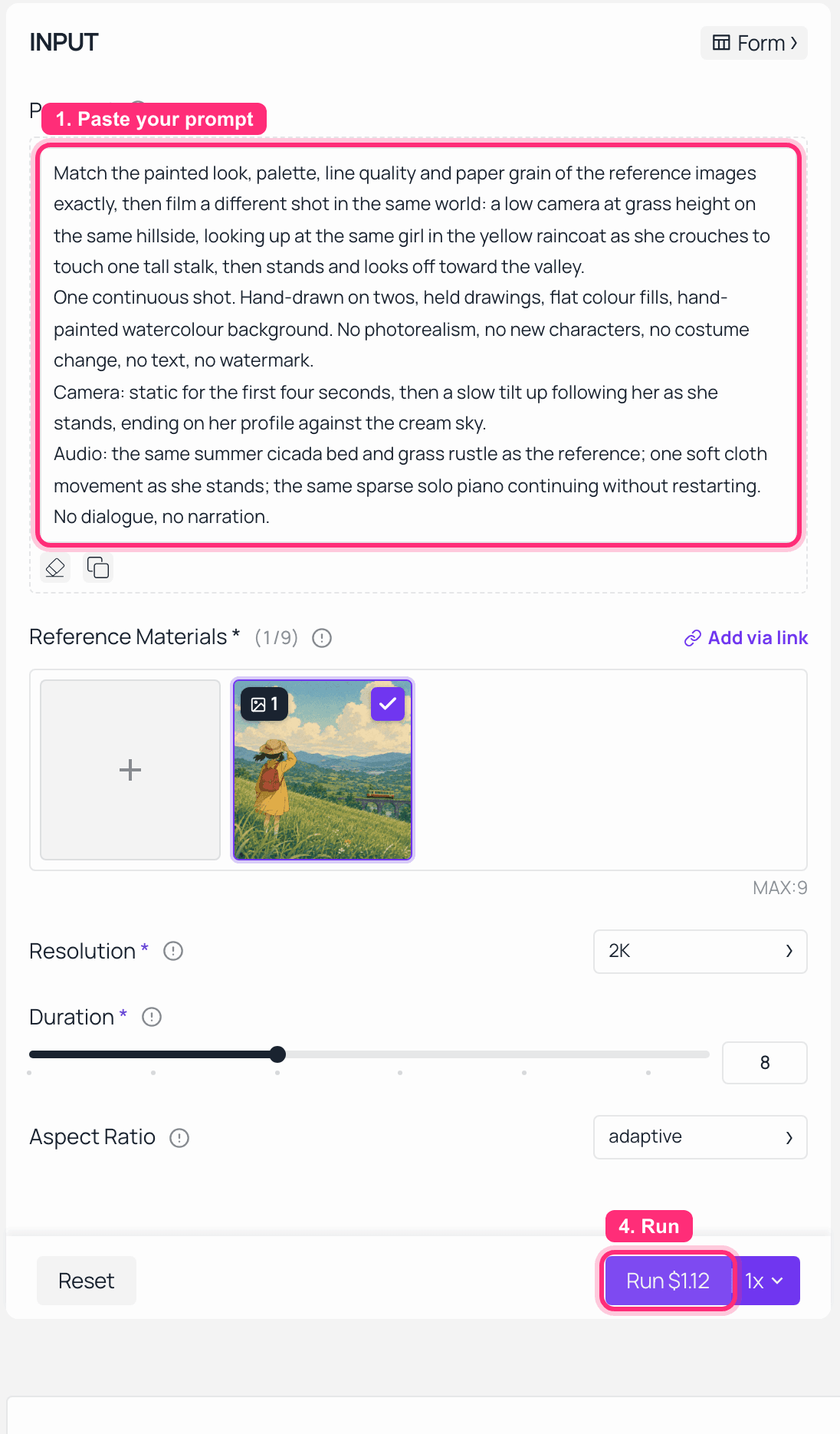
MiniMax H3 reference-to-video playground on Atlas Cloud with the Ghibli keyframe loaded as the reference and the matched-shot prompt in place at 2K
MiniMax H3 reference-to-video: the keyframe in the Reference Materials slot, the matched-shot prompt loaded, 2K. Reference material is billed at $0, so the $1.12 quote is all render. The result is right below.
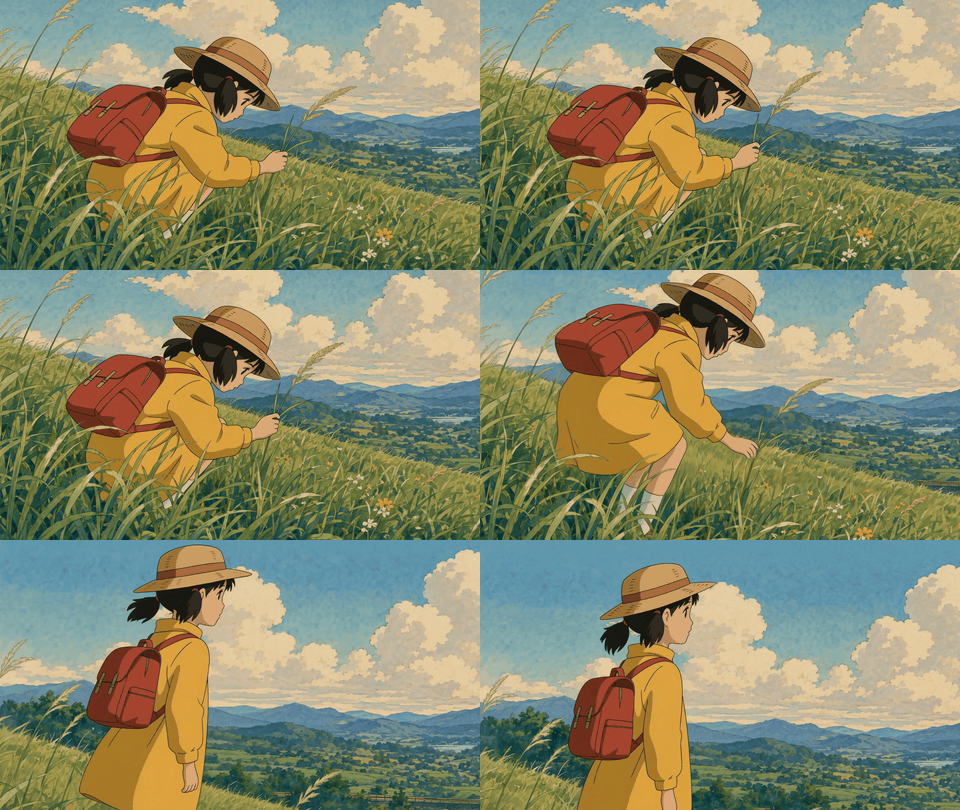
Matched second shot in the same MiniMax H3 Ghibli style world: low camera at grass height looking up at the girl in the yellow raincoat
The delivered second shot. Same palette, same line weight, same paper grain, new camera. Silent GIF ; the source mp4 carries stereo audio.
That is the full chain: paint, animate, match. Three runs, one tab.
Three variations worth running next, once the chain works:
- Your own photo, repainted. Send a landscape or street photo you own through
google/nano-banana-2/editwith: "Repaint this photograph as a hand-painted 2D animation background: gouache and watercolour texture, clean hand-inked outlines, flat colour fills, limited palette of green, cream and sky blue, subtle paper grain. Keep the exact same composition, camera angle and horizon line. Remove all text, signage and logos. No photorealism, no 3D render." Then animate the result. Crop the painted frame to 9:16 first if you want vertical, because the frame decides the shape, not a ratio field. - Same frame, different weather. Prefix the Step 2 prompt with
Repaint the lighting as dusk in light rain: palette shifts to slate blue, wet cream and one warm window glow;and swap the audio layer for steady light rain plus one distant thunder roll at second eight. No new keyframe needed. - Draft at 768P first. Cheaper per second, useful for blocking. One hard rule attached to it, in the next section.
What a MiniMax H3 Ghibli Style Sequence Costs
Preview: a publishable 30-second two-shot sequence lands around $4.40, and the cheap-draft route has a catch that costs more than it saves.
Here is the bill, built from the per-second rates verified on the model pages and confirmed against real job records.
| Line item | Endpoint | Quantity | Cost |
|---|---|---|---|
| Painted keyframe | gpt-image-2, quality high, 2048x1152 | 1 image | $0.17 |
| Shot one | h3/image-to-video, 2K | 15s at $0.14/s | $2.10 |
| Shot two | h3/reference-to-video, 2K | 15s at $0.14/s | $2.10 |
| Reference stills for shot two | h3/reference-to-video | 2 files | $0.00 |
| Sequence total | 30s finished, 2K, with audio | $4.37 | |
| One re-run of either shot | h3, 2K | 15s | +$2.10 |
| Optional dedicated music cue | minimax/music-2.6 | 1 track | +$0.15 |
| Optional 768P draft first | h3, 768P | 8s at $0.10/s | +$0.80 |
Now the catch. Drafting at 768P to save money works for composition and blocking, and it does not work the way people assume.
Two things we measured. First, a bare text-to-video prompt re-run at a different resolution tier does not come back sharper, it comes back as a different film: different set dressing, different camera height, different props. Locking the first frame through image-to-video is what confines the difference to detail. Second, and this one surprised us: with the same locked first frame and the same prompt, the audio tracks from the two tiers are unrelated. Waveform correlation between them measured 0.0053, which is statistical noise.
Translation: a 768P draft previews your composition and your action beats. It is never the mix you ship.
Homage, Copyright, and What You Can Publish
Short version, and not legal advice: a visual style itself is generally not what copyright protects, but training data and outputs are a live and contested question, and platform terms are their own separate matter.
That contest is not hypothetical. On 27 October 2025 Japan's Content Overseas Distribution Association, a rights-holder body spanning anime, film, games and publishing, submitted a written request asking that "its members' content is not used for machine learning without their permission", and noted that "under Japan's copyright system, prior permission is generally required for the use of copyrighted works, and there is no system allowing one to avoid liability for infringement through subsequent objections" (CODA, October 2025).
Three practical habits that keep your output clean:
- Describe the craft, never the studio. Our prompts above name gouache, on twos, flat fills and paper grain, and nowhere name a company or a director.
- Do not put recognizable characters, logos or title cards in frame. Our hillside has no character IP in it at all.
- Check the terms that apply to your account before you monetise, and check the terms of the platform you publish on separately.
Build a world that shares a technique with films you love. Do not build a knock-off of a specific one.
Frequently Asked Questions
Can MiniMax H3 do Ghibli style, and should I write "Studio Ghibli" in the prompt?
Yes to the first, and we would not do the second. Every result in this article came from craft vocabulary instead: hand-painted 2D cel animation, gouache with visible brush texture, hand-inked outlines, flat colour fills, on twos, held drawings, subtle paper grain. Those six phrases carry the look, they are more specific than a studio name, and they keep the publishing question simpler.
Does MiniMax H3 generate the wind and the piano itself, or do I add sound afterwards?
Itself, in the same job. MiniMax describes H3 as "generating video with native stereo sound, up to 15 seconds at 2K resolution" (MiniMax, July 2026), and our delivered files carry AAC stereo at 32kHz. Write a dedicated Audio: paragraph naming each layer and when it enters. If you want a full composed track rather than a cue, generate it separately on minimax/music-2.6 at $0.15 and mix it in.
How long can one shot be, and does 15 seconds actually hold?
Duration accepts every whole second from 4 to 15 on all three endpoints, and our 15-second request delivered a 15.08-second container. It holds. The reason to want 15 rather than 8 is not epic scale, it is the opposite: it is the only way to afford three seconds where nothing happens, which is exactly the beat this style is built on.
How do I keep the same character, palette and paper grain across two shots?
Use reference-to-video with two references, the original keyframe plus a still from your first finished clip, and write "match the painted look, palette, line quality and paper grain of the reference images exactly" as the first clause. Watch out for one silent failure: mixing image and refers in a single call completes and bills in full while discarding one of the inputs, with no warning field anywhere in the response.
Should I draft at 768P and re-run at 2K to save money?
Draft at 768P for composition, yes. But lock the first frame through image-to-video, or a re-run returns a different film. And treat the draft's audio as throwaway: same frame, same prompt, different tier, and the two audio tracks measured a waveform correlation of 0.0053 with each other. The mix is regenerated, not upscaled.
Is a MiniMax H3 Ghibli style video safe to publish or monetise?
Depends on what is in the frame and what your account's terms say, and this is not legal advice. Style-descriptive prompts with no character IP, no logos and no studio name in frame are the conservative version, and that is the version this article demonstrates. Verify the applicable terms before commercial use.
One last thing worth repeating, because it is the part people skip. The reason a minimax h3 ghibli style shot lands is not the green palette. It is that the motion is deliberately worse than the model can do, and that the last three seconds are allowed to be empty. Write the timing sheet. Write the sound. Then let it sit still.