You already know how to prompt a video model. "Cinematic lighting, slow push in, 4K." That vocabulary has carried you for two years.
Then you paste it into MiniMax H3 and get back a 2K clip that arrives with its own soundtrack. The picture looks great. The pacing is mush. Two letters in your title are misspelled. The audio is some room tone the model picked for you.
The model is not the problem. You handed it a sentence. It wanted a schedule.
So I went and read all 45 example prompts MiniMax shipped with H3, plus the finished clips that came with them, and pulled the frames apart. The official prompts are not descriptions. The good ones are shot lists with a music cue sheet stapled to the back. Below is the structure, the parameters that are actually exposed right now, and one demo you can reproduce in about twenty minutes.
Key takeaways
- H3 prompts are timelines, not descriptions. The strongest official examples literally slice the clip with [0s-2s], [2s-4s] markers, and the finished film hits every beat.
- Sound and picture come out of the same pass, so audio has to live inside the prompt body. Official prompts give it its own block, down to "jazz bass groove enters at 6s."
- Text you spell out comes back clean. Text you do not spell out comes back as letter-shaped noise. I have the frame crops from a single official clip proving both halves at once.
- image-to-video accepts an end_image. Give it a first frame and a last frame and the emotional arc is pinned before you spend a second of compute.
- Prompt length is not a virtue. Short official prompts work when a reference image is doing the describing. Length tracks how much of the job you refused to hand to a reference.
The This Is Fine dog, still on the left and burning down in 10 seconds of MiniMax H3 output on the right
That is the same drawing on both sides. Left is KC Green's original panel, untouched. Right is one image-to-video call: first frame in, last frame in, ten seconds out, and the fire crackle and the flat little "this is fine" are the model's own audio track. Nobody scored it. Everything in this guide is aimed at getting you to that second half.
What a MiniMax H3 Prompt Actually Looks Like (I Read All 45)
Every "MiniMax H3 prompt guide" currently on the first page of search is a spec sheet: 2K, 24fps, 5 to 15 seconds, native audio. That is the model card. It is not a prompt.
Here is a real one. This is a chunk of the official prompt behind MiniMax's noir title sequence, translated from the Chinese original, running maybe a third of its full length:
Generate a 15-second 16:9 light-suspense crime film title sequence. Overall style references the visual language of these images: retro Japanese-anime title cards, hard-edged silhouettes, comic collage, asymmetric split screen, strong geometric colour blocks, English credit titles, a little Japanese katakana decoration, jazz-crime feel. The mood is 60% suspense, 40% jazz: mysterious, cool, nimble, urban-crime, not horror, not heavy, and do not turn it into a cheerful jazz MV.
[...] English credits must be clearly legible [...] Do not add Chinese, do not produce garbled text, do not misspell the English. Rule for the whole piece: every English credit and job title appears exactly once. Do not repeat a job title, do not repeat a name, do not give one person multiple titles.
Transitions must be varied: circular vinyl-record mask, vertical car-door wipe, a figure's long shadow sweeping the screen, red-line cut, giant English letter mask, split-screen frame recomposition, hard colour-block cut, panels pasted in block by block. All transitions land on the drum hits: crisp, suspenseful, nimble, comic-collage. No soft dissolves, no fluid transitions.
BGM: original 15-second title music, 60% suspense, 40% jazz. Built from a sustained bass tone, tense pizzicato strings, cold synth pulses, kick drum, sparse jazz brushes, a walking bass fragment, short baritone sax phrases and brief brass stabs. First 2 seconds establish suspense with low frequencies and hi-hat, at 3 seconds the low drums enter, at 6 seconds the jazz bass groove joins, at 10 seconds a short sax/brass riff appears, the last 2 seconds lock it with a tense chord and drum hit.
Read where the words went. Almost none of them went to "beautiful" or "cinematic." They went to a negative list, a transition list, and a second-by-second music cue sheet. That is the shape of the job.
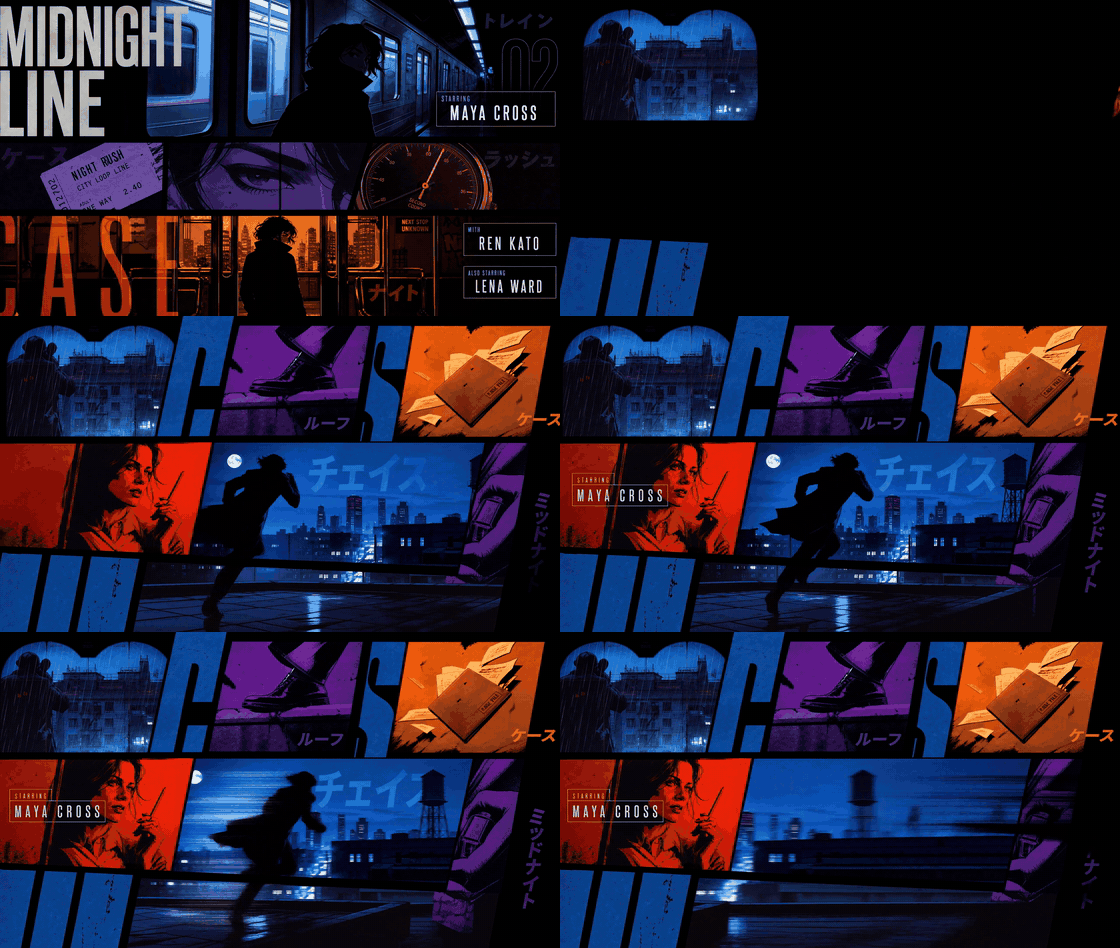 MiniMax H3 official noir title sequence: MIDNIGHT LINE, with clean STARRING credits
Look at the credits in that clip. MIDNIGHT LINE, STARRING, MAYA CROSS, REN KATO, LENA WARD, DIRECTED BY NOAH VOSS. Spelled correctly, no job title used twice, katakana decoration sitting where it was asked to sit. The prompt did not say "make nice titles." It said no repeats, no misspellings, no Chinese, and named the aesthetic five different ways.
 Five style reference boards handed to MiniMax H3 alongside the noir title prompt
Those five boards went in with the text. Five images plus one long brief, one generation. That is what this work looks like now.
And the reason so many of the 45 prompts are short is sitting right there in the picture. Across the whole set, the median prompt is around 130 Chinese characters, but the two longest run 657 and 858. The short ones are short because a reference board is carrying the description. The long ones are long because nothing else was going to carry it.
Why Most MiniMax H3 Prompts Come Out Flat, and the Garbled-Text Fix
Three things go wrong, and they are all absences rather than mistakes.
No timeline. You asked for ten seconds and described one moment, so you get one slow push-in stretched over ten seconds. The model had nothing to do at second seven.
No audio block. Sound is generated in the same pass as picture. If you say nothing, the model still ships you a track. It just picks one.
No negative list. Left alone, the model reaches for soft dissolves, invents extra on-screen text, and adds a subtitle strip nobody asked for.
The clearest proof is the official game-UI prompt, which is built out of six timestamped beats: [0s-2s] menu, [2s-4s] right-arm panel, [4s-7s] armament grid, [7s-8.5s] confirm, [8.5s-10s] loading bar, [10s-15s] the world loads in. The finished clip hits all six, in order, on time.
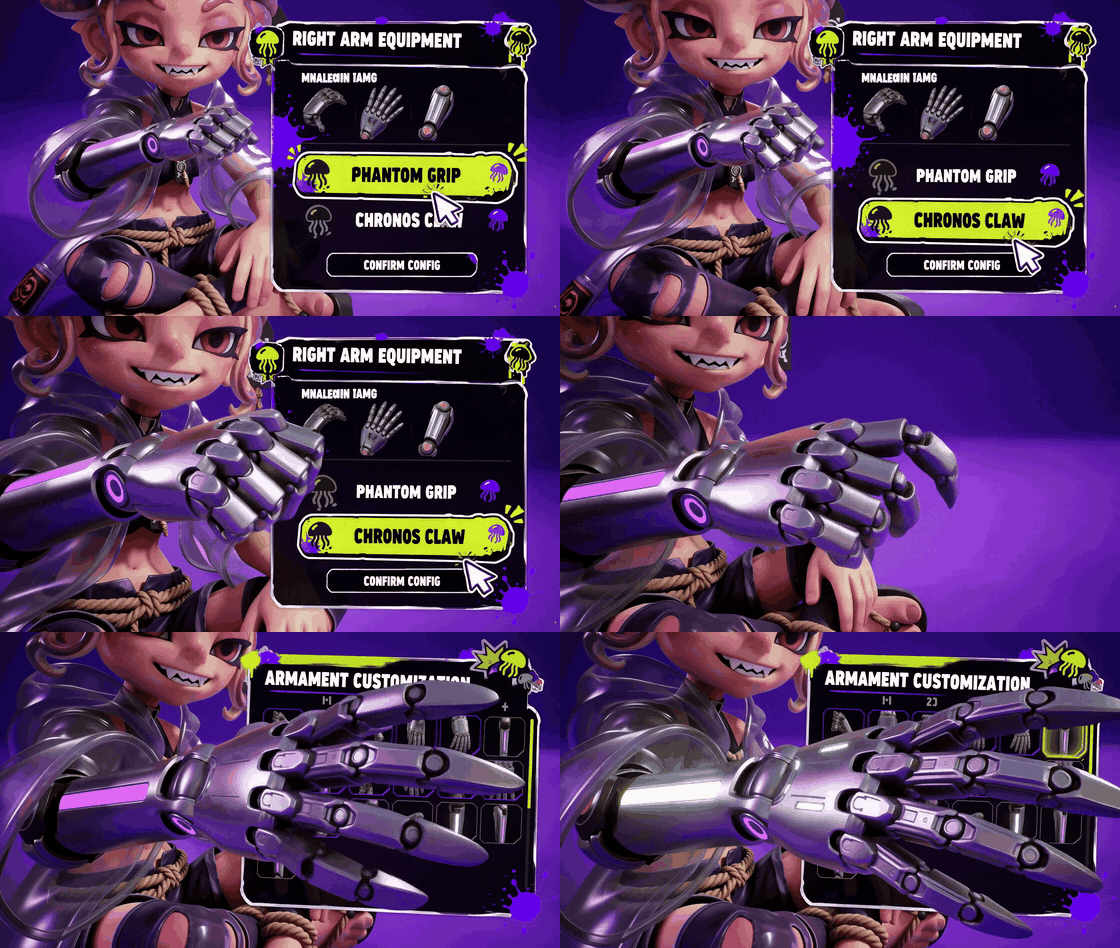 MiniMax H3 game UI clip: menu, equipment panel, loading bar, world load
Now the honest half, from the same clip, at full 2560x1440 resolution.
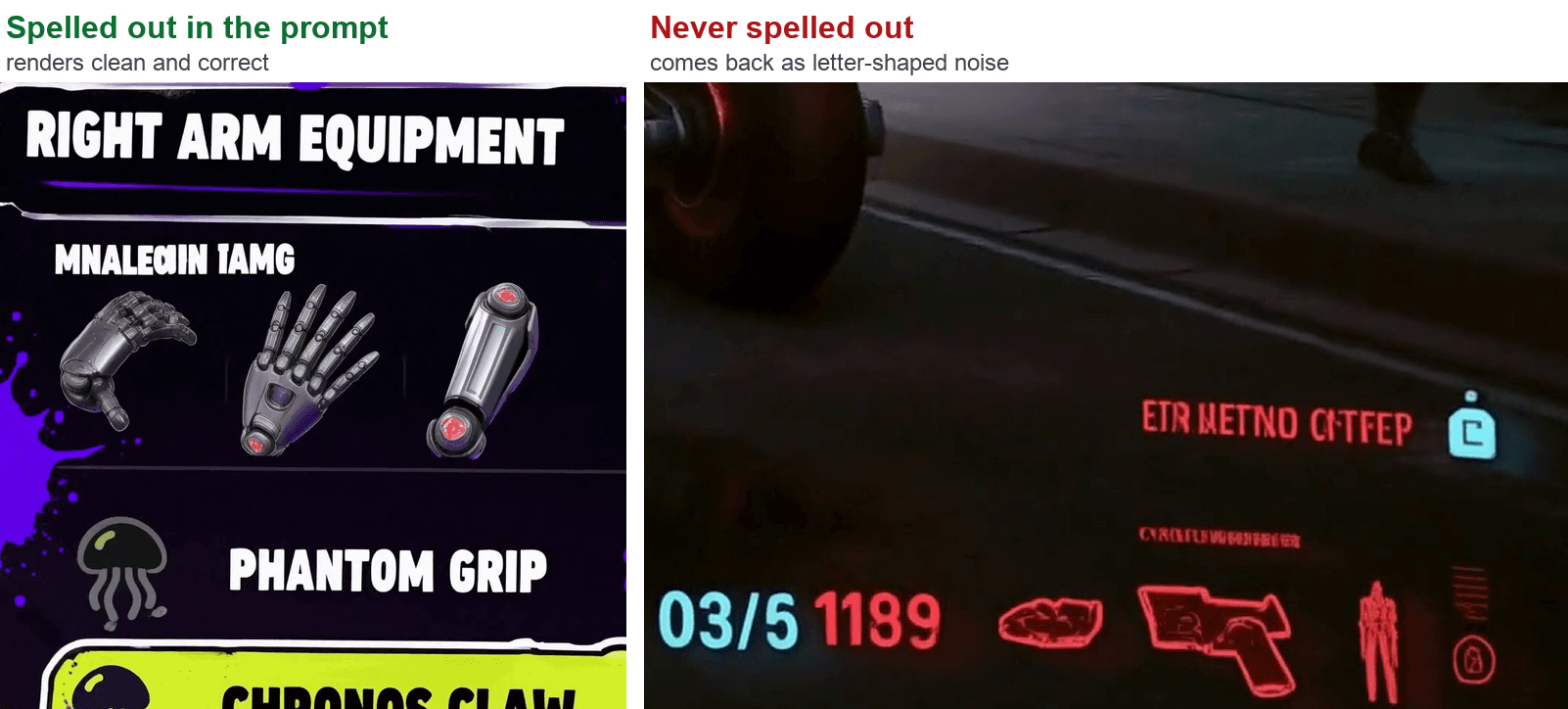 Left: text spelled out in the prompt renders cleanly. Right: text not spelled out renders as letter-shaped noise
On the left, every string the prompt actually typed out: RIGHT ARM EQUIPMENT, PHANTOM GRIP, CHRONOS CLAW. Crisp, correct, kerned like a real game menu.
On the right, the HUD in the final street shot, which the prompt only ever called "HUD elements." It reads ETR METNO CITFEP. Above the equipment icons, where the prompt said nothing, you get MNALEαIN IAMG. That is not a rendering bug. The model is drawing the texture of English because it was never given the string.
So the fix is not a setting. It is a habit:
If a word needs to be readable, type the word. Then add a negative line: do not misspell, do not add other text, do not add subtitles.
And here is the six-block shape every strong official prompt turns out to share.
| Block | What goes in it | Example from an official prompt | Skip it and you get |
|---|---|---|---|
| 1. Style contract | Medium, texture, palette, era, the look you must not lose | "retro Japanese-anime title cards, hard-edged silhouettes, comic collage, strong geometric colour blocks" | A generic glossy render that drifts by second six |
| 2. Timeline | Literal time slices with an action in each | [2s-4s] Smooth zoom to her right arm. UI panel slides in from the right | One idea stretched over the whole duration |
| 3. Camera | Movement, or an explicit refusal to move | "locked off, static wide shot, no push in, no cuts" | A default slow dolly you did not ask for |
| 4. Audio | Every sound, and when it enters | "at 6 seconds the jazz bass groove joins, the last 2 seconds lock it with a tense chord" | Whatever room tone the model likes today |
| 5. Text, spelled out | The literal strings, in quotes | "THIS IS FINE." / CONFIRM CONFIG | Letter-shaped noise, as above |
| 6. Negative list | The transitions, objects and clichés to refuse | "No soft dissolves, no fluid transitions, do not add Chinese, do not repeat a job title" | Soft dissolves, invented text, uncanny drift |
Blocks 5 and 6 are free. They cost nothing extra to generate and they are where most of the quality lives.
The MiniMax H3 Prompt Workflow: Which Endpoint Your Prompt Belongs To
Same key, same submit-and-poll shape, three doors. Which one you pick decides what your prompt still has to do.
| Endpoint | What you hand it | What it locks for you | Parameters worth knowing | Reach for it when | Billing |
|---|---|---|---|---|---|
| minimax/h3/text-to-video | Prompt only | Nothing. The text carries everything | duration 5-10 (default 8), resolution 2K, ratio must be set explicitly | Testing a look or a sound design before you commit | Billed per second of output, current rate on the model page |
| minimax/h3/image-to-video | Prompt + image (first frame), optional end_image | Where the clip starts, and optionally where it lands | end_image, duration 5-10 (default 8), ratio adaptive by default | You have artwork and you want it to move without being redrawn | Billed per second of output |
| minimax/h3/reference-to-video | Prompt + refers[] | Subject identity and style, across a scene you invent | refers[] mixed array, duration 5-15, ratio up to 21:9 | Same character or product, new environment | Billed per second of output |
refers[] is the one that is genuinely under-documented in the wild, so here is the shape it wants:
json1"refers": [ 2 { "url": "https://.../subject.png", "type": "image" }, 3 { "url": "https://.../style-board.png" }, 4 { "url": "https://.../motion-ref.mp4", "type": "video" }, 5 { "url": "https://.../beat.mp3", "type": "audio" } 6] 7
Four rules that will each save you a wasted generation:
- Audio cannot ride alone. At least one image or video has to be in the array. A beat track by itself is rejected.
- type is optional. It is inferred from the URL, but state it anyway when the extension is ambiguous.
- The ceilings are real. Up to 9 images, 3 videos and 3 audio clips, 12 files total, with reference video and audio running 2 to 15 seconds each (MiniMax API docs, July 2026).
- Give every reference a job inside the prompt text. This is the highest-leverage habit on this list. Official prompts open with lines like "Image 1 is the overall mood and style reference, Image 2 is the lead character reference." Without that sentence, the model has to guess which board means what.
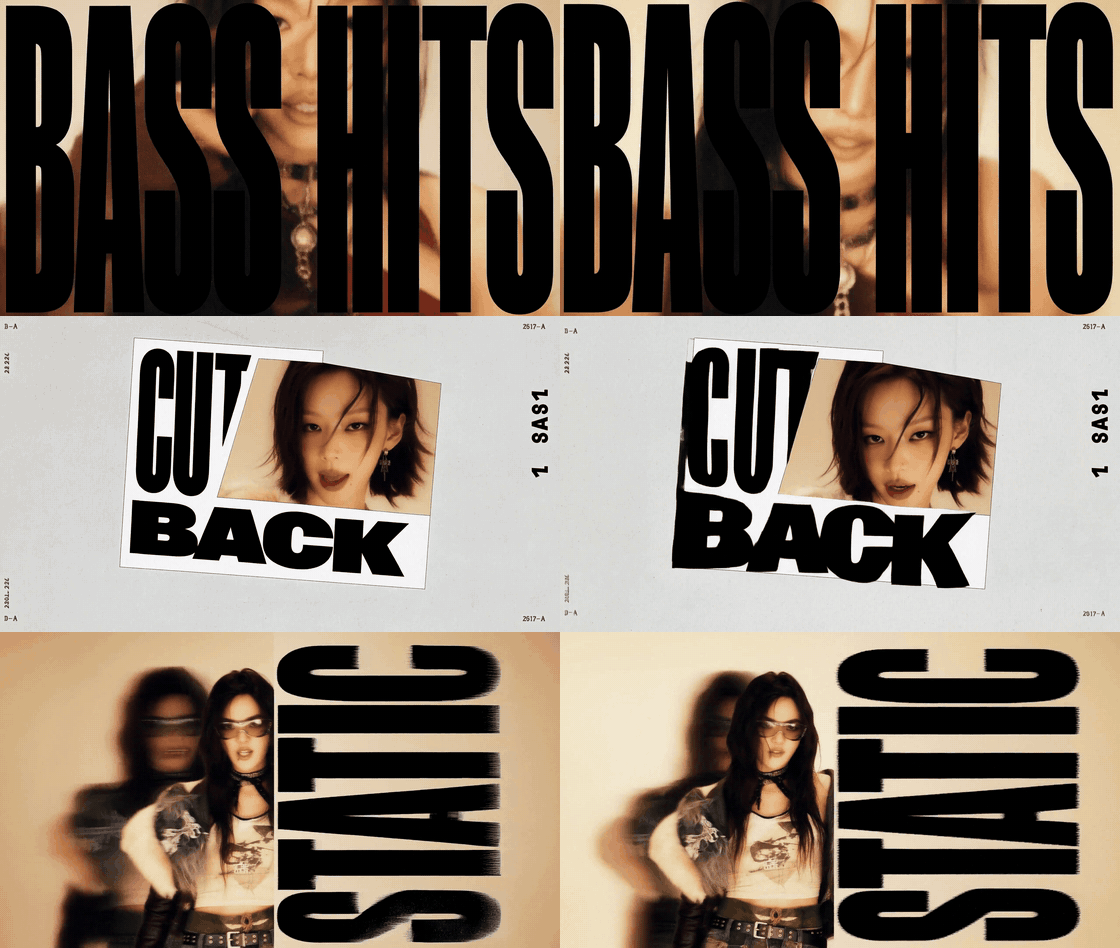 MiniMax H3 dark-pop music video: CUT BACK, ONE LOOK, DETONATE typography
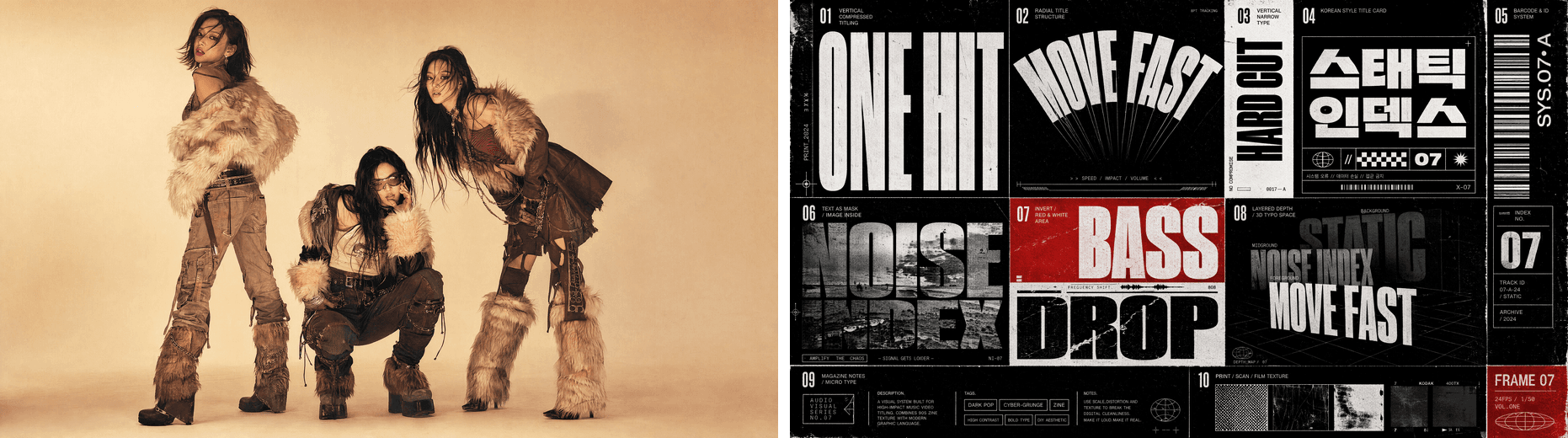 The two typography reference boards behind the dark-pop clip
That clip is the argument for rule 4. Its prompt never describes a single letterform. It says "text packaging style and texture reference the images," and hands over two boards. The layout arrived because it was shown, not described.
One more table, because the model card and the API do not currently say the same thing, and the gap is where people lose an afternoon.
| Thing | MiniMax's own documentation | What the endpoints actually accept today | What that means for your prompt |
|---|---|---|---|
| Duration | 4 to 15 seconds, integers only | text-to-video and image-to-video: 5 to 10, default 8. reference-to-video: 5 to 15, default 8 | A 15-second shot list only fits reference-to-video right now. Rewrite longer boards into 10 |
| Resolution | 2K | resolution defaults to 2K, and 2K is currently the only value that runs. A 768p job comes back with model MiniMax-H3 does not support resolution 768P, supported resolutions: 2K, even though 768p appears in the pricing table | Write for a 1440px short side. Detail you ask for will actually survive |
| Aspect ratio | Common ratios or adaptive | image-to-video and reference-to-video default to adaptive. Text-only rejects adaptive and returns its allowed set: 16:9, 4:3, 1:1, 3:4, 9:16, 21:9 | On text-to-video, set ratio explicitly or the job fails validation |
| Mixed references | 9 images, 3 videos, 3 audio, 12 files, audio never alone | refers[] takes {url, type} with image, video or audio, at least one image or video | You really can sync motion to a supplied beat. You just cannot supply only the beat |
| Native audio | Stereo audio in the same pass | Every one of the nine official clips I probed: 2560x1440, 24fps, AAC stereo at 32kHz | The audio block is not decoration. It is half the deliverable |
Everything above ran on Atlas Cloud, where all three H3 endpoints sit behind one key and one submit-and-poll loop, so switching between them is a change of model string and nothing else.
MiniMax H3 Prompt Tutorial: Set the This Is Fine Dog On Fire, With Sound
Here is the whole thing end to end. The joke works because the dog does nothing. Stretch that denial into ten seconds of real time, add real fire, and let the last two seconds go where the original comic actually went, and it gets funnier and slightly worse for you. Most people have only ever seen the first two panels.
Step 1: Download the original comic. Do not let an AI redraw it.
The strip is six panels, two columns by three rows, 600 by 887. We only want panel 2 and panel 6.
bash1curl -L -o gunshow-648.png https://gunshowcomic.com/comics/20130109.png 2# 600x887, 6 panels, 2 cols x 3 rows 3 4# crop panel 2 (the "THIS IS FINE." panel): x 302-584, y 20-293 5# crop panel 6 (the melting dog): x 302-584, y 595-868 6# upscale each 4x with Lanczos -> 1128x1092 7
Say it plainly: do not ask an image model to draw "a dog that looks like This Is Fine." An AI recreation gets clocked as fake in half a second and the joke dies on the spot. The watercolour wash, the wobbly hand lettering and the paper grain are the entire contract. The 4x Lanczos upscale is only there because 282px of source is thin; it gives the model real pixels to hold onto without inventing any.
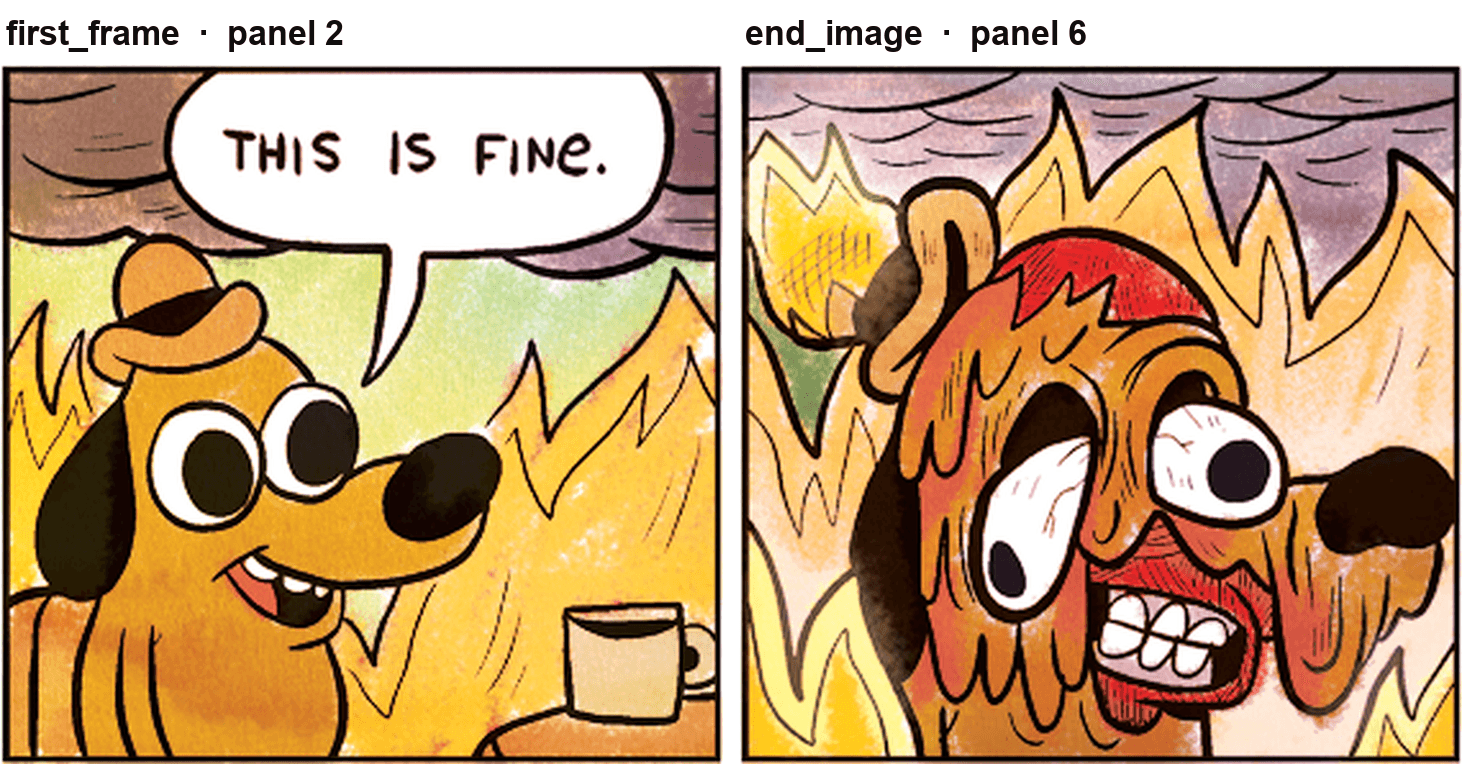 Panel 2 and panel 6 of the original comic, labelled as the first frame and end image inputs
Step 2: Run it on image-to-video with an end_image.
Model: minimax/h3/image-to-video. Settings: resolution 2K, image = panel 2, end_image = panel 6, ratio 1:1 to match the square-ish source. Set duration to 10; the slider sits at 8 by default, so drag it.
text1Hand-painted 2D webcomic panel, brought to life. Keep the original watercolour 2texture, visible ink outlines, off-register paper grain and flat comic palette 3in every frame. Do not smooth, do not re-render in 3D, do not clean up the 4linework, do not add new objects, do not add new text. 5 6[0s-3s] Almost nothing moves. The dog sits perfectly still, holding the mug, 7eyes fixed forward. Only the flames behind him move: slow orange licks climbing 8the wall, one ember drifting up. The speech bubble reading "THIS IS FINE." 9stays exactly where it is, fully legible, unchanged, hand-lettered. 10 11[3s-6s] The dog lifts the mug and takes one small, calm sip. The speech bubble 12fades out after the sip. The fire brightens. The wall behind him begins to warp 13with heat. His hat starts to smoulder at the brim. 14 15[6s-8.5s] The heat reaches him. His ears sag, his outline softens and begins to 16run downward like wet paint. He still does not move his eyes. The mug stays in 17his paw. 18 19[8.5s-10s] Full melt. The face distorts, one eye slides, teeth bared in a fixed 20grin, the fur runs red and orange. He holds the pose. Hold on the final frame 21for the last half second. 22 23Camera: locked off, single static wide shot, no push in, no handheld, no cuts. 24The frame never moves. This is one continuous take inside one comic panel. 25 26Audio: room-tone of an interior fire throughout - low crackle, occasional pop of 27burning wood, a faint structural creak. At 3s, one ceramic mug touching teeth and 28a small swallow. A calm, flat, unbothered male voice says exactly: "This is fine." 29- deadpan, no emotion, slightly too relaxed. From 6s the crackle grows louder and 30the room tone thickens; the last 2 seconds add a low sub-bass swell. No music, 31no laugh track, no sound effects that are not in this list. 32 33Do not add subtitles. Do not add a watermark. Do not spell any word other than 34the words already in the image. Do not change "THIS IS FINE." Do not cut away. 35
That prompt is the structure table, alive. Paragraph one is the style contract. The four bracketed slices are the timeline. Then camera, then audio, then the negative list. Nothing in it is decorative.
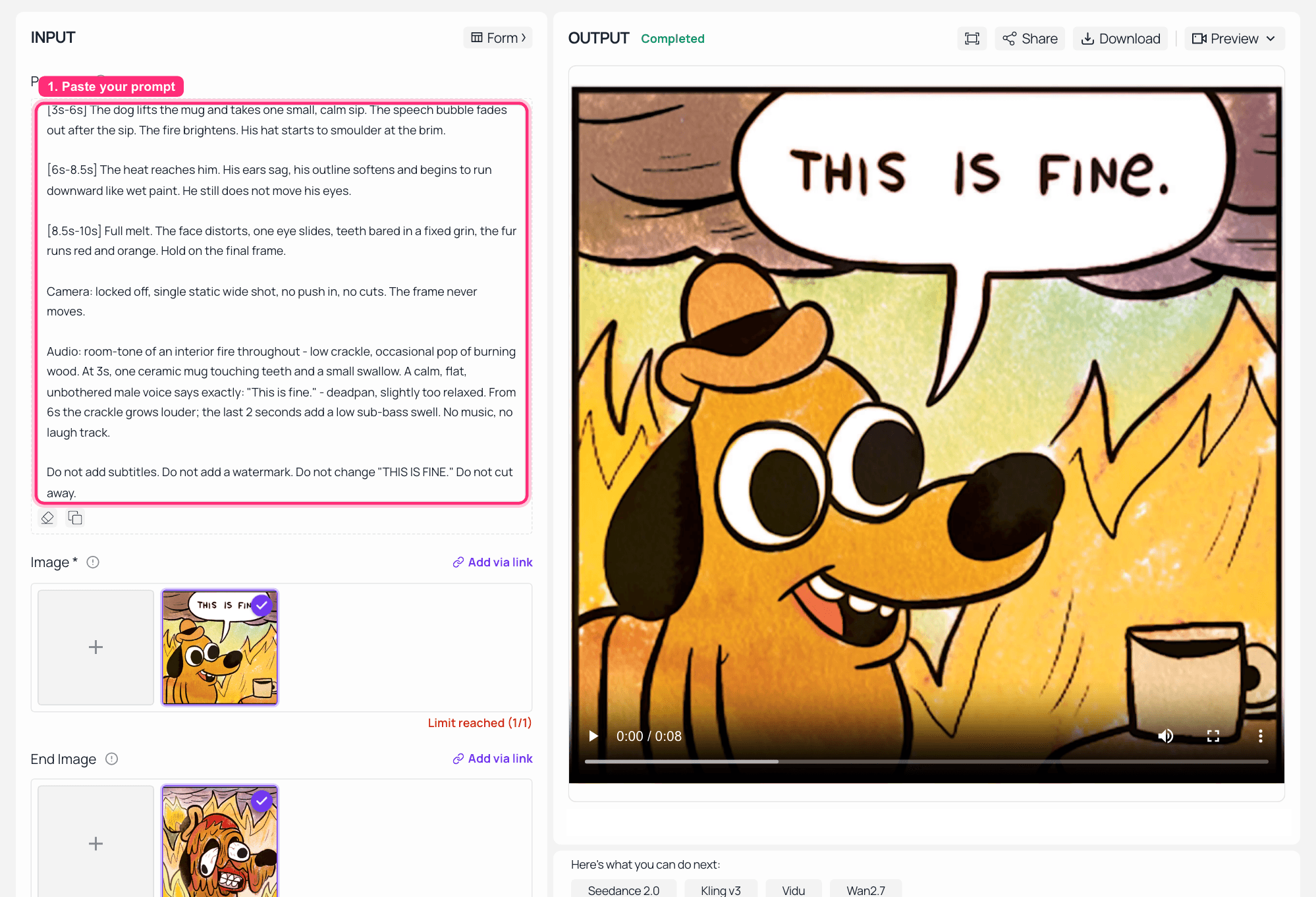 MiniMax H3 image-to-video on Atlas Cloud: first frame and end image loaded, 10 seconds at 2K, finished clip in the output panel
Step 3: Read the output like a QA pass.
Four checks, each one testing a different block of the prompt.
- Is THIS IS FINE. in the bubble still legible and still spelled right? That tests block 5.
- Did the linework survive, or did something "improve" it into clean 3D? That tests block 1.
- Does the audio contain only the sounds you listed? Probe the container: it should come back h264 plus AAC stereo.
- Does the final frame land on panel 6's pose? That tests end_image.
bash1ffprobe -v error -show_entries stream=codec_type,codec_name,width,height,r_frame_rate,channels,sample_rate \ 2 -of default=noprint_wrappers=1 output.mp4 3
Mine came back at 1472x1440, 24fps, h264 plus AAC stereo, 10.13 seconds. Worth noting: I asked for ratio: 1:1 and got 1472x1440, so on image-to-video the source frame's shape wins. Match your two panels to the shape you actually want.
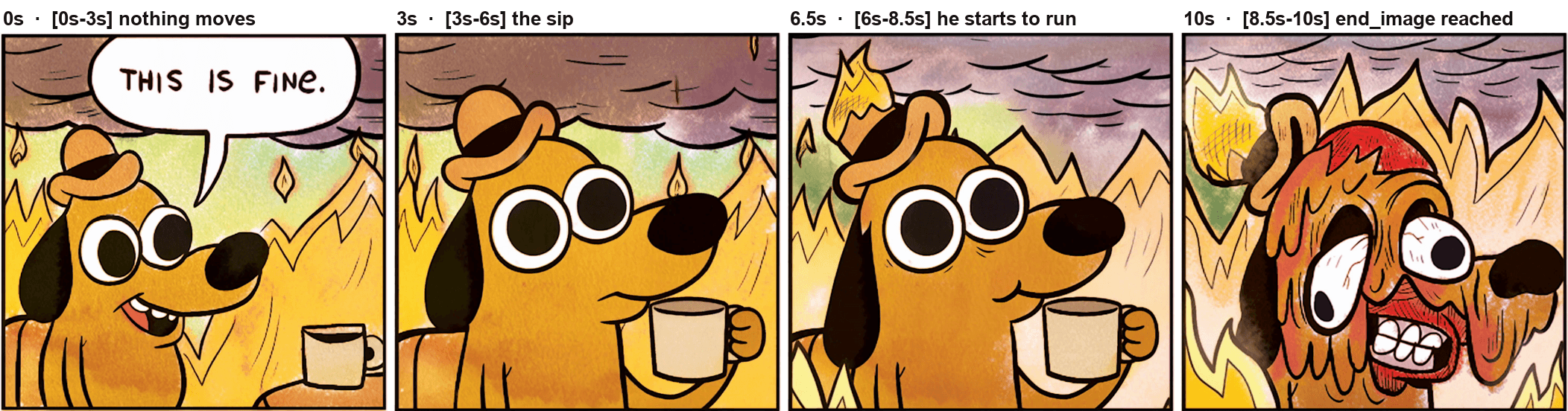 Four frames from the finished clip at 0s, 3s, 6.5s and 10s, matching the four time slices in the prompt
Step 4: Move the dog somewhere new with reference-to-video.
Same character, new room. Model: minimax/h3/reference-to-video. Settings: refers[] = panel 2 as image, duration 8, resolution 2K, ratio 16:9.
text1Image 1 is the character and art-style reference: keep this exact hand-painted 22D webcomic look, the same watercolour texture, the same ink outline weight, the 3same dog, the same little hat, the same mug. Do not redraw him in 3D, do not 4change his proportions, do not clean up the linework. 5 6Put him in a different room and keep his composure. A cramped open-plan office at 7night, fluorescent tubes flickering, a wall of monitors all showing a red error 8state, printer paper drifting down through the frame, a small electrical fire in 9the corner. He sits in an office chair at the centre of the frame, mug in paw, 10looking straight at the camera, completely relaxed. 11 12Camera: locked off, static wide shot. No push in, no cuts. 13 14Audio: fluorescent hum, printer grinding, a repeating soft alarm chirp every two 15seconds, distant electrical crackle, one calm sip at 4s. No music. No voice. 16 17Do not add any on-screen text. Do not add subtitles. Do not add other characters. 18
The transferable rule: refers[] carries identity and style, the text carries the scene. That split is the whole trick to character consistency, and it is why the first line of the prompt exists at all.
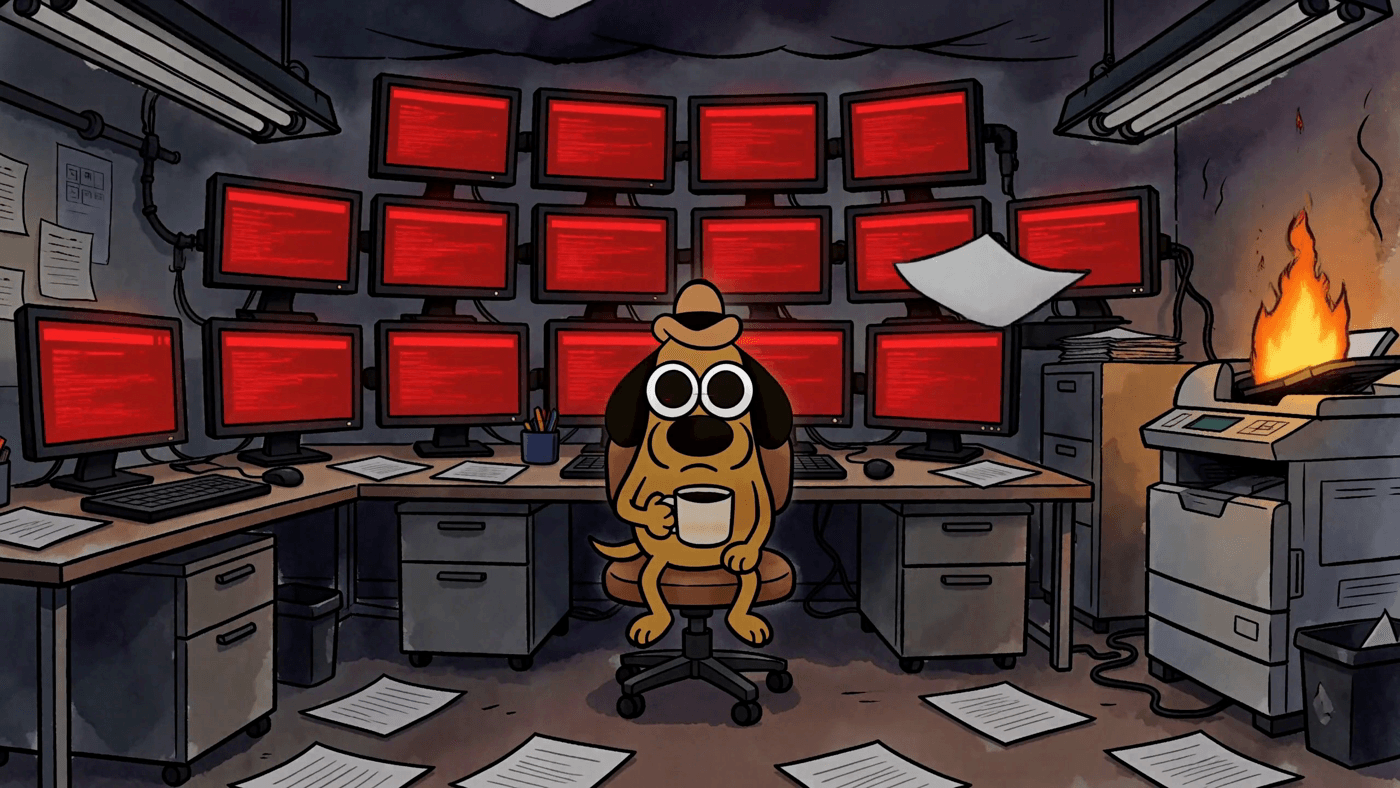 The same webcomic dog relocated to a burning open-plan office at night, generated by MiniMax H3 reference-to-video
Same hat, same mug, same ink weight, new room. One reference image did all of that.
Three More MiniMax H3 Prompt Patterns Worth Stealing
Pattern 1: the motion poster, where the layout must not move.
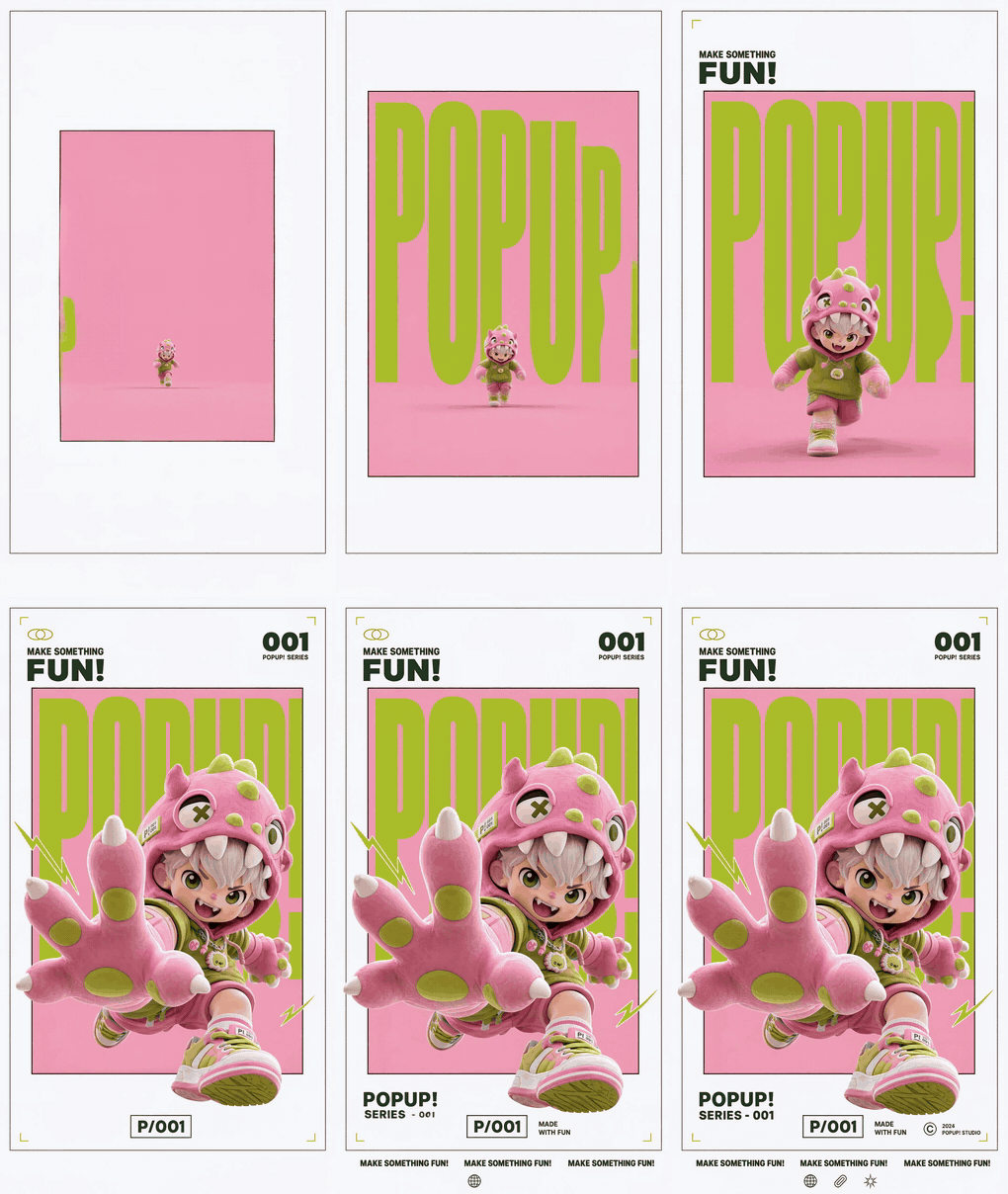 MiniMax H3 motion poster: the POPUP! layout animates while the frame and typography stay locked
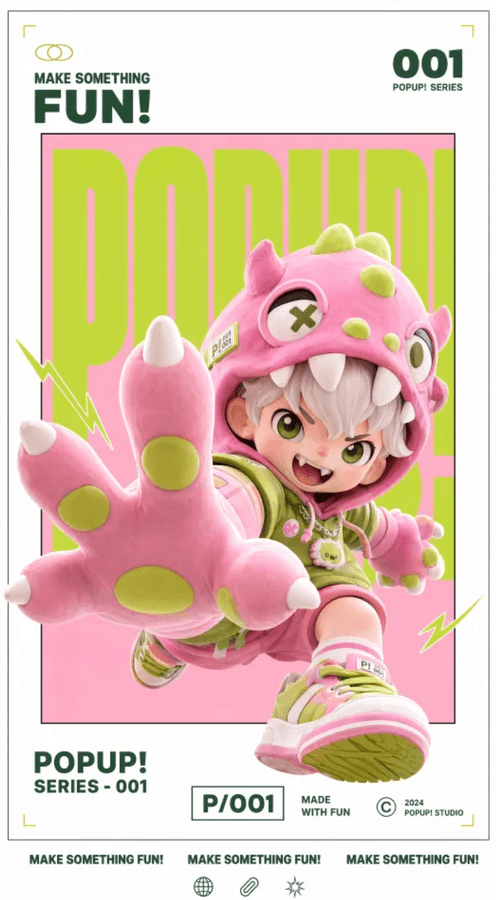 The original static poster handed to MiniMax H3
The whole prompt is two lines: keep the gallery white frame, the inner frame, the red-white-black palette, the 3D-figure feel and the layout structure unchanged, and put a nimble sound effect under the text entrance. The rule: name the parts that must survive. "Keep the layout" is not a style note, it is a constraint, and the model treats it as one.
Pattern 2: the interface demo, where verbs beat adjectives.
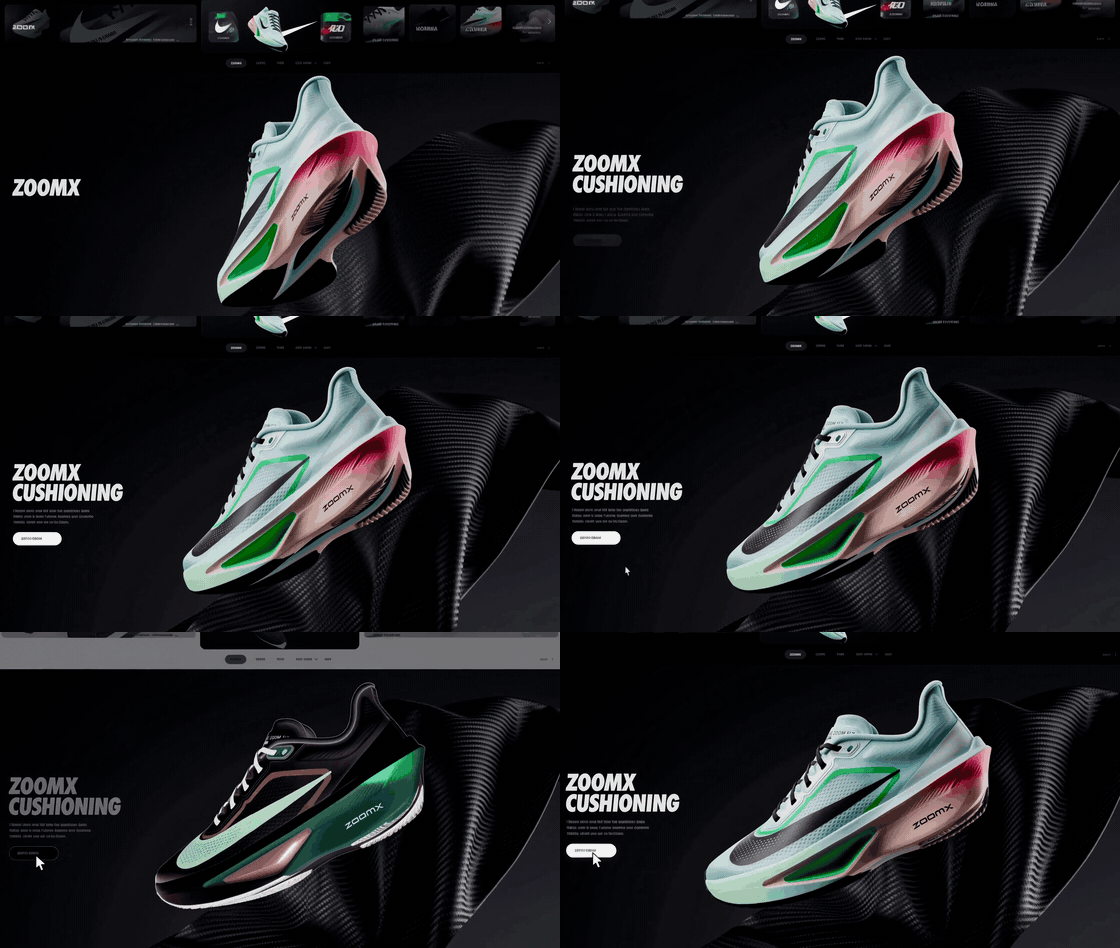 MiniMax H3 landing page demo: scroll, hover, colour inversion on a product page
 The single product reference image behind the landing-page clip
That prompt asks for a downward page scroll, a hover state, a strong scale-up and a colour inversion. Four verbs. It never says "modern" or "sleek." Interactions are actions, so write them as actions. The oversized italic type and the carbon-weave background came from the adjectives; the thing that makes it read as a real page came from the verbs.
Pattern 3: live action plus hand-drawn, held together by refusals.
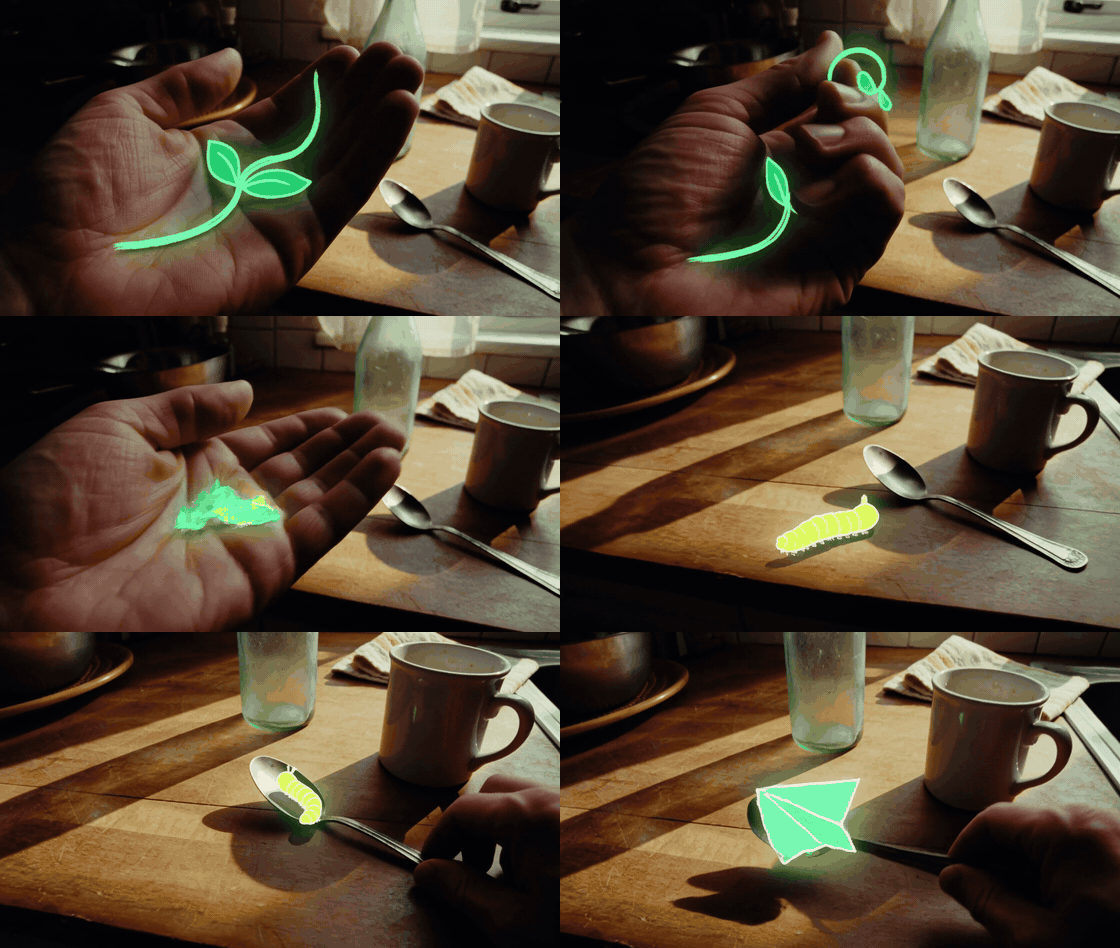 MiniMax H3 clip fusing live-action kitchen footage with hand-drawn glowing creatures
This one is a phone-shot evening kitchen with small glowing hand-drawn creatures in it, and the reason it stays charming instead of turning into a horror short is a list of bans: no giant eyes, no split mouths, no fangs, no threatening posture, no lunging, no sudden cut to black, no jump scares. The negative list is the primary style control, not a patch. It is also where you encode taste.
 Four frames from the official sci-fi trailer: THE STARS WERE LISTENING
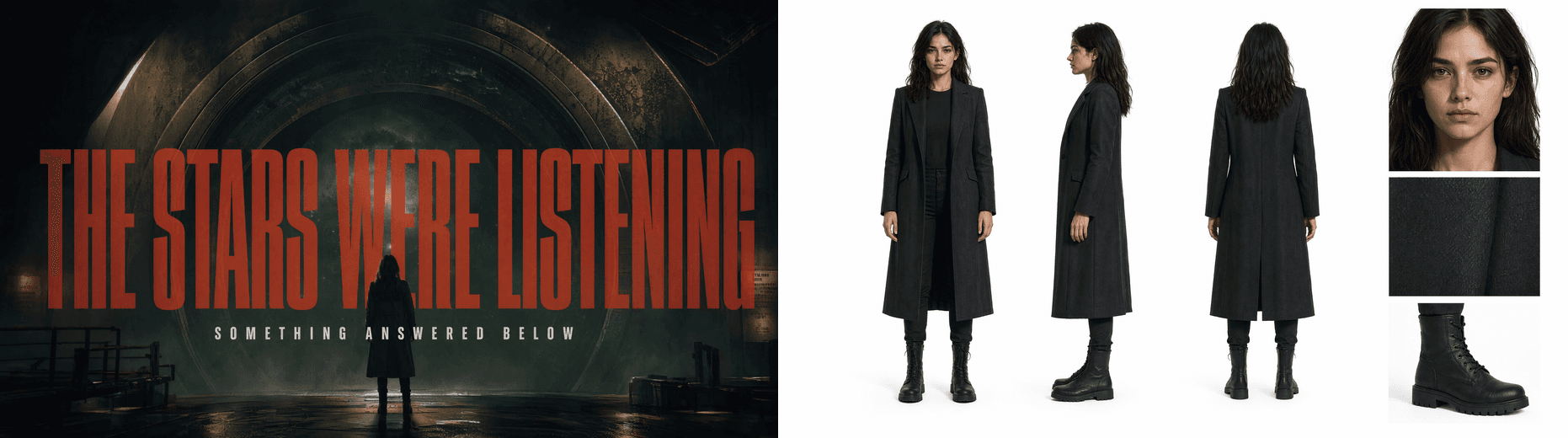 The mood board and character reference behind the trailer
The trailer above closes the loop on both ideas. The prompt spells out one title, THE STARS WERE LISTENING, in detail: extremely narrow, heavy, all caps, dark red mixed with rust, slight grain and fogged edges. That one comes back exactly as ordered. Two reference boards handle the mood and the lead, so the text never has to describe a face. Division of labour, all the way down.
What It Costs to Run These MiniMax H3 Prompts
H3 is billed per second of generated video, by resolution, so the cost model is refreshingly boring: a 15-second take costs about three 5-second tries. Everything else follows from that.
- Iterate at 5 seconds, deliver at 10 or 15. Composition, palette and sound design all resolve at 5. Nothing about a locked-off shot needs the full duration to tell you it is wrong.
- end_image is a cost tool, not just a creative one. Most reruns happen because the ending drifted. Pinning the last frame removes that failure mode before you pay for it.
- Negative lists and spelled-out text are free. They add characters to a prompt that is billed by the second, not the token. Use them heavily.
- Match duration to the endpoint before you write. Building a 15-second shot list and then discovering your endpoint caps at 10 costs you a rewrite, not just a rerun.
One thing not to plan around yet: the pricing tables list a cheaper 768p tier, but as of this writing a 768p job is rejected outright and 2K is the only resolution that runs. Budget as if every second is a 2K second. Current per-second rates sit on the model page, which is also where the 768p tier will show up once it opens.
MiniMax H3 Prompts, Memes and Copyright
The dog is not public domain. This Is Fine comes from KC Green's webcomic Gunshow #648, published on 9 January 2013, and only the first two panels ever went viral (Know Your Meme, January 2013). Green has talked publicly, and pretty wearily, about watching the image get reused forever, including by people whose politics he does not share (NPR, January 2023).
This walkthrough is commentary and teaching, not a stock library. If you want to ship something commercially, draw your own frames or license the ones you use. And run your own policy check before a client job: H3 applies content rules to recognisable real people and well-known IP, and finding that out mid-deadline is not fun.
Frequently Asked Questions
Does MiniMax H3 generate audio, or do I add it afterwards?
Same pass. Picture and sound come out together, which is exactly why audio has to be written into the prompt body rather than bolted on later. Give it its own Audio: block and state when each sound enters. Every one of the nine official clips I probed came back as AAC stereo at 32kHz alongside a 2560x1440, 24fps video stream.
How long can a MiniMax H3 prompt be?
Up to 7,000 characters, per MiniMax's documentation. In practice the official examples span a wide range, with a median around 130 Chinese characters and the two longest at 657 and 858. Short prompts work fine when a reference image is doing the describing. If you have no references, expect to write a shot list.
Why does text come out garbled in my MiniMax H3 videos?
Because you did not type it. Strings that appear literally in the prompt render cleanly; anything you gesture at generically ("HUD elements," "some labels") comes back as letter-shaped texture. Spell out every word that has to be readable, then add do not misspell, do not add other text, do not add subtitles.
How many reference images, videos and audio clips can one MiniMax H3 prompt use?
Nine images, three videos and three audio clips, twelve files in total, with reference video and audio between 2 and 15 seconds each. Audio cannot be the only reference. Note that model capability and what a given endpoint exposes are two different things, so check the model page for the current input list.
Can a MiniMax H3 prompt control how the clip ends, not just how it starts?
Yes, on image-to-video, via the optional end_image parameter. Give it a first frame and a last frame and the clip interpolates between them. The demo above is exactly that: comic panel 2 in, comic panel 6 out. Keep the two images at similar aspect ratios or the transition gets ugly.
What durations and resolutions can I actually get right now?
2K, and only 2K. A 768p job is currently rejected with supported resolutions: 2K, despite 768p appearing in the pricing table. Duration differs by endpoint: text-to-video and image-to-video accept 5 to 10 seconds with a default of 8, while reference-to-video accepts 5 to 15. One more gotcha: on text-only generation the API rejects adaptive and requires an explicit ratio.