Spending hours manually cutting out background elements or fixing scrambled text on flattened AI renders remains a top operational bottleneck for creative production teams. Internal workflow benchmarks show that creators lose substantial production hours attempting to retrofit static, single-layer graphics for modular design layouts.
Key Takeaways:
Seedream 4.5 to 5.0 Pro upgrade moves your creative stack from single-layer raster generations to an adaptable multimodal design framework. Seedream 4.5 remains ByteDance's baseline model for fast, single-layer photographic consistency. In contrast, the Seedream 5.0 Pro reasoning engine delivers native layer separation with automated background inpainting, 14 language typography, and explicit spatial grounding.
- When to Upgrade: Move to 5.0 Pro for modular UI assets, multi-language typography, precise spatial editing, and multi-layer exports for downstream AI video (e.g., Seedance 2.5).
- When to Keep 4.5: Retain 4.5 for low-cost, high-volume single-raster renders, warm photographic headshots, and native 4K direct outputs.
- API Shift: Change endpoint to seedream-5-0-pro, reduce reference array to 10 files, and pass layer extraction payloads.
Pipeline Migration Strategy
| User Profile | Recommended Workflow | Key Technical Driver |
| Commercial Designers & UI Teams | Seedream 5.0 Pro | Native layer exports and multi-script typography. |
| E-Commerce Builders | Seedream 5.0 Pro | Conversational editing and background inpainting. |
| Batch Social Graphic Creators | Seedream 4.5 | Fast single-turn raster generation. |
This architectural transition represents a significant milestone in ByteDance image model evolution. Teams executing an AI image generation pipeline migration should maintain hybrid operations: preserve 4.5 for rapid ideation while deploying 5.0 Pro for production assets.
Key Technical Delta: Seedream 4.5 vs 5.0 Pro Specification Matrix
Pipeline engineers frequently waste API credits trying to force single-layer image generators to output modular design assets. The transition to 5.0 Pro shifts the core asset container from flat raster renders to structured, multi-layer design files.
Quantitative Parameter Comparison
| Technical Feature | Seedream 4.5 | Seedream 5.0 Pro |
| Output Container | Flattened JPEG/PNG | Multi-layer transparent PNG / alpha layers |
| Max Resolution Tier | Native 4K | 1K to 2K design container |
| Reference Image Input | Up to 14 images | Up to 10 images plus spatial coordinates |
| Supported Languages | Precision typography & bilingual (CN/EN) focus | 14 native languages (multilingual & RTL scripts) |
| Interactive Selection | None (global prompt) | Point, lasso, box, and anchor points |
| Interactive Editing | Full re-generation required | Interactive canvas editing (sketch & selection) |
Understanding API Migration and Asset Outputs
Examining the generation resolution benchmark shows that 4.5 targets raw pixel density, whereas Seedream 5.0 Pro specifications prioritize structural editability. Developers conducting a Seedream API parameter migration must update their backend request schemas.
To help engineering teams answer "What are the exact API parameter changes when upgrading to Seedream 5.0 Pro?", the following JSON schema comparison highlights the key parameter shifts:
Legacy Seedream 4.5 Request Payload
plaintext1// POST https://ark.ap-southeast.bytepluses.com/api/v3/images/generations 2{ 3 "model": "bytedance/seedream-v4.5", 4 "prompt": "A detailed watercolor style portrait of a futuristic mechanic", 5 "image": [ 6 "https://example.com/ref1.jpg", 7 "https://example.com/ref2.jpg" 8 // Supports up to 14 reference URLs 9 ], 10 "sequential_image_generation": "auto" 11}
Upgraded Seedream 5.0 Pro Request Payload
plaintext1// POST https://ark.ap-southeast.bytepluses.com/api/v3/images/generations 2{ 3 "model": "bytedance/seedream-v5.0-pro/text-to-image", 4 "prompt": "Design brief: Subject: A futuristic mechanic in workshop. Output layers: Separate into subject, text, and background.", 5 "image": [ 6 "https://example.com/ref1.jpg", 7 "https://example.com/ref2.jpg" 8 // Limited to 10 reference URLs max 9 ], 10 "enable_layer_separation": true, 11 "spatial_coordinates": [ 12 { 13 "type": "box", 14 "box_2d": [120, 340, 500, 800], 15 "label": "target_subject" 16 } 17 ], 18 "output_format": "alpha_png_stream" 19}
Key API Backend Updates:
- Model Endpoint Update: Change the model identifier string from seedream-4-5 to seedream-5-0-pro on the Volcano Ark API endpoint.
- Reference Payload Adjustment: Reduce the maximum image array size from 14 down to a 10-file reference image limit to accommodate spatial processing overhead.
- Layer Request Payload: Pass enable_layer_separation and spatial grounding annotations (spatial_coordinates) to receive separated element outputs rather than flat images. Teams seeking a true multi-layer PSD export can programmatically compile these individual alpha PNG streams directly into editable Photoshop documents.
Migrating Core Features: How Seedream 5.0 Pro Expands Production Capabilities
Designers routinely waste hours attempting to fix distorted letterforms or re-render an entire background just to move a single foreground element three inches to the left.
Three Functional Production Upgrades
-
Native Layer Separation and Background Inpainting
An automated layer separation AI image workflow splits a single render into 10+ independent, transparent PNG layers. When isolating a main subject, 5.0 Pro automatically inpaints the hidden background surface behind it, enabling instant scaling or element swaps.
-
Spatial Grounding and Multi-Reference Pinpointing
Utilizing Seedream 5.0 Pro spatial grounding, creators can lock onto coordinate regions using point, lasso, box, or sketch tools. This powers interactive canvas editing across a multi-reference image pipeline accepting up to 10 reference images for character, lighting, and product consistency.
-
Multilingual Vector Typography
The engine executes native multilingual text rendering across 14 languages, including right-to-left scripts like Arabic alongside Japanese, Korean, and French, adhering strictly to regional typographic rules.
Text Density Performance: 4.5 vs 5.0 Pro
Does Seedream 5.0 Pro handle dense text better than 4.5 without corruption? Independent benchmarks confirm 5.0 Pro maintains high accuracy on complex infographics where 4.5 drops characters, misplaces text layers, or oversimplifies structural briefs.
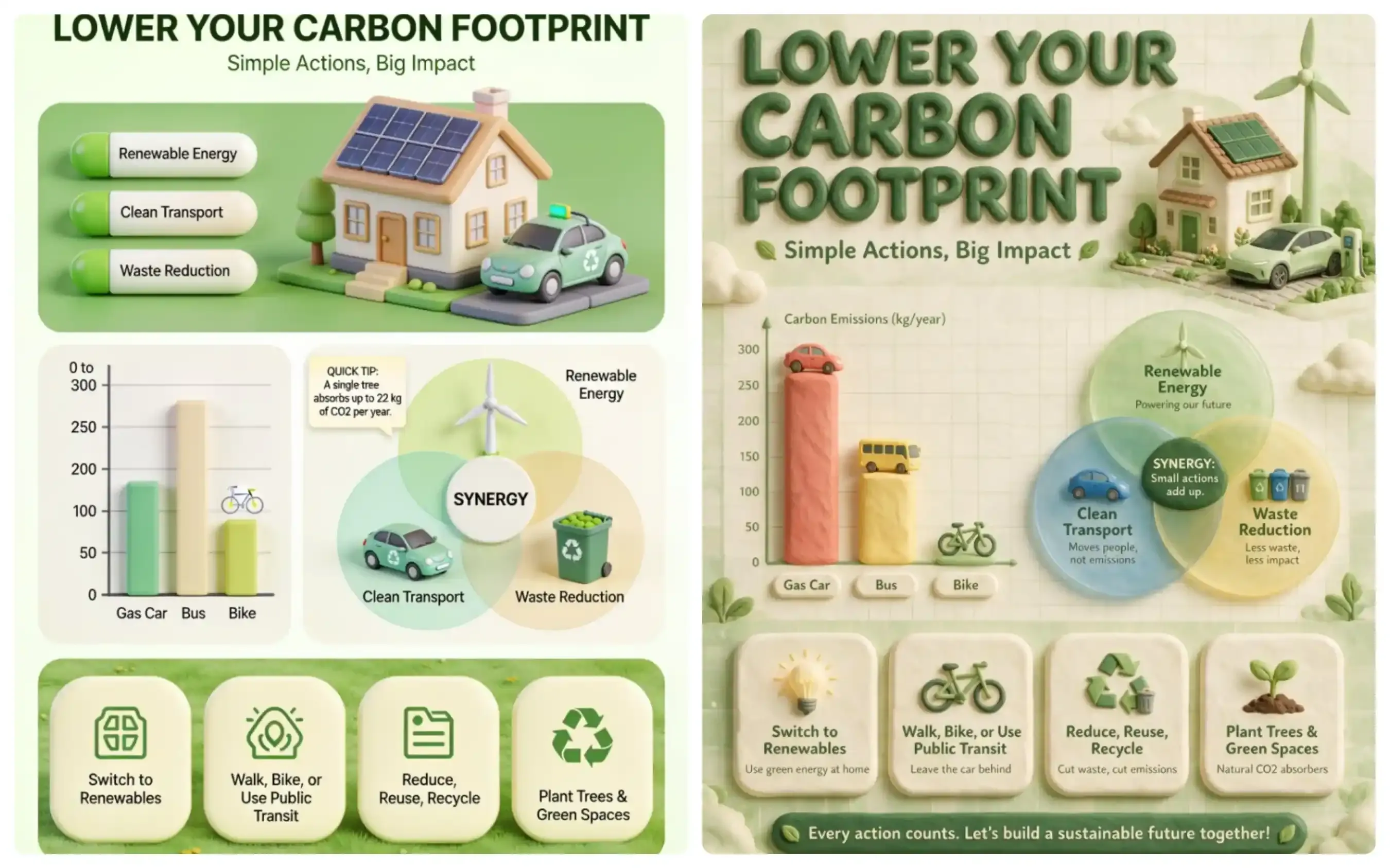
Test: Side-by-side benchmark generated via Atlas Cloud using a complex 3D infographic design brief. Seedream 4.5 (Left) truncates lower-level text and simplifies layout constraints. Seedream 5.0 Pro (Right) executes 100% of the structured brief, including multi-tier typography, chart labels, and footer banners.
Deep-Dive Visual Analysis:
- Prompt Compliance & Layout Depth: Seedream 4.5 (Left) collapsed the prompt's layout rules—completely dropping the bottom footer banner and reducing the 3D Venn diagram text hierarchy. In contrast, 5.0 Pro (Right) parsed every single structural section, maintaining spatial padding and complete component grid logic.
- Typography & Micro-Text Integrity: 5.0 Pro successfully renders multi-line subtext across all four bottom cards (e.g., "Natural CO₂ absorbers", "Cut waste, cut emissions") with crisp, legible letterforms. Seedream 4.5 failed to render these subtext layers entirely.
- Data Visualization Logic: While 4.5 struggles with relative chart proportions, 5.0 Pro strictly aligns the 3D bar chart elements with their corresponding numeric y-axis scales and label tags ("Gas Car", "Bus", "Bike").
This level of spatial and typographic control converts raw image outputs directly into editable, production-ready design assets.
Prompt Syntax Adaptation: Updating Your Prompts from 4.5 to 5.0 Pro
Attempting to run legacy Seedream 4.5 prompt structures on 5.0 Pro frequently results in layout errors and missing asset details. While 4.5 required heavy visual descriptive tags to guess aesthetic intent, 5.0 Pro functions as a structural design parser that expects precise, component-level instructions.
Comparing Prompt Frameworks
Executing a legacy prompt migration requires moving away from word-salad quality modifiers ("4K", "hyperrealistic", "masterpiece") toward structured design briefs.
plaintext1/ Seedream 4.5 Legacy Prompt Syntax / 2"A hyperrealistic e-commerce banner for an organic shampoo bottle, 4k, dramatic lighting, highly detailed, beautiful background with mint leaves, professional photography."
plaintext1/ Seedream 5.0 Pro Design Brief Prompt / 2"Design brief: High-end e-commerce hero banner. 3Aesthetic Style: Studio lighting, dramatic moody shadow, dark wooden tabletop, luxury cosmetics photography. 4Subject: 250ml frosted green shampoo bottle with gold foil labeling, centered in lower two-thirds. 5Typography: Header text reading "PURE MINT" in elegant gold sans-serif, top-center alignment. 6Spatial Rules: Scatter fresh mint leaves naturally around the bottle base, with subtle depth-of-field blur. No overlap with main bottle text. 7Output Layers: Separate into subject layer, gold typography layer, and moody background plate."

Test: Visual output comparison between Seedream 4.5 using legacy modifier keywords (Left) and Seedream 5.0 Pro using a structured Design Brief (Right), rendered via Atlas Cloud.
Deep-Dive Visual Analysis:
- Compositional Precision: The legacy prompt (Left) relies on randomized rendering, causing the mint leaves to obstruct the bottle and crowding the foreground. The 5.0 Pro brief (Right) strictly enforces spatial rules, placing the subject precisely in the lower two-thirds and scattering decorative elements with organic depth-of-field.
- Typographic Refinement: While 4.5 generates standard rasterized text prone to edge bleed, 5.0 Pro executes crisp, high-contrast gold foil typography ("PURE MINT") with clean vector-like margins suitable for hero UI layouts.
- Production Readiness: The structured brief enables multi-layer separation (Typography, Subject, Background), allowing design teams to directly edit text layers or isolate product assets without re-rendering the whole scene.
Unlocking Layout Control with Design Briefs
When implementing Seedream prompt conversion, creators must learn design brief prompting syntax. The Seedream 5.0 Pro prompt syntax parses explicit layout directives, hexadecimal color codes, and layer separation requests.
| Syntax Element | Legacy 4.5 Syntax | 5.0 Pro Design Brief Syntax |
| Aesthetic & Lighting | "dramatic lighting, 4k, professional photography" | Aesthetic Style: Studio lighting, dramatic moody shadow, dark wooden tabletop, luxury cosmetics photography. |
| Typography Control | "shampoo bottle with text saying pure mint" | Typography: Header text reading "PURE MINT" in elegant gold sans-serif, top-center alignment. |
| Spatial Formatting | "mint leaves around the bottle" | Spatial Rules: Scatter fresh mint leaves naturally around the bottle base, with subtle depth-of-field blur. No overlap with main bottle text. |
| Asset Structure | Flattened single-layer raster output | Output Layers: Separate into subject layer, gold typography layer, and moody background plate. |
Replacing vague visual qualifiers with literal spatial constraints yields repeatable, production-ready assets across large-scale pipeline runs.
Typography conversion tips:
Wrap exact text in quotes, name the language, and state position and weight:
“Headline ‘Summer Collection’ in English, bold condensed sans-serif, top center.”
While transitioning to explicit spatial directives prevents prompt corruption, misconfiguring aesthetic style parameters can sometimes lead to flat or dull renders. If you are evaluating whether the new architecture fits your existing pipeline generation workflow, read our detailed technical breakdown on whether Seedream 5.0 Pro underperforms compared to 4.5 across real-world commercial benchmarks.
Pipeline Integration: Feeding 5.0 Pro Layer Assets into Downstream AI Video Models
Animating flat image outputs in image-to-video tools usually triggers severe visual warping. When a motion engine processes a flattened PNG, background details bleed into foreground subjects, causing facial morphing and melting product edges.
The Power of Isolated Motion Layers
Seedream 5.0 Pro to Seedance video workflow starts with the model’s native layer separation. Instead of one locked raster, the output arrives as independent components: subject, background, text, and effects. Creators can then animate the foreground layer while locking the background, which directly reduces identity drift.
Image-to-video asset preparation steps
- Generate the still in 5.0 Pro with explicit layer instructions.
- Export the separated subject and background.
- Import the subject layer as the primary motion target and the background as a static plate.
- Run the AI motion pipeline inside Seedance 2.5 or compatible tools.
This structural separation optimizes image-to-video asset preparation by allowing models like Seedance 2.5 or Grok Imagine Video to animate specific elements while holding background geometry completely static.
Practical gains versus 4.5 sources
| Asset type | 4.5 flat frame result | 5.0 Pro layered result |
| Character identity | Frequent face and pose shifts | Stable subject layer across frames |
| Background integrity | Often warps with subject motion | Locked plate, independent of subject |
| Text or UI overlays | Frequently distorted | Separate layer, can stay static |
Maintaining multi-frame consistency across shot transitions requires clean asset boundaries. Video editors can pass the isolated foreground character into image-to-video models while running parallel motion prompts on background layers, eliminating downstream cleanup in post-production.
Technical Edge Cases: When to Retain Seedream 4.5 in Your Production Pipeline
Upgrading an entire asset generation pipeline to a newer model standard can backfire if your workflow prioritizes raw generation throughput and fixed budget caps over interactive editing. While Seedream 5.0 Pro expands spatial control, forcing it into simple, high-volume production tasks introduces unnecessary compute overhead and higher API latency.
Operational Metrics: Seedream 4.5 vs 5.0 Pro
Running a hybrid AI production pipeline allows engineering teams to route high-volume, low-complexity requests to 4.5 while reserving 5.0 Pro for modular design work.
| Production Parameter | Seedream 4.5 | Seedream 5.0 Pro | Optimal Routing Choice |
| Average Latency (1K Output) | ~2.8 seconds | ~5.4 seconds | Seedream 4.5 (High throughput) |
| Native Max Resolution | Direct 4K render | 1K to 2K design container | Seedream 4.5 (Raw pixel scale) |
| API Cost Benchmark | ~$0.036 / image | Tiered / Multi-layer pricing | Seedream 4.5 (Batch cost control) |
| Color Rendering Tuning | Warm photographic tone | Neutral design profile | Task-dependent |
Seedream 4.5 legacy stability remains useful in three clear situations:
- First, pure photographic headshots and single-subject product images benefit from its established photographic color science, which often delivers warmer skin tones and more natural lighting without additional prompting.
- Second, basic social graphics that require only one clean frame run with lower compute demand.
- Third, large batch jobs where every fraction of a cent and every second of wait time compound.
Evaluating the Cost per Image Benchmark
Is Seedream 4.5 faster or cheaper for basic batch generation than 5.0 Pro?
Data from a generation latency comparison across bulk generation runs confirms that Seedream 4.5 processes simple single-turn prompts nearly twice as fast. Because 5.0 Pro evaluates spatial positioning, text alignment, and layer extraction arrays, its inference cycle carries higher processing times.
Seedream 4.5 commonly sits near $0.03–$0.05 per image, while Seedream 5.0 Pro frequently lists higher rates (often $0.045–$0.09 depending on resolution tier and host). Generation latency comparison also favors 4.5 for straightforward prompts; the 5.0 Pro reasoning layer adds overhead that shows up in high-volume queues.
| Use case | Preferred model | Reason |
| Simple single-subject headshots | 4.5 | Color warmth, lower cost |
| High-volume social batches | 4.5 | Cost per image benchmark advantage |
| Multilingual layouts / layers | 5.0 Pro | Design control and text accuracy |
| Video first-frame preparation | 5.0 Pro | Layer export for motion pipelines |
Preserving Photographic Color Science and Native 4K Output
Beyond latency, Seedream 4.5 legacy stability holds a specific technical advantage in single-subject portraiture. The model’s underlying photographic color science applies a warm, cinematic tone curve out of the box, ideal for direct-to-publish headshots. Additionally, 4.5 supports native 4K canvas renders directly, whereas 5.0 Pro focuses compute resources on multi-layer parsing within 1K and 2K bounds.
For pipeline optimization, keep 4.5 active on API endpoints serving rapid social graphics, direct 4K renders, and single-subject visual assets.
Migration Decision Framework: When and How to Upgrade Your Team
Pushing an abrupt API model migration without clear role-based criteria often disrupts ongoing creative sprints and wastes engineering hours re-indexing prompt databases. A successful transition requires aligning model capabilities directly with production roles and pipeline requirements.
Role-Based Upgrade Matrix
Use the Seedream upgrade decision matrix below to decide by role rather than by hype.
| Role | Upgrade now if… | Keep hybrid if… |
| E-commerce Brand | Need multi-language product banners and layer edits | Only run simple single-product shots |
| Game UI Developer | Require precise spatial grounding and reusable layers | Prototypes stay flat and single-language |
| Social Content Creator | Produce dense text graphics or video first frames | High-volume simple posts dominate |
| Agency Lead | Clients demand editable AI assets and faster revisions | Budget is locked to lowest cost-per-image |
Step-by-Step 30-Day Transition Checklist
Executing an enterprise AI image migration requires structured phases. Follow this operational AI toolstack transition checklist to manage your team's Seedream 5.0 Pro workflow rollout:
Days 1 to 10: Infrastructure and API Mapping
- Audit active API calls on BytePlus ModelArk and update model IDs to target the 5.0 Pro endpoint (dola-seedream-5-0-pro-260628).
- Update input JSON schemas to accommodate spatial coordinate annotations and layer extraction flags.
Days 11 to 20: Prompt Library Refactoring
- Convert legacy descriptive tag strings into structured design briefs containing explicit layout directives.
- Build standardized hex color and coordinate tag templates for regional subject replacement.
Days 21 to 30: Designer Onboarding and Downstream Pipeline Sync
- Train creative teams on interactive point, lasso, and sketch-based editing controls.
- Connect transparent layer exports directly into downstream video pipelines like Seedance 2.5 to eliminate character warping during video generation.
Enterprise AI image migration succeeds when teams treat the switch as a measured process rather than a full cutover.