


The product video looks ready until someone pauses on the turning package and finds a changed letter. Gemini Omni 1.2 Flash product label consistency is promising enough to test with real packshots, but Google's improvement claim is no substitute for checking the label in the delivered frames. For a commercial ad, the question is whether the visible logo, exact words, package shape, and color survive the camera move.
This article explains how to inspect label drift across four user-supplied clips. Two use a public concept-package sheet for the fictional KOBU soda can, and two use photographs of a bottle and tea sachets. The KOBU clips use different camera instructions, so they illustrate two inspection challenges rather than a controlled test of reference-image count. A commercial release still needs a separate test with approved product photography.
Key takeaways
- Google reports stronger reference following in Gemini Omni 1.2 Flash, including packaging typography and brand colors, but does not promise exact label text in every frame.
- The KOBU concept-package examples show a short turn and a full rotation; they do not isolate the effect of supplying more reference images.
- Review readable letters, logos, shape, and color at key moments and throughout the clip. A legal or product claim with an incorrect character blocks a real ad release.
- Higher output resolution can help you inspect a label; it cannot correct a character the model generated incorrectly.
What Changed in Gemini Omni 1.2 Flash for Product Videos?
Google released Gemini Omni 1.2 Flash on November 5, 2026. Its announcement says the model can generate or edit clips from 3 to 15 seconds in one-second increments, compared with a 10-second maximum for Gemini Omni 1.1. It also describes stronger adherence to reference images across camera angles, including packaging typography and brand colors. Those claims make a turning product shot a sensible test case (Google, November 2026).
A longer possible shot matters because a package can leave a straight-on view, turn, and return within one clip. The return is useful evidence: reviewers can compare the last clear view with both the first view and the real photo. A visually consistent bottle from a distance may still contain a wrong ingredient or a shifted unit of measure. Camera continuity and textual fidelity need separate checks.
Reference adherence is broader than label accuracy
Google DeepMind's published reference-to-video comparison gives Gemini Omni 1.2 Flash a 63% to 37% side-by-side preference over Gemini Omni 1.1 for multi-reference identity consistency. It also reports a 52% to 48% comparison for prompt adherence (Google DeepMind, November 2026). These are comparison results for whole clips. They do not measure whether each letter on a commercial label stays correct, and they cannot predict the outcome for a particular SKU.
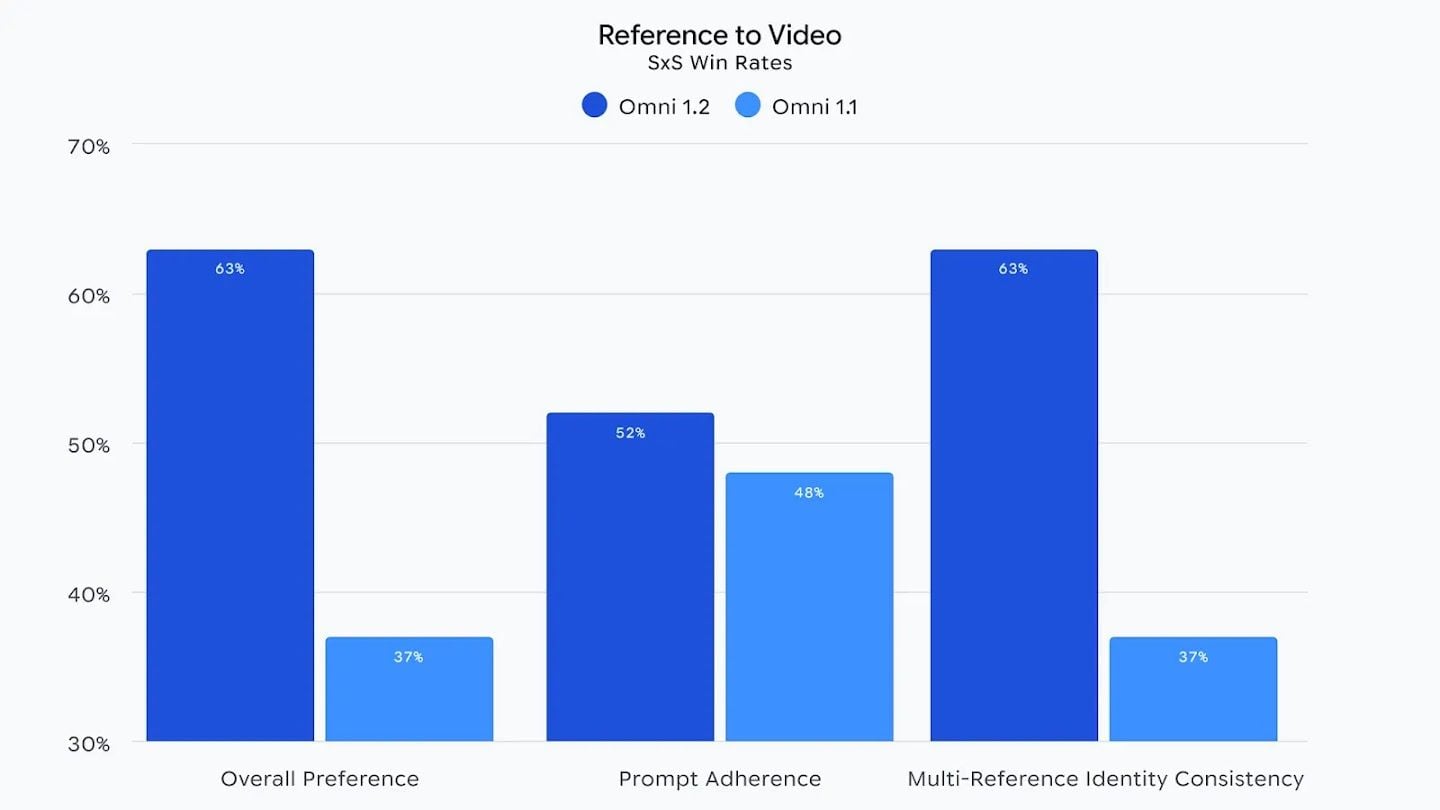
DeepMind's reference-to-video comparison measures overall preference, prompt adherence, and multi-reference identity consistency. It is not a packaging-text accuracy test.
The model's reference-to-video workflow accepts multiple stills and can output a 16:9 or 9:16 clip. That makes a controlled one-photo versus three-photo comparison possible. The model may also generate native audio, although sound is incidental to this label inspection. A smooth camera arc creates the challenge; the review depends on what the product actually shows at each angle.
What Does Product Label Consistency Actually Mean?
A creative reviewer should define the pass criteria before generating. Otherwise, a convincing scene may overshadow a small but consequential packaging change. For a real SKU, four features carry different kinds of risk:
- Logo: Is the mark the same design, in the same position and proportions, without an extra symbol?
- Lettering: Are the product name, variant, quantity, ingredients, warnings, and other must-match words spelled exactly as they appear on the approved pack?
- Package geometry: Does the bottle, box, cap, seal, handle, or label panel retain its actual shape and placement?
- Color: Do the approved package and brand colors remain recognizable across the turn, allowing for ordinary changes in illumination?
Readability is a separate condition. A label may be technically correct in a frame that no customer could read. Record when motion blur, glare, a hand, or a steep angle hides the text. Do not count hidden text as a verified pass. If the front panel leaves view, assess only what is physically visible and inspect it again when the camera returns.
Text hallucination deserves its own note. A model might add an ingredient, a claim, a certification mark, or a plausible-looking number that was never on the pack. These changes can matter more than a slightly altered silhouette. The reviewer needs a transcription from the approved physical label, not a guess made from an attractive video frame.
Set three release outcomes. Acceptable means every required customer-visible detail matches wherever it is legible and the clip still works at normal playback speed. Needs correction means a noncritical visual detail or legibility problem can be fixed with a controlled edit, crop, or replacement frame, followed by another full review. Do not publish means any required claim, quantity, warning, ingredient, logo, or package identity differs from the approved source.
This threshold should reflect the product. A plain unbranded container is an easier creative test than a supplement carton dense with required text. For the carton, teams may decide at the outset to use filmed packaging or a verified package layer in post-production. That choice is a production control, not a verdict on the model.
Prepare Real Product References Before Generating Video
Choose one physical SKU that the team owns or has permission to show. Photograph its front face clearly. Then photograph the same item from the left-front and right-front angles under similar light. Keep the camera height and distance close enough that the label remains useful at all three angles. Do not substitute a generated package for missing photography; the video would then test faithfulness to a fabricated label.
The front image should let a reviewer read the text that matters. Avoid glare across the wordmark, extreme perspective, cropped seals, and retouched lettering. The side images should reveal real geometry: cap depth, panel wrap, edges, and any change in what is printed around the curve. If an angle shows only a sliver of text, that is still useful for checking placement, but it cannot validate unseen words.
Before uploading, make a short reference sheet. Transcribe each must-match word and number directly from the approved packaging. Note capitalization, punctuation, spacing, units, and line breaks when layout matters. Mark text that cannot be read confidently from the source photos. Get a better photograph or the approved artwork for that field instead of silently filling in what seems likely.
The concept-package references used below
For the demonstration, we used Scenario's KOBU Sour Tantrum product sheet. Scenario describes KOBU as a made-up soda and says its sheet was generated with GPT Image 2.5 Sunburst. The sheet shows the large pink KOBU wordmark, vertical SOUR TANTRUM text, a yellow yuzu mascot, and a graphic-only back. The three upload files were crops of that same sheet, not photographs of a physical can. This lets us inspect prominent design and lettering in a concept video, but it does not validate legal copy or the model's fidelity to a real product.
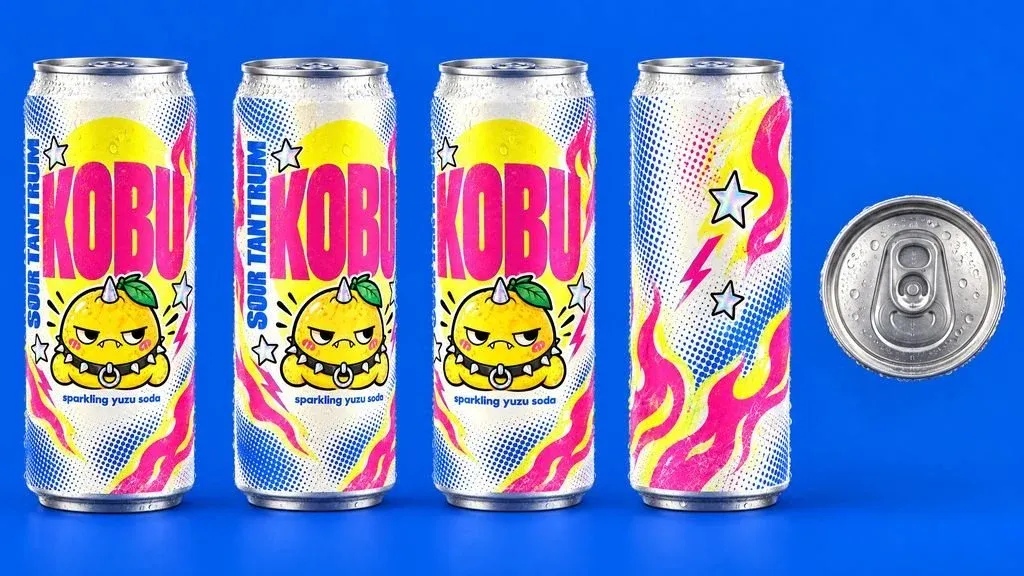
Public concept-package reference from Scenario. The demonstration checks the visible KOBU design, not an approved retail label.
Clip 1 uses the front crop alone and asks for a short turn back to the front. Clip 2 uses front, left-front, and back crops and asks for a full rotation. These are deliberately different shot briefs, so any difference in their output cannot be attributed to reference count alone. To test one versus three images causally, run both image sets with the same camera prompt and settings.
Store the input files with each run record. The record should also include submission time, displayed settings, completion state, and the first completed output. If a run fails, note the error. If the team samples several successes and shows only the cleanest, label that selection honestly; it cannot be compared to a single first output from the other condition.
No brand-approved physical-product photos were supplied for commercial validation. Use an approved product reference as the source of truth when applying the scorecard to a real campaign SKU.
Two KOBU Label-Motion Examples
The Gemini Omni 1.2 Flash Reference-to-Video page on Atlas Cloud accepts multiple reference images and an 8-second, 16:9 request. The two supplied downloads below are both 8.04-second, 1280 × 720 videos. Their filenames and pixels do not establish which model, seed, or number of attempts produced them. Treat them as user-provided demonstrations of the review method, not measured Gemini Omni 1.2 Flash performance. The original MP4 files are retained beside the GIFs for frame inspection.
The first shot starts on the front, turns enough to show one edge, and returns to the front. At 0.5 seconds and 7.7 seconds, the large KOBU wordmark, mascot, and small product line are visible. At the deepest turn, only part of the front label is in view, so the hidden letters cannot be scored there.
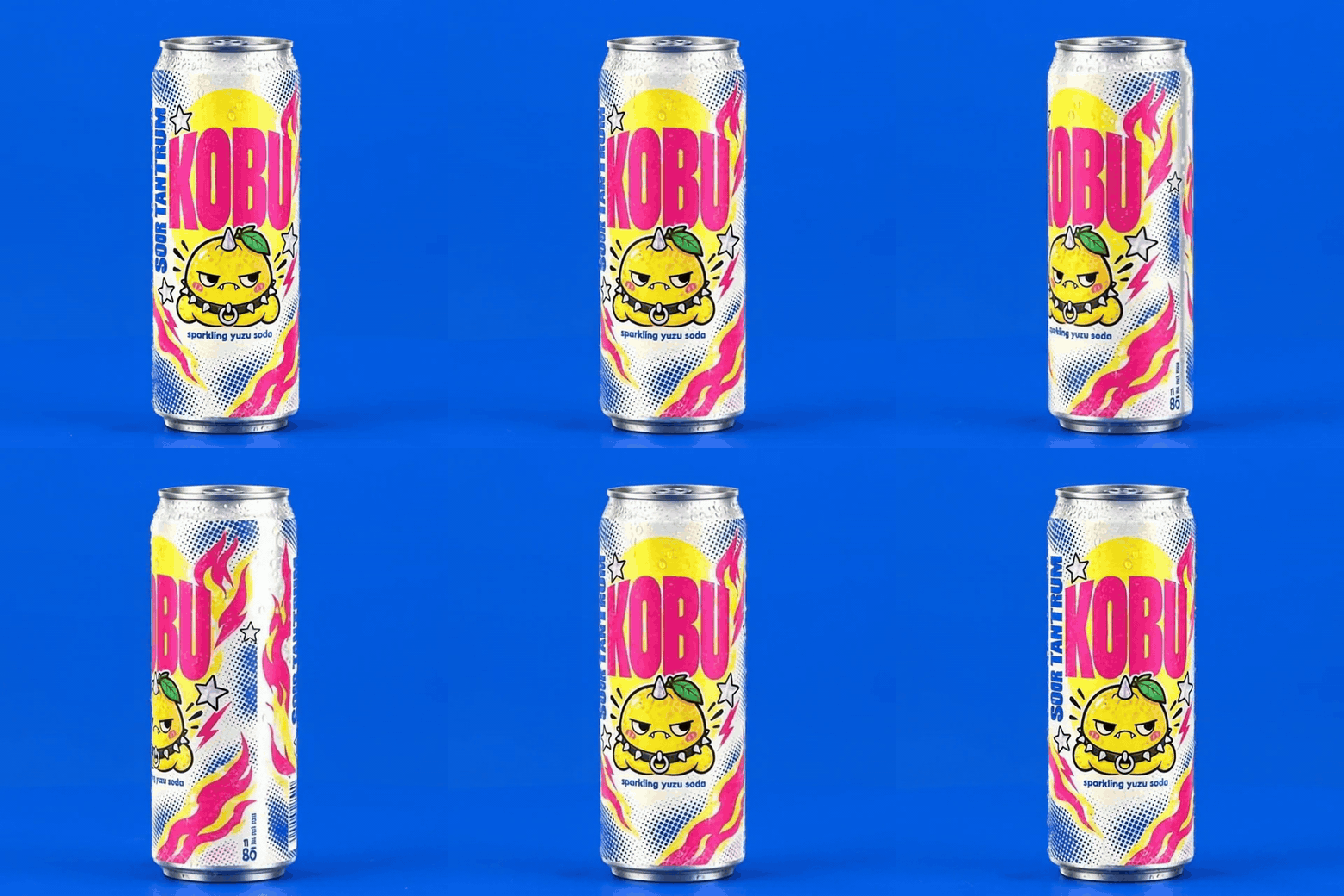
Clip 1: short turn from a front-reference brief. The front returns near the end; a hidden portion of the label is unverified during the turn.
The second shot moves farther around the can. Its graphic-only back, including the stars and lightning bolt, is visible around 4 seconds. The front comes back near the end, but at 7.7 seconds it remains slightly oblique and the small product line is too soft for a character-by-character pass. The larger KOBU letters and mascot remain recognizable in the sampled front views.
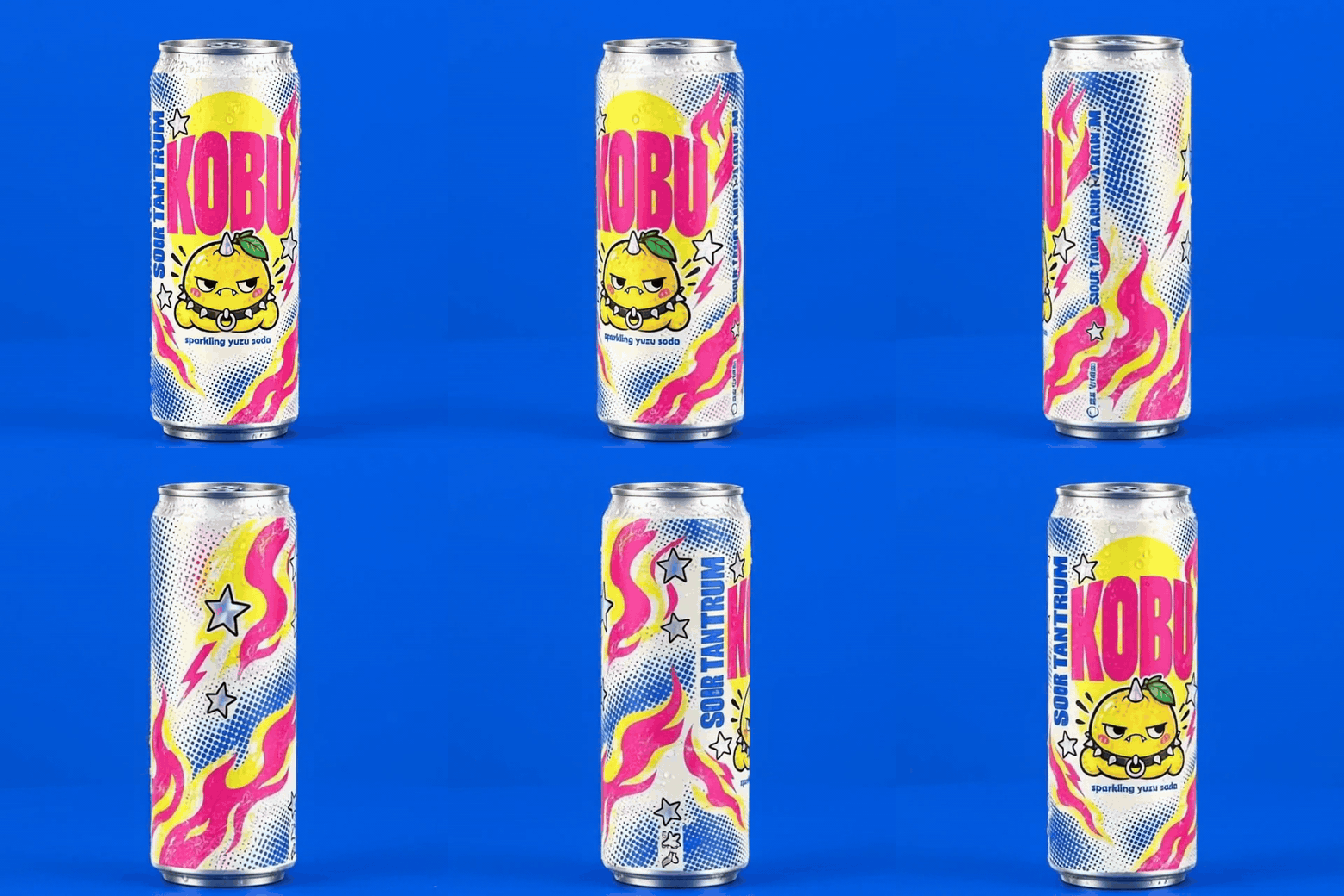
Clip 2: wider rotation from front, left-front, and back concept references. The back view adds a distinct inspection point; the small front line at the return remains unverified.
| Check | Clip 1: front crop | Clip 2: front, left-front, back crops |
|---|---|---|
| Camera task | Short turn and return | Wider turn exposing the graphic-only back |
| Front at 0.5 seconds | KOBU, mascot, and small line visible | KOBU, mascot, and small line visible |
| Around 4 seconds | Part of the front label is hidden by angle | Back graphics visible; no approved back copy exists to check |
| Front near 7.7 seconds | Front returns; main elements visible | Front remains slightly oblique; small line unverified |
For a reproducible one-versus-three reference experiment, use the same motion prompt for both sets and preserve the interface settings and first completed output. The two clips shown here answer a different practical question: what can a reviewer inspect when the package makes a small turn versus a wider turn?
Two More Handling Examples With Real Product Photos
The next two user-supplied clips use photographed packaging rather than the KOBU concept sheet. The bottle clip is 8.04 seconds and the tea clip is 15.04 seconds; both are 1280 × 720. The files do not include a verifiable model, seed, or attempt history, so these are examples of what to inspect, not measured Gemini Omni 1.2 Flash results.
Glass bottle: a label during a pour
The input was Alex P. Kok's front and rear photographs of a Smirnoff bottle, published on Wikimedia Commons under CC BY-SA 4.0. The brief asked for a hand to lift the open bottle, pour into a glass, and return the front to camera. This tests a changing tilt and hand contact instead of another turntable rotation.
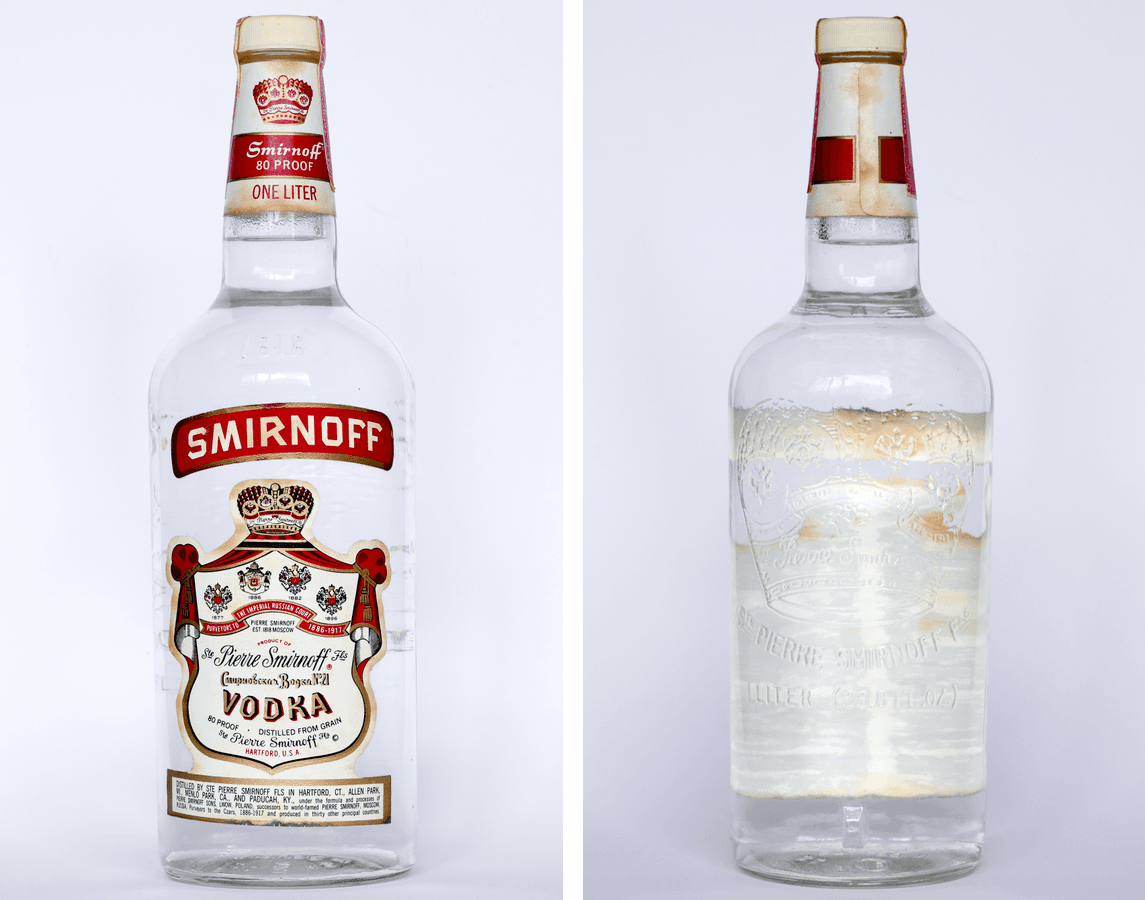
Front and rear input photographs by Alex P. Kok, Wikimedia Commons, CC BY-SA 4.0; combined side by side for comparison. Both original files are retained with the article assets.
At about 0.8 and 7.4 seconds, the large front SMIRNOFF and VODKA lettering remains recognizable. Around the pour at 4 seconds, the neck-band lettering differs from the source, while the small lines on the ornate label are too soft for a character-by-character pass. A recognizable front label is therefore not an exact-text pass.
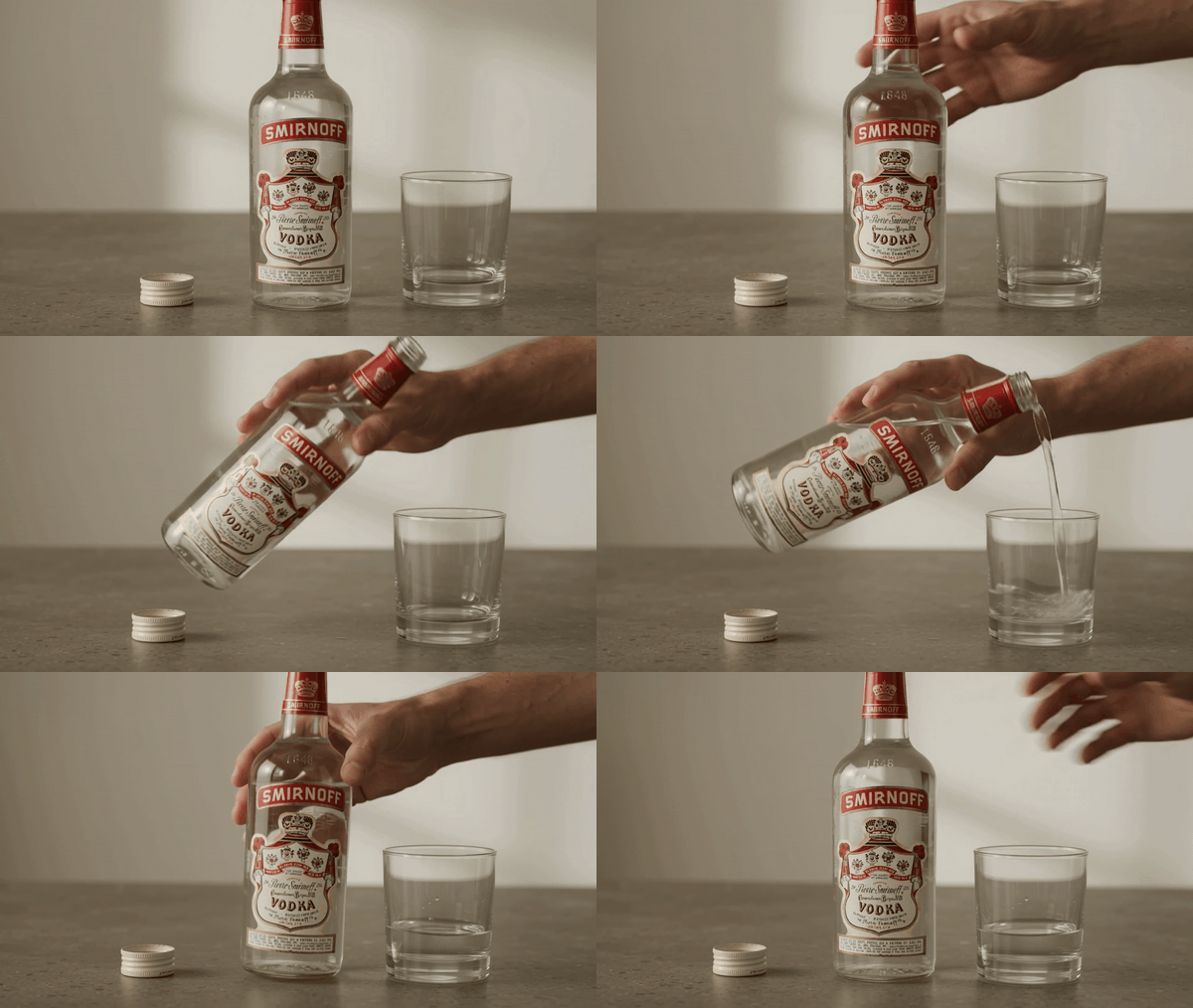
8.04-second clip, converted to GIF. The original MP4 is retained for frame inspection.
Tea sachets: three variants through opening and brewing
The input was Wikiname8's photograph of Fraser Tea sachets, published on Wikimedia Commons under CC BY 4.0. The uploaded PNG is retained with the article assets; the original photograph appears below. The brief singled out purple Rainbow Rooibos, blue Cream Earl Grey, and red Peppermint Stick, then asked for the purple packet to be lifted, opened, and brewed while the other variants stayed in view.
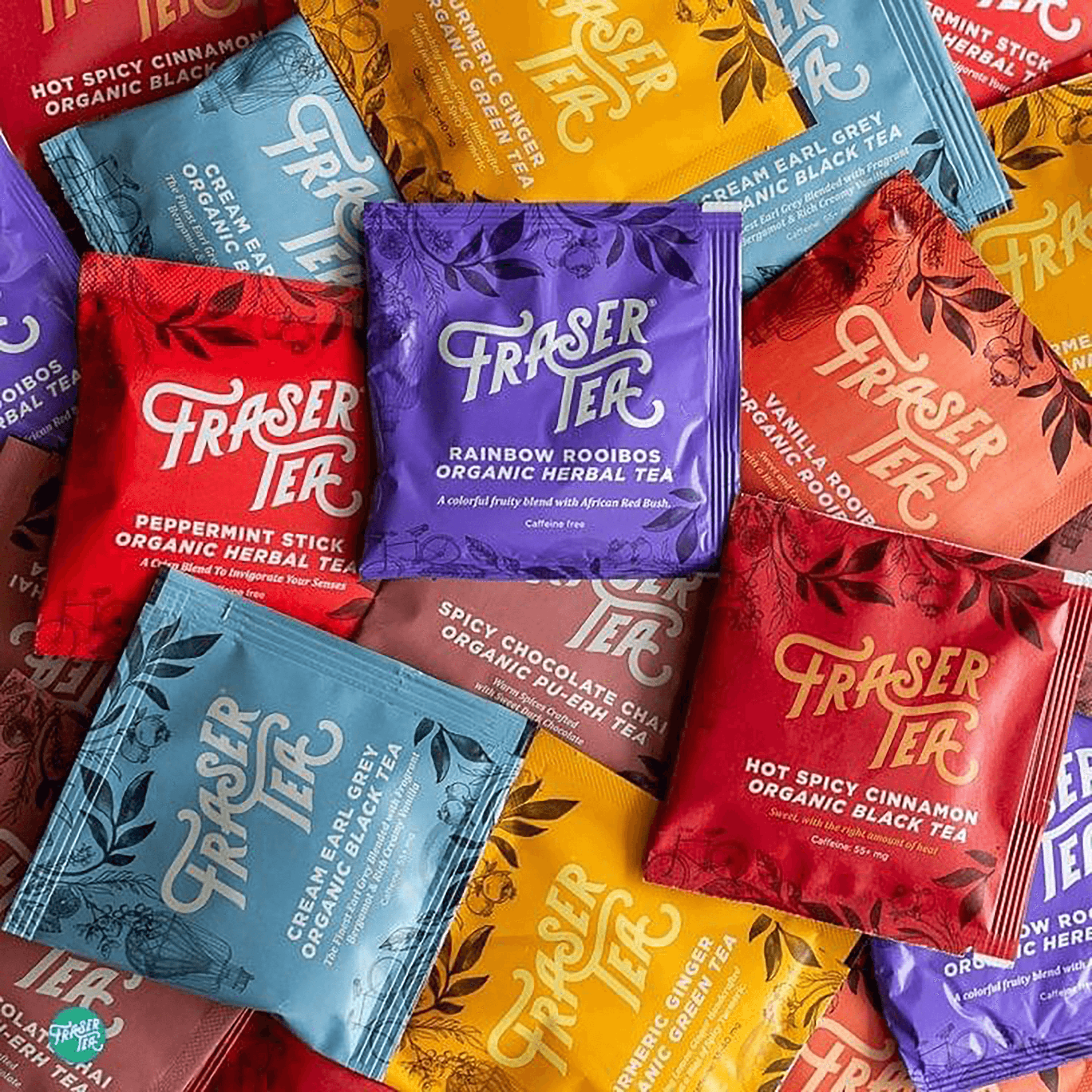
Input photograph by Wikiname8, CC BY 4.0. The three named variants provide a color-to-flavor check.
The 15-second sequence changes from an overhead product view to a close handling shot and a final cup view. The blue and purple packets keep recognizable brand marks in the sampled frames, but the red packet's flavor wording does not match the reference's Peppermint Stick. In the final view, the purple flavor line is partly hidden behind the cup and red packet, so that line is unverified there. The longer action gives more review points, but does not repair the changed red text.
15.04-second user-supplied clip. It stays as a video with a selected poster frame because it exceeds 10 seconds.
Audit Label Drift Before You Publish
Open the raw files in a viewer that can step through frames. First watch each clip at normal speed to judge whether the product is recognizable and whether the requested camera move happened. Then pause at five planned positions: the opening front view, the first turn, the greatest angle, the return toward front, and the final frame. Scrub the intervals between them too. A defect can appear for only a few frames.
For each clear view, compare the video side by side with its source reference: the Scenario sheet for the KOBU demonstration or approved photographs for a real SKU. Check exact characters, the logo's form and placement, the silhouette, cap or seal, and color. Log the timestamp and a crop for any mismatch. When text is unreadable, mark it unverified rather than pass. If a required field is hidden throughout the clip, the clip cannot establish label fidelity for that field.
A 2026 Reddit discussion about product-video reviews describes labels becoming softer and caps or package widths changing in paused frames. That is a useful reason to inspect still frames. It is an anecdote about a different test, not evidence that Gemini Omni 1.2 Flash passes or fails this one.
A frame-by-frame pass/fail scorecard
Create one row for each timestamp and required field. Record the source transcription, what the frame visibly says, legibility, and a pass/fail decision. Keep screenshots of the beginning, greatest turn, and end next to the approved front image. If the side panel has required content, add the side reference at the matching angle. Those images should expose the actual letters at readable size, not merely display attractive wide shots.
A missing letter in a required ingredient or a changed quantity is a release failure even if the rest of the video looks stable. If the error is limited to a disposable background or a crop that removes the issue without hiding essential product information, a corrective edit may be reasonable. Recheck the entire corrected output, including transitions and export. A local correction can affect neighboring frames.
An approved package image layer or verified typeset label in post-production offers more control when exact wording matters. The motion clip can supply the scene and camera move while the real text comes from approved artwork. This approach needs careful tracking, perspective, and occlusion work, so the composited result still requires review. Do not tell a compliance reviewer that a generated sentence is exact because it looked plausible on playback.
When Is Gemini Omni 1.2 Flash Worth Using for a Product Ad?
A large front label, simple package geometry, and a modest camera turn make a reasonable first test. Dense fine print, frequent occlusion, or required legal copy call for a stricter plan and likely more post-production control. The deciding factor is the finished clip's audit, not the model name or an aggregate benchmark.
Use the reference-to-video route when you have genuine product photography and want to see whether the model can animate that specific item. Keep the first output and its inputs as evidence. If the ad needs a guaranteed verbatim label at all times, budget for approved artwork, live footage, or both. That can still leave room for generated motion elsewhere in the creative.
The Atlas Cloud model catalog listed Gemini Omni 1.2 Flash Reference-to-Video at a discounted starting rate of $0.023 per generated second, down from $0.028, when checked in November 2026. At that displayed starting rate, an 8-second generation would be $0.184 and two would be $0.368 before any reruns. The listing is a starting price; confirm the live quote for the selected resolution and any other controls before running. Google's separate $0.07-per-second 720p announcement applies to its own platform, not to this Atlas quote.
The cost of review is separate from generation cost. A cheap clip that changes required label copy is not ready to publish, while a clip that passes after a careful frame audit may save production time. The KOBU GIFs make the inspection task concrete, especially when the back comes into view. They do not establish a Gemini Omni 1.2 Flash pass rate or a release decision for a real package. To answer Gemini Omni 1.2 Flash product label consistency for your SKU, capture approved product views, keep the model's run record, and audit the first completed output against the physical label.
Frequently Asked Questions
Can Gemini Omni 1.2 Flash guarantee exact packaging text?
No published reference-adherence comparison establishes a per-character guarantee for your label. Treat exact text as a release criterion you verify in the completed frames. Keep the approved pack or artwork beside the clip during review.
Is one product photo enough, or should I upload multiple angles?
One sharp front image is enough to start the controlled comparison. Add real left-front and right-front photos for the second run, then judge both first completed clips. More angles are useful only when they clarify the same physical product.
Will a 1080p export fix an incorrect label?
No. Higher output resolution may make the mistake easier to see, but it does not turn a generated wrong character into the approved one. Check the original frames and correct the source or use verified artwork in post-production.
Can I publish a clip when the package carries required legal text?
Publish only after the required text has been checked in the actual delivered frames or supplied through an approved, verified package layer. If a field is wrong or cannot be read where the ad relies on it, hold the clip for correction and review.




