GPT Image 2.5 rate limits currently range from 5 to 250 images per minute across the paid API tiers listed on OpenAI's Flare and Sunburst model pages. Both pages also list token limits. Check your actual account configuration before scheduling work: ChatGPT usage allowances, OpenAI API limits, and Atlas Cloud endpoint constraints require separate checks.
The awkward moment comes when a campaign is almost ready and the last few pictures are still missing. Clicking Generate again can leave you with an original task, a duplicate task, and no clear idea which will finish first.
This guide connects the published limits to a practical delivery plan. You will find a diagnostic table, a queue procedure, a worked 100-image calculation, and a controlled method for checking whether a successful image actually meets its brief. The useful target is a folder of approved assets by your deadline.
Documentation checked September 16, 2026. Account-specific capacity and exact configured costs require separate verification.
Editorial status: the test-environment access gate prevented the six planned generations. The article includes the reproducible protocol and official source evidence, but its three output comparisons and completed-run capture remain unavailable.
Key Takeaways
- Identify your access route before applying any limit.
- Check the account, project, model, and any shared allowance.
- Diagnose the error before deciding whether to retry.
- Budget for approved images, including inspection and rework.
GPT Image 2.5 Rate Limits Depend on Your Access Route
Start with the place where you pressed Generate. A ChatGPT subscription, an OpenAI API project, and an Atlas Cloud account are different access routes. A screenshot from one cannot establish the allowance on another.
In ChatGPT, check your current plan, image feature access, and the message shown when generation stops. A paid subscription does not establish an unlimited allowance. Avoid planning a day's work around a daily image count copied from another person's account.
The release discussion includes users asking whether Plus still has a daily image cap. That establishes a reader concern; the numbers in those questions do not establish policy. (Reddit release discussion, September 2026.)
For the API, record the organization, project, and exact model identifier used by your application. For Atlas, identify the selected endpoint and the account running it. Then sort the visible signal into a limit type.
| Limit type | Visible signal | Next check |
|---|---|---|
| Product usage allowance | ChatGPT says image creation is temporarily unavailable | Read the account's current message and any reset time |
| Images per minute, IPM | Image-rate restriction during repeated submissions | Confirm the image allowance for that route and model |
| Tokens per minute, TPM | Error or account panel names a token limit | Inspect the relevant token allowance |
| Concurrent work | Tasks wait while other tasks remain active | Count in-flight work and verify the concurrency policy |
| Balance or billing quota | Billing warning or quota error | Check funds, billing status, and spending restrictions |
| Model access | Permission or model-unavailable response | Confirm account eligibility and the exact endpoint |
Keep this distinction visible in your team's job sheet. A marketer saying “I hit the limit” should record the route and message before another colleague starts troubleshooting.
Also identify who else uses the same account resources. A second workstation does not necessarily provide additional capacity. Ask the account owner whether the website, internal tool, and overnight jobs draw from the same pool.
The API table's “Free: not supported” entry concerns that API model tier. It does not establish whether ChatGPT's free product can generate images.
GPT Image 2.5 Rate Limits by API Tier
The official model pages currently publish the following table for both variants. These are public usage-tier figures, checked on September 16, 2026, rather than a guarantee that every account has precisely this configuration.
| OpenAI API usage tier | TPM | IPM |
|---|---|---|
| Free | Not supported | Not supported |
| Tier 1 | 100,000 | 5 |
| Tier 2 | 250,000 | 20 |
| Tier 3 | 800,000 | 50 |
| Tier 4 | 3,000,000 | 150 |
| Tier 5 | 8,000,000 | 250 |
Sources: (OpenAI Flare model page, checked September 2026) and (OpenAI Sunburst model page, checked September 2026).
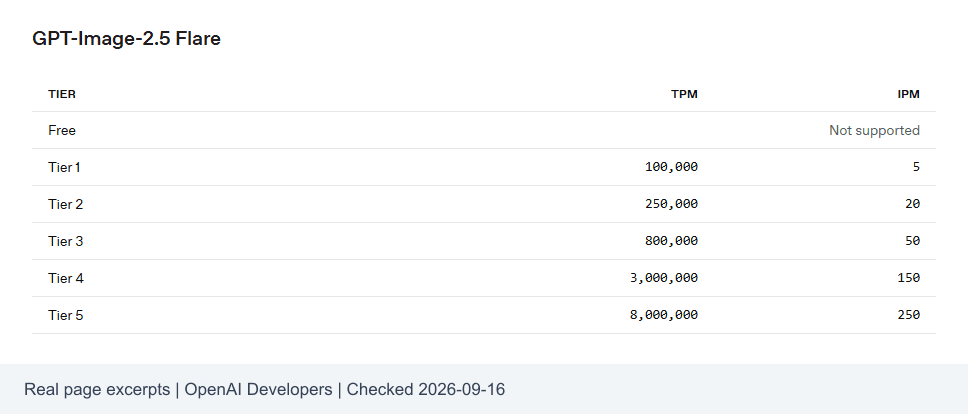 Official OpenAI model page showing GPT Image 2.5 rate limits by usage tier
Official model-page evidence. Check date: September 16, 2026.
IPM counts images; RPM counts requests. Preserve that distinction in your planning spreadsheet. With one image per successful request, the two counts may align in a simple estimate. Multiple outputs, retries, or other endpoint behavior can break that assumption.
Use the table as a starting point for a capacity conversation. Write down the published tier, then compare it with the limits visible to the account actually doing the work. If they differ, investigate before committing a deadline.
Matching tables do not show that Flare and Sunburst finish a task in the same time. They also do not establish that switching between the variants adds their allowances together. Confirm any shared limits in the account configuration.
A team preparing a Friday campaign can turn this into a short preflight: identify the production route, verify the current allowance, check other scheduled workloads, and assign one person to watch the queue. Save the check date so an old screenshot does not become a permanent operating assumption.
Do not multiply a minute allowance by the minutes in a day and promise that many finished images. Such a calculation excludes idle time, generation latency, other constraints, and rejected outputs.
Diagnose GPT Image 2.5 Rate Limits Before Retrying
Save the error body, HTTP status, timestamp, and available request identifier before changing anything. A screenshot saying “429” alone leaves too much unknown.
OpenAI's documentation describes organization and project limits, shared model pools, response headers, and temporary-error handling. It advises waiting at least as long as a supplied Retry-After, adding jitter, and avoiding rapid repeated failures, which can consume minute allowance. (OpenAI rate limits, checked September 2026.)
The following diagnostic procedure is an application design proposal. Error labels and recovery controls must be mapped to the platform you actually use.
| Visible situation | Check first | Action |
|---|---|---|
| Temporary 429 | Error body and any wait or reset hint | Pause the affected queue, then reduce submission pace |
OpenAI insufficient_quota | Balance, billing state, and account eligibility | Resolve the account issue; stop automatic retries |
| Timeout after submission | Original request record, task ID if available, history | Reconcile the original task before resubmitting |
| Long queue | Pending status and count of active tasks | Keep waiting while the task remains valid; inspect delays separately |
| Parameter or content rejection | Specific validation or rejection reason | Correct the request; do not classify it as a rate-limit retry |
The OpenAI code in the table is an OpenAI-specific diagnostic example. It is not a promise that Atlas returns the same error object or supports the same headers.
For a timeout, separate what you know from what you suspect. “My client stopped waiting” does not establish whether the server accepted the job. Mark the local record as uncertain and inspect the original operation through whatever status or history mechanism the route provides.
If no reconciliation mechanism exists, route that uncertainty to an operator. Blindly submitting again can create another billable job. Record that risk before someone decides to retry.
For reset timing, use the response or account message relevant to the limit you hit. Avoid assuming every restriction resets at midnight or exactly 60 seconds after the error.
Preserve the evidence after recovery. A small incident record showing the route, original error, wait duration, and final outcome helps the next operator distinguish an account issue from a traffic spike.
Handle GPT Image 2.5 Rate Limits with a Queue
A queue gives your team one place to decide what runs next. For a small campaign, a spreadsheet and one operator may be sufficient. An application can implement the same decisions in a durable job store.
Use this six-step SOP:
- Assign a stable business ID. Record the prompt version, desired output, model, dimensions, quality, and deadline. A revised brief gets a new version.
- Check existing work. Return the saved output for a completed job. Leave an active or uncertain job in reconciliation instead of creating another submission.
- Control pace and concurrency separately. Admit work only when the local rate budget and an in-flight slot are available. Retries use the same admission controls.
- Honor a server wait hint. For a confirmed retryable error, wait at least the instructed duration and add a little randomness.
- Otherwise use bounded backoff. Increase delays between attempts, add jitter, and cap the delay. Keep the task's overall deadline in view.
- Stop deliberately. When the retry budget or deadline is exhausted, save the last evidence and send the task for review.
This platform-neutral pseudocode illustrates scheduling decisions. It is not an Atlas SDK or an endpoint contract.
plaintext1claim business_job_id atomically 2if completed: return saved_asset 3if active_or_uncertain: reconcile_original; stop 4 5while attempts_remaining and before_deadline: 6 wait_for_rate_budget_and_inflight_slot() 7 result = submit_once_and_record_identifiers() 8 9 if completed: save_asset_and_finish() 10 if accepted: track_original_until_terminal(); stop 11 if submission_outcome_unknown: mark_uncertain(); stop 12 if billing_or_access_or_validation_error: stop_for_review() 13 if not_retryable: stop_for_review() 14 15 delay = server_minimum_wait_if_present() 16 otherwise: delay = capped_exponential_backoff() 17 schedule_next_attempt_after(delay + random_jitter) 18 19save_final_state_for_review()
The atomic claim matters when two workers see the same queued row. Both must not conclude independently that the job is free to submit. Persist the submission state before a worker disappears or restarts.
Application-level deduplication still leaves a difficult window: a service may accept a request just before the client loses the response. Native endpoint idempotency can address some duplicate-submission risks when documented. A local business ID alone cannot guarantee exactly-once execution, and this guide does not assume Atlas accepts a particular idempotency header.
Prioritize by delivery need. Finish the approved campaign's missing image before admitting optional variations. Keep a short operator note explaining why work stopped so a colleague can resume without guessing.
Plan 100 Images Around GPT Image 2.5 Rate Limits
Use two counters: generated outputs and accepted deliverables. The second counter tells a campaign owner whether the work is ready.
Consider a hypothetical planning example, with one output per task. Assume an effective allowance of 5 IPM, average in-flight occupancy of 60 seconds, and a maximum of 2 simultaneous tasks. These inputs are illustrative, not measurements from Atlas or OpenAI.
| Planning input or calculation | Hypothetical value | Interpretation |
|---|---|---|
| Required approved images | 100 | The actual delivery target |
| Effective image allowance | 5 IPM | Assumed account capacity |
| Image allowance needed for 100 outputs | 100 ÷ 5 = 20 minutes | Quota-capacity requirement, not a completion promise |
| Concurrent tasks | 2 | Assumed in-flight ceiling |
| Average slot occupancy | 60 seconds | Submission through completion |
| Concurrency-side capacity | 2 × 60 ÷ 60 = 2 images/minute | Lower than the image allowance |
| Assumed acceptance rate | 80% | Simplified estimate for planning |
| Generation allowance for 100 accepted images | 100 ÷ 0.8 = 125 outputs | Includes a rough rework budget |
| Capacity time at 2 outputs/minute | 125 ÷ 2 = 62.5 minutes | Excludes additional inspection and handoff work |
A useful approximation is:
plaintext1sustainable images/minute ≈ minimum of: 2 image allowance 3 request allowance × images per request 4 token allowance ÷ applicable tokens per image 5 concurrency × 60 ÷ average occupancy seconds
Use comparable units and actual account measurements. If token consumption is unavailable, leave that term unresolved rather than estimating it from prompt word count. This formula describes a planning model, not the provider's implementation.
The 125-output estimate assumes a stable acceptance probability across attempts. Real rework can be correlated: a prompt that repeatedly miscounts objects may keep failing until someone changes it. Review recurring defects before buying more attempts.
Different work needs different acceptance gates:
- Weekly content illustrations: the subject must match the article, and the crop must work at publication size.
- Product concept material: the image must preserve required shape and placement. A concept image cannot substitute for verified product photography.
- Teaching or recipe illustrations: counts, objects, and sequence details must match the explanation. An extra ingredient can mislead readers.
Add download, inspection, revision, and handoff time to the schedule. If one person reviews every asset, measure that person's pace too.
Before a deadline, separate essential images from optional variants. Track ready, rejected, active, and uncertain items independently. A folder containing 100 files can still be several approved deliverables short.
Reduce Rework Before You Raise Your Limits
Define a pass before pressing Generate. That makes the decision repeatable and keeps a convincing-looking image from slipping through with a wrong count or unusable text.
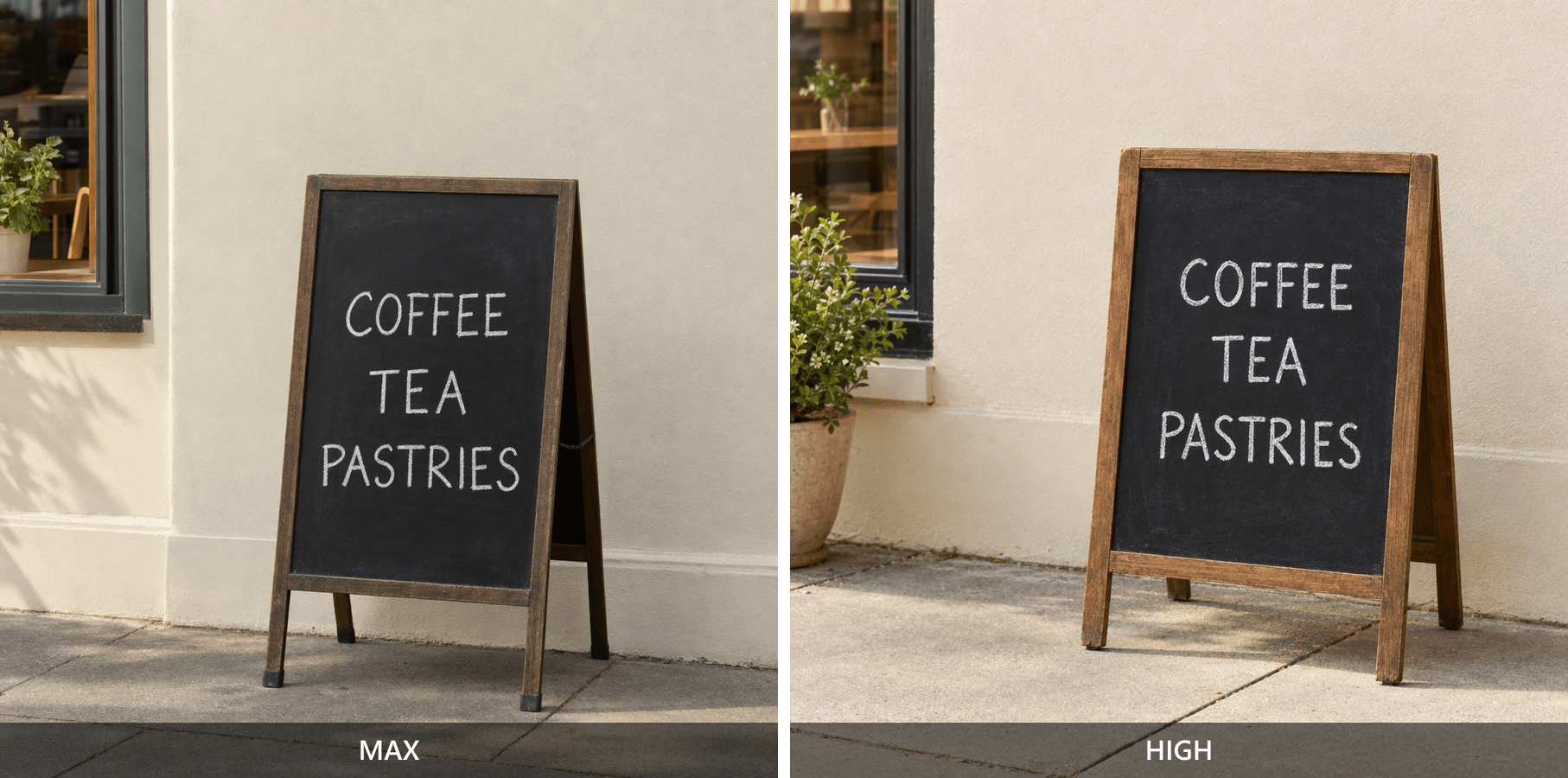
The controlled protocol here uses GPT Image 2.5 Flare Text-to-Image, one PNG per task, at 2048x1152. For each brief, run max first, then high, keeping all other available settings unchanged. Preserve the originals and inspect both at the same display size.
Evidence status: The six Flare outputs below were generated for the three briefs at 2048x1152. Each pair records one MAX and one HIGH result. These examples support the inspection steps shown here, but six outputs do not establish a broad quality ranking or acceptance-rate claim.
A. Object count and composition
Copy this prompt unchanged:
plaintext1Create a realistic overhead food photograph for a recipe article. 2Show exactly six whole red tomatoes arranged in two neat rows of three 3on a light wooden cutting board. Place one stainless-steel kitchen knife 4to the right of the board and one folded beige linen towel to the left. 5No other vegetables, no sliced tomatoes, no plates, no hands, no text, 6and no logos. Use soft natural window light from the upper left. 7Keep the entire cutting board inside the frame. 8Horizontal 16:9 composition.
Count each tomato, check the two rows, and inspect all four board edges. Then look for forbidden objects. Accept the frame only when the whole brief passes. A correct tomato count with a cropped board still requires a decision about repair or regeneration.
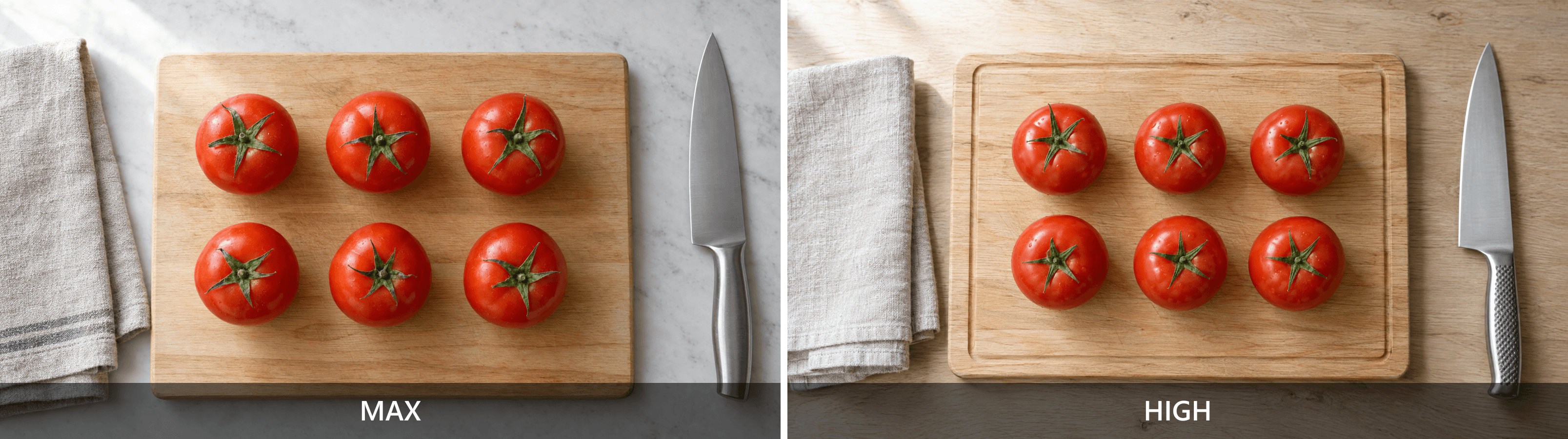 High and max Flare outputs for the six-tomato count and full-board check
Left: MAX. Right: HIGH. Both outputs show six tomatoes in two rows; inspect the full board, knife, towel, and any forbidden objects before approving either result.
B. Space for a headline
plaintext1Create a realistic editorial still-life photograph for a home-office 2article. Place an open unbranded notebook, one black pen, and one plain 3ceramic coffee cup entirely within the left half of a pale oak desk. 4Keep the right 45 percent of the frame empty, showing only the desk 5surface so a designer can add a headline later. No laptop, no phone, 6no plants, no visible writing, no text, and no logos. 7Use soft daylight and a slightly elevated camera angle. 8Horizontal 16:9 composition.
At 2048 pixels wide, the rightmost 45% starts at approximately x = 1126. Check that area on the original. Then place a real headline in a local layout preview to assess readability. A guide line is a post-production annotation, not part of the generated scene.
 High and max home-office outputs with the requested right-side headline area marked
Left: MAX. Right: HIGH. Both outputs preserve a usable right-side desk area for a headline; assess that empty region at the final display size.
C. Exact short text
plaintext1Create a realistic photograph of a small freestanding black chalkboard 2outside a quiet neighborhood cafe. The board must contain exactly 3these three lines of clearly readable white lettering: 4COFFEE 5TEA 6PASTRIES 7Do not add prices, extra words, logos, or other readable signs. 8Show the full board with a simple cream-colored wall behind it, 9warm morning daylight, and a small area of clean pavement. 10No people. Horizontal 16:9 composition.
Read every letter in the original and in the publication-size preview. Check the background for extra readable signs. This is an AI-generated test scene, not a photograph documenting a real cafe. Preserve misspellings in the evidence instead of retouching them away.

High and max AI-generated cafe chalkboards for checking COFFEE TEA and PASTRIES
Left: MAX. Right: HIGH. Read each line at publication size and check the background for extra readable text before approving a result.
Six outputs can demonstrate an inspection process. They cannot establish a platform success rate, production throughput, or a rate-limit ceiling. A single pair also cannot isolate quality-setting effects from generation variability.
Judge a setting by the accepted asset and its recorded cost. Without exact charges, a high-versus-max cost conclusion remains unmeasured. If both pass, record that; if neither passes, revise the brief before repeating the same failure.
Evaluate Atlas Cloud for Your Image Workflow
Use the same representative task to evaluate an access route. This keeps the evaluation tied to the work your team needs to deliver.
The selected GPT Image 2.5 Flare Text-to-Image page is the endpoint for this protocol. Open it, confirm the model name, paste one complete prompt above, and select the requested size and quality.
Check what the form actually retains after you leave each control. A typed width that reverts before submission does not create a 2048-pixel test. Record the committed settings, run one task, wait for a terminal state, and download the actual output.
Save the task identifier if exposed, submission time, completion time, and result file together. For the comparison run, create a separate task and change only quality. Do not infer a new output from sample artwork already displayed on the model page.
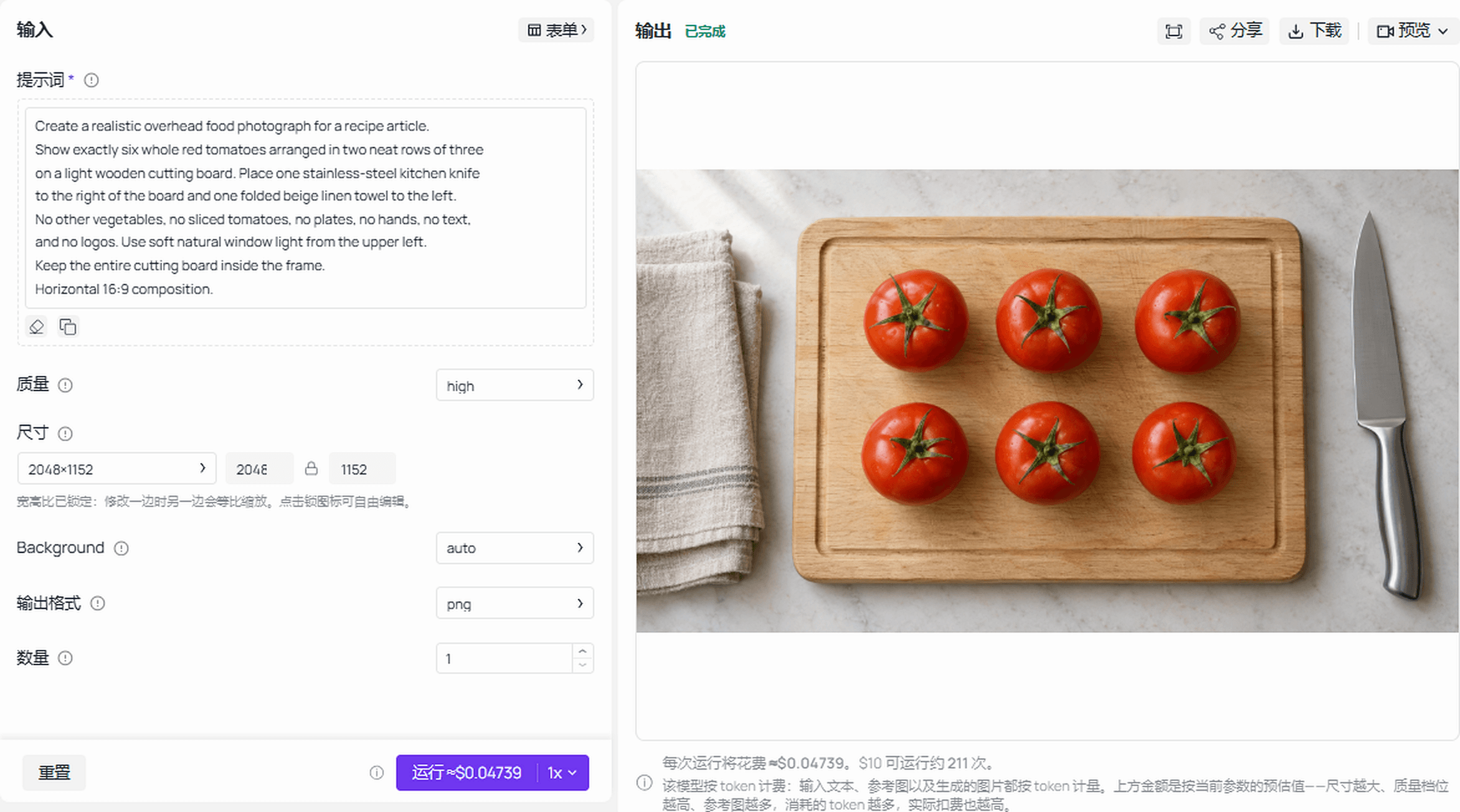 Completed Flare run showing the tomato brief, active settings, and generated result
Completed Flare run: the screen shows the tomato brief, HIGH quality, 2048x1152 size, PNG output, and the returned six-tomato result.
Evaluate the route against five fields:
- Model and endpoint: confirm Flare text-to-image rather than an edit endpoint or a different variant.
- Rate and concurrency: obtain the applicable account limits and whether workloads share them.
- Task recovery: verify how the account exposes active work, terminal failures, and results after a timeout.
- Configured cost: check the unit, selected dimensions, quality, and any discount conditions.
- Acceptance and rework: retain the original output and a short reason for every rejected asset.
Use the current model directory as the price-check entry point, then inspect the selected configuration. A rounded starting price does not establish the charge for 2048x1152 + max.
Atlas account concurrency, production throughput, shared allowances, and failed-task billing were not independently established for this article. Confirm them account-side. Test-environment task times also cannot establish production API performance.
Run one representative prompt, inspect the result, and check your account limits before scaling.
GPT Image 2.5 Rate Limits FAQ
How many GPT Image 2.5 images can I generate per minute?
The paid OpenAI API model-page tiers list 5 through 250 IPM. Use your account's current settings for operational planning, including token and any other applicable constraints. A published image allowance does not guarantee that every image will finish or pass review within that minute.
Does ChatGPT Plus have a fixed daily image limit?
This article does not establish a universal fixed daily count for Plus. Check your account's current image-generation message and plan information. User reports can help identify a question to investigate, but a number from someone else's session cannot safely become your team's daily production budget.
Do Flare and Sunburst have the same rate limits?
Their official model pages displayed matching tier tables when checked on September 16, 2026. That does not establish matching generation times or separate capacity pools. Before planning a split workload, confirm the limits and sharing rules that apply to both variants in your account.
Why do I get a 429 error when I still have credits?
A balance answers whether funds remain; it does not answer whether the current request fits a rate constraint. Read the error body and any wait hint. If the error identifies an account or quota problem, address that problem instead of assuming repeated delayed submissions will solve it.
When do GPT Image 2.5 rate limits reset?
Use the relevant response headers or account notice. Different constraints can have different windows, and there is no single reset time established here for all routes. Follow a supplied minimum wait, reduce the queue's pace, and retain the original job state while deciding whether a retry is appropriate.
Does using Atlas Cloud remove GPT Image 2.5 rate limits?
No. Evaluate Atlas as an access option with its own endpoint behavior and account constraints. Confirm those details before increasing volume. A practical plan for GPT Image 2.5 rate limits combines verified capacity, controlled submissions, task recovery, and acceptance checks that reduce avoidable rework.





