Sebuah lembar 16 pose memerlukan pemeriksaan pemutaran: apakah tangan bergerak secara alami, apakah kaki mempertahankan kontak, dan apakah bingkai terakhir terhubung kembali dengan bingkai pertama?
Hasil Uji Animasi Stilled GPT Image 2.5 ini menunggu tolok ukur yang dijelaskan di bawah ini. Lingkungan pembuatan saat ini menampilkan halaman masuk akses. Tidak ada temuan kualitas animasi, jumlah lolos, atau pemenang model yang telah diukur. Draf ini mempertahankan eksperimen lengkap dan instruksi reproduksi; ini bukan laporan hasil yang selesai.
Di sini, animasi stilled berarti menghasilkan selembar bingkai diam yang berurutan, mengekstrak sel-selnya, dan memutar sel-sel tersebut secara berurutan.
Ini adalah istilah kerja kami, bukan nama fitur resmi yang terverifikasi. Still bergaya animasi adalah satu gambar; lembar bingkai berurutan berisi beberapa gambar; pembuatan video asli menghasilkan gerakan melalui alur kerja yang berbeda.
Perbandingan yang direncanakan mencakup lima tugas, dua model, dan tiga permintaan independen per kombinasi. Perakitan GIF dilakukan secara lokal setelah pembuatan gambar. Ukur seberapa banyak gerakan yang bertahan tanpa bingkai baru atau perbaikan tersembunyi.
Kesimpulan Utama
- Belum ada permintaan tolok ukur yang selesai; pengukuran yang tidak tersedia tidak boleh dibaca sebagai kegagalan model.
- Nilai transisi berurutan, titik kontak, dan sambungan pengulangan secara terpisah dari penampilan karakter.
- Anggarkan untuk ekstraksi dan inspeksi di samping pembuatan, dan pisahkan pemutaran mentah dari perbaikan.
Apa yang Kami Uji dan Bagaimana Kami Menilainya
Tolok ukur ditentukan untuk GPT Image 2.5 Sunburst Text-to-Image dan Text-to-Image. Pembuatan dimaksudkan untuk berjalan di lingkungan uji Atlas Cloud yang telah masuk log. Waktu tunggunya, jika dapat diukur, menggambarkan lingkungan dan sesi tersebut, bukan komitmen layanan produksi.
| Kontrol | Setelan praregistrasi |
| Masukan | Perintah tekstual yang sama untuk setiap tugas yang dipasangkan; tanpa referensi |
| Keluaran Gambar | PNG, 2048×1152, kualitas=maks, n=1 |
| Latar belakang | Buram untuk melambai, menuang, rotasi, mengayuh; transparan untuk berjalan |
| Pengulangan | Tiga permintaan independen per tugas dan model; total 30 permintaan |
| Tata letak | Empat kolom, empat baris; ukuran sel target 512×288 |
| Ekstraksi | Kiri ke kanan, lalu atas ke bawah; pertahankan semua 16 potongan nominal |
| Pemutaran | Target 125ms per bingkai, 8fps, sekitar dua detik |
| Pemrosesan | Tanpa interpolasi, pengurutan ulang, penstabilan, atau penghapusan bingkai gagal |
Lembar 2048×1152 menyediakan 512×288 piksel per sel yang sama. Memperbesar GIF tidak dapat memulihkan detail yang tidak ada pada sel-sel tersebut. 480 sel target milik 30 permintaan, jadi interpretasi tersebut adalah observasi berkorelasi, bukan 480 percobaan independen.
Untuk setiap lembar, periksa tata letak, identitas, 15 transisi yang berdekatan, dan hubungan fisik khusus tugas. Tugas pengulangan menambahkan transisi 16→1. Lembar mentah yang memenuhi kualifikasi harus memenuhi setiap pemeriksaan yang berlaku; hitungan tingkat bingkai tetap terpisah. Catat detail yang ambigu atau teroklusi sebagai tidak terwujud alih-alih memberikan nilai "lulus" yang tidak didukung.
Eksekusi bergantian antara Sunburst dan Flare, menjaga setiap permohonan tetap terpisah. Tampilkan permohonan pertama yang selesai di setiap tujum; pertahankan kegagalan permohonan gajal. Gambar yang selesai dengan gerakan yang salah tetap ada dalam kumpulan data. Tiga pengulangan tidak dapat menentukan tingkat keberhasilan umum.
Eksperimen yang diterbitkan sebelumnya membuatsepuluh grid bingkai utama dan mendokumentasikan batas panel yang tidak sama. Papan cerita dan pengaturannya berbeda dengan kita, jadi hasil-duanya hanya merupakan latar belakang. (Genflick, September 2026.)
Hasil Uji Animasi Stilled: Transformasi Ulat Menjadi Kupu-Kupu
When you purchase a transition, keep one small world stable while the subject changes state. The clay caterpillar begins beneath the same bent branch, hangs down from a branch, forms a cocoon, and emerges as a butterfly. The camera remains fixed at table height, giving the branch, tabletop edge, and background a ring position as reference points.
The first revisited follows the caterpillar from its curved pose under the branch into its hanging pose. Its body should move in small steps while its branch fork, base, and point of attachment stay in the same place. A recognizable caterpillar in isolated frames does not establish that it followed a continuous route into the cocoon.
The middle of the sequence is where the set must remain especially stable. The cocoon can change shape as the action develops, but the branch should not shorten, shift, or acquire new texture. Watch the horizon line and the branch base as well as the subject, because background drift can make a real pose change look like a camera movement.
The final frames introduce the butterfly. Check whether it emerges from the cocoon at a readable later, and whether its scale remains plausible relative to the branch. The transformation is easier to see when the viewer can compare one preserved material against one advancing subject, rather than trying to infer a change across rebuilt scenes.
Current evidence: This case provides a clear visual example of a short-term, one-direction transformation. It does not provide a qualified tolerance score, pass count, or comparison between models.
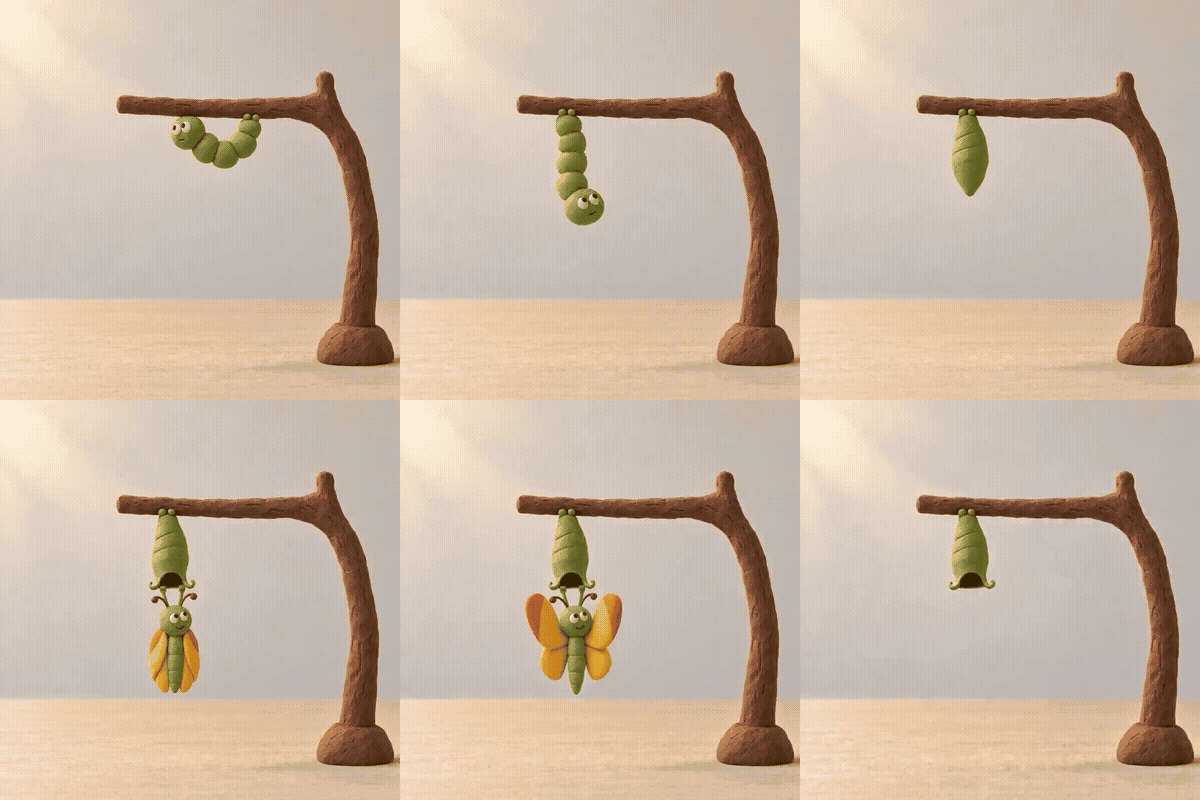
Ulat tanah liat yang menjadi kupu-kupu di bawah cabang yang tetap diam.
Catat cabang, permukaan meja, lalu kamera terkunci secara terpisah dari potensi ini.
We have demonstrated that the repeated reading of this sequence is required. Mengulanginya would turn the completed butterfly back into a cocoon in the palm of your hand. Work should preserve each underlying still so the fall can be located while reading credit by repeating the original state.
Watermark Understanding of DNA continuity
A rotating DNA double helix is a compact test of structural continuity. The action can be simple, but the object has repeated features that make drift easy to spot: two outer rails, evenly spaced rungs, a lower tip, and a soft shadow beneath the object. These anchors should retain their relationships as the sequence moves forward.
Side-by-side presentation makes individual passages easier to review. Start with the silhouette: a certain change in orientation is expected, but a sudden change in helix height, width, or twist is not part of a controlled rotation. Then follow the rungs and lower tip to see if the object remains one coherent structure.
Lighting and framing matter here as much as geometry. If the shadow changes direction or the helix slides sideways, the viewer cannot understand whether the apparent movement came from object rotation, camera drift, or a rebuilt scene. A stable background is useful exactly because it removes that ambiguity.
This kind of example should be judged frame by frame, not by selecting the strongest still. An attractive last image may hide a broken transition in the middle. Record the first pair that introduces a shape, position, or lighting change that does not follow the intended motion.
Current evidence: Evidence:** This case shows how a short object sequence can be inspected for shape, position, lighting, and framing continuity. It is not a general performance score or a model-ranking claim.
Play on Codes (DNA-Fast Forward)
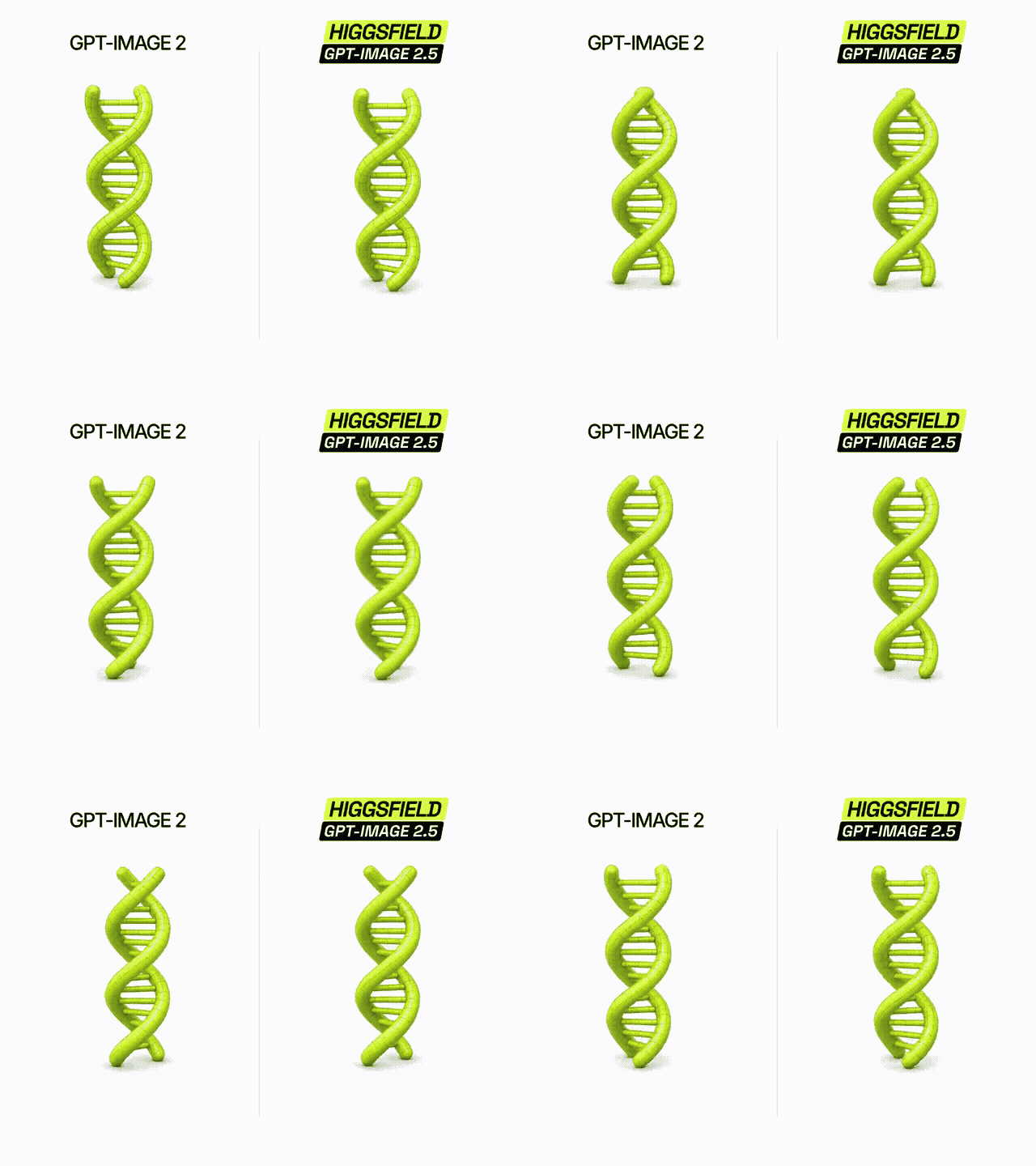
Perbandingan sekuens DNA hijau untuk dimaknai kontinuitas
Research your outer rails, rungs, lower tips, framing, and shadow in the red frame.
Let us use this tool to find a possible reverse-connection detection, where we can see what is the connection between frames that are frames away from each other.
If the edge state has a different orientation, present it as a forward behavior rather than hiding a reset with a ping-pong effect.
Hasil Uji Animasi Anok: Sekuens Bug Bunga Peony
When a Peony blooms, the whole object is controlled and continuous. The flower begins as a head that is purposefully dense, opens through several petal states, and finishes as a full bloom. The intended change is substantial, so the elements that should remain fixed need to be stated clearly: stems, leaves, camera, background, and lighting.
Start by following the stem from the ground line to the flower head. It should remain upright and retain the same thickness as the petals open. The leaves should stay connected at the same node; a leaf that moves to another stem position shows a rebuilt object, not a continuous bloom.
Next, inspect the petals. The opening should step outward from the bud rather than jumping directly from a closed to a fully open state. The bloom can become larger, but its center should remain aligned with the stem. A sudden change in petal color, edge texture, or light direction belongs in the transition notes.
The dark background and fixed viewpoint make this one-way change readable. They also make a useful comparison with the flower itself: the petals may evolve, while the surrounding world should not. This difference is the basis for reviewing product reveals, character reactions, and other progressive state changes.
Current evidence: This case shows a clear, one-way opening action with stable scene anchors. It does not provide a calibrated one-time result or a reliable 'glow'.
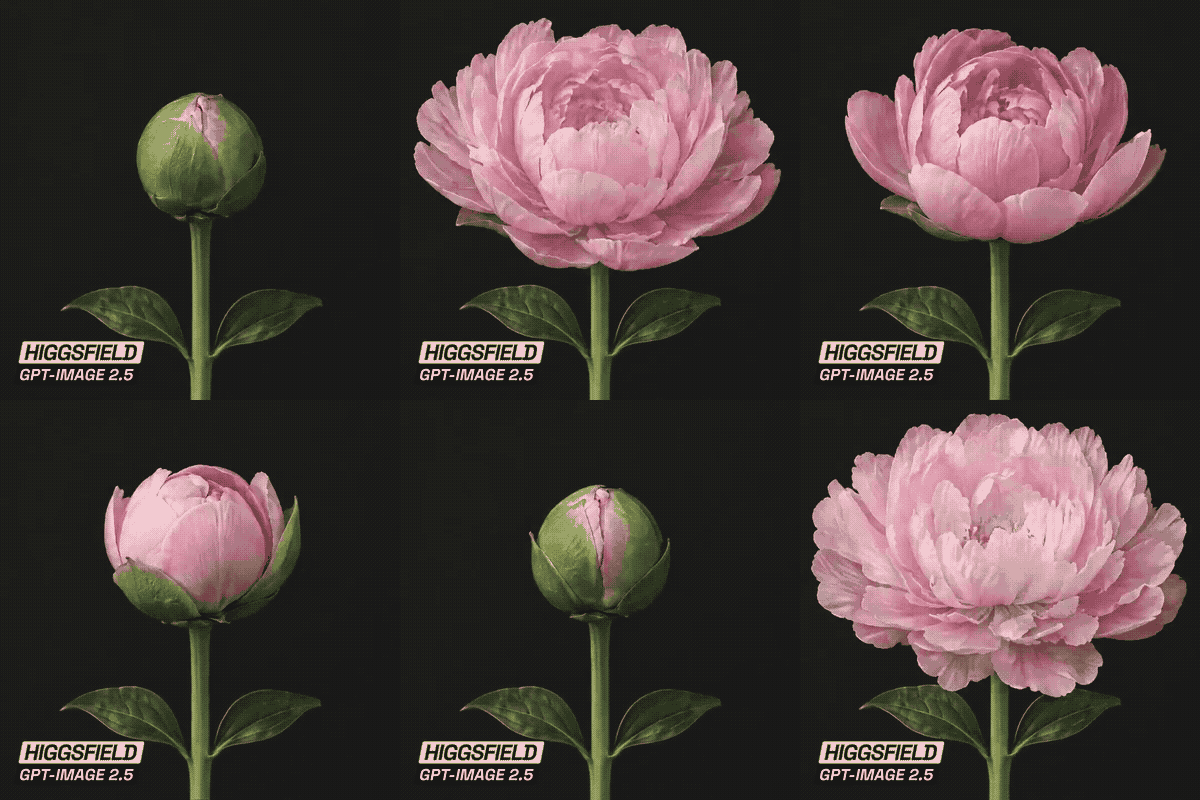
Bunga peony yang terbuka dari kuncup hingga mekar
Check the progression of petals while the stem, leaf attachment, background, lamp, and lighting remain stable.
This sequence should be played once. A repeat form would close the flower once again and add motion that is not part of the carefully designed blooming. Keep a version of the video controls aside from the final GIF so reviewers can separate broken frames from compression artifacts.
Independent repeated tests elsewhere have also flexible prompt-following and consistency, with different results. Their rubric does not provide animation scores for this article. (PromptFrenzy, accessed September 2026.)
Recreate the Workflow and Count the Real Cost
- Open the model and confirm the settings.
Use the practice space Sunburst for the first request and the Flare for the matched request. Select maximum quality, 2048×1152, PNG, and one image. Settle on 'unexpected' for A, B, D, E; 'transparent' for D.
The official image guide documents maximum quality, custom dimensions, and choice for transparency. These output controls cover an evenly divided frame sheet. (OpenAI, accessed September 2026.)
Verify the selected values after leaving each control. Preserve the quote and the actual request settings. The screenshot result below is reserved for actual outputs; a sample from the model page cannot prove that an experiment was performed.
- Use this prompt list without rewriting between models.
Prompt A: Melambaikan tangan
plaintext1Create one 2048x1152 image containing exactly 16 consecutive animation frames arranged in a strict 4-column by 4-row grid, read left to right and then top to bottom. Each cell is exactly 512x288 pixels. No gutters, borders, captions, numbers, or text. 2 3Show the same adult office worker seated at a plain wooden desk in every frame. They have short dark hair, a teal shirt, and no accessories. Use natural window light, a plain light-gray wall, and a locked eye-level camera. Keep the face, clothing, desk, background, lighting, and lighting identical. 4 5Animate one greeting: frames 1-4 gradually raise the right hand from the desk; frames 5-10 show one side-to-side wave; frames 11-15 gradually lower the hand; frame 16 returns to the resting pose. Keep the left hand on the desk. Preserve five fingers and the same sleeve length. The transition from frame 16 to frame 1 should be continuous. Advance the action by small readable increments.
Prompt B: Menuangkan kopi
plaintext1Create one 2048x1152 image containing exactly 16 consecutive animation frames in a strict 4-column by 4-row grid, read left to right and then top to bottom. Each cell is exactly 512x288 pixels. No gutters, borders, captions, numbers, or text. 2 3Use a locked side view of a clear glass cup on a wooden kitchen counter. One adult hand holds a small stainless-steel coffee pot above and to the left of the cup. Use soft natural lighting and keep the camera, counter, cup, hand, and pot design unchanged. 4 5Frames 1-3 show the pot tilting toward the empty cup. Frames 4-11 show a continuous narrow stream of coffee entering the cup while the liquid rises progressively. Frames 12-14 show the pot returning upright and the stream stopping. Frames 15-16 show the cup half full and the upright pot held still. Keep the stream connected to the spout while pouring. Do not spill or change the cup shape. This is a one-way action, not a loop. The coffee must remain in the cup at the end.
Produk rotasi
plaintext1Create one 2048x1152 image containing exactly 16 consecutive product-rotation frames in a strict 4-column by 4-row grid, read left to right and then top to bottom. Each cell is exactly 512x288 pixels. No gutters, borders, captions, numbers, logos, or text. 2 3Show one unbranded white low-top canvas sneaker with six pairs of eyelets, white laces, a thin navy stripe around the rubber sole, and a small red fabric tab centered on the heel. Place it on a light-gray seamless surface. 4 5Keep the camera locked at product height with a slight downward view. Rotate only the shoe around a fixed vertical axis. Frame 1 is the front view. Each subsequent frame advances the rotation by 22.5 degrees in the same direction. Frame 16 is at 337.5 degrees so the next frame can return smoothly to frame 1. Keep the shoe scale, rotation center, materials, eyelets, sole stripe, heel tab, and lighting consistent. Reveal physically plausible side, back, and opposite views.
Prompt D: Siklus berjalan
plaintext1Create one 2048x1152 transparent PNG containing exactly on frame of a 4-column by 4-row grid, read left to right and then top to bottom. Each cell is exactly 512x288 pixels. No gutters, borders, ground line, captions, numbers, or text. 2 3Show one full-body adult pedestrian in a clean, flat 2D game-prototype style, facing right in strict side view. The pedestrian has short hair, a mustard jacket, navy trousers, and white shoes. Keep the character centered at the same horizontal level and the feet on the same baseline in every cell. Preserve the same character scale, clothing shapes, and colors. 4 5Create one complete in-place walking cycle. Frame 1 has the left foot forward at contact; frame 5 is a passing pose; frame 9 has the right foot forward at contact; frame 13 is the opposite passing pose. Fill all intervening frames with progressive motion. Frame 16 should lead naturally into frame 1 without repeating it. Keep the arms swinging opposite the legs and preserve left-right limb identity throughout.
Prompt E: Mengayuh
plaintext1Create one 2048x1152 image containing exactly 16 consecutive animation frames in a strict 4-column by 4-row grid, read left to right and then top to bottom. Each cell is exactly 512x288 pixels. No gutters, borders, captions, numbers, or text. 2 3Show a full-body adult cyclist on a plain stationary exercise bicycle in strict side view. The cyclist wears a blue short-sleeved shirt, black shorts, and white shoes. Use a light-gray studio background and a locked camera. Keep the bicycle frame, saddle, handlebars, rider identity, clothing, and lighting unchanged. 4 5Animate exactly one complete crank revolution. Start with the visible pedal at the top. Advance the crank by 22.5 degrees per frame in one consistent direction. Keep the opposite pedal 180 degrees away. Each shoe must remain attached to its own pedal, with the knees and hips moving in a plausible way. Keep both hands on the handlebars. Frame 16 should connect naturally to frame 1. Do not swap legs, detach the feet, or deform the bicycle.
- Extract and inspect the original files.
Save the downloaded PNG, not the page thumbnail. Use the local approach:
plaintext1python slice-grid.py sheet.png --rows 4 --cols 4 --out frames --fps 8
Add --once for coffee. The script saves numbered PNGs, a GIF, and a JSON crop log. Check the log's actual dimensions and alpha levels, then inspect each image for fragments of neighboring panels. Automatic division does not validate the illustrated boundaries.
GIF stores delays in hundredths of a second, so it cannot encode exactly 125ms in a single frame of delay. The helper alternates between 120ms and 130ms, maintaining a two-second total for 16 frames. The log records this quantization; the PNG sequence remains available for exact 8fps playback elsewhere.
- Separate correction work from the raw sequence.
| Problem | How to identify it | What local processing can do |
| Partition boundaries that are uneven | Neighboring image enters a nominal fraction | Separate manual crops, as long as all content is intact |
| Anchor or scale drift | Fixed scene points move between frames | Measured alignment in a labeled fix version |
| Identity or geometry change | Clothing, limbs, or object structure changes | Cropping cannot restore lost structure |
| Wrong action phase | Pose order jumps, reverses, or repeats | Changing the time cannot render what's absent |
| Physical contradiction | Liquid disappears or feet detach | Requires real correction, not just extraction |
Record active minutes for separation, timing, and repairs separately. Preserve both versions and describe each operation. A repaired animation may be suitable for a project, while a raw sheet and then failing the benchmark.
- Calculate cost from measured usage.
As checked on September 15, 2026, the model directory displays rounded starting prices around $0.004 and $0.003 per picture, with a 20% discount label both for both models. These are catalog starting prices. The high settings need their own quote, and token-based pricing can differ.
| Cost function | Sunburst | Flare |
| Planned settings | max, 2048×1152, PNG | Max, 2048×1152, PNG |
| Exact selected-settings quote | Unmeasured | Unmeasured |
| Actual billed total | Unmeasured | Unmeasured |
| Confirmed submitted baseline requests | 0 | 0 |
| Qualified sheets | Unmeasured | Unmeasured |
| Actual generation cost per qualified sheet | N/A | N/A |
| Crop / timing / repair labor | Unmeasured | Unmeasured |
Divide actual billed generation cost by qualified sheets only when both quantities exist. If no sheet qualifies, report N/A. Keep labor separate or apply your own hourly rate as needed. A starting-price multiplication cannot establish the cost of a usable animation.
Run the same prompt after checking a complete raw sequence. The final [: Final results from the GPT Image 2.5 Stilled Animation Test** must support that decision with evidence downloaded, but the blocked draft hasn't yet produced an outcome.
FAQ
Can GPT Image 2.5 generate an animated GIF directly?
This workflow requests a PNG frame and assembles a GIF locally. Image output settings should not be described as native animation or video generation. Every result that shows motion must mention its source sheet and processing, including the playback order and delays.
What does "stilled animation" mean in this test?
It means generating consecutive one-frame pictures within one track, extracting them, and displaying them sequentially. We use it as an operational description. It does not refer to a verified official model feature, and a single "animation-style still" does not satisfy the definition.
Is Flare's answer or what?
Comparison is unresolved because no baseline requests have been completed. Once available, the results should be reported task-by-task across all three requests within the scope. Identity within the sheet, transition quality, and physical consistency require separate examination; one selected example cannot establish a general winner.
Why does my sprite sheet look consistent but jitter when played?
Check panel boundaries, character anchors, changing scale, phase of action, and frame duration. Similar-looking stills can occupy different positions in their cells. Keep the original equal crops while testing corrections, so you can determine whether alignment helps or the source movement needs review.
Does GPT Image 2.5 improve on GPT Image 2 for this benchmark?
This experiment includes no concurrent GPT Image 2 control. It therefore cannot establish an improvement percentage, a speed advantage over that model, or a lower usable-animation cost. External experiments use different prompts and settings; they provide context, not a missing control group.
How much does it cost to create one usable animation?
Use actual charge for every submitted request, including billed failures, plus the time required to inspect and repair the output. Divide generation by the number meeting your acceptance standard. Exact-setting quotes, settlement, and usable outcomes are unmeasured here, so no numerical per-animation cost is defensible yet.





