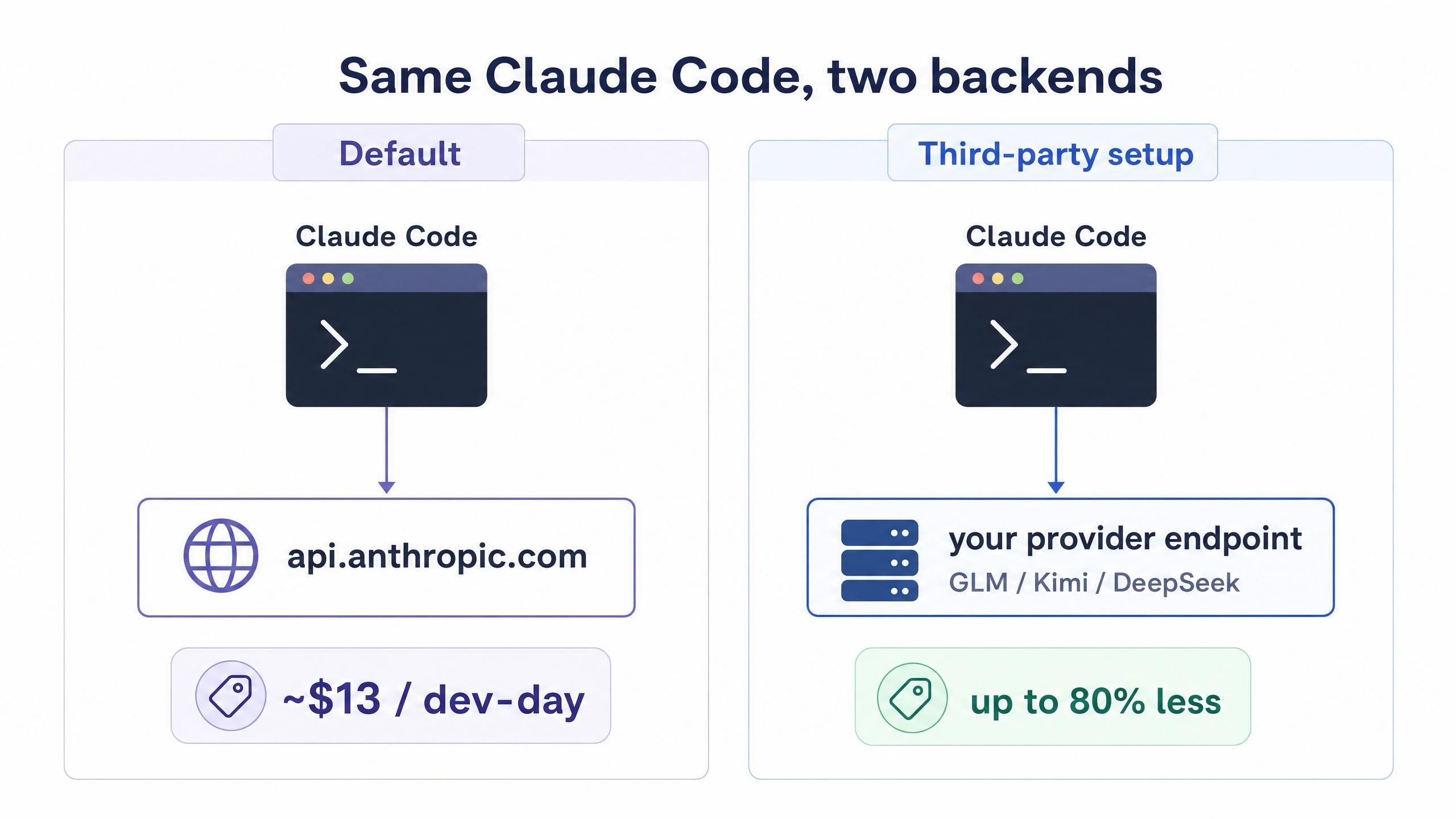
Claude Code is one of the best agentic coding tools available, and it is also one of the most expensive to run at scale, with heavy users reaching $13 per active developer-day on the standard API (CloudZero, 2026). Here is the part most people miss: the model that powers Claude Code is swappable. With a single environment variable, you can point the exact same Claude Code experience at a different backend, including far cheaper open-weight models like GLM, Kimi, and DeepSeek.
This guide is a complete, no-fluff walkthrough of a Claude Code third party API setup. You will learn how the redirect actually works under the hood, the exact config to paste, how to pick a model, and how to verify everything is wired correctly. The whole thing takes about five minutes, and the savings show up on day one.
Key Takeaways
- Claude Code reads its backend from the ANTHROPIC_BASE_URL environment variable, so any Anthropic-compatible endpoint can replace the default without touching the app itself (Claude Code docs, 2026).
- The setup is a single edit to ~/.claude/settings.json, no proxy or wrapper script required for the basic case.
- Open-weight models cut per-token cost dramatically: DeepSeek V4 Flash runs near $0.14 per million input tokens versus several dollars for frontier models (Codersera, 2026).
- Using a gateway that aggregates many models behind one endpoint means you swap models by changing one line, not by re-registering keys with five different vendors.
Why Bother With a Claude Code Third Party API Setup
The honest answer is cost, and the numbers are not subtle. Agentic tools like Claude Code resend the accumulated context on every reasoning step, so they burn 10 to 100 times more tokens than a chat window for the same amount of work (LeanOps, 2026). That token multiplier is exactly why a single complex task can quietly run into dollars, and why teams see monthly bills that climb into the hundreds per engineer.
A Claude Code third party API setup attacks that bill at the source: the per-token price. Instead of paying frontier rates for every edit, refactor, and test run, you route the bulk of that work to an open-weight model that costs a fraction as much. On routine coding, the quality gap is far smaller than the price gap. The point of the setup is not to give up Claude Code, it is to keep the tool you like while paying open-model prices for the tokens.
There is a second reason that matters for anyone outside the regions Anthropic serves directly: access. A third-party endpoint gives developers a stable, compatible way to use Claude Code without depending on a single vendor's billing or availability.
How a Claude Code Third Party API Setup Actually Works
Before pasting any config, it helps to understand the one mechanism that makes all of this possible. Claude Code does not hardcode Anthropic's servers. At startup it reads a handful of environment variables, and the important one is ANTHROPIC_BASE_URL. By default it points at Anthropic's API. Change it, and every request Claude Code makes goes to the new address instead (Claude Code docs, 2026).
For this to work, the third-party endpoint has to speak the same protocol Claude Code expects, which is the Anthropic Messages API format. This is why you cannot point it at a raw OpenAI endpoint directly. The provider needs to expose an Anthropic-compatible URL. Many model providers now publish exactly such an endpoint, and gateways that aggregate multiple open models do the translation for you so that GLM, Kimi, or DeepSeek all answer in the format Claude Code understands.
The three variables that carry the load are:
- ANTHROPIC_BASE_URL: where Claude Code sends requests.
- ANTHROPIC_AUTH_TOKEN: the API key for that endpoint, not your Anthropic key.
- ANTHROPIC_MODEL: which model the endpoint should run.
Once you internalize that the app is just a client pointed at a URL, the rest of the setup is mechanical.
Claude Code Third Party API Setup: Step by Step
This is the core of the guide. The example below uses Atlas Cloud as the provider because it exposes one Anthropic-compatible endpoint that fronts the major open-weight models, which keeps the config short and lets you switch models later without re-doing any of this. The same steps apply to any compatible provider; only the base URL and key change.
Step 1: Get Your API Key and Base URL
By the end of this step you will have two strings: an endpoint URL and a key.
- Create an account with your chosen provider and open its API key section.
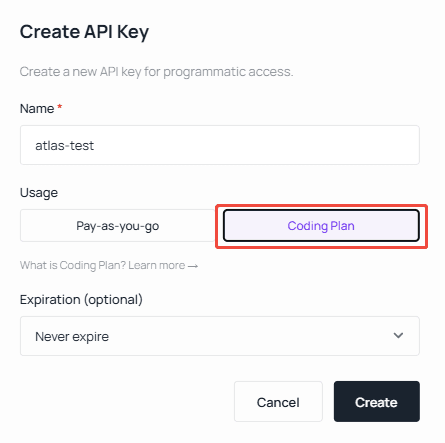
- Generate a key scoped to coding or agent usage. On Atlas Cloud, you select Coding Plan as the key type when creating it, which ties the key to the credit-based coding quota rather than general pay-as-you-go.
- Copy the key somewhere safe and note the base URL. For Claude Code specifically, Atlas Cloud uses https://api.atlascloud.ai (note: no /v1 suffix for the Claude Code endpoint, which is a common tripping point).
Step 2: Edit Your settings.json
By the end of this step Claude Code will be pointed at the new backend. Open the config file for your OS:
- macOS / Linux: ~/.claude/settings.json
- Windows: %USERPROFILE%\.claude\settings.json
Paste the following, replacing the token with your real key:
plaintext1{ 2 "env": { 3 "ANTHROPIC_AUTH_TOKEN": "your-atlas-api-key", 4 "ANTHROPIC_BASE_URL": "https://api.atlascloud.ai", 5 "ANTHROPIC_MODEL": "zai-org/glm-5.1", 6 "ANTHROPIC_DEFAULT_HAIKU_MODEL": "zai-org/glm-5.1", 7 "ANTHROPIC_DEFAULT_SONNET_MODEL": "zai-org/glm-5.1", 8 "CLAUDE_CODE_DISABLE_EXPERIMENTAL_BETAS": "1" 9 } 10}
One detail that saves a lot of confusion: setting ANTHROPIC_DEFAULT_HAIKU_MODEL and ANTHROPIC_DEFAULT_SONNET_MODEL to the same model means Claude Code's background tasks (the small, fast calls it makes for things like summarizing) also route to your chosen model instead of silently failing on an unavailable default.
Step 3: Pick the Model That Fits the Job
By the end of this step you will have a sensible default model. The ANTHROPIC_MODEL value is just a model ID string the provider recognizes. With an aggregating endpoint, switching is a one-line change: set it to zai-org/glm-5.1 today, moonshotai/kimi-k2.6 tomorrow, or deepseek-ai/deepseek-v4-flash for high-volume background work, and restart Claude Code. No new keys, no new config blocks.
Step 4: Verify Your Claude Code Third Party API Setup
By the end of this step you will know it works. Open a terminal in any project and run:
plaintext1claude
Then give it a trivial task, such as asking it to explain a file or write a one-line function. If it responds normally, the redirect is live and your requests are going to the third-party model. If you get an authentication error, the key is wrong or pasted with a stray space. If you get a connection error, re-check the base URL, especially the presence or absence of the /v1 suffix for your specific tool.
Choosing Models for Your Claude Code Third Party API Setup
Picking a model is where the real savings get decided. The smart pattern is to default to a strong, cheap open model for everyday work and reserve a pricier model only for the hardest reasoning. The capability is genuinely there: on SWE-Bench Pro, leading open models score in the high 70s against roughly 91 for top frontier models (Codersera, 2026), a real gap on the hardest problems but a near-irrelevant one for routine feature work and refactors.
On a credit-based gateway, each model carries a multiplier that maps token usage to credits, so you can see the relative cost at a glance. Here is how a few popular coding models compare:
| Model ID | Context | Input multiplier | Output multiplier | Approx. savings vs official |
|---|---|---|---|---|
| deepseek-ai/deepseek-v4-flash | 1M | 0.23 | 0.46 | ~50% |
| deepseek-ai/deepseek-v3.2 | 160K | 0.42 | 0.62 | ~55% |
| minimaxai/minimax-m2.5 | 200K | 0.65 | 2.18 | ~45% |
| moonshotai/kimi-k2.6 | 262K | 1.72 | 7.26 | ~45% |
| zai-org/glm-5.1 | 200K | 2.54 | 7.99 | ~45% |
Source: Atlas Cloud Coding Plan credit rules. Credit cost = input tokens × input multiplier + output tokens × output multiplier.
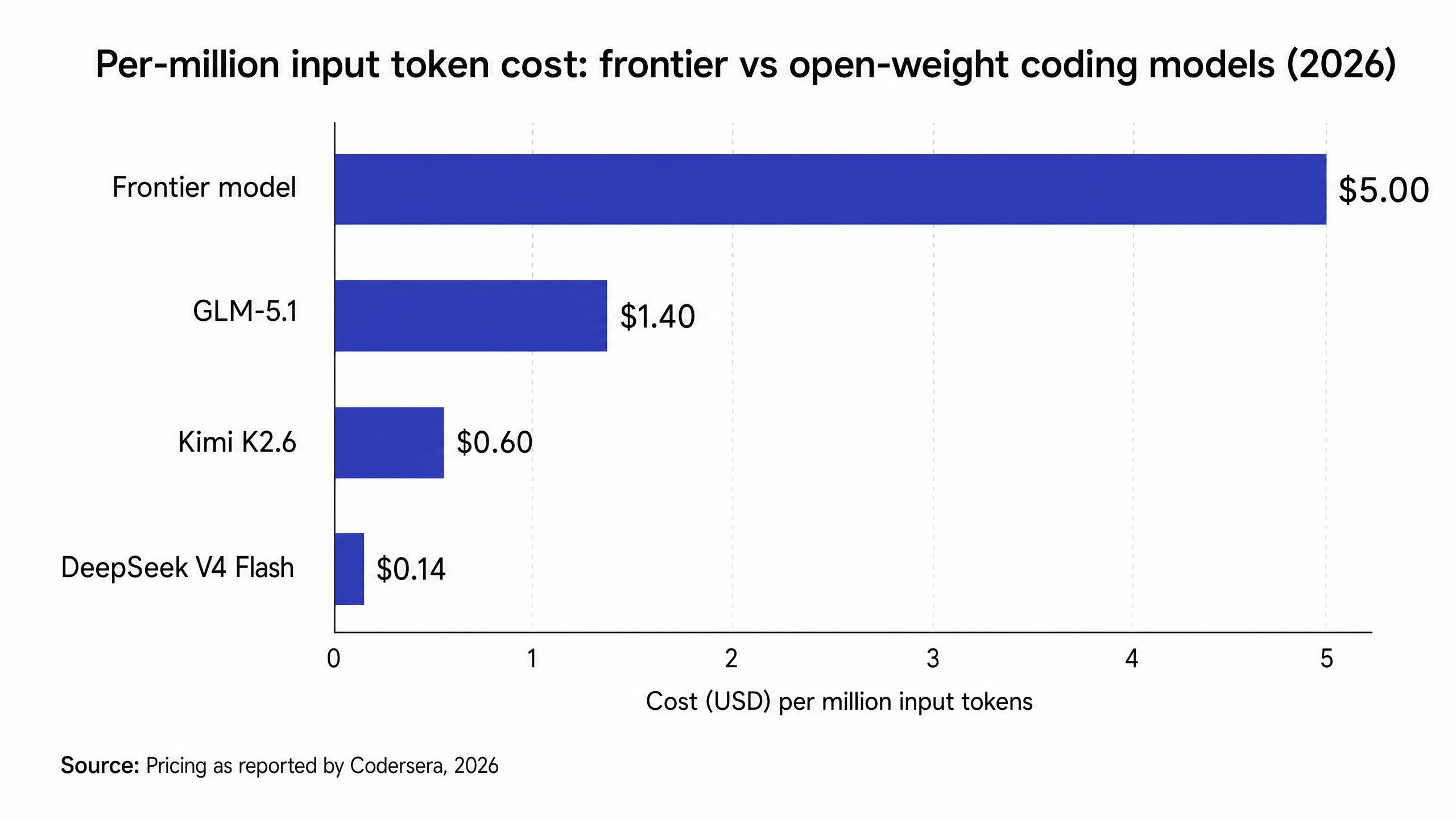
A practical default for most developers: run GLM-5.1 or Kimi K2.6 for interactive coding, drop to DeepSeek V4 Flash for bulk or background jobs, and only reach for a frontier model on the occasional task that genuinely stumps the open model.
One Setup, Many Tools: Beyond Just Claude Code
The same endpoint that powers your Claude Code third party API setup is not limited to Claude Code. Most developers run more than one agent: Codex in the terminal, Cursor in the editor, OpenClaw or OpenCode on the side. Pointing each one at a different vendor means juggling separate keys and separate bills. Pointing them all at a single OpenAI-compatible base URL collapses that into one credit pool and one place to swap models.
For Codex, the equivalent of the Claude Code config lives in ~/.codex/config.toml:
plaintext1model_provider = "atlas_coding_plan" 2model = "zai-org/glm-5.1" 3 4[model_providers.atlas_coding_plan] 5name = "atlascloud" 6base_url = "https://api.atlascloud.ai/v1" 7wire_api = "chat" 8requires_openai_auth = true
Your key goes in ~/.codex/auth.json as OPENAI_API_KEY. OpenClaw, OpenCode, Cursor, and Copilot-style clients all take the same https://api.atlascloud.ai/v1 base URL with the OpenAI-compatible protocol. Note the difference worth remembering: Claude Code uses the bare https://api.atlascloud.ai, while the OpenAI-compatible tools use the /v1 path.
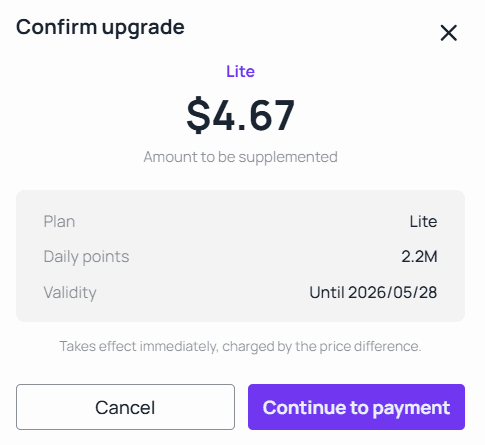
Consolidating like this also fixes budgeting. Plans that refresh a fixed daily credit allowance at midnight put a structural ceiling on a runaway agent loop, and pay-as-you-go packs absorb the occasional spike. If you outgrow a tier mid-cycle, prorated upgrades charge only the difference rather than a fresh plan.
Common Claude Code Third Party API Setup Mistakes to Avoid
Most failed setups trace back to a small handful of errors, and nearly all of them are in the config string rather than anything deep.
Wrong base URL path. The single most common mistake. Claude Code and the OpenAI-compatible tools often expect different paths from the same provider. If Claude Code throws a connection error, check whether your endpoint should or should not carry the /v1 suffix.
Using your Anthropic key by mistake. The ANTHROPIC_AUTH_TOKEN must be the third-party provider's key, not your Anthropic key. They are not interchangeable, and reusing the wrong one produces an authentication error that looks more mysterious than it is.
Forgetting the background model variables. If you set only ANTHROPIC_MODEL but leave the Haiku and Sonnet defaults pointing at unavailable Anthropic models, Claude Code's small background calls can fail. Set all three to a model your endpoint actually serves.
Assuming every feature ports perfectly. Third-party models handle the core coding loop well, but provider-specific extras and the very newest model behaviors may differ from the Anthropic default. Start with a routine task to confirm the basics before trusting it on something critical.
Frequently Asked Questions About Claude Code Third Party API Setup
Is a Claude Code third party API setup difficult to do?
No. The basic case is a single edit to ~/.claude/settings.json with three or four environment variables, and it takes about five minutes. You do not need a proxy or wrapper script unless you want to switch models mid-session, which is an advanced option rather than a requirement.
How much can a Claude Code third party API setup actually save?
It depends on the model you choose, but the price spread is large. DeepSeek V4 Flash runs near $0.14 per million input tokens versus several dollars for frontier models (Codersera, 2026), so routing the bulk of routine work to an open model commonly cuts the per-token bill by 70% or more without changing how you code.
Which model should I use after my Claude Code third party API setup?
For interactive coding, a strong general model such as GLM-5.1 or Kimi K2.6 is a good default. For high-volume or background jobs where latency matters less, a cheaper model like DeepSeek V4 Flash makes sense. Keep a frontier model on standby only for the occasional task that an open model cannot crack.
Will every feature work after a Claude Code third party API setup?
The core agentic coding loop works well, since it relies on the standard Messages API that compatible endpoints implement. Some provider-specific features or the newest model-specific behaviors may differ from the Anthropic default, so it is worth testing on a low-stakes task first.
Do I have to undo the setup to switch back to Anthropic?
No. Keep your Anthropic key handy and simply restore the original ANTHROPIC_BASE_URL (or remove the override) in settings.json to point Claude Code back at Anthropic. Many developers keep both configs around and switch based on the task at hand.
Conclusion
A Claude Code third party API setup is one of the highest-leverage five-minute changes a developer can make in 2026. The tool stays exactly the same, but the backend, and the bill, do not. Point ANTHROPIC_BASE_URL at an Anthropic-compatible endpoint, pick an open-weight model that fits the job, and you keep the Claude Code workflow you already know while paying a fraction of frontier prices. If you want the whole thing under one key and one budget that also covers Codex, OpenClaw, and the rest, you can set it up through the Atlas Cloud Coding Plan console and switch models any time by changing a single line.







