
If you're evaluating the Kling AI API pricing strictly on developer value, here is the short answer: it delivers competitive cost per video generation for production workloads. However, realizing this value depends entirely on navigation of a critical operational divide: the commercial API operates on a completely separate billing infrastructure from the consumer web application.
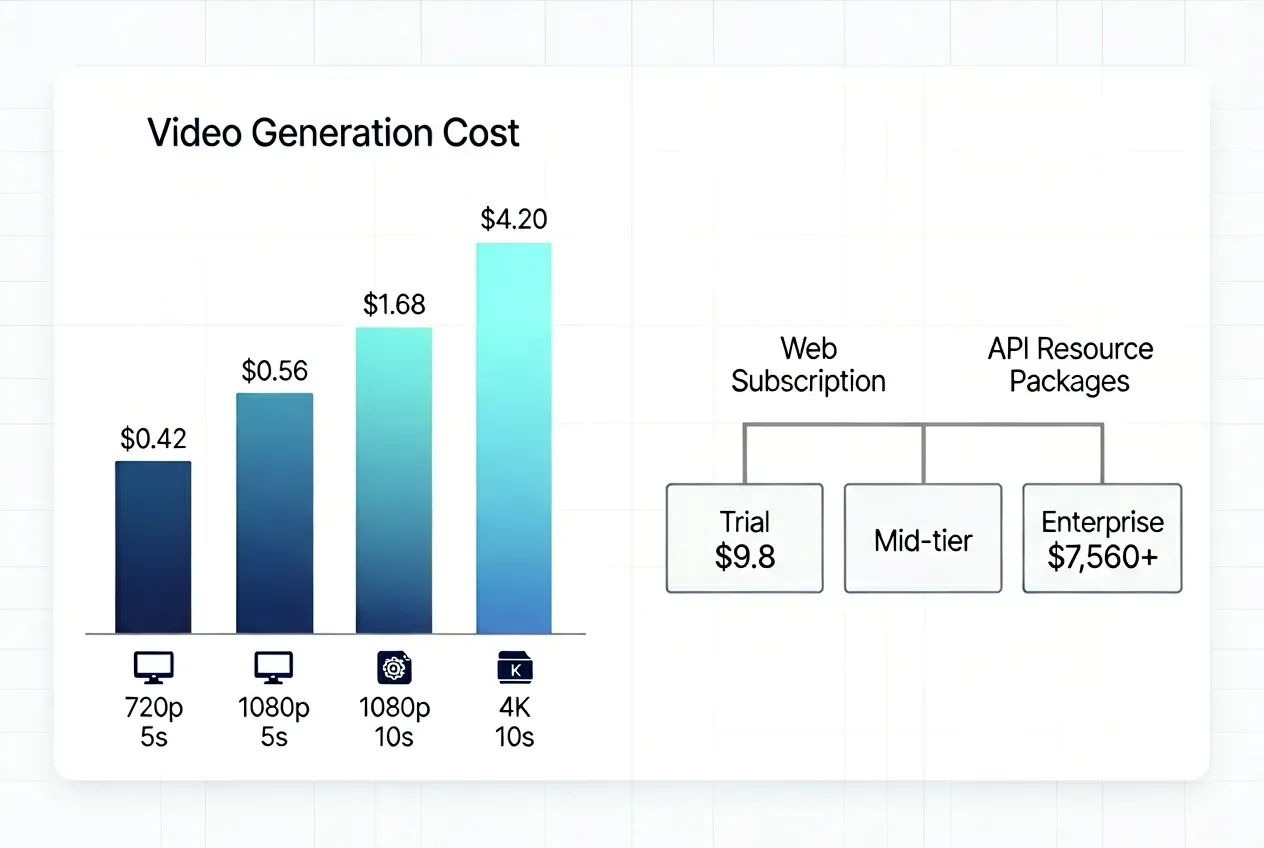
Key cost benchmarks at a glance:
| Video Type | Approx. Cost |
| Standard 5s clip (720p, Video 3.0) | ~$0.42 |
| Standard 5s clip (1080p, Video 3.0) | ~$0.56 |
| Premium 10s clip (1080p, native audio) | ~$1.68+ |
| High-end 10s 4K shot | Up to ~$4.20 |
The Kling AI API pricing model runs on prepaid Resource Packages, billed entirely outside of web subscriptions:
- Trial entry: $9.8 minimum commitment
- Mid-tier production: packages scaling through hundreds of dollars
- Enterprise volume: $7,560+ for 60,000 resource units
A web subscription (Standard at $10/month through Ultra at $180/month) grants zero API access. Conversely, API credits cannot touch the web UI. Developers building products must budget exclusively through the Resource Package system, making the Kling AI API worth it primarily at sustained, predictable output volumes where per-unit costs compress meaningfully.
Breaking Down the Kling AI API Pricing Model: Prepaid Resource Packages Explained
The Kling AI API pricing model ditches recurring subscriptions entirely. Instead, engineering teams purchase Kling AI API prepaid packages of resource units upfront, drawing them down as generation tasks run. There are no monthly renewals, no auto-billing surprises — but there is one critical catch: expiration.
A common pitfall for teams transitioning from prototyping to web testing is assuming that consumer Web Memberships (Standard, Pro, Premier, or Ultra plans) or Spirit Units can fuel the API console. They cannot. These environments are completely siloed; web credits grant zero developer access, and API units cannot touch the web UI. If your team utilizes both solutions, you must budget for each independently.
How Unit Validity and Scale Limits Work
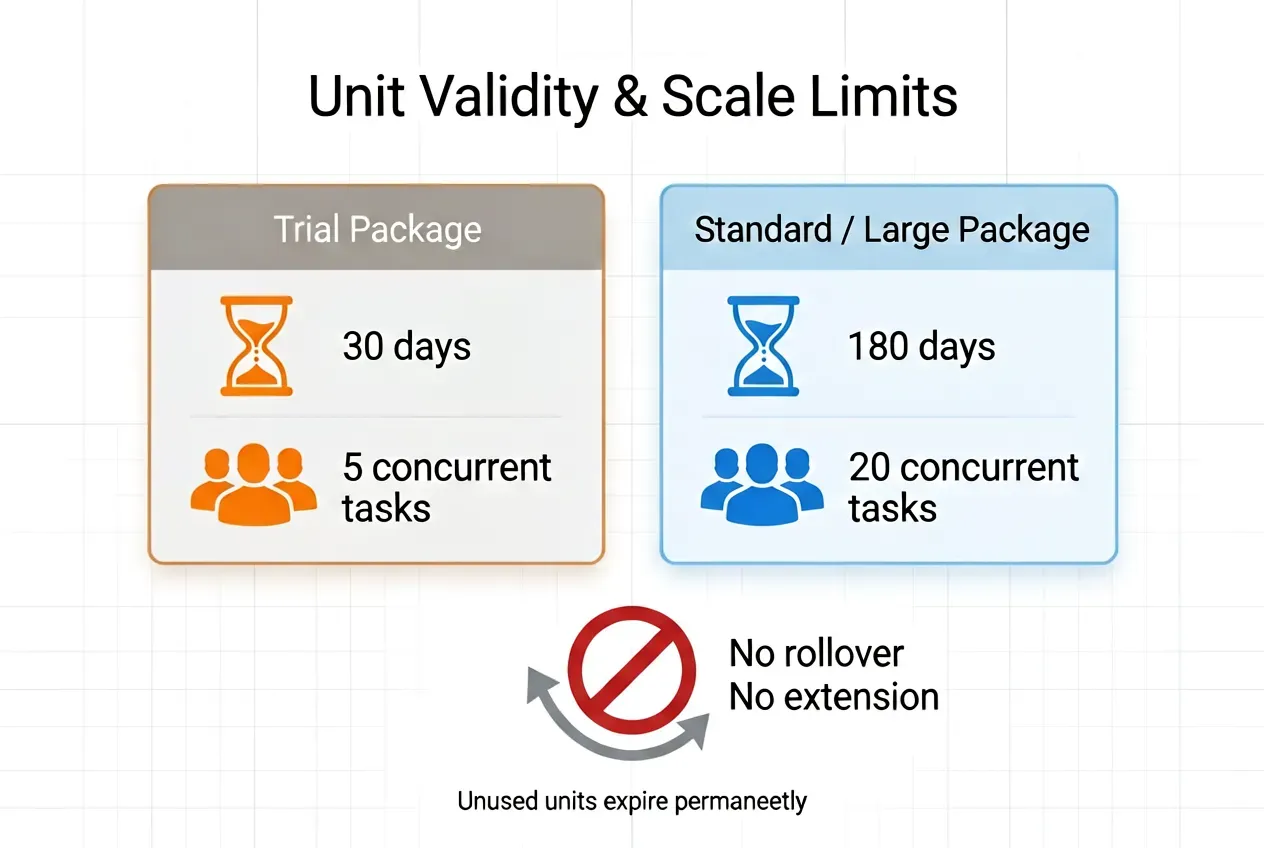
Beyond the billing separation, unit validity expiration is strict and non-negotiable:
- Trial packages expire after 30 days (capped at 5 concurrent tasks)
- Standard/Large packages expire after 180 days (unlocked to 20 concurrent tasks)
- Unused API resource units cannot be rolled over or extended once the window closes.
Official Package Pricing Matrix
Based on the current Kling AI developer pricing page:
Trial Packages (30-day validity, 5 concurrent tasks)
| Package | Price | Units | Unit Price |
| Trial S | $9.80 | 100 units | $0.098/unit |
| Trial L | $98 | 1,000 units | $0.098/unit |
Standard Packages (180-day validity, 20 concurrent tasks)
| Package | Price | Units | Unit Price |
| Package 1 | $700 | 5,000 units | $0.14/unit |
| Package 2 | $2,100 | 15,000 units | $0.14/unit |
| Package 3 | $5,670 | 45,000 units | $0.126/unit |
| Package 4 | $7,560 | 60,000 units | ~$0.126/unit |
Looking at the numbers, you will notice an intentional pricing paradox: the Trial tiers offer a heavily subsidized entry rate ($0.098/unit), whereas standard production packages start at a higher baseline ($0.14/unit).
This inverted pricing reflects the operational scaling value. The subsidized Trial tier is restricted to 5 concurrent tasks to prevent pipeline congestion. Moving to the Standard tier introduces a premium on the unit rate, but it officially unlocks a 20-concurrent-task capacity—a mandatory throughput upgrade for live production pipelines that require instant, parallel processing.
How Much Does the Kling AI API Cost Per Video? (Multi-Model Fee Analysis)
The cost per second video generation in the Kling API is not flat. It varies by model, resolution, mode, and whether native audio is enabled. Here is how the math actually works across generations.
Kling Video 3.0 and Video-3O (Omni) Pricing
To help engineering teams budget accurately, this unified billing matrix consolidates both Kling-Video-O3 and Kling-V3 pricing. While base resolutions share identical resource unit deductions, their feature-specific capabilities, such as Omni’s cross-modal inputs versus V3’s specialized camera toolsets, scale differently:
| Resolution / Tier | Baseline Capabilities & Applied Features | Model Availability | Units / Sec | Cost / Sec (at $0.14/unit) |
| Standard (720p) | Base Generation (Text-to-Video / No Audio) | V3 & V3-Omni | 0.6 | ~$0.084/s |
| Video Input / Cross-Modal Extension with video | V3-Omni Only | 0.9 | ~$0.126/s | |
| Native Audio Integration (with audio / no voice) | V3 & V3-Omni | 0.8 / 0.9 | ~$0.112 - $0.126 | |
| Camera Motion Suite (Motion Control std) | Kling-V3 Only | 0.9 | ~$0.126/s | |
| Professional (1080p) | Base Generation (Text-to-Video / No Audio) | V3 & V3-Omni | 0.8 | ~$0.112/s |
| Video Input / Cross-Modal Extension with video | V3-Omni Only | 1.2 | ~$0.168/s | |
| Native Audio Integration (with audio / no voice) | V3 & V3-Omni | 1.0 / 1.2 | $0.140 - $0.168 | |
| Camera Motion Suite (Motion Control pro) | Kling-V3 Only | 1.2 | ~$0.168/s | |
| 4K Ultra HD | Broadcast Grade Outputs (With or Without Audio) | V3 & V3-Omni | 3 | ~$0.420/s |
Note on Audio Deductions: Under the 720p tier, V3-Omni's native audio costs 0.8 units/sec, while Kling-V3's text/image with audio costs 0.9 units/sec. Under the 1080p tier, V3-Omni costs 1.0 unit/sec, while Kling-V3 costs 1.2 units/sec.
4K video generation pricing scales to 3x the Professional rate, making it a premium output reserved for broadcast or cinema-grade deliverables. The kling ai clip length for both V3 series models natively supports 3 to 15 seconds per single generation, giving production pipelines far more sequential runway than older legacy caps.
Legacy Model Deductions (V1.5 / V2.1)
Older generations follow a structured workflow logic that introduces rigid, block-based deduction buckets (5-second or 10-second tasks) rather than modern per-second flexibility. Interestingly, the standard Kling-V2-1 and Kling-V1-5 infrastructure share identical baseline unit requirements, whereas the high-end Master pipeline commands a massive premium:
| Model Iteration | Product Features & Applied Capabilities | Output Duration | Resource Unit Deduction | Approx. Cost (at $0.14/unit) |
| Kling-V1-5 / Kling-V2-1 | Standard Mode (std x 5s / Video Extension) | 5s | 2.0 units | $0.28 |
| Kling-V1-5 / Kling-V2-1 | Standard Mode (std x 10s) | 10s | 4.0 units | $0.56 |
| Kling-V1-5 / Kling-V2-1 | Professional Mode (pro x 5s / Motion Brush / Start/End Frame) | 5s | 3.5 units | $0.49 |
| Kling-V1-5 / Kling-V2-1 | Professional Mode (pro x 10s / End Frame Control) | 10s | 7.0 units | $0.98 |
| Kling-V2-1-Master | Master Production Suite (master x 5s Text/Image to Video) | 5s | 10.0 units | $1.40 |
| Kling-V2-1-Master | Master Production Suite (master x 10s Image to Video) | 10s | 20.0 units | $2.80 |
Note: The gap in budget efficiency becomes really clear when you look at the raw generation numbers. Making a 10-second high-quality clip on the old V2.1 nodes only uses 7.0 units ($0.98). But if you switch to the high-end V2.1 Master block, it eats up a massive 20.0 units ($2.80) to render that exact same amount of video.
Technical Note on V1.5 vs. V2.1 Efficiency:
Because Kling-V1-5 and Kling-V2-1 use the exact same credit cost system, developers should just use Kling-V2-1 for all older workflows. The price parity does not mean feature parity; V2.1 delivers a massive upgrade in prompt adherence, temporal consistency, and larger motion dynamics over V1.5 without costing an extra cent. V1.5 remains accessible strictly for backward compatibility with older, hard-coded software integrations.
Hypothetical Budget: Calculating a 10-Second HD Clip
To contextualize these disparate model matrices for an engineering or marketing budget, here is what a standard 10-second high-definition asset actually costs across different generation nodes within the official framework (calculated at the baseline Standard Package rate of $0.14/unit):
| Model & Workflow Choice | Resolution / Specific Capabilities Applied | Total Units (for 10s) | Real Clip Cost (at $0.14/unit) |
| Kling-V3 / Video-3O Standard | 720p, Base Generation (No Audio) | 6.0 units | $0.84 |
| Kling-V3-Omni Standard | 720p, Video Generation (with audio no voice) | 8.0 units | $1.12 |
| Kling-V3 Standard | 720p, Text/Image to Video (with audio x no voice) | 9.0 units | $1.26 |
| Kling-V3 / Video-3O Pro | 1080p, Base Generation (No Audio) | 8.0 units | $1.12 |
| Kling-V3-Omni Pro | 1080p, Video Generation (with audio) | 10.0 units | $1.40 |
| Kling-V3 Pro | 1080p, Text/Image to Video (with audio x no voice) | 12.0 units | $1.68 |
| Kling-V3 Pro / Omni Pro | 1080p, Advanced Input (with video or Motion Control) | 12.0 units | $1.68 |
| Kling-V3 / Video-3O 4K | 4K Ultra HD Mode (Cinema Grade, Base Suite) | 30.0 units | $4.20 |
| Kling-V2-1 Professional | 1080p Legacy Pro Block (pro x 10s) | 7.0 units | $0.98 |
| Kling-V2-1-Master | 1080p Legacy Master Block (master x 10s) | 20.0 units | $2.80 |
For the vast majority of commercial SaaS deployments, selecting the V3-Omni Pro or Kling-V3 Pro without audio at roughly $1.12 per 10-second clip delivers the clearest cost-to-quality ratio within the official pricing framework. If your workflow requires high camera dynamism, moving to Kling-V3 Pro with Motion Control at $1.68 provides the strongest balance of control and performance without skyrocketing your data overhead.
Scaling Metrics: How Kling AI API Pricing Compares to Competitors
Pricing on paper rarely tells the full story. Once you factor in volume discounts, third-party aggregators, and head-to-head model comparisons, the Kling API's real position in the market becomes much clearer.
Volume Discounts: How Official Package Tiers Reduce Unit Costs
The official API's Kling AI API pricing overview rewards volume. Here is how per-unit costs shift across package tiers:
| Package | Total Units | Price | Cost Per Unit |
| Trial (100 units) | 100 | $9.80 | $0.10 |
| Standard Package 1 | 5,000 | $700 | $0.14 |
| Standard Package 3 | 45,000 | $5,670 | $0.13 |
| Standard Package 4 | 60,000 | $7,560 | ~$0.126 |
Moving from the Trial tier to Package 3 reduces your unit rate by 10%, and teams committing at the highest volume see meaningful per-clip savings across large production runs.
Third-Party Aggregators: Lower Barrier, Different Trade-offs
For engineering teams not ready to commit to large upfront prepaid blocks, third-party API aggregators offer an alternative entry point. By breaking down the rigid package requirements into fluid, usage-based billing, these platforms bypass the 180-day unit expiration risk—though they exchange this flexibility for varying rate premiums and localized throughput rules:
| API Provider | Model & Tier (Image-to-Video Workflow) | Listed Rate (no sound) | Calculated 10s Video Cost |
| Atlas Cloud | Kling V3.0 Standard (720p) | $0.071 / second | $0.71 |
| Kling V3.0 Professional (1080p) | $0.095 / second | $0.95 | |
| fal.ai | Kling V3.0 Standard (720p) | $0.084 / second | $0.84 |
| Kling V3.0 Professional (1080p) | $0.112 / second | $1.12 | |
| EvoLink | Kling V3.0 Standard (720p) | $0.079 / second | $0.79 |
| Kling V3.0 Professional (1080p) | $0.106 / second | $1.06 | |
| PiAPI | Kling V3.0 Standard (720p) | $0.10 / second | $1 |
| Kling V3.0 Professional (1080p) | $0.15 / second | $1.50 |
These third-party ecosystems strip away the upfront capital lockup entirely, but they introduce unique technical trade-offs. While platforms like Atlas Cloud or EvoLink offer highly predictable, discounted pricing tailored for continuous API scaling, others like fal.ai penalize Professional-tier rendering with massive cost premiums ($1.12 for 10 seconds). Meanwhile, PiAPI is optimal for teams seeking structured financial tracking, using a fixed per-video cost model that removes the math behind dynamic rendering speeds.
However, remember the operational ceiling: none of these third-party endpoints natively guarantee the unthrottled, 20-task concurrent processing pipeline that comes unlocked with the official Kling AI API Standard package.
Kling 3.0 vs. Seedance 2.0: The Direct Competitor Check
ByteDance's Seedance 2.0 stands as the most formidable native rival to the Kling 3.0 ecosystem. Seedance 2.0 calculates costs directly based on point consumption, with the unit price of points varying by plan; taking the standard plan as an example—where each point costs $0.031—we can compare the cost of generating a 10-second video using Kling V3 versus Seedance 2.0.
| Base Model & Generation Tier | Technical Setup (Text/image-to-Video Workflow) | Official Credit / Unit Cost | Cost Per Second | Real Cost for 10s Clip |
| Kling V3 Standard (720p) | 720p, Base Generation (No Audio) | 6.0 units | ~$0.084 / s | $0.84 |
| Seedance 2.0 Fast (720p) | 720p, Base Generation (No Video Input) | 120 credits | $0.0310 / s | $0.31 |
| Kling V3 Professional (1080p) | 1080p, Base Generation (No Audio) | 8.0 units | ~$0.112 / s | $1.12 |
| Seedance 2.0 (1080p Cinematic) | 1080p, Base Generation (No Video Input) | 300 credits | $0.0310 / s | $0.93 |
While ByteDance’s Seedance 2.0 gains a notable feature advantage by bundling native audio directly into its standard metrics at no extra charge, its mainstream consumer pricing structure introduces a completely different cost curve for automated sequencing. Under the most popular creator subscription, Seedance 2.0 maintains a highly predictable, flat-rate $0.0310 per second operational cost. When factored into standard production batches, generating a high-end cinematic 1080p asset lands at $0.93 on Seedance 2.0, closely rivaling the $1.12 on Kling V3 Professional developer resource packages.
For enterprise developers running continuous pipelines, the choice hinges on flexibility versus flat-rate simplicity. Kling’s API allows granular scaling and dynamic optimization for massive multi-task concurrency, while Seedance 2.0’s direct subscription remains highly cost-effective for solo creators and post-production studios aiming to maximize their standard monthly credit quotas without tracking micro-second infrastructural variations.
Final: Is the Kling AI API Worth It for Developers and Enterprise?
The Kling AI API verdict depends less on the per-second rate and more on whether your generation rhythm justifies the prepaid commitment structure.
When the API Is Worth It
The enterprise video generation ROI case is strongest for:
- High-volume SaaS integrations generating hundreds of clips per month, where Standard Package pricing ($0.126-$0.14/unit) competes well against alternatives
- Automated marketing pipelines with predictable, recurring generation schedules that can fully consume a 180-day package window
- Complex generation workflows requiring reference-to-video, multi-shot sequencing, or voice-controlled asset generation that few competing APIs match at this price point
- Production teams that can absorb the 20-concurrent-task Standard tier and need reliable throughput at scale
When to Step Back
The Kling API scale limitations hit hardest for teams with irregular workflows:
- Small teams or indie developers with unpredictable monthly volume risk forfeiting unused units as Trial packages expire in 30 days and Standard packages in 180 days, with no rollover
- Projects still in prototyping phases are better served by pay-as-you-go aggregators (Atlas Cloud, fal.ai) before committing to prepaid blocks
- Workflows requiring heavy native audio may find Seedance 2.0's all-in audio pricing more economical at equivalent resolution
Hidden Integration Costs to Budget
Beyond the base API rate, SaaS AI integration costs include real engineering overhead that teams often underestimate:
| Hidden Cost | Impact |
| Queue management and retry logic | Engineering time for async polling and timeout handling |
| Peak-hour congestion | Benchmarks show wait times exceeding 30 minutes during high-demand periods |
| Reroll rate (failed or unusable generations) | A 70% first-take success rate effectively raises your real cost per clip by ~1.4x |
| Multi-user credit tracking | Budget visibility across team members requires custom usage dashboards |
For developers building at sustained scale with predictable workflows, the Kling AI API delivers competitive per-second costs and strong motion quality. For everyone else, start with a trial package or a third-party aggregator before committing.







