The photo you actually like of yourself was taken by someone else. You are turned three quarters away, mid-laugh, and it would be the perfect profile picture if only it looked like a selfie. That gap is what a best selfie AI generator search is really about: turning one decent photo into the shot you never took, without losing your own face in the process.
We ranked eight tools by what they do to a single portrait, checked every free tier against the vendor's own page, and ran two of them live on September 3, 2026, with and without an account. One tool's "no account needed, no watermarks" promise turned out to be two separate offers: without an account you get one watermarked file a day. Here is what we found, starting with how we judged.
Key Takeaways
- Selfie AI generators fall into three mechanisms: one-photo reframers, multi-photo trained models, and style filters. Pick by what you can upload.
- TheAtlas Cloud free AI selfie generatorrebuilds one portrait as an arm's-length phone selfie and keeps your face, hairstyle and freckles. Your first run is free after sign-in.
- "Free" ranges from watermark-free daily allowances to watermarked or low-resolution previews. Read the export line before you upload, and check the counter after.
- Tinder and Hinge do not ban AI selfies outright. They ban photos that do not look like you, and Tinder's Face Check compares a live video selfie to your profile photos.
- Stylized outputs (anime, Disney, painting) work for feeds and gaming avatars, not for anything that gets verified.
How We Ranked the Best AI Selfie Generators
A selfie generator has one job: produce a photo of you. So the first filter was intent. Text-to-image tools that draw a stranger from a prompt were out.
Headshot tools that swap your background for a grey studio were out too, because that is a different search with a different result (the selfie to headshot breakdown covers what those rewrite).
What remained splits into three mechanisms. One-photo reframers take a single portrait and re-render it from a new angle or in a new scene. Multi-photo trained models ask for 5 to 20 selfies, build a private model of your face, then generate dozens of shots. Style filters keep your pose and swap the medium: anime, watercolor, marble bust. The mechanism decides what you upload, how long you wait, and how much of your face survives.
For each tool we pulled the free tier, sign-in requirement, watermark policy and licence from the vendor's own product or pricing page. Two of the eight advertise runs without an account, so we ran those two live on September 3, 2026, anonymously and then with a free account, using portraits nobody on the team appears in. The Atlas Cloud run is our own, on a portrait supplied by the team.
| Tool | Input mechanism | Output style | Best for |
|---|---|---|---|
| Atlas Cloud | One photo, optional scene line | Photorealistic phone selfie | A realistic selfie that is still you |
| PixelPanda | One photo, 14 scene presets | Photorealistic scene swap | Dating and lifestyle scenes |
| Magic Hour | One photo, preset picker | Stylized (anime, marble, cartoon) | Free avatars with no account |
| VAKPixel | One photo, four preset groups plus a note | Photorealistic mood and lighting selfies | Picking the vibe of a selfie in four clicks |
| Fotor | One photo, art styles | Anime, Disney, oil painting | Art-style profile pictures |
| LightX | One photo, presets or text prompt | Stylized and photoreal presets | Browsing a huge preset library |
| Remini AI Photos | 8 to 12 selfies, trained | Photorealistic portrait sets | Batches of studio-style photos from a phone |
| PhotoAI | 5 to 20 photos, trained | Photorealistic sets | Volume shoots from a trained model |
1. Atlas Cloud: Best Selfie AI Generator for a Realistic Selfie From One Photo
Most tools on this list change the world around you. The Atlas Cloud selfie generator changes the camera.
You upload a photo someone else took, and it comes back as an arm's-length selfie: your pose rebuilt with the tilt and reach of a phone held out in front of you, your face and hair carried straight across. The tool page puts it as "freckles and all". Here is what one run did to a portrait taken by someone else.
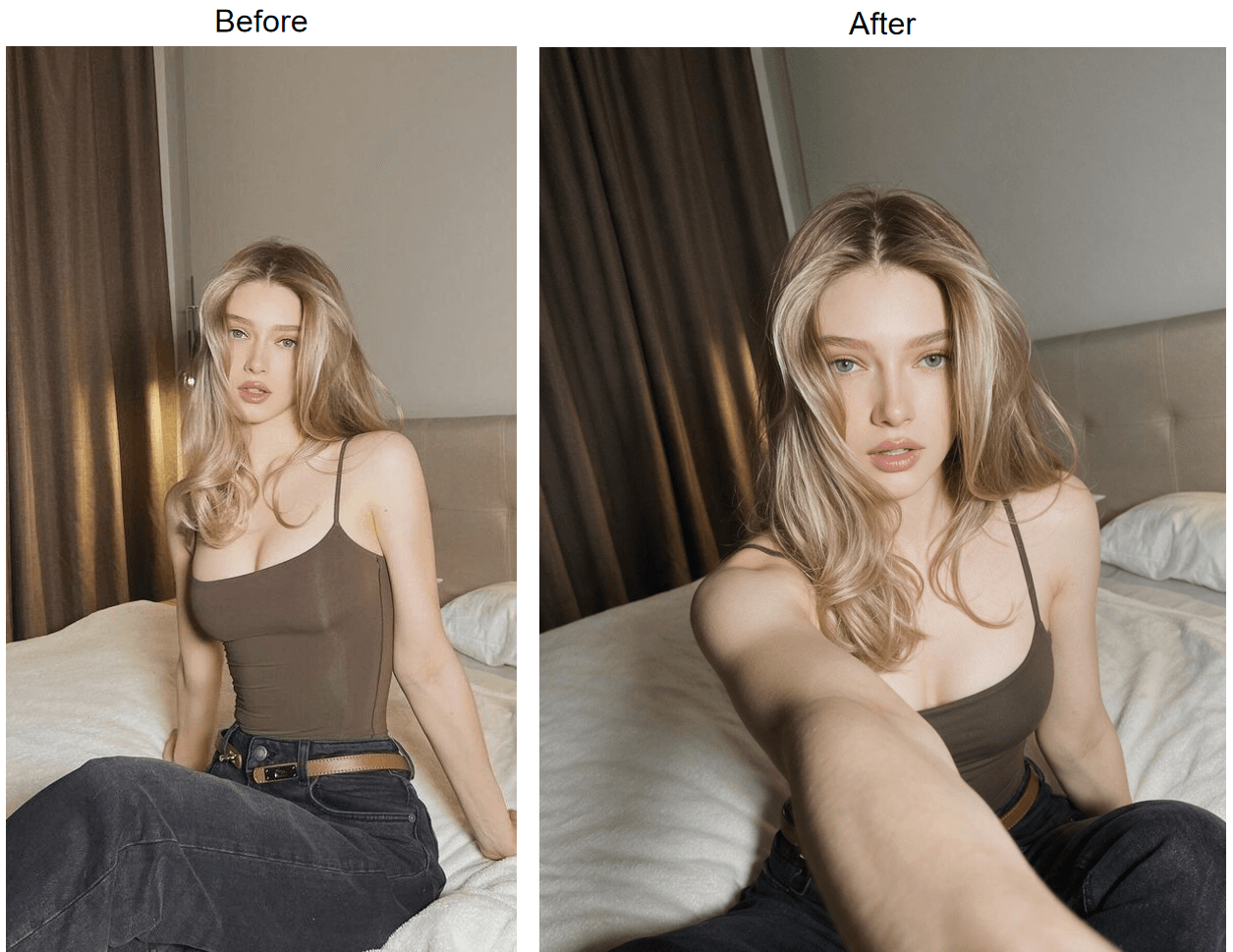
Left: input photo. Right: Atlas Cloud AI selfie generator output, run by the Atlas Cloud editorial team on September 3, 2026.
Look at the pair closely. The reframing is a re-render, not a crop: the arm, the tilt and the framing are new. The face, the hair, the clothing and the background carry over.
Because the whole frame is rebuilt from your one photo, the input still matters. The page's own tips: light your face with daylight or a bright lamp, pick a shot where both eyes and your whole face are visible, and start from a sharp file.
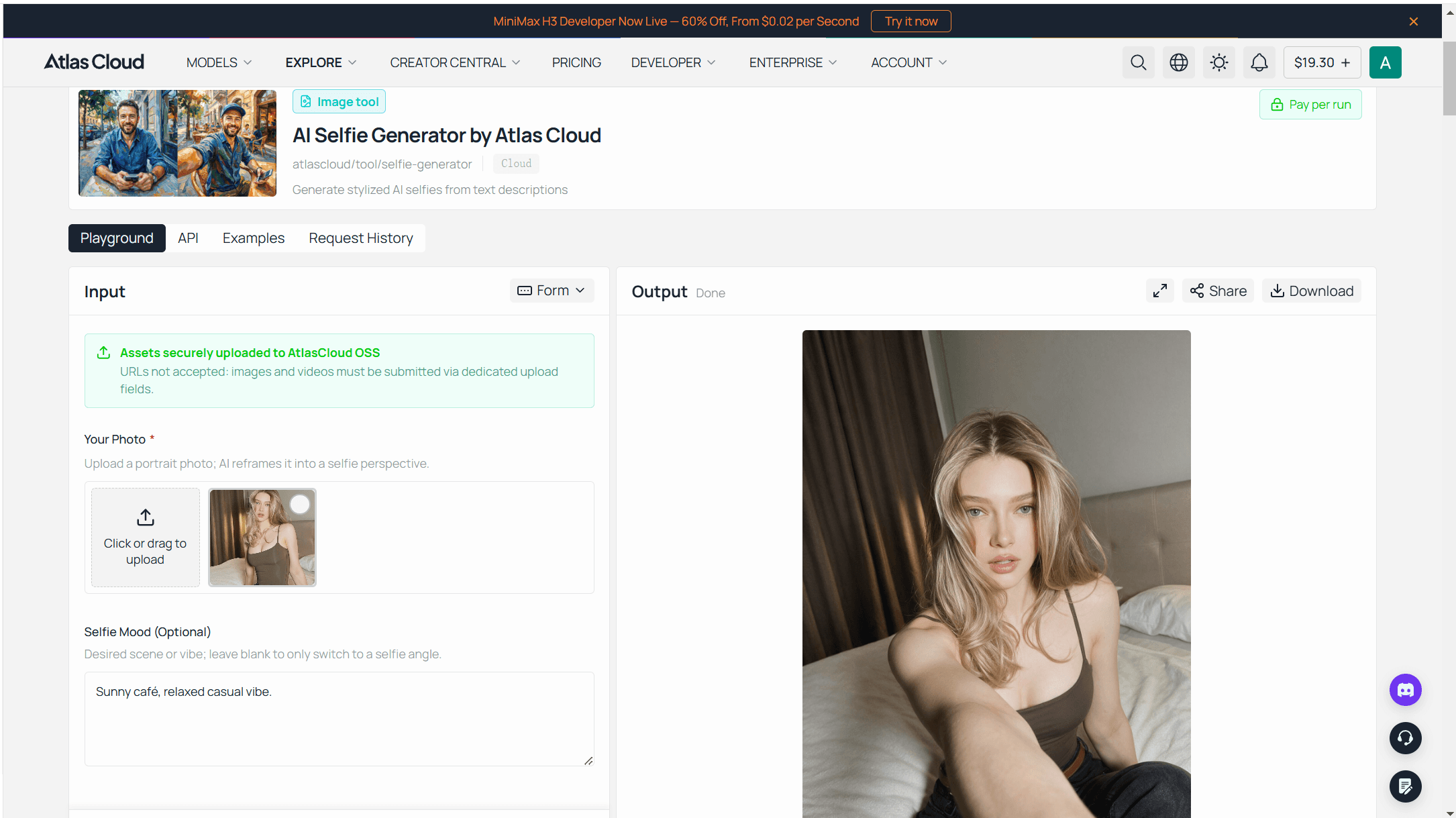
The tool sits in the free AI tools family on Atlas Cloud, listed there among the tools that give each eligible user one free trial. Running it takes three steps on the free AI selfie generator page:
- Sign in with Google, GitHub or email, then drop a portrait of up to 10MB into the uploader.
- Type a few words into the optional mood field, such as golden hour rooftop, or leave it blank. An empty field keeps your original setting and changes only the camera angle.
- Hit Run Free, wait about 30 seconds, and download a 1328 x 1776 portrait. The page's words on the file: "What you saw before downloading is exactly what you keep."
2. PixelPanda: Best AI Selfie Generator for Dating Profile Scenes
PixelPanda's pitch is scene presets, and the list reads like a dating profile checklist: Dating Profile, Coffee Shop, Golden Hour, Beach Vibes, Night Out, Cozy at Home, 14 in all. Under the hood the page names Flux Kontext, an image-to-image model, and promises a 3:4 portrait in 15 to 30 seconds. We fed it the sample portrait published on Atlas Cloud's tool page and picked Dating Profile.
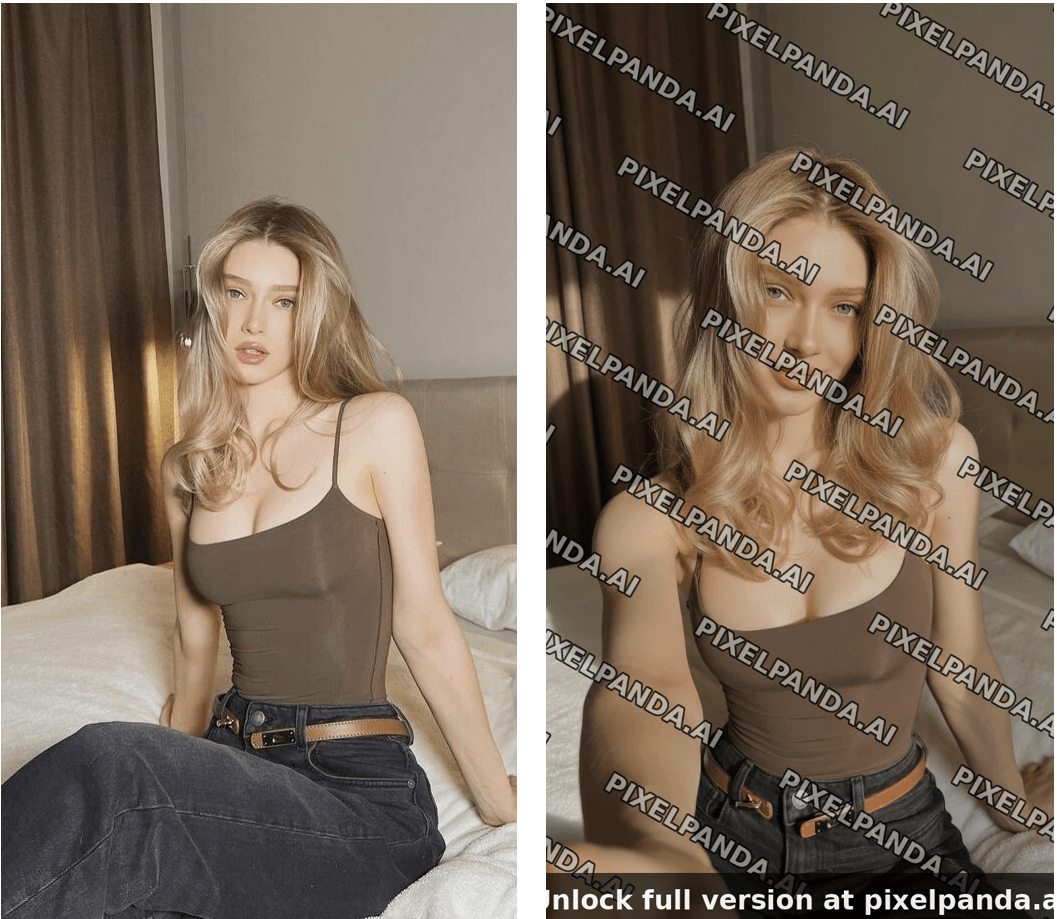
Left: input photo, the sample portrait from Atlas Cloud's tool page. Right: PixelPanda anonymous free output, run by the Atlas Cloud editorial team on September 3, 2026.
The scene work is competent. Warm café bokeh, evening light, a plausible off-shoulder top instead of the black dress. Then the free tier gets in the way. The FAQ reads, verbatim: "Totally free. 3 generations per day, no account needed, no credit card, no watermarks. The images are full resolution and yours to use however you want."
Our anonymous result arrived as a 1248 x 832 PNG covered in a diagonal tiled PIXELPANDA.AI watermark, with a footer bar reading "Unlock full version at pixelpanda.ai". The Download link pointed at a file inside a storage folder named watermarked-results, and the widget beside it said "Sign up free to download without the watermark.
The FAQ's sentence is really two offers stapled together. Without an account, on September 3, 2026, we got one generation a day and it carried the watermark. After a team member created a free account the same day, the counter showed three generations a day and the download came back clean. So the no-account tier is a preview of how you would look in each scene; the three clean files a day exist, behind the sign-up the FAQ says you do not need.
3. Magic Hour: Best Free AI Selfie Generator for Stylized Avatars Without an Account
Magic Hour is the tool to open when you want to try the idea before giving anyone an email address. Its FAQ promises "3 free selfies per day" with "no account needed", and a counter reading "3 images left today" sits above the uploader for anonymous visitors. We checked both claims by using one.
The run went like this. We dropped a 225 x 300 portrait, one of the example photos from Magic Hour's own page, into the uploader. Generation started on its own, with no button press, using the preset the widget had loaded by default: Studio Ghibli. The page promised about 15 seconds. Ours took closer to a minute in the free queue, then the counter dropped to 2.
The output was a 432 x 576 PNG, an anime rendering of the same pose, necklace and hoop earrings against a lantern-lit market. There was no watermark anywhere on the file, which matches the FAQ line: "No watermark on AI selfie generator photos for all users, including free users with no sign up."
| What we checked | Magic Hour free run, September 3, 2026 |
|---|---|
| Sign-in | None asked for |
| Counter | 3 images left today, then 2 |
| Preset | Studio Ghibli, loaded by default, ran on upload |
| Output | 432 x 576 PNG from a 225 x 300 input |
| Watermark | None on the downloaded file |
| Licence on free | "personal projects and non-commercial purposes" |
| Retention | Privacy panel says 1 day, FAQ says deleted within 7 days |
Two things hold it at third place, and both are in the table. The licence line means a free result is for personal use only; commercial rights come with a paid plan.
And the default result is a cartoon. The page lists professional styles alongside anime and marble, but the run starts the moment the upload lands, so switch the preset before you drop the photo or you will spend one of your three on Ghibli. Its own framing is stylized avatars, which is a different product from a selfie that could pass as a photo.
4. VAKPixel: Best AI Selfie Generator for Picking the Vibe
VAKPixel is sorts its presets by feeling rather than place rather than a scene. You upload one photo, click through four preset groups and an optional custom note, and the page states the result is "Powered by Nano Banana AI" using "the latest Gemini-powered models". The four groups on the page:
- Daily Life: Morning coffee vibe, Gym progress selfie, Late night thoughts, Rainy mood, Weekend chill, Travel day
- Mood: Sad, Confident, Romantic, Lonely, Happy
- Style: Cinematic, Soft aesthetic, Dark & moody, Golden hour, Vintage film
- Lighting: Natural light, Warm indoor, Neon glow, Blue hour, Dramatic
The interesting part is on the page itself: VAKPixel prints the instruction block it sends with every run.
It reads like a checklist for this whole article: "Generate a selfie of attached person", "100% character consistency", "No facial distortion. No change in features.", "no third person camera", and a licence to change "the background, environment, props, cloths, accessories, makeup, pose, hairstyle, lighting". That is the one-photo reframer recipe, written down.
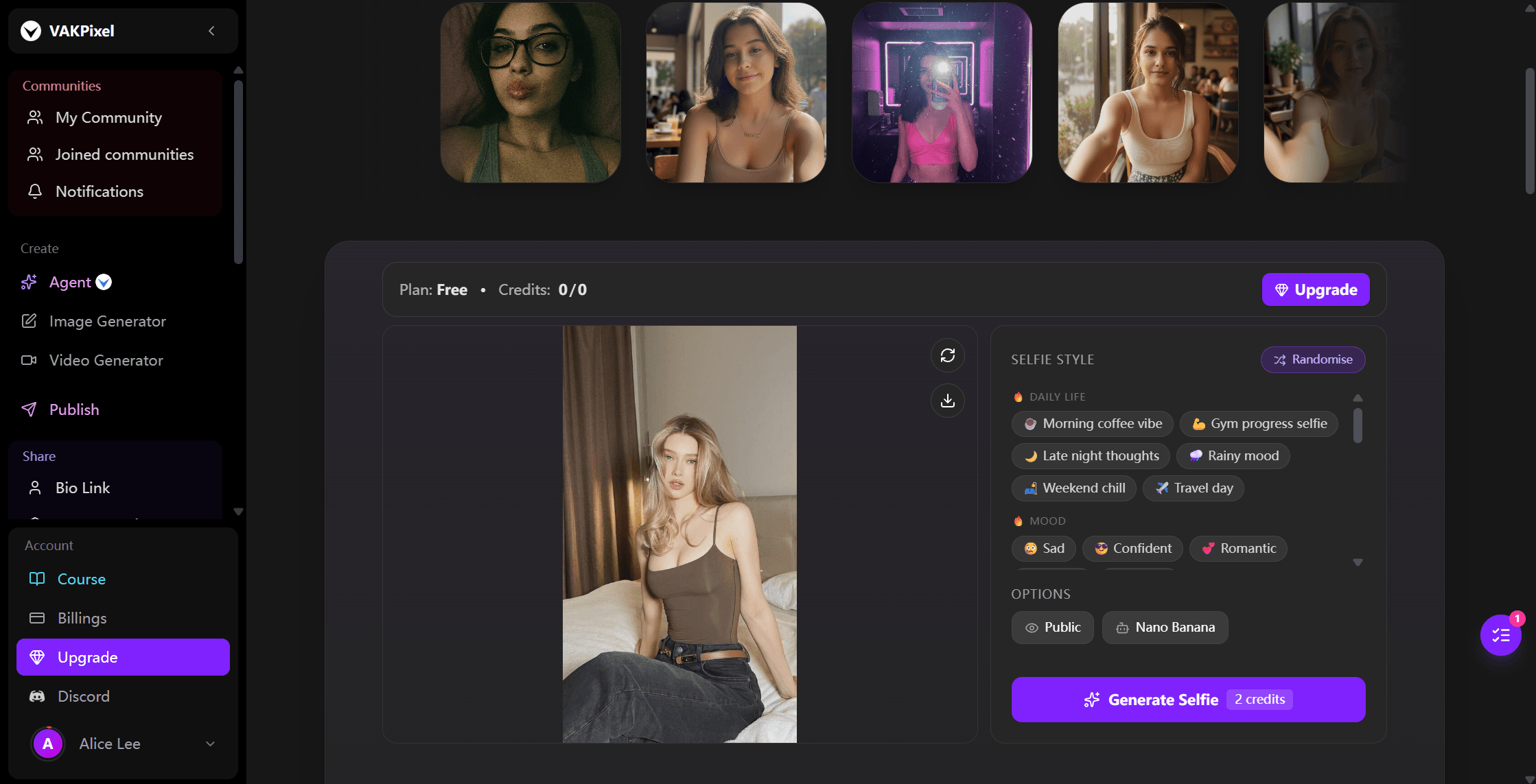
The free tier is real but conditional. The FAQ says you "can start for free by watching ads to earn credits" and that "Each selfie generation costs 2–4 credits depending on the model you choose"; the button on the page read 2 credits when we looked.
You can browse the presets without an account, but "You'll only need to log in when you want to upload a photo or generate a selfie", so a run always needs a sign-in. The sign-up form then asks for more than an email: a required Social Media field reads "Add at least one social media handle so we can verify your presence", with slots for X, Instagram, YouTube, TikTok or a website, and it will not continue until one is filled.
Downloads come as PNG, JPG or WebP. Watermark and output size are not stated on the tool page.
One FAQ line deserves a slow read before you upload: "By default, generated images are public." The Private toggle that keeps a selfie out of the public gallery is listed under the Pro, Ultimate and Creator plans. For a dating-profile selfie, that is the first setting to check, not the mood.
Where VAKPixel fits: you know the feeling you want the selfie to carry and would rather click Rainy mood than write a prompt. Where it does not: you want a free run without handing over an account and a social handle, or you want the result kept private without paying.
Four More AI Selfie Generators Worth Knowing
These four either turn you into artwork, need a stack of photos before they produce anything, or would not let us in on test day. Each has a clear use; none is a one-photo realistic selfie tool we could verify end to end.
| Tool | What the vendor page says about the free step | What paying unlocks | Fits |
|---|---|---|---|
| Fotor | "Limited Free credits" with "Watermarked JPG, PNG & PDF Exports" | "HD & Transparent PNG, Watermark-Free" exports, 1200 to 12000 credits a year by tier | Anime, Disney, game art or oil-painting versions of you |
| LightX | "5 daily free AI credits", "Generate up to 5 images daily"; watermark on free not stated | Pro: "No watermark on projects", 1000 AI credits a month | Browsing "1000+ Stylish Presets" plus a text prompt |
| Remini AI Photos | "Choose 8-12 images to teach the AI what you look like", a few minutes to train | Weekly and monthly in-app purchases; no price on the web page | A batch of studio-style portraits from a phone |
| PhotoAI | Trains "in about a minute" from 5 to 15 photos, 20 recommended; refunds only before a model is created | Paid plans with photo allowances per model; prices on its pricing page | Volume shoots from one trained model |
Fotor is the art-style entry. Its page asks you to "upload your portraits or selfies" and renders them as "anime, Disney character, game art, illustration, and oil painting"; its pricing table keeps watermark-free exports for paid plans. It is try-before-you-buy for an illustrated profile picture, and nothing it makes will read as a photo to a dating app.
LightX publishes the most generous daily count on this list and pairs its presets with a free text field, which is why it was in our top four on paper. On September 3, 2026, neither login nor upload went through for us after repeated attempts, so we could not see what a free export looks like and moved it here.
Remini and PhotoAI are the trained-model pair. Remini's page promises "dozens of stunning photos of yourself in different poses and angles" once you feed it 8 to 12 images; PhotoAI wants 5 to 15, recommends 20, and refunds only before a model exists. Both suit someone replacing a whole grid at once, and both overshoot someone who wants one selfie of tonight.
Best Free AI Selfie Generators: The Fine Print Behind Every Free Tier
The sections above answer whether each tool can make a selfie. This one answers whether the free selfie is usable. Five questions decide it, and the matrix below scores six tools on all five. Remini and PhotoAI sit out because neither publishes a free tier for photo generation.
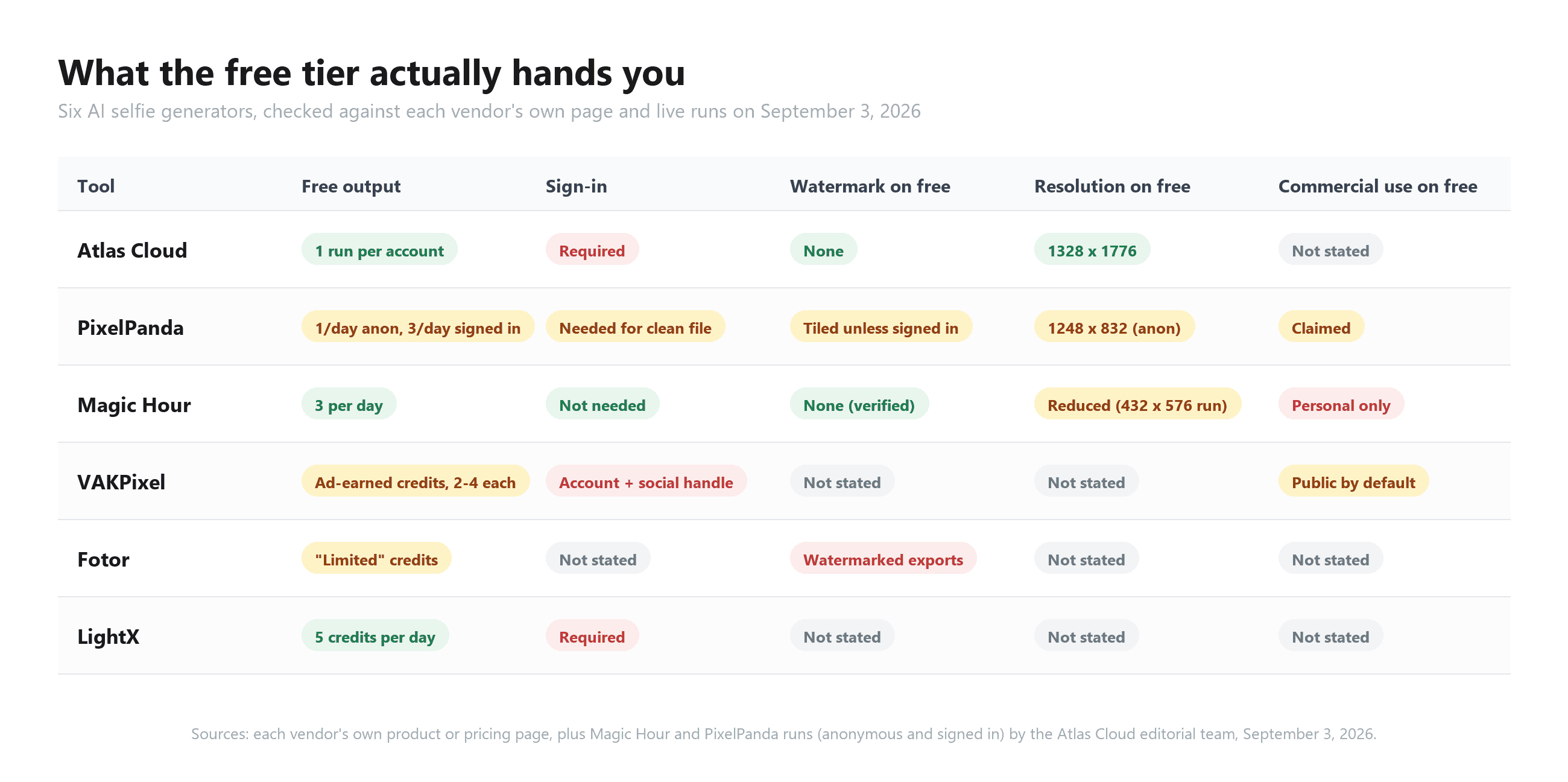
How to read it. A published count is a claim until the counter agrees. Of the four tools that print a daily or per-account number, Magic Hour's matched what we saw live with no account, and PixelPanda's three a day only appeared after a free sign-up. A "no watermark" line is a claim until the download link agrees; Magic Hour's held for anonymous users, PixelPanda's held only for signed-in ones.
Resolution and licence are where the grey cells pile up. Two vendors publish an output size for the free tier and the rest say nothing. Two vendors address the licence on free outputs, in opposite directions: Magic Hour restricts it to personal use, and PixelPanda grants full rights in one FAQ answer, then stamps the anonymous file in the next screen. The other four say nothing. VAKPixel adds a column of its own: free outputs land in a public gallery by default, and the Private toggle is a paid feature.
Retention is the quietest column. Magic Hour publishes two different numbers on one page. Atlas Cloud says results are filed in your request history. The others do not address it. If a free selfie is going anywhere public, the tools with the fewest grey cells are the safe picks, whatever their counters say.
Will a Selfie AI Generator Pass Tinder Face Check?
The reason most people want a realistic selfie is a dating profile, so the last question is whether the apps will accept one. Neither Tinder's nor Hinge's written rules ban AI-made photos outright. Both ban not looking like you, and Tinder now checks that with a camera.
Tinder's Community Guidelines put it plainly under a rule titled "Just be you": "Don't create a fake account or pretend to be someone you're not, even if it's just for fun." Enforcement moved from words to cameras in 2025.
Tinder's October 22 announcement states that "Face Check is now required for all new users in seven countries and the state of California". New members "complete Face Check by taking a short video selfie within the app" so the system can confirm "that their face matches the one shown in their profile photos."
Tinder's own Face Check FAQ describes the mechanism: your facial geometry becomes a "FaceMap", and the check asks "whether the person in your video selfie appears to be the same person as in your profile photos."
Hinge's Prohibited Content page lists two relevant lines: users may not "Misrepresent themselves by posting someone else's photo or likeness" and may not "Use fake identities or AI-generated content to mislead others." The operative words are mislead and likeness.
Hinge's AI dating guide, published March 5, 2026, goes further than the rules: "But skip the AI-generated profile photos. 88% of Hinge daters are uncomfortable with them." The figure comes from Hinge's Gen Z D.A.T.E. report; the guide does not publish the sample or method.
| Platform | Written rule | How it is enforced | Source date |
|---|---|---|---|
| Tinder | "Don't create a fake account or pretend to be someone you're not" | Face Check: live video selfie matched against profile photos, required for new users in seven countries and California | October 22, 2025 |
| Hinge | No "AI-generated content to mislead others"; no posting "someone else's photo or likeness" | In-app reports; official guidance to skip AI profile photos | March 5, 2026 |
Map that onto the three mechanisms. A one-photo reframer that keeps your face produces a photo of you at a new angle, which is the lowest-risk case under both rulebooks. A style filter produces an obvious cartoon, which no verification will match and no dater will mistake for a photo; use it on Discord, not on a verified profile.
A trained model is the middle case: a good one produces you, a flattering one produces a version of you that a video selfie will not match. Whatever you generate, put at least one unedited photo in the same profile and let the AI shot be the extra angle.
Frequently Asked Questions
What is the best selfie AI generator in 2026?
For a realistic selfie from one photo, Atlas Cloud's free AI selfie generator, because it rebuilds the camera angle while carrying your face and hair across, outputs at 1328 x 1776, and stamps nothing on the download. For scene presets aimed at dating profiles, PixelPanda, with the caveat that the no-account file is watermarked and the clean three-a-day tier needs a free sign-up. For a free stylized avatar with no account at all, Magic Hour.
Is there a best free AI selfie generator with no watermark?
Two tested clean on September 3, 2026: Magic Hour's free download had no watermark, and Atlas Cloud's tool page states the free file has nothing stamped on it. PixelPanda's page says no account and no watermarks, but its no-account result arrived tiled with the brand name and a sign-up prompt; a free account gets three clean generations a day. Fotor's pricing table lists watermarked exports on the free plan.
How many photos does an AI selfie generator need?
It depends on the mechanism. One-photo reframers and style filters (Atlas Cloud, PixelPanda, Magic Hour, VAKPixel, Fotor, LightX) need a single portrait; Atlas Cloud's guidance is a well-lit shot with your full face showing. Trained models need a set: Remini asks for 8 to 12 images, PhotoAI for 5 to 15 with 20 recommended.
If you want a professional headshot rather than a selfie, the free headshot generators ranking covers that separate category.
Can I use an AI selfie generator photo on Tinder or Hinge?
Yes, as long as it looks like you. Tinder requires new users in several regions to pass Face Check, a video selfie matched against profile photos. Hinge prohibits AI content used to mislead and advises daters to skip AI profile photos altogether. A one-photo reframe of your own face is the safest kind; a stylized or heavily beautified image is the kind that fails a match.
How much does an AI selfie cost after the free run?
Atlas Cloud shows the metered price of a run beside the Run button in its playground before you commit, so you see the figure before spending anything past the free generation. PixelPanda's page lists paid credits from $7.99 a week for 280 credits at one credit per generation.
VAKPixel's plans start at $19 a month for 500 credits, with each selfie costing 2 to 4 credits, and free credits come from watching ads. Remini's App Store listing shows in-app purchases from $4.99 to $9.99 a week and $9.99 a month, with no price on its web page. Magic Hour, Fotor and LightX sell paid tiers whose per-selfie cost is not published on their tool pages.
Conclusion
Eight tools, three mechanisms, one question that settles the ranking: after the generation, is the person in the frame still you? One-photo reframers answer it best when the goal is a realistic selfie, style filters answer it honestly by not pretending to be photos, and trained models only when you feed them enough good photos. The free tiers separate on paperwork rather than pixels, and a vendor's promise is worth exactly what its download link delivers.
Start with the photo you already like and one tool that changes the camera instead of your face. If the result reads as you at arm's length, you have found your best selfie AI generator, and the dating-app rules, the resolution question and the watermark question all answer themselves.### 사용자가 업로드한 콘텐츠를 번역합니다.
당신이 실제로 마음에 들어 하는 자신의 사진은 다른 사람이 찍은 것이다. 당신은 3/4 각도로 몸을 돌린 채 웃음이 터진 순간이고, 셀카처럼 보인다면 완벽한 프로필 사진이 될 것이다. 그 간극이 바로 최고의 AI 셀카 생성기 검색의 진짜 의미다. 즉, 좋은 사진 한 장을 찍지 못한 장면으로 바꾸되, 그 과정에서 당신의 얼굴을 잃지 않는 것이다.
우리는 단일 초상화에 대해 8가지 도구가 무엇을 하는지 평가하고, 모든 무료 티어를 공급업체 자체 페이지와 대조했으며, 2026년 9월 3일에 계정 유무에 따라 그중 2가지를 직접 실행했다. 한 도구의 "계정 불필요, 워터마크 없음" 약속은 사실 두 가지로 분리된 제안이었다. 계정이 없으면 하루에 워터마크가 있는 파일을 하나만 받을 수 있다. 다음은 평가 방법부터 시작한 우리의 조사 결과다.
핵심 요약
- 셀카 AI 생성기는 세 가지 메커니즘으로 나뉜다. 한 장의 사진을 다시 구성하는 리프레이머, 여러 장의 사진으로 학습하는 모델, 스타일 필터. 업로드할 수 있는 것에 따라 선택하라.
- __Atlas Cloud 무료 AI 셀카 생성기는 초상화 한 장을 팔을 뻗은 휴대폰 셀카로 재구성하며 얼굴, 헤어스타일, 주근깨를 그대로 유지한다. 로그인 후 첫 실행은 무료다.
- "무료"는 워터마크 없는 일일 허용량부터 워터마크 또는 저해상도 미리보기까지 다양하다. 업로드 전에 내보내기 조건을 읽고, 실행 후 카운터를 확인하라.
- 틴더와 힌지는 AI 셀카 자체를 금지하지 않는다. 당신처럼 보이지 않는 사진을 금지하며, 틴더의 Face Check는 라이브 영상 셀카를 프로필 사진과 비교한다.
- 스타일화된 결과물(애니메이션, 디즈니, 페인팅)은 피드와 게임 아바타용이지, 검증이 필요한 곳에는 적합하지 않다.
최고의 AI 셀카 생성기를 평가한 방법
셀카 생성기의 임무는 하나다. 당신의 사진을 만드는 것. 그래서 첫 번째 필터는 의도였다. 프롬프트에서 낯선 사람을 그려내는 텍스트-이미지 도구는 제외했다.
배경을 회색 스튜디오로 바꾸는 헤드샷 도구도 제외했다. 그것은 다른 검색이고 다른 결과를 만들기 때문이다(셀카에서 헤드샷으로 분석에서 다룬다).
남은 도구들은 세 가지 메커니즘으로 나뉜다. 한 장의 사진 리프레이머는 단일 초상화를 가져와 새로운 각도나 새로운 장면으로 다시 렌더링한다. 여러 장의 사진 학습 모델은 5~20장의 셀카를 요구하고, 얼굴의 개인 모델을 구축한 다음 수십 장의 사진을 생성한다. 스타일 필터는 포즈를 유지하고 매체만 바꾼다. 애니메이션, 수채화, 대리석 흉상 등. 메커니즘은 무엇을 업로드할지, 얼마나 기다릴지, 얼굴이 얼마나 보존될지를 결정한다.
각 도구에 대해 무료 티어, 로그인 요구 사항, 워터마크 정책, 라이선스를 공급업체의 제품 또는 가격 페이지에서 확인했다. 8개 중 2개 도구가 계정 없이 실행을 광고하므로, 이 두 가지를 2026년 9월 3일에 익명으로, 그리고 무료 계정으로 직접 실행했다. 팀 구성원이 등장하지 않는 초상화를 사용했다. Atlas Cloud 실행은 팀이 제공한 초상화로 우리가 직접 진행한 것이다.
| 도구 | 입력 메커니즘 | 출력 스타일 | 가장 적합한 용도 |
|---|---|---|---|
| Atlas Cloud | 사진 1장, 선택적 장면 설명 | 사실적인 휴대폰 셀카 | 여전히 나인 사실적인 셀카 |
| PixelPanda | 사진 1장, 14가지 장면 프리셋 | 사실적인 장면 교체 | 데이팅 및 라이프스타일 장면 |
| Magic Hour | 사진 1장, 프리셋 선택기 | 스타일화(애니메이션, 대리석, 만화) | 계정 없는 무료 아바타 |
| VAKPixel | 사진 1장, 4가지 프리셋 그룹 + 메모 | 사실적인 분위기 및 조명 셀카 | 4번의 클릭으로 셀카 분위기 선택 |
| Fotor | 사진 1장, 아트 스타일 | 애니메이션, 디즈니, 유화 | 아트 스타일 프로필 사진 |
| LightX | 사진 1장, 프리셋 또는 텍스트 프롬프트 | 스타일화 및 사실적 프리셋 | 방대한 프리셋 라이브러리 탐색 |
| Remini AI Photos | 셀카 8~12장, 학습 | 사실적인 초상화 세트 | 휴대폰 사진으로 스튜디오 스타일 사진 묶음 |
| PhotoAI | 사진 5~20장, 학습 | 사실적인 세트 | 학습된 모델로 대량 촬영 |
1. Atlas Cloud: 한 장의 사진으로 사실적인 셀카를 만드는 최고의 AI 셀카 생성기
이 목록의 대부분 도구는 당신 주변의 세상을 바꾼다. Atlas Cloud 셀카 생성기는 카메라를 바꾼다.
다른 사람이 찍은 사진을 업로드하면, 팔을 뻗은 셀카로 돌아온다. 당신의 포즈가 앞으로 든 휴대폰의 기울임과 뻗음으로 재구성되고, 얼굴과 머리카락은 그대로 유지된다. 도구 페이지에서는 "주근깨까지 그대로"라고 표현한다. 다음은 다른 사람이 찍은 초상화에 한 번 실행한 결과다.
왼쪽: 입력 사진. 오른쪽: Atlas Cloud AI 셀카 생성기 출력, 2026년 9월 3일 Atlas Cloud 편집팀 실행.
두 사진을 자세히 보라. 다시 구성은 자르기가 아니라 재렌더링이다. 팔, 기울임, 프레임이 새롭다. 얼굴, 머리카락, 옷, 배경은 그대로 유지된다.
전체 프레임이 한 장의 사진에서 재구성되므로 입력이 여전히 중요하다. 페이지의 자체 팁: 낮이나 밝은 램프로 얼굴에 조명을 비추고, 두 눈과 얼굴 전체가 보이는 사진을 고르고, 선명한 파일에서 시작하라.
이 도구는 Atlas Cloud의 무료 AI 도구 제품군에 속하며, 자격을 갖춘 각 사용자에게 1회 무료 체험을 제공하는 도구들 사이에 있다. 무료 AI 셀카 생성기 페이지에서 실행하는 데는 세 단계가 필요하다:
- Google, GitHub 또는 이메일로 로그인한 다음 최대 10MB의 초상화를 업로더에 넣는다.
- 선택적 분위기 필드에 golden hour rooftop 같은 몇 마디를 입력하거나 비워 둔다. 빈 필드는 원래 설정을 유지하고 카메라 각도만 바꾼다.
- Run Free를 누르고 약 30초를 기다린 다음 1328 x 1776 초상화를 다운로드한다. 파일에 관한 페이지의 설명: "다운로드 전에 본 것이 곧 당신이 갖는 것이다."
2. PixelPanda: 데이팅 프로필 장면을 위한 최고의 AI 셀카 생성기
PixelPanda의 핵심은 장면 프리셋이며, 그 목록은 데이팅 프로필 체크리스트처럼 읽힌다. Dating Profile, Coffee Shop, Golden Hour, Beach Vibes, Night Out, Cozy at Home, 총 14가지다. 내부적으로 페이지는 이미지-이미지 모델인 Flux Kontext를 언급하며 15~30초 안에 3:4 초상화를 제공하겠다고 약속한다. 우리는 Atlas Cloud 도구 페이지에 게시된 샘플 초상화를 입력하고 Dating Profile을 선택했다.
왼쪽: 입력 사진, Atlas Cloud 도구 페이지의 샘플 초상화. 오른쪽: PixelPanda 익명 무료 출력, 2026년 9월 3일 Atlas Cloud 편집팀 실행.
장면 처리는 수준급이다. 따뜻한 카페 보케, 저녁 빛, 검은 드레스 대신 그럴듯한 오프숄더 탑. 그런데 무료 티어가 발목을 잡는다. FAQ에는 말 그대로 이렇게 적혀 있다: "완전 무료. 하루 3회 생성, 계정 불필요, 신용카드 불필요, 워터마크 없음. 이미지는 전체 해상도이며 원하는 대로 사용할 수 있다."
우리의 익명 결과는 대각선 타일 형태의 PIXELPANDA.AI 워터마크로 덮인 1248 x 832 PNG로 도착했고, 하단 바에는 "pixelpanda.ai에서 전체 버전 잠금 해제"라고 적혀 있었다. 다운로드 링크는 watermarked-results라는 스토리지 폴더 안의 파일을 가리켰고, 옆의 위젯에는 "워터마크 없이 다운로드하려면 무료로 가입하세요"라고 표시되었다.
FAQ의 문장은 실제로 두 개의 제안을 겹쳐 놓은 것이다. 2026년 9월 3일, 계정 없이는 하루에 1회 생성만 가능했고 워터마크가 포함되었다. 팀원이 같은 날 무료 계정을 만든 후에는 카운터에 하루 3회 생성이 표시되었고 다운로드는 깨끗하게 나왔다. 따라서 계정 없는 티어는 각 장면에서 당신이 어떻게 보일지 미리보는 용도다. 하루 3개의 워터마크 없는 파일은 FAQ가 필요 없다고 말하는 가입 뒤에 존재한다.
3. Magic Hour: 계정 없이 스타일화된 아바타를 위한 최고의 무료 AI 셀카 생성기
Magic Hour는 이메일 주소를 누구에게도 제공하기 전에 아이디어를 먼저 시도해보고 싶을 때 여는 도구다. FAQ는 "계정 불필요"와 함께 "하루 3장 무료 셀카"를 약속하며, 익명 방문자에게 업로더 위에 "오늘 3장 남음"이라는 카운터가 표시된다. 우리는 직접 사용해 두 주장을 모두 확인했다.
실행 과정은 이러했다. Magic Hour 자체 페이지의 예시 사진 중 하나인 225 x 300 초상화를 업로더에 넣었다. 버튼을 누르지 않아도 위젯이 기본으로 로드한 프리셋인 Studio Ghibli로 생성이 자동 시작되었다. 페이지는 약 15초를 약속했다. 우리는 무료 대기열에서 1분 가까이 걸렸고, 카운터는 2로 떨어졌다.
출력은 432 x 576 PNG로, 등불이 켜진 시장을 배경으로 같은 포즈, 목걸이, 후프 귀걸이를 한 애니메이션 렌더링이었다. 파일 어디에도 워터마크가 없었으며, 이는 FAQ의 "가입 없는 무료 사용자를 포함한 모든 사용자에게 AI 셀카 생성기 사진에 워터마크가 없습니다"라는 문구와 일치한다.
| 확인 항목 | Magic Hour 무료 실행, 2026년 9월 3일 |
|---|---|
| 로그인 | 요구되지 않음 |
| 카운터 | 오늘 3장 남음, 이후 2장 |
| 프리셋 | Studio Ghibli, 기본 로드, 업로드 시 실행 |
| 출력 | 225 x 300 입력에서 432 x 576 PNG |
| 워터마크 | 다운로드한 파일에 없음 |
| 무료 라이선스 | "개인 프로젝트 및 비상업적 용도" |
| 보관 기간 | 개인정보 패널은 1일, FAQ는 7일 이내 삭제라고 표시 |
두 가지가 이 도구를 3위에 머물게 하며, 둘 다 표에 있다. 라이선스 조항은 무료 결과물이 개인 용도로만 사용 가능함을 의미하며, 상업적 권리는 유료 플랜에 포함된다.
그리고 기본 결과물은 만화다. 페이지는 애니메이션과 대리석 옆에 전문가용 스타일도 나열하지만, 업로드가 들어가는 순간 실행이 시작되므로 사진을 넣기 전에 프리셋을 바꾸지 않으면 3장 중 1장을 Ghibli에 쓰게 된다. 도구 자체의 포지셔닝은 스타일화된 아바타이며, 이는 사진으로 통할 수 있는 셀카와는 다른 제품이다.
4. VAKPixel: 분위기를 고르기 위한 최고의 AI 셀카 생성기
VAKPixel은 프리셋을 장소나 장면이 아닌 느낌별로 분류한다. 사진 한 장을 업로드하고, 4개의 프리셋 그룹과 선택적 사용자 메모를 클릭한다. 페이지는 결과물이 "최신 Gemini 기반 모델"을 사용하는 "Nano Banana AI 기반"이라고 밝힌다. 페이지의 4개 그룹:
- Daily Life: Morning coffee vibe, Gym progress selfie, Late night thoughts, Rainy mood, Weekend chill, Travel day
- Mood: Sad, Confident, Romantic, Lonely, Happy
- Style: Cinematic, Soft aesthetic, Dark & moody, Golden hour, Vintage film
- Lighting: Natural light, Warm indoor, Neon glow, Blue hour, Dramatic
흥미로운 부분은 페이지 자체에 있다. VAKPixel은 모든 실행과 함께 전송하는 지시 블록을 인쇄해 놓았다.
이 글 전체의 체크리스트처럼 읽힌다. "첨부된 사람의 셀카 생성", "100% 캐릭터 일관성", "얼굴 왜곡 없음. 특징 변화 없음.", "3인칭 카메라 없음", 그리고 "배경, 환경, 소품, 옷, 액세서리, 메이크업, 포즈, 헤어스타일, 조명"을 바꿀 수 있는 라이선스. 이것이 한 장의 사진 리프레이머 공식이 문서로 적힌 것이다.
무료 티어는 실재하지만 조건부다. FAQ는 "광고를 시청하여 크레딧을 적립해 무료로 시작할 수 있다"고 말하며 "각 셀카 생성은 선택한 모델에 따라 2~4크레딧이 소요된다"고 한다. 우리가 확인했을 때 페이지의 버튼은 2크레딧으로 표시되었다.
계정 없이 프리셋을 탐색할 수 있지만, "사진을 업로드하거나 셀카를 생성할 때만 로그인하면 된다"고 하므로 실행에는 항상 로그인이 필요하다. 가입 양식은 이메일 이상을 요구한다. 필수 Social Media 필드에는 "귀하의 존재를 확인할 수 있도록 소셜 미디어 핸들을 하나 이상 추가하세요"라고 적혀 있으며 X, Instagram, YouTube, TikTok 또는 웹사이트를 위한 입력란이 있고, 하나를 채울 때까지 진행되지 않는다.
다운로드는 PNG, JPG 또는 WebP로 제공된다. 워터마크와 출력 크기는 도구 페이지에 명시되어 있지 않다.
FAQ의 한 줄은 업로드 전에 천천히 읽을 가치가 있다. "기본적으로 생성된 이미지는 공개입니다." 셀카를 공개 갤러리에서 제외하는 Private 토글은 Pro, Ultimate, Creator 플랜에 나열되어 있다. 데이팅 프로필 셀카의 경우, 이것이 분위기가 아닌 확인해야 할 첫 번째 설정이다.
VAKPixel이 맞는 경우: 셀카가 담아야 할 느낌을 알고 있고 프롬프트를 쓰는 대신 Rainy mood를 클릭하고 싶을 때. 맞지 않는 경우: 계정과 소셜 핸들을 넘기지 않고 무료 실행을 원하거나, 비용을 지불하지 않고 결과물을 비공개로 유지하려 할 때.
알아둘 만한 AI 셀카 생성기 4가지 더
이 네 가지는 당신을 예술 작품으로 바꾸거나, 무엇이든 생성하기 전에 사진 묶음이 필요하거나, 테스트 당일 우리를 들여보내지 않았다. 각각 명확한 용도가 있으며, 우리가 끝까지 검증할 수 있었던 한 장의 사진 기반 사실적 셀카 도구는 없다.
| 도구 | 공급업체 페이지가 무료 단계에 대해 말하는 내용 | 유료로 해제되는 것 | 적합한 경우 |
|---|---|---|---|
| Fotor | "제한된 무료 크레딧" 및 "워터마크 있는 JPG, PNG & PDF 내보내기" | 티어별 연간 1200~12000 크레딧, "HD & 투명 PNG, 워터마크 없는" 내보내기 | 애니메이션, 디즈니, 게임 아트 또는 유화로 그려진 나 |
| LightX | "일일 무료 AI 크레딧 5개", "하루 최대 5개 이미지 생성"; 무료 워터마크 여부 미표시 | Pro: "프로젝트 워터마크 없음", 월 1000 AI 크레딧 | "1000개 이상의 스타일리시한 프리셋" 및 텍스트 프롬프트 탐색 |
| Remini AI Photos | "AI가 당신의 모습을 학습하도록 8~12개 이미지 선택", 학습에 몇 분 소요 | 주간/월간 인앱 구매, 웹 페이지에 가격 없음 | 휴대폰 사진으로 스튜디오 스타일 초상화 묶음 |
| PhotoAI | 사진 5~15장(20장 권장)으로 "약 1분 만에" 학습, 모델 생성 전에만 환불 | 모델당 사진 허용량이 있는 유료 플랜, 가격은 가격 페이지에 있음 | 하나의 학습된 모델로 대량 촬영 |
Fotor는 아트 스타일 항목이다. 페이지는 "초상화나 셀카를 업로드"하라고 요청하며 이를 "애니메이션, 디즈니 캐릭터, 게임 아트, 일러스트레이션, 유화"로 렌더링한다. 가격표는 워터마크 없는 내보내기를 유료 플랜으로 유지한다. 일러스트 프로필 사진을 위한 구매 전 체험용이며, 데이팅 앱에서 이 결과물이 사진으로 읽히는 일은 없다.
LightX는 이 목록에서 가장 관대한 일일 횟수를 공개하고 프리셋과 무료 텍스트 필드를 함께 제공하므로, 서류상으로는 상위 4개에 들어 있었다. 그러나 2026년 9월 3일, 반복 시도 끝에도 로그인과 업로드가 모두 진행되지 않아 무료 내보내기가 어떤지 확인할 수 없었고, 이 도구를 여기로 옮겼다.
Remini와 PhotoAI는 학습 모델 쌍이다. Remini의 페이지는 812장의 이미지를 넣으면 "다양한 포즈와 각도의 수십 장의 놀라운 자신의 사진"을 약속한다. PhotoAI는 515장을 요구하고 20장을 권장하며, 모델이 존재하기 전에만 환불한다. 둘 다 전체 그리드를 한 번에 교체하려는 사람에게 맞고, 오늘 밤의 셀카 한 장만 필요한 사람에게는 과하다.
최고의 무료 AI 셀카 생성기: 모든 무료 티어 뒤의 세부 조항
위 섹션들은 각 도구가 셀카를 만들 수 있는지에 답한다. 이 섹션은 무료 셀카가 실제로 사용 가능한지에 답한다. 다섯 가지 질문이 이를 결정하며, 아래 매트릭스는 여섯 도구를 다섯 가지 기준으로 평가한다. Remini와 PhotoAI는 사진 생성에 대한 무료 티어를 공개하지 않으므로 제외된다.
읽는 방법. 공개된 횟수는 카운터가 일치할 때까지 하나의 주장일 뿐이다. 일일 또는 계정당 숫자를 명시한 네 도구 중 Magic Hour는 계정 없이 우리가 실제로 본 것과 일치했고, PixelPanda의 하루 3회는 무료 가입 후에만 나타났다. "워터마크 없음" 조항은 다운로드 링크가 일치할 때까지 하나의 주장일 뿐이다. Magic Hour는 익명 사용자에게 유지되었고, PixelPanda는 로그인 사용자에게만 유지되었다.
해상도와 라이선스는 회색 지대가 쌓이는 곳이다. 두 공급업체는 무료 티어의 출력 크기를 공개하고 나머지는 아무 말도 하지 않는다. 두 공급업체는 무료 출력물의 라이선스를 반대 방향으로 다룬다. Magic Hour는 개인 용도로 제한하고, PixelPanda는 한 FAQ 답변에서 전체 권리를 부여한 다음 다음 화면에서 익명 파일에 도장을 찍는다. 나머지 네 곳은 아무 말도 하지 않는다. VAKPixel은 자체 열을 추가한다. 무료 출력물은 기본적으로 공개 갤러리에 들어가며, Private 토글은 유료 기능이다.
보관 기간은 가장 조용한 열이다. Magic Hour는 한 페이지에 두 가지 다른 숫자를 게시한다. Atlas Cloud는 결과물이 요청 기록에 보관된다고 말한다. 나머지는 다루지 않는다. 무료 셀카가 공개적인 곳으로 갈 예정이라면, 회색 지대가 가장 적은 도구가 카운터가 무엇을 말하든 안전한 선택이다.
AI 셀카 생성기 사진이 틴더 Face Check를 통과할까?
대부분의 사람이 사실적인 셀카를 원하는 이유는 데이팅 프로필이므로, 마지막 질문은 앱이 이를 수락할지 여부다. 틴더와 힌지 모두 서면 규칙에서 AI 생성 사진을 outright 금지하지 않는다. 둘 다 당신처럼 보이지 않는 사진을 금지하며, 틴더는 이제 카메라로 이를 확인한다.
틴더의 커뮤니티 가이드라인은 "Just be you"라는 규칙 아래 이를 명확히 밝힌다. "재미로라도 가짜 계정을 만들거나 다른 사람인 척하지 마세요." 집행은 2025년에 말에서 카메라로 옮겨갔다.
틴더의 10월 22일 발표에 따르면 "Face Check는 이제 7개국과 캘리포니아 주의 모든 신규 사용자에게 필수"다. 신규 회원은 "앱 내에서 짧은 영상 셀카를 촬영하여 Face Check를 완료"하며, 시스템이 "그들의 얼굴이 프로필 사진에 표시된 얼굴과 일치하는지" 확인할 수 있다.
틴더 자체 Face Check FAQ는 메커니즘을 설명한다. 얼굴 기하학이 "FaceMap"이 되며, 확인은 "영상 셀카 속 인물이 프로필 사진 속 인물과 동일한 사람처럼 보이는지"를 묻는다.
힌지의 금지 콘텐츠 페이지에는 두 가지 관련 조항이 있다. 사용자는 "다른 사람의 사진이나 초상을 게시하여 자신을 잘못 표현"할 수 없으며 "다른 사람을 오도하기 위해 가짜 신원이나 AI 생성 콘텐츠를 사용"할 수 없다. 핵심 단어는 오도와 초상이다.
힌지의 AI 데이팅 가이드(2026년 3월 5일 게시)는 규칙보다 더 나아간다. "하지만 AI 생성 프로필 사진은 건너뛰세요. 힌지 데이팅 이용자의 88%가 불편해합니다." 이 수치는 힌지의 Gen Z D.A.T.E. 보고서에서 나온 것이며, 가이드는 표본이나 방법을 공개하지 않는다.
| 플랫폼 | 서면 규칙 | 집행 방식 | 출처 날짜 |
|---|---|---|---|
| Tinder | "가짜 계정을 만들거나 다른 사람인 척하지 마세요" | Face Check: 라이브 영상 셀카를 프로필 사진과 대조, 7개국과 캘리포니아 신규 사용자 필수 | 2025년 10월 22일 |
| Hinge | "다른 사람을 오도하는 AI 생성 콘텐츠" 금지, "다른 사람의 사진이나 초상 게시" 금지 | 인앱 신고, AI 프로필 사진을 건너뛰라는 공식 안내 | 2026년 3월 5일 |
이를 세 가지 메커니즘에 대입해 보라. 얼굴을 유지하는 한 장의 사진 리프레이머는 새로운 각도에서의 당신 사진을 만들며, 두 규칙 모두에서 가장 위험이 낮은 경우다. 스타일 필터는 명백한 만화를 만들며, 어떤 검증도 일치하지 않고 어떤 데이팅 사용자도 사진으로 착각하지 않는다. Discord에서는 써도 되고, 검증된 프로필에서는 쓰지 마라.
학습 모델은 중간 경우다. 좋은 모델은 당신을 만들고, 아첨하는 모델은 영상 셀카와 일치하지 않을 버전의 당신을 만든다. 무엇을 생성하든 같은 프로필에 편집되지 않은 사진을 최소 한 장 넣고, AI 사진은 추가 각도로 사용하라.
자주 묻는 질문
2026년 최고의 AI 셀카 생성기는 무엇인가요?
한 장의 사진으로 사실적인 셀카를 원한다면 Atlas Cloud의 무료 AI 셀카 생성기다. 카메라 각도를 재구성하면서 얼굴과 머리카락을 그대로 유지하고, 1328 x 1776으로 출력하며, 다운로드에 아무것도 새기지 않기 때문이다. 데이팅 프로필을 겨냥한 장면 프리셋을 원한다면 PixelPanda다. 단, 계정 없는 파일에는 워터마크가 있고 하루 3장의 깨끗한 티어는 무료 가입이 필요하다. 계정 전혀 없이 무료 스타일화 아바타를 원한다면 Magic Hour다.
워터마크 없는 최고의 무료 AI 셀카 생성기가 있나요?
2026년 9월 3일에 두 곳이 깨끗하게 테스트되었다. Magic Hour의 무료 다운로드에는 워터마크가 없었고, Atlas Cloud 도구 페이지는 무료 파일에 아무것도 새겨지지 않는다고 명시한다. PixelPanda의 페이지는 계정 없음과 워터마크 없음을 말하지만, 계정 없는 결과물은 브랜드 이름과 가입 안내가 타일 형태로 찍혀 나왔다. 무료 계정은 하루 3장의 깨끗한 생성물을 얻는다. Fotor의 가격표는 무료 플랜에서 워터마크 있는 내보내기를 나열한다.
AI 셀카 생성기에는 사진이 몇 장 필요한가요?
메커니즘에 따라 다르다. 한 장의 사진 리프레이머와 스타일 필터(Atlas Cloud, PixelPanda, Magic Hour, VAKPixel, Fotor, LightX)는 초상화 한 장이 필요하다. Atlas Cloud의 안내는 얼굴 전체가 보이고 조명이 잘 든 사진이다. 학습 모델은 사진 묶음이 필요하다. Remini는 812장, PhotoAI는 515장(20장 권장)을 요구한다.
셀카가 아닌 전문적인 헤드샷을 원한다면 무료 헤드샷 생성기 순위가 그 별도 카테고리를 다룬다.
AI 셀카 생성기 사진을 틴더나 힌지에 사용해도 되나요?
네, 당신처럼 보이는 한 가능하다. 틴더는 여러 지역의 신규 사용자에게 프로필 사진과 대조되는 영상 셀카인 Face Check를 통과하도록 요구한다. 힌지는 오도에 사용되는 AI 콘텐츠를 금지하고 데이팅 사용자에게 AI 프로필 사진을 아예 건너뛰라고 조언한다. 자신의 얼굴을 한 장의 사진으로 다시 구성한 것이 가장 안전한 유형이고, 스타일화되거나 과도하게 미화된 이미지는 매칭에 실패하는 유형이다.
무료 실행 후 AI 셀카 비용은 얼마인가요?
Atlas Cloud는 플레이그라운드에서 실행 버튼 옆에 실행당 측정된 가격을 표시하므로, 무료 생성 이후 지출하기 전에 금액을 확인할 수 있다. PixelPanda의 페이지는 생성당 1크레딧으로 주당 280크레딧에 $7.99부터 유료 크레딧을 나열한다.
VAKPixel의 플랜은 월 500크레딧에 $19부터 시작하며, 각 셀카는 24크레딧이 들고 무료 크레딧은 광고 시청으로 얻는다. Remini의 App Store 목록은 주당 $4.99$9.99, 월 $9.99의 인앱 구매를 보여주며 웹 페이지에는 가격이 없다. Magic Hour, Fotor, LightX는 도구 페이지에 셀카당 비용을 공개하지 않은 유료 티어를 판매한다.
결론
여덟 가지 도구, 세 가지 메커니즘, 순위를 결정하는 한 가지 질문. 생성 후 프레임 속의 인물이 여전히 당신인가? 사실적인 셀카가 목표일 때 한 장의 사진 리프레이머가 가장 잘 답하고, 스타일 필터는 사진인 척하지 않음으로써 정직하게 답하며, 학습 모델은 충분히 좋은 사진을 넣었을 때만 답한다. 무료 티어는 픽셀이 아니라 서류에서 갈린다. 공급업체의 약속은 다운로드 링크가 실제로 제공하는 만큼의 가치만 있다.
이미 마음에 드는 사진과, 얼굴 대신 카메라를 바꾸는 도구 하나로 시작하라. 결과물이 팔을 뻗은 당신으로 읽힌다면, 당신은 최고의 AI 셀카 생성기를 찾은 것이다. 데이팅 앱 규칙, 해상도 문제, 워터마크 문제 모두 스스로 답이 된다.





