전 세계 최저가로 만나는 Seedance 2.0 Mini & Fast API — 공식 가격 대비 최대 68% 할인

Change Background to White: The Free Way, and the Photos Where It Backfires

Change background to white free in your browser. What a white background photo needs for passports, and the pixel tests that show when it fails.

The upload form says the same thing every time. Plain white background, no shadows. Your photo has a bookshelf in it, or a beige hallway, or somebody's shoulder. So you go looking for a way to change background to white, and the first page of results comes back wall to wall with tools promising it in one click.

Most of them deliver. What the tool pages tend to leave out is that white is a demanding colour to drop a cutout onto, and that several of the forms demanding it will refuse an edited photo on principle. We measured the pixels on real cutouts and read what the passport authorities publish themselves.

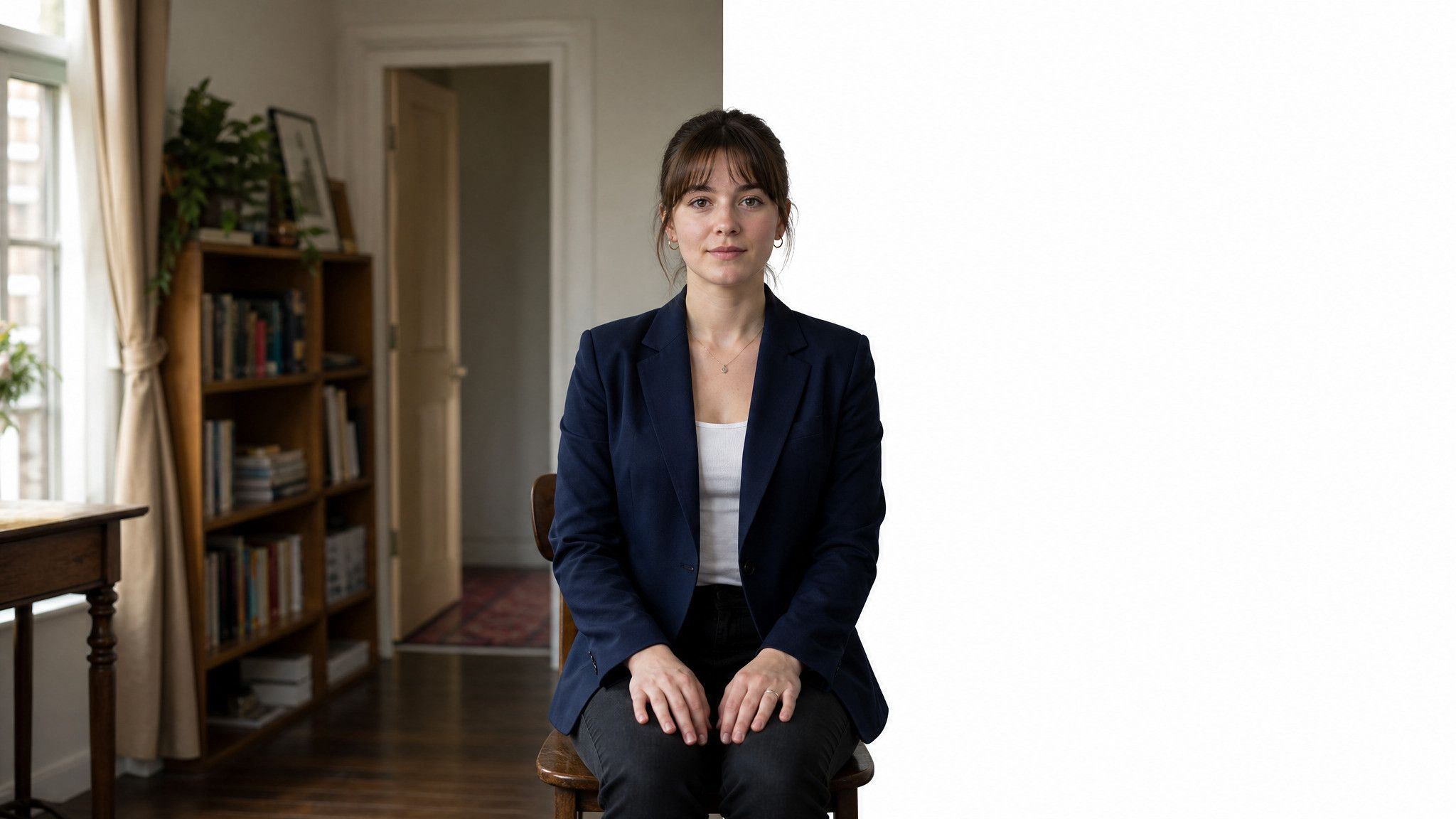
A woman sitting upright, a real room behind her on the left and an empty white background on the right, split by a straight vertical line down the centre of the frame.

Key Takeaways

  • The free browser tool returns a transparent PNG. White is a second step, and you decide the exact shade.
  • The US State Department tells applicants not to change a passport photo with software, apps, filters, or AI.
  • The UK asks for a plain light-coloured background and clear contrast against it, not pure white.
  • France bans a white background for ID photos outright.
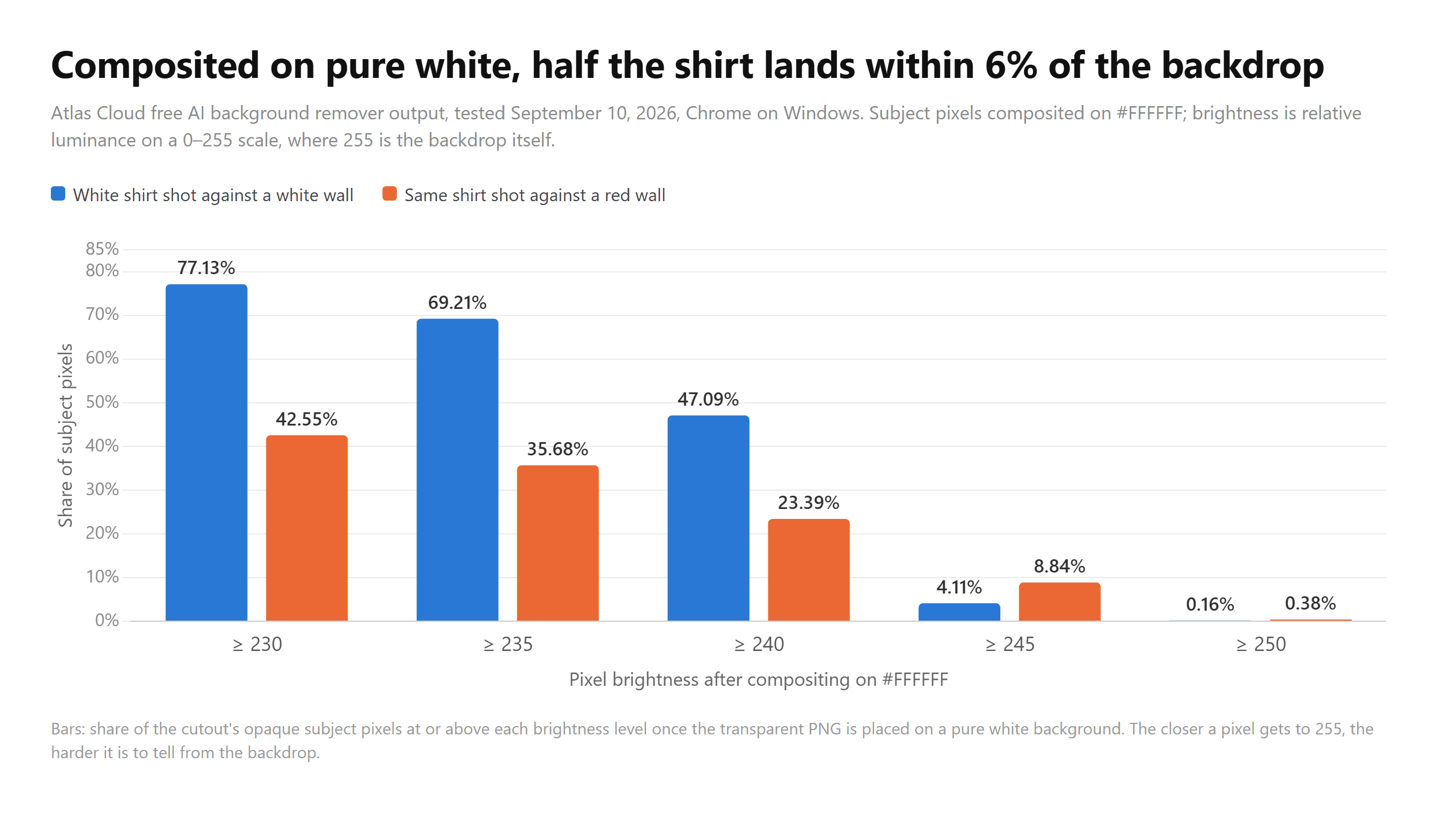
  • Placed on pure white, 47% of a white shirt sat within 6% of the backdrop's brightness.

How to Change Background to White, Free

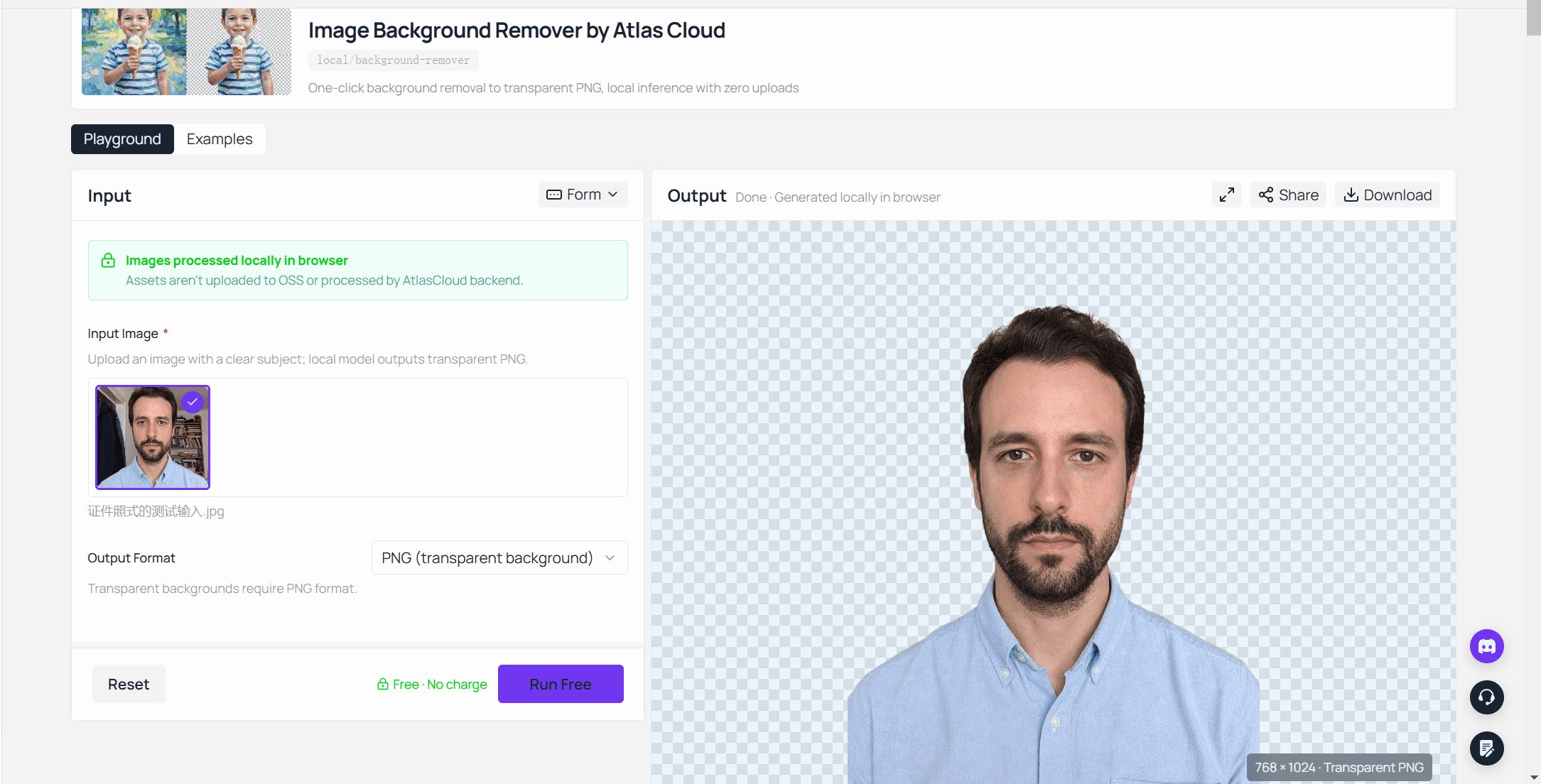
Start with the cutout. The free AI background remover from Atlas Cloud runs the model inside the page. Drop a photo in, wait for the weights to load on the first run, and a transparent PNG comes back. No account, no watermark, and the page states that assets are not uploaded to storage or processed on a backend. We cut the machine off the network mid-session and it carried on working.

The Atlas Cloud free AI background remover after a run, showing an ID-style portrait lifted off its original room background into a transparent PNG.

One detail shapes everything below. The Output Format dropdown holds exactly one entry, PNG (transparent background), with a line underneath noting that transparent backgrounds require PNG. The tool does not paint a backdrop for you, and separating the cut from the fill turns out to be the useful order.

When the white is yours to apply, you pick the shade, and you see what the cutout looks like before it goes anywhere. Size is not the constraint people expect either: our largest test file, 8192 x 4608 at 33.58 MB, came back at full resolution, 37.75 megapixels with no downscaling.

Add White Background to Photo After the Cutout

Three routes, and whatever editor is already on your machine will handle them. Open the PNG, add a filled layer underneath, flatten. Or place it in a document with a white page and export. Or simply save the transparent PNG as a JPG, since JPG carries no alpha channel and editors flatten onto white by default, which we cover in the piece on alpha channels.

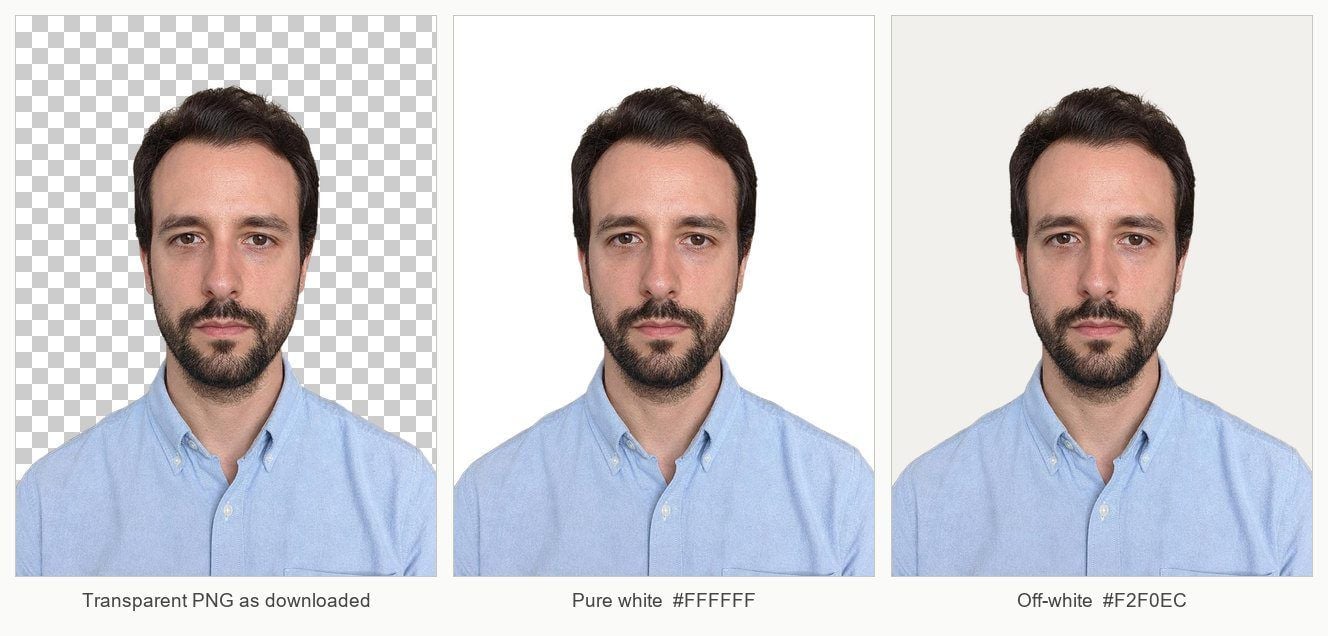
The third route is the fastest and the one to watch. You get a white you never chose, and on some subjects that default is the wrong call. The next two sections show why.

The same ID-style cutout on three backdrops: the transparency checkerboard it downloads as, pure white, and a warm off-white that keeps the shirt and the edges separated. AI-generated test input.

Where a White Background Photo Is Accepted

A white backdrop is the safe default for commerce and for anything internal. It stops being safe the moment a government is the one reading the file.

Where the photo goesCan you swap the backgroundWhat decides it
US or UK passport applicationNoBoth authorities publish a no-editing rule
French passport or ID cardNo, and white is banned regardlessBackground must be a light colour, not white
Marketplace product listingYesPlatform image specs ask for a plain backdrop, not an unedited file
Company directory or staff badgeUsuallySet by your employer's own spec
LinkedIn or any social profileYesNo platform rule against editing
Exam board or job portal uploadCheck the wording firstSome copy passport rules verbatim, others only want white
Printed CV or press kitYesNo authority involved

The middle row of that table is the one people get wrong, because several of the tools ranking for this search run a dedicated passport background page. The demand is real. The permission is not.

Passport Photo White Background: The Rules Say Do Not Edit

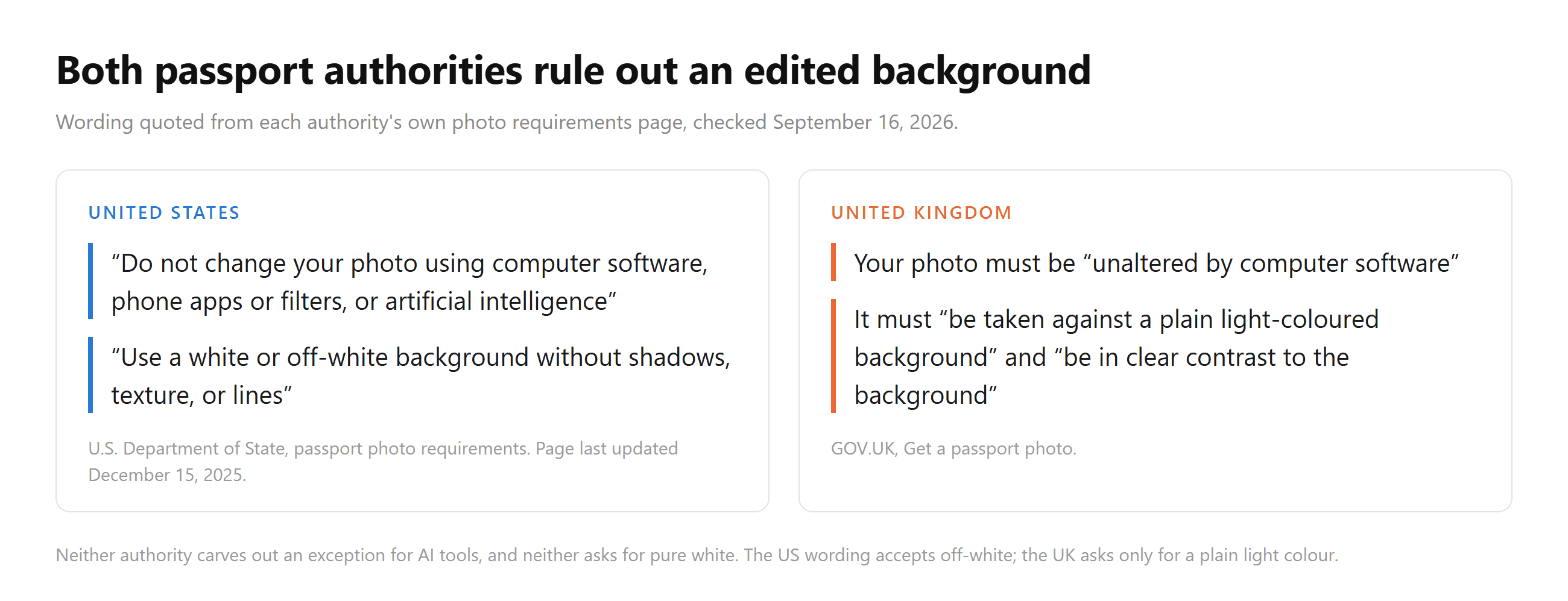
The US State Department photo requirements page carries a line that settles it: "Do not change your photo using computer software, phone apps or filters, or artificial intelligence". The same page asks for "a white or off-white background without shadows, texture, or lines" and a photo taken in the last 6 months.

Britain words it more briefly. GOV.UK requires the photo to be "unaltered by computer software", and separately asks that it "be taken against a plain light-coloured background".

Two quote cards comparing the United States and United Kingdom passport photo rules, both ruling out software editing and neither asking for pure white.

Read those together and the scope is wider than it first looks. The US sentence names AI, but it names computer software first. Lifting a subject off one backdrop and dropping it on another is computer software changing the photo, whichever engine performs the cut. A passport photo background remover does not become compliant by being fast or free.

White Background for Passport: What to Do Instead

Retake it. A bedsheet taped flat, a painted wall, or a roller blind gives a plain backdrop, and both authorities care more about shadows than about the exact tone. Stand a good arm's length forward so your head throws its shadow past the wall rather than onto it, and light yourself from the front.

Check the spec before you shoot, not after. The US wants 2 x 2 inches with the chin to crown measurement between 25 and 35 mm. The UK wants at least 600 by 750 pixels, between 50 KB and 10 MB, taken within the last month. Those numbers move independently of each other and they do get updated.

Pure White Is the Wrong Default for Light Subjects

Here is where the measurement comes in. We took a cutout of a man in a white shirt, composited it onto pure #FFFFFF, and read the brightness of every opaque subject pixel.

Just under half of him, 47.09%, landed at brightness 240 or higher on a 0 to 255 scale. The median pixel sat at 239.5, roughly 6% darker than the backdrop behind it. Only 0.16% of the subject reached 250 or above, so a boundary technically survives, but half the shirt is doing very little work to announce where the person ends.

Grouped bar chart showing that a white shirt photographed against a white wall puts 47% of its pixels within 6% of a pure white backdrop, against 23% for the same shirt shot on a red wall.

The orange bars are the same shirt on the same person, photographed against a deep red wall instead. That version reaches 240 on only 23.39% of its pixels. The room you stood in when the shutter fired is still steering the result long after the room has been cut away, because the wall set the light bouncing back at you.

Now put that beside the British rule quoted above, which asks the subject to "be in clear contrast to the background". A pale shirt on pure white is the combination working against that sentence. Drop the backdrop to a soft off-white around #F2F0EC, or ask the person to wear something with some depth to it, and the edge reappears at no cost.

A White Background Maker Shows Edges a Dark One Hides

The other half of the problem sits in the 1 to 3 pixel band where the cutout meets nothing. Those pixels are partly transparent and they carry a blend of the subject and whatever used to be behind it.

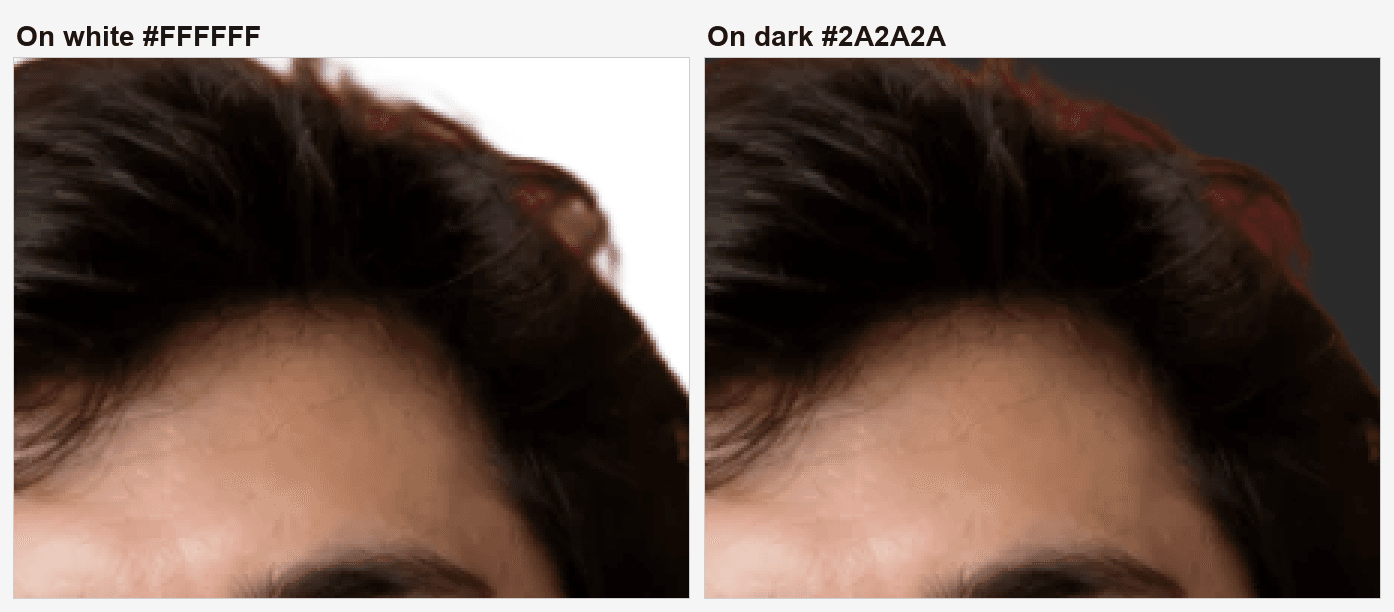
On our white shirt against a red wall, that band leans red. Composite it onto white and 78.8% of those edge pixels differ from the backdrop by more than 20 brightness levels, with a median gap of 57. Composite the identical pixels onto a dark grey and the median gap collapses to 9, with only 39.4% clearing the same threshold.

The same cutout edge at 300 percent, composited on white where the red fringe from the original wall is obvious, and on dark grey where the same pixels sink into the background. AI-generated test input.

Look at the hairline in that pair. The red the model dragged off the wall is plainly there on the left and nearly gone on the right. So a white background maker is holding your cutout to a higher standard than a dark one would, which is the opposite of what the word "clean" suggests.

Two habits fix most of it. Photograph against something unsaturated, since a strong single colour behind a pale subject is the combination that fringes. And when a fringe does survive, contract the selection by a pixel in any editor before you flatten.

Change Background Color of Photo When White Is Not Allowed

France is the case that breaks the assumption entirely. Service-Public.fr, the government's own guidance for passport and ID card photos, states: "Le fond doit être uni, de couleur claire (bleu clair ou gris clair par exemple). Le fond blanc est interdit." The background must be plain and light, light blue or light grey for example, and a white background is forbidden.

AuthorityPublished background wordingPure white
US Department of State"white or off-white", with no shadows, texture, or linesAccepted
GOV.UK"a plain light-coloured background"Not requested
Service-Public.fr"Le fond doit être uni, de couleur claire" and "Le fond blanc est interdit"Forbidden

Wording checked September 16, 2026. The French page carries a verification date of 11 March 2026.

For everything outside an ID office the colour is a design decision rather than a rule, and white is rarely the strongest one. Mid greys hold a face better on a bright page, and a deeper tone reads well in a dark interface. Our guide to headshot background colours lists hex values for six of them.

FAQ

Can I change a photo background to white for free without an account?

Yes. The Atlas Cloud tool runs in the browser with no login and no watermark on the output, and the cutout comes back as a transparent PNG. It sits in the same set of free AI tools as the image upscaler, which also processes files on your own machine. Filling that transparency with white takes one more step in any editor, or happens automatically when you export to JPG.

What is the best white background maker for a passport photo?

For a US or UK passport, the choice of tool is beside the point. Both authorities ask for a photo that software has not altered, so the compliant route is a retake against a plain wall. For anything that is not a government ID, pick the tool that returns your file at full resolution and lets you choose the shade of white yourself.

Does a passport photo background remover work for an id photo background elsewhere?

Sometimes, and it depends entirely on who reads the file. Exam boards, employers, and visa centres set their own specs, and plenty of them ask only for a plain light background without saying anything about editing. Read the exact wording on the form you are filling in.

Should the white be pure #FFFFFF?

Not usually. Pure white swallows pale clothing and bleaches soft edges, and neither the US nor the UK passport rule actually asks for it. An off-white in the #F2F0EC range keeps the subject separated while still reading as a plain backdrop on screen and in print.

Conclusion

Splitting the job in two is what puts the result back under your control. Cut the subject out, look at the transparent PNG, then choose the backdrop with your own eyes open. That order matters because white punishes both ends of the job: it flattens light clothing into the page and it spotlights whatever colour the old wall left along the edge.

Before you upload anything to an official form, read what that form says about editing. A US or UK passport application rules it out in writing, and a French one rules out white itself. Everywhere else, from a product listing to a staff directory to a CV, you are free to change background to white and worth spending a minute on which white you pick.

최신 모델

하나의 API로 모든 미디어 AI를.

모든 모델 탐색