충격은 설득력 있어 보일 수 있습니다. 잠시 후에도 장면이 여전히 말이 됩니까? Genie 4를 평가하는 유용한 방법은 명확한 충돌을 본 뒤 접촉 후 어떤 일이 일어나는지 확인하는 것입니다. 충돌 및 객체 이동을 위한 Genie 4 물리 시뮬레이션에 관한 이 가이드는 객체 정체성, 방향 변화, 장면 연속성을 위한 반복 가능한 관찰 프로토콜을 제공합니다. 또한 생성된 뷰가 무엇을 보여줄 수 있고, 질량, 속도, 물리 법칙에 관해 무엇을 입증할 수 없는지 설명합니다.
핵심 요점
- Genie 4는 노출된 상태 변수를 갖춘 기존 물리 엔진이 아니라 상호작용형 생성 월드 모델입니다.
- 고정된 장면과 단일 충돌은 접촉, 충돌 후 이동, 객체 연속성을 판단하기 쉽게 해줍니다.
- 설득력 있는 클립이 수치적 정확성이나 엔지니어링 및 안전 테스트에 대한 적합성을 입증하지는 않습니다.
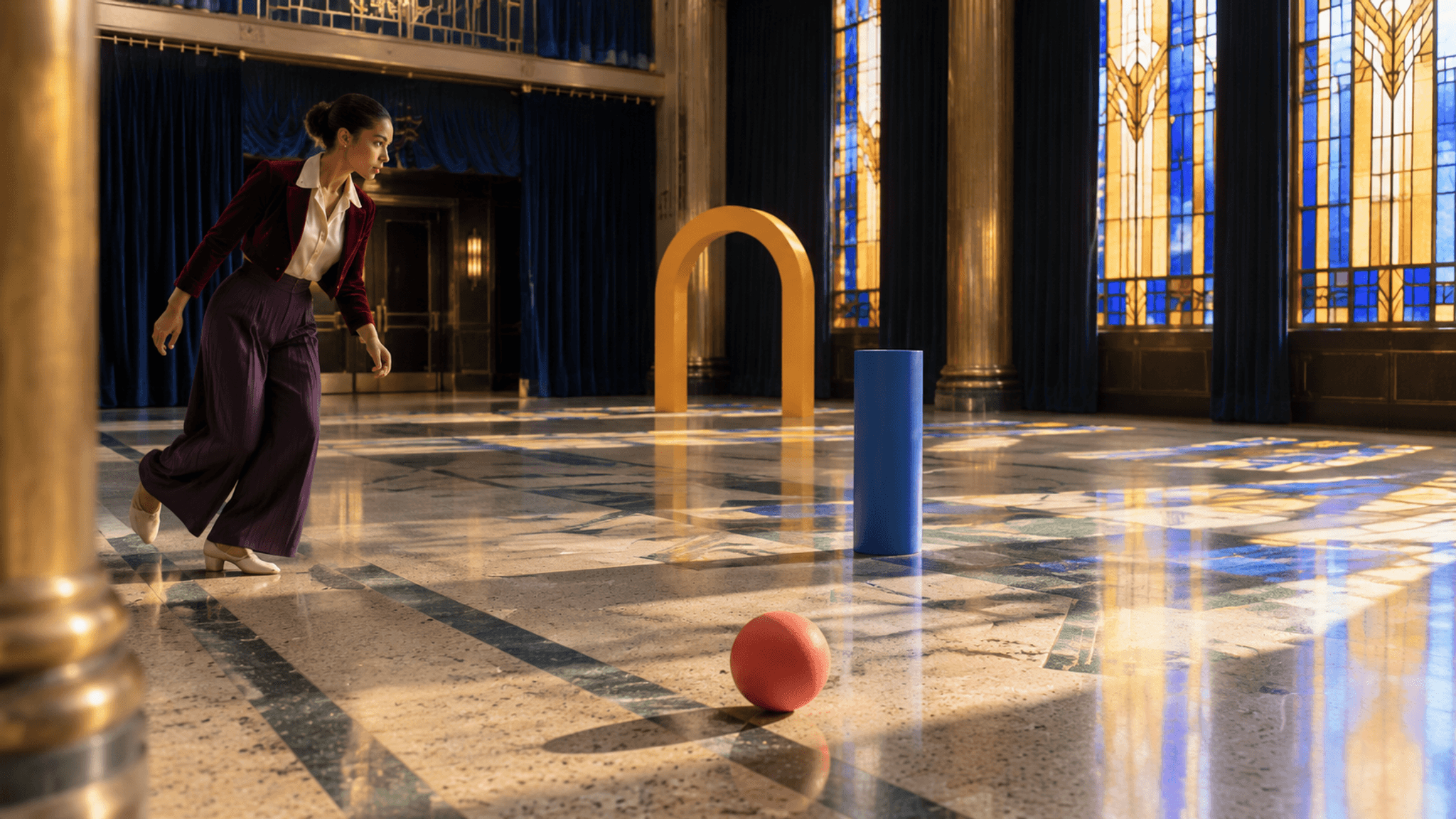
아르데코 로비 사례의 기준 프레임: 움직임이 시작되기 전의 무용수, 공, 원기둥, 아치.
Genie 4에서 “물리 시뮬레이션”이란 무엇인가
기존 물리 엔진은 위치, 속도, 충돌 형상, 재질 속성 같은 명시적 수량을 구성된 규칙에 따라 업데이트합니다. 반면 월드 모델은 상호작용형 장면을 생성하고 사용자 행동이나 지시에 반응합니다. 그 출력은 원인과 결과를 묘사할 수 있지만, 보이는 결과가 그 묘사 뒤의 숫자나 규칙을 자동으로 드러내지는 않습니다.
Google은 Genie 4를 객체가 충돌하고 물이 흐르며 나무가 흔들리는 환경을 생성할 수 있는 월드 모델이라고 설명합니다. 또한 카메라를 바꾸거나 객체를 추가하는 것처럼 자연어를 통한 실시간 변경도 설명합니다. 이는 장면을 탐색하고 다음에 무슨 일이 일어나는지 질문하는 데 흥미로운 모델로 만듭니다. 하지만 그 자체로 각각의 묘사된 충돌을 측정된 물리 결과로 만들어 주지는 않습니다 (Google DeepMind, Genie 4).
개발자에게 이 구분은 실용적입니다. 상호작용형 생성 세계를 사용해 메커니즘을 탐색하고, 시각적 방향을 찾고, 후속 이벤트를 프롬프트할 수 있습니다. 전통적인 엔진은 반발 계수, 마찰, 질량, 충돌 형상을 조정하기에 여전히 적합한 곳입니다. 그곳에서는 이런 값이 명시적이고 검사 가능한 입력이기 때문입니다. 시스템이 그런 값과 검증 방법을 노출하지 않는다면 “사실적인 물리”를 벤치마크 주장이 아니라 시각적 설명으로 취급하세요.
Genie 4 충돌 테스트를 설계하는 방법
시청자가 일어났는지 판단할 수 있을 만큼 단순한 이벤트로 시작하세요. 정지한 블록에 공이 부딪히는 것은 복잡한 장면에서 움직이는 객체 더미보다 평가하기 쉽습니다. 카메라는 고정하고, 두 객체는 모두 보이게 하며, 바닥은 단순하게 유지하세요. 각 객체에 뚜렷한 색과 모양을 부여해 정체성 변화를 쉽게 알아차릴 수 있게 하세요.
이것이 충돌 및 객체 이동을 위한 Genie 4 물리 시뮬레이션 테스트의 핵심입니다. 실행 간 비교할 수 있는 여파가 있는 하나의 단순한 이벤트입니다.
Google의 Project Genie 프롬프트 지침은 환경과 캐릭터 또는 객체 행동을 직접적인 언어로 설명하라고 권장합니다. 이 지침은 Project Genie를 위한 것이며, 공개된 Genie 4 프롬프트 구문이 아닙니다. 그래도 명확한 테스트 브리프를 위한 합리적인 출발점입니다. 설정, 객체, 초기 상태, 이벤트, 그리고 검사하려는 지점을 명시하세요 (Google, Project Genie 프롬프트 팁, 2026년 3월).
제안된 테스트 프롬프트는 다음과 같을 수 있습니다:
plaintext1In a plain studio with a flat floor, show one red ball rolling from left to right toward one stationary blue block. Keep both objects fully visible from a fixed side view. The ball contacts the center of the block. Continue the same view after contact so the ball and block remain visible. Keep their colors and shapes consistent. No extra objects or scene changes.
이것은 테스트 명세이며, Genie 4가 이 정확한 제어를 받아들이거나 특정 결과를 낼 것이라는 주장이 아닙니다. 사용 가능한 세션에서 테스트할 때는 문구, 보이는 제어, 화면 녹화를 저장하세요. 시스템이 실시간 조향을 제공한다면 각 지시와 입력한 시점을 기록하세요. 이런 세부 정보는 모델 동작을 프롬프트 변경이나 카메라 이동과 구분하는 데 도움이 됩니다.
각 실행마다 충돌 관찰 카드를 사용하세요:
| 관찰 | 기록 |
|---|---|
| 시작 상태 | 표면, 객체 위치, 초기 이동, 카메라 각도 |
| 접촉 | 접촉이 보이는지, 충돌 시 두 객체 중 하나가 가려지는지 |
| 즉각적 반응 | 보이는 방향 변화, 튕김, 구름, 기울어짐, 미끄러짐 또는 정지 |
| 연속성 | 색, 모양, 개수, 상대 위치가 알아볼 수 있게 유지되는지 |
| 반복 실행 | 같은 프롬프트에서 무엇이 비슷하게 유지되고 무엇이 바뀌었는지 |
한 번에 하나의 조건만 바꾸세요. 예를 들어 먼저 블록을 정지 상태로 유지한 다음, 블록이 이미 움직이는 별도 테스트를 실행하세요. 카메라, 표면, 문구도 바꿨다면 그 결과들을 하나의 변수를 분리한 것처럼 비교하지 마세요. 각 변형에 명확한 이유가 있을 때 작은 테스트 세트가 더 유익합니다.
충돌 후 객체 이동을 읽는 방법
접촉 직전의 순간, 접촉 자체, 그리고 그 후 몇 순간을 별도의 관찰로 검토하세요. 벽에 눈에 띄게 닿고 방향을 바꾸는 공은 장면이 충돌 반응을 묘사한다는 증거를 제공합니다. 벽을 통과하거나, 색이 바뀌거나, 사라지거나, 다른 곳에 다시 나타나는 공은 연속성 문제를 제기합니다. 왜 그런 일이 일어났는지 설명하기 전에 화면에 무엇이 있는지 기록하세요.
관찰 카드는 의도적으로 정성적입니다. “접촉 후 공이 왼쪽으로 움직였다”는 보이는 설명입니다. “공이 운동량을 보존했다”는 렌더링된 클립만으로는 제공되지 않을 수 있는 수량에 관한 주장입니다. 그 주장을 뒷받침하려면 관련 상태의 신뢰할 수 있는 측정, 정의된 단위와 조건, 이벤트를 반복하고 분석할 방법이 필요합니다. 원근법에서 보이는 압축, 튀는 높이, 이동 거리는 오해를 불러일으킬 수 있습니다.
접근이 허용된다면 같은 테스트를 여러 번 반복하세요. 실행 간 일관성은 프롬프트가 비슷한 장면을 생성하는 경향이 있는지 알려줄 수 있습니다. 그래도 단일 실행이 물리 법칙을 따른다는 것을 입증할 수는 없습니다. 반복된 출력은 기본 계산을 드러내지 않으면서 시각적 패턴을 공유할 수 있습니다. 이벤트 판독성, 객체 연속성, 반복 가능성에 대해 별도로 메모하세요. 이것들은 유용한 프로토타입 관찰이며, 하나로 합친 “물리 점수”가 아닙니다.
엔진과 공정하게 비교하려면 시나리오 설명을 일정하게 유지하고 각 시스템이 실제로 노출하는 것을 적어 두세요. 엔진은 좌표와 속도를 제공할 수 있고, 생성 세계는 실시간 시각적 상호작용을 제공할 수 있습니다. 비디오와 수치 시뮬레이션을 서로 바꿔 쓸 수 있는 증거로 취급하기보다, 답해야 할 질문에 비추어 출력을 비교하세요.
Genie 4가 입증할 수 있는 것과 없는 것
Genie 4는 상호작용형 장면을 만들고 조종하는 방법으로 탐색할 수 있습니다. 공식 자료는 생성된 환경을 보여주고 직접적인 복잡한 이벤트를 설명하면서도 일관성과 상호작용에 관한 연구 한계를 나열합니다. 그런 시연은 제품의 의도된 기능을 확립할 뿐, 측정된 충돌 정확도 벤치마크를 확립하지 않습니다. 공식 페이지는 현재 상태와 한계를 설명합니다. 접근성이나 기능이 업무에 중요할 때 다시 확인하세요.
공식 페이지는 또한 복잡한 이벤트와 객체 지속성이 여전히 연구 과제라고 밝힙니다. 이는 충돌 테스트에 직접적으로 중요합니다. 깔끔한 충돌 프레임 뒤에도 객체가 모양을 바꾸거나, 사라지거나, 이전 위치를 잃을 수 있습니다. 연속성을 신뢰할 수 있는 동작으로 취급하기 전에 여파를 확인하고 실행을 반복하세요. 제품 시연은 가능한 결과를 보여주며, 정확성 주장을 뒷받침하려면 독립적인 측정이 필요합니다.
그 경계는 유용한 역할 분담을 시사합니다:
- 초기 게임 또는 영화 아이디어 구상: 충돌이 어떻게 보일지 또는 상호작용형 장면이 어떻게 전개될지 탐색합니다.
- 메커니즘 구현: 게임 엔진의 충돌 시스템을 사용하고 그 매개변수와 상태를 검사합니다.
- 과학 또는 엔지니어링 분석: 질문에 적합한 검증된 시뮬레이터나 측정 설정을 사용합니다.
- 로봇 안전 또는 배포: 생성된 시각 장면에 유일한 검증 방법으로 의존하지 마세요.
월드 모델은 팀이 유망한 시나리오를 발견하거나 아이디어를 전달하는 데 도움이 될 수 있습니다. 하지만 동작을 계산하거나 검증해야 하는 시스템을 대체하지는 않습니다. 동료와 공유할 때 생성된 자료를 시각적 프로토타입으로 표시해, 아무도 예시적 결과를 검증된 시뮬레이션 결과로 오해하지 않게 하세요.
하나의 시각적 사례: 아르데코 로비 충돌
시각적 참조는 정원이 아니라 텅 빈 아르데코 극장 로비에서 이루어집니다. 늦은 오후 빛이 기하학적 스테인드글라스를 통과해 옥색과 크림색 테라조 위로 내려앉습니다. 인디고 벨벳 커튼과 황동 기둥이 명확한 바닥 경로를 프레이밍합니다. 버건디 벨벳 크롭 재킷, 아이보리 실크 블라우스, 딥 플럼 와이드 팬츠, 크림 가죽 댄스 슈즈를 착용한 무용수가 산호색 고무 공을 코발트색 목재 원기둥 쪽으로 쓸어 보냅니다. 원기둥은 사프란색 목재 아치를 살짝 밀칩니다. 그녀의 표정은 집중된 기대에서 놀라움으로, 그리고 움직이는 객체들 주위를 돌 때 장난스러운 안도로 바뀝니다. 제공된 6개의 10초 클립은 그 연쇄의 서로 다른 부분을 보여줍니다. 이것들은 생성된 비디오 스토리보드이며, Genie 4 출력이나 완료된 물리 테스트가 아닙니다. 성공적인 움직임과 연속성 실패를 모두 살펴보세요.
공유 오프닝 프레임은 Seedream v5.0 Pro Text-to-Image (bytedance/seedream-v5.0-pro/text-to-image)로 만드세요. 반복 실행의 경우 Seedance 2.5 Image-to-Video (bytedance/seedance-2.5/image-to-video, 16:9 첫 프레임)로 10초 클립을 생성하세요. 반복 실행에서는 이전 클립의 명확한 마지막 프레임을 다음 첫 프레임으로 사용하세요. 원본 캐릭터 및 위치 참조를 옆에 유지하세요. 이 글을 위해 제공된 다운로드된 MP4 6개는 GIF로 변환되어 아래에 배치되었습니다. 내장 메타데이터가 생성 모델이나 원본 프롬프트를 식별하지 않으므로, 여기의 모델 이름과 작성된 프롬프트는 재현 가능한 권장 사항이며 이 파일들의 검증된 출처가 아닙니다. 이 클립은 상호작용형 Genie 4 녹화나 측정된 시뮬레이션이 아닙니다.
Seedream v5.0 Pro용 공유 첫 프레임 프롬프트:
plaintext1Wide 16:9 cinematic photograph inside an empty 1930s Art Deco theater foyer, designed as a clear stage for a kinetic collision scene. Cream-and-jade terrazzo floor with long geometric inlay lines, two brass-clad columns, deep indigo velvet curtains, and tall amber-and-cobalt stained-glass windows. Late-afternoon sun enters from camera right, casting sharply defined colored window shapes across the floor. At frame left stands one young adult dancer with warm brown skin, expressive dark eyes, and hair in a secure sculpted bun. She wears a cropped burgundy velvet jacket over an ivory silk blouse, deep-plum pleated wide-leg trousers, and cream leather dance shoes. Her posture is coiled for movement, one heel lifted, gaze fixed on one matte coral-red rubber ball in the foreground. A single cobalt-painted wooden cylinder stands three meters ahead on the ball's path; a single lightweight saffron-painted wooden arch stands behind it. All three movable objects are fully visible and clearly separated. Low 35 mm camera, strong floor leading lines, one softly blurred brass column at the edge, tactile velvet, silk, wood, and terrazzo, controlled coral-cobalt-saffron accents against rich indigo and warm ivory. Elegant photographic realism, natural shadows and slight film grain. No garden, plants, crowd, stage performance, text, signage, logos, extra balls, extra dancers, floating objects, or UI.
다른 생성 패스를 위해 6개 클립 모두에서 같은 무용수, 의상, 객체 수, 바닥 구조, 건축, 햇빛 방향, 색조를 유지하세요. 각 10초 세그먼트에는 보이는 동작과 변화하는 카메라 방향이 필요합니다. 제공된 클립은 있는 그대로 표시되며, 접촉이나 전환이 불명확한 경우 캡션에 그렇게 명시되어 있습니다.
샷 1: 첫 접촉
검사할 항목: 시작 위치, 발과 공의 접촉, 공의 초기 방향.
plaintext1Use the supplied Art Deco foyer still as the exact first frame. Ten seconds of continuous, expressive movement. From 0-3 seconds, track laterally at knee height as the dancer glides diagonally along the jade-and-cream terrazzo toward the single coral ball. Her gaze stays on the ball; her expression shifts from focused anticipation to a quick playful smile, while her burgundy velvet jacket and deep-plum pleated trousers move with natural inertia. From 3-6 seconds, she makes a precise side step, rotates her shoulders and hips, and sweeps one cream dance shoe into clear contact with the ball exactly once. The ball begins rolling toward the stationary cobalt cylinder. Pan smoothly from her foot to the rolling ball without hiding the touch. From 6-10 seconds, follow the ball in a low three-quarter view while the dancer completes a controlled turn, catches her balance, and raises her eyebrows as she watches its path. Keep the ball, cylinder, and saffron arch distinct and spatially stable. Amber-and-cobalt stained-glass light, indigo curtains, brass columns, crisp shadows, natural 35 mm motion, rich but controlled color. No dialogue, text, crowd, plants, extra props, duplicated limbs, teleportation, or zoom-only motion. Wide 16:9.
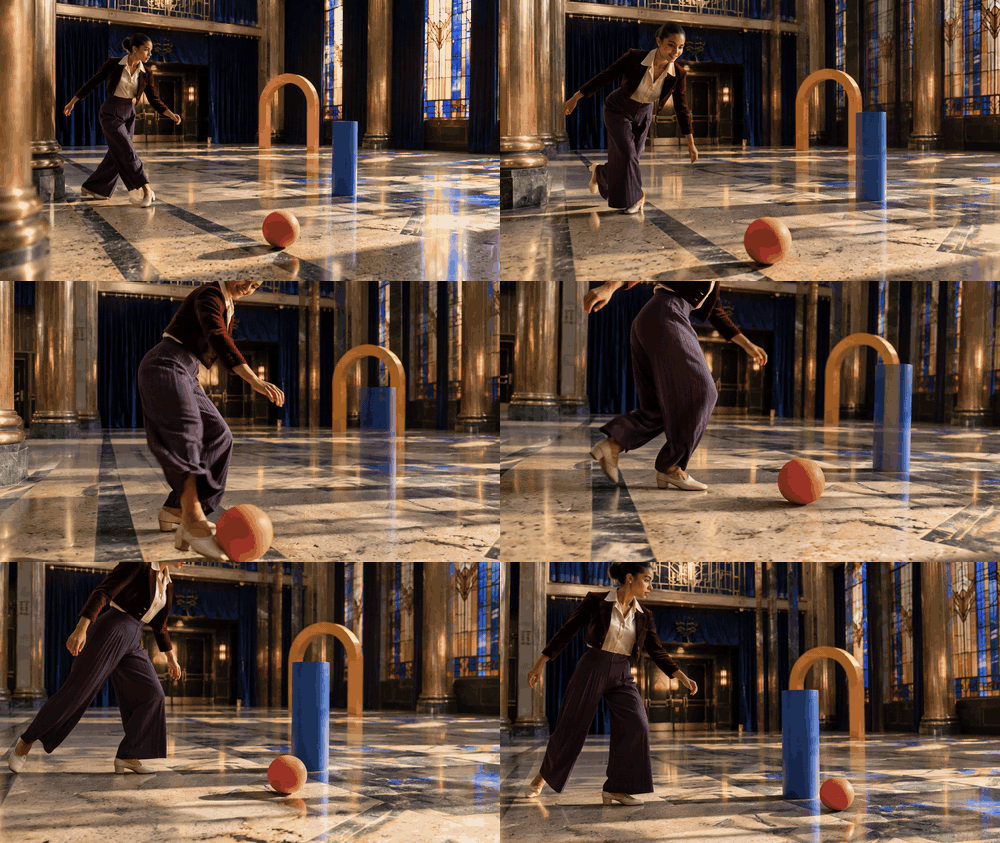
무용수가 다가가 공을 움직이기 시작하는 것처럼 보입니다. 발과 공의 접촉은 짧기 때문에, 이 클립은 통제된 충격량의 증거라기보다 시각적 참조입니다.
샷 2: 주요 충돌
검사할 항목: 공과 원기둥의 접촉, 공의 바뀐 방향, 원기둥의 첫 반응.
plaintext1Begin from the chosen final frame of shot one in the identical empty Art Deco theater foyer. Preserve the dancer's warm brown skin, sculpted bun, burgundy velvet jacket, ivory blouse, deep-plum trousers, cream dance shoes, and the exact coral ball, cobalt cylinder, and saffron arch. Ten seconds. From 0-3 seconds, a low front three-quarter tracking view follows the ball across the terrazzo inlay lines toward the still cylinder; show a clean gap until contact. From 3-5 seconds, the camera arcs to a clear side angle while staying wide enough to show both complete objects. The coral ball strikes the cylinder once at its lower half. The ball deflects diagonally left; the cylinder tips and begins rotating right. Make the contact point visible and do not let either object pass through the other. From 5-10 seconds, track laterally to hold both resulting motions in one frame. In the background, the dancer reacts with widened eyes and an open-mouthed smile, then pivots sharply around the cylinder's path. Stained-glass sunlight moves across real terrazzo texture, brass surfaces remain fixed, indigo curtains stay in place. Smooth cinematic 35 mm motion, believable gravity, no hidden impact, dialogue, text, crowd, plants, duplicate objects, or slow push-in. Wide 16:9.
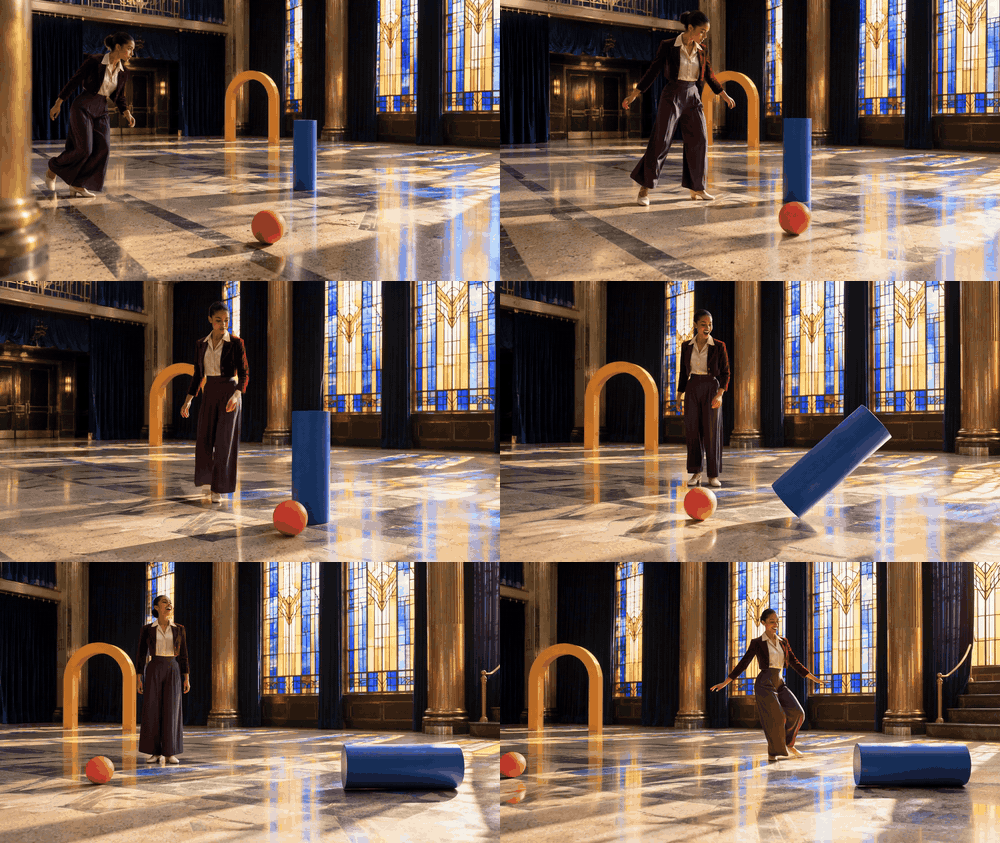
공이 닿을 때 원기둥이 기웁니다. 측정된 충돌 반응을 주장하기 전에 접촉 프레임을 검사하세요.
샷 3: 원기둥 후속 동작
검사할 항목: 파란 원기둥이 첫 충돌 후 같은 모양을 유지하고 일관되게 움직이는지. 이 추가 제공 클립은 원래 5샷 프롬프트 계획의 일부가 아니었습니다. 정확한 원본 생성 프롬프트는 이용할 수 없으며, 다음은 반복 실행을 위한 제안 프롬프트입니다.
plaintext1Continue from the final frame of the ball-to-cylinder impact in the same empty Art Deco theater foyer. Ten seconds. Keep one coral rubber ball, one cobalt-painted wooden cylinder, one saffron wooden arch, and the same dancer in a burgundy velvet jacket, ivory blouse, deep-plum wide-leg trousers, and cream dance shoes. From 0-3 seconds, track low beside the ball as it rolls away from the cylinder on the cream-and-jade terrazzo. From 3-7 seconds, shift to a clear three-quarter side angle as the cylinder tips, rocks on its edge, and gradually falls to the floor, keeping its blue color, size, and solid shape. From 7-10 seconds, widen the view to show the ball, fallen cylinder, arch, and dancer together; she crosses the background in two quick dance steps, then turns her head toward the moving cylinder with a surprised expression. Preserve the stained-glass light pattern, brass columns, indigo curtains, gravity, and object count. Smooth camera movement, no hidden collision, extra objects, text, plants, teleportation, or zoom-only motion. Wide 16:9.
공이 시야에 남아 있는 동안 원기둥이 기울고 가라앉습니다. 두 세그먼트를 연속 영상으로 취급하기 전에 원기둥의 시작 위치를 클립 02와 비교하세요.
샷 4: 2차 충돌
검사할 항목: 모든 객체가 정체성을 유지한 채 원기둥에서 아치로 운동이 전달되는지.
plaintext1Use the selected final frame of shot two as the first frame in the same Art Deco foyer. Maintain the exact burgundy-and-plum outfit, dancer's face and bun, coral ball, cobalt cylinder, saffron arch, terrazzo pattern, brass columns, indigo curtains, and light direction. Ten seconds. The cylinder is already rotating toward the stationary arch. From 0-3 seconds, track at waist height beside the cylinder while the dancer crosses behind it in a quick, elegant chasse step; her expression tightens from delight to alert concentration. From 3-6 seconds, drop to a low three-quarter angle and show the cobalt cylinder making one clear contact with the arch's lower left side. The light wooden arch rocks back, while the cylinder rolls a short additional distance; neither changes shape or color. From 6-10 seconds, orbit gently to keep both objects and their slowing motion visible as the dancer makes a small airborne turn, lands softly beyond them, and steadies herself with one extended hand. The pleated trousers and velvet jacket settle naturally. Colored stained-glass light cuts across cream-and-jade terrazzo, warm brass glints remain restrained, realistic 35 mm film texture. No shattering, magical sparks, speech, captions, crowd, plants, teleports, duplicate objects, or zoom-only motion. Wide 16:9.
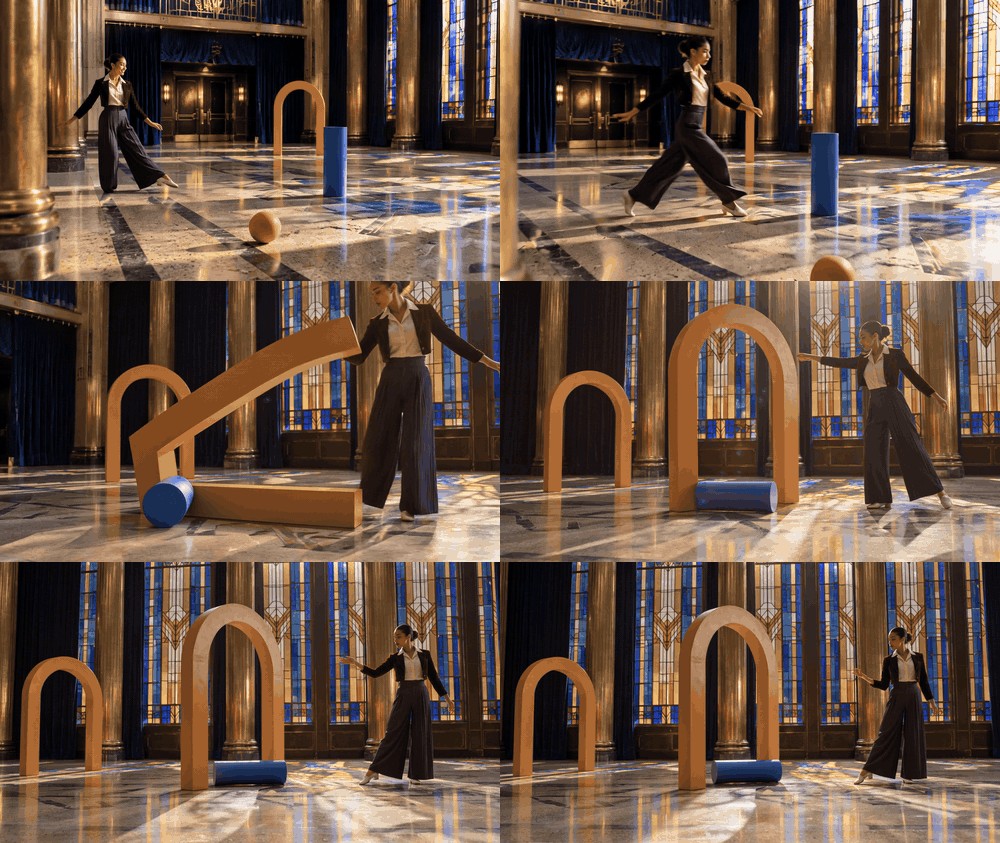
아치가 원기둥 근처에서 기울지만 정확한 접촉 지점은 불명확합니다. 이것은 의도된 2차 충돌의 스토리보드이며, 묘사된 전달이 물리적으로 올바르다는 증거가 아닙니다.
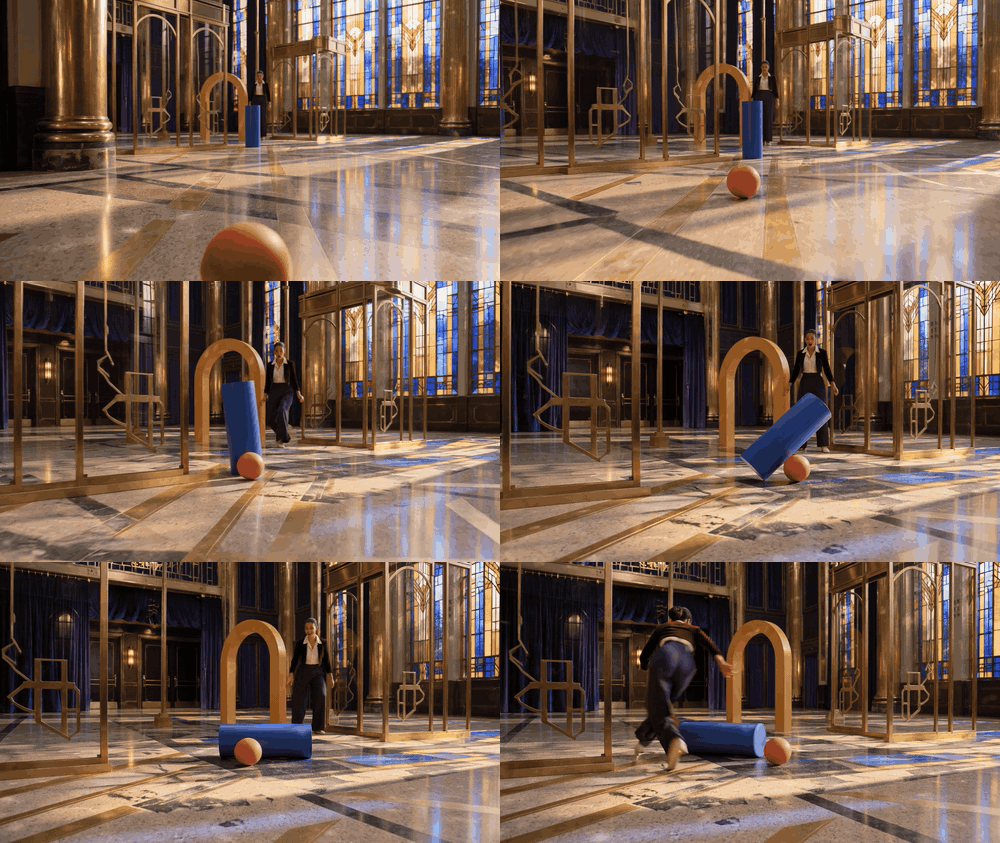
샷 5: 가림과 회복
검사할 항목: 고정된 기둥 뒤를 지난 후 같은 공이 다시 나타나는지.
plaintext1Continue from the preceding shot's final frame in the same empty Art Deco foyer. The single coral ball is still rolling slowly; the cobalt cylinder has shifted, and the saffron arch is rocking toward rest. Ten seconds. From 0-3 seconds, follow the dancer from slightly behind as she takes two fast, fluid dance steps across the geometric terrazzo and spots the ball. Her brows draw together in concentration, then one corner of her mouth lifts. From 3-6 seconds, slide the camera behind a fixed brass-clad column so the ball becomes briefly hidden by the column itself. Keep the column, floor pattern, and dancer spatially consistent while the ball continues its established direction. From 6-10 seconds, emerge at a low three-quarter angle as the same single coral ball rolls out from the far side with unchanged size, color, and direction. The dancer turns her shoulders, reaches toward it, stops short, and lets it pass, breaking into a delighted grin. Keep the cylinder and arch in plausible background positions. Amber-and-cobalt stained-glass light, indigo velvet curtains, tactile silk and terrazzo, smooth 35 mm camera movement. No speech, titles, crowd, plants, duplicate ball, object morphing, location jump, or empty slow zoom. Wide 16:9.
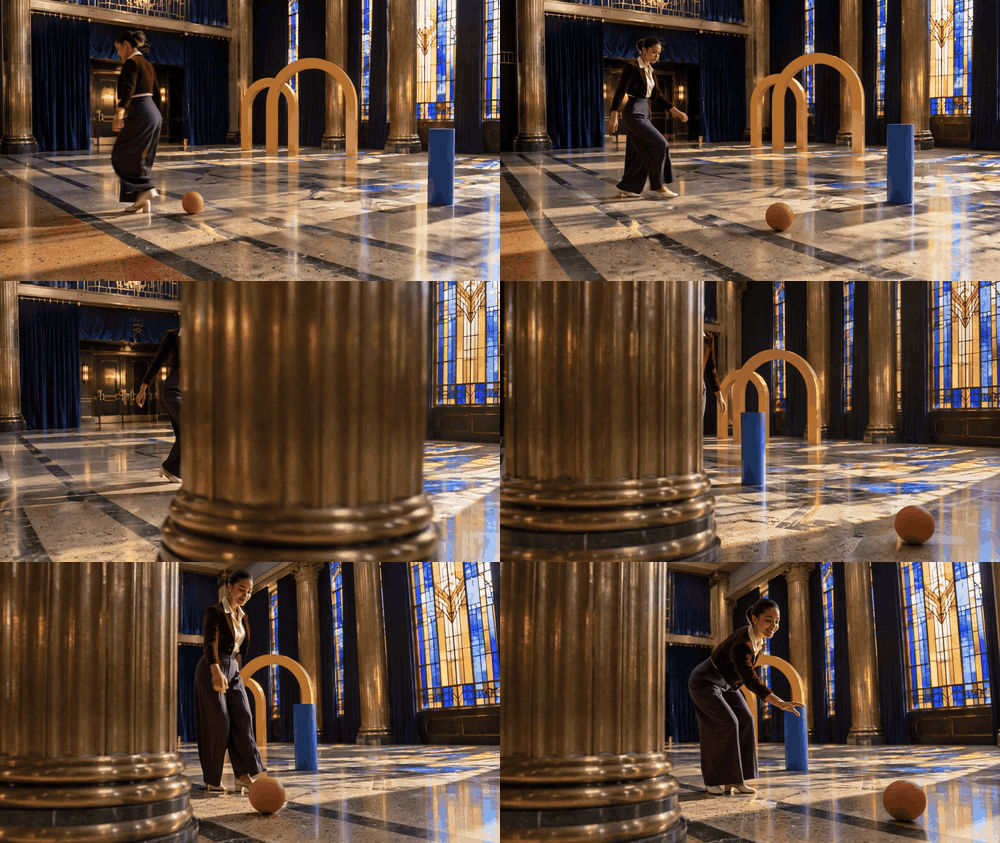
공이 고정된 기둥에 잠시 가려집니다. 가림 양쪽에서 공의 색, 크기, 방향을 비교하세요.
샷 6: 여파
검사할 항목: 최종 상대 위치, 가라앉는 움직임, 전체 장면의 연속성.
plaintext1Use the final frame of shot four as the first frame, preserving the dancer's burgundy cropped velvet jacket, ivory silk blouse, deep-plum wide-leg trousers, cream dance shoes, the same coral ball, cobalt cylinder, saffron arch, brass columns, indigo curtains, stained-glass windows, and terrazzo floor. Ten seconds. From 0-3 seconds, begin low beside the coral ball as it decelerates along the floor inlay lines; the saffron arch completes a small believable rocking motion farther back. From 3-6 seconds, crane smoothly into a wide three-quarter view that reveals all three objects at once in their changed positions. Do not reset them to their starting places. The dancer travels around the settled cylinder with two flowing steps and a full controlled spin, her pleated trousers describing a clear arc. From 6-10 seconds, arc the camera to face her as she catches her balance, checks the ball and arch, exhales, then smiles with visible relief and playful pride. Hold the final composition long enough to read every object's position. Warm directional window light and colored glass shapes, cream-and-jade terrazzo, rich indigo and burgundy, restrained film grain, physically plausible settling. No speech, captions, crowd, plants, duplicate props, sudden camera teleport, or push-in-only movement. Wide 16:9.
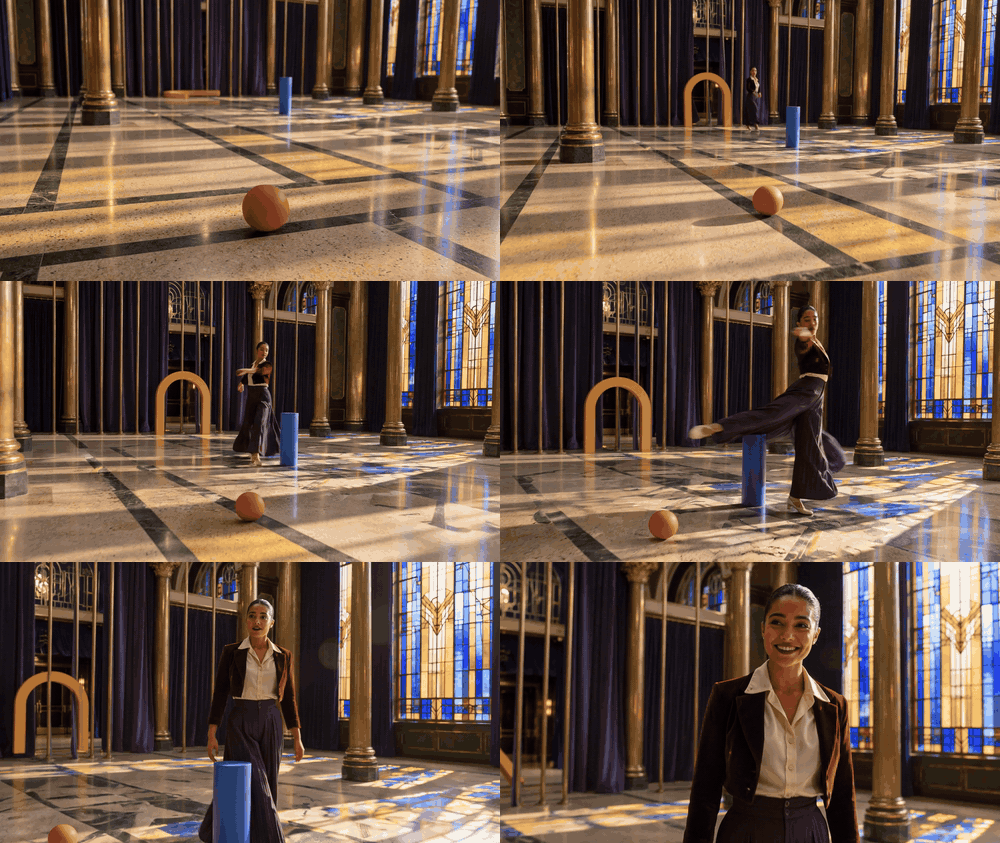
와이드 엔딩은 무용수의 회전과 최종 장면을 보여줍니다. 아치의 위치를 클립 04와 비교하세요. 겉보기 초기화는 연속성 실패일 것입니다.
제공된 6개 결과를 하나의 사례로 검토하세요. 발 접촉이 보이지 않거나, 샷 사이에 편향이 바뀌거나, 객체가 복제되거나, 최종 위치가 갑자기 바뀌면 실패를 있는 그대로 기록하세요. 스토리보드는 아이디어를 전달할 수 있지만 수치 물리학을 검증할 수는 없습니다. 실제 Genie 4 세션에서는 위의 더 단순한 고정 카메라 프로토콜을 사용하고, 실제 상호작용을 저장하고, 보이는 여파를 같은 관찰 카드와 비교하세요.
접근 및 다음 단계
Google의 발표는 Genie 4를 신뢰할 수 있는 테스터부터 시작하는 연구 프리뷰로 설명하며, Project Genie 및 선정된 파트너와 연계된 더 넓은 제공 계획을 언급합니다. 이는 변화하는 출시이므로 모든 독자가 오늘 시도할 수 있다고 가정하지 말고 접근을 위해 현재 공식 Genie 페이지를 확인하세요. Project Genie의 이전 공개 프롬프트 조언은 유용한 맥락이지만, Genie 4 접근이나 동일한 제어를 보장하지는 않습니다.
Genie 4에 접근할 수 있다면 하나의 고정 카메라 충돌로 시작하고 프롬프트와 녹화를 저장하세요. 결론을 내리기 전에 관찰 카드를 작성하세요. 접근할 수 없더라도 지금 프로토콜을 준비하거나, 텍스트-투-비디오 모델로 명확히 라벨링된 비디오 참조를 만들 수 있습니다. 충돌 및 객체 이동을 위한 Genie 4 물리 시뮬레이션에서 핵심 질문은 하나의 충격이 설득력 있어 보이는지가 아닙니다. 접촉 후에도 장면이 해석 가능하게 남아 있는지, 그리고 증거가 내려야 할 결정에 충분히 강한지입니다.
자주 묻는 질문
Genie 4는 물리 엔진인가요?
Google은 Genie 4를 시뮬레이션 환경을 생성하고 상호작용하기 위한 월드 모델이라고 설명합니다. 기존 물리 엔진은 장면에 대해 구성된 속성과 계산된 상태를 노출합니다. 생성 세계가 같은 데이터를 노출하거나 검증된 수치 시뮬레이션을 제공한다고 가정하지 마세요.
Genie 4는 공이 튀는 모습이나 두 객체가 충돌하는 모습을 보여줄 수 있나요?
공식 Genie 자료는 객체 충돌이 있는 환경을 설명합니다. 특정 프롬프트나 세션은 달라질 수 있으므로 실제 실행을 평가하고 접촉 및 충돌 후 이동이 계속 보이는지 기록하세요. 제품 시연은 요청한 모든 충돌에 대한 보장이 아닙니다.
Genie 4는 게임 또는 엔지니어링 물리학에 충분히 정확한가요?
생성된 장면은 시각적 탐색을 지원할 수 있지만, 렌더링된 결과만으로 수치적 정확성을 입증하지는 않습니다. 구현, 엔지니어링 분석, 안전 결정에는 게임 엔진이나 적절하게 검증된 시뮬레이터를 사용하세요.
AI 비디오 생성기가 객체 이동을 테스트할 수 있나요?
제안된 움직임에 대한 시각적 참조를 만드는 데 도움이 될 수 있습니다. 생성된 클립은 물리 엔진과 같은 상호작용이나 측정 가능한 상태를 제공하지 않으며, 실제로 Genie 4에서 나온 것이 아니라면 Genie 4 출력으로 제시해서는 안 됩니다.





