A user uploads an 8-second rescue-drone clip and types: “Move this to a snowy alpine command post, but do not change the battery-lock action, the drone, or the timing.” An AI API for Video Editing Apps can make that request possible, but it is not a one-call magic trick. In a production app, it is a contract covering rights, a bounded instruction, an asynchronous job, a reviewable result, retries, and a cost ceiling.
The practical starting point is narrow: keep the original clip and change 1 clearly named variable, such as a setting or product color. Treat the result as a variation for review. Do not promise automatic rough cuts, captions, B-roll, a full timeline, and generative reshoots in the first release.
Key takeaways
- Build editing around a durable job and revision record, not a raw prompt field.
- Match the API route to the actual job: prompt edit, timeline render, clipping, or new footage.
- Test preservation with the same short clip before expanding to longer or multi-variable edits.
- Measure accepted-edit cost, including retries and human review, rather than a displayed model rate alone.
Video production demand is rising while teams still need predictable workflows and budgets. The IAB projects U.S. digital video ad spend to exceed $80 billion in 2026, a useful reminder that editing infrastructure is a product decision, not just a model choice. For teams testing several video-edit paths, Atlas Cloud can provide one asynchronous entry point across model routes, reducing the amount of provider-specific plumbing a first version must carry.
What an AI API for Video Editing Apps Actually Does
An AI video editing API accepts an existing asset plus an instruction, then produces a new revision that a person can inspect. The useful definition includes the surrounding system: controlled upload, job state, output storage, a review decision, and a record that ties output back to source and instruction.
That differs from an API that only creates new pixels from text. It also differs from a non-linear editing engine that renders a precisely specified timeline. Production apps often use more than 1 of these routes, but each has a different success metric, latency profile, and approval interface.
AI API for Video Editing Apps vs Video Generation APIs
| Product job | Primary input | Expected output | What the reviewer checks |
|---|---|---|---|
| Text-to-video generation | Prompt, optional references | A new shot | Story, subject consistency, visual fit |
| Instructional video edit | Existing clip plus constrained instruction | A changed revision of that clip | What changed and what stayed stable |
| Timeline composition | Timeline JSON, assets, rules | Deterministic rendered file | Frame timing, captions, branding, audio mix |
| Transcript-led clipping | Long recording and transcript | Clips, captions, highlights | Segment choice, transcript accuracy, safe framing |
This article focuses on the second row. Alibaba Cloud’s current Wan 2.7 reference describes instruction-based editing and style transfer with text, video, and optional reference images. It also documents asynchronous task creation and result polling, which is the operational model an app needs to plan for (Alibaba Cloud, September 2026).
The 4 Jobs Users Call “AI Video Editing”
Users often put 4 very different requests into one sentence: “edit this video.” Your product should classify the job before it selects a model or creates a quote.
- Instructional video-to-video edit: Preserve a recorded performance while changing a bounded element such as scenery, a garment, lighting, or a product color.
- Timeline composition and render: Assemble known assets with exact cuts, transitions, captions, logos, and audio rules.
- Transcript-driven clipping: Find useful moments in a long recording, create captions, reframe for a platform, and export shorter edits.
- Generated insert shot: Create missing B-roll or a new transition shot from text, an image, or references.
Each route needs its own definition of success. A timeline renderer should be deterministic. A clipping service should be judged on segment selection and caption quality. A prompt-driven edit needs preservation checks. A generated insert needs script fit and rights review. Combining their results behind one vague “Generate” button makes failures difficult to explain and costs hard to control.
The AI API for Video Editing Apps User Promise to Avoid
Avoid “one prompt, perfect edit.” It encourages a user to ask for several transformations at once, then makes it unclear what failed.
Use language that matches an uncertain generation process: “preview an edit,” “create a variation,” and “preserve what you lock.” Let people separately lock subject identity, product geometry, camera path, action, duration, frame, and original sound. A lock is a product instruction and an evaluation target, not a guarantee that a model will meet it every time.
The AI API for Video Editing Apps Architecture That Survives Production
A browser should never own the full editing workflow. It can upload an asset and show progress, but your backend needs to authorize the source, submit the job, receive events, protect the output URL, and record the review decision.
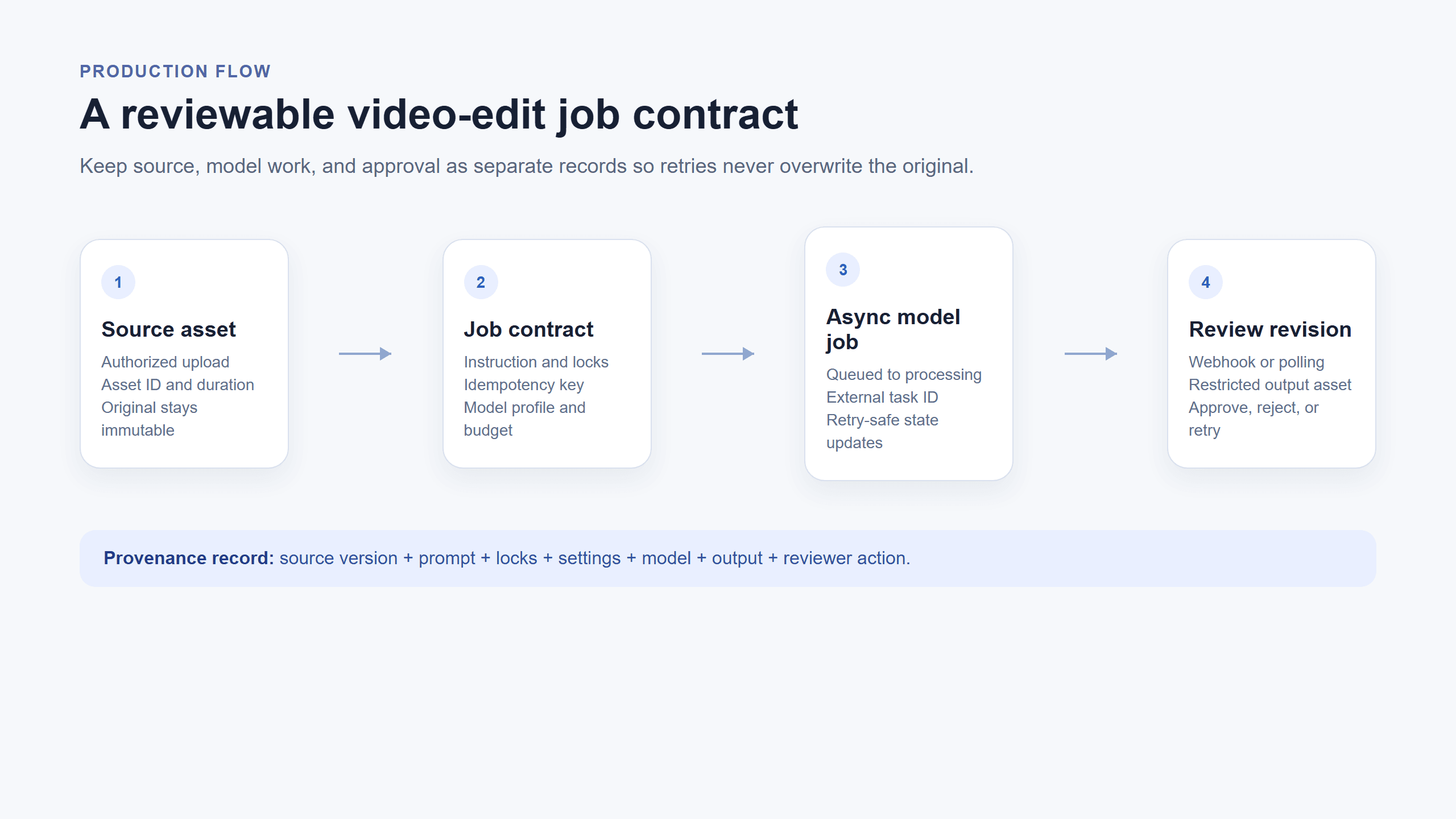 Browser-rendered AI API for Video Editing Apps job contract showing source asset, job contract, async processing, webhook or poll, and review revision
A browser-rendered production flow: source asset becomes an asynchronous job, then a reviewable revision. This is an architecture diagram, not a vendor UI.
AI API for Video Editing Apps Need a Job Contract, Not a Raw Prompt
Give every edit a stable record before it reaches a model. That record lets your team retry safely, provide support, calculate spend, and delete assets when a customer requests it.
| Field | Why it belongs in the contract |
|---|---|
source_asset_id | Keeps the client from permanently exposing a source-file URL |
source_duration_ms | Enforces eligibility, duration caps, and budget rules |
instruction | Stores the natural-language request that the reviewer sees |
locked_elements | Names the people, objects, action, sound, and framing to preserve |
model_profile | Separates a fast preview from a higher-cost review route |
idempotency_key | Prevents accidental duplicate charges and duplicate jobs |
status | Represents uploaded, queued, processing, completed, failed, or expired |
review_state | Separates generated output from pending, approved, or rejected |
provenance | Links source, instruction, settings, model, time, output, and reviewer action |
Do not allow client-side code to send a fresh task every time the network reconnects. Create the idempotency key at the product level and return the existing job when the same request is replayed.
Async AI API for Video Editing Apps: Upload, Submit, Observe, Review
The durable flow is straightforward even when model behavior is not:
- The client uploads the source to controlled storage and receives an asset identifier.
- Your backend validates size, duration, rights confirmation, and plan limits, then creates the job contract.
- A worker submits the edit to the selected route and stores the external task identifier.
- A signed webhook updates the job, or your worker polls until it reaches a terminal state.
- Your app creates a restricted review asset and shows it beside the original.
- The user approves, rejects, or retries. Approval creates a new project revision instead of replacing the source.
Webhook handlers need signature validation, event de-duplication, and an idempotent update path. Polling remains useful as a recovery process when a provider event is delayed or unavailable. The UI should never assume that pressing Run means an output exists immediately.
Preserve Originals and Make Every Edit Reversible
Keep the original file immutable. Each generated output is a revision, and “completed” only means a model returned a file. It does not mean the user accepted it.
For every revision, retain the source version, instruction, locks, model identifier, settings, creation time, output identifier, and review action. This provenance record supports undo, customer support, deletion requests, and an honest explanation when a user asks why a particular result differs from their clip.
How to Choose an AI API for Video Editing Apps
Start with the input and output contract, then test a route against a specific use case. A broad model leaderboard cannot tell you whether a product stays stable through the exact hand movement, object edge, or caption-safe crop your app needs.
Choose the AI API for Video Editing Apps by Input and Output Contract
| Product problem | Route to test first | Key risk | Acceptance focus |
|---|---|---|---|
| Product short needs a new setting | Instructional video edit | Product or hand drift | Shape, hand contact, action, camera stability |
| Clothing or an object must change | Video edit with optional reference | Replacement flicker | Target stability and no added objects |
| Podcast needs Shorts | Transcript and clipping pipeline | Bad segment choice | Quote accuracy, captions, vertical safe area |
| Templates must render in volume | Timeline renderer | Layout inconsistency | Data mapping, brand elements, throughput |
| Script needs B-roll | Text-to-video or image-to-video | Script and rights mismatch | Relevance, provenance, human review |
For an optional route that must preserve original sound, verify both the model’s current audio behavior and your own output handling. Do not assume that a video-edit model will retain a voice, room tone, or music track. If the sound matters, preserve the original audio as a separate, reviewable delivery decision.
AI API for Video Editing Apps Cost Is a Product Decision
The displayed model rate is only one line in the cost of an accepted revision. Your actual cost includes failed attempts, source seconds, concurrency, storage, egress, moderation, support work, and human review.
Use this planning equation for a cohort of similar edits:
accepted edit cost = (attempts × source seconds × displayed rate + operational costs) ÷ accepted outputs
The exact rate changes by model, resolution, duration, market, and promotional state. Check the live model listing and its specific detail page on the publication date, then store the rate quoted to the user with the job. A sensible first release also sets a short source limit, a per-job attempt limit, preview and quality profiles, and an escalation path for a paid or manually reviewed retry.
When a Timeline Renderer Is the Better Answer
Use a timeline renderer when users need frame-accurate transitions, fixed caption placement, reusable brand templates, audio mixing, or repeatable bulk output. A prompt edit cannot replace those controls reliably.
Use prompt-driven video editing when the user’s request is about preserving recorded action while changing a specific visual element. That distinction prevents an app from offering an expensive generative route for work that a deterministic render could do better.
Build an AI API for Video Editing Apps: A Reproducible 8-Second Test
Before you compare models, make a small test asset that exposes the errors your product cannot tolerate. Use one 16:9, 8-second, unbranded MP4. The action should show a gloved hand locking a battery into a compact orange rescue drone, unfolding its arms, then pressing the power button. It needs clear hand movement, object edges, foreground and background depth, and changing light. Keep the first pass silent so audio does not mask a visual preservation failure.
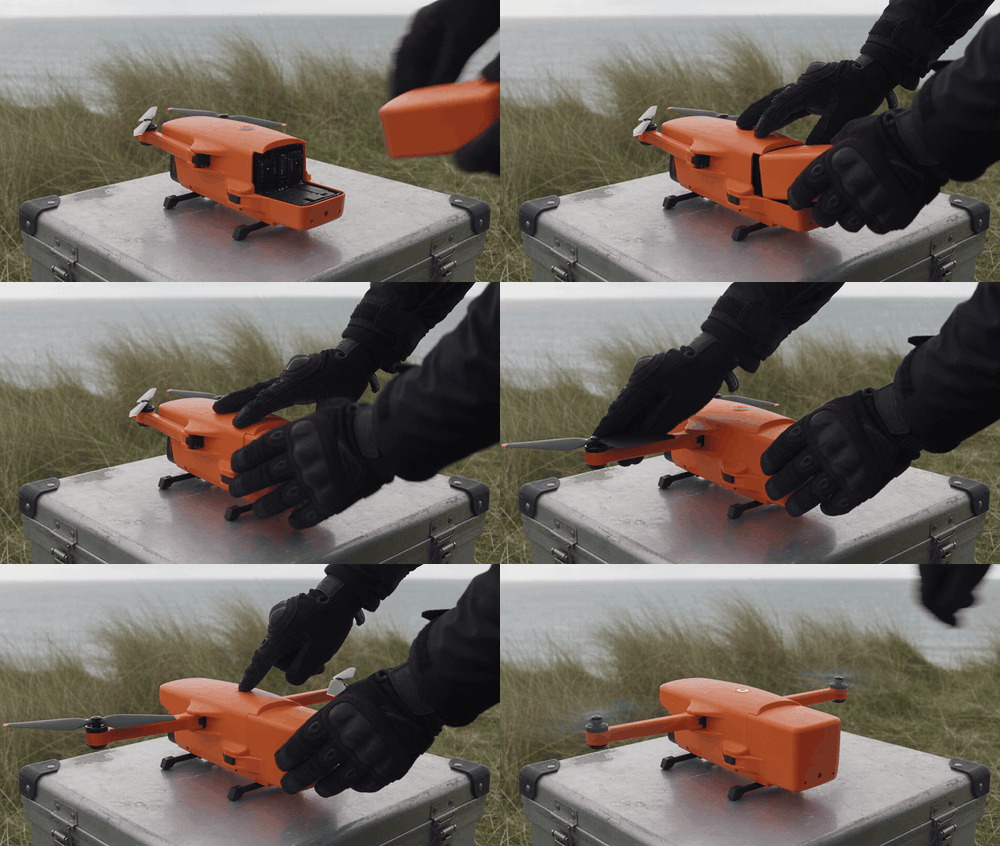
Silent 8-second source clip for an AI API for Video Editing Apps preservation test: gloved hand locks a battery into a rescue drone, unfolds its arms, then powers it on
Shared source clip, shown as a silent GIF: lock the battery, unfold the drone arms, then press power. Use only footage your team created or has clear permission to process.
AI API for Video Editing Apps Test Asset and Acceptance Rules
Use an authorized source asset. Do not scrape a social video for a product test. Reject an output if it adds a hand, drone, logo, text, flicker, camera cut, timing change, or visible deformation. Accept only when the hand movement, drone position, camera path, and duration remain recognizable and instructions do not spill into untouched elements.
This is a controlled product-scene test, not a universal performance claim. Run the same source and prompt multiple times if you need a distribution of outcomes. Store each result with its settings and reviewer decision.
AI API for Video Editing Apps Test 1: Scene Restyle With Wan 2.7 Video Edit
- Upload the authorized source clip to Wan 2.7 Video Edit.
- Select
1080P,16:9,duration: 8,prompt_extend: true, and a random seed. Confirm the form actually committed these settings before submitting. - Paste the following prompt as a single edit request.
plaintext1Use the uploaded eight-second video as the exact timing, camera, hand-motion, and drone-shape reference. Preserve the same gloved hand, compact orange rescue drone, battery-lock action, arm-unfolding action, power-button press, camera path, framing, and pacing. 2 3Transform only the setting into a high-altitude alpine rescue command post at blue hour. Replace the weathered field case with a black rubberized operations table. Through a partially open emergency tent behind the drone, show wind-driven snow, dark mountain ridges, and a distant searchlight sweeping across the snowfall. Add one fixed overhead work lamp that clearly lights the work surface. Keep the drone unbranded and physically unchanged, including its orange body color. 4 5The action must remain the same: a gloved hand locks in the battery, unfolds the drone arms, then presses the power button. Documentary field realism, stable edges, consistent lighting across all frames. 6 7No text, captions, logos, extra hands, extra drones, warped propellers, camera cuts, flicker, or sudden changes in timing.

Wan 2.7 Video Edit alpine-command result from the shared 8-second rescue-drone clip
Controlled scene-restyle result, shown as a silent GIF. Review the orange drone outline, battery-lock continuity, and whether the tent, snow, or searchlight intrudes on the hands or drone.
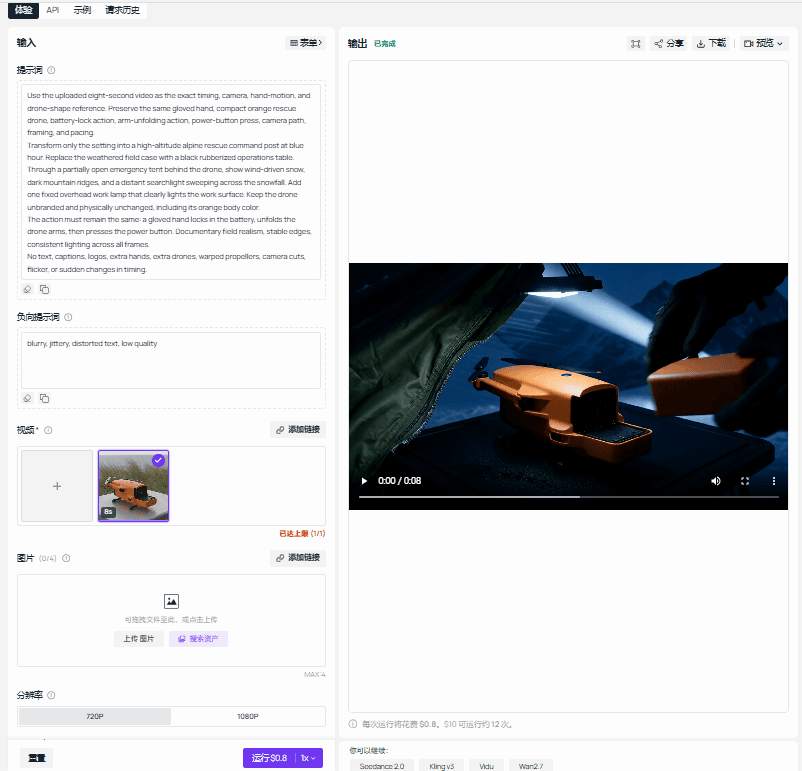
Completed Wan 2.7 Video Edit playground capture showing this article's source, prompt, settings, and output
Wan 2.7 Video Edit on Atlas Cloud: completed playground capture for the controlled scene test, with this article’s prompt and output visible.
The acceptance check is narrow: the drone silhouette should remain stable, the battery lock and arm movement should remain continuous, and the tent, snow, and searchlight should change the setting without swallowing the hands or drone. A single successful run does not prove a model will perform that way for every product, clip, or prompt.
AI API for Video Editing Apps Test 2: Controlled Object Replacement With Gemini Omni Flash Video Edit
- Upload the same clip to Gemini Omni Flash Video Edit.
- Select the currently highest available
720psetting,thinking_level: high, and a random seed. Do not add a reference image for the first test. - Paste this object-replacement instruction.
plaintext1Use the uploaded video as the exact reference for camera position, hand identity, hand movement, lighting direction, battery motion, framing, and timing. Preserve everything except the drone body color. 2 3Replace only the compact orange rescue drone with an unbranded cobalt-blue rescue drone. Keep exactly the same size, position, rotation, reflections, gloved-hand contact points, battery-lock motion, arm-unfolding motion, and power-button interaction. The replacement must remain stable from the first frame to the last frame. 4 5Do not change the person, hands, worktable, battery, background, camera motion, pacing, duration, or sound. No text, labels, logos, extra objects, duplicated drones, warped fingers or propellers, flicker, cuts, or generated music.
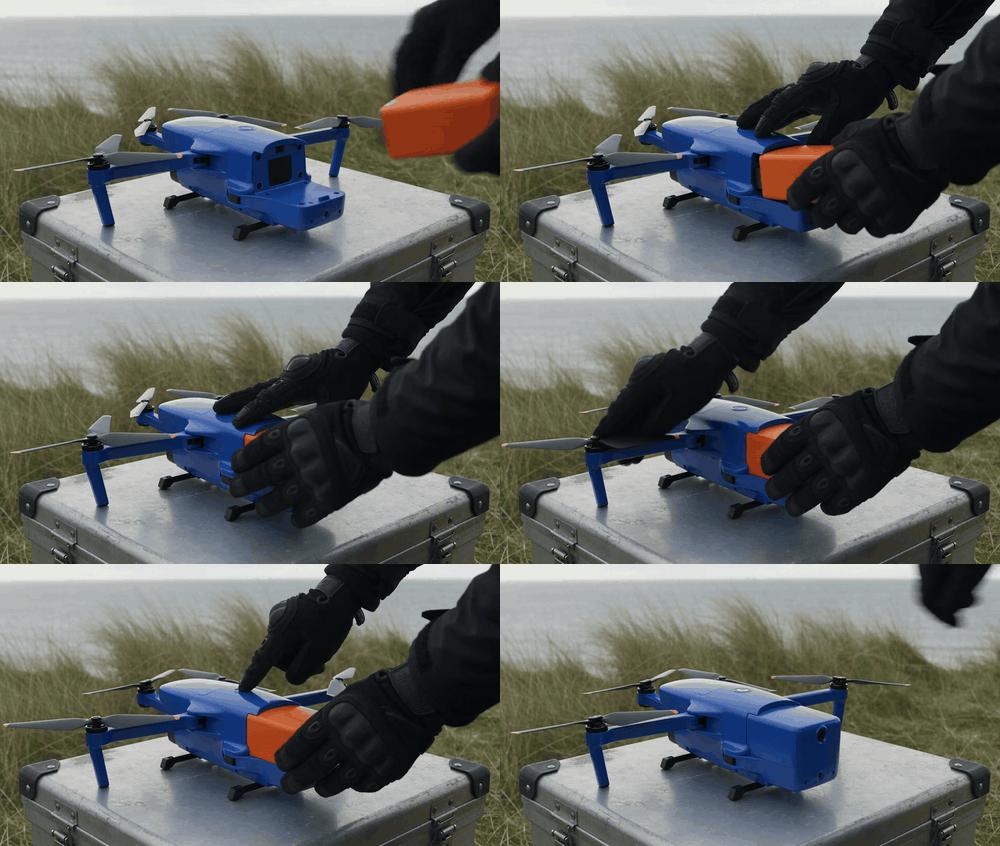
Gemini Omni Flash Video Edit controlled cobalt-blue rescue-drone replacement from the shared source clip
Controlled object-replacement result, shown as a silent GIF. Inspect the replacement during battery locking, arm unfolding, and the power-button press, especially at gloved-hand contact points.
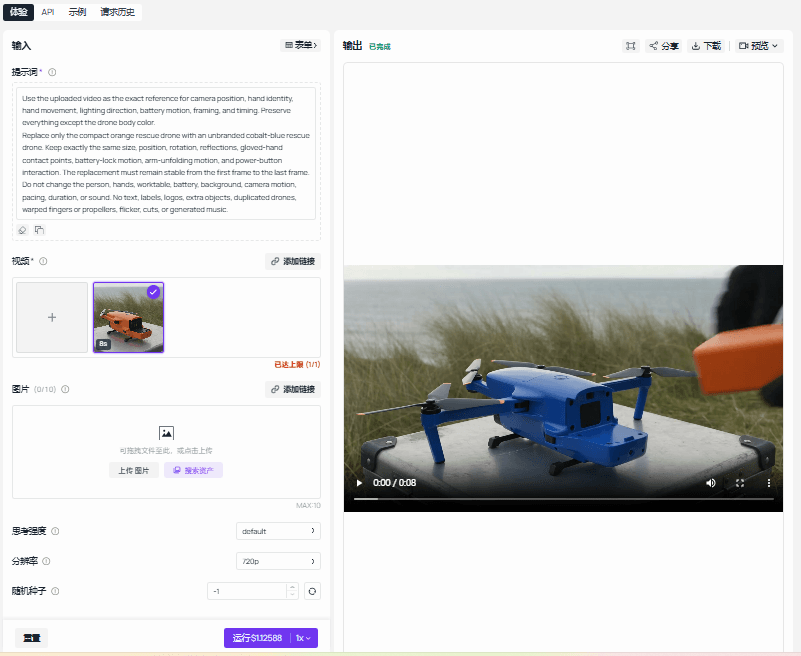 Completed Gemini Omni Flash Video Edit playground capture showing this article's source, prompt, settings, and output
Gemini Omni Flash Video Edit on Atlas Cloud: completed playground capture for the one-object replacement test, with the real run output visible.
Accept this result only if the blue drone stays stable through all 3 action phases, does not intersect fingers, and does not cause unrelated changes. Different models may suit different jobs. This test helps a team decide which model profile deserves further validation; it does not create a permanent quality ranking.
AI API for Video Editing Apps: Ship a Safe Product Experience
AI API for Video Editing Apps Need a Rights and Consent Gate
Ask uploaders to confirm that they hold the necessary rights to the source video and any reference asset. Give customer footage, identifiable people, trademarks, protected characters, and sensitive scenes an escalation path. Keep source-to-output provenance, honor deletion requests, and set project-level expiration rules.
These checks are product controls, not legal conclusions. Do not imply that a generated output automatically grants commercial rights. Your terms, region, source agreements, and intended use still matter.
AI API for Video Editing Apps Need Honest Failure States
Show queued, processing, needs review, failed, and retrying as distinct states. A failed job should not look like a completed project revision.
When motion preservation fails, guide the user toward a useful retry: shorten the source, change 1 variable instead of 3, lock more elements, or submit a cleaner reference. If original sound matters, preserve and review its audio track independently instead of asking a generative route to recreate it by default.
AI API for Video Editing Apps Should Launch With One Narrow Workflow
Ship the smallest complete loop first:
- Authorized source upload.
- One single-variable edit task.
- Asynchronous job status page.
- Side-by-side original and result review with reject.
- Download or write-back to the user’s project.
- Cost and failure-reason logging.
- Only then add references, batches, captions, or timeline tools.
This sequence gives product teams a failure dataset before they create a broad automation promise.
AI API for Video Editing Apps: Integration and Cost Checklist
Use this checklist before expanding an AI API for Video Editing Apps beyond its first workflow.
| Launch check | Evidence to retain |
|---|---|
| Defined edit task, not a universal editor claim | A single-sentence job definition and excluded cases |
| Full provenance chain | Source, instruction, locks, model, output, reviewer, and timestamps |
| Duplicate-charge protection | Idempotency key and webhook event de-duplication test |
| Budget strategy | Preview and quality profiles, source limit, retry limit, escalation rule |
| Honest result state | Variation label until an explicit approval occurs |
| Accepted-edit economics | Attempts, source seconds, displayed rate, operational cost, accepted outputs |
| Real evaluation | Authorized uploaded clip and actual output, never a synthetic UI mockup |
| Rights operations | Consent, deletion, retention, and sensitive-content entry points |
The fastest way to ship is to make one edit task observable from upload through approval. Once that loop has reliable data, you can decide whether your next investment is a better prompt-edit route, clipping, a timeline renderer, or generated B-roll.
Conclusion: Start With a Reviewable Edit, Not an AI Editor Claim
An AI API for Video Editing Apps becomes dependable when the product makes one bounded change observable from upload to approval. Keep the source immutable, state exactly what should stay locked, treat every generated file as a revision, and measure the cost of accepted edits instead of the price of a single attempt.
That foundation gives a team useful evidence before it adds broader automation. Once users can review a stable, single-variable prompt edit, the next choice between better video editing, clipping, timeline rendering, or generated B-roll becomes a product decision backed by real job data.
Frequently Asked Questions
What is an AI API for video editing apps?
It is a service layer that lets an app submit an existing video and editing instruction, receive an asynchronous result, and manage review, retries, provenance, and delivery. It may use a generative video-edit model, a timeline renderer, a clipping system, or several routes together.
How is an AI video editing API different from a video generation API?
A generation API creates a new shot from a prompt or references. An editing API starts with existing footage and asks the system to preserve specified parts while changing a defined element. The app should expose different expectations, review criteria, and cost controls for each route.
Can an AI API for Video Editing Apps preserve the original video motion?
It can attempt to preserve motion, camera path, timing, and named elements, but the app must test that behavior with representative footage. Lock the relevant elements, use one-variable instructions, and require review before applying the output. Treat preservation as an acceptance test rather than a blanket promise.
Should my app use prompt-based editing or a timeline rendering API?
Use prompt-based editing when users want to retain a recorded action while changing a visual element. Use a timeline renderer for precise cuts, caption placement, templates, transitions, audio mixing, and repeatable batches. Many products need both, but they should not share the same success metric.
How do AI video editing API costs scale with retries and video length?
Costs usually increase with source seconds, selected settings, attempts, storage, egress, moderation, and review. Track accepted-edit cost instead of only rate per second. Short preview clips and capped retries make the early product easier to budget.
What rights checks should an AI video editing app require before processing uploads?
Require the uploader to confirm rights to source footage and reference assets. Provide paths for consent-sensitive material, trademarks, protected characters, deletion requests, and retention controls. Seek appropriate legal advice for your product and market rather than treating this checklist as legal guidance.





