
The reply box greys out, a banner says "Something went wrong", and Retry does nothing. Before you clear a single cookie, find out which of two problems you have. ChatGPT not working for everyone is an outage, and nothing on your laptop will fix it. ChatGPT not working only for you is a browser, network or account issue, and OpenAI publishes the fix for each one.
Three checks separate the two in under a minute. Below them, we went through every ChatGPT incident OpenAI logged in October 2026 and pulled the official explanation for each error, upload limit and login failure.
Key Takeaways
- Checkstatus.openai.combefore touching settings: an open ChatGPT incident means the fix is on OpenAI's side.
- "A network error occurred" points to your connection; "Something went wrong" can be OpenAI's servers or your setup, in OpenAI's words.
- Upload failures often trace to a published limit: 512 MB per document, 20 MB per image, three uploads a day on Free.
- Login loops usually come from a VPN or an old code;fora generic login error, OpenAI says wait 60 seconds and retry.
- While ChatGPT is down, the OpenAI models on Atlas Cloud answer the same prompt through a separate service.
Is ChatGPT Not Working Right Now, or Only for You?
Start with the question that decides everything else, in the order that saves the most time.
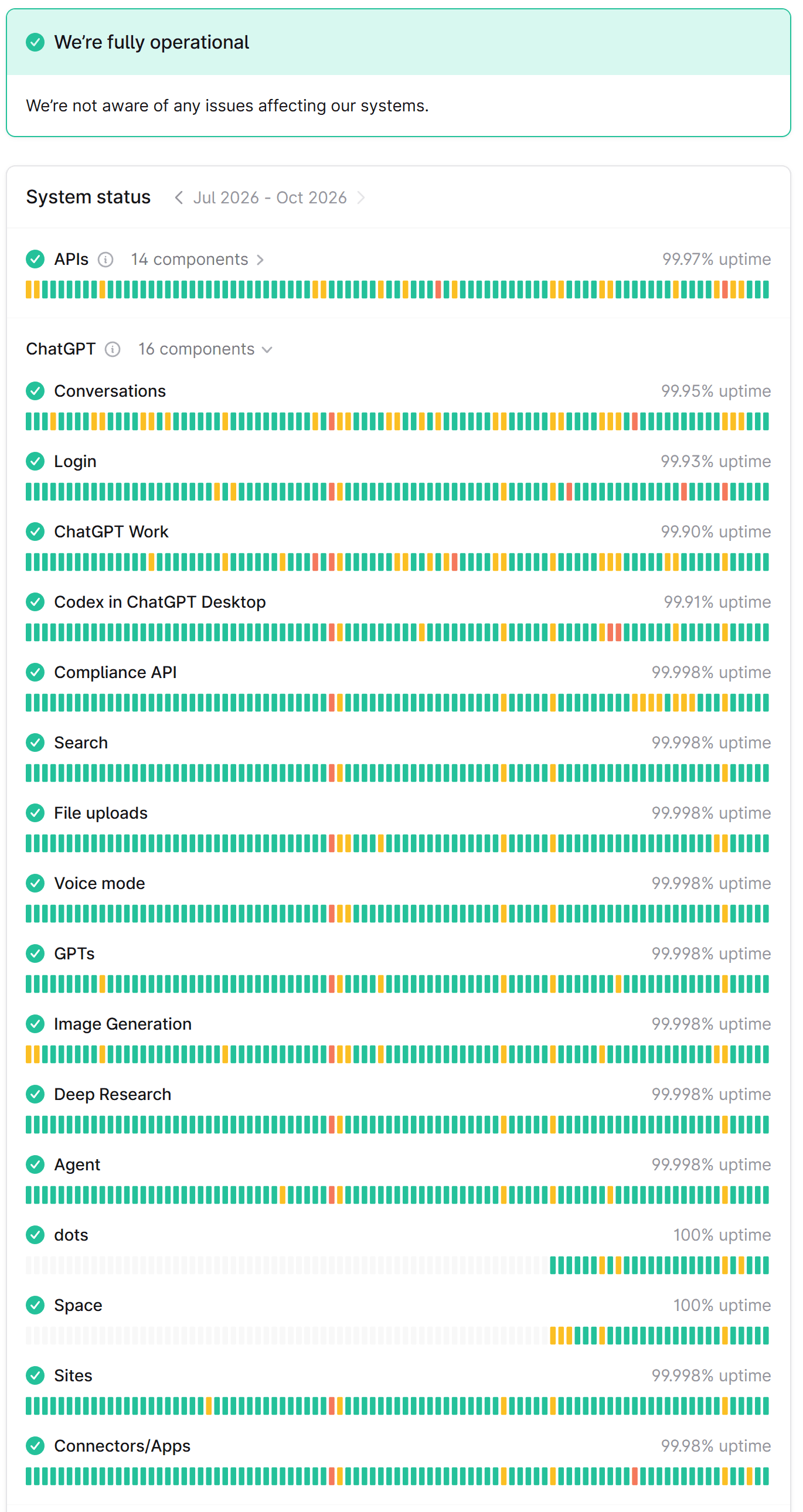
- Open status.openai.com. The ChatGPT section lists 16 components, including Conversations, Login, File uploads, Image Generation and Voice mode. If the one you are using shows anything other than Operational, stop troubleshooting. The problem is on OpenAI's side.
- Try an incognito window. It loads ChatGPT without your extensions and without stale cookies. If the page works there, the fault is in your normal browser profile.
- Try another network. Switch your phone to mobile data, or turn the VPN off for a minute. If that fixes it, the request was being blocked or rerouted on the way.
User-report trackers are a second opinion at best: they spike for problems that hit one region or one plan, so treat the status page as the source of record.
Source: OpenAI Status , captured October 26, 2026
Labels run from Operational through Degraded performance and Partial outage to Full outage. OpenAI doesn't define them, so the incident title and the affected components tell you more than the color. Here is what the page logged for ChatGPT in October 2026.
| Date (Pacific time) | Incident title on the status page | What stopped working | How long |
|---|---|---|---|
| October 1 | Issues with login, signup, and ads | Login | About 53 minutes |
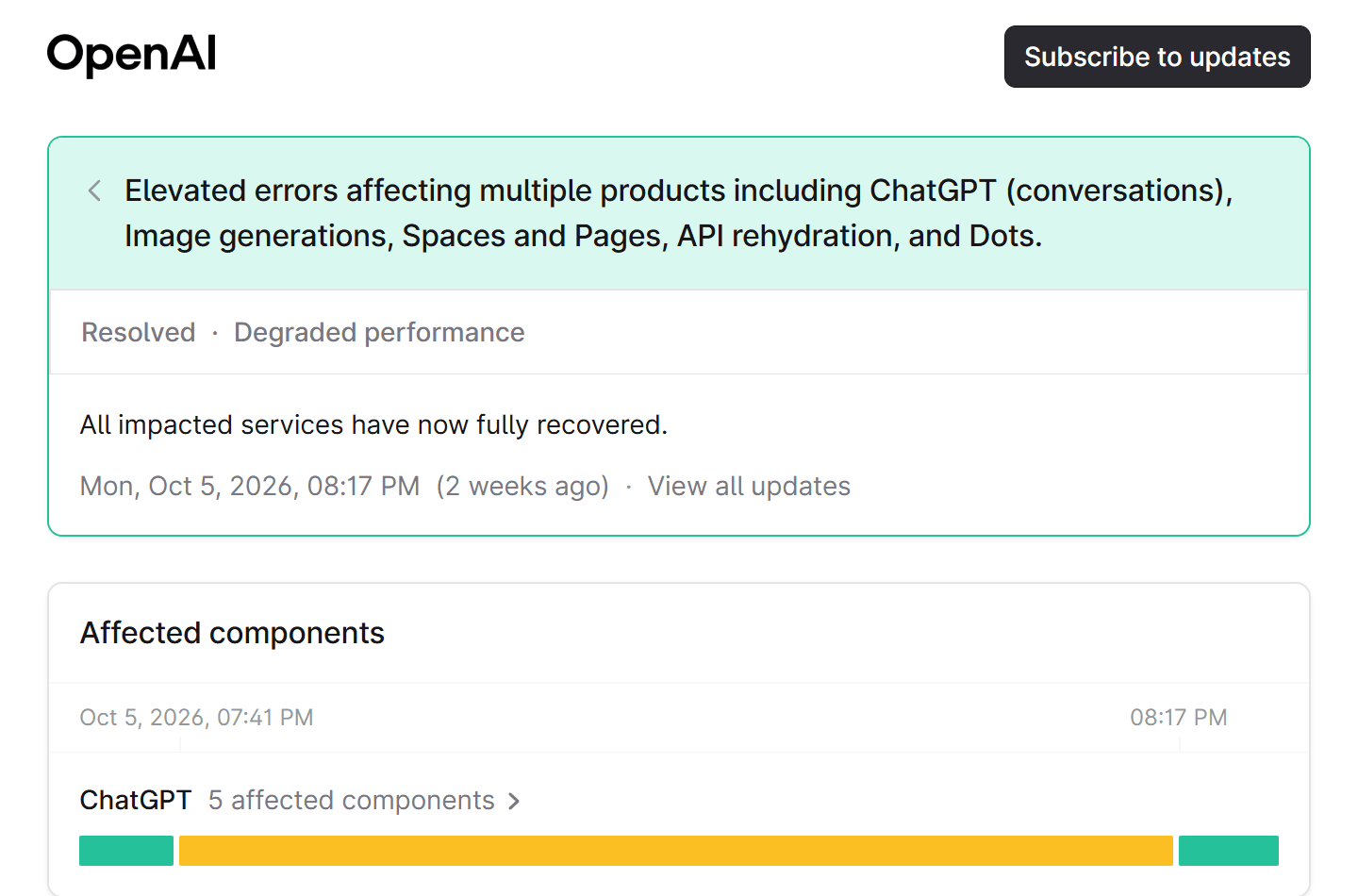
| October 5 | Elevated errors affecting multiple products including ChatGPT (conversations), Image generations... | Conversations, image generation | About 36 minutes |
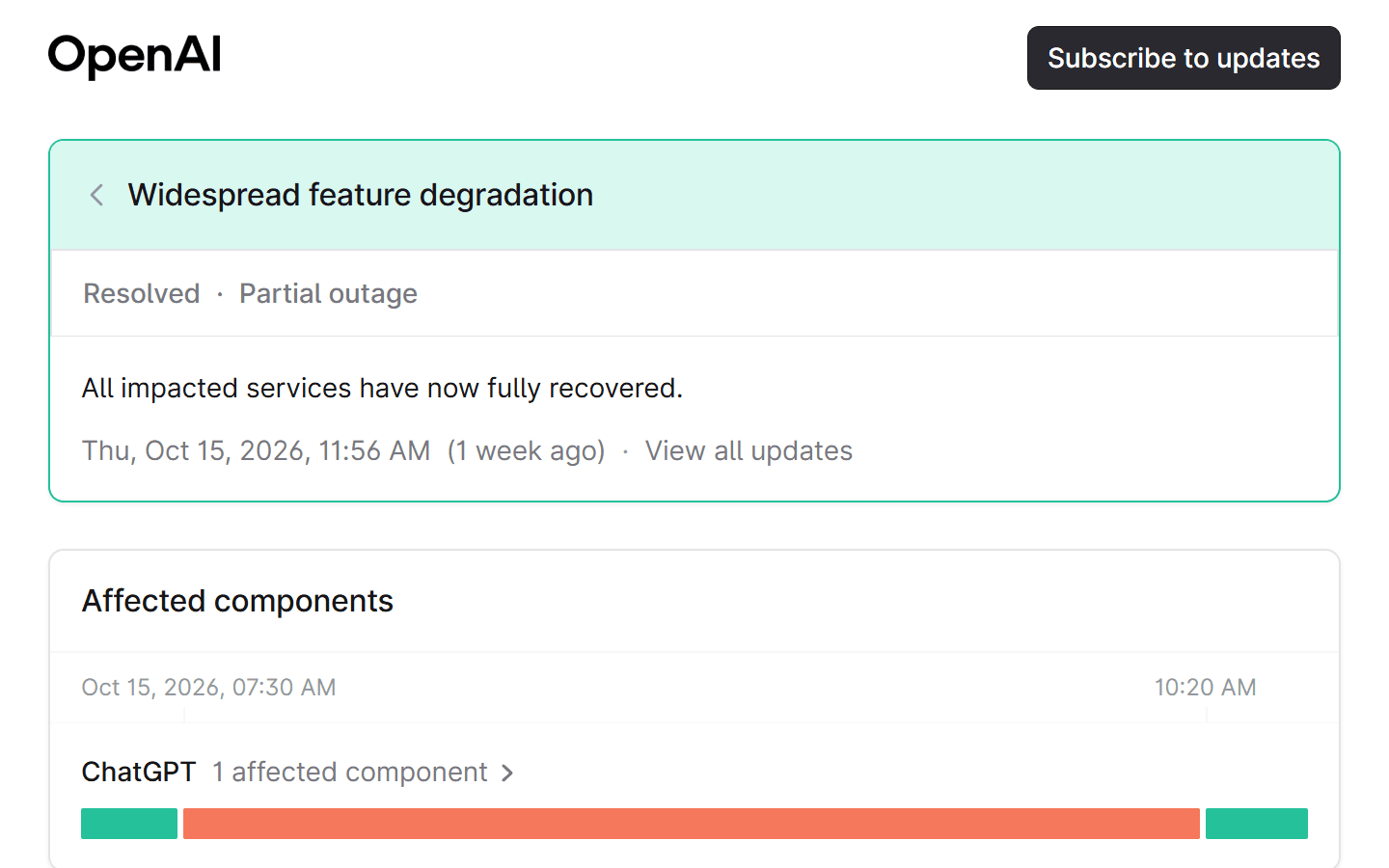
| October 15 | Widespread feature degradation | Logins and signups in the iOS and Android apps | About 3 hours |
| October 19 | File Download errors | File uploads and downloads | About 43 minutes |
| October 21 to 22 | Elevated ChatGPT conversation and Responses API errors | Conversations in India, Japan and Korea | About 6.5 hours |
Two patterns stand out. Most incidents clear in under an hour, so waiting is often the right fix. And several were regional: a user in Tokyo and a user in Toronto had different experiences on October 21. The widest incident the page shows was September 3, when a routing change took down ChatGPT and Codex for roughly 40 minutes before OpenAI mitigated it.
Keep Working While ChatGPT Is Down: GPT-6 Luna on Atlas Cloud
An outage is a bad time to discover that your only route to a model is one website. Atlas Cloud hosts GPT-6 Luna, the model OpenAI's release notes assign to ChatGPT's Free and Go plans, on its own infrastructure. When the chat page fails, the same prompt still has somewhere to go.
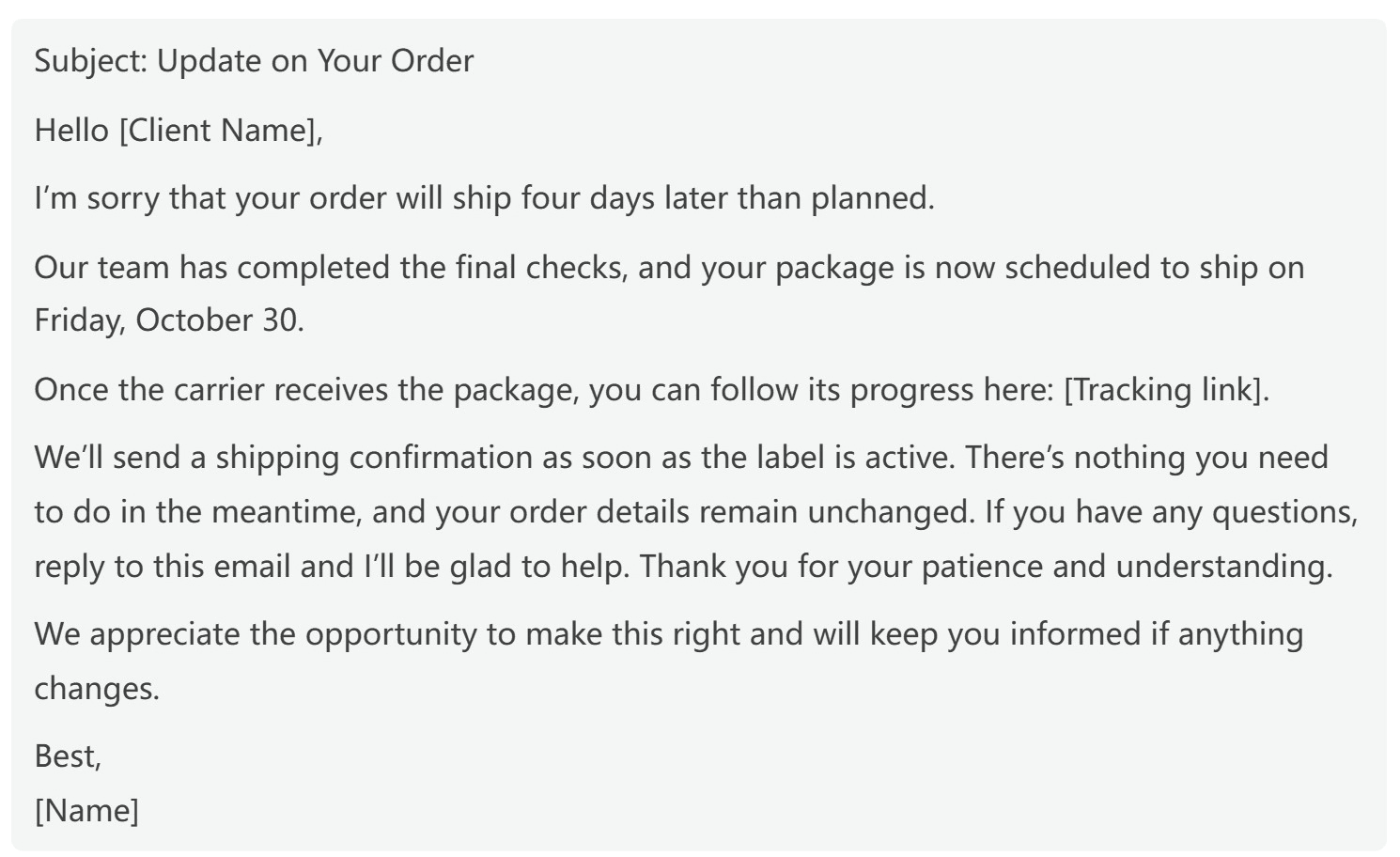
We tested it with a task that can't wait for a status page to turn green: a short email telling a client that their order will ship four days late. One prompt, one reply. Luna apologized once, named the new date, dropped in a tracking placeholder, and added a line we hadn't asked for but would keep: "There's nothing you need to do in the meantime."
Method 1: Run the Prompt in the GPT-6 Luna Playground
No code needed. Sign in, open the GPT-6 Luna playground, then:
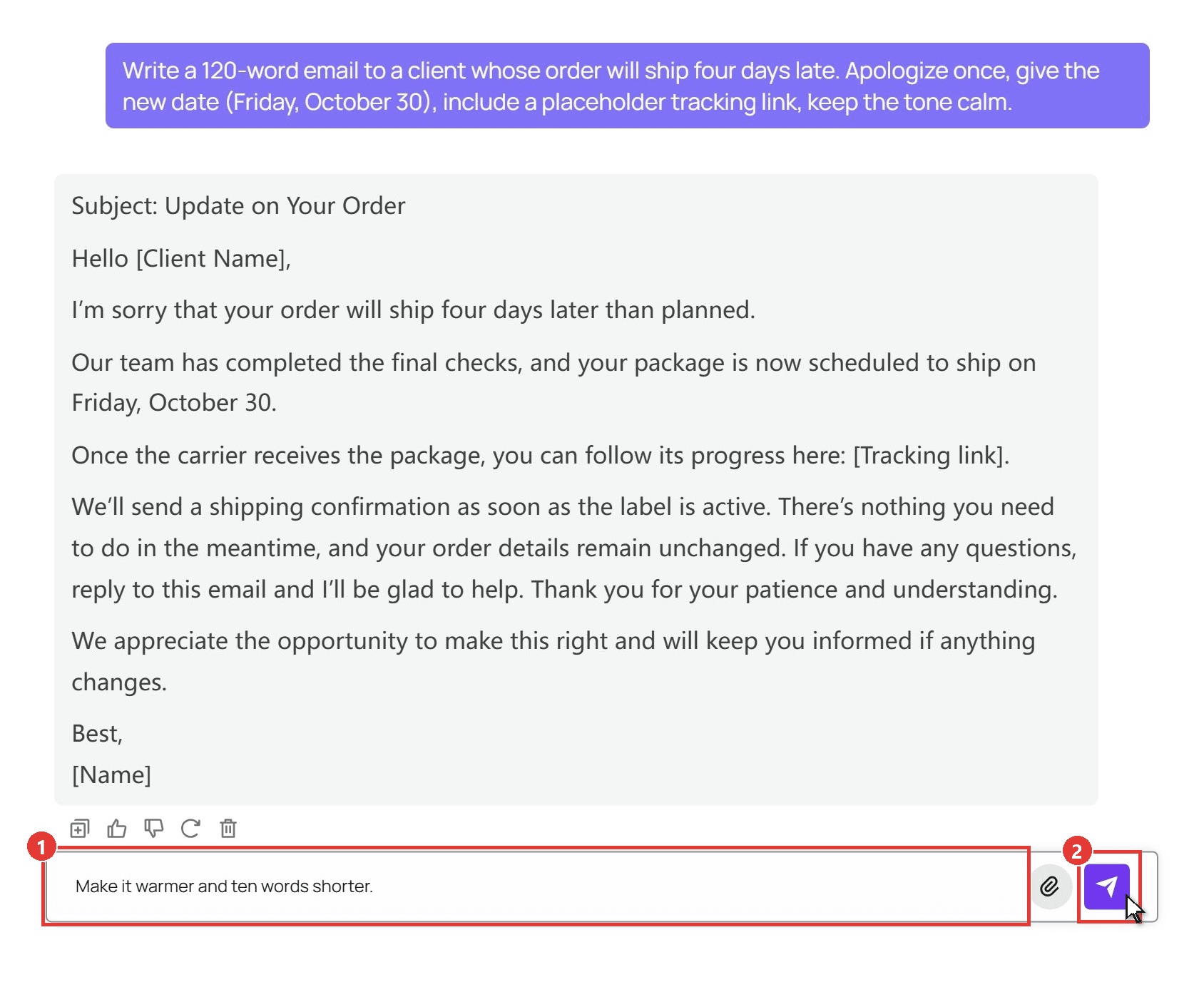
- Paste your prompt into the message box. Ours asked for a 120-word email about a four-day shipping delay, with one apology, the new date, a placeholder tracking link and a calm tone.
- Click the send arrow. The answer streams into the chat area, and you can ask for a warmer or shorter version in the same box.
Method 2: Send the Same Request Through the API
If ChatGPT going down also stops a script or internal tool, give it a second route. Three steps.
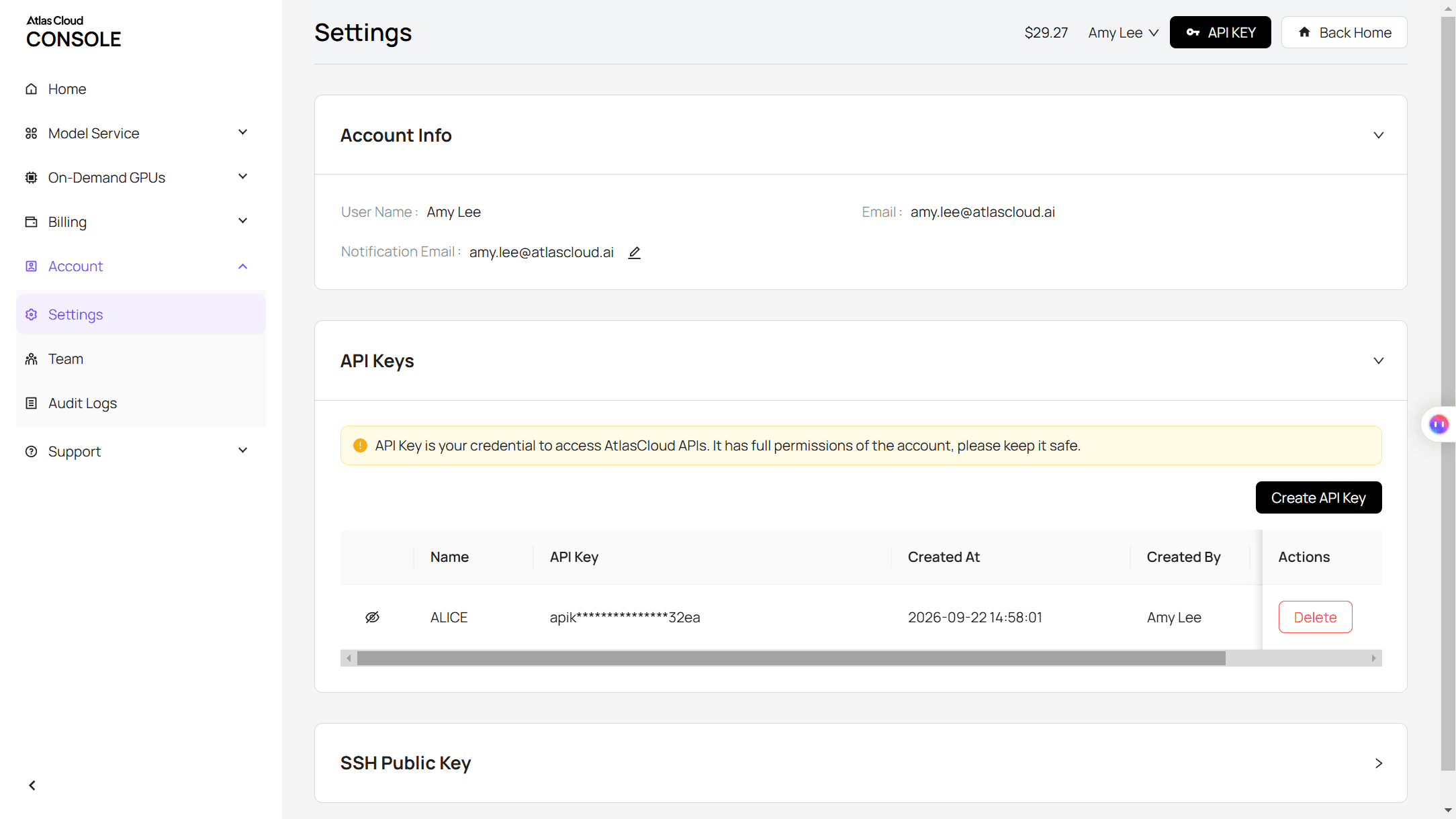
Step 1: Create an API key. Open Settings in the console, go to API Keys, and click Create API Key. Keep it on the server side, never in a browser.
Step 2: Check the request format. The API docs cover the chat completions format, and the model page has an API tab with a ready-made example.
Step 3: Send the request. A standard chat completions call. The reply comes back in choices[0].message.content.
plaintext1curl -X POST "https://api.atlascloud.ai/v1/chat/completions" \ 2 -H "Authorization: Bearer $ATLASCLOUD_API_KEY" \ 3 -H "Content-Type: application/json" \ 4 -d '{ 5 "model": "openai/gpt-6-luna", 6 "messages": [{"role": "user", "content": "Write a 120-word email to a client whose order will ship four days late. Apologize once, give the new date (Friday, October 30), include a placeholder tracking link, keep the tone calm."}], 7 "max_tokens": 600 8 }'
The same endpoint and key cover GPT-6 Sol and every other chat model on the platform, so a fallback is one model string away.
Why Is My ChatGPT Not Working? What Each Error Message Means
If the status page is green and incognito didn't help, the banner itself is the clue. OpenAI's troubleshooting article explains each one. We kept its wording and added the single action that usually clears it.
| Error message | What OpenAI says it means | What to try first |
|---|---|---|
| "Something went wrong." | "a temporary server issue or a problem with your local setup" | Refresh, then start a new chat |
| "A network error occurred." / "An error occurred while connecting to the websocket." | Your device "is unable to establish a reliable connection to our servers" | Turn off VPN or proxy, then switch network |
| "There was a problem preparing your chat." | An extension or URL blocker "interferes with loading the page" | Disable extensions or use incognito |
| "There was an error generating a response." | "May be a one-time error" | Click Regenerate |
| "We detect suspicious activity." / "Unusual Activity Detected" | Automated or shared-account behavior was suspected | Turn off VPN, stop sharing the account, change the password |
| "Download failed" / "File Not Found" | The file expired, or it is over the 512 MB limit | Regenerate the file, keep it under 512 MB |
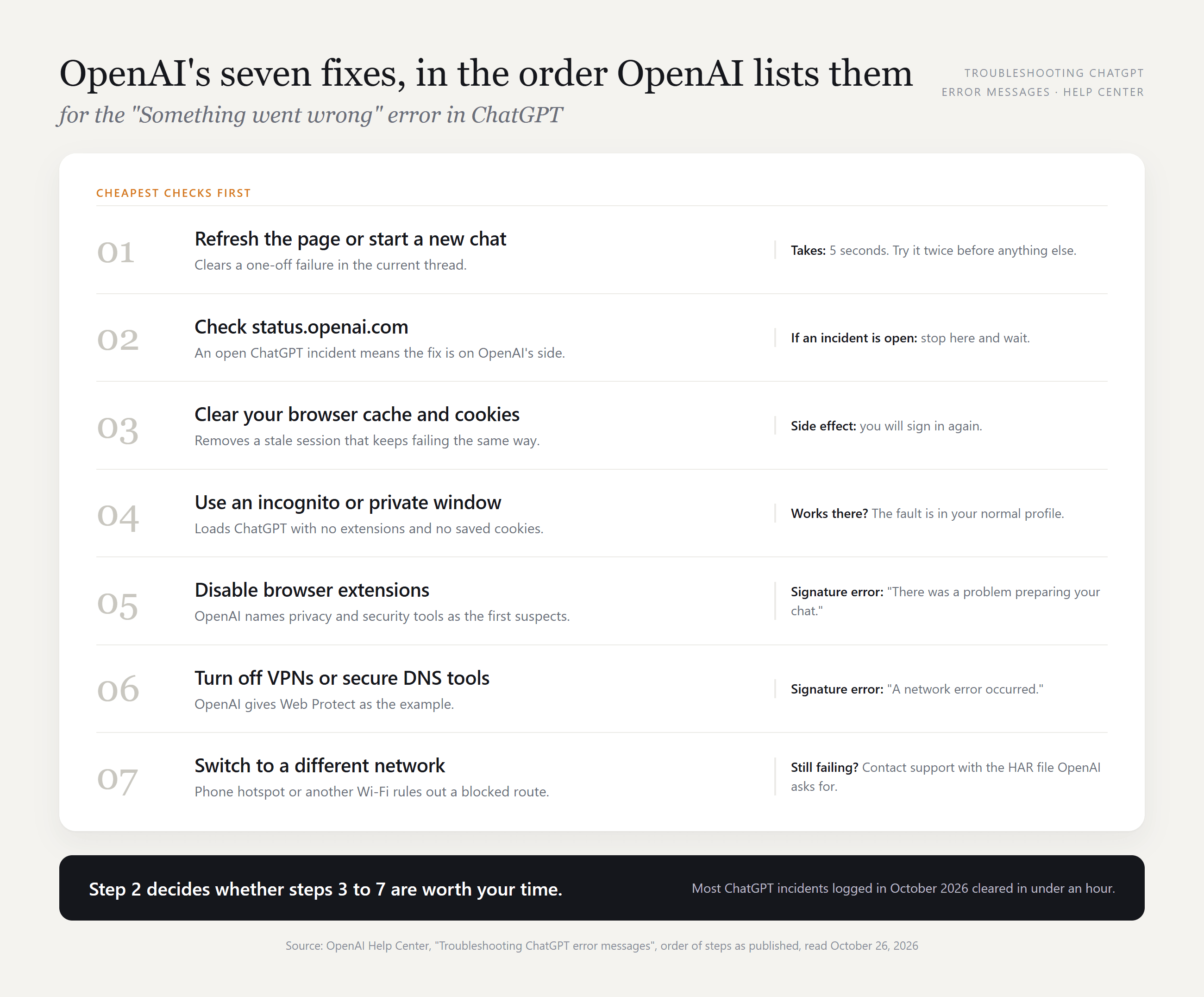
For the generic "Something went wrong", OpenAI lists seven steps in a fixed order, and the order matters: the cheap checks come first.
"Too many requests" and "Conversation not found" are not on OpenAI's list. In practice the first is a rate limit (wait, then retry), and the second usually means the chat was archived or deleted. Our guide to ChatGPT archived chats covers getting those back.
ChatGPT Not Working on Chrome: Blank Page or Stuck Loading
Chrome is where most extension problems live. OpenAI names "privacy or security tools" as the extensions to disable first, and the "preparing your chat" error is their signature.
| What you see in Chrome | Likely cause | What to try |
|---|---|---|
| Message box never appears, page stays white | An extension is blocking a script | Open the same URL in incognito |
| "Checking your browser" repeats forever | Cloudflare verification loop, often with a VPN on | Pause the VPN and refresh |
| Page loads, reply never arrives | Websocket blocked by a proxy or secure DNS tool | Turn off the proxy or Web Protect |
Some users also report a Cloudflare error code 1020 when their IP has been flagged. OpenAI doesn't document it, so the practical move is a different network. A Chrome tab that works but feels sluggish is a different problem, covered in our piece on why ChatGPT is slow.
ChatGPT Login Not Working: Verification Loops, Codes and the Wrong Method
Login failures feel like outages, but October's status log shows only three login incidents, each under three hours. The rest of the time the cause is local, and OpenAI's login article gives a short list.
- Stuck on "Checking your browser"? OpenAI's instruction is to "Temporarily pause any personal VPN or proxy services and refresh the page."
- A generic error on the login screen? "Wait at least 60 seconds, then try again."
- No verification code? Request a new one and use the latest. OpenAI also says to "Check spam/quarantine folders and allowlist [email protected]."
- "Wrong authentication method"? You picked a sign-in method "that isn't enabled for your account." If you signed up with Google, the email-and-password route won't work.
Source: OpenAI Status , captured October 26, 2026
That October 15 incident hit logins and signups in the iOS and Android apps specifically, while the web kept working. If the app rejects you and the browser lets you in, that is the pattern of an incident, not a password problem.
ChatGPT Upload Not Working: The File, PDF and Image Limits That Block It
When a file refuses to attach, or the message fails once it is attached, the explanation is usually one line in OpenAI's file upload FAQ. These are the published ceilings as of October 2026.
| Limit | OpenAI's published value |
|---|---|
| Documents and presentations | 512 MB per file |
| Images | 20 MB per image |
| CSV files and spreadsheets | Approximately 50 MB |
| Text and document content | 2 million tokens per file |
| Upload rate, all plans | 80 files every 3 hours |
| Upload rate, Free plan | 3 file uploads per day |
| Project files | 5 on Free, 25 on Go and Plus, 40 on Pro, Business and Enterprise |
A PDF that fails is often scanned pages rather than text, so it hits the size limit first, or it is simply the fourth upload of the day on Free. OpenAI also notes that "Failed upload attempts can sometimes count toward the upload-rate limit," so three failed tries on Free can use the whole daily allowance.
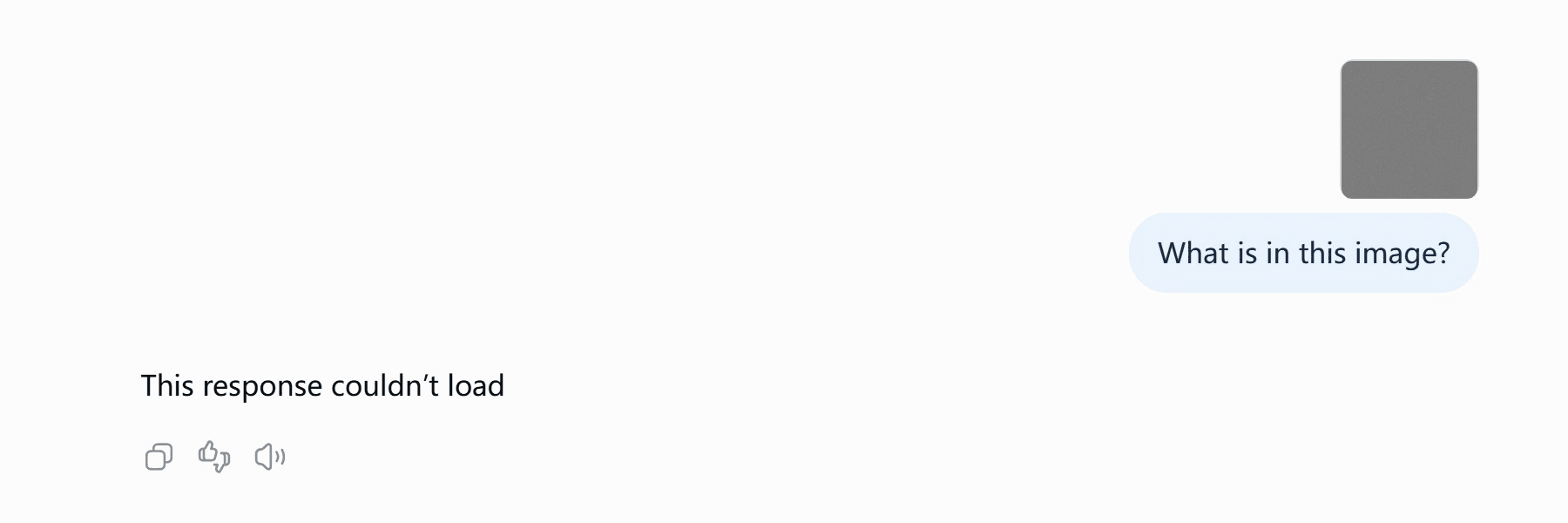
We tried it on a Free account with an 89 MB PNG. The file attached without complaint and the message went through, but the reply came back as "This response couldn't load". The limit is enforced after you send, not when you attach, so an oversized file looks fine right up to the moment it fails.
If every upload fails on an office network, the block may be upstream: OpenAI asks IT teams to allow traffic to the oaiusercontent.com domain, where uploaded files are stored.
ChatGPT Image Generator Not Working: Limits, Refusals and Stuck Renders
Image failures come in three flavors, and each looks different in the chat.
- Alimitnotice. OpenAI's Free tier FAQ says image generation has "separate usage limits" and that "ChatGPT will notify you when you reach an applicable limit." We tested how far a Free account gets in our ChatGPT image generation limit write-up.
- A refusal. ChatGPT declines in plain text and says why. Rewording, or removing a named person or brand, is the fix on your side.
- A render that never finishes. OpenAI's guidance is that "Image generation may take a few minutes, depending on the complexity of your request." If it passes ten, check the Image Generation component on the status page. On October 5 it was one of the affected products.
Source: OpenAI Status , captured October 26, 2026
ChatGPT App Not Working on Your Phone, Windows 11 or Laptop
The apps add a layer the web version doesn't have: an installed binary that can be outdated or half-updated. OpenAI's help article on the Windows app sets the baseline at "Windows 10 (x64 and arm64) version 17763.0 or higher," which every Windows 11 machine meets, and points to the Microsoft Store or winget for installation.
| Platform | First thing to check | What to try |
|---|---|---|
| Windows 11 app | A pending Store update, or an install from an unofficial download | Settings > Apps > Installed Apps > ChatGPT > Advanced Options > Reset |
| iPhone and Android | App store update, then a reinstall | Sign out, delete, reinstall, sign in |
| Windows and macOS apps | "Phone number required" banner | Add a phone number from a supported country, as OpenAI's error page says |
Source: OpenAI Status , captured October 26, 2026
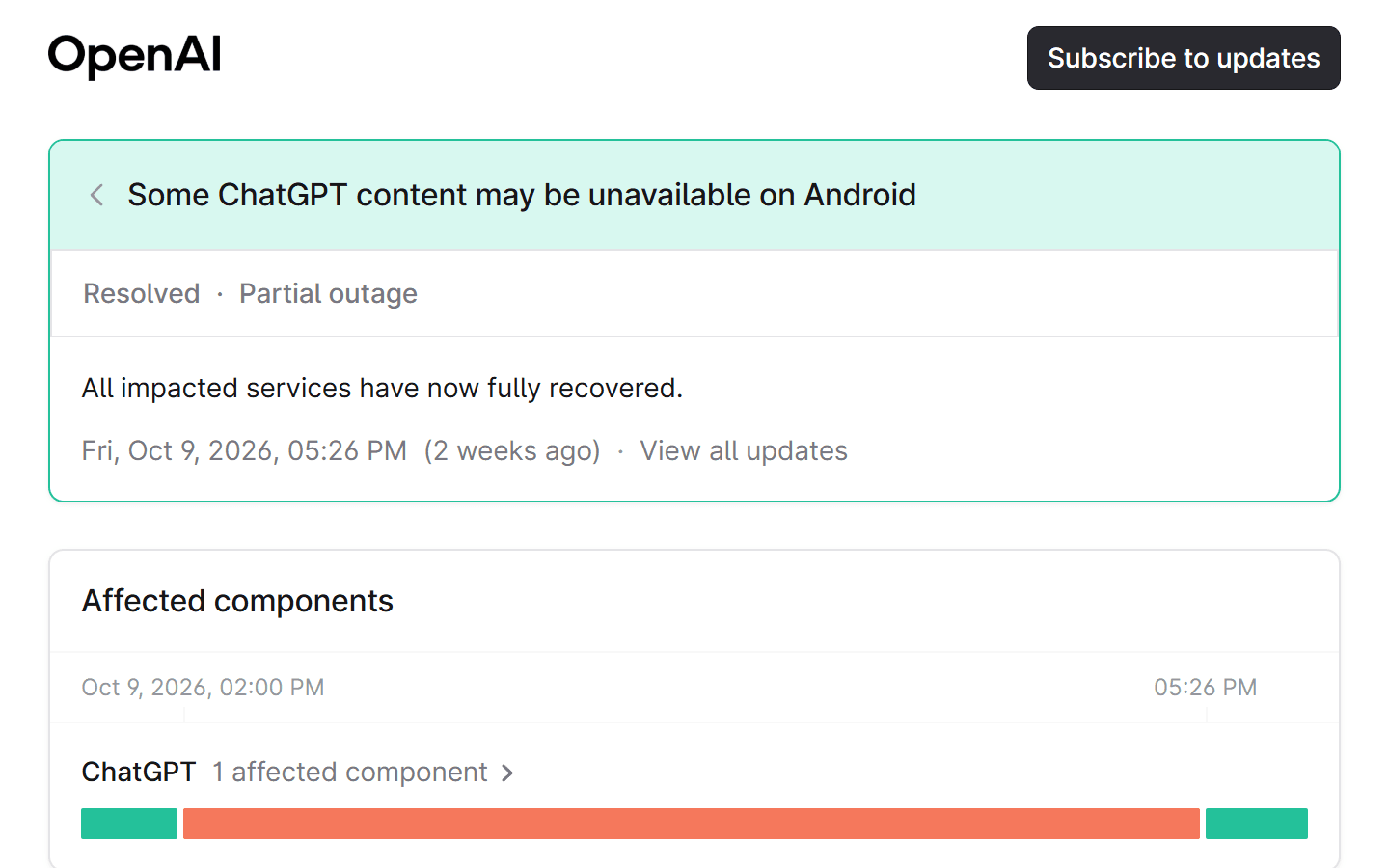
Two October incidents were app-only. On October 9, Android users saw "This content is unavailable in this version of the app" until a fix rolled out, and OpenAI's advice during the incident was to use ChatGPT on the web. On days like those, the browser on the same phone is the fastest workaround.
FAQ
Why is ChatGPT 5 not working after the update?
Since October 7, 2026, ChatGPT runs GPT-6 by default: Plus, Pro, Business and Enterprise get GPT-6 Sol, and Free and Go get GPT-6 Luna. OpenAI says older models "generally remain available in ChatGPT for 90 days after a successor is released," so a GPT-5 option that vanished from the picker reached the end of that window rather than breaking.
Why is ChatGPT read aloud not working?
Read aloud is one of the per-message actions OpenAI lists for the iOS and Android apps, alongside Copy and Share. If the button is missing, update the app first, since older builds hide newer actions. If it is there but silent, check the phone's media volume and silent switch.
Why is the ChatGPT Canva link not working?
Canva runs inside ChatGPT as a connected app, not a separate GPT, and has to be connected under Settings > Plugins before "Canva, turn these ideas into a presentation" does anything. OpenAI notes that very old mobile builds label that menu Apps instead, so an outdated app is the usual reason the connection appears missing.
Is ChatGPT Plus not working while the free version works?
It can happen, because paid features sit on their own components. On August 31, 2026, the "ChatGPT Work seeing elevated errors and latency" incident ran for about five hours and was listed against ChatGPT Work only, so Plus users lost Work mode while basic chat kept going. Check the specific component before assuming your subscription broke.
Conclusion
When ChatGPT stops, the first minute decides whether you spend the next hour fixing something or waiting for someone else to. The status page, an incognito window and a second network answer that question almost every time. If an incident is open, most are gone within the hour. If the page is green, the error banner names the fix: extensions for "preparing your chat", VPN for network errors, limits for uploads.
For work that can't wait, set up a second route before the next incident. GPT-6 Luna on Atlas Cloud takes the prompt you were about to send, through a playground or one API call, and answers while the usual page is down. That is the most useful thing to know about ChatGPT not working: the model is still reachable, even when the website isn't.





