TL;DR
- Draft saves time. A 480p draft is ready in about 1 min 40 s at $0.134 per second, and most problems are obvious at a glance.
- It doesn't always save money. Upgrading to 1080p costs $0.592 per second, almost the same as $0.596 for direct 1080p. Draft only beats direct generation when the seconds you upgrade are under about 78% of the seconds you draft.
- Our whole film cost $86.90, against $92.45 if every attempt had gone straight to 1080p: a 6% saving, because we picked shots from several takes and had to upgrade them all.
- Where Draft fits: complex action and multi-camera long takes that need several tries, prompts you're still tuning, and workflows where you upgrade one complete take per part.
About this test: This post was written by the Atlas Cloud team, and every generation was run on Atlas Cloud. Prices are the on-screen prices on the test day, November 4, 2026, including that day's 20% discount, with audio generation on. The ledger reflects how we made this one film.
Last week we "discovered" a magical oasis in the western Gobi. All of it, of course, was generated with Seedance 2.5: a mechanical camel, an armored engineering truck, a gunfight chase and a fistfight inside a sandstorm. Anyone who makes AI video knows shots like these rarely land on the first try.
So in this episode we put Seedance 2.5's new Draft mode to the test: generate a 480p draft first, then upgrade to 1080p once you're happy. We spent about ninety dollars and logged every charge. The math turned out less simple than we expected.
How we tested
The project: a 60-second western sci-fi short
The story is called The Great Sandstorm. Flynn rides a half-mechanical camel alone across the Gobi badlands with an old map tucked in his coat. The Black Hat bandit chases him down in a monster engineering truck to take it. The two trade gunfire and cannon fire, race into a giant sandstorm, and fight hand to hand over the map inside it. The storm stops dead, and both men realize they are standing at the entrance of a mysterious oasis.
Seedance 2.5 can generate up to 30 seconds in one go, with multi-camera cuts and camera moves inside a single generation. So we split the film into 3 long takes and wrote each as a shot-by-shot prompt with timecodes:
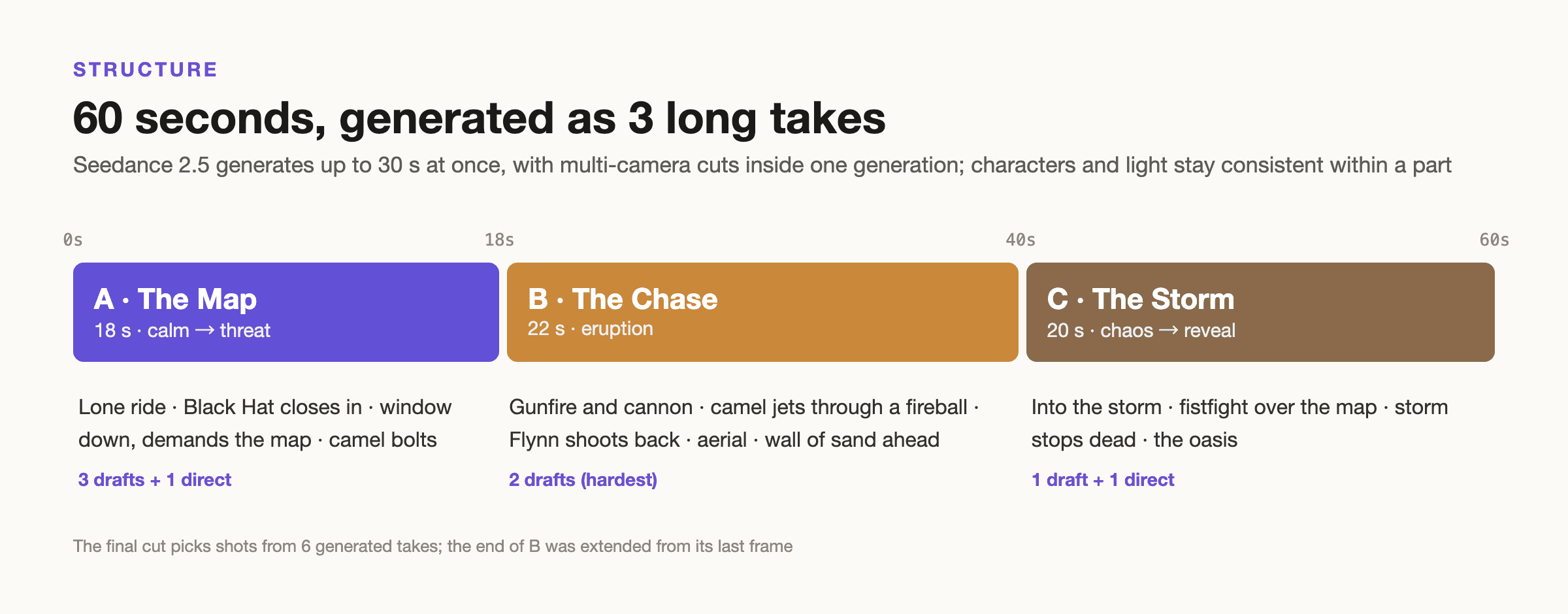
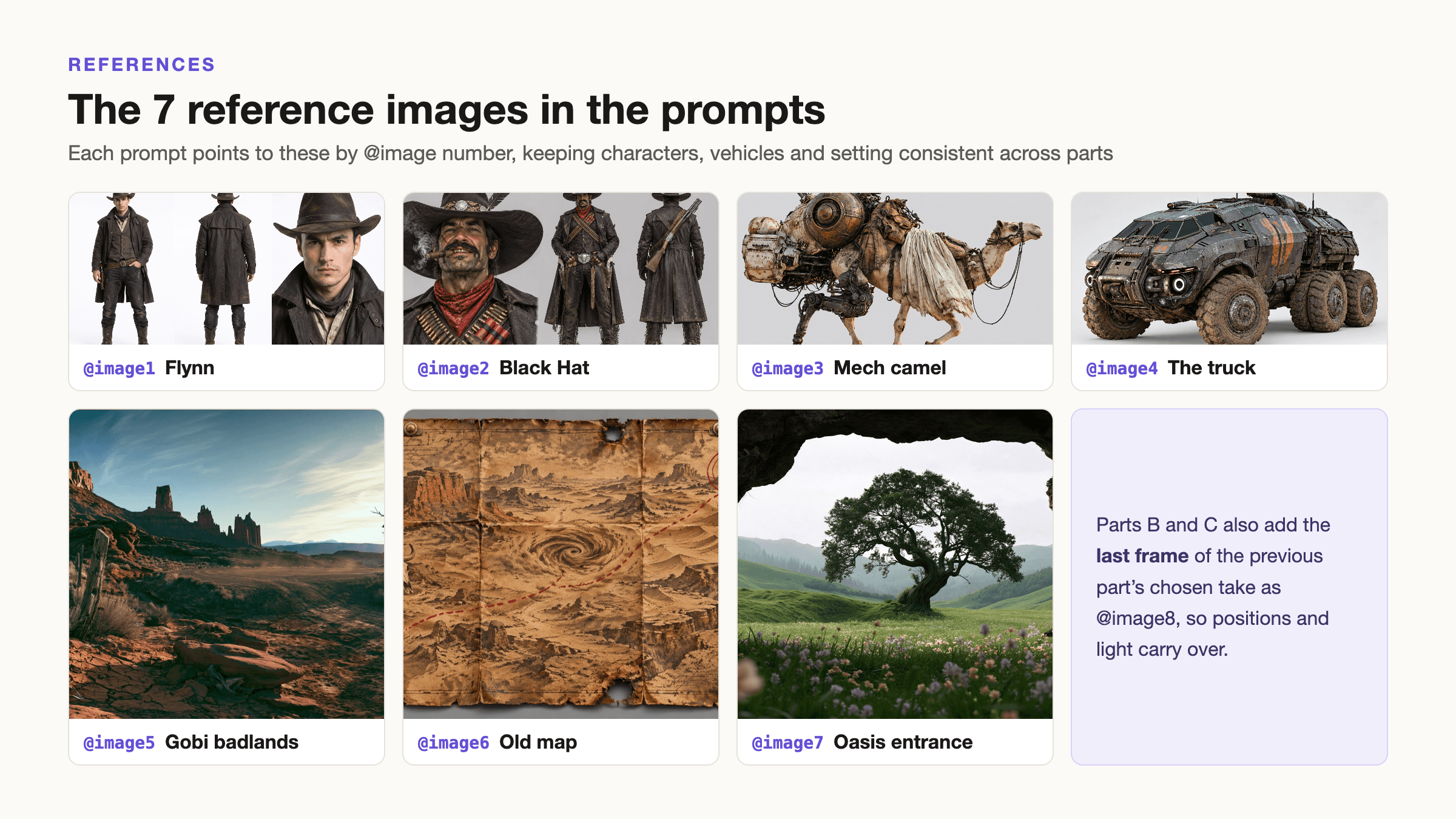
All three prompts reference the same set of images by @image number: Flynn, the Black Hat bandit, the mechanical camel, the engineering truck, the Gobi badlands, the old map and the oasis entrance. This keeps characters and vehicles consistent across parts. The full prompts are in the appendix.
One caveat: the film was not generated in one pass. We tried each part several times and cut the final film from shots across 6 generated takes, extending one part from its last frame. This directly affects the math below.
Test conditions and prices
- Model and platform: Seedance 2.5, Atlas Cloud English interface, November 4, 2026.
- Pricing: on-screen prices on the test day, including the 20% discount, with audio generation on.
- Baseline: "what if every attempt were direct 1080p": the same number of attempts and the same durations, priced at that day's 1080p rate.
| Mode | Price per second | Measured |
|---|---|---|
| 480p draft (Draft) | ~$0.134 | 18 s $2.41; 20 s $2.68; 22 s $2.95 |
| Draft Complete (draft upgraded to 1080p) | ~$0.592 | 22 s $13.03 |
| Direct 1080p | ~$0.596 | 5 s $2.98 |
How to use Draft
- Open Seedance 2.5 on Atlas Cloud and turn Draft on.
- In about 1 min 40 s the 480p draft is ready, at about $0.134 per second.
- Pick the one you like, copy its ID and hand it to Draft Complete.
- About 2 minutes later you have the 1080p version. Drafts can be upgraded for 7 days, and the same draft can be upgraded more than once.
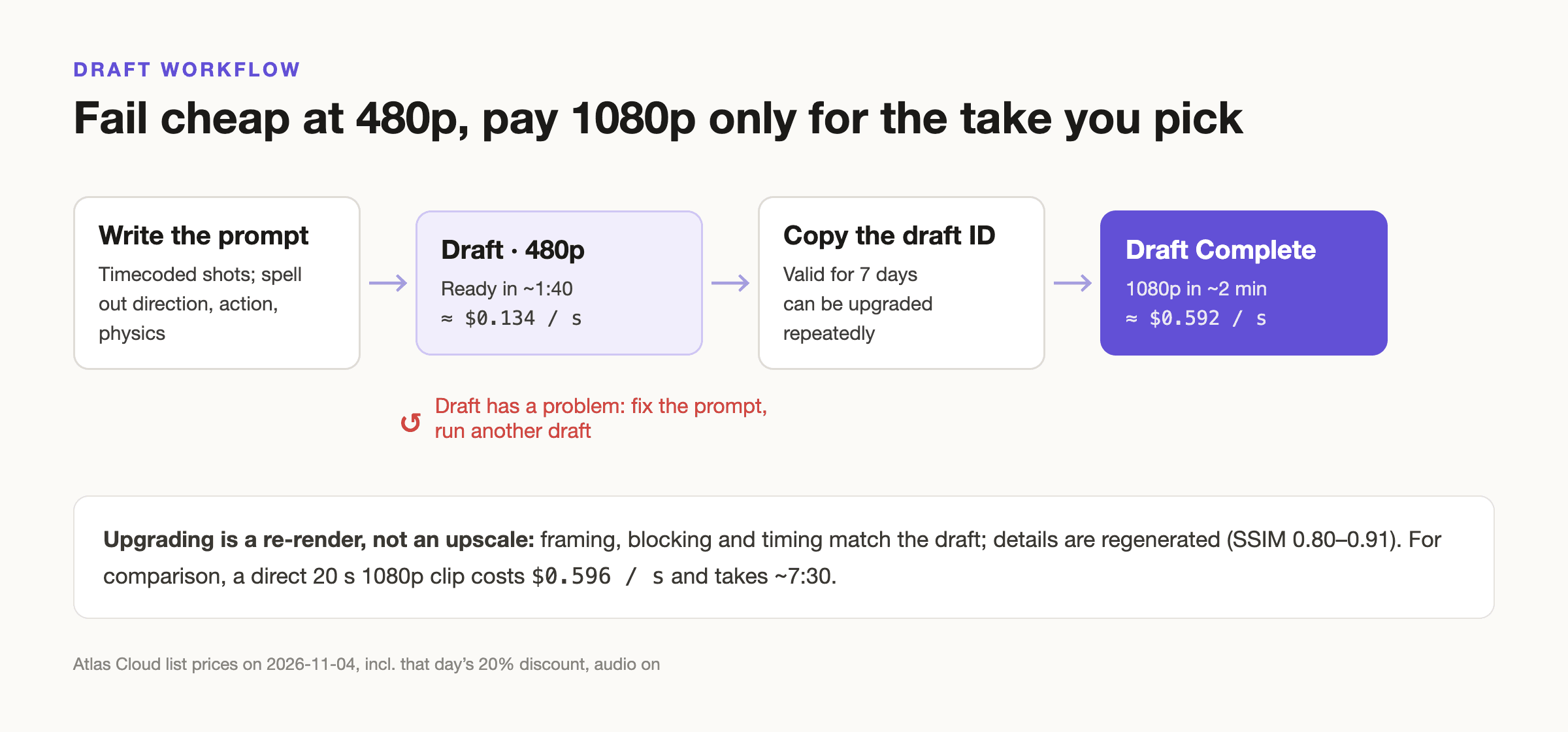
Upgrading doesn't enlarge the draft; it re-renders from it. Framing, blocking and the timing of the action stay the same, while details are regenerated; the camel's leg positions, for example, come out slightly different. We compared drafts with their upgrades and measured a similarity (SSIM) of 0.80–0.91. In other words, what you like at 480p you'll mostly get at 1080p, but not frame for frame.
Where drafts earn their keep: debugging
Seedance 2.5 follows prompts very literally. Most of our first-round problems weren't the model drawing badly; they were prompts that weren't clear enough. Write "desert" and it draws a sand desert. Write "rockets out" and the camel really does fly into the sky.
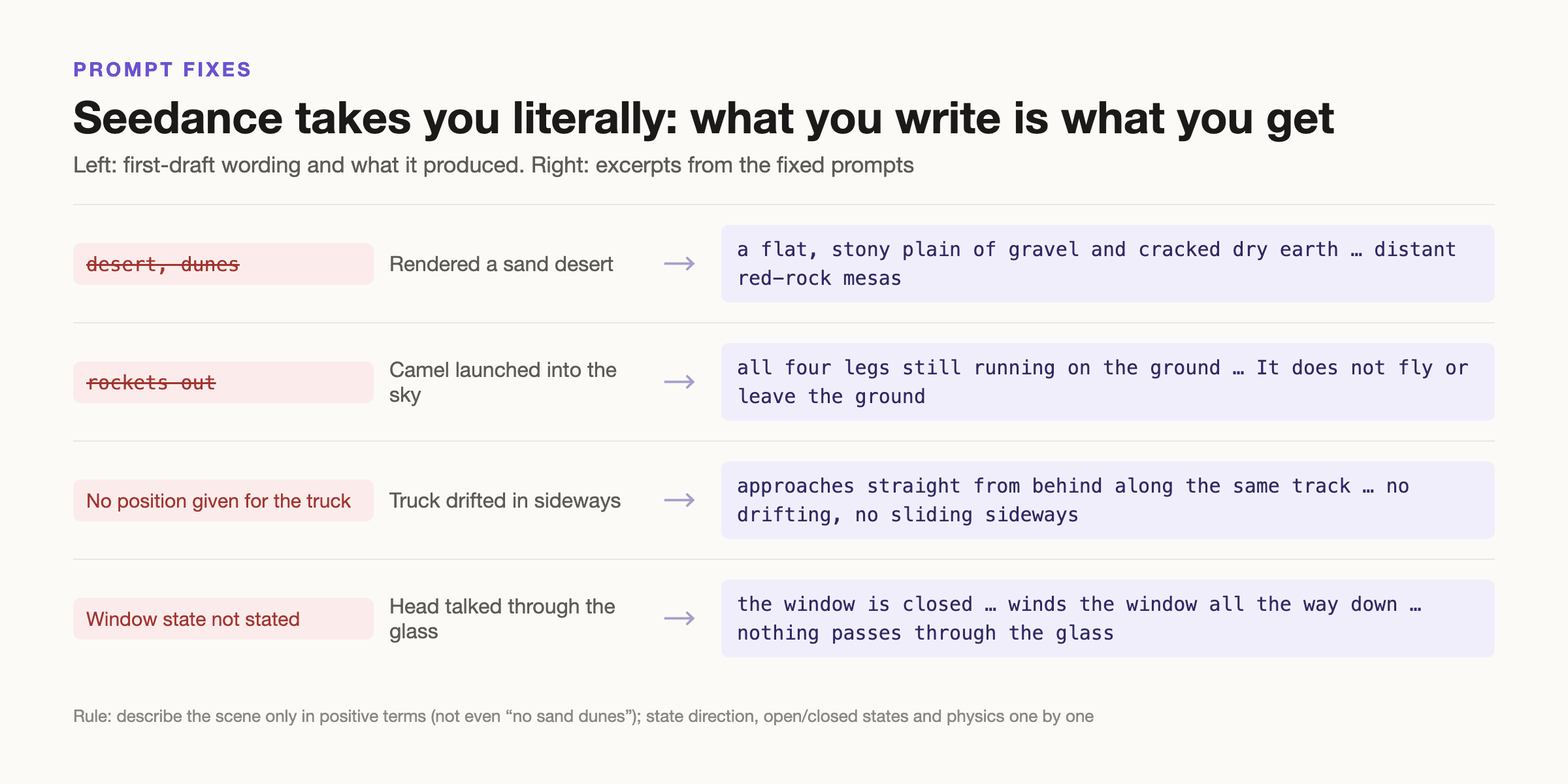
All of these are obvious at 480p. Here are the errors that actually came up in this test, and how we changed the prompts:
| Where | Problem | What we changed |
|---|---|---|
| A, first version | The Gobi badlands turned into a sand desert | Removed "desert" and "dunes" and described only gravel, cracked dry earth and red-rock mesas in positive terms; didn't even use a negative like "no sand dunes" |
| A, first version | The truck drifted in sideways | Fixed the direction: it comes straight from behind along the same track; added "no drifting, no sliding sideways" |
| A, first version | The Black Hat's head talked through the window glass | Split it into two actions: the window starts closed and is wound down before he speaks; stated "nothing passes through the glass" |
| A, first version | The camel was "launched" into the sky | Removed "rockets out"; stated that the thrust only pushes forward and all four legs keep running on the ground |
| A, draft | The truck pulled ahead of the camel, nose to nose | Both always travel toward screen right in the same direction; the truck never passes the camel and never turns around |
| B, draft v1 | Flynn turned to shoot but aimed the wrong way | Stated that the gun points at the truck 25 meters behind him, with the truck in the same frame |
| B, draft v1 | The sandstorm was ahead in one shot and behind in the next | Stated that the storm is always ahead in the direction of travel; the last shot looks forward from behind them, with no reverse angle |
| C, second take | The Black Hat clipped through the door jumping out | The prompt already said he couldn't pass through the door and it still happened; we dropped this take and used another |
One more trick: the last frame of the chase felt unfinished, so we used it as the first frame of a short extension and let the storm swallow both men. Between parts, we also used the last frame of the previous part's chosen take as a reference image for the next part, so positions and light carry over.
The math: why we only saved 6%
| Part | What we did | Actual cost | If all direct 1080p | Difference |
|---|---|---|---|---|
| A (18 s) | 1 direct 1080p + 3 drafts, 1 upgraded | $28.57 | 4 × $10.67 = $42.68 | Saved $14.11 (-33%) |
| B (22 s) | 2 drafts, both had good shots, both upgraded | $31.96 | 2 × $13.03 = $26.07 | Spent $5.89 more (+23%) |
| C (20 s) | 1 draft upgraded + 1 direct 1080p | $26.38 | 2 × $11.85 = $23.70 | Spent $2.68 more (+11%) |
| Total | $86.90 | $92.45 | Saved $5.55 (-6%) |
Note: A's first version was generated directly at 1080p (Draft wasn't on yet) and is estimated at $10.67 for the same duration.
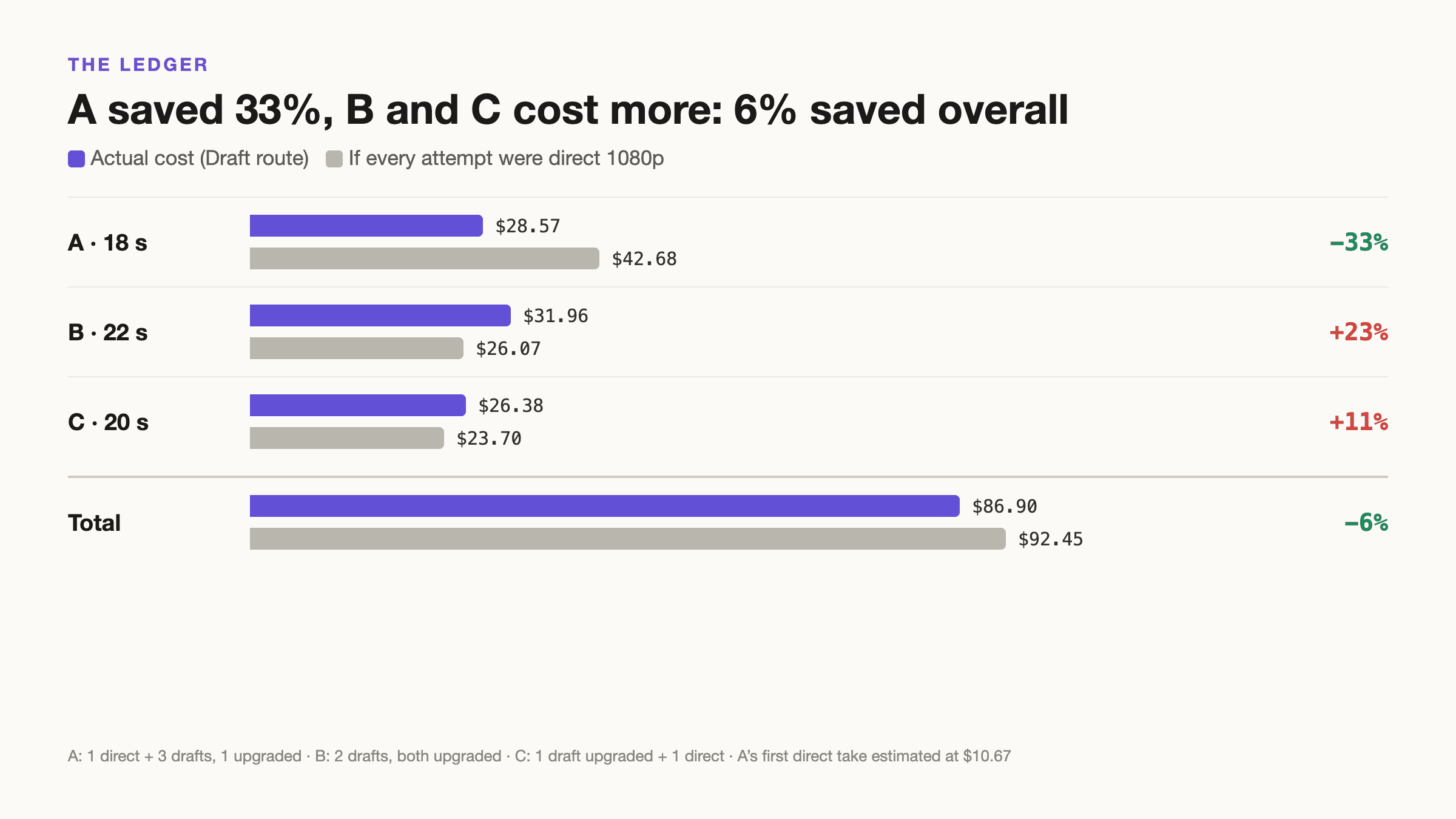
So why did part A save a third while the whole film saved only 6%? Three reasons:
- Upgrades aren't discounted. Draft Complete costs about $0.592 per second, nearly the same as $0.596 for direct 1080p. Every take you end up using costs the 1080p price plus a draft fee on top, roughly 23% more.
- The good shots were spread across different takes. B's first take had the better cannon blast and aerial shot; the second got Flynn's backward shot and the storm direction right. To use both, we had to upgrade both takes in full, so B cost 23% more than going direct. C also used two takes and cost 11% more.
- Savings have a break-even point. Drafts cost $0.134 per second, upgrades $0.592 and direct 1080p $0.596. Draft is cheaper than direct only when upgraded seconds are under about 78% of drafted seconds ((0.596 − 0.134) ÷ 0.592). This time we ran 6 drafts totaling 118 seconds and upgraded 82 seconds, about 69%, just inside the line, so we saved only a little.
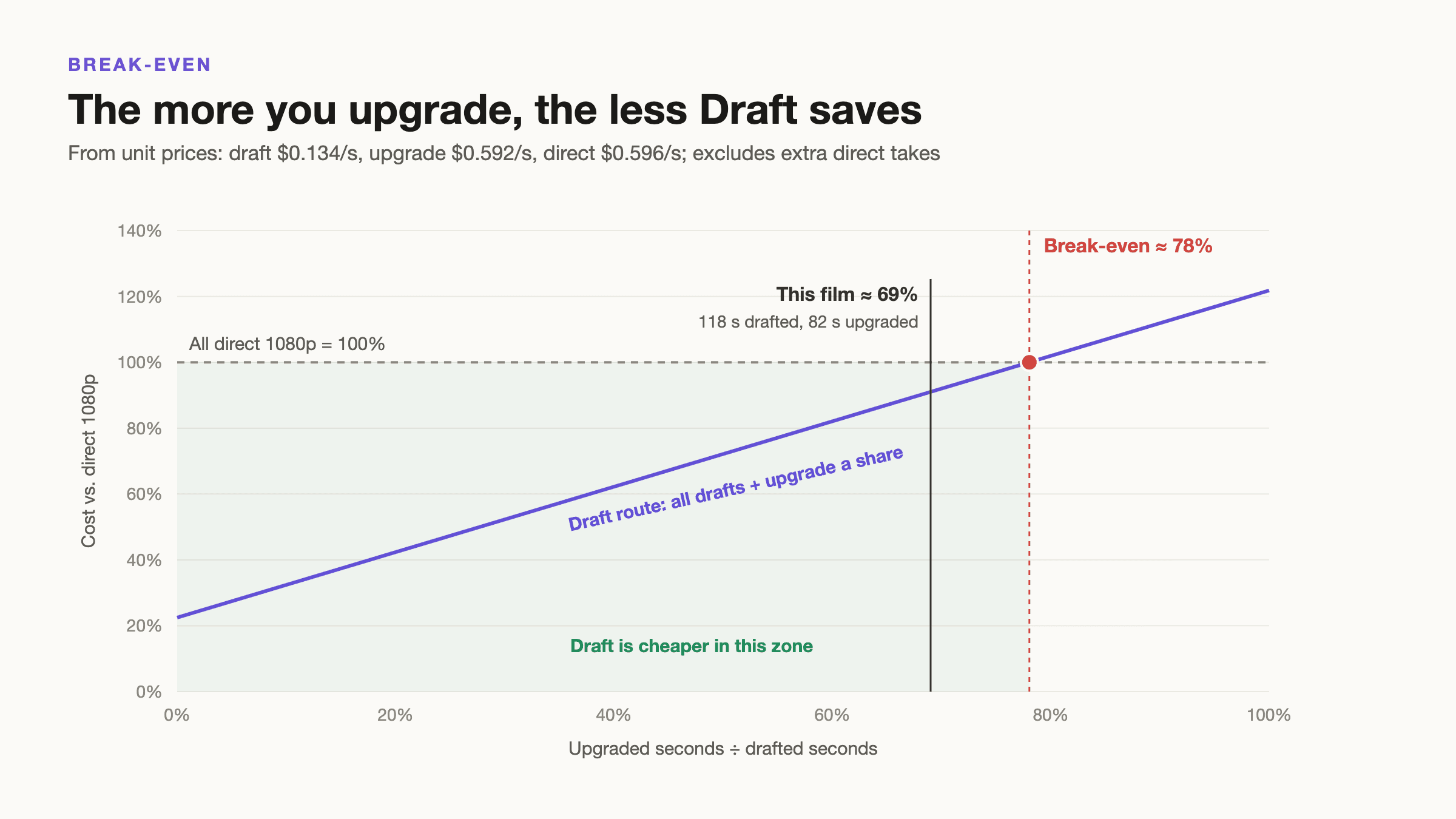
In other words, this is the bill for our "pick shots from several takes" approach. If you upgrade only one take per part, the result will look more like part A's -33%.
Time: the clear win
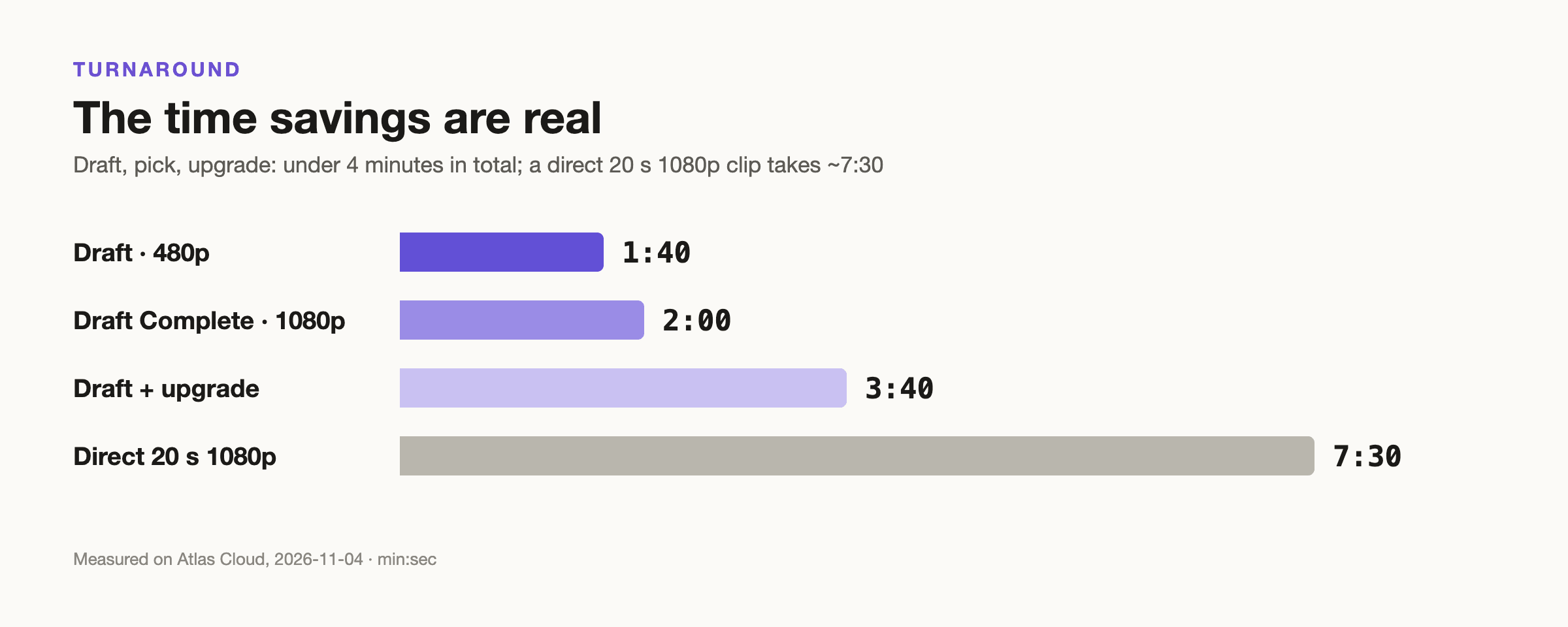
Whether Draft saves money depends on how you use it, but the time savings are certain:
- 480p draft: about 1 min 40 s
- Upgrading a draft to 1080p: about 2 minutes
- Generating a 20-second clip directly at 1080p: about 7 min 30 s
Drafting, picking and upgrading takes under 4 minutes in total, and most of the waiting happens at 480p. When you need to revise the prompt again and again, that gap multiplies.
Who Draft is for
Good fit
- While prompts are still being tuned and blocking or physics problems aren't sorted out
- Complex action and multi-camera long takes that rarely land on the first try
- When you plan to use just one complete take per part
- When turnaround matters and you need to iterate fast
Less worth it
- Picking a few shots from each of several takes, since every take has to be upgraded in full
- Prompts already stable enough to land on the first try, where the draft fee is pure overhead
- Needing resolution above 1080p (upgrades currently top out at 1080p)
- Leaving drafts for a long time before deciding (drafts expire after 7 days)
Our three tips
- Use drafts to tune prompts, not to collect shots. Use drafts to sort out direction, blocking and physics first, upgrade once a draft is basically usable, and try to upgrade only one take per part.
- If you want to pick shots from several takes, cut them short. Instead of upgrading several full 20-second takes, regenerate the good shots as separate 4–8 second clips and pay 1080p only for the seconds you need.
- Remember the math. A draft costs about a quarter of the full price, and an upgrade costs the full price. Budget for "drafts at about 23% + upgrades at 100%".
A suggestion for model providers
If Draft Complete could someday upgrade just the selected seconds, or credit the draft fee against the upgrade, then "pick shots from several takes", the most common way people actually work, would truly save money.
Final thoughts
Make your mistakes in the sandstorm, and save the clarity for the oasis. Just don't drag every sandstorm into the oasis with you.
As for the oasis, it now lives on our hard drive.
Appendix: the three full prompts
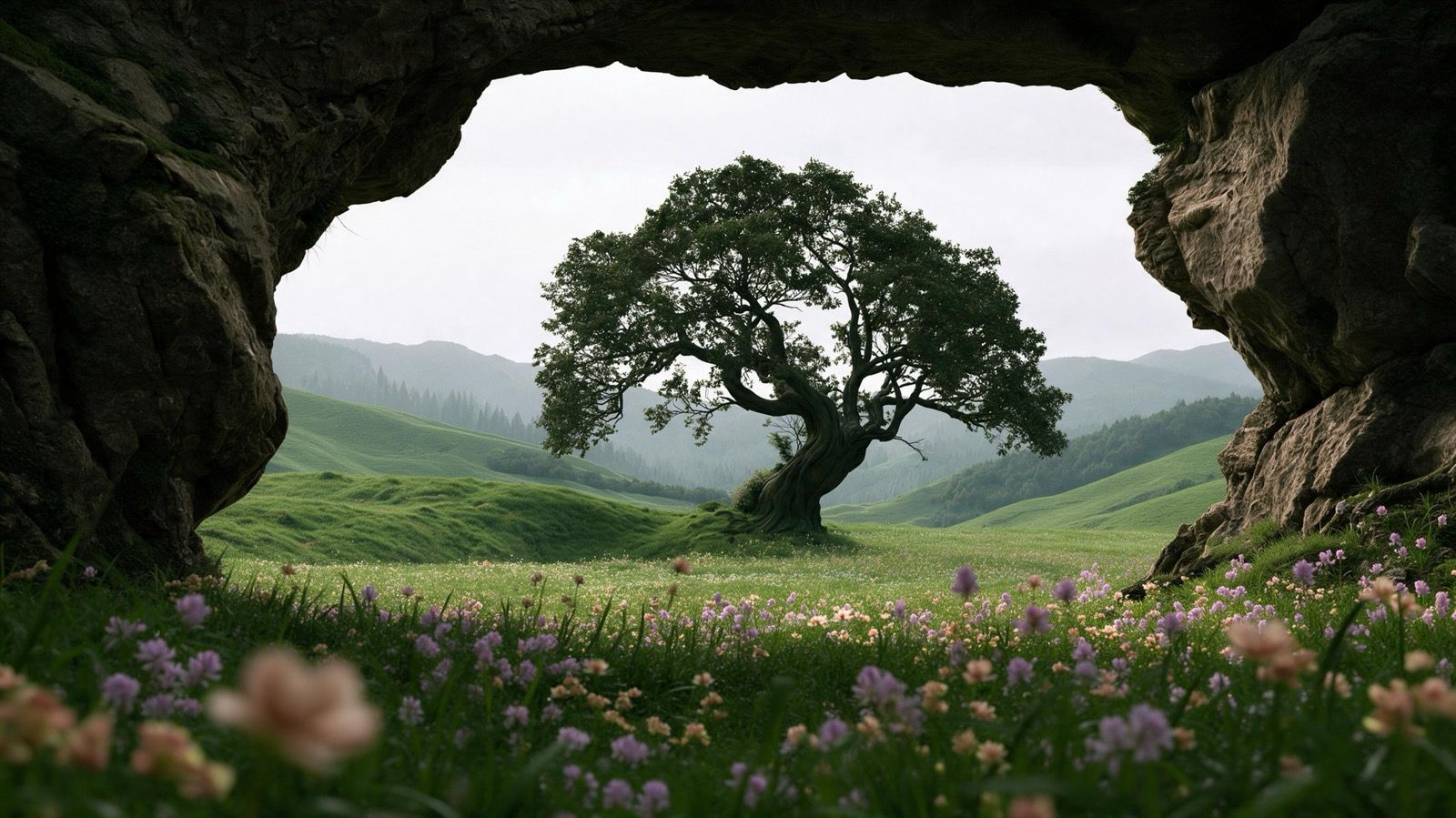
Below are the final prompts for all three parts, as written. They include every fix from the debugging section above: positive-only scene description, fixed screen direction, window open and closed states, the camel running on the ground, the storm's direction and so on. @image1–@image7 are the 7 reference images shown earlier; when generating B and C, we also added the last frame of the previous part's chosen take as @image8.
A · The Map · 18 s
A lone ride across the Gobi → the Black Hat closes in from behind and lowers his window to demand the map → the camel bolts.
text1Western sci-fi short film, cinematic 16:9, Sergio Leone meets Mad Max: Fury Road. Flynn @image1, the Black Hat bandit @image2, the mechanical camel @image3, the engineering truck @image4, the Gobi badlands @image5, the map @image6. Keep characters and vehicles consistent with the references in every shot. 2 3Setting for every shot: Gobi badlands - a flat, stony plain of gravel and cracked dry earth with sparse dry scrub and distant red-rock mesas. 4Screen direction for every shot: Flynn always travels from screen left to screen right. The truck comes from behind him along the same track and then drives parallel to him on his right-hand side, both always heading screen right. The truck never pulls in front of the camel and never turns to face it. 5 6Shot 1 (0-5s): Extreme wide shot at midday, heat haze over the gravel plain. Flynn @image1 rides the camel @image3 at a slow walk from screen left to screen right, a tiny figure in a vast landscape; slow lateral tracking shot. Cut to a medium shot: he unfolds the weathered map @image6, studies it, folds it and tucks it inside his coat. 7Shot 2 (5-8s): The camel's ears twitch and Flynn looks back over his shoulder. Over-the-shoulder telephoto shot looking back along the trail behind him: a plume of dust rises on the far horizon, and the truck @image4 approaches straight from behind along the same track, growing larger. It drives in a straight line; no drifting, no sliding sideways. 8Shot 3 (8-12s): The truck comes up from behind on the camel's right side and slows down until it drives side by side with the camel at walking pace, about two meters away, both moving toward screen right with the truck's nose pointing the same way as the camel's head. Wide side-on tracking shot from the camel's left: the camel and Flynn in the foreground, the truck running parallel just beyond them. Cut to a low-angle shot from Flynn's position of the truck's driver's door beside him: the window is closed. The Black Hat bandit @image2 winds the window all the way down, rests his elbow on the open window frame, cigar between his teeth, and shouts: "Hand over the map!" His head stays inside the cab behind the open window frame; nothing passes through the glass. 9Shot 4 (12-15s): Leone-style extreme close-up of Flynn's eyes in the shadow of his hat brim. A beat. He answers flatly: "Not a chance." 10Shot 5 (15-18s): Flynn kicks the camel and it breaks into a full gallop toward screen right, pulling ahead of the truck, all four legs pounding the ground, gravel flying. The camel stays on the ground and simply runs. Close-up: the bandit's grin fades; he spits out the cigar and reaches for his gun. Whip pan to the truck accelerating after the camel. 11 12Look: anamorphic lens character, 35mm film grain, hard midday sunlight, ochre and rust palette, deep shadows, realistic physics and weight. 13Audio: the two lines of dialogue exactly as written, plus diegetic sound - wind, gravel crunching under the camel's feet, truck engine, the window motor. No music, no on-screen text.
B · The Chase · 22 s
Gunfire and cannon fire → the camel jets through a fireball → Flynn shoots back → aerial shot → a wall of sand ahead.
text1Western sci-fi short film, cinematic 16:9, Sergio Leone meets Mad Max: Fury Road. Flynn @image1, the Black Hat bandit @image2, the mechanical camel @image3, the engineering truck @image4, the Gobi badlands @image5. Keep characters and vehicles consistent with the references in every shot. 2 3Setting for every shot: Gobi badlands - a flat, stony plain of gravel and cracked dry earth with sparse dry scrub and distant red-rock mesas. 4Blocking for every shot: Flynn on the camel is always in front; the truck is always behind him, chasing in the same direction, about 25 meters back. The truck never pulls alongside the camel and never closes the gap. In side-on shots both race from screen left to screen right. 5The truck's driver's window is already fully lowered from the previous scene. 6The dust storm is always ahead of them, in the direction they are racing. It never appears behind them. 7 8Shot 1 (0-5s): Wide side-on tracking shot: the camel @image3 gallops from screen left to screen right with Flynn @image1 crouched in the saddle; about 25 meters behind it the truck @image4 thunders after him, kicking up a long trail of dust. The Black Hat bandit @image2 leans out of the open driver's window and fires his revolver forward at the camel ahead; bullets kick up gravel just behind the camel's legs. 9Shot 2 (5-10s): The roof cannon on the truck aims forward at the camel ahead and fires. The shell explodes just beside the camel. The jet thrusters on the camel's hindquarters ignite and push it forward, low and fast along the ground: in slow motion it charges straight through the fireball and dust cloud, all four legs still running on the ground, a streak of exhaust flame trailing behind. It does not fly or leave the ground. 10Shot 3 (10-14s): Medium shot from in front of the galloping camel, looking back: Flynn twists around in the saddle and aims his revolver backward over his shoulder, straight at the truck chasing 25 meters behind him, clearly visible in the background. His gun points back toward the truck and the bandit; he fires three shots. Cut to the truck: the bullets spark off its armor and windshield, and the bandit ducks behind the open window frame. 11Shot 4 (14-18s): High overhead drone shot: the camel leads, the truck follows about 25 meters behind, swerving left and right and carving S-shaped tracks across the gravel. The gap between them stays the same. 12Shot 5 (18-22s): Low tracking shot from behind both of them, looking forward along their path: the camel ahead, the truck behind it, both racing away from the camera toward the horizon. Directly ahead of them, a towering wall of dust and sand hundreds of meters high rises across the horizon and rolls toward them. Flynn and the bandit both look up at the storm in front of them. The camera stays behind them, facing forward, and never turns around. 13 14Look: anamorphic lens character, 35mm film grain, hard midday sunlight, ochre and rust palette, kinetic but readable action, motion blur on fast moves, realistic physics and weight. 15Audio: diegetic sound only - galloping hooves on gravel, roaring engine, revolver shots and ricochets, cannon blast, jet-thruster roar, rising wind. No dialogue, no music, no on-screen text.
C · The Storm · 20 s
Into the storm as the thrusters die → a fistfight over the map → the storm stops dead → both men discover the oasis entrance.
text1Western sci-fi short film, cinematic 16:9, Sergio Leone meets Mad Max: Fury Road. Flynn @image1, the Black Hat bandit @image2, the mechanical camel @image3, the engineering truck @image4, the Gobi badlands @image5, the map @image6, the entrance of the mysterious oasis @image7. Keep characters and vehicles consistent with the references in every shot. 2 3Setting: Gobi badlands - a flat, stony plain of gravel and cracked dry earth with sparse dry scrub. 4Continuity: this scene picks up mid-chase. The camel is in front, the truck is about 25 meters behind it, and the wall of dust is directly ahead of them in the direction they are racing. The oasis entrance lies ahead in that same direction. 5 6Shot 1 (0-5s): Low tracking shot from behind, already moving at full speed: the camel @image3 races ahead with its hindquarter thrusters flaring, the truck @image4 25 meters behind it, both charging into the towering wall of dust ahead. The leading edge of the storm hits the camel first and swallows it; its thrusters cough, sputter and die, and the camel stumbles and drops to its knees, skidding through the gravel. A beat later the truck plunges into the storm behind it, headlights blazing through the brown-out; it brakes hard, slews sideways and skids to a stop a few meters from the kneeling camel. Both are already in frame and in motion from the first frame; nothing slides in from the edge of the frame. 7Shot 2 (5-12s): Inside the storm, the bandit @image2 kicks the driver's door open and jumps down from the cab; Flynn @image1 slides off the camel's back. They fight hand to hand in the swirling dust: silhouettes, hats torn away by the wind, a slow-motion punch. The bandit grabs for the map @image6 inside Flynn's coat; Flynn wrestles it back. Handheld camera circling the two fighters. 8Shot 3 (12-15s): The storm stops abruptly. Dust falls out of the air, shafts of sunlight break through, total silence. The two men freeze mid-grapple, gripping each other's collars. 9Shot 4 (15-20s): They slowly turn their heads to look ahead. Reverse shot: they are standing right in front of the entrance of the mysterious oasis @image7. Slow push-in from behind the two men toward the entrance. Hold, then cut to black. 10 11Look: anamorphic lens character, 35mm film grain, dusty brown storm light turning to clear soft daylight, realistic physics and weight. 12Audio: natural diegetic sound effects only - roaring wind, thrusters sputtering out, braking tires on gravel, punches and grunts, then sudden silence, falling dust, a single bird call. Absolutely no music of any kind: no score, no soundtrack, no background music, no musical instruments, no drums, no humming or singing. No dialogue, no on-screen text.
Test date: November 4, 2026. Model: Seedance 2.5 (Draft / Draft Complete / 1080p). Platform: Atlas Cloud. Prices are that day's on-screen prices, including a 20% discount, with audio generation on; prices may vary by date, account and promotion.
Try Seedance 2.5 on Atlas Cloud
Seedance 2.5, including Draft and Draft Complete, is available on Atlas Cloud. There are two ways to use it:
- Generate on the website. Open the model page, switch on Draft, upload your references, paste a prompt and run it. It's the quickest way to try the draft-then-upgrade workflow from this post.
- Call the API. Get an API key and call Seedance 2.5 from your own app or pipeline, alongside the other models on the platform with the same key.
Model pages:


