
 Atlas Cloud is nu geautoriseerde reseller in de VS van Dreamina Seedance 2.5 en Seedream 5.0 Pro.Atlas Cloud is nu geautoriseerde reseller in de VS van Dreamina Seedance 2.5 en Seedream 5.0 Pro.
Gemini Omni is de native multimodale videofamilie van Google DeepMind voor creatie en bewerking op basis van prompts. Genereer video vanuit tekst, animeer stilstaande afbeeldingen of bewerk bestaande beelden met optionele visuele referenties, terwijl onaangetaste content behouden blijft. Flexibele instellingen voor resolutie, beeldverhouding en duur ondersteunen uiteenlopende productieprocessen. Atlas Cloud bundelt de toegang met transparante pay-as-you-go-prijzen. Begin vandaag nog met bouwen.
Gemini Omni Flash is ontwikkeld door Google. Atlas Cloud (geëxploiteerd door Atlas Cloud AI LLC) biedt toegang tot het model maar is niet de eigenaar ervan. Alle handelsmerken zijn eigendom van hun respectieve eigenaren.
Atlas Cloud biedt u de nieuwste toonaangevende creatieve modellen in de industrie.
Vergelijk de Gemini Omni-invoerroutes, uitvoermogelijkheden en productiegebruiksscenario's voor zeven gespecialiseerde video-eindpunten.
| Modaliteit | Beschrijving |
|---|---|
| Gemini Omni Flash R2V API (Reference To Video) | Combineer een tekstprompt met één tot vijf referentieafbeeldingen om een cinematografische video met native geluid te genereren. Consistente onderwerpen, scènes en stijlen maken dit eindpunt geschikt voor merksequenties, terugkerende personages en gecoördineerde visuele storytelling. |
| Gemini Omni Flash I2V API (Image To Video) | Op basis van een stilstaand beeld en een tekstprompt maakt dit eindpunt een cinematografische video met geluid, waarbij het brononderwerp en de compositie behouden blijven. Het is geschikt voor productanimatie, beweging in portretten en de ontwikkeling van visuele concepten. |
| Gemini Omni Flash Video Edit API | Dien een bestaande video, een tekstinstructie en optionele referentieafbeeldingen in om scèneconsistente wijzigingen met native audio toe te passen. Omdat ongewijzigde beelden behouden blijven, kunnen editors gerichte aanpassingen maken zonder de volledige scène opnieuw op te bouwen. |
| Gemini Omni Flash T2V API (Text To Video) | Met alleen een tekstprompt ontstaat een cinematografische video met gesynchroniseerde native audio en beweging die is gebaseerd op de fysica van de echte wereld. De aanstuurbare generatie met hoge snelheid ondersteunt conceptvisualisatie, verhaalontwikkeling en snelle prototyping van video's. |
| Gemini Omni Flash R2V Developer API | Voor gerichte transformaties combineer je een bestaande videoclip met referentieafbeeldingen en tekstprompts. Het eindpunt ondersteunt video-stijdoverdracht, scènebewerking en het invoegen van personages voor creatieve toepassingen die gerichte varianten van aangeleverde beelden genereren. |
| Gemini Omni Flash I2V Developer API | Maximaal zeven referentieafbeeldingen kunnen een video op basis van een tekstprompt aansturen, terwijl de visuele identiteit in het volledige resultaat behouden blijft. Kies deze route voor terugkerende personages, consistente productbeelden of samenhangende assets binnen een campagne. |
| Gemini Omni Flash T2V Developer API | Kies een tekstprompt samen met de vereiste resolutie, beeldverhouding en duur om een aanstuurbare cinematografische video te produceren. Flexibele uitvoerinstellingen helpen ontwikkelaars platformspecifieke content te maken, generatie-workflows te automatiseren en meerdere creatieve richtingen te testen. |
Elke aanvraag aan de Gemini Omni Flash API kan een willekeurige combinatie van tekst, afbeeldingen, video en audio bevatten, gesynchroniseerd geluid genereren, de fysica van de echte wereld modelleren en het resultaat via gesprekken verfijnen.
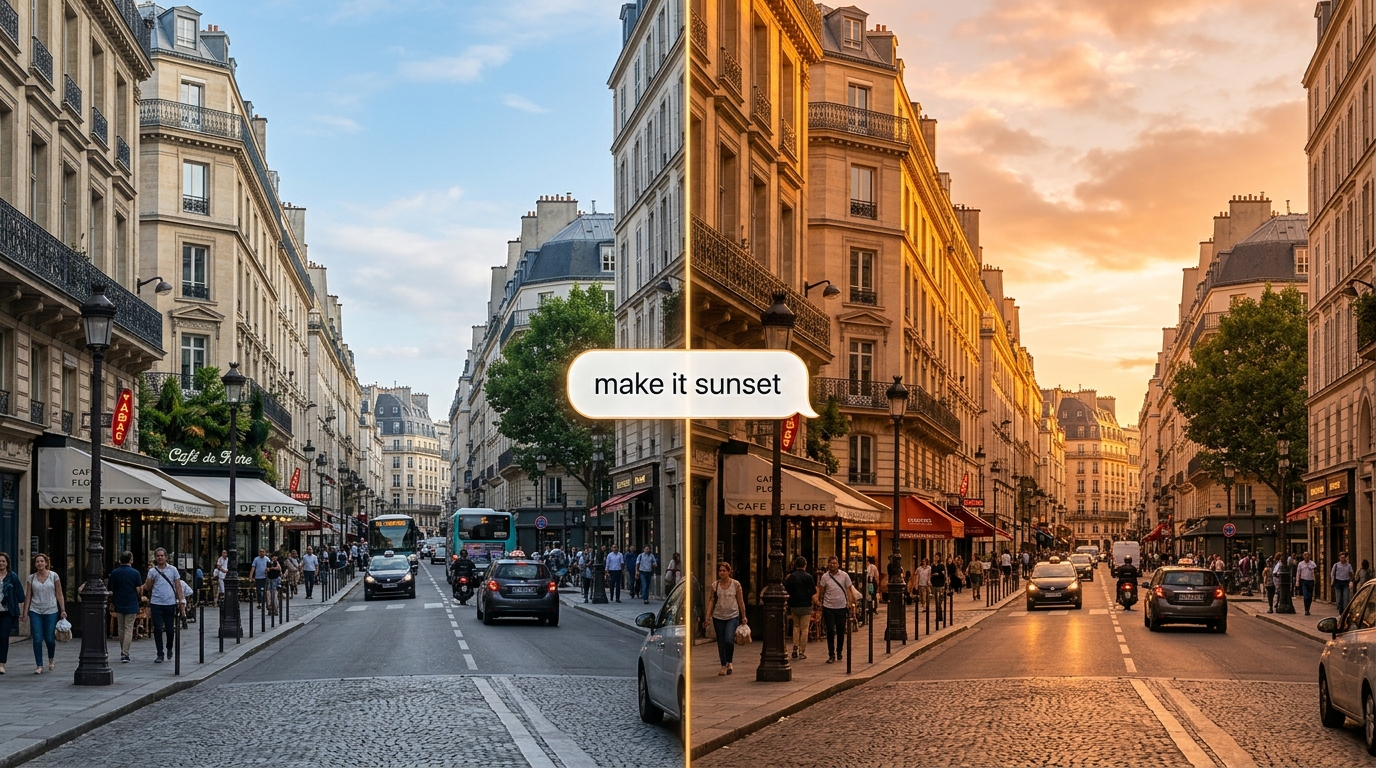
Verfijn een clip met natuurlijke taal; de Gemini Omni Flash API past de wijziging toe en behoudt de rest van de scène. De stateful Interactions API onthoudt elke beurt, zodat bewerkingen op elkaar voortbouwen.
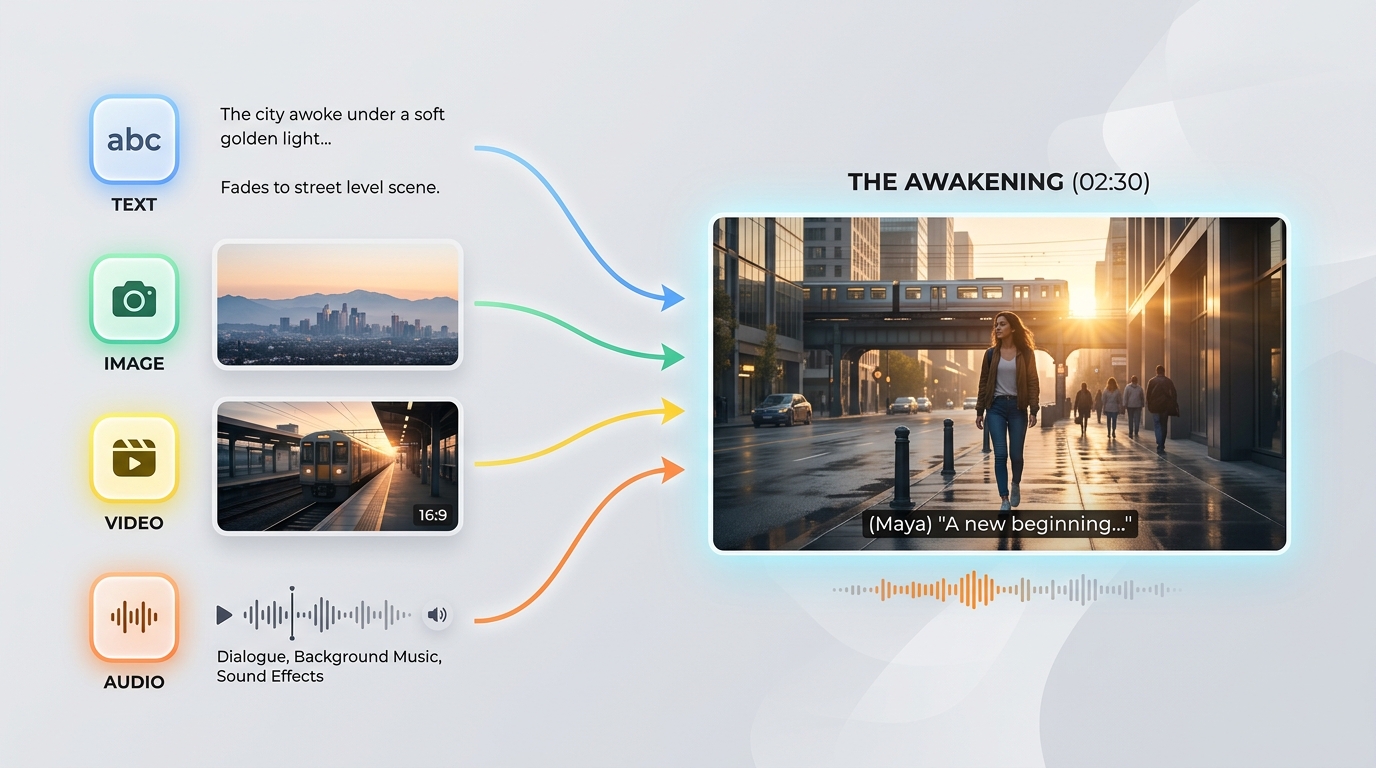
De Gemini Omni Flash API accepteert in één prompt elke combinatie van tekst, afbeeldingen, video en audio. Dankzij deze invoer-van-alles-naar-alles kun je een generatie aansturen met het bronmateriaal dat je al hebt.
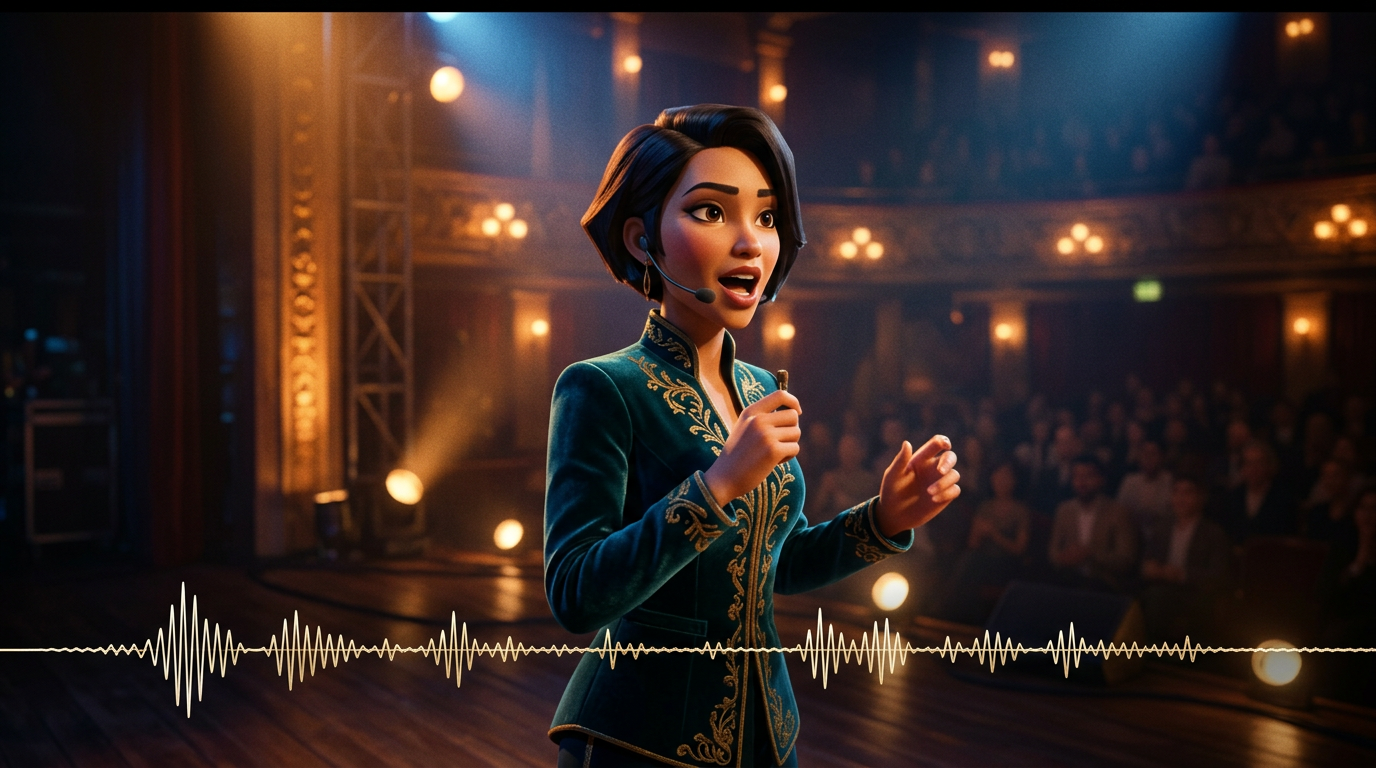
Het geluid wordt samen met het beeld gegenereerd in één inferentieronde, zodat dialoog, effecten en ambiance perfect op de actie afgestemd blijven. De Gemini Omni Flash API vereist achteraf geen afzonderlijke audiostap.

De Gemini Omni Flash API is gebaseerd op een model van de fysica van de echte wereld en rendert geloofwaardige reflecties, zwaartekracht, belichting en weersomstandigheden. Scènes blijven visueel coherent en vervallen niet in artefacten, zelfs niet in dynamische opnamen.
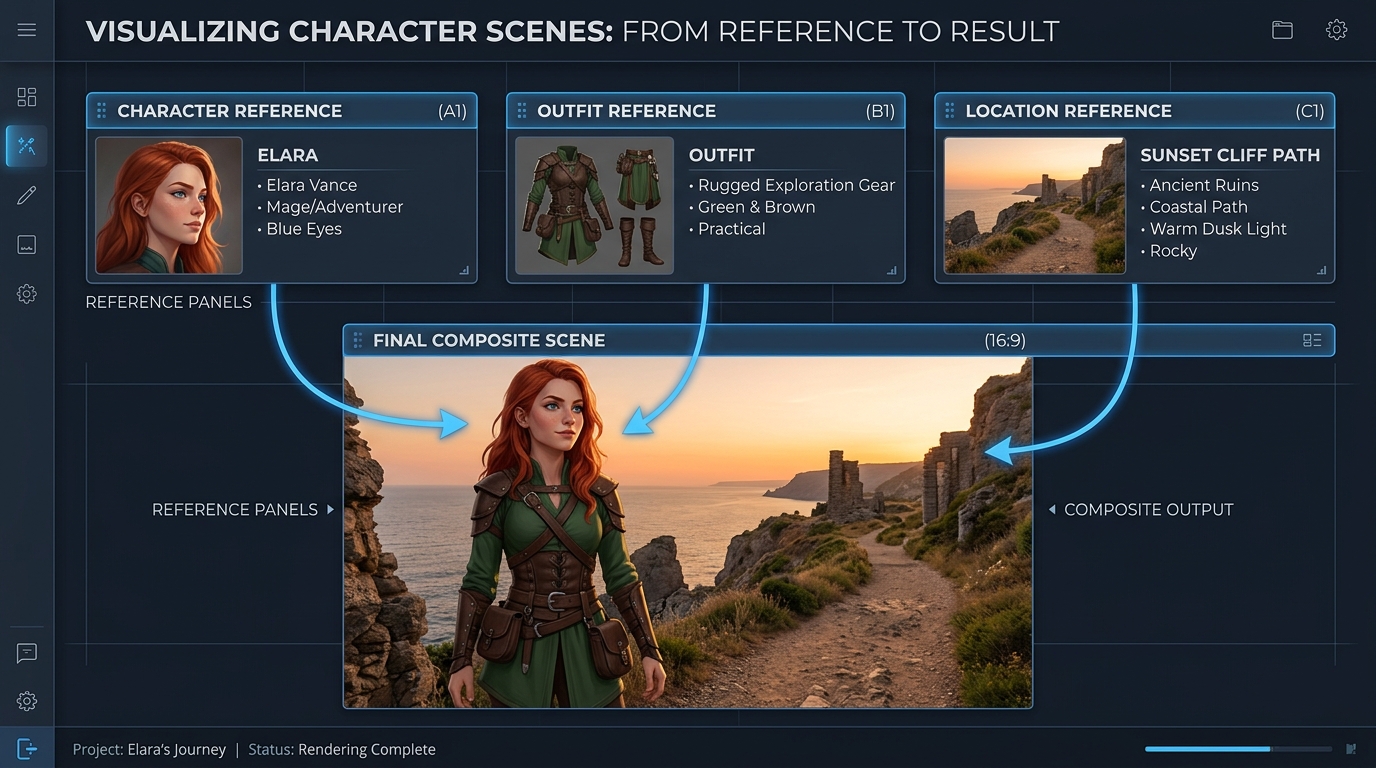
Stuur een generatie aan met maximaal zeven referentieafbeeldingen en drie korte videoclips; de Gemini Omni Flash API houdt onderwerpen, stijl en scène consistent. Zo blijft de identiteit bij bewerkingen en tussen opnamen stabiel.
Dezelfde prompt, gegenereerd door Gemini Omni en andere toonaangevende videomodellen: meerdere shots en een hoogwaardige commerciële film
Genereer een doorlopende video in 3 scènes: Scène 1: De vrouw staat onder neonlichten in een regenachtige straat in Tokio. Reflecties op de natte grond, cinematografische scherptediepte, handheld-camerabeweging. Scène 2: De camera gaat langzaam over naar een dichterbij genomen shot. Ze spreekt zacht synchroon met de aangeleverde stem, waarbij haar lipbewegingen perfect overeenkomen. Het achtergrondverkeer gaat naadloos door. Scène 3: Ze gaat een metrostation binnen. De belichting, het weer en de sfeer blijven consistent. De camera volgt haar van achteren, waarbij de consistentie van haar identiteit behouden blijft. Beperkingen: - Behoud exact dezelfde gezichtsidentiteit in alle scènes - Behoud de continuïteit van de belichting (regen, neonreflecties) - Zorg voor fysiek realisme (interactie met regen, natte oppervlakken) - Zorg voor audiovisuele synchronisatie met de steminvoer - Geen reset van de scène tijdens overgangen; behoud een continue wereldtoestand Stijl: hoogwaardig cinematografisch realisme, filmkorrel, anamorfische lens, geringe scherptediepte, filmlook in 4K
Gemini Omni
Wan 2.7
Kling v3.0
Genereer een doorlopende video in 4 scènes: Scène 1: Een kleine witte robot zit roerloos op een houten bureau in een schemerig appartement om middernacht. Maanlicht valt door het raam naar binnen. De ogen van de robot lichten langzaam op en een zacht mechanisch gezoem begint. Scène 2: De robot klimt voorzichtig van het bureau af. Zijn kleine metalen voeten maken zachte klikgeluiden op de houten vloer. De camera volgt hem vanuit een lage hoek, waarbij de grootte en vorm van de robot consistent blijven. Scène 3: De robot loopt de keuken in. Reflecties op de koelkastdeur en de tegelvloer reageren op natuurlijke wijze op zijn beweging. Hetzelfde maanlicht en de rustige nachtsfeer uit de vorige scène blijven behouden. Scène 4: De robot stopt bij een raam en kijkt naar buiten, naar de stadslichten. De camera beweegt langzaam van achteren naar voren, waarbij de identiteit, materialen, schaal, belichting en geluidscontinuïteit van de robot behouden blijven. Vereisten: - Behoud exact hetzelfde robotontwerp in alle scènes - Behoud één doorlopende indeling van het appartement, zonder reset van de scène - Houd de belichting van kamer tot kamer consistent - Laat voetstappen en mechanisch gezoem synchroon lopen met de beweging van de robot - Gebruik fysiek realistische reflecties, schaduwen en interacties met objecten - Zorg voor vloeiende overgangen tussen scènes, alsof één doorlopende wereld wordt gefilmd Stijl: cinematografisch realisme, rustige sciencefictionatmosfeer, zacht maanlicht, gedetailleerde materialen, realistische camerabewegingen, geringe scherptediepte, hoogwaardige commerciële filmlook
Gemini Omni
Kling V3.0
Pixverse v6
Gemini Omni brengt campagneproductie, conversatiegestuurde revisie, previsualisatie, visueel leren, merkcontinuïteit en geïntegreerde tools voor makers samen in workflows voor tekst-, beeld-, referentie- en videobewerking met gesynchroniseerde ingebouwde audio.

Geef een goedgekeurd stilstaand productbeeld een filmische beweging met behoud van het onderwerp en de compositie. Marketingteams kunnen teasers voor productlanceringen, advertenties voor sociale media en verzorgde productonthullingen maken met gesynchroniseerde ingebouwde audio.

Beschrijf een gerichte wijziging en Gemini Omni bewerkt bestaand videomateriaal, terwijl onaangeroerde inhoud intact blijft. Editors kunnen alternatieve uitvoeringen, gelokaliseerde varianten en revisies voor klanten maken zonder een goedgekeurde scène opnieuw op te bouwen.

Stuur generatie aan met referentiebeelden om producten, personages en visuele stijl gedurende een clip consistent te houden. Studio's kunnen gecoördineerde campagne-assets, terugkerende merkwerelden en herkenbare episodische inhoud voor verschillende kanalen ontwikkelen.

Begin met een tekstprompt en genereer filmische video met gesynchroniseerde audio en beweging die is gebaseerd op de fysica van de echte wereld. Regisseurs en ontwerpers kunnen verhaalonderdelen, camera-ideeën en platformspecifieke formaten verkennen voordat de productie begint.

Zet abstracte concepten om in korte visuele uitleg door de scène, de actie en de beoogde leerreeks te beschrijven. Onderwijsteams kunnen wetenschapsdemonstraties, uitleg van processen en trainingsmodules maken met ingebouwd geluid.

Combineer tekstgeneratie, animatie van stilstaande beelden, creatie op basis van referenties en videobewerking binnen één Gemini Omni-integratie. Makersplatforms kunnen geïntegreerde productietools aanbieden zonder afzonderlijke visuele en audiopijplijnen samen te stellen.
Vergelijk de Gemini Omni API-referentievideomodellen, waaronder Gemini Omni 1.1 Flash, met toonaangevende alternatieven op basis van ondersteunde invoer, referentiecapaciteit, audiogeneratie en standaardprijzen.
| Model | Geaccepteerde invoer | Referentiecapaciteit | Audiogeneratie | Standaardprijs | Standard Base Price |
|---|---|---|---|---|---|
| Gemini Omni 1.1 Flash Reference-to-Video | Text, source video, reference images | Conversational additions, removals, replacements, and restyling | 360p, 720p, upscaled 1080p, upscaled 4K | Native synchronized audio | $0.041 |
| Gemini Omni Flash Reference-to-Video | Text, source video, up to 5 reference images | Scene-consistent edits that preserve untouched footage | 720p | Native audio editing | $0.14 |
| Seedance 2.0 Reference-to-Video | Text, source video, up to 5 reference images | Instruction-guided video changes with visual references | 720p, 1080p | Automatic audio or original audio retention | $0.14 |
| Wan-2.7 Reference-to-video | Text, source video, reference images, optional driving audio | Style transfer, scene changes, and element replacement | 720p, 1080p | Original audio retention, regeneration, or driving audio | $0.10 |
Binnen enkele minuten aan de slag — volg deze eenvoudige stappen om modellen te integreren en uit te rollen via het platform van Atlas Cloud.
Registreer bij atlascloud.ai en voltooi de verificatie. Nieuwe gebruikers ontvangen gratis credits om het platform te verkennen en modellen te testen.
De combinatie van Gemini Omni Flash's geavanceerde modellen met het GPU-versnelde platform van Atlas Cloud biedt ongeëvenaarde prestaties, schaalbaarheid en ontwikkelaarservaring.
Lage Latentie:
GPU-geoptimaliseerde inferentie voor realtime reasoning.
Uniforme API:
Voer Gemini Omni Flash, GPT, Gemini en DeepSeek uit met één integratie.
Transparante Prijzen:
Voorspelbare op tokens gebaseerde facturering met serverloze opties.
Ontwikkelaarservaring:
SDK's, analytics, fine-tuning tools en sjablonen.
Betrouwbaarheid:
99,99% beschikbaarheid, RBAC en compliance-ready logging.
Beveiliging & Compliance:
SOC 2 Type II, HIPAA-afstemming, gegevenssoevereiniteit in VS.
De Gemini Omni API geeft ontwikkelaars via Atlas Cloud toegang tot de van nature multimodale video- en videobewerkingsmodellen van Google DeepMind. Afhankelijk van het geselecteerde endpoint kan de API video's genereren op basis van tekst of afbeeldingen, referentiemedia gebruiken, bestaande beelden bewerken en gesynchroniseerde native audio produceren.
Gemini Omni 1.1 Flash voegt video-extensie, interpolatie tussen het eerste en laatste frame, uitvoerresoluties van 360p tot en met 4K en uitgebreidere referentieaansturing toe. De extensievariant voegt per aanvraag 3 tot 10 seconden toe en kan worden gekoppeld om een coherente video van maximaal 40 seconden te maken.
Maak een Atlas Cloud-account aan, bewaar je API-sleutel op de server en selecteer het modelendpoint dat bij je workflow past. Atlas Cloud biedt één OpenAI-compatibele sleutel, terwijl het gepubliceerde schema van elk endpoint de vereiste prompt, media-inputs en generatie-instellingen beschrijft.
Kies text to video wanneer je met een prompt begint, image to video wanneer je een stilstaand beeld wilt animeren, of reference to video wanneer identiteits- en stijlsturing belangrijk zijn. Gebruik video edit om bestaande beelden aan te passen en het Gemini Omni 1.1 Flash video extend-endpoint om een scène voort te zetten.
De limieten voor referenties verschillen per endpoint en modelversie. Gemini Omni 1.1 Flash Reference to Video accepteert maximaal 10 referentieafbeeldingen en 3 referentievideoclips, terwijl eerdere endpoints andere limieten ondersteunen. Controleer daarom het schema van het geselecteerde endpoint voordat je media indient.
Gemini Omni 1.1 Flash ondersteunt uitvoer van 3 tot 10 seconden bij 24 FPS, met opties voor resoluties van 360p, 720p, opgeschaald 1080p en opgeschaald 4K. De ondersteunde beeldverhoudingen zijn 16:9 en 9:16, hoewel de beschikbare bedieningselementen per Atlas Cloud-endpoint kunnen verschillen.
Ja. De video edit-variant volgt tekstinstructies om elementen toe te voegen, te verwijderen, te vervangen of een andere stijl te geven, terwijl beelden die niet in de prompt worden genoemd behouden blijven. Gebruik voor iteratieve wijzigingen gerichte instructies en de interactiecontext die door de geselecteerde workflow wordt ondersteund.
Als je een scène wilt voortzetten, geef je een bestaande clip op aan het Gemini Omni 1.1 Flash video extend-endpoint en vraag je om nog 3 tot 10 seconden. Extensies kunnen worden gekoppeld tot een totale duur van 40 seconden, terwijl de image to video-variant kan interpoleren tussen opgegeven eerste en laatste frames.
De standaardprijzen van Atlas Cloud voor Gemini Omni 1.1 Flash bedragen $0.041 per seconde voor text to video, reference to video, videobewerking en video-extensie. Image to video kost $0.043 per seconde. Eerdere Gemini Omni Flash-endpoints beginnen bij $0.112 per seconde, met gebruiksgebaseerde facturering en zonder abonnement.
Elke gegenereerde video bevat een onzichtbaar SynthID-watermerk dat programmatisch kan worden gedetecteerd. Veiligheidsfilters worden toegepast op zowel prompts als gegenereerde uitvoer, terwijl de verwerkingstijd varieert afhankelijk van duur, resolutie en serverbelasting. Aparte instellingen voor negative prompt, system instruction, temperature, top_p en stop sequence worden niet ondersteund. Neem uitsluitingen daarom op in de hoofdprompt.
De Seedance 2.5 API is nu beschikbaar op Atlas Cloud! Het biedt ontwikkelaars het nieuwste videomodel van ByteDance. Het genereert tot 30 seconden native video in één enkele doorgang vanuit tekst, een enkele afbeelding, of tot wel 50 multimodale referenties, met gesynchroniseerde audio en meertalige tekst in het frame. Op Atlas Cloud heeft u er toegang toe via één sleutel, waarbij onderwerpconsistentie en verbeterde fysica lange opnames coherent houden.

De Wan 3.0 API is de volgende generatie van Alibaba's Wan-videofamilie, gebouwd om het genereren van lange formaten, multi-referentie controle en audiovisuele kwaliteit naar nieuwe hoogten te tillen. Atlas Cloud host al Wan 2.7, 2.6 en 2.5, en Wan 3.0 draait op dezelfde uniforme sleutel zonder afzonderlijke configuratie. Begin vandaag nog met bouwen. Scroll naar beneden naar de showcase om te zien wat Wan 3.0 kan creëren.
MiniMax H3 is MiniMax’ multimodale videofamilie voor creatie op basis van tekst, afbeeldingen en referenties. Via de ondersteunde routes blijven onderwerpen uit referentiemedia behouden, zijn flexibele beeldverhoudingen beschikbaar en worden gegenereerde geluiden via H3 Developer gekoppeld aan de beelden, met uitvoerprofielen die per endpoint worden geselecteerd. Atlas Cloud brengt de hele familie samen achter één OpenAI-compatibele sleutel, met transparante betaling naar gebruik vanaf het standaardtarief van $0.038 per seconde. Begin vandaag nog met bouwen.
De gpt-image-2.5-familie van OpenAI biedt ontwikkelaars de keuze uit Flare en Sunburst voor productie-workflows voor afbeeldingen. Render in willekeurige resoluties tot 3840x2160 en kies uit vijf kwaliteitsniveaus, waaronder xhigh en max, om aan specifieke uitvoervereisten te voldoen. Atlas Cloud biedt direct inzetbare REST-inferentie zonder cold starts en met standaardprijzen vanaf $0.004 per generatie. Begin vandaag nog met bouwen.
De Seedream 5.0 Pro API biedt ontwikkelaars het bestuurbare beeldbewerkingsmodel van ByteDance op Atlas Cloud. Het plaatst bewerkingen nauwkeurig met ankers en coördinaten, scheidt afbeeldingen in bewerkbare lagen, fuseert meerdere referenties en matcht exacte kleuren en materialen, met meertalige tekst in 2K en 3K. Op Atlas Cloud heeft u er toegang toe via één enkele sleutel!
Seedance 2.0 is het productievideomodel van ByteDance voor nauwkeurige shotcreatie. Zet prompts om in video, animeer een afbeelding als eerste frame met optionele begeleiding door een laatste frame, of stuur de resultaten met referentiemedia en optioneel zoeken op het web. Atlas Cloud bundelt deze workflows in één uniforme API met transparante tarieven op basis van gebruik en één OpenAI-compatibele sleutel. Begin vandaag nog met bouwen.
De Kling 3.0 API brengt de vlaggenschip videosuite van Kuaishou naar Atlas Cloud via één OpenAI-compatibele sleutel. Het omvat twee modellen: Kling 3.0 voor AI Director storytelling, meertalige lipsynchronisatie en nauwkeurige tekst op het scherm, en Kling 3.0 Omni (O3) voor het klonen van onderwerpen en stemmen uit een korte video of afbeelding. Beide genereren in dezelfde passage native audio, met een output tot 4K. Bouw filmische verhaallijnen, wereldwijde marketing, meertalige advertenties en seriële karaktercontent op een betrouwbare infrastructuur.
Grok Imagine Video geeft ontwikkelaars toegang tot xAI's videofamilie voor het maken, animeren, uitbreiden en bewerken van clips. Genereer video's van 1 tot 15 seconden op basis van prompts, stuur mensen, objecten of stijlen aan met maximaal zeven referentieafbeeldingen en werk in 480p of 720p. Atlas Cloud brengt deze mogelijkheden samen via OpenAI-compatibele endpoints met transparante prijzen op basis van gebruik. Begin vandaag nog met bouwen.
Vidu Q4 is het nieuwste vlaggenschipvideomodel van Vidu, ontworpen voor image-to-video- en reference-to-video-generatie. Het kan één stilstaand beeld animeren en automatisch scèneovergangen creëren, zodat ontwikkelaars twee invoerpaden hebben voor verschillende productworkflows. Atlas Cloud biedt speciale API-endpoints met gepubliceerde parameterschema's tegen de geverifieerde standaardprijs van $0,04 per seconde. Begin vandaag nog met bouwen.
Gemini Omni 1.1 Flash is Google DeepMind’s van nature multimodale videofamilie voor flexibele productie-workflows. Bewerk bestaande beelden met tekstinstructies, behoud visuele consistentie met maximaal 10 referentieafbeeldingen en 3 videoclips, of verleng een shot in aan elkaar te koppelen segmenten tot 40 seconden. Krijg toegang tot elke workflow op Atlas Cloud met één OpenAI-compatibele API-sleutel, betalen naar gebruik en Day-0-beschikbaarheid. Begin vandaag met bouwen.
Nano Banana 2.1 is Google's beeldmodellenfamilie, gebouwd op Gemini 3.6 Flash. Het biedt generatie en bewerking op Pro-niveau met de snelheid van Flash, ondersteunt bewerkingen in natuurlijke taal en samenvoegingen van 1 tot 14 invoerafbeeldingen, en behoudt consistentie voor maximaal 4 personages en 10 objecten. Via Atlas Cloud krijgen ontwikkelaars toegang tot deze familie met één OpenAI-compatibele sleutel, betrouwbare uptime en beschikbaarheid vanaf dag 0. Begin vandaag nog met bouwen.
Bouw met de Nano Banana 2 API, aangedreven door Google's Gemini 3.1 Flash Image model. Het genereert native 4K-beelden tot 4096x2304 met nauwkeurige tekstweergave en consistente personages over maximaal 14 referentiebeelden voor zowel generatie als bewerking. Op Atlas Cloud heeft u er toegang toe via één uniforme API naast meer dan 300 modellen, met prijzen vanaf $0,04 per afbeelding, 99,99% uptime en gratis credits om te beginnen.
Handleidingen, tutorials en productupdates om het meeste uit Atlas Cloud te halen.



