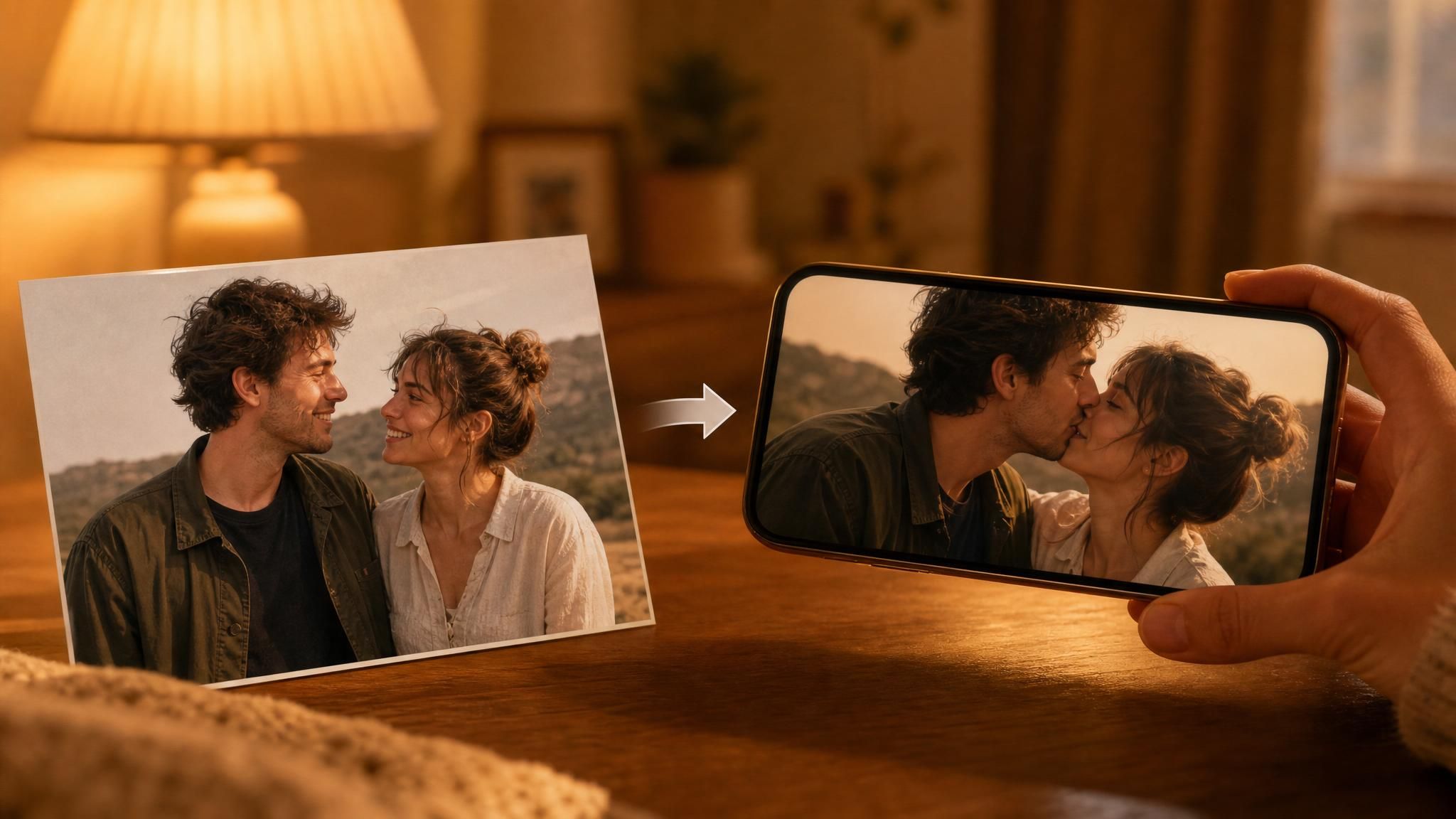
A couple's photo goes in. A short video comes out, two people leaning in for a kiss that never happened. The clip lands on TikTok, the comments fill with "how did you make this," and another few thousand people go looking for the same tool. That is the kissing AI PixVerse has been promoting since early 2025, and it runs on a one-tap template called KissKiss.
This guide covers what the template actually is, how to use it in the app, what a kiss clip costs on each route, why the trend keeps resurfacing worldwide, and the consent rules PixVerse enforces on exactly this kind of content.
Key Takeaways
- KissKiss is an official PixVerse effect template. PixVerse promoted it on its own channels in January 2025, then ran a "Kiss Me, AI!" Valentine's Day campaign that February (PixVerse on X, 2025).
- One-click effects are template IDs layered on PixVerse's image-to-video models. The same generation is available prompt-driven through the API, without the template wrapper.
- On Atlas Cloud, PixVerse V6 image-to-video runs $0.025 to $0.115 per second depending on resolution and audio, verified on the model page July 27, 2026. A 5-second 720p kiss clip with audio comes to $0.30.
- PixVerse's terms prohibit sexually suggestive content of real people made without their consent, and its moderation pipeline screens both the uploaded photo and the finished video.
What Is the PixVerse AI Kiss Effect?
The PixVerse AI kiss effect ships in the app as a template named KissKiss. You pick it from the effect library, upload a photo, and the app renders a short video of the people in the frame kissing. No prompt writing, no settings. PixVerse's own effects documentation describes the whole category as one-click: pick an effect, add a photo, done.
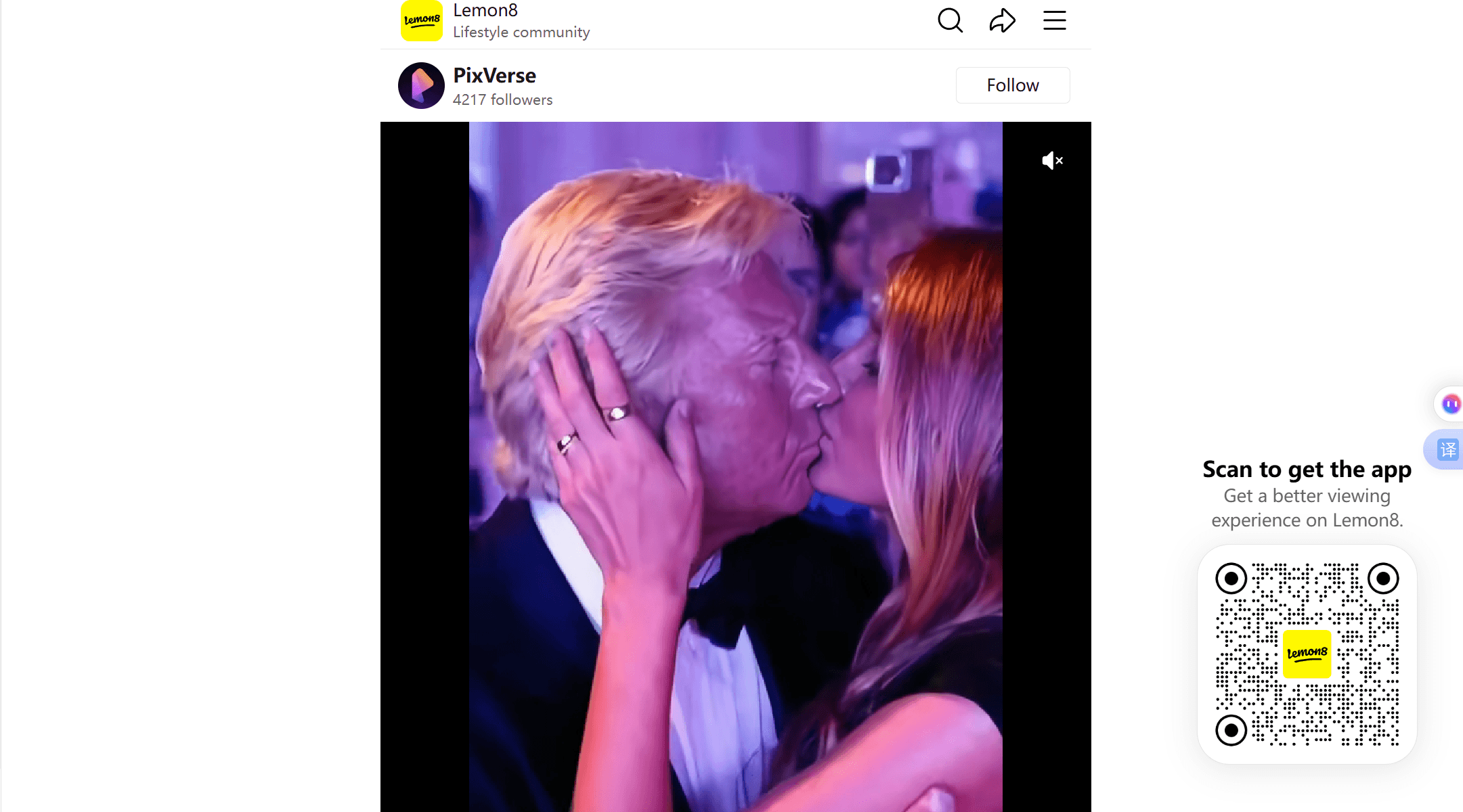
PixVerse pushed this template hard through its official accounts. A January 16, 2025 post on the company's Lemon8 account pitched it with celebrity envy, asking users jealous of Zendaya, Tom Holland, or the Biebers to upload a photo and pick the "KissKiss" effect (PixVerse on Lemon8, 2025). Four weeks later, on February 13, 2025, the company ran a "Kiss Me, AI!" Valentine's special on X and tagged Elon Musk, Tom Holland, and Zendaya in the campaign's opening post.
Under the hood there is no separate kiss model. PixVerse's platform API exposes every effect as a template_id paired with one or more uploaded image references, riding on the same image-to-video generation that powers the rest of the product. That detail matters later, because it means the template is a convenience layer you can step around, keeping the motion while gaining control over duration, resolution, and audio.
How to Make a PixVerse AI Kissing Video
Any PixVerse AI kissing clip starts with an account. Sign in at app.pixverse.ai, a Google login works, then open the effect section and search for a kiss template. One thing to know before you search: PixVerse rotates its effect shelf, so templates get featured, renamed, and cycled out over time. If KissKiss doesn't surface by that exact name, "kiss" as a search term will turn up whatever the current label is; our PixVerse effect catalog walkthrough tracks how that rotation works. From there the flow is short: upload your photo, hit Create, wait for the render, download the result.
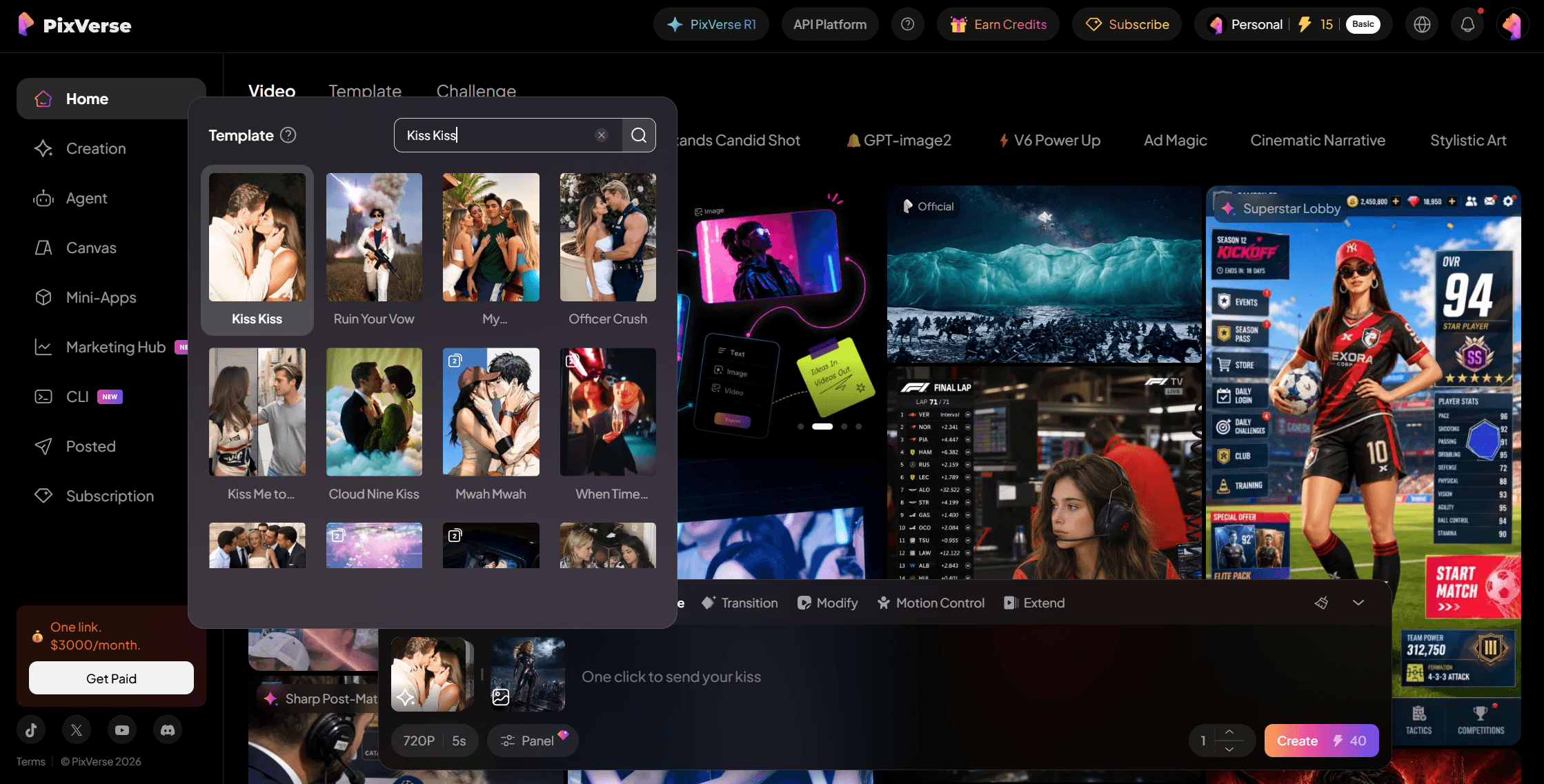
The photo is the only real decision you make, and it decides most of the output quality. PixVerse's own walkthrough for KissKiss has you upload a single picture, so both people need to share one frame; separate photos have to be merged into one image before upload.
| Source photo | Likely result | Better input |
|---|---|---|
| Two people side by side, faces visible | Clean lean-in motion, stable faces | Already good, use as is |
| Two separate photos stitched with mismatched lighting | Warped faces where the halves meet | Match brightness before merging |
| Tight crop on faces only | Stiff motion, clipped shoulders | Include shoulders, leave headroom |
| Group shot with extra people | Model may pick the wrong pair | Crop to the two subjects |
Billing works the way PixVerse's other one-click effects do: a flat credit price per generation, shown in the app at the moment you generate. For comparison, the Muscle Surge template displayed 20 credits per run as of July 2026, and template prices shift over time, so treat the in-app number as the only current one. Free accounts get 90 signup credits plus 60 daily refreshing credits (PixVerse Platform Docs, 2026), which covers a few watermarked template runs a day depending on where the kiss template's credit price sits. A failed take costs the same credits as a keeper.
Run PixVerse Kiss Generation Through Atlas Cloud
Past a handful of personal clips, the app flow runs into its limits: a preset you can't adjust, a watermark on free exports, no control over duration or resolution, and a daily credit ceiling. Atlas Cloud hosts the PixVerse model family behind one pay-as-you-go API, and the PixVerse V6 image-to-video playground exposes the same kind of image-to-video generation the templates ride on, watermark-free, billed per second of output.
Here is the verified price grid from that model page, current as of July 27, 2026, with no active discount:
| Quality | Without audio | With audio | 5-second clip, with audio |
|---|---|---|---|
| 360p | $0.025/sec | $0.035/sec | $0.175 |
| 540p | $0.035/sec | $0.045/sec | $0.225 |
| 720p | $0.045/sec | $0.060/sec | $0.30 |
| 1080p | $0.090/sec | $0.115/sec | $0.575 |
Two ways to use it.
Method 1: Generate a PixVerse Kiss Clip in the Playground
No code needed. Open the playground page, upload your photo, and describe the motion in the prompt field: something like "the two people turn toward each other and share a gentle kiss, camera static." Pick a duration from 1 to 15 seconds, a quality tier from 360p to 1080p, and toggle audio. The page quotes the exact cost before you run; at the default 720p, 5 seconds, audio on, that readout shows $0.30 per run.
Here is what that control buys you. We built two character stills, an armored superheroine on a night rooftop and a shy gamer in his warm apartment, then had PixVerse V6 animate them as a split-screen where she leans across the seam for the kiss:
Method 2: Call PixVerse V6 From the API
Step 1: Get your API key. Create one in the Atlas Cloud console dashboard and copy it.
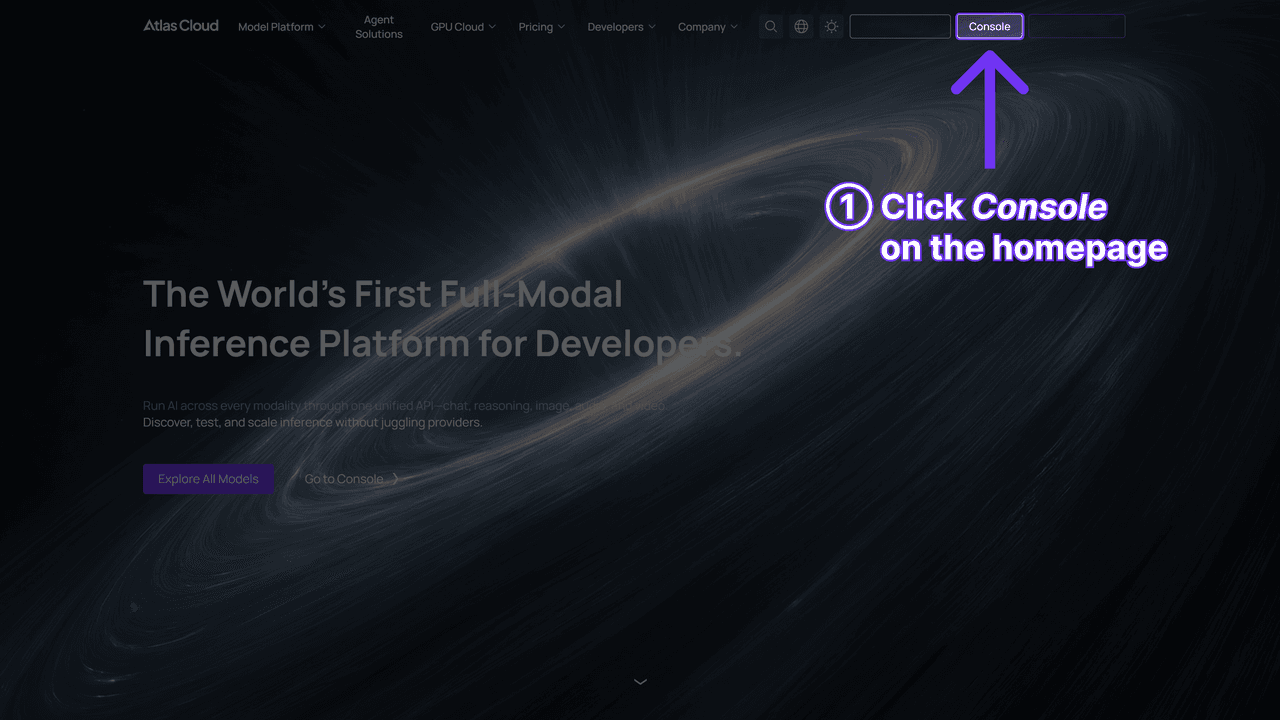
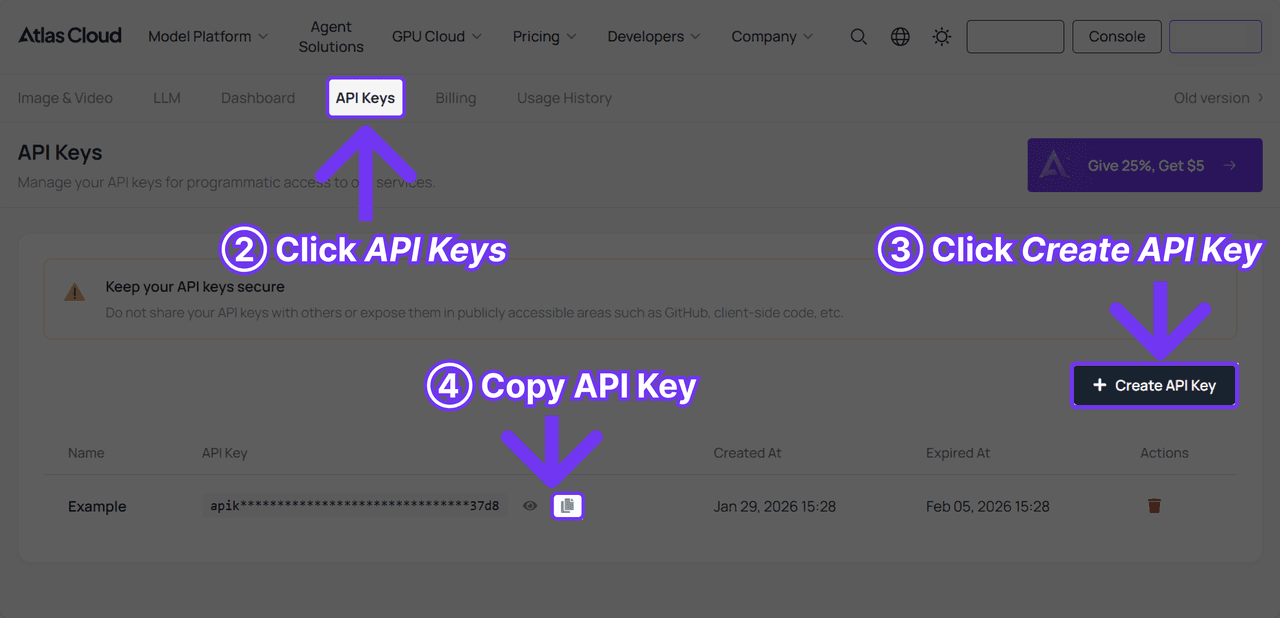
Step 2: Check the API docs. Endpoints, parameters, and authentication live in the API documentation.
Step 3: Make your first request. Submit the job:
plaintext1curl -X POST https://api.atlascloud.ai/api/v1/model/generateVideo \ 2 -H "Content-Type: application/json" \ 3 -H "Authorization: Bearer $ATLASCLOUD_API_KEY" \ 4 -d '{ 5 "model": "pixverse/v6/image-to-video", 6 "image": "<your_uploaded_image>", 7 "prompt": "The two people turn toward each other and share a gentle kiss, soft window light, camera static", 8 "duration": 5, 9 "quality": "540p", 10 "sound": true 11 }'
The response returns a prediction ID. Poll it until the status reads completed:
plaintext1curl https://api.atlascloud.ai/api/v1/model/prediction/<prediction_id> \ 2 -H "Authorization: Bearer $ATLASCLOUD_API_KEY"
Atlas Cloud runs one API across the whole platform, so the same key, auth header, and submit-and-poll loop drive every hosted model. If you later want to test kiss motion on a different generator, you swap the model string and leave the rest of the integration alone. The API route also sidesteps template churn entirely: a prompt can't rotate off a shelf.
Why PixVerse Kissing Videos Keep Trending on TikTok
The PixVerse kissing trend covers a family of formats running across several languages at once. TikTok's discover shelf for "Pixverse Kissing Tutorial" shows where the volume sits: the biggest tutorial on that shelf, by Indonesian creator a_hermawan10, teaches the "get kissed by a pretty stranger" format and carries 6.4 million likes. Tutorials in Italian, Portuguese, and other languages cluster in the thousands to hundreds of thousands.
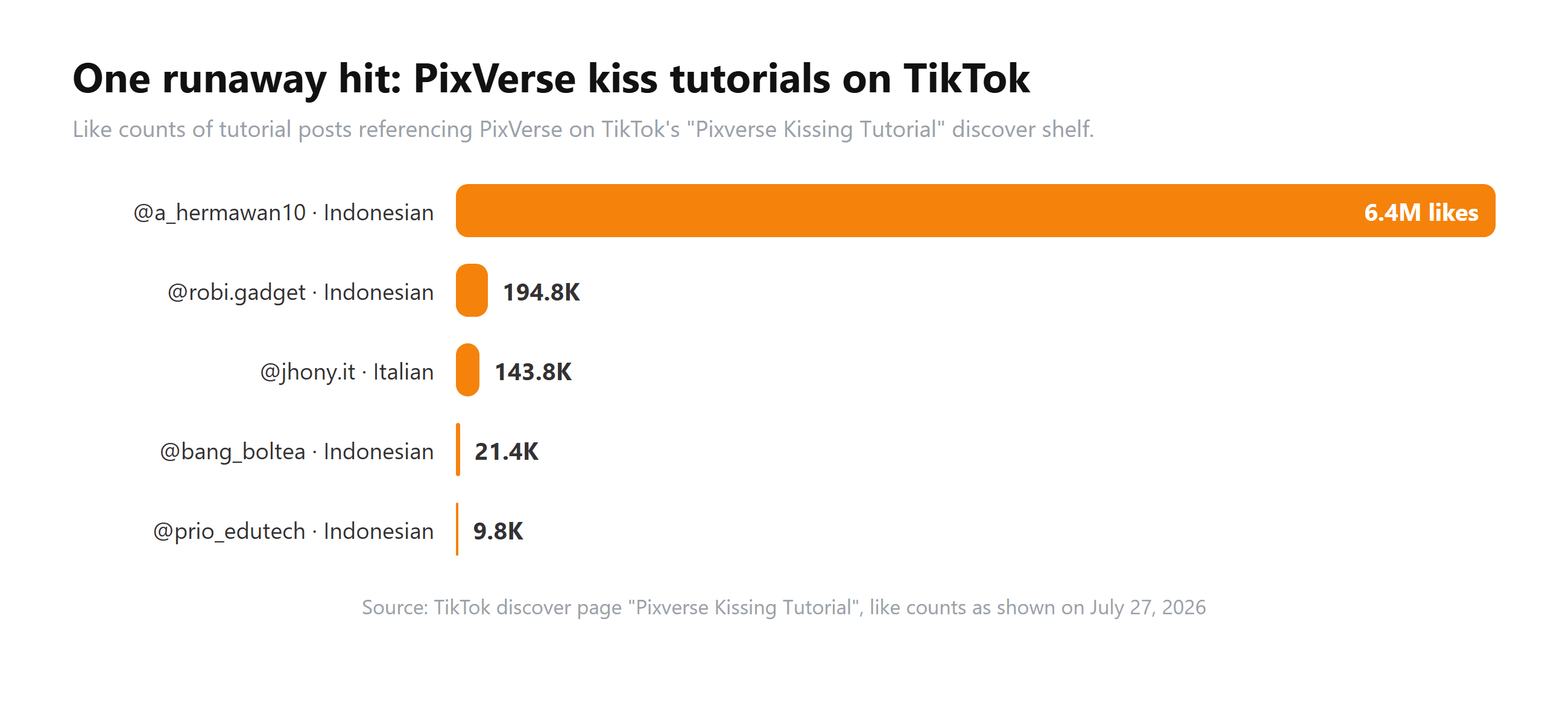
Source: TikTok discover, "Pixverse Kissing Tutorial", retrieved July 27, 2026.
The formats split roughly three ways. Couples and long-distance partners animate their own photos. Prank accounts stage "kissed by a random stranger" clips, the format behind the biggest Indonesian tutorials. A third variant targets celebrities: the Portuguese tutorial on that shelf walks viewers through making kiss videos with a famous person's photo, with PixVerse named as the tool.
The trend travels because the production cost collapsed. A convincing kiss clip used to require two willing people and a camera. Now it requires one photo and a template, and the result trades in romance, surprise, or wish fulfillment, all of which short-video feeds reward.
Where PixVerse Kiss Content Crosses the Policy Line
That celebrity variant sits in direct tension with PixVerse's own rules. The consumer terms of service, updated May 7, 2026, prohibit "sexually explicit or sexually suggestive content of other people without the subject's consent" (PixVerse Terms of Service, 2026). A kiss clip of two consenting adults who uploaded their own photo is squarely inside the sanctioned use case. A kiss video of a celebrity, an ex, or a stranger who never agreed to it is the category that clause exists for. PixVerse's own Valentine's campaign tagged celebrities on X, so the company has marketed the very use its terms restrict; either way, the ToS line is the one that governs your account.
The three policy documents split the enforcement work:
| Document | Last updated | What it does for kiss content |
|---|---|---|
| Terms of Service | May 7, 2026 | Bans suggestive content of real people made without consent, allows termination without prior notification |
| Community Guidelines | March 20, 2025 | Sets the enforcement ladder: warning, content removal, temporary restrictions, suspension, permanent ban |
| Platform (API) Terms | January 5, 2025 | Reserves the right to review API-generated video with automated plus manual checks |
Enforcement runs through software as much as through the contract. Uploads pass through input moderation before generation starts; a rejected photo returns the error "Image moderation failed: The uploaded image is not compliant" (code 500063 in the platform docs). Finished videos can fail output moderation too, returning generation status 7. Credits for moderated generations are refunded automatically, and the docs warn that accounts making too many moderated requests get suspended. The practical read: the system blocks at the input stage when it can, and repeated pushes against the line cost you the account rather than just the clip.
Frequently Asked Questions
Is the PixVerse AI kiss effect free?
Free within limits. New accounts get 90 signup credits plus 60 daily refreshing credits, and one-click templates deduct a flat credit price per generation shown in the app. Free exports carry a watermark. Watermark-free output means a paid plan in the app or per-second API generation.
Can PixVerse make two people from separate photos kiss?
The kiss template takes one image, so both faces need to share a frame. Merge the two photos into a single image first, match the lighting as closely as you can, then upload the combined picture. Mismatched halves are the most common cause of warped results.
What does a PixVerse kiss video cost through the API?
On Atlas Cloud, PixVerse V6 image-to-video is billed per second: $0.025 at 360p without audio up to $0.115 per second at 1080p with audio, as listed on the model page in July 2026. A 5-second clip lands between $0.125 and $0.575 depending on tier.
Why was my PixVerse kissing video blocked?
PixVerse moderates at both ends of the pipeline. The upload can fail input review (error 500063, "The uploaded image is not compliant") and the finished video can fail output review (status 7). Credits are auto-refunded either way. Content involving minors, explicit material, or real people who never consented is what the policy documents prohibit, and the docs warn that repeated moderated requests can suspend the account.
Does the KissKiss template still exist in the app?
Kiss templates recur on PixVerse's effect shelf, but names and featured slots rotate over time. If KissKiss doesn't appear by that exact name, search "kiss" inside the Effect Center, or skip the shelf entirely and prompt the motion through the image-to-video model directly.
Conclusion
KissKiss is the template that carried PixVerse into TikTok feeds across multiple languages, and it earns the attention: one photo in, an emotionally loaded clip out, nothing to learn. For personal use, the app is the right tool, credits and watermark included.
The moment kiss generation becomes a product feature or a content pipeline, the math changes. Per-second billing beats flat template credits, prompts beat rotating shelf names, and watermark-free exports come standard. The model behind the trend is one API call away, and the rule that follows you across both routes is consent: generate kisses with people who agreed to be in them.