Two days before 2025, most AI video tools still made you wait a minute or more per clip. PixVerse picked that exact moment to ship a model that answered in under ten.
That model was PixVerse V3.5, announced December 29, 2024. It closed out a two-month sprint that started with PixVerse V3 in late October, and it left a longer mark than its short life at the top suggests: its price rows, its start-end frame idea, and even its model name are all still live in 2026. This guide covers both releases, what a V3.5 clip costs in credits today, what the free tier actually buys, and where the feature set runs now.
Key Takeaways
- PixVerse V3 launched October 29, 2024 with four new features named in the official post: Effect, Style, Extend, and Lipsync.
- PixVerse V3.5 followed on December 29, 2024, promising clips "in under 10 seconds" plus upgraded anime rendering; trade coverage added start-end frame generation and 1080p support.
- On PixVerse's current price grid, a 5-second V3.5 clip costs 45 credits at 360p or 540p, 60 at 720p, 120 at 1080p; choosing 8 seconds or fast motion doubles it.
- v3.5 is the oldest model name the current PixVerse API still accepts. Plain v3 is gone from the enum.
- The start-end frame concept V3.5 introduced runs today as a dedicated V6 endpoint on Atlas Cloud, metered from $0.025 per second.
PixVerse V3 Landed First: Lipsync, Effects, Story Extend
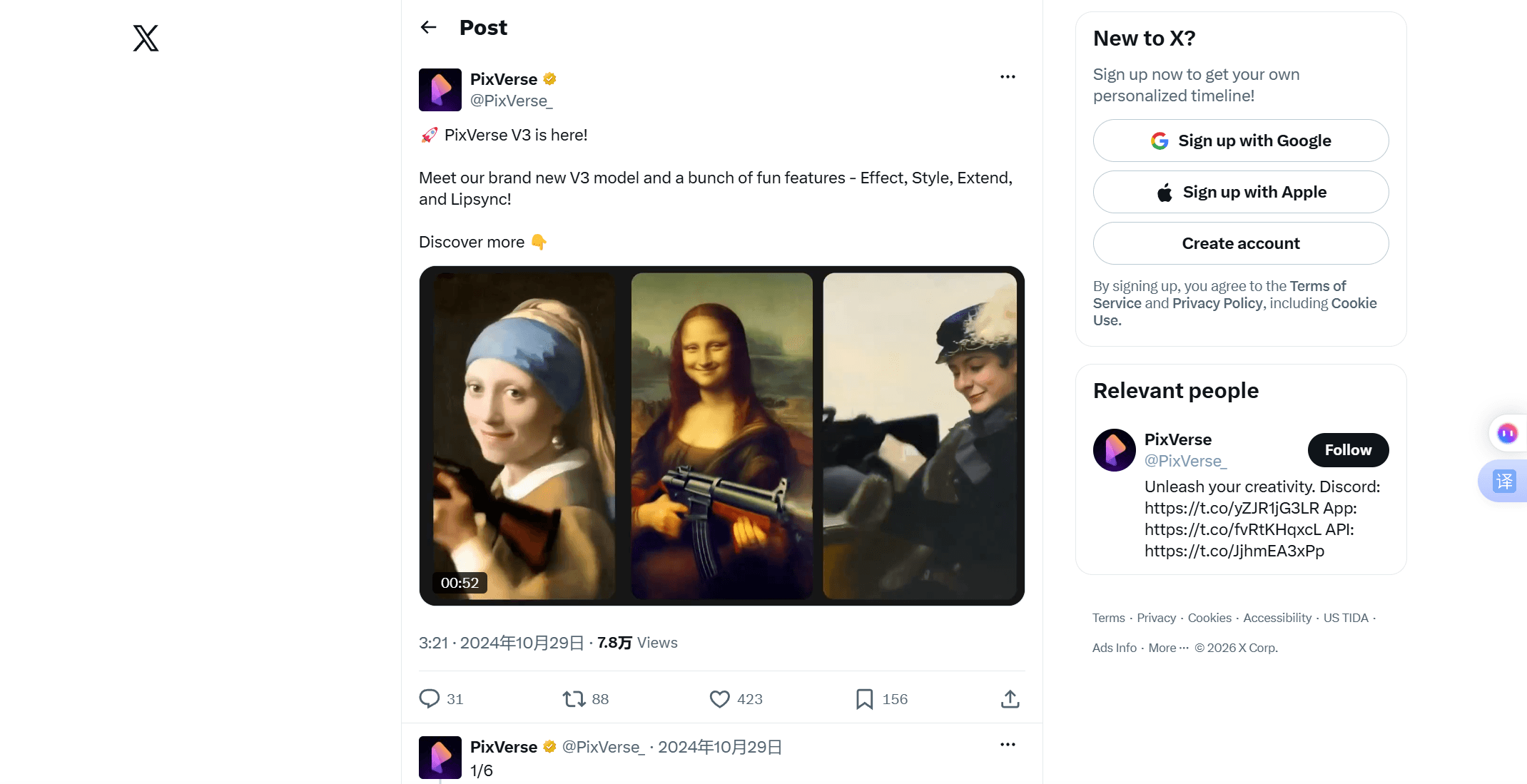
The V3.5 story starts two months earlier. On October 29, 2024, the official PixVerse account posted: "PixVerse V3 is here! Meet our brand new V3 model and a bunch of fun features - Effect, Style, Extend, and Lipsync!" The launch post bundled a model upgrade with four named features in a single announcement.
Each of those four names carried real weight. Lipsync let characters in a generated clip speak in multiple languages, the ancestor of today's Speech feature. Extend added story continuation: feed the system a fresh prompt and it lengthened an existing video by 5 to 8 seconds while holding characters steady. Style switched between looks like anime and realistic. Effect opened a template shelf, with launch entries including Wizard Hat and Monster Invasion. Launch coverage from AIbase also credited the pixverse v3 ai model with sharply better prompt reading, "capable of conveying emotions, textures, and cinematographic language."
 The Effect shelf paid off almost immediately. Three days after V3 shipped, PixVerse released the "We Are Venom!" template timed to the new Venom film, and symbiote transformation clips flooded short-form feeds through November. That playbook, ride a cultural moment with a one-tap template, became a recurring PixVerse move; the effects breakdown traces it forward to 2026. A typical pixverse v3 ai video from those weeks was exactly that: a phone photo, one template, eight seconds of transformation.
| Version | Released | Signature addition |
|---|---|---|
| V2.5 | Aug 22, 2024 | Roughly 2x speed, 4K upscaling |
| V3 | Oct 29, 2024 | Effect, Style, Extend, Lipsync |
| V3.5 | Dec 29, 2024 | Under-10-second generation, anime upgrade |
| V4 | Feb 25, 2025 | Realism jump, Restyle |
What Changed in the PixVerse V3.5 AI Update
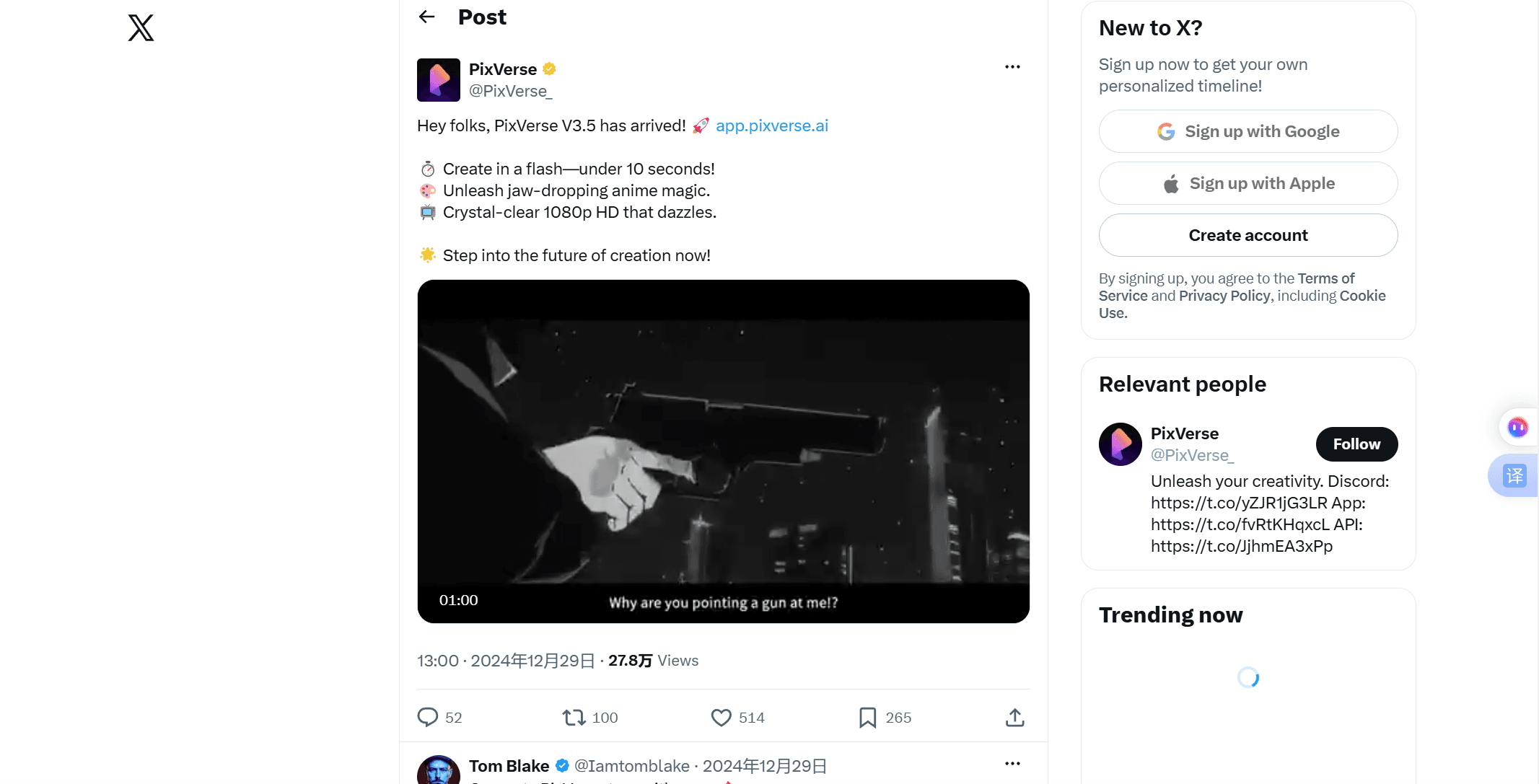
V3 added features. V3.5 cut the wait. The official announcement on December 29, 2024 made two promises: "Create in a flash—under 10 seconds!" and "Unleash jaw-dropping anime magic." AIbase's launch report went further on the speed claim, reporting generation "in as fast as 5 seconds," and filled in the rest of the release: support for 1080p output, smoother motion control, and generation from a start frame plus an end frame for clean transitions between two stills.
 The timing explains the emphasis. December 2024 was a crowded month: Sora had just opened to the public, and Kling had shipped its 1.6 update earlier that month. Against rivals competing on realism, the PixVerse V3.5 AI update bet on turnaround time and a distinctive anime look, the two things a short-form creator feels on every generation. Reviewers spent the first week of January pitting V3.5 clips against Kling 1.6 side by side.
 Of everything in that list, the start-end frame idea aged best. It turned into a permanent product category, which is where the current lineup comes in.
Start-End Frames in 2026: PixVerse on Atlas Cloud
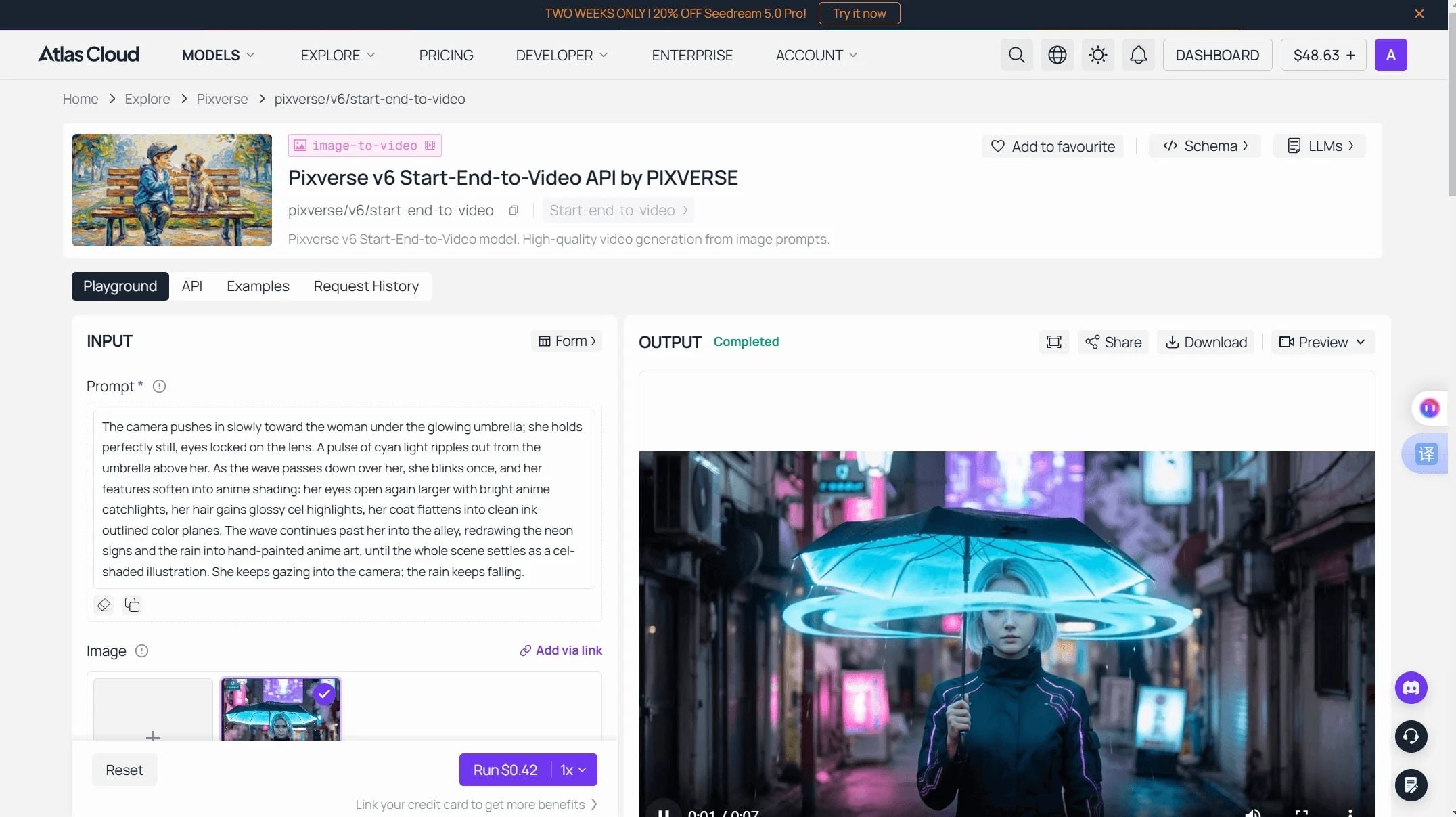
What V3.5 introduced as a trick now runs as a dedicated endpoint on the current generation. Atlas Cloud hosts the active PixVerse family, and its V6 Start-End-to-Video playground is the direct descendant of the V3.5 feature: two stills in, one coherent transition out, now with 1 to 15 second durations, optional synchronized audio, and per-second billing instead of credit packs. No subscription, no watermark.
Rates as of July 2026, read from the model page, no discount active:
| Quality | Without audio | With audio |
|---|---|---|
| 360p | $0.025 / sec | $0.035 / sec |
| 540p | $0.035 / sec | $0.045 / sec |
| 720p | $0.045 / sec | $0.060 / sec |
| 1080p | $0.090 / sec | $0.115 / sec |
The playground defaults, 5 seconds at 720p with sound on, come to $0.30 per run, so $10 covers about 33 transitions. One toggle worth knowing: Atlas Cloud enables audio by default, so switch it off if your estimates keep landing high.
Method 1: PixVerse Start-End Generation in the Playground
Log in, open the playground, and the form needs three required inputs before the options.
- Add thestartimage. A plain URL works; no separate upload call needed here.
- Add the end image. Match lighting and crop between the two stills for a natural result.
- Write the prompt. Describe the motion in between, not the frames themselves.
- Pick duration and quality. Anything from 1 to 15 seconds, 360p to 1080p.
- Run. The button quotes the exact cost before you commit.
Method 2: Call the PixVerse API From Code
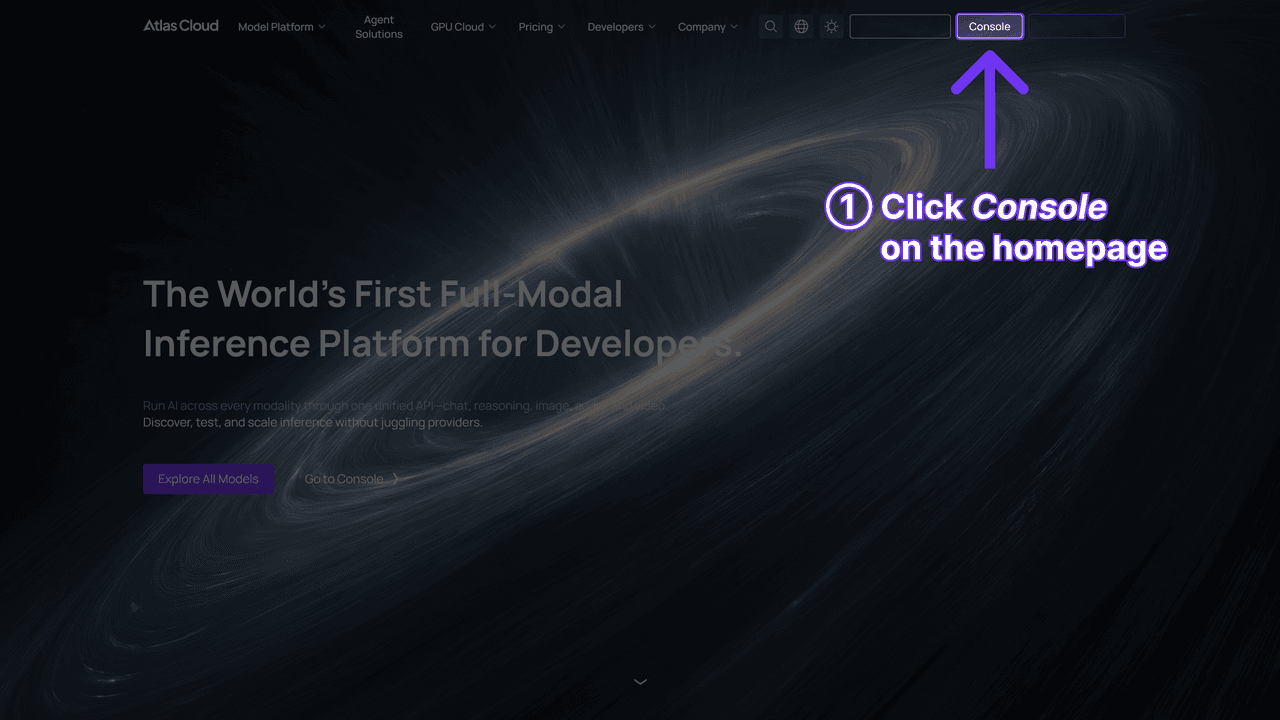
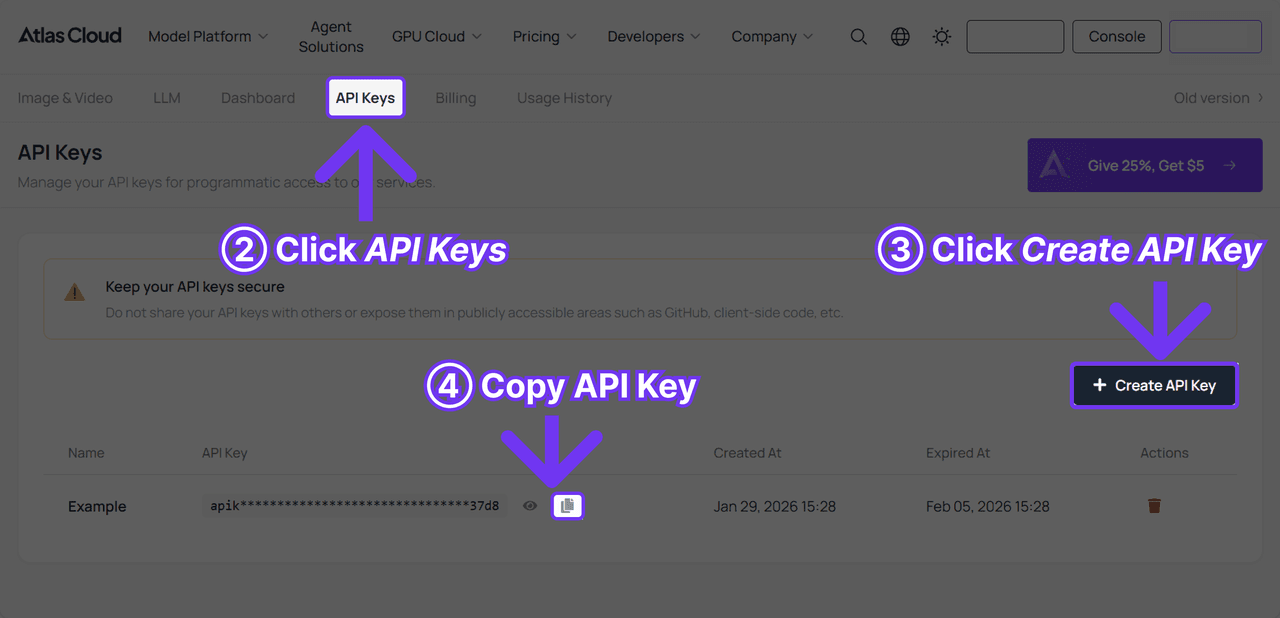
Step 1: Get your API key. Create one in the Atlas Cloud console and keep it in an environment variable, never in client-side code.
 Step 2: Check the API docs. Endpoints, parameters, and authentication live in the API documentation.
Step 3: Make your first request. Submit the job with both frames:
plaintext1curl -X POST https://api.atlascloud.ai/api/v1/model/generateVideo \ 2 -H "Content-Type: application/json" \ 3 -H "Authorization: Bearer $ATLASCLOUD_API_KEY" \ 4 -d '{ 5 "model": "pixverse/v6/start-end-to-video", 6 "prompt": "The pencil sketch fills with color, line art settles into a finished anime portrait, gentle push-in", 7 "image": "https://example.com/sketch.jpg", 8 "end_image": "https://example.com/portrait.jpg", 9 "duration": 5, 10 "quality": "720p", 11 "sound": false 12 }'
The response returns a prediction ID. Poll it until the status reads completed:
plaintext1curl https://api.atlascloud.ai/api/v1/model/prediction/<prediction_id> \ 2 -H "Authorization: Bearer $ATLASCLOUD_API_KEY"
Atlas Cloud runs one API across everything it hosts: same key, same auth header, same submit-and-poll loop. Moving to text-to-video, to C1, or to whatever PixVerse ships next means changing the model string and nothing else.
PixVerse V3.5 AI Video Costs in Credits Today
Here is the part that surprises people: the model never left. PixVerse's current text-to-video API reference lists its supported model values as v3.5, v4, v4.5, v5, v5.5, v5.6, v6, and c1. That makes v3.5 the oldest name still accepted, a full year and a half after release. Plain v3 did not survive; its features were absorbed into the platform and the model name dropped out of the enum. Searches for pixverse v3 5 today mostly come from developers checking whether an old integration string still resolves. It does.
The platform pricing page prices V3.5 on a grid shared with V4, V4.5, and V5, in credits per clip:
| Quality | 5s, normal motion | 8s or fast motion |
|---|---|---|
| 360p (Turbo) | 45 | 90 |
| 540p | 45 | 90 |
| 720p | 60 | 120 |
| 1080p | 120 | not listed |
Two doubling rules decide most bills: picking 8 seconds over 5, or switching to fast motion mode. 1080p lists only the 5-second normal tier. At the $10-per-1,000-credits pack rate, a 720p 5-second pixverse v3.5 ai video costs $0.60. The same silent clip renders for 45 credits on V6, and meters at $0.225 through Atlas Cloud, so keeping a workflow on the old string costs close to triple the metered rate.
The docs carry a few era markers, too. Some of PixVerse's own how-to pages still describe a negative_prompt field with a 25-to-200-word recommendation; the current generation endpoint no longer lists that parameter. And every V3.5 clip renders silent. Audio generated in the same pass only arrived with V5.5 in December 2025.
PixVerse V3 Free Tier: What Free Access Buys Now
The pixverse v3 free tier is a big reason both 2024 releases spread as fast as they did. V3 rolled out globally through the regular app, effects included, and the credit system let anyone test the new model without paying. That mechanism still exists, with numbers that have drifted over time.
As of July 2026 checks, the free plan looks like this:
| Free plan detail | Value |
|---|---|
| Signup credits | 90 |
| Daily credits | 60 |
| Watermark on exports | Yes |
| Resolution cap | 540p |
| Daily allowance vs the V3.5 grid | Covers one 5-second clip at 360p or 540p |
Treat those numbers as a snapshot. PixVerse's own blog commits only to a daily range of 30 to 60 credits and says the amount changes, so the exact allowance on any given week is theirs to set. Removing the watermark takes a paid plan, or skipping credits entirely for metered per-second billing through the API route above.
Frequently Asked Questions
Is PixVerse V3.5 still available in 2026?
Yes, through PixVerse's own API. The current text-to-video reference lists v3.5 among its supported model values, making it the oldest callable version. The web app defaults everyone to the newest generation, and Atlas Cloud hosts only the current V6 and C1 series, so v3.5 specifically means calling PixVerse's platform directly.
When did PixVerse V3.5 come out?
December 29, 2024, announced on the official PixVerse X account. It arrived two months after PixVerse V3 (October 29, 2024) and about two months before V4 (February 25, 2025).
What is the difference between PixVerse V3 and V3.5?
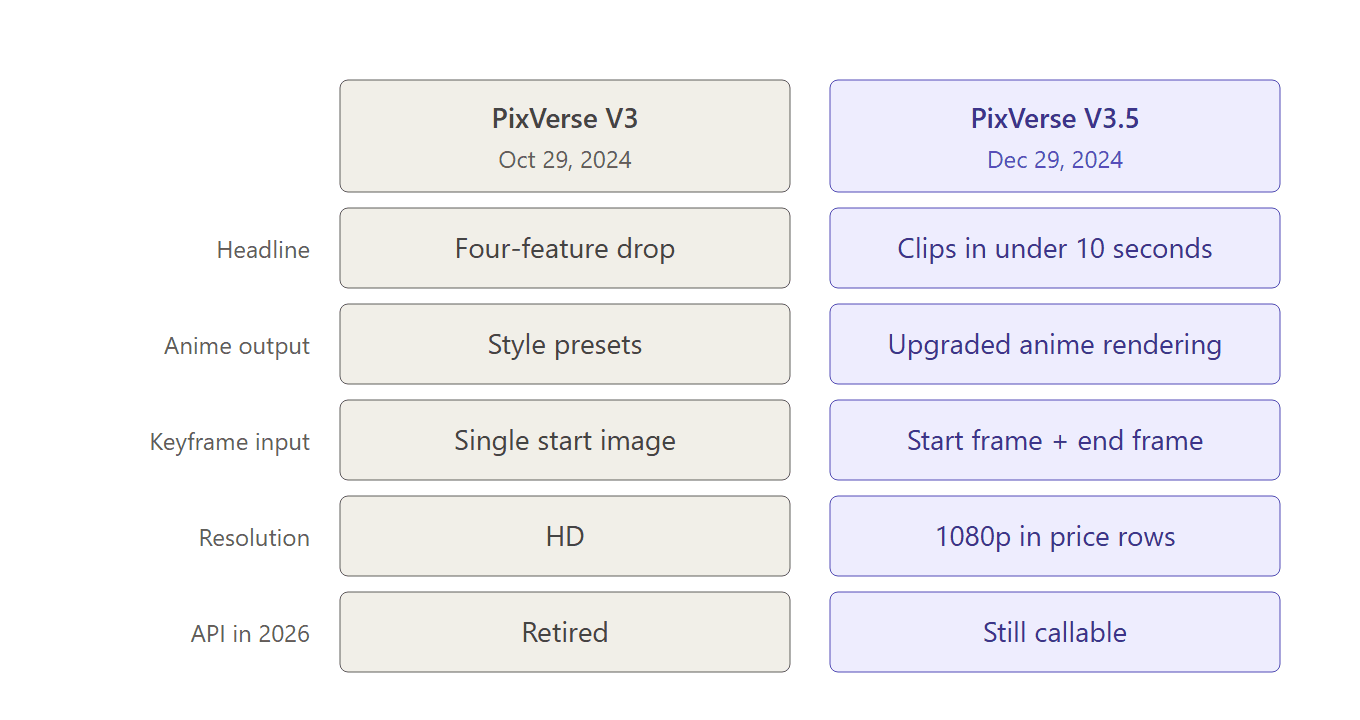
V3 was a feature drop: Effect templates, Style presets, story Extend, and Lipsync, on top of a stronger base model. V3.5 focused on performance: generation in under 10 seconds, upgraded anime rendering, 1080p support, and start-end frame generation for transitions between two stills.
Is PixVerse V3 free to use?
The V3 model name is retired, but the free tier that carried it survives. As of July 2026, new accounts get 90 signup credits plus a daily allowance of 60, with a watermark and a 540p cap on free exports. PixVerse's blog quotes the daily figure as a shifting 30-to-60 range, so expect the numbers to move.
Does PixVerse V3.5 generate audio?
No. Every model from v3.5 through V5 renders silent clips, with sound effects and lip sync applied as separate passes afterward. In-pass audio generation started with V5.5 in December 2025 and is standard on V6 and C1, where it raises the per-second rate.
Conclusion
PixVerse V3.5 was a two-line announcement whose ideas outlasted the model's time at the top. The ten-second promise reset what creators expected from generation speed, the anime push gave the platform a look it still owns, and the start-end frame experiment grew into a permanent endpoint category.
The 2026 reading is simple. If you need the exact V3.5 output for an old workflow, the model string still resolves on PixVerse's API at 2024-era credit prices. For everything else, the same ideas run faster and cheaper on the current generation, metered per second in the Atlas Cloud playground quoted above.