Your clip ends right as it gets good. Five seconds of a perfect shot, then black. And if you made it on the free plan, there's a logo sitting on top of it too.
Those are the two walls every PixVerse creator hits: the video length limit and the watermark. Both are real. Both have moved recently, and most guides online still describe the old rules. Here is what the limits actually are in 2026, straight from PixVerse's docs and the app itself, plus the routes past both.
Key Takeaways
- PixVerse V6 generates 1 to 15 seconds per clip, and the official docs confirm "1080p supports up to 15s" (PixVerse V6 docs, retrieved July 2026). Older models were capped at 5 or 8 seconds.
- There is no hard ceiling on total length. The Video Extend endpoint adds up to 15 seconds per request, and the docs list no cap on how many times you can chain it.
- The watermark is a plan feature, not a setting. Free app exports carry it; paid plans from $10 a month and generation on Atlas Cloud export clean.
- PixVerse V6, C1, and the V6 Video Extend endpoint all run on Atlas Cloud, billed per second, with V6 starting at $0.025 per second.
The PixVerse Video Length Limit in 2026: 15 Seconds, With Asterisks
The current answer is 15 seconds per generation. PixVerse V6, the flagship model, accepts any duration from 1 to 15 seconds across text-to-video, image-to-video, transitions, and reference-to-video. That range holds at every resolution, including 1080p. We checked the web app's duration picker in July 2026: it lists every second from 1s to 15s, with 5s as the default.
That single number hides a few asterisks, though. The pixverse ai video duration limit you personally see depends on where you're generating and which model is selected.
| Where you generate | Length limit | Notes |
|---|---|---|
| PixVerse app or API, V6 or C1 selected | 1 to 15 seconds per generation | Same range across text, image, transition, and reference modes |
| V5-era and older models | 5 or 8 seconds | Legacy caps, detailed below |
| PixVerse R1 | No fixed clip length | Continuous stream, a different product entirely |
| Video Extend | +1 to 15 seconds per pass | No documented cap on total chained length |
One more scope note: 15 seconds is the per-generation cap, not the ceiling on what you can end up with. Extensions stack, and we'll get to that. First, the asterisk that confuses the most people: why so many users still see an 8-second wall.
Why Your PixVerse AI Video Duration Limit Still Says 8 Seconds
If your duration menu only shows 5s and 8s, you're not on V6. You're generating with an older model, and the pixverse ai video duration options collapse to the legacy pair the moment one is selected.
Here's how the cap has moved across model generations:
| Model generation | Duration options | Resolution catch |
|---|---|---|
| V6 (current) | Any length, 1 to 15 s | None; docs state 1080p supports up to 15s |
| C1 | 1 to 15 s | None |
| V5 / V5.5 / V5.6 | 5 or 8 s | 8 s unavailable at 1080p on some versions |
| V4.5 and earlier | 5 or 8 s | Legacy docs: "1080p doesn't support 8", fast motion mode locked to 5 s |
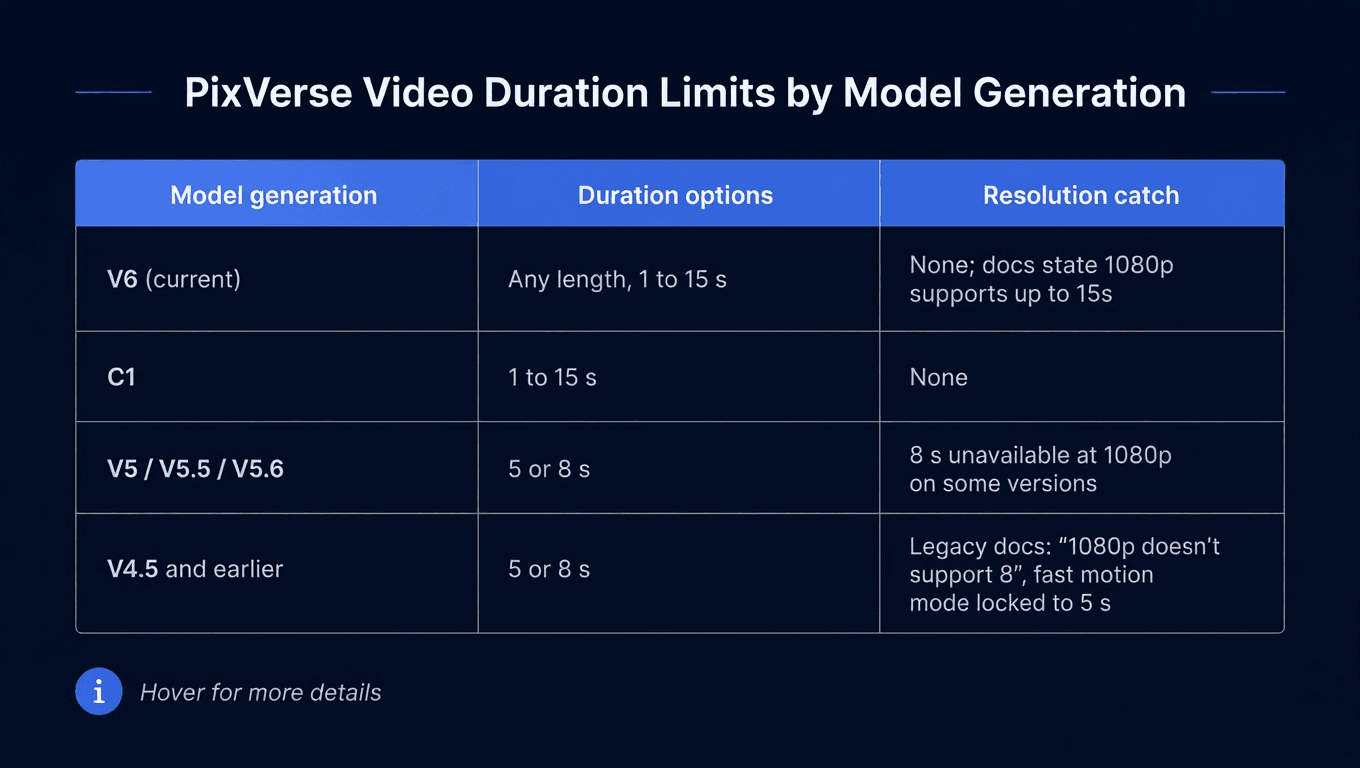
The 5/8 pattern ran deep for years. PixVerse's own MCP server README from the V4 era lists "Duration: 5s or 8s" flat, and the legacy Extend documentation still carries the old caveats: no 8-second output at 1080p, and fast motion mode restricted to 5 seconds. That's why so many tutorials and third-party write-ups repeat "PixVerse maxes out at 8 seconds." It was true. It stopped being true with V6, which the official V6 review post describes as supporting 1 to 15 second generation.
So the fix for a stuck duration menu is one click: switch the model picker to V6 (or C1). The pixverse maximum video length per clip immediately triples, and the 1080p restriction disappears with it.
Fifteen seconds still isn't a scene, though. For anything longer you need the extension workflow.
Extending PixVerse Videos Past 15 Seconds on Atlas Cloud
The official way past the cap is Video Extend. The model reads the final frames of an existing clip, takes a prompt describing what happens next, and generates a continuation that picks up from the last frame. Each pass adds 1 to 15 seconds, and neither PixVerse's V6 docs nor the endpoint page lists a limit on how many passes you can chain. A 15-second base plus three extensions is a one-minute video.
Atlas Cloud hosts the full PixVerse model family, including the dedicated V6 Video Extend endpoint, billed per second with no subscription and no credit packs. V6 generation starts at $0.025 per second without audio, and every output is watermark free. Two ways to run the workflow:
Method 1: Extend PixVerse Videos in the Browser
Open the V6 Video Extend playground, no code needed. Paste a public URL to your source clip (mp4, mov, or webm), write a prompt for how the scene should continue, pick a duration up to 15 seconds, and match the quality setting to your source video so the cut point doesn't show. Run it, download, and feed the result back in if you want another pass.
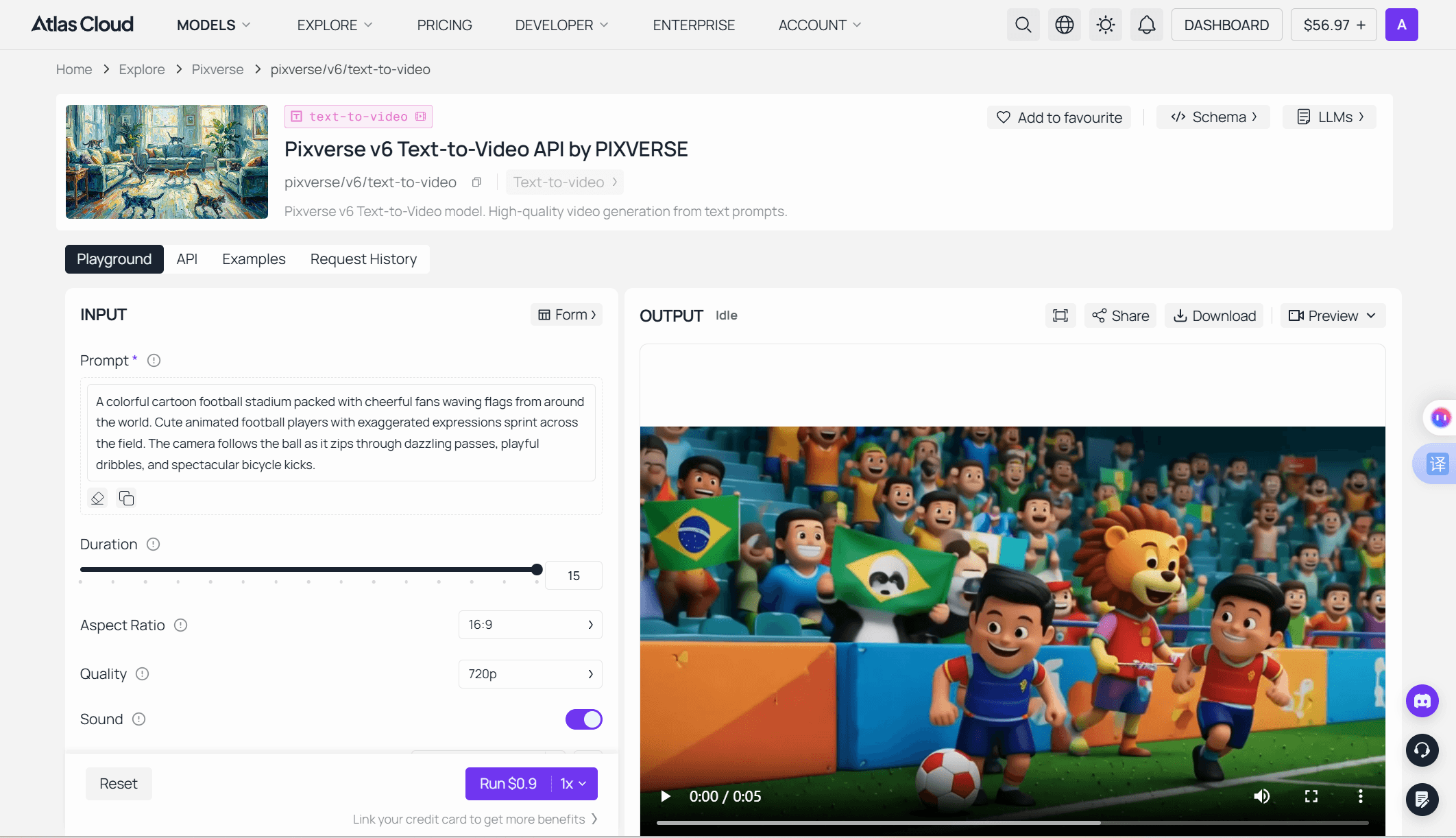
Two details from the endpoint's own notes are worth knowing. The extension duration is independent of the source video's length, so a long chained video can keep growing. And the source just needs to be a publicly reachable URL, which means clips generated anywhere, not only on PixVerse, can be extended.
Method 2: Chain PixVerse Video Extensions Through the API
Once you're stitching scenes programmatically, three steps get you running:
- Get your API key. Create one in the Atlas Cloud console dashboard and copy it.
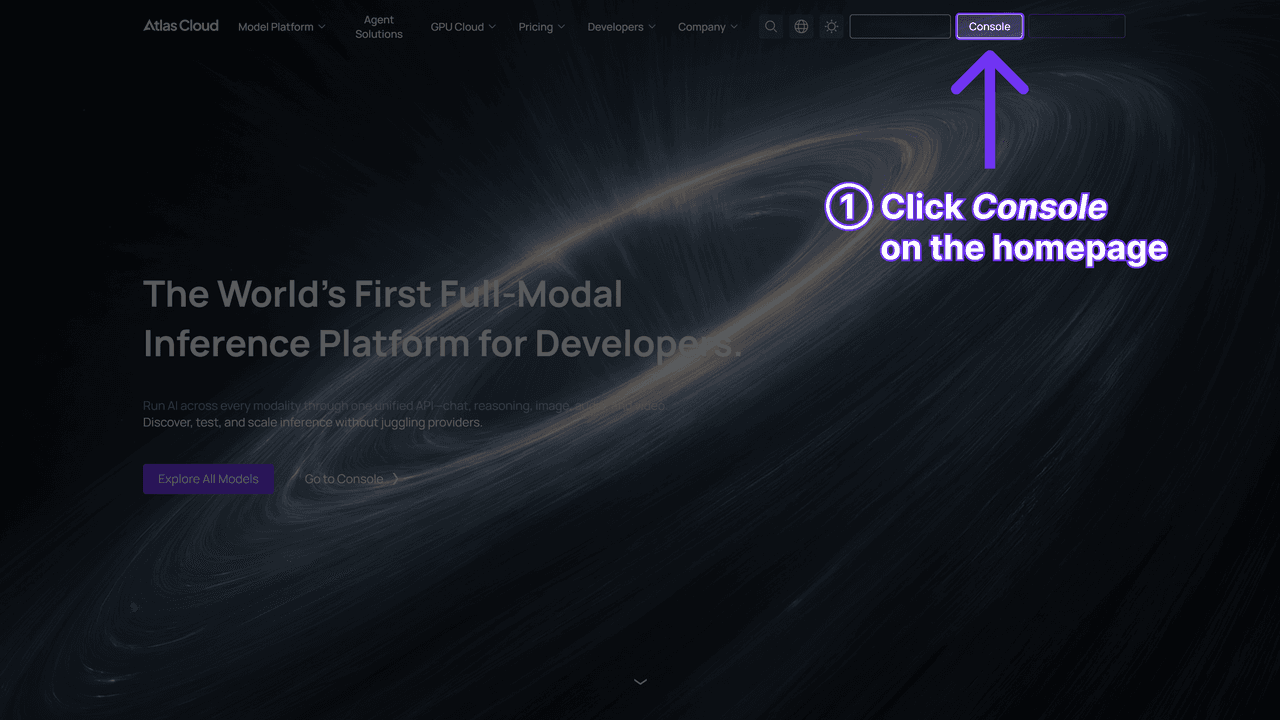
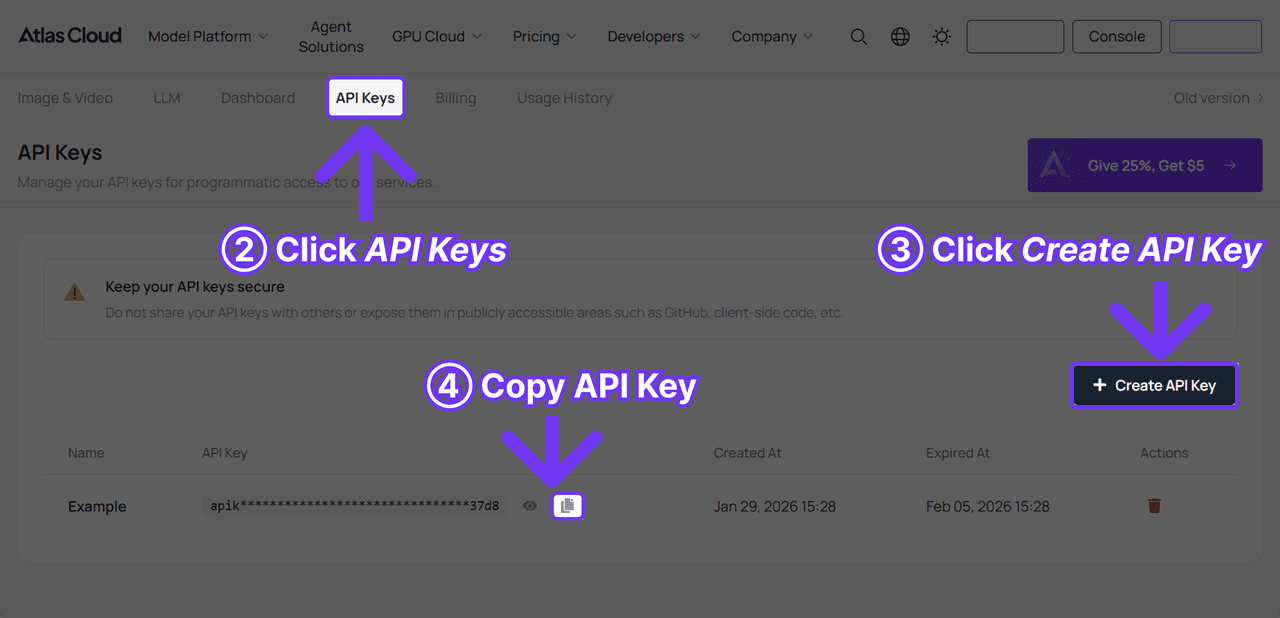
2. Check the docs. The API documentation covers the video endpoints, request format, and authentication in one place.
3. Make the first request. Generate a base clip. Through the One API design, every model on the platform shares the same endpoint shape and auth, so swapping PixVerse for another video model later is a model-string change, not a re-integration.
A practical tip from testing extensions: short passes of 1 to 3 seconds read as subtle continuations, while 8 to 15 second passes give the model room for a real scene development. Plan your chain accordingly rather than defaulting to max length every pass.
Chaining costs money per second, of course. Which brings up the limit nobody puts in a spec sheet.
The Real PixVerse AI Video Length Ceiling Is Your Credit Balance
Every PixVerse route prices video by how much of it you generate, so the practical pixverse ai video length cap is arithmetic, not the duration picker. PixVerse's free tier refreshes a daily credit allowance, 60 a day at our last check, and the company's own blog notes the exact figure can vary. On the developer side, the official V6 credit table bills per second: 5 credits at 360p, 7 at 540p, 9 at 720p, 18 at 1080p, all before audio.
Run those numbers against the 15-second maximum and the wall appears fast:
| Clip | PixVerse API credits (no audio) | Atlas Cloud price (no audio) |
|---|---|---|
| 5 s at 540p | 35 | $0.175 |
| 15 s at 540p | 105 | $0.525 |
| 15 s at 720p | 135 | $0.675 |
| 15 s at 1080p | 270 | $1.35 |
| 60 s at 720p (15 s base + three extends) | 540 | $2.70 |
A single max-length 540p clip runs 105 credits at those API rates, nearly two days of the free tier's typical daily allowance. The app prices clips on its own scale, but the logic is identical: cost scales with seconds. That is the quiet reason most free-tier videos stay at 5 seconds: not the model, the meter. Enabling audio raises every rate, and a failed take burns the same credits as a keeper.
The per-second framing also explains why "maximum length" questions are really cost questions. Nothing technically stops a 3-minute chained video; at 720p without audio it simply costs about $8.10 on metered billing, and proportionally more in prepaid credits.
Credits are one half of the free-tier tax. The logo in the corner is the other.
PixVerse Watermark Rules: Which Videos Get Stamped
The pixverse watermark policy is simple once you see it as a plan feature. Free exports carry the PixVerse logo and top out at 540p on the current plan table. Every paid consumer tier removes it, starting with the $10 Standard plan ($8 a month billed annually). The developer side tells you how optional the stamp really is: PixVerse's official API examples pass a water_mark boolean, set to false in every sample request.
| Route | Watermark | Resolution ceiling |
|---|---|---|
| Free app plan | Yes | 540p |
| Standard, $10/mo | No | 720p |
| Pro and up, $30+/mo | No | 4K |
| Atlas Cloud playground or API | No | 1080p native |
So "how to remove pixverse watermark" has one honest first answer: change how the video is generated. A paid plan removes it from app exports, and API-based generation on Atlas Cloud is watermark free at every resolution tier, billed only per second of output. For a full breakdown of what the free tier does and doesn't include, see our free credits guide.
What that answer rules out matters just as much: there is no hidden toggle in the app, no export trick, and no mod APK that produces a clean file from a free account. Generation happens server side, so nothing on your device can unlock a clean copy after the fact.
Which is exactly why the watermark remover tools that promise otherwise deserve a closer look.
PixVerse Watermark Removers vs. Regenerating Clean
Search for a pixverse watermark remover and you'll find a row of upload-a-file tools promising clean output in one click. Understand what they actually do before trusting one with your footage. The watermark isn't a layer sitting on top of the video; it's baked into the rendered frames. Any removal tool is reconstructing the pixels underneath by guessing, either by cropping the region out, blurring it, or AI-inpainting it frame by frame.
On moving footage that guesswork shows. Watermark regions sit over motion, so inpainted patches shimmer, smear, or lag a frame behind the action. Cropping changes your aspect ratio. And every one of these tools requires uploading your video to someone else's server, with whatever retention policy they may or may not publish.
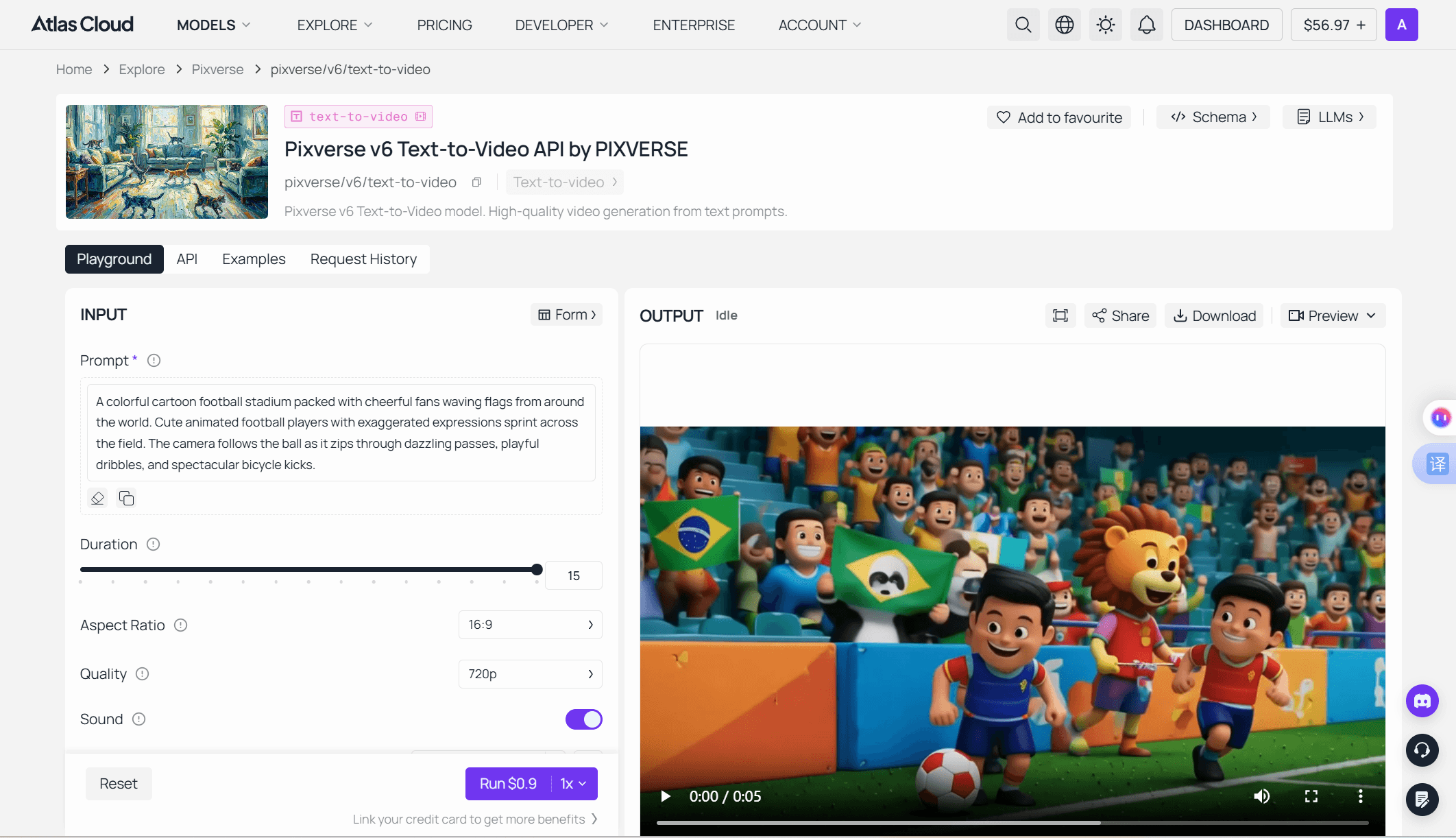
The math argues against them too. A watermarked free-tier video is capped at 540p, so even a flawless removal leaves you with a 540p file. Regenerating the same 5-second clip watermark free on Atlas Cloud costs $0.175 at 360p with audio, or $0.30 at 720p with audio, and you keep the full prompt control to improve the shot while you're at it. Paying for a remover subscription to salvage low-resolution output costs real money for a worse file.
If a clip is genuinely unrepeatable and only exists as a watermarked file, a removal tool is the last option left, and the artifacts above are the price. For everything else, pixverse ai watermark free output is a generation setting, not a post-production project.
Frequently Asked Questions
What is the maximum video length in PixVerse AI?
15 seconds per generation on the current V6 and C1 models, at any resolution up to 1080p. There's no documented ceiling on total length: the Video Extend endpoint adds up to 15 seconds per pass and can be chained repeatedly, so longer videos are built as a base clip plus extensions.
Why does my PixVerse duration menu only show 5 and 8 seconds?
An older model is selected. V5-era and earlier models were capped at 5 or 8 seconds, with 8 seconds unavailable at 1080p on some versions. Switch the model picker to V6 or C1 and the full 1-to-15-second range appears.
How do I get PixVerse videos without a watermark?
Generate them on a route that doesn't apply one. Paid PixVerse plans from $10 a month export clean from the app, and PixVerse models on Atlas Cloud output watermark free at every resolution, billed per second. Free app exports always carry the logo.
Do PixVerse watermark remover tools actually work?
Partially. They crop, blur, or AI-inpaint the logo region, which tends to leave visible artifacts over moving footage, and the underlying file stays capped at the free tier's 540p. They only make sense for an existing clip you can't regenerate.
Does PixVerse R1 have a video length limit?
R1 is a realtime world model that streams continuously rather than rendering fixed clips, so it doesn't have a per-clip duration cap in the V6 sense. It runs at up to 720p on its own site, realtime.pixverse.ai. Our PixVerse R1 breakdown covers how it differs from clip generation.
Does extending a video cost more than generating one?
No premium applies. On Atlas Cloud, the V6 Video Extend endpoint bills the same per-second rates as V6 generation, from $0.025 per second without audio, and the extension length you pay for is independent of how long the source video already is.
Conclusion
The PixVerse length story in 2026 is better than most guides suggest: 15 seconds per generation on V6, any 1-second step you like, full range at 1080p, and an extend workflow with no documented total cap. The 8-second wall is a legacy-model symptom with a one-click fix.
The watermark story is simpler still. It marks one thing only: free app exports. Pay for a plan and it's gone from new exports; generate on Atlas Cloud and it never appears. Removal tools exist for the clip you can't remake, but for everything else the clean path is cheaper, sharper, and one prompt away.