Quick Overview: What's New in Seedance 2.5?
- The Core Solution: Seedance 2.5 cuts out the need to patch short videos together. It renders a clean, high-quality 30-second AI clip in one single go, keeping your lighting, camera angles, and brand assets completely uniform.
- Key Breakthroughs: It features an upgraded R2V system that reads up to 50 mixed media inputs, an extended 180-second video clip expansion tool, and a sharp brush feature to fix tiny mistakes on exact parts of a frame.
- Who It Is For: It is built directly for business video teams, online stores, and ad shops that must protect their official brand look. It is not the best choice for casual creators who just want quick video generations from a simple text prompt without using matching image assets.
Stay Tuned! Dreamina Seedance 2.5 is coming soon, with underlying API services powered by BytePlus. Here is an exclusive preview demo and technical first look at the upcoming model capabilities and what they mean for your commercial production workflows.
Video creators regularly face a frustrating reality: stitching together 5-second clips only to watch character consistency and lighting dissolve at the seam. Seedance 2.5 removes this bottleneck by enabling commercial spots without stitching through a continuous, broadcast-standard single-segment video.
This updated video generation model outputs a 30-second native video in a single shot, handling natural pacing shifts, text-to-video consistency, and native audio synchronization. Older workflows like Seedance 2.0 capped out at 15 seconds, forcing commercial production teams into tedious post-production stitching timelines.
Quick Comparison: Seedance 2.0 vs. 2.5
| Core Feature | Seedance 2.0 | Seedance 2.5 | Commercial Impact |
| Native Clip Length | 5 to 15 seconds | Up to 30 seconds, or extends up to 180s | Eliminates stitching; allows full-length storytelling without visual drift. |
| Multimodal Inputs | Up to 12 assets (9 images, 3 videos, 3 audio) | Up to 50 assets (Scripts, images, audio, style guides) | Deep brand control; fully converts comprehensive production briefs into clips. |
| Motion & Scene Control | Basic reference style & VFX transfer | Advanced R2V (Reference-to-Video) | Guides precise character paths and spatial layouts for complex scenes. |
| Audio Integration | Visuals aligned to reference audio | Dual-branch native audio calculation | Syncs environmental SFX and transitions automatically while removing random noise. |
| Post-Edit Flexibility | Full scene regeneration required | Precise Local Region Editing | Modifies specific objects or characters without breaking the existing framework. |
| Output Quality | 720p – 1080p, 4K | Production-grade Clean Output (4K) | Removes unintended subtitles/BGM; ready for direct commercial broadcasting. |
By eliminating fragmented generation, this framework elevates creative workflows into highly automated content pipelines. Production teams can now deploy full AI video ads with stable, unbroken continuity from the opening hook to the final call to action.
The Mechanics of Single Pass 30 Second Video Generation Without Post Production Assembly
Editors regularly waste hours trying to smooth out jump cuts when merging short AI clips. A character’s hair shifts shade, or the background lighting suddenly morphs. Seedance 2.5 resolves these artifacts by running a single-pass generation engine that calculates the entire timeline at once instead of stitching fragments together.
Preserving Continuity Across 30 Seconds
Maintaining visual consistency over a longer duration requires strict temporal control. The system achieves this by locking down structural anchors early in the process:
- Character Identity: Facial proportions and clothing textures remain stable from the first second to the last.
- Camera Logic: The system coordinates cinematic camera moves such as panning, tracking, and dollying without breaking perspective.
- Environmental Lighting: Light sources maintain their direction and intensity, eliminating the sudden exposure shifts common in multi-clip setups.
Seedance 2.5 vs 2.0: What Changed?
When comparing Seedance 2.5 vs 2.0, the major breakthrough centers on temporal coherence and control density. The previous version relied on short loops or extending clips step-by-step.
The 2.5 architecture completely overhauls this limitation by introducing an advanced R2V system that cross-references up to 50 multimodal inputs concurrently, such as design sketches, green-screen motion references, and product mockups. By crunching these 50 anchors alongside the full 30-second timeline in a single block of data, the model completely bypasses the need for multi-clip assembly while maintaining absolute brand fidelity.
High-Impact Applications
This architectural change serves specific commercial use cases:
- E-commerce Video Ads: Brands can show a product from multiple uninterrupted angles to build consumer trust.
- High-Resolution Display Contexts: Digital billboards and retail screens demand clean, seamless visuals where rendering errors become painfully obvious.
By processing motion and geometry as a single block of data, the model avoids visible video seams and transition errors entirely.
Leveraging 50 Multimodal Reference Inputs for Exact Brand and Product Consistency
Many designers discover that typing descriptive prompts alone fails to reproduce an exact product packaging design or specific face shape across varying scenes. The output often morphs into generic lookalikes rather than maintaining the required corporate identity. Seedance 2.5 addresses this limitation by supporting up to 50 multimodal reference inputs to guide a single generation timeline.
Unifying Assets for Maximum Control
Instead of depending purely on text descriptions, creators can now combine multiple categories of joined reference inputs. This combined approach provides deep control over motion and scene structure by allowing teams to upload an extensive array of visual assets simultaneously.
| Asset Input Category | Primary Function in Generation |
| Product Mockups | Locks in dimensions, labels, and logos of a physical item. |
| Character Sheets | Maintains precise facial profiles and clothing styles from all angles. |
| Composition Templates | Dictates structural layout, horizons, and focal points. |
What Seedance 2.5 is Best For
This structural capability defines exactly what the updated model is best for: preserving absolute brand and product consistency throughout a commercial clip. When a user feeds the model text prompts alongside specific image and motion references, the software tracks structural boundaries accurately Seedance 2.5 AI Video.
As a result, a physical product or a specific character model remains completely accurate during complex action sequences and rapidly shifting background environments. This asset heavy architecture removes the need for hours of trial and error manual prompt engineering, providing a reliable pipeline for commercial production studios.
Step by Step Workflow to Generate Broadcast Quality AI Commercials
Video marketing teams frequently waste entire workdays on back and forth revisions because an AI video generator renders an unpredictable background or shifts product colors halfway through a clip. When key brand assets look inconsistent, the entire project stalls. Shifting to a continuous production layout resolves these structural errors. This workflow step-by-step guide details how to build a unified 30-second commercial from canvas setup to final rendering.
The 4-Step Production Pipeline
Step 1.Establish the Continuous Scene Brief:
Open your shot planner to map out the entire 30-second narrative arc as a single continuous event. Write a comprehensive scene brief that describes the central subject action, background progression, and precise camera language (such as a smooth crane down transitioning into a slow tracking push).
Step 2.Upload and Lock Reference Assets:
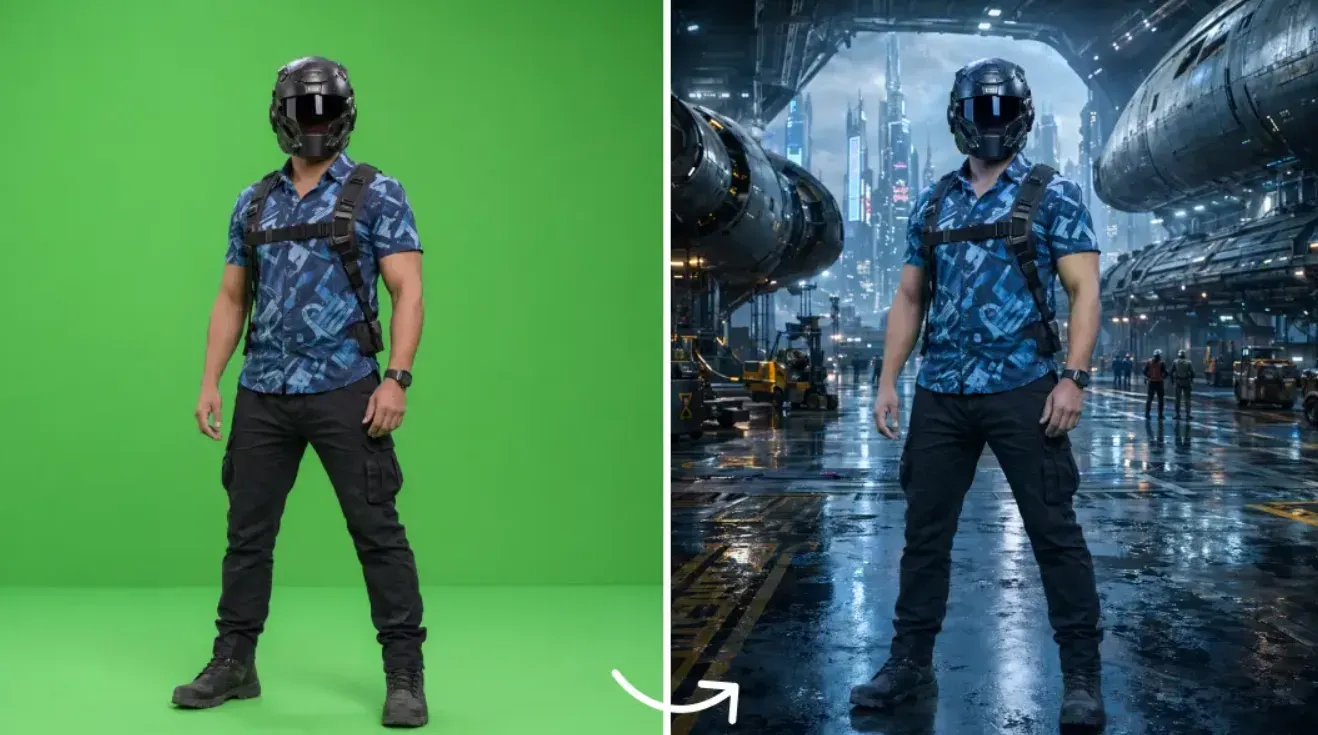
Import your brand assets directly into the control panel. Link up to 50 structural, character, and text references simultaneously to build a protective visual boundary. This setup keeps your logo proportions, specific item packaging shapes, and key faces fully uniform across the entire multi-scene timeline.
Step 3.Trigger the Extended Generation:
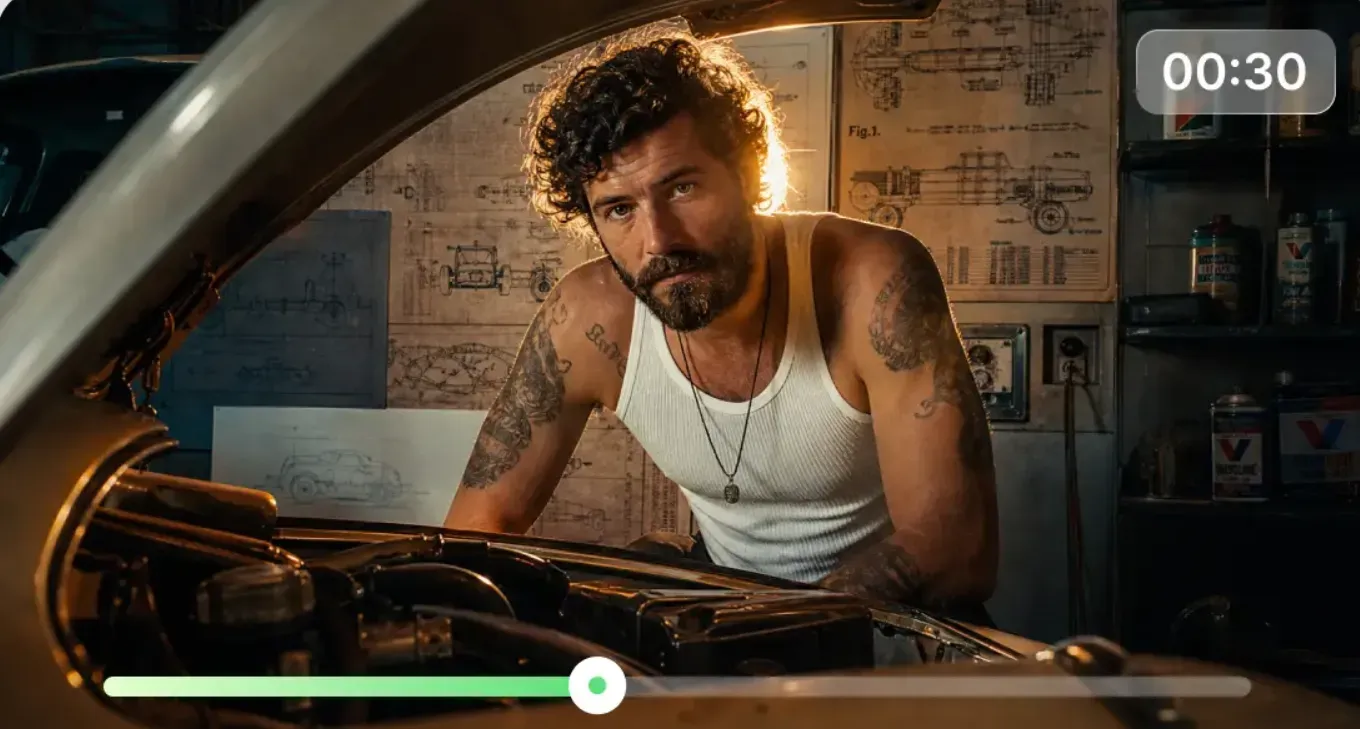
Set your rendering parameters to compute the full 30 seconds concurrently. Instead of relying on manual clip extensions that cause visual drift, use the native engine to output a steady, unbroken stream of movement. Run the initial processing cycle to build the foundational spatial framework for the advertisement.
Step 4.Execute Targeted Refinement:
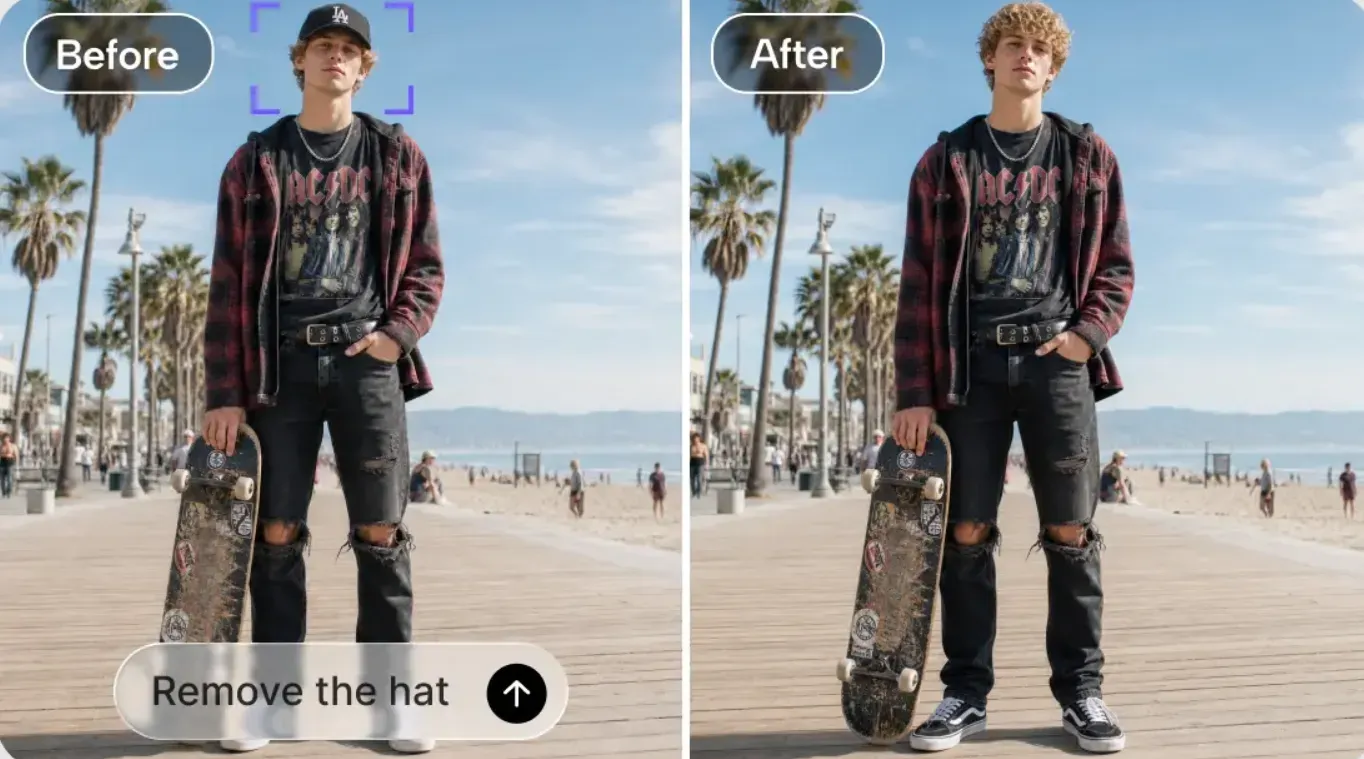
Review your primary rendering timeline. If small details require corrections—such as fixing a moving hand or replacing an unwanted object—activate the Precise Local Region Editing tool. This allows you to perform localized adjustments on a specific frame region, modifying the exact element while preserving the surrounding lighting, motion, and timeline continuity.
Post-Processing and Quality Verification
When you finish your main video setup, run the 4K upscaler in Seedance 2.5 AI Video to make it sharp. This step clears up blurry pixels and sharpens text, so the clip is ready for streaming apps, TV ads, and big company presentations.
This approach saves production teams hours of editing time. It shifts the creative focus away from fixing individual clips manually and moves it toward a smooth, automated workflow for fast content creation.
Advanced Techniques for High Quality Video Continuation and Sound Design
A massive headache with long-form AI video production is the visual drift that happens when trying to stretch a great clip. You extend a 30-second asset, but by second 45, the background geometry warps and the color palette shifts entirely out of spec.
Seamless Video Continuation Beyond 30 Seconds
Seedance 2.5 directly addresses this limitation with a dedicated architecture designed for high-quality video continuation. Instead of facing progressive degradation, creators can now expand a baseline 30-second spot into a coherent 180-second sequence via the platform's beta long-video mode. Because the system tracks the underlying physics, motion paths, and character identities of the original file, it ensures absolute visual style preservation across the extended timeline, enabling producers to churn out whole stories without apparent quality loss.
| Project Metric | Standard Pass | Extended Workflow |
| Native Generation | 30 Seconds | Up to 180 Seconds |
| Production Speed | 1x Processing | Up to 3x Timeline Continuity |
End-to-End Sound Design & Audio Synchronization
Beyond visual extension, the update redefines how creators approach audio. A major upgrade in Seedance 2.5 is its improved stability that removes random, unwanted background music and stray subtitles, delivering a perfectly clean video baseline ready for post-production.
Instead of fighting with cluttered AI-generated noise, creators can leverage Dreamina’s unified platform ecosystem for precision audio control:
- Context-Aware Sound Effects: By passing the clean Seedance 2.5 video into Dreamina’s integrated sound effects engine, the platform matches textures like surface impacts or directional cinematic swooshes to physical movements on screen.
- Beat-Synced Background Music: The platform’s script-to-video and music workflows allow ambient tracks to align with the visual hooks and structural transitions generated by the model.
This full-stack integration ensures that the resulting sound design matches the exact millisecond a visual event occurs, removing the need for tedious manual tracking adjustments and providing a true studio-quality commercial pipeline.
Is Seedance 2.5 Right for Your Workflow?
Availability update — the preview wait is over. Seedance 2.5 is now live on Atlas Cloud, so you can generate these single-pass 30-second ads today using the same text-, image-, and reference-to-video endpoints described above.
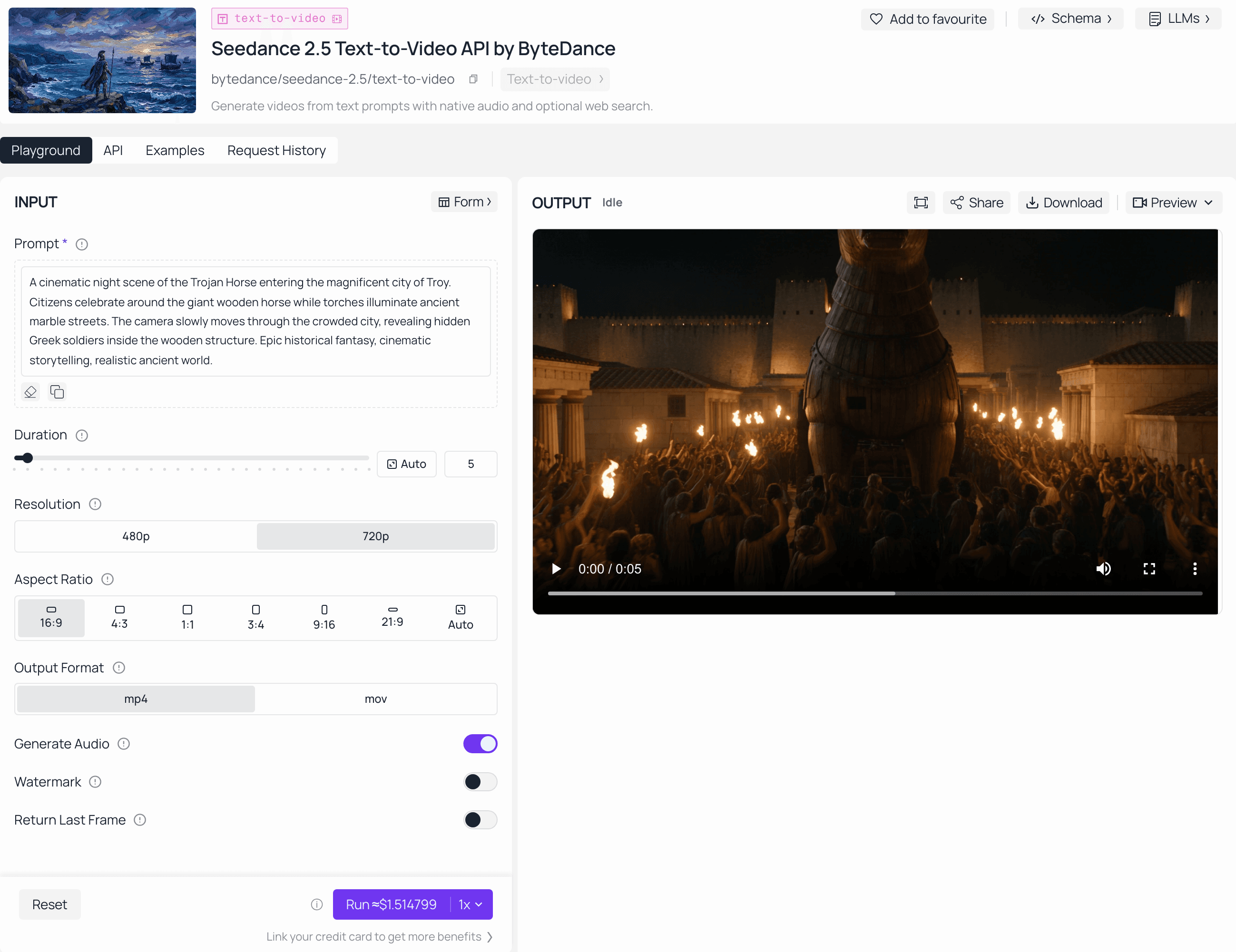
Seedance 2.5 makes a huge jump in fixing shaky, long-form AI videos, but it is not perfect for everyone. Depending on your team's workflow, budget, and tech skills, here is an honest look at who should buy it now and who should wait.
Who Seedance 2.5 is Best For
- Commercial & E-Commerce Video Teams: If you constantly waste hours trying to keep product boxes, logos, and characters looking identical across different shots, the 50-multimodal asset setup and R2V tool are total lifesavers.
- Social Media Ad Agencies: Teams that want to quickly create high-quality, smooth 30-second promo videos without the messy headache of stitching together short clips in editing software.
Who It Might Not Suit
- Casual Hobbyists: If you prefer rapid, one-sentence text-to-video prompt experimentation without worrying about complex character sheets, product mockups, or precise regional editing, this asset-heavy ecosystem might feel like overkill.
- Creators Who Want Instant All-in-One Videos: Because Seedance 2.5 focuses on rendering a completely clean video draft by removing random AI noise and messy background music, you still need to use separate tools to add your final sound design and music.
Current Availability & Next Steps
Keep in mind that Seedance 2.5 is still marked as "Coming Soon" on the official Dreamina website. This means the general public cannot open the tool and test it out just yet.
While the general public cannot experience these single-pass 30-second generations or the R2V tracking interface just yet, studio teams and enterprise creators should prep their 3D white models, character sheets, and asset libraries now. Once the model goes live on Dreamina, those with structured multimodal pipelines ready to import will instantly hold a massive unfair advantage in automated commercial production.