A striking first ad is easy to approve. The next placement is the harder test: does the product still match, does the headline survive the new crop, and does a moving version keep its details? Three published GPT Image 2.6 examples make those questions concrete. They show a campaign adapted across placements, a product refined through successive edits, and a can animated as a short loop. The images and GIF below are the publishers' original outputs from fictional brand briefs, credited beside each case. They were not generated in an Atlas Cloud session, and they do not represent measured campaign performance.
Key takeaways
- Approve a source creative and a list of fixed product details before requesting another placement.
- Change one thing per edit so a team can identify where a label, shape, or layout drifted.
- Play every GIF through and inspect the background props as well as the product.
- Treat generated ads as production candidates; check copy, claims, rights, crop, and final upload behavior before publishing.
Case 1: One electric-bike idea across two placements
JZ Creates published a fictional VOLTA electric-bike campaign made with GPT Image 2.6 Sunburst. Its brief fixed the bike's sage-green step-through frame, tan saddle and grips, front light, rider's camel coat, headline, and price line. The team first made a landscape hero ad, then used that result as the basis for an outdoor billboard and a vertical Story concept. This is a useful way to lay out a campaign case: show the starting creative, show the adapted placement, then name the details that must remain identical.
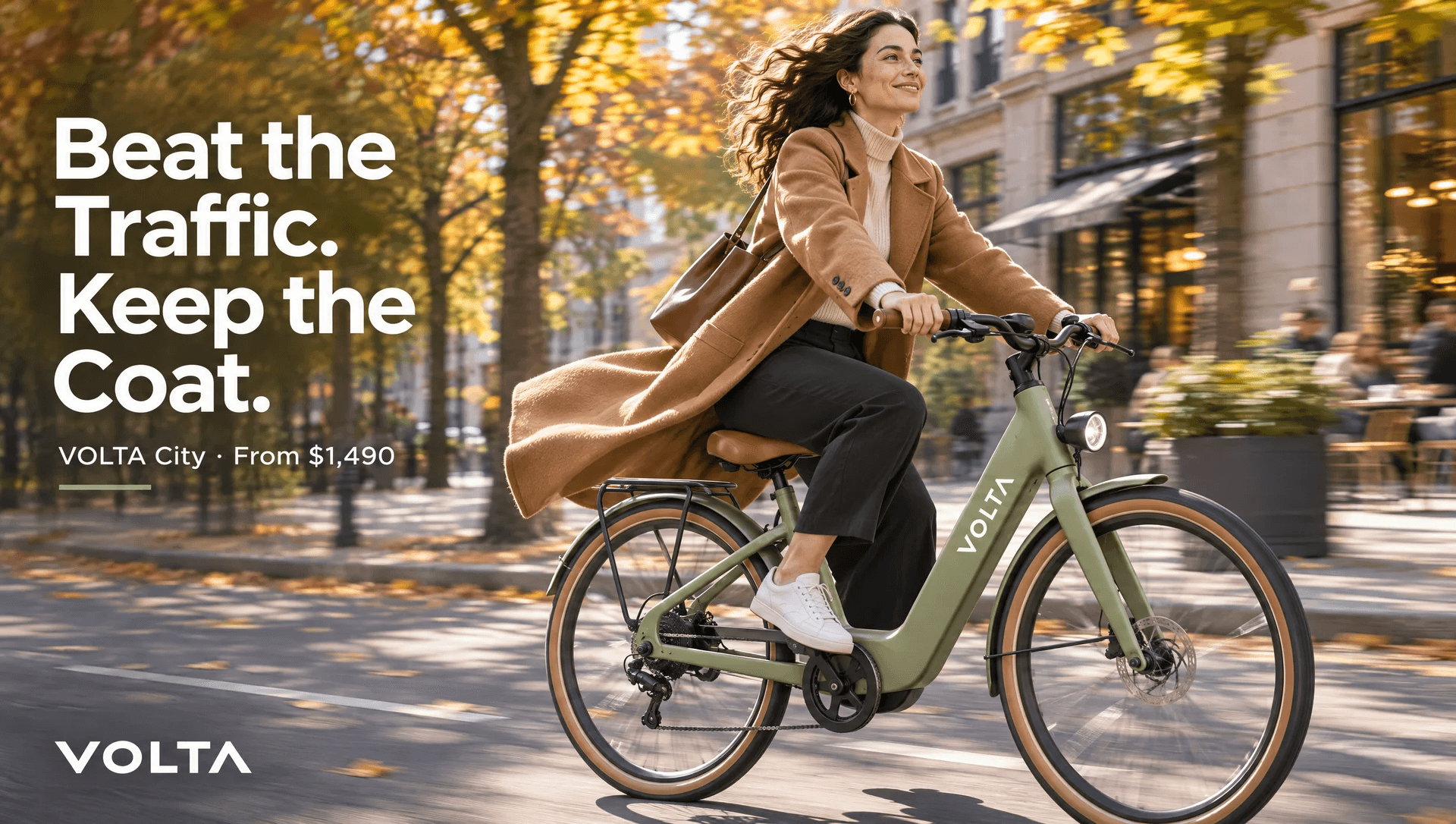
Case 1, first output. The bike, rider, headline, and offer establish the source of truth. Image: JZ Creates, fictional VOLTA campaign, November 2026.
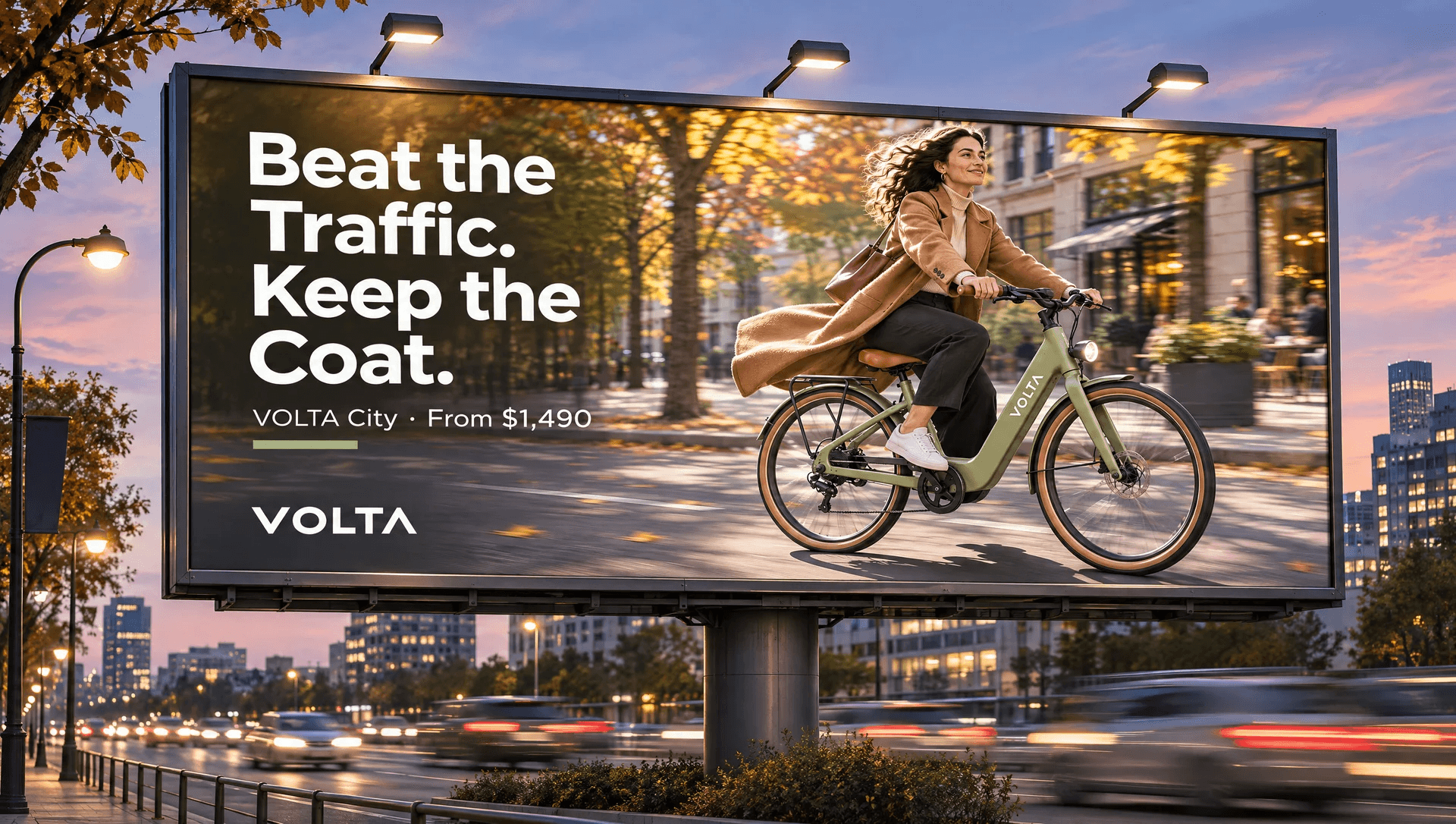
Case 1, second output. The billboard changes the viewing context while retaining the same creative elements. Image: JZ Creates, fictional VOLTA campaign, November 2026.
Compare the frame opening, paint, saddle, rider, and exact wording before deciding the two files belong to one campaign. The billboard largely keeps the original ad intact within a new street scene. That makes the continuity easy to see, but it also means this example proves placement adaptation more clearly than it proves a difficult redesign. JZ Creates also published a Story concept; its headline sits close to a simulated profile row, so a real Story would still need a safe-area check in the destination platform. The public mockup is a concept image, not a capture of a live social app.
What to borrow: start with an approved master, identify the features that cannot move, and ask for each new placement separately. For a real brand, verify the price and call to action independently of the pixels in the image.
Case 2: A product edit that changes only the scene
CreateVision AI published a fictional NOMA serum sequence generated with GPT Image 2.6. The starting bottle has an ivory body, cobalt cap, brass collar, and the words “NOMA,” “DAILY SERUM,” and “30 ml.” The publisher then used GPT Image 2.6 Sunburst to change the background to sage, add folded linen, and add a blossom, one request at a time. The side-by-side comparison below pairs the original reference with the third edited result.
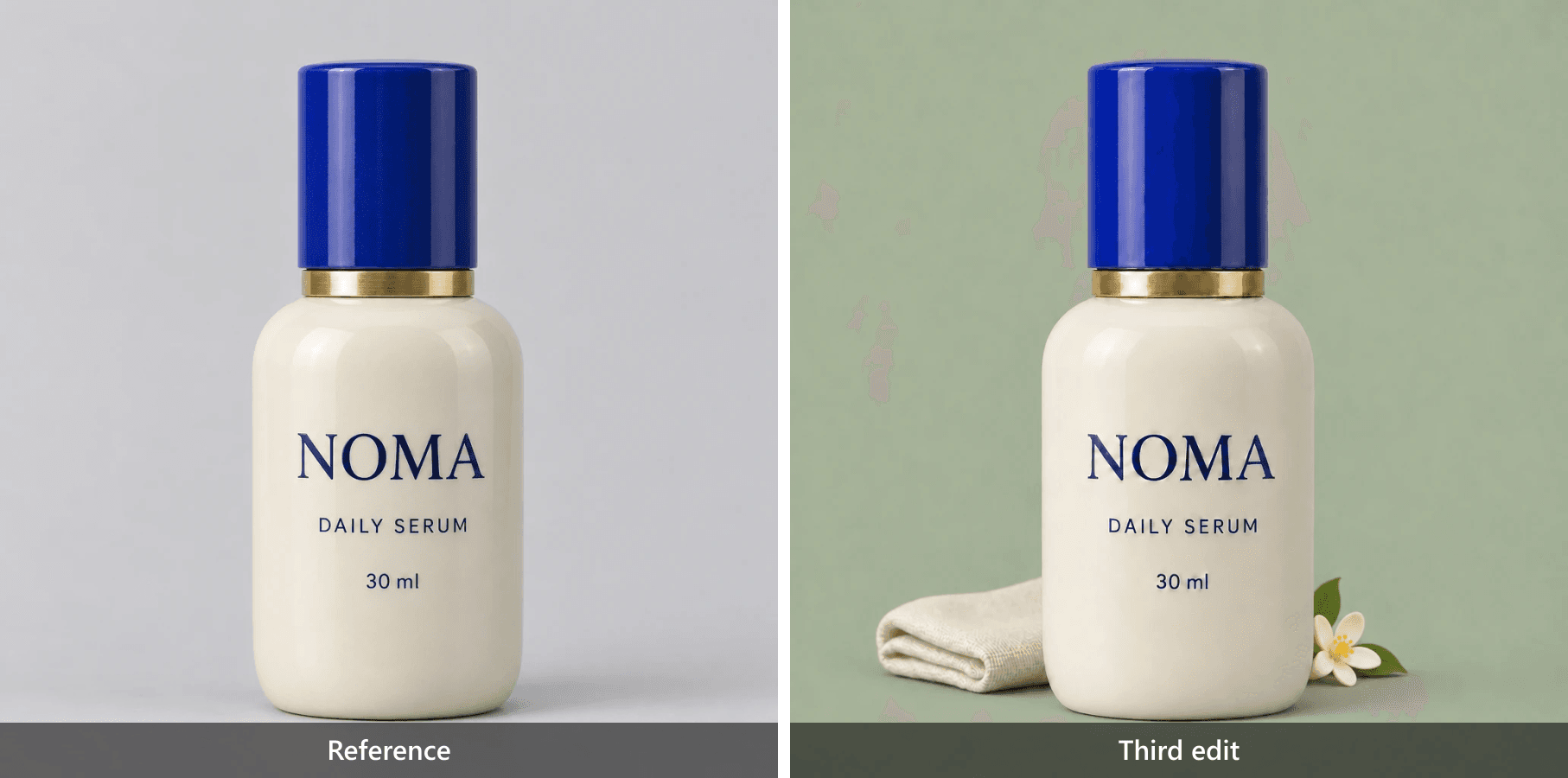
Case 2, reference and third edit. The background and props change; the label, cap, collar, and bottle outline remain recognizable at this viewing size. Source images: CreateVision AI, November 2026. Comparison assembled for this article.
The example is useful for a social campaign because changing a seasonal setting or prop is common, while the packaging must remain recognizable. The visible result supports a narrow conclusion: those named bottle details appear consistent in these displayed files. It does not establish pixel-level identity, and the fictional label is not a substitute for proofing regulated or commercial packaging. The publisher reports three sequential edits and inspected each output. That review step is part of the workflow, not an optional polish pass.
What to borrow: give GPT Image 2.6 the last approved image as an edit reference, repeat the packaging details in the instruction, and request one change. Save each approved stage so a later edit can return to it if the product drifts.
Case 3: A product GIF that needs a frame-by-frame check
For a fictional sparkling-water brand, JZ Creates asked GPT Image 2.6 Sunburst for a rotating FIZZWELL can with blood oranges, ice, condensation, and bubbles. Its published GIF is 768 × 432 pixels. The file embedded here has 12 frames at 120 milliseconds each, making one pass about 1.44 seconds. The can turns far enough to show a generated back label and then returns to its opening view. It is a real animated file, rather than a still image presented as motion.
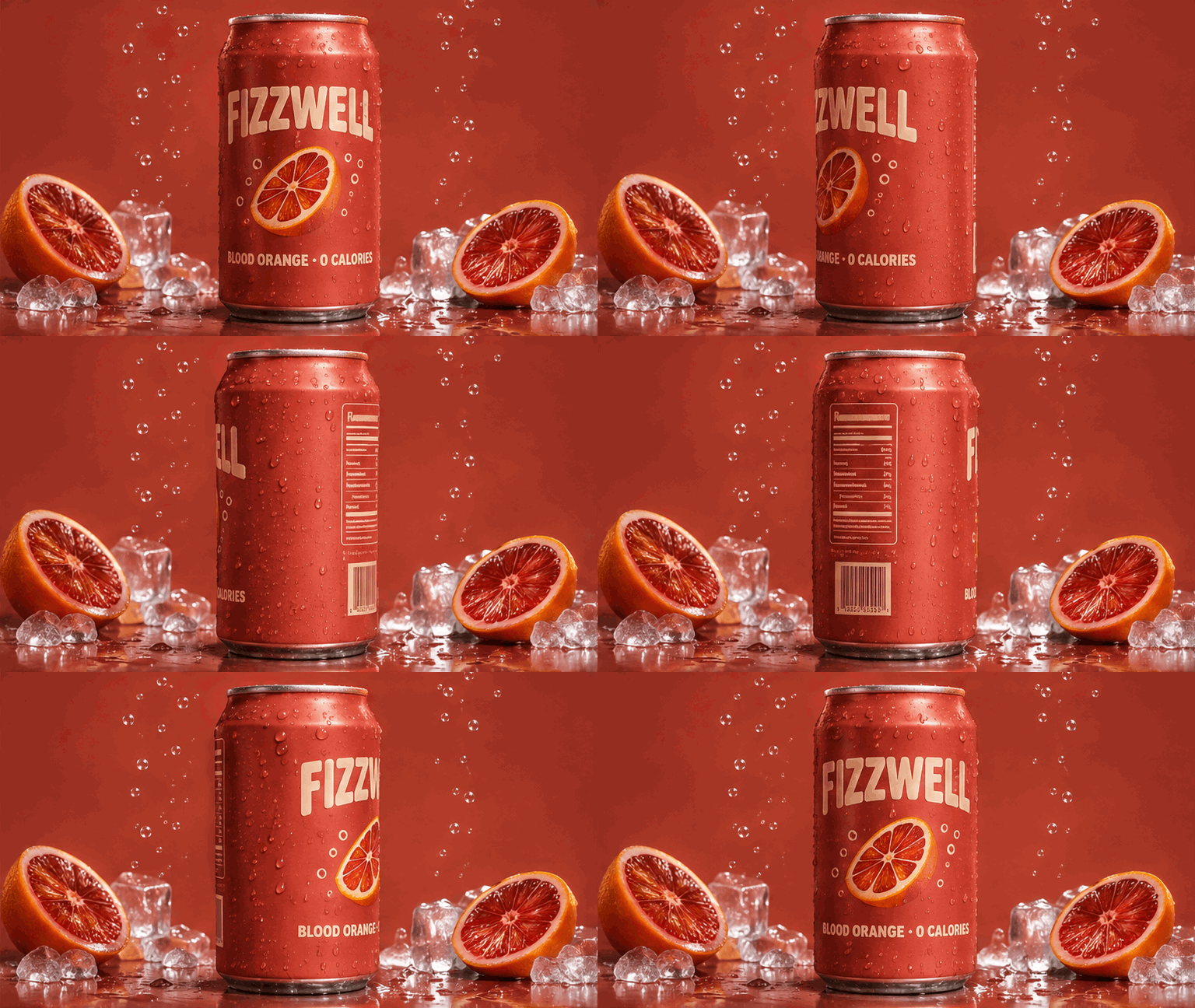
Case 3, original animated GIF. Watch the can label during the turn and the ice and oranges at the sides; the publisher notes slight prop movement between frames. GIF: JZ Creates, fictional FIZZWELL campaign, November 2026.
The movement makes the product visible from more than one side, so it adds information beyond a static hero shot. It also exposes the weak points: small props shift, and any invented ingredients or nutrition panel on the back would need to be replaced with approved product information before publication. Inspect the first-to-last transition at normal speed and step through the frames at full size. A short loop that looks smooth in a feed can still fail a packaging review.
What to borrow: specify what moves and what stays fixed, keep copy outside the GIF when frame-to-frame lettering matters, and approve the exported file rather than the prompt. If a social destination converts the GIF to video, inspect that converted upload too.
Turn these examples into your own GPT Image 2.6 campaign
Start with one product photograph or approved creative that you have the right to use. Record the visible features a reviewer will check: shape, color, packaging text, logo placement, and any legal claims. Then choose the placement before writing the edit instruction. The three cases above suggest a practical sequence:
| Stage | Input | Ask GPT Image 2.6 to change | Human approval test |
|---|---|---|---|
| Master creative | Licensed product photo and brand brief | Composition, background, and one message | Product facts and copy match the brief |
| Second placement | Approved master plus original product reference | Layout and safe space for the destination | Headline, product, and call to action survive the actual crop |
| Product variation | Last approved still | One background, prop, or colorway detail | Packaging and unrelated objects remain correct |
| GIF | Approved still or product reference | Meaningful movement with a clear return to the opening pose | Every frame, loop join, file size, and upload preview pass review |
Your turn: make one Feed image move
The published examples leave one useful test for your own campaign: can a still become motion without changing the product or the setting? This test uses a fictional folding reading lamp so the GIF can show a function, not just make a product spin. The lamp has a matte terracotta oval base, two satin-brass hinges, a pleated warm-ivory shade, and one small round brass switch. The still shows it folded and unlit. The GIF opens the shade and lights the book, then folds the lamp again. Put the social headline in the post caption or a separate design layer, not inside the GIF.
Step 1: Create the Feed still. Use GPT Image 2.6 Sunburst Text-to-Image on Atlas Cloud. The requested settings were one 1024 × 1280 PNG at high quality and medium complexity. Keep the complete lamp in the frame and leave clear space in the upper left for later copy. Approve the base, both hinges, shade, switch, book, and camera angle before continuing.
plaintext1Create a photorealistic 4:5 social Feed product photograph for a fictional 2folding reading lamp. The lamp is fully folded and unlit: a compact matte 3terracotta oval base, exactly two slim satin-brass hinges tucked close to the 4base, a collapsed pleated warm-ivory paper shade, and one small round brass 5switch on the front of the base. 6 7Place it on the right half of a dark walnut side table beside one closed, 8unmarked navy hardcover book. Behind it is a muted midnight-blue plaster wall. 9Soft late-afternoon light enters from the left and gives the brass a restrained 10highlight; the lamp casts a believable contact shadow. 11 12Shoot from a fixed front three-quarter view at table height, with the entire 13product visible and generous clean negative space in the upper left for a 14headline that will be added later. Tactile materials, natural perspective, 15restrained editorial product photography. No readable text, logos, hands, 16people, extra products, interface, watermark, or invented controls.
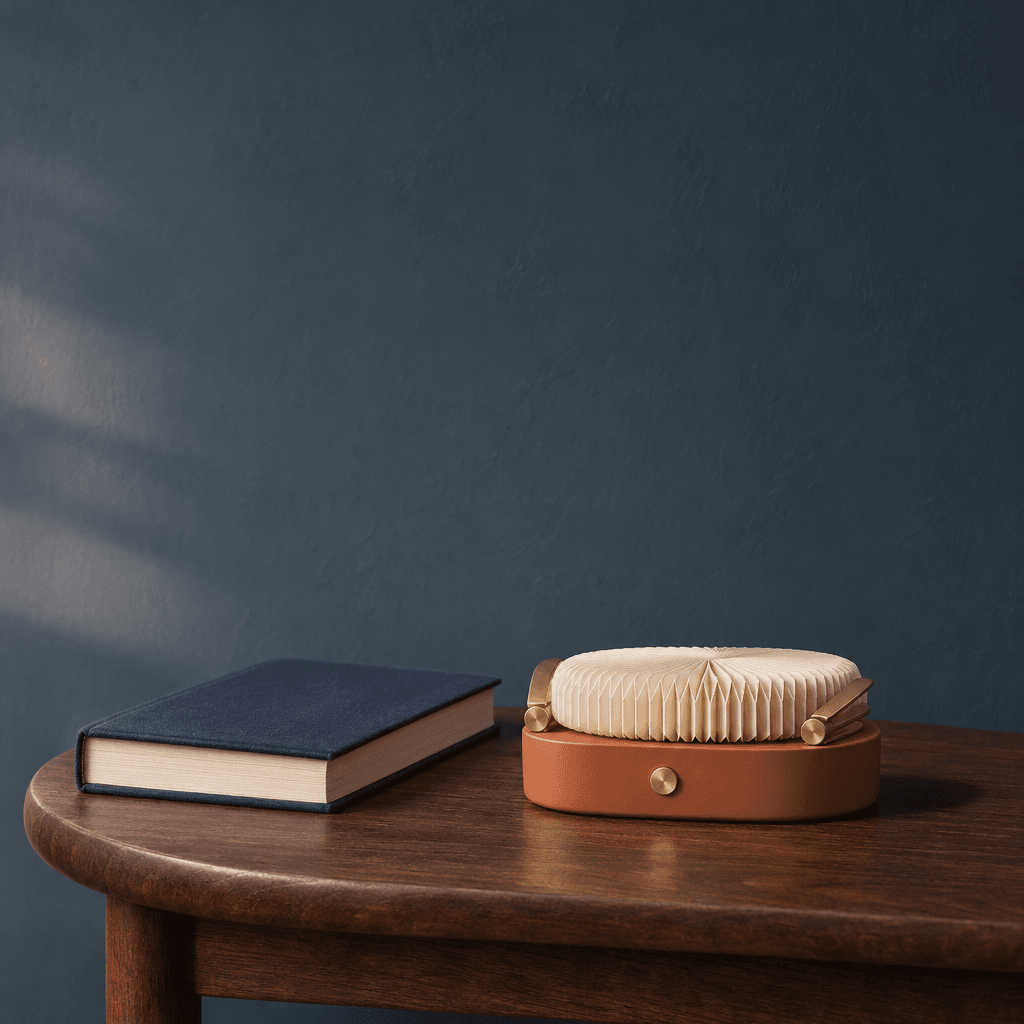
Self-generated case, still. The exported PNG is 1024 × 1024 pixels, so this square file needs a separate crop and safe-area check for a 4:5 Feed placement. The upper-left area is clear for copy added later.
Step 2: Animate that still. Upload the PNG to GPT Image 2.6 Sunburst Edit on Atlas Cloud as the reference. The requested settings were one GIF, 16 frames, 200 milliseconds per frame, high quality, high complexity, and a 512 × 640 frame size. Those settings ask for a 3.2-second loop; the downloaded file is different, so inspect the export itself before publishing. Do not submit the GIF as a finished ad until the lamp geometry and loop join pass a frame-by-frame review.
plaintext1Use the uploaded Feed image as the exact product, scene, and opening-frame 2reference. Create a seamless 3.2-second animated GIF for the same fictional 3folding reading lamp. Begin with the lamp fully folded and unlit in precisely 4the reference pose. 5 6In one smooth motion, its two satin-brass hinges unfold and the pleated 7warm-ivory shade opens; the small round switch glows softly and a warm pool of 8light reaches the closed navy book. As the lamp opens, the viewpoint makes a 9gentle, clearly visible arc from the original front three-quarter view to a 10slightly elevated side view that reveals both hinges, then returns. 11 12The lamp folds back, the glow fades, and the last frame matches the first frame 13in product shape, camera position, shadow, and lighting for a clean loop. Keep 14the matte terracotta base, brass hinges, paper shade, switch, walnut table, 15book, and midnight-blue wall identical throughout. Keep the book and background 16stationary. Continuous, readable product action and viewpoint change; no slow 17zoom-only motion, shape morphing, flicker, new objects, text, logos, hands, 18people, interface, or watermark.
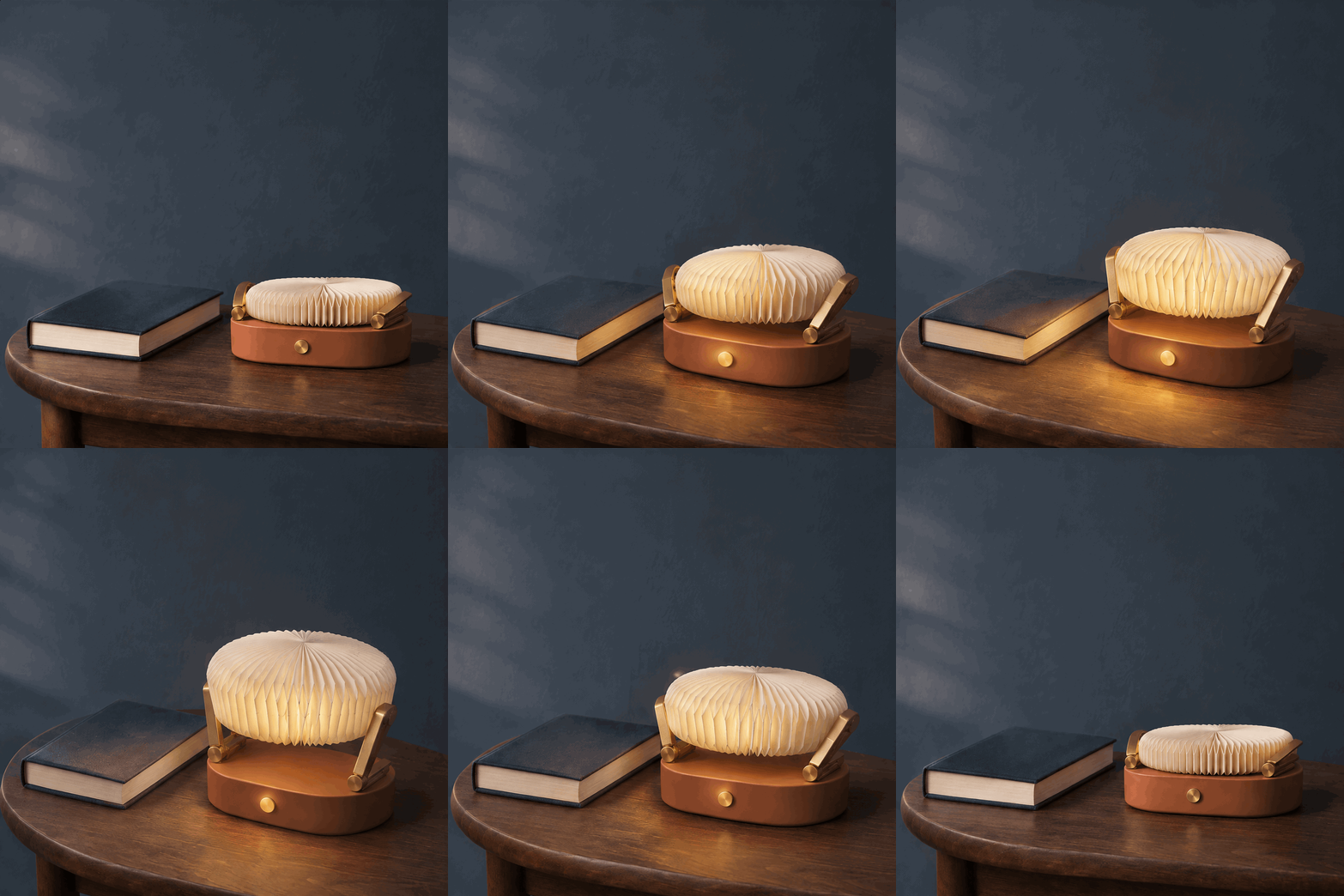
Self-generated case, animated output. The exported GIF is 912 × 912 pixels with nine frames at 200 milliseconds each, for a 1.8-second loop. The lamp opens and lights the book, then closes. Its viewpoint stays largely fixed rather than making the requested camera arc.
What the files show: motion makes the lamp's unfolding function clearer than the still alone. The book, table, wall, and product colors remain recognizable. The requested camera arc did not appear, and the output is shorter and squarer than requested. The first and last frames both show the lamp folded, though the join should still be checked at normal playback speed before release. For a placement that needs a 4:5 frame or a changing viewpoint, revise the request and inspect the next export.
Atlas Cloud edit view. The real screenshot below shows the GPT Image 2.6 Sunburst Edit page with the animation prompt, uploaded still, and a generated lamp image. It does not show the export settings, so the dimensions and timing above come from the downloaded files. Check the current controls and Atlas Cloud model catalog before running; dimensions, quality, frame count, and retries affect cost.
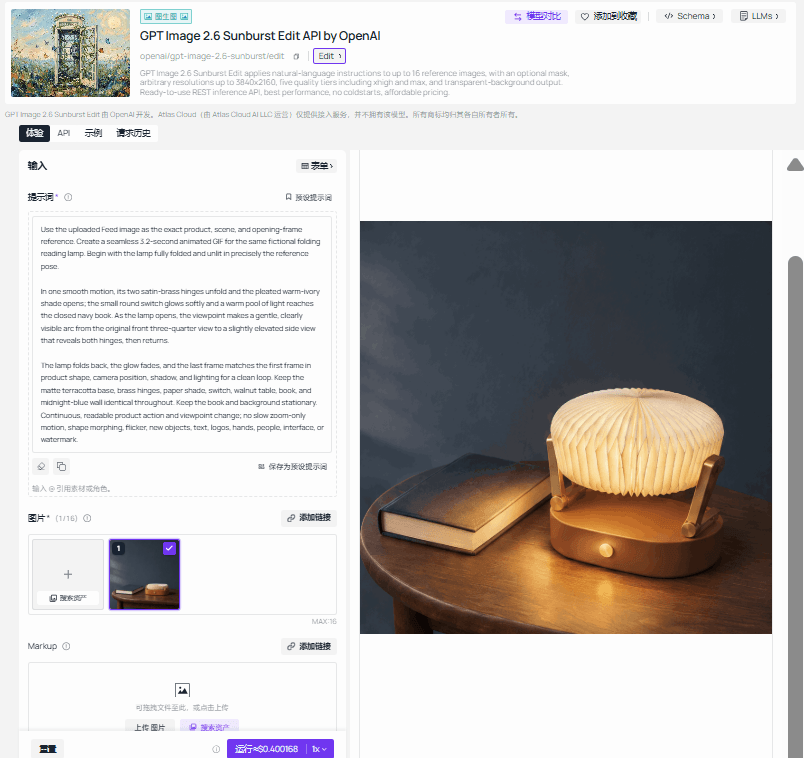 Self-generated case, Atlas Cloud edit-page screenshot. Shown after the still and animated output so the input and result can be compared first.
| Before release | Reject or fix when... |
|---|---|
| Product identity | A cap, outline, material, label, or logo differs from the approved source |
| Words and claims | The image invents a price, ingredient, specification, or offer |
| Placement | A real crop or interface overlay covers the product, headline, or action |
| Motion | The subject morphs, props jump, the loop snaps, or the upload loses animation |
| Rights and record | The product photo, people, logos, or approved copy lack clearance; prompts and outputs are not saved |
The three published cases show why approval cannot stop at the first attractive image. VOLTA makes cross-placement consistency visible. NOMA shows how a controlled edit can change a setting while keeping a product recognizable. FIZZWELL shows that motion can add a useful second view and a new inspection burden. Use GPT Image 2.6 to produce candidates, then approve the actual files in the surfaces where people will see them.
Frequently Asked Questions
Can GPT Image 2.6 keep one product consistent across a campaign?
It can preserve recognizable details in reference-led edits, as the NOMA sequence illustrates. Compare every output against the approved product file. A successful example does not guarantee the same result for a different package, angle, or prompt.
Should a social ad headline be inside the generated image?
That can work for a fixed, proofread creative. Add copy in a design layer or platform caption when you expect frequent localization, offer changes, or animation. Either way, proofread the final placement at phone size.
Is a generated GIF ready to post if it loops?
No. Inspect each frame for shape and label changes, play the join between the last and first frames, and check how the destination handles the GIF. The FIZZWELL example shows why the surrounding props need attention as well as the can.
Where did the examples come from?
The VOLTA and FIZZWELL files were published by JZ Creates in “GPT Image 2.6 Examples: 10 Ads With Prompts Included.” The NOMA reference and edited result were published by CreateVision AI in “GPT Image 2.6: Real Tests, Edits & GIFs.” Both articles appeared in November 2026 and describe fictional brands. The files here are credited editorial examples; they are not Atlas Cloud test results or evidence of live advertising outcomes.


