


A MiniMax H3 Image trading card collection needs a design that survives a change of subject. A convincing first card is a starting point. The next cards still need matching borders, readable names, and a back that belongs to the same collection.
Three examples make those decisions easier to see: an official MiniMax H3 Image rabbit tarot illustration compared with a new MiniMax H3 Image result, AI-generated fantasy cards from the trAIding-cards project, and an AI-created robot card collection. They show a complete card face, a repeatable series, and a theme developed into multiple characters.
The first case pairs an official MiniMax H3 Image sample with a new MiniMax H3 Image result generated on Atlas Cloud and a screenshot of its completed output. The fantasy and robot projects are public references made with other models. This documents one new MiniMax H3 Image card, rather than a completed MiniMax H3 Image collection test.
Key takeaways
- Compare an official MiniMax H3 Image card sample with a new MiniMax H3 Image result before expanding the design into a deck.
- A published AI-generated fantasy set shows how varied subjects can share a fixed card layout.
- Assign subject and style references different roles, then check every card together.
- Keep labels, numbering, and print preparation under direct layout control when precision matters.
Case 1: Recreate the Rabbit Moon Card with MiniMax H3 Image
The official MiniMax H3 Image showcase includes a rabbit-themed tarot card. We used an adapted English prompt describing the rabbit, crescent moon, mortar, and illuminated-manuscript treatment to create a new MiniMax H3 Image card on Atlas Cloud. The comparison below places the official example on the left and the new result on the right.
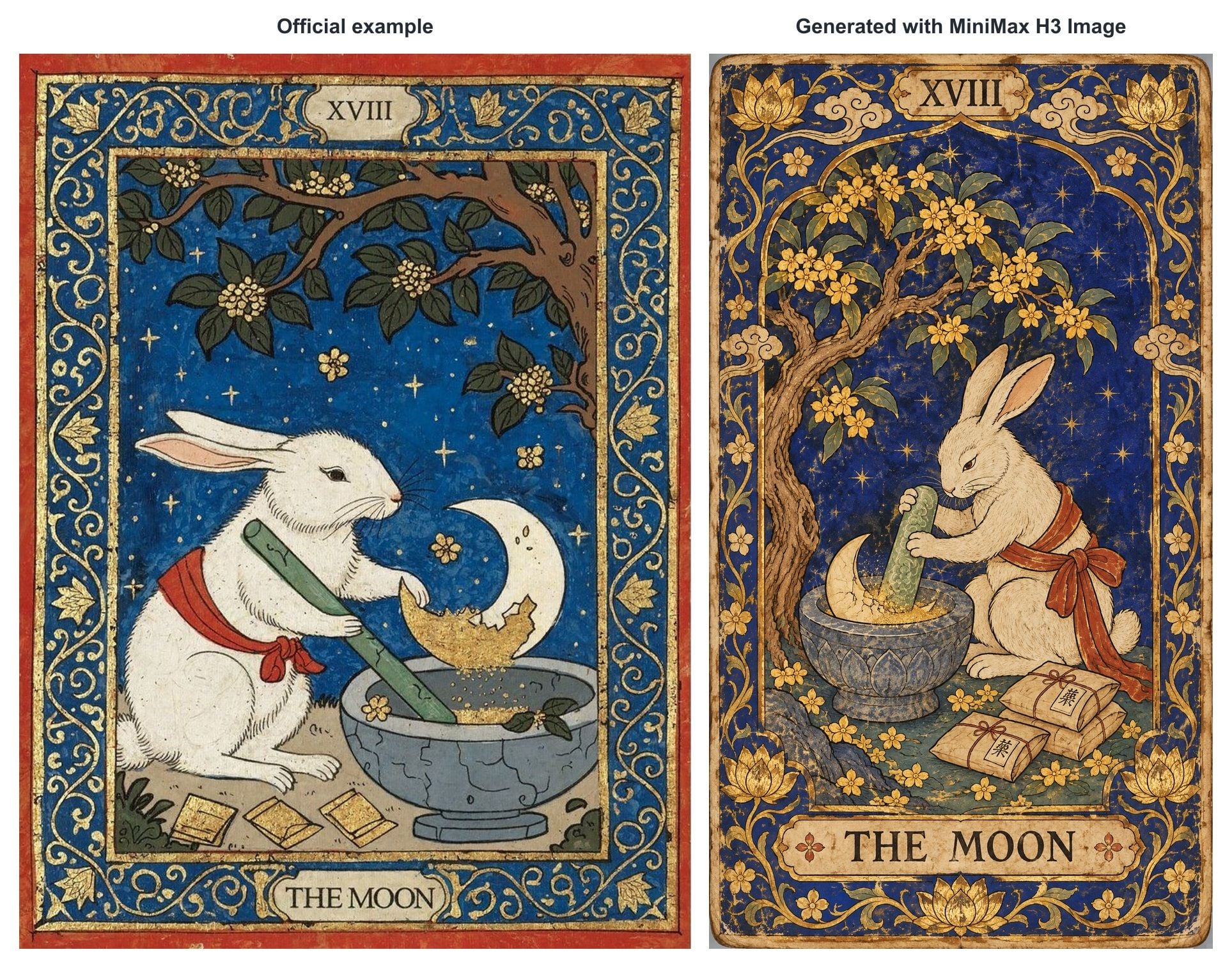
Left: official MiniMax H3 Image example. Right: generated with MiniMax H3 Image on Atlas Cloud. Both complete card faces retain their original proportions; only resizing, spacing, and the comparison labels were added.
The new card retains the blue-and-gold palette, rabbit, stone mortar, XVIII numeral, and THE MOON title. Its rabbit pose, crescent placement, botanical decoration, and taller proportions differ. This is a new interpretation of the brief, rather than a pixel-for-pixel copy of the official artwork.
Generate the Card on Atlas Cloud
The Atlas Cloud screenshot shows the adapted prompt on the left and the completed card on the right. The visible configuration is medium quality, high complexity, and 1152 × 2048 pixels, a 9:16 portrait canvas. The downloaded result has those same dimensions.
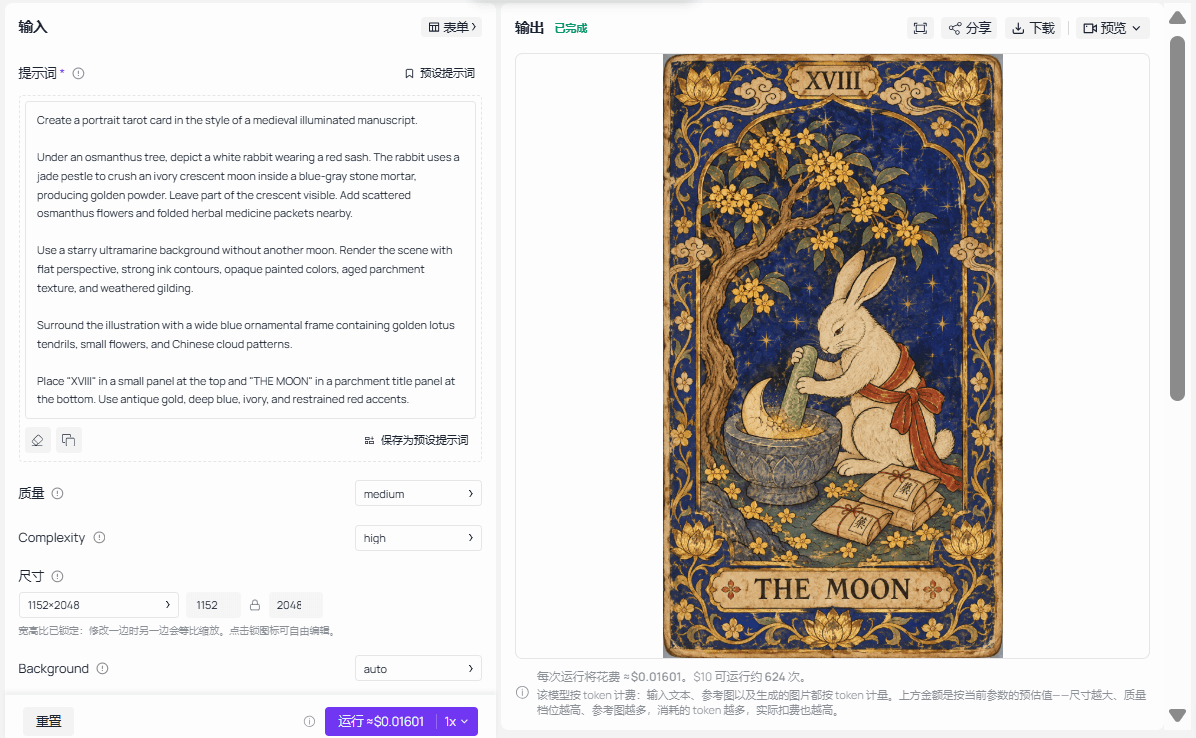
Atlas Cloud generation screenshot supplied with the downloaded MiniMax H3 Image result. The prompt and completed output are shown together; the screenshot is reproduced unchanged.
MiniMax publishes a prompt for its Jade Rabbit example. The run shown here uses the adapted wording visible in the Atlas Cloud screenshot. Keep the submitted prompt with the downloaded result so later variations have an identifiable starting point.
What This Example Helps You Judge
Look at the division of space. The rabbit and moon occupy the illustration window. The numeral has a separate top position, and the title sits in a bottom cartouche. Those are useful design roles to decide before asking for another card.
A collection brief should identify which regions can change. The central illustration can hold a different subject, while the border width and label locations stay fixed. Without that distinction, a request for a new character can turn into a new layout.
The sample is a tarot illustration, an adjacent card-design format. It does not establish trading-game rules, a common card back, or consistency across numbered fronts. Nor does one readable title prove that the model will correctly render a longer name on the next attempt. Use the sample to choose what to inspect; check your own outputs independently.
What MiniMax H3 Image Contributes
The MiniMax H3 Image model card describes unified text-to-image and image editing, support for up to 16 reference images, and native output around 16 megapixels. Those are relevant tools for making artwork and attempting reference-led variations. They do not guarantee a fixed frame or exact labels across a set.
For your collection, decide whether the model should produce the complete front or only the illustration. A complete-front attempt is useful for exploring composition. Artwork-only generation gives you more control over a collection whose text and geometry must remain exact.
Case 2: trAIding-cards Builds an AI-Generated Fantasy Collection
The open-source trAIding-cards project uses OpenAI DALL·E and ChatGPT to create fantasy trading cards. Its public gallery supplies actual digital results, including the three cards below. These are published AI-generated card examples, not MiniMax H3 Image outputs or photographs of event attendees.
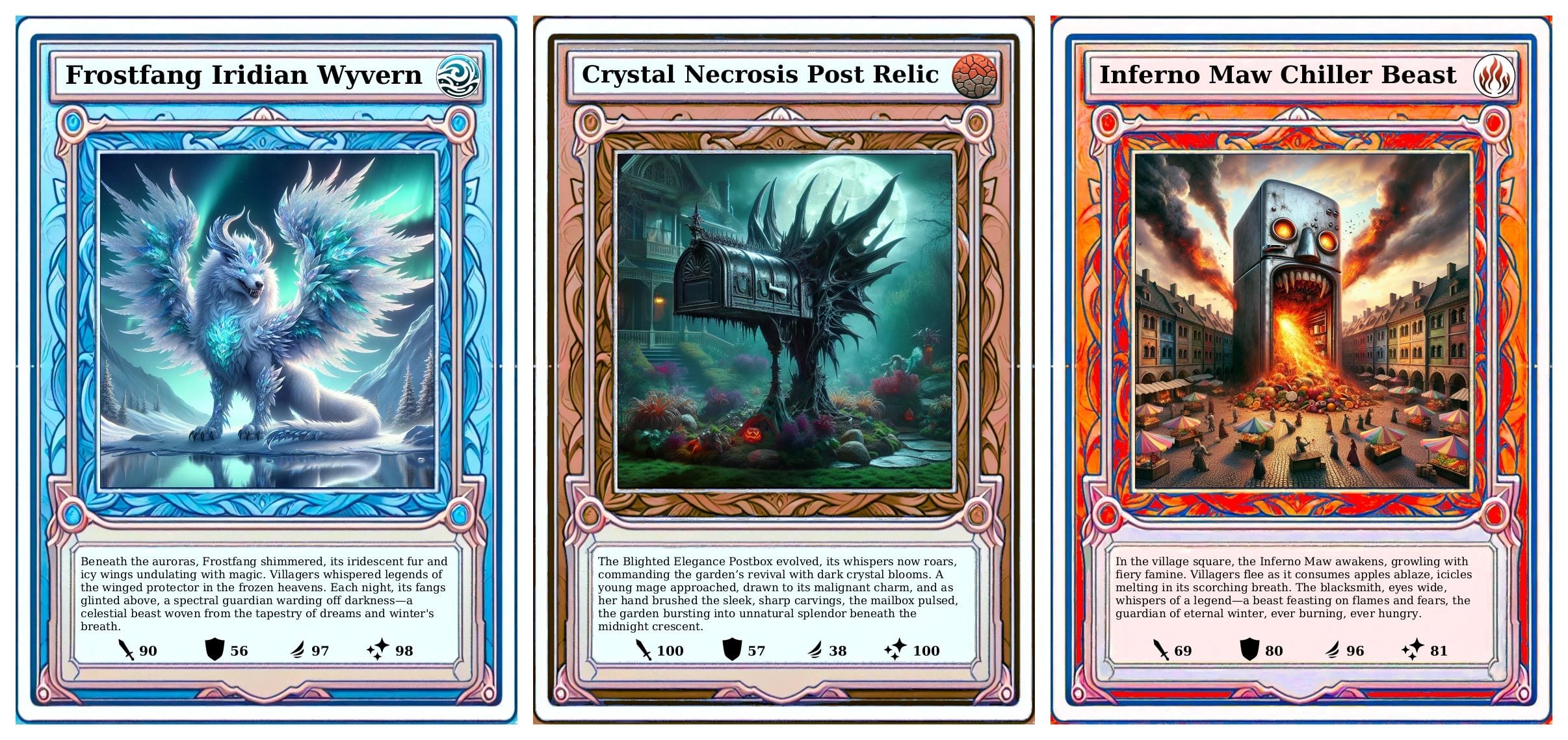
Source: okafke, trAIding-cards. Original card PNGs arranged side by side; artwork, titles, stories, and values unchanged. AI generation supplies the artwork and text; a renderer assembles each front.
Different Subjects, One Recognizable Card System
Compare the feathered creature, spiked mailbox, and fire-breathing refrigerator. Their subjects and palettes differ, while the title band, square illustration window, story panel, and four-stat row recur. Those repeated regions make the series readable as a collection.
For a MiniMax H3 Image adaptation, choose which regions are fixed before changing the subject. Let the illustration vary within its window, then check the title and information areas independently. The useful target is a shared card system that accommodates distinct characters.
Case 3: URBAN BOTS Turns Everyday Photos into AI Character Cards
In Daisuke Sawai's URBAN BOTS project, everyday street photos became robot characters and trading-card prototypes. His April 27, 2025 tutorial identifies OpenAI GPT-4o image generation in ChatGPT and shows the steps from photos through character development to printing. These are not MiniMax H3 Image outputs.
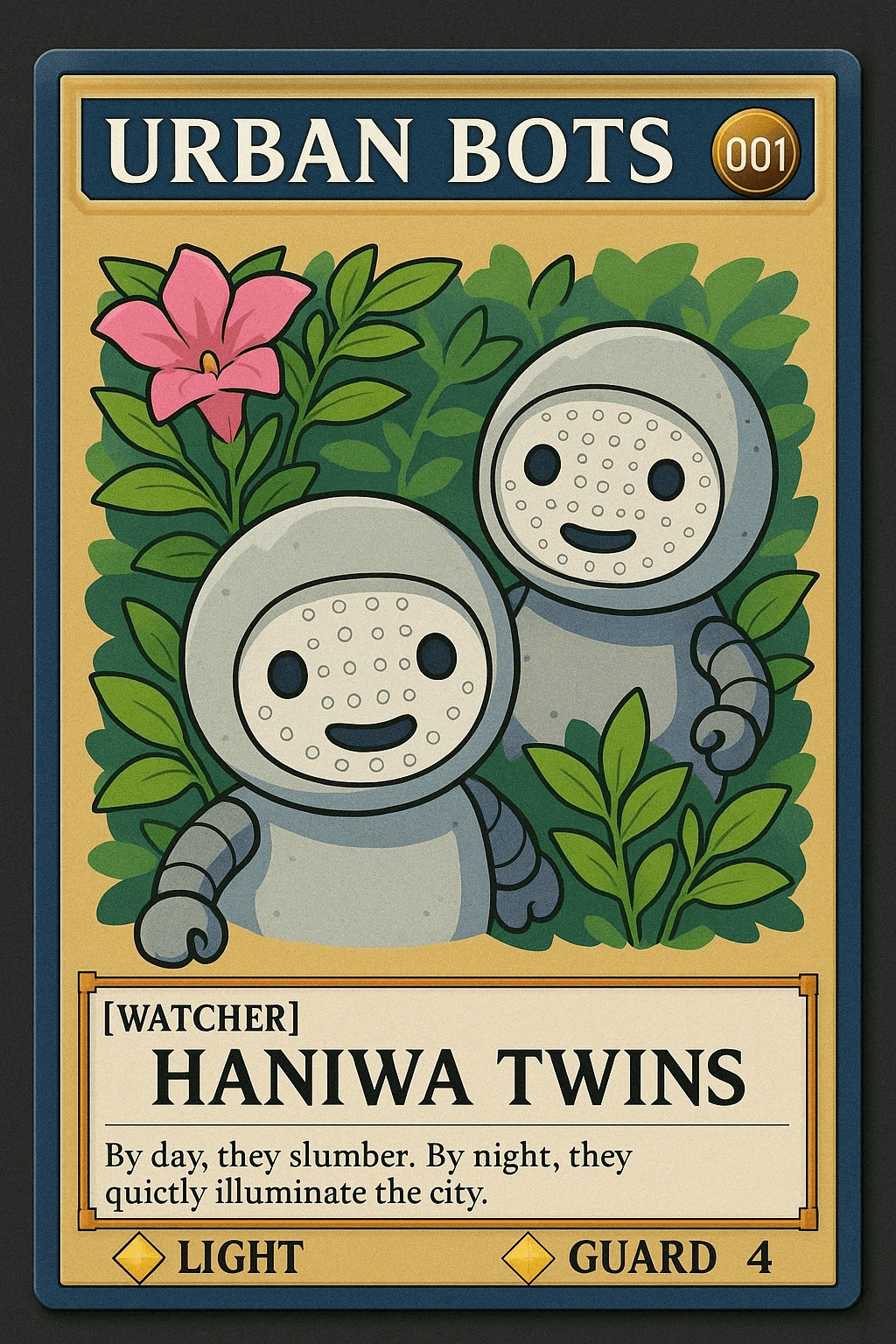
Published AI-generated HANIWA TWINS card. Source: Daisuke Sawai / Dai33. Converted to JPEG; artwork and lettering unchanged.
Build a Theme, Then Check Its Execution
The card makes its identity visible through subject, name, and collection header. The photographed prototypes below also expose changes in frame, lettering, and labels across the collection.
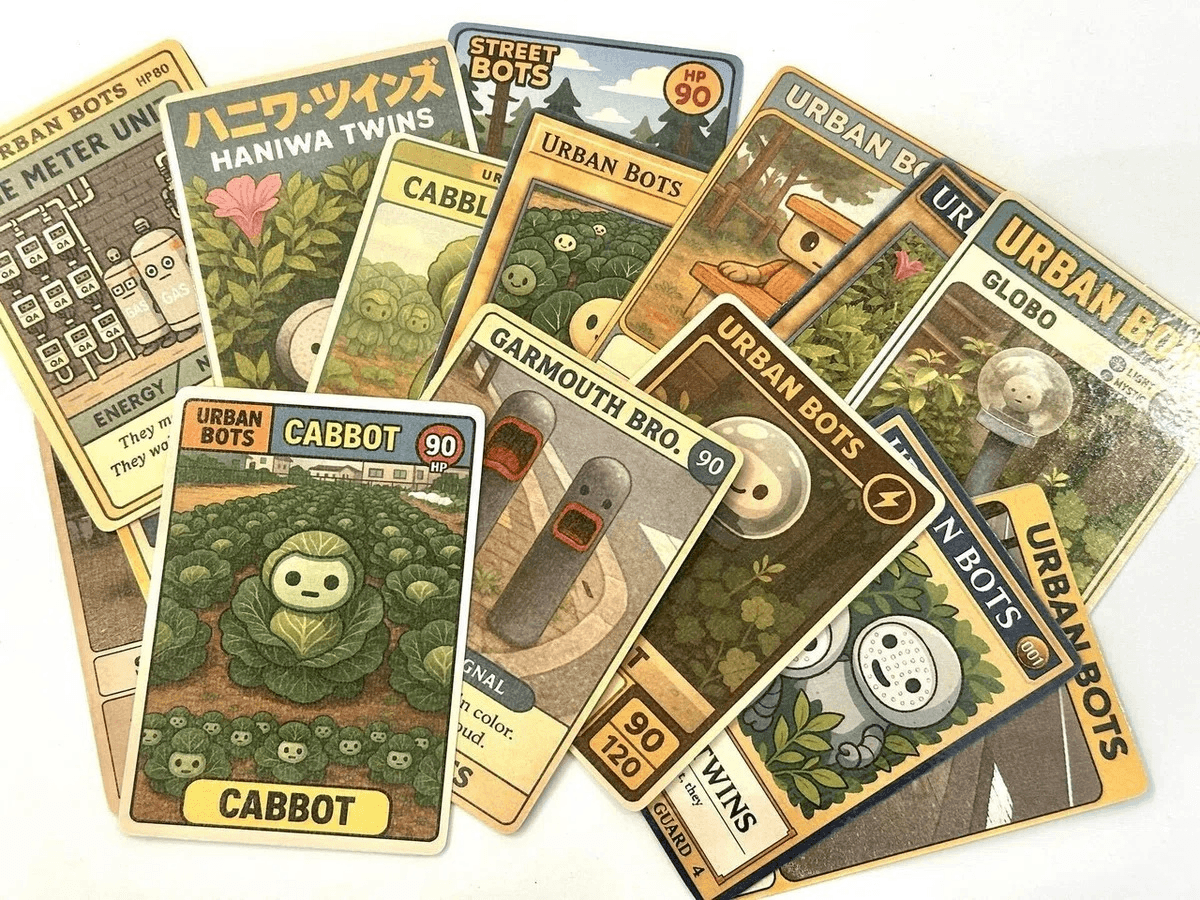
Author's published prototype photo. Source: Daisuke Sawai / Dai33. Converted to JPEG.
Our MiniMax H3 Image adaptation: choose a subject family, preserve recognizable details, and review every front against one layout. A shared story can connect the characters while a fixed template resolves the visible differences in their presentation.
How the Published Cases Explain the Work
The three sources answer different reader questions. MiniMax supplies a visible output with a model identity. trAIding-cards shows multiple AI-generated subjects in a shared card system. URBAN BOTS adds character development. Together they help assess a collection without confusing a visual sample with a production test.
For your own case study, keep this evidence beside each example:
| Reader's question | Evidence to include | What to avoid claiming |
|---|---|---|
| What did the model actually return? | Original downloaded output and model name | A local reconstruction was untouched model output |
| How did the next card stay consistent? | Reference image, submitted instruction, and side-by-side results | One successful card proves a whole set |
| What did the designer finish locally? | Frame, text, or compositing changes | Every pixel came from the image model |
| Did the files become physical cards? | Actual printed samples or proof photographs | A digital preview validates printing |
An exact prompt adds reproducibility only when the source supplies it. Reconstructing one from a finished image can be a useful new brief, but it must be labeled as an adaptation. These published images should not be presented as results of prompts invented for this article.
Adapt the Method to MiniMax H3 Image
Define Your Card Records First
Start with the data that must survive every generation: collection name, card title, number, edition, and matching back. Keep that list outside the model. A label in a prompt records an instruction; it does not validate the letters inside an image.
Choose a theme with visibly different subjects. Differences expose whether the shared treatment actually holds. A short name and a long name also reveal whether the label band works across the collection.
Decide which design properties stay fixed and which belong to each subject:
| Keep fixed across the set | Change for each card |
|---|---|
| Canvas proportions and illustration-window position | Subject and action |
| Border geometry and label alignment | Card name and number |
| Lighting treatment and illustration style | Appropriate scene details |
| Font, type sizes, and text hierarchy | Approved edition information |
| One shared back file | Front-to-back pairing record |
Avoid filling the card with invented statistics unless you are deliberately designing a game and have defined those rules. Empty space is preferable to information that appears meaningful but has no agreed function.
Approve One Master Before Making Variations
Open MiniMax H3 Image Text-to-Image on Atlas Cloud for an original starting image. Use a supported portrait size and record the actual returned dimensions.
If you are exploring a complete front, inspect the outer frame, image window, title, and number separately. Choose the master because all required parts work together. An appealing central picture alone is insufficient if the longest planned title cannot fit its label area.
Keep the original download. Save local corrections as a separate version so you can identify which details were generated and which were finished in a template.
Give References Specific Responsibilities
For a derivative, open MiniMax H3 Image Edit. Use the approved master as the design reference. If you also provide a subject photo, explain that it controls identity or appearance while the master controls treatment and framing.
This is the central instruction to resolve: preserve the design system while replacing the content that belongs to the previous card. Ask for a new subject in its appropriate setting, rather than accidentally preserving the first subject's pose and scenery.
Return to the same approved master for each derivative. If each new card becomes the reference for the next, an accidental frame change can become part of the evolving design. A common reference makes the intended target easier to review, even though each result still needs checking.
Generate one record at a time. Increasing the image count does not, by itself, assign a different name and number to each image. Download and identify each result before moving on.
Keep Exact Layout and Lettering Under Direct Control
The trAIding-cards renderer places generated artwork into a template, then draws the title, story, and stats. Its complete fronts combine AI output with controlled layout; the model does not independently redraw every label and frame.
For a MiniMax H3 Image collection, our recommendation is to use the same separation when exact labels matter. Put usable MiniMax H3 Image artwork into one local layout and populate the title, number, and edition from your card records. The model then supplies the illustration while the template controls repeated geometry.
A correction should match the defect. Wrong animal or identity: revise the artwork. Wrong title: correct the text layer. Uneven border: fix the shared frame. This keeps an accepted illustration from being regenerated merely because a small label needs work.
Describe the finished result accurately, for example, “MiniMax H3 Image artwork with local card layout and lettering.” Preserve both the raw image and the assembled front.
Review the Collection as a Set
Put the fronts side by side at the same display height. Align their canvas edges and compare stable features first: border thickness, header baseline, illustration-window height, and lower labels. Avoid cropping each card differently to improve the overview; that hides the very differences you need to inspect.
Then read every name and number against the manifest. Correctly formed numbers can still repeat. Check the visible sequence independently from the filenames, and include the longest and shortest names in the same review.
Use separate decisions for artwork, lettering, layout, and back pairing:
| Check | Accept when | Repair when |
|---|---|---|
| Subject | Identity and important features are recognizable | Features, pose, or important objects are wrong |
| Text | Every field matches the written record | Letters, numbers, or labels differ |
| Layout | Repeated edges and baselines align | Margins or label positions drift |
| Back | The intended shared file is paired correctly | An old version or wrong orientation appears |
| Provenance | Raw output and local changes are identifiable | The production history is ambiguous |
A near-size preview answers a different question from a large contact sheet: can someone read the card comfortably? Inspect both. Keep failed fields marked until the corrected export has been opened and checked.
Prepare the Files for Sharing or Printing
Save individual fronts, the shared back, a collection preview, and a manifest. Keep reference inputs and raw model downloads separate from the finished exports. This lets you change a label later without losing the original artwork.
For printing, use the selected printer's product template. MakePlayingCards' image FAQ lists 822 × 1122 pixels at 300 DPI as the minimum upload for its 2.5 × 3.5-inch poker cards, and explains bleed and safe areas. That is a product requirement, not a universal upload size for all cards.
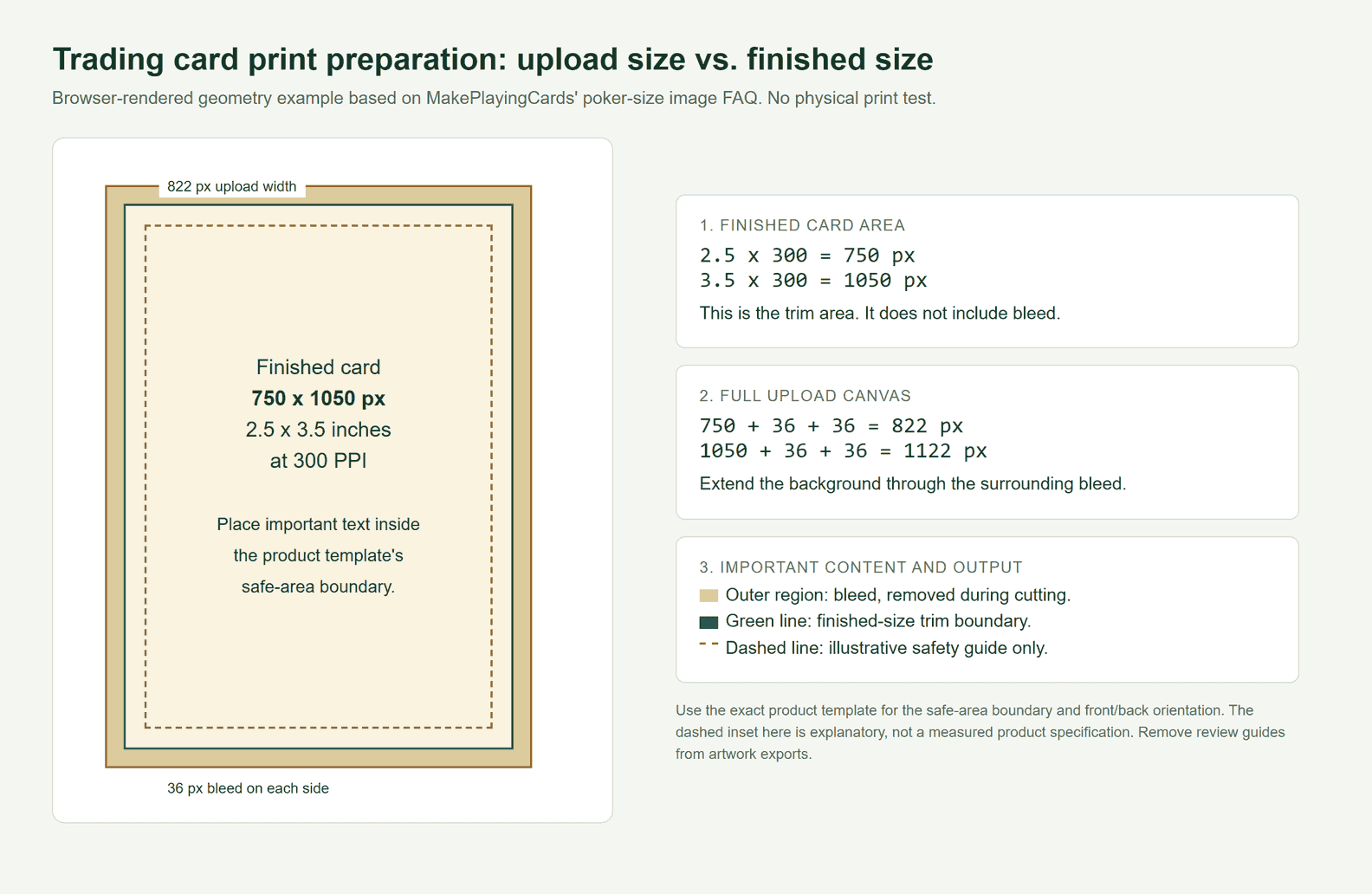
Local HTML/CSS diagram rendered in a real browser. The outer canvas is 822 × 1122 pixels and the trim area is 750 × 1050 pixels. The dashed safety inset is illustrative; follow the chosen product's actual template. This diagram is not a photograph of a printed MiniMax H3 Image card.
Extend the background into the bleed and keep important text inside the template's safe area. Do not simply squeeze a finished front into a larger upload rectangle. Check front/back orientation and export without review guides unless the printer requests them.
Changing a DPI tag does not create image detail. Inspect the source pixels, small text, and exported dimensions. Order a physical proof before distributing a batch; the digital files cannot tell you how cutting alignment and printed color will look.
Frequently Asked Questions
Has a Complete MiniMax H3 Image Trading Card Collection Been Demonstrated Here?
The MiniMax H3 Image evidence here includes MiniMax's official tarot illustration, one new MiniMax H3 Image card generated on Atlas Cloud, and its completed-output screenshot. The trAIding-cards and URBAN BOTS collections used other models. A complete multi-card MiniMax H3 Image set has not been tested in this article.
Can I Copy the Exact Prompt Behind the Official Moon Card?
Yes. MiniMax publishes the prompt with its Jade Rabbit showcase example. The new Atlas Cloud result in this article used an adapted version, which is visible in the generation screenshot.
Should MiniMax H3 Image Generate the Whole Front or Just the Artwork?
Use complete-front generation to explore a design. For repeated borders, exact names, and reliable numbering, put the generated artwork inside a shared local template. Check which approach suits the final deliverable before expanding the collection.
Can a Digital Holographic Effect Become Real Foil?
A colored image can suggest reflections. Physical foil depends on the printer's product and production requirements. Confirm those requirements before preparing an additional foil layer or mask.
What Should I Try First?
Approve one original master and one visibly different derivative in the Atlas Cloud browser workspace. Check the artwork, labels, and border together. Expand the collection once you know which parts MiniMax H3 Image can deliver for your brief and which parts you will finish in a fixed layout.




