徹底解決下一代 AI 影片中腳步滑動、手臂漂浮與手部變形問題的終極指南。
AI 影片在過去一年中取得了長足的進步。現在,您可以生成令人信服的人臉、電影級光影以及近乎照片級真實的背景。然而,一旦角色開始移動,這種幻覺往往就會破滅。您可能見過這種情況:手臂擺動節奏錯誤、腳步在地面上像沒有摩擦力一樣滑動、手指在幀與幀之間融合在一起。這些問題會瞬間讓人出戲。如果您花過時間嘗試製作寫實的 AI 影片,一定遇到過這些故障。人們很容易將此歸咎於模型,但在針對動作進行了一系列測試後,我們發現,利用 Kling 3.0 測試發現,品質上的最大飛躍並非來自更換工具,而是來自於撰寫更精確的 AI 影片提示詞 (Prompts)。
如果您花時間生成過寫實 AI 影片,您很可能看過類似的問題。
人們的直覺通常是怪罪模型。但在針對 Kling 3.0 進行了 60 多次動作專項測試,以驗證 AI 複雜提示詞準確度後,我們不斷發現同樣的規律:動作品質的最大提升往往來自於 AI 影片提示詞中的微小細節。
不是大幅度的修改,而是一些細微的調整,例如:
- 描述腳步落地的細節。
- 提及步伐中的重心轉移。
- 告訴模型攝影機如何移動。
這些線索能為模型提供更好的指導,使其了解動作應如何跨幀展開。這就是高效 AI 影片提示詞工程的核心。
本文將帶您了解我們測試中始終能產生最自然動作的 10 個 AI 影片提示詞,涵蓋從基礎步行到複雜的多角色互動。對於每一個提示詞,我都會解釋其測試目的以及為何有效,為您提供如何使用 Kling 3.0 獲得專業效果的明確路徑。
為什麼寫實的人體動作仍然是 AI 影片中最難的部分
靜態場景基本已經解決。
大多數現代影片模型都能生成令人信服的肖像或風景,而不會出現明顯的瑕疵。
人體動作則是完全不同的問題。
一個簡單的步行序列需要模型在多個幀中協調數十個關節,同時保持:
- 身體比例一致。
- 重心分佈可信。
- 腳與地面接觸穩定。
加上服裝擺動、頭髮運動或手持物體,複雜性會迅速增加。這正是進階 AI 影片動作控制變得至關重要的原因。
在這方面,Kling 3.0 明顯優於早期版本。其時序動作架構能更可靠地處理幀間一致性,尤其是在較長的序列中。即便如此,提示詞結構仍然非常重要。沒有精確的指令,即使是最好的模型也難以製作出寫實的 AI 影片。
10 個實現更自然人體動作的 AI 影片提示詞
以下是我們在測試中產生最穩定結果的十個提示詞。它們不是什麼魔法公式,但表現始終優於簡單的變體。
提示詞 #1 — 自然步行
測試目的: 基礎步行機制與重心轉移。
提示詞:
plaintext1Twilight on a city street. The pavement's still wet from rain. A woman in a beige trench coat walks through it—nothing special, just walking. Easy pace. Arms loose at her sides. Each step lands heel-first, then rolls forward. Behind her, streetlights and neon signs blur across the wet ground. The camera's low, almost street-level, like someone crouched with a 35mm. No drama. No action. Just her and the city, moving through each other. Feels real because it is.
負面提示詞:
plaintext1sliding feet, moonwalk, floating, stiff legs, robotic movement, gliding, no foot contact, distorted gait, blurry background
兩個細節帶來了顯著差異。「腳跟到腳尖」的落地描述有助於防止常見的「滑步」瑕疵。與主體移動速度相同的跟隨鏡頭也改善了穩定性。當角色保持在畫面中心時,Kling 3.0 往往能更一致地保持身體比例。
提示詞 #2 — 衝刺動作
測試目的: 高速動作與全身協調。
提示詞:
plaintext1A man runs fast on a track during golden hour. He takes steps. His legs go forward and his feet hit the ground hard. His arms move up and down in a beat as his muscles get tight and then relax with each step. 2The camera follows him from the side fast with a special lens. The background gets blurry. The runner stays clear in the picture. With a camera snap each movement looks sharp and clear, against the warm light.
對於腳步接觸,描述「可見的衝擊力」(visible impact) 很重要。否則,衝刺往往會退化為漂浮動作。將動態模糊限制在背景有助於保留跑步者身體的細節,這是進階 AI 影片動作控制的關鍵技巧。
提示詞 #3 — 頭部轉動特寫
測試目的: 轉動過程中的面部一致性。
提示詞:
plaintext1Close. A woman turns her head slowly. Left to right. For a moment there's nothing but her face. Her hair follows just behind, catches the light as it moves. Near the end of the turn, her eyes find the lens. A small smile starts. Not even a smile yet. Just the start of one. The light is soft. You can see her skin, the slight tension in her neck as she moves. 50mm lens. The frame stays with her the whole time. Quiet. Like she just noticed you.
頭部轉動很棘手,因為面部幾何形狀相對於鏡頭會快速變化。將動作速度減慢至四秒並增加次要的頭髮運動,往往能產生更平滑的結果。對於任何需要保持角色身份一致性的 AI 影片工作流來說,這種技術至關重要。
提示詞 #4 — 坐下
測試目的: 重心轉移與人體與物體的互動。
提示詞:
plaintext1Sunlight through big windows. A man in a navy suit walks to a leather chair and sits. Slow. Lets the chair take his weight. He adjusts his jacket, crosses one leg over the other, settles in. The leather gives beneath him. His suit creases. 35mm lens. You see the texture of the chair, the way he holds himself. Nothing more. Just a man in his space. Unguarded.
墊子被壓縮的細節暗示角色應與椅子產生物理互動,而不是懸浮在上面。這種細節程度改善了與物體碰撞相關的 AI 複雜提示詞準確度。
提示詞 #5 — 手部互動
測試目的: 手指穩定性與物體接觸。
提示詞:
plaintext1Late afternoon sun. Coming through the window. Warm. Angled. A woman's hand enters the frame. Just her hand. Fingers close around a ceramic cup. Thumb rests on top. She lifts it from the wooden saucer. Slow. Brings it to her mouth. A small sip. Then sets it down. Soft clink when cup meets saucer. The light catches everything. Her fingers. The tea. Dust floating. The lens is close. You see the texture of the ceramic. Her nail catching light. The slight shift in her grip as she lets go. Small moment. Feels full.
當手部被錨定在一個物體上,而不是在空間中自由移動時,會穩定得多。這是 AI 影片提示詞工程中避免手指變形的基礎規則。
提示詞 #6 — 芭蕾旋轉
測試目的: 旋轉動作與布料動態。
提示詞:
plaintext1On a theater stage a pro ballerina does a smooth spin under one spotlight. Her white tutu flares out a bit as she turns one leg out while her arms move nicely from second to position. 2The stage around her is dark so all eyes are, on the dancer and her moves. The shot is taken with a 24mm lens capturing the full spin in one go looking natural and balanced.
使用芭蕾術語能為模型提供更明確的身體定位目標。它利用了進階 AI 影片動作控制來處理複雜的旋轉物理,且不會使背景變形。
提示詞 #7 — 雙人互動
測試目的: 多角色空間一致性。
提示詞:
plaintext1Late afternoon light. Warm. Cutting across the street at an angle. Two people see each other on the sidewalk. Old friends. One puts out a hand to shake. The other opens his arms. They laugh at the mismatch, then go in for the hug. Hands pat each other's backs a couple times. Quick rhythm. Real. They stand there a moment. Easy. The city moves around them. The shot's from a bit back. Handheld. The kind of framing that catches something before it's gone. Every gesture clear. Nothing pushed. Just two people glad to see each other.
從不同的動作開始有助於模型維護兩個獨立的角色軌跡。這種方法對於涉及多個主體的角色一致性 AI 影片工作流至關重要。
提示詞 #8 — 拉花藝術
測試目的: 雙手協調與流體運動。
提示詞:
plaintext1Behind the counter. A barista with a pitcher. The café is quiet. Warm. The kind of place you stay awhile. She tilts the metal pitcher over a small cup. Milk flows out. Thin stream. White against dark. Her other hand cradles the cup. Guides it. A pattern starts showing on the surface. Leaf-like. Delicate. Steam rises between them. Light hits the edge of the pitcher. The curve of the cup. Soft. Golden. You can tell she's done this before. Not rushed. Not thinking. Slow. Careful. The milk moves like she knows where it's going before it gets there.
為每隻手分配特定的角色能提高穩定性。這種具體性確保了在處理流體動力學和雙手協調任務時的 AI 複雜提示詞準確度。
提示詞 #9 — 面部表情變化
測試目的: 漸進式的情感過渡。
提示詞:
plaintext1Soft light in the room. Quiet. Even. A man sits with his phone. Looking down at it. His face is still at first. Just waiting. Neutral. Then something catches him. His eyebrows lift. Barely at first. Then more. His eyes widen. Just a little. The way they do when you're not sure you're seeing right. Then the surprise turns into something else. His mouth opens slightly. Curves into a smile. Not big. Real. You watch it move through his face. The muscles shifting. Warmth reaching his eyes. Camera at eye level. Close. Catches every small change. Focus stays on him. On the phone in his hand. On the quiet moment when good news comes and a person sits alone with it. Smiling before they know they're smiling.
將表情分解為多個階段有助於避免突然的面部變形。這種分階段的方法是專業 AI 影片提示詞工程的基石。
提示詞 #10 — 電影場景
測試目的: AI 影片場景序列與多層次運動。
提示詞:
plaintext1The camera looks down as the door opens. Heavy wood. Old. The kind that's been there forever. A man walks in. Long dark coat. Shadows on his face. He stops just inside. Looks around. Then moves forward. Slow. Deliberate. His coat shifts with each step. Behind him, a pianist plays. Sways a little on the bench. Smoke rises through amber light. Warm. The camera pulls back. Slow. Steady. The detective keeps walking. Nothing cuts away. One take. Fifteen seconds maybe. Everything in its own time. His walk. The piano. The light holding it all together. Dark. Quiet. Feels like another time.
前景、中景、遠景同時發生,這就是創造深度感的方式,能避免畫面過於平面。此提示詞之所以有效,是因為模型必須同時追蹤多個層次:前面的偵探、後面的鋼琴師、中間的光線與煙霧。一切同時進行,沒有什麼元素在爭搶視線。這就是讓場景感覺「真實」的原因,而不僅僅是事件一個接一個地發生。
測試環境:如何在全球使用 Kling 3.0
本指南中的所有提示詞均使用 Kling 3.0 進行測試。
Kling AI 現在已正式在中國境外可用,平台已推出具有國際訪問權限的全球版。不過,早期許多國外的創作者仍遇到障礙:註冊流程預設使用中國手機號、支付方式不符,或是不知道從哪裡開始。如果您一直想了解如何從中國境外使用 Kling 3.0,您並不孤單——好消息是,現在前往全球網站、建立帳號並開始生成已經變得容易多了。
我們使用 Atlas Cloud 進行測試,它提供了對同一模型的全球存取權限,具備英文介面與完整功能支援,包括:
- 專業模式 (Professional Mode) 生成
- 負面提示詞 (Negative prompts)
- 最高 4K 輸出
- 15 秒影片片段
定價也較低——每秒價格約從 USD0.153 起,而官方平台約為 USD0.18。
如果您想親自嘗試這些 AI 影片提示詞:在 Atlas Cloud 上試用 Kling 3.0
成功動作提示詞中出現的四種模式
我們進行了大量測試,一些規律不斷出現在有效的提示詞中。這些都是簡單的東西,您可能會覺得顯而易見,但很容易被忽略。
1. 描述物理現象,而不僅僅是動作
告訴模型「發生什麼事」與描述「物理上如何發生」有很大差別。這種區別對於 AI 複雜提示詞準確度至關重要。
弱提示詞:
一個人在走路
強提示詞:
一個人在走路。步伐穩健。手臂在身體兩側自然擺動。每一步腳跟先著地,然後向前滾動。腳下是濕潤的地面。
第二個版本為模型提供了可運作的素材——步伐、手臂節奏、腳如何接觸地面。沒有這些細節,它只能退化為通用的動畫,看起來動了,但感覺沒有人在真正走路。
2. 將動作置於真實環境中
動作很少在真空中發生,提示詞也不應那樣描述。
環境細節為模型提供了光照、地面互動與空間深度的背景資訊。
對比:
一個女人在跑步
與:
一個女人在陽光明媚的清晨公園裡慢跑,馬尾辮隨著每一步擺動,腳步落在碎石小徑上。
現在,提示詞告訴模型的資訊不僅僅是動作,還包括表面、光線、地點。
3. 鏡頭調度比人們預期的更重要
改善動作品質最簡單的方法之一,就是告訴模型攝影機如何表現。這是進階 AI 影片動作控制的關鍵面向。
沒有指導時,大多數模型預設為靜態廣角鏡頭,這通常會使動作看起來很平面。
即使是基本的指令也有幫助:
中景鏡頭, 50mm 鏡頭, 跟拍鏡頭
在許多測試中,僅僅添加一個跟拍鏡頭就使動作看起來自然得多。
4. 使用負面提示詞作為護欄
負面提示詞在針對特定失敗模式時效果最佳。
對於人體動作,一個簡短的基準線通常很有幫助:
肢體模糊, 關節扭曲, 多出的手指, 不自然的動作, 身體部位變形
關鍵在於不要過度使用。極長的負面提示詞實際上會使動畫看起來僵硬,從而毀掉您製作寫實 AI 影片的機會。
簡單的動作提示詞模板
如果您正在構建自己的 AI 影片提示詞,這樣的結構通常效果很好:
plaintext1[角色描述] 2 3執行 [動作] 4 5動作細節: 6步伐機制 / 手臂運動 / 重心轉移 7 8環境: 9地點 / 表面 / 光線 10 11鏡頭: 12鏡頭類型 / 鏡頭規格 / 運動方式 13 14負面提示詞: 15肢體扭曲, 手指過多, 腳步滑動
常見問題:如何有效使用 Kling 3.0
Q:這些提示詞適用於其他模型嗎? 是的,物理原理是通用的,儘管 Kling 3.0 的特定架構對這些詳細線索的反應特別好。
Q:我應該使用什麼解析度? 測試與迭代時請堅持使用 1080p。當您需要為寫實 AI 影片獲得最大細節時,再切換到 4K 進行最終渲染。
Q:我的手看起來仍然很奇怪。我該怎麼辦? 嘗試先將手固定在一個物體上(如杯子或欄杆)。這是 AI 影片提示詞工程中解決手部問題最可靠的方法。
結語
AI 影片中寫實的人體動作不僅僅取決於模型能力。
提示詞設計的作用比許多人預期的要大得多。
在數十次測試中,表現最好的提示詞始終做到了幾件簡單的事:
- 它們描述了物理動作,而不僅僅是行為。
- 它們將動作置於明確的環境中。
- 它們指定了攝影機行為。
- 它們使用了有針對性的負面提示詞。
像 Kling 3.0 這樣的工具提供了渲染引擎,而提示詞只是為它提供了更好的指令。
歸根結底,掌握這些技術不僅是為了修復故障,更是為了透過 AI 影片工具實現更好的說故事方式。當您的角色動作可信時,觀眾就不再關注技術,而是開始沉浸在故事中。
如果您想親自實驗這些提示詞,可以透過 Atlas Cloud 執行它們,看看不同的動作描述如何影響結果。
如何在 Atlas Cloud 上使用這兩款模型
Atlas Cloud 讓您可以並行使用模型——先在 Playground 中測試,然後透過單一 API 整合。
方法 1:直接在 Atlas Cloud Playground 中使用
方法 2:透過 API 存取
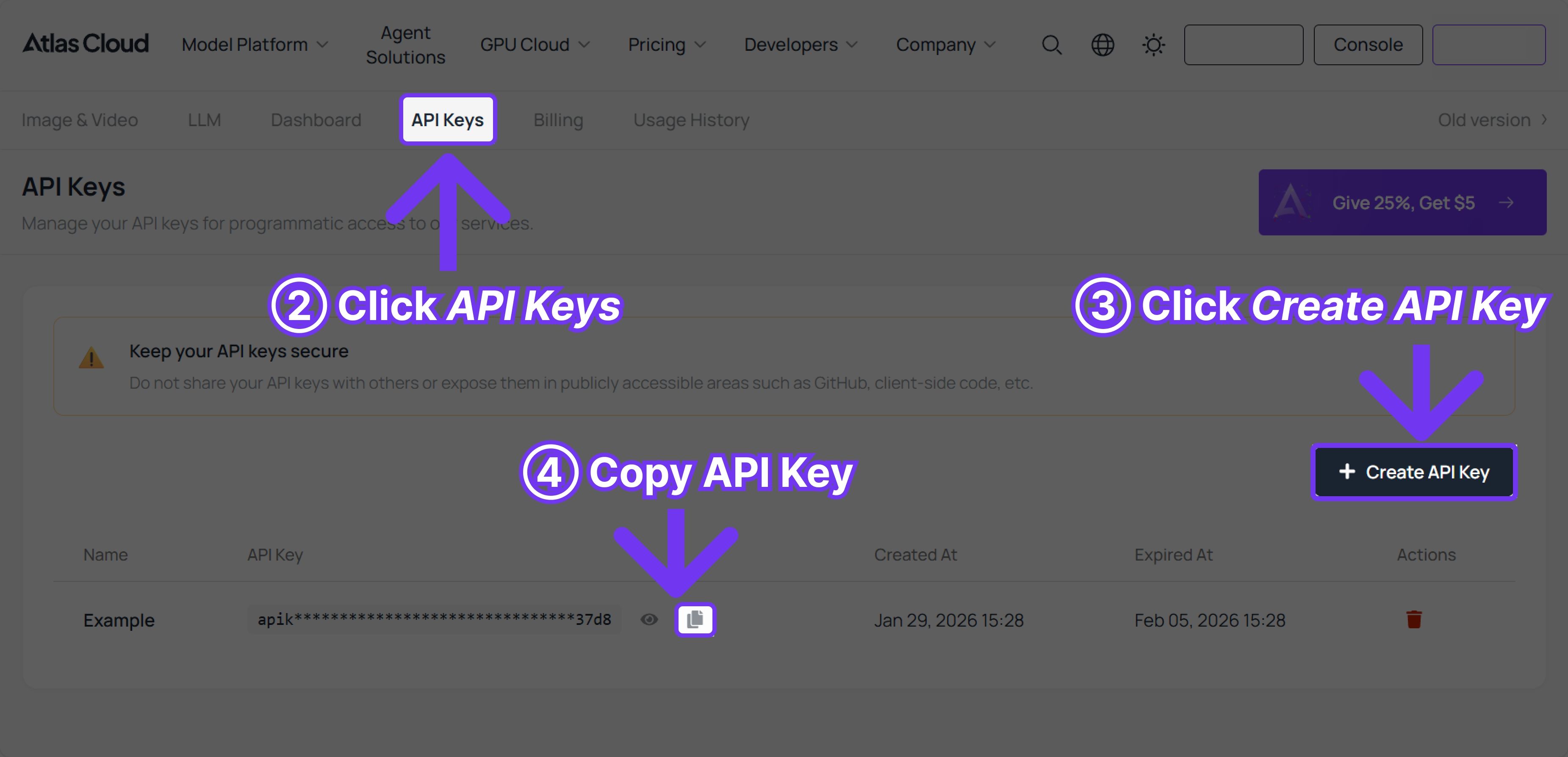
步驟 1:取得您的 API 金鑰
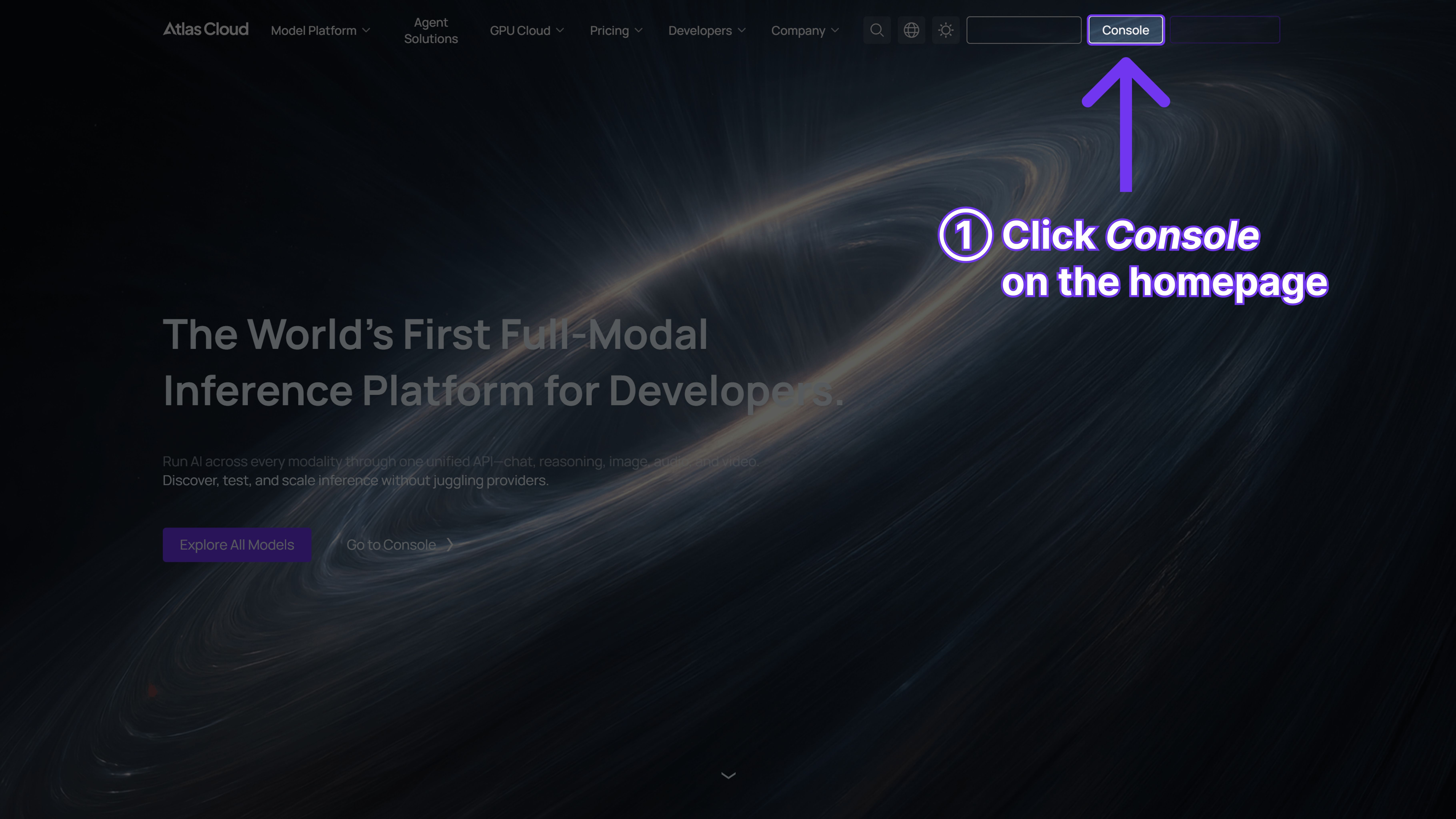
在您的 控制台 中建立一個 API 金鑰並複製以備後用。
步驟 2:查看 API 文件
在我們的 API 文件 中檢閱端點、請求參數與身份驗證方法。
步驟 3:發送您的第一個請求 (Python 範例)
範例:使用 Kling v3.0 標準文字轉影片功能生成影片。







