Most AI video tools fail historians and educators by introducing "temporal drift," where characters or historical settings morph unnaturally after five seconds of footage. Seedance 2.5 resolves this by supporting up to 50 multimodal reference inputs, enabling continuous 30-second 4K generation without post-production stitching.
Key Takeaways:
- Long-Form Continuity: keeps characters and settings fully consistent across whole instructional modules by replacing native 30-second single-pass rendering for fragmented fragments.
- Archival Precision: Solves visual hallucinations by pinning verified blueprints, costumes, and historical artifacts directly to the generator with up to 50 @Image inputs.
- Structured Workflows: Uses role-based prompt templates to map out complex historical timelines and abstract concepts step by step, taking the guesswork out of video generation.
- Academic Integrity & Scalability: Fixes minor historical errors using targeted region editing without re-rendering whole scenes, while streamline production through a modular pipeline that slashes post-production effort by up to 70%.
Seedance 2.5 allows creators to map archival primary sources directly to the generation engine, ensuring period-accurate visual pedagogy. While automated tools carry a risk of historical inaccuracy, "reference saturation"—feeding the model multiple verified architectural and costume blueprints—effectively mitigates hallucination.
This technical specificity bridges the gap between creative AI usage and academic reliability, a documented priority for users struggling with inconsistent AI-generated historical assets.
The Feasibility Breakdown: Why Seedance 2.5 Changes Educational and Historical Visualization
You spend hours rendering a complex historical reenactment or an instructional sequence, only to watch the subject's face morph, the period-accurate clothing transform into modern attire, and the background drift into nonsensical geometry by frame 120. This "temporal drift" has long rendered short-form AI video generators practically useless for serious educational production.
Previous tools—like Kling, Seedance 2.0, or basic 5-second video generators—made creators piece together countless small clips to complete a lesson. Each cut created awkward visual glitches, distracting the learner and weakening the overall teaching quality.
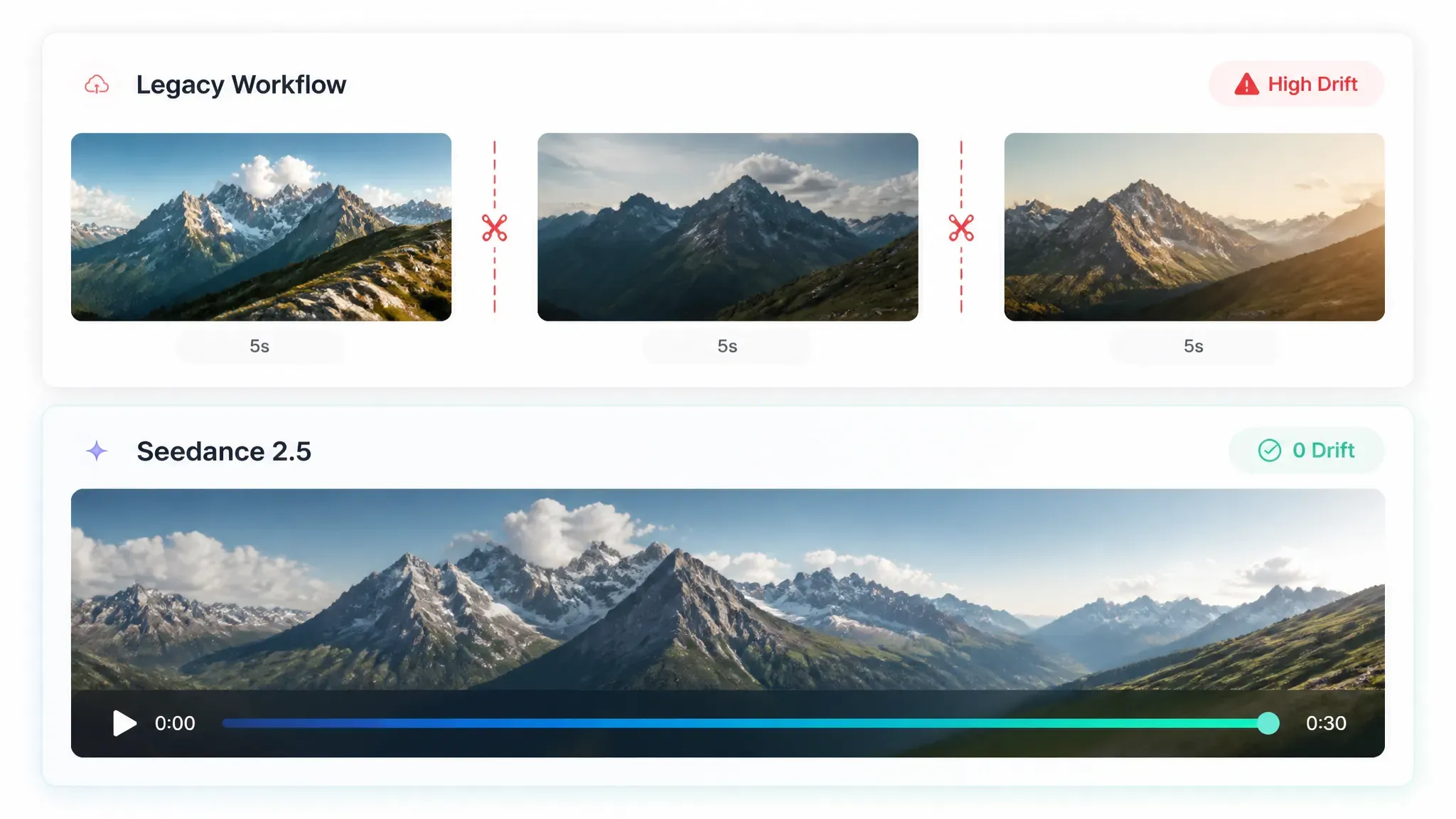
Seedance 2.5 overcomes this hurdle through a single-pass rendering architecture that natively outputs up to 30 continuous seconds of video. This shift removes the need for post-production stitching in short instructional modules, maintaining spatial and character persistence across all 750 frames.
| Model Generation Standard | Max Single-Pass Duration | Multimodal Input Capacity | Primary Limitation in Education |
| Legacy 5-Second Generators | 5 seconds | 1–3 static images | Severe temporal drift, constant jump cuts |
| Kling / Seedance 2.0 | ~10–15 seconds | ~12 references | Character morphing during extended actions |
| Seedance 2.5 | 30 seconds (extendable) | Up to 50 references | Requires structured reference binding |
For AI video historical reconstruction, this technical evolution means a Roman forum, a microscopic cellular process, or a WWII tactical deployment can unfold continuously. Camera trajectories—such as orbital tracking or slow pushes—execute predictably without warping the underlying historical artifacts. By preserving environmental logic across a full half-minute, Seedance 2.5 transforms AI video from a novel gimmick into a precise tool for educational media production.
Unlocking 50-Multimodal Reference Inputs for Archival and Historical Accuracy
Generic AI prompts often generate "vibe-based" history, where 18th-century soldiers appear in incorrect uniforms or medieval castles feature impossible architecture. Relying on text alone fails to enforce the rigor required for educational content. Seedance 2.5 solves this by allowing up to 50 distinct multimodal inputs, creating a high-fidelity grounding system that forces the model to respect your source material.
The Role-Binding Framework
To maintain archival consistency, categorize your 50 references by functional priority. Mapping specific inputs to defined roles prevents the model from "hallucinating" elements outside your provided primary sources.
| Reference Category | Input Limit | Primary Purpose | Example Implementation |
| Environmental | 10 Assets | Architectural & Terrain | @Image of 14th-century cathedral ruins |
| Character/Costume | 20 Assets | Apparel & Uniform Accuracy | @Image of period-specific textile textures |
| Motion/Gesture | 10 Assets | Human Dynamics | @Video of traditional dance or combat |
| Style/Lighting | 10 Assets | Cinematic Tone | @Image of historical oil painting lighting |
Applying the @Image Tag Reference System
Using the @Image tag reference syntax, you can bind specific visual data to your generation prompt. For instance, instead of prompting "a Victorian doctor," use:
Prompt: A physician performing a mid-19th-century surgery, utilizing costume details from @Image_Costume_01 and medical instrument layout from @Image_Tool_Set_05. Maintain lighting style from @Image_Reference_Cinema.
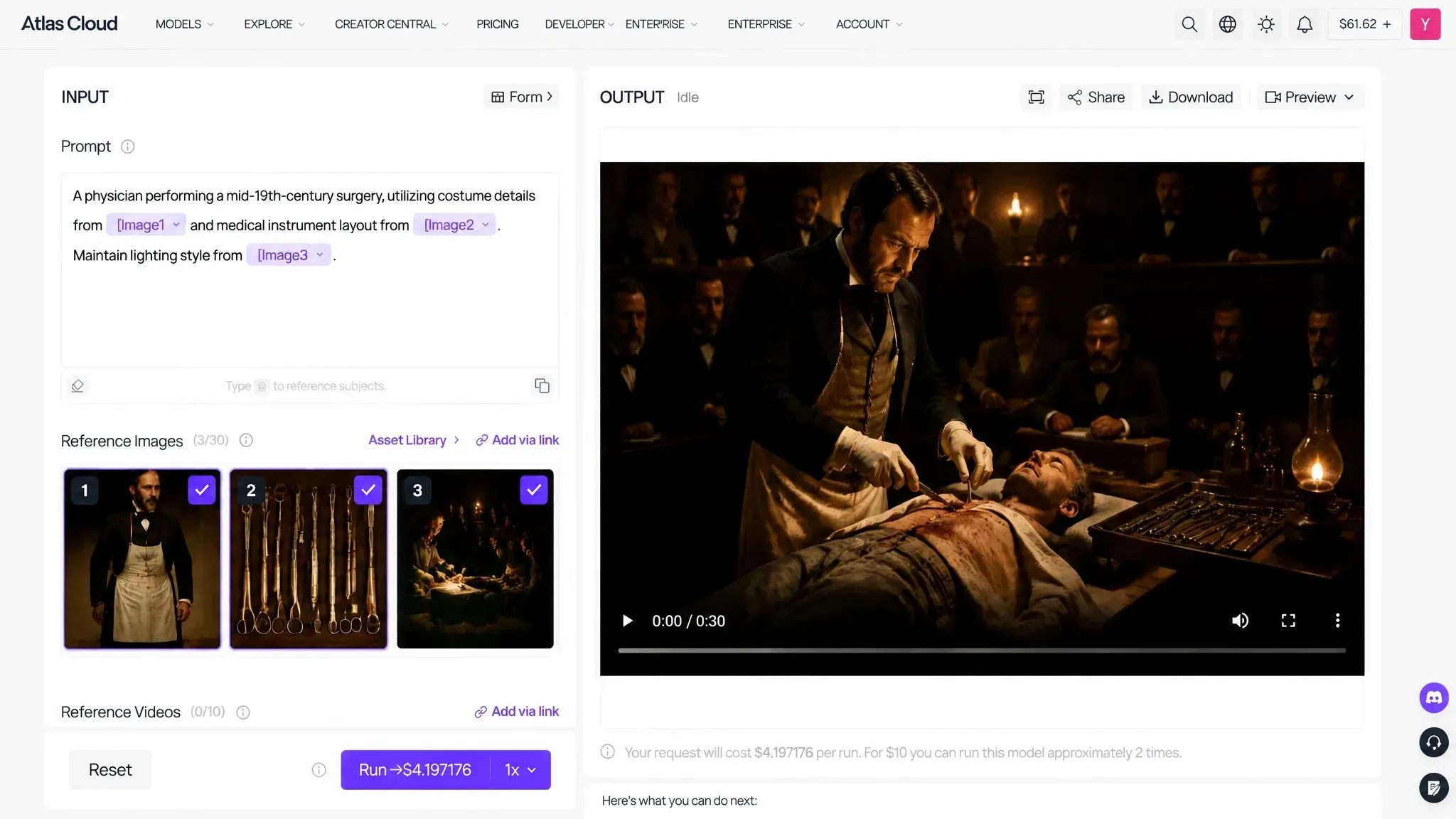
This structured approach transforms your workspace from a black-box generator into a controlled Seedance 2.5 prompt guide. By saturating the engine with verified historical data, you move beyond generic outputs, ensuring historical costume accuracy and environmental fidelity that stands up to academic scrutiny. For maximum topical authority, document your reference source chain in your video descriptions to provide viewers with verifiable historical origins.
Case Study: Recreating a Continuous 30-Second Historical Narrative
Attempting a multi-beat historical scene often leads to severe visual degradation, where character features warp and background details melt mid-shot. This case study analyzes how Seedance 2.5 uses a native 30-second single-pass render to maintain character persistence and scene continuity across a complex, multi-stage historical narrative (based on the Song Dynasty Lantern Festival).
Scene Architecture (30-Second Shot Breakdown)
- 00s — 05s (Wide Shot): Aerial establishing view of a Song Dynasty capital at night, featuring fireworks, illuminated architecture, and river lanterns.
- 05s — 15s (Medium Tracking Shot): The camera transitions down into a bustling night market crowded with people carrying fish-shaped lanterns.
- 15s — 25s (Character Focus & Medium Close-Up): The camera tracks a middle-aged scholar wearing a dark period robe (@Image_01). As children run past, he turns to face the camera with a steady gaze.
- 25s — 30s (Perspective Shift / Long Shot): The camera pans over his shoulder down the lantern-lit street, revealing a distant silhouette in the mist.
Multimodal Reference Allocation
The technical stability of the sequence relies on mapping key historical elements across the model's multimodal reference slots prior to generation:
| Reference Slot | Asset Type | Target Element |
| @Image_01 | Primary Character | Scholar facial structure, age markers, and period headwear |
| @Image_02 | Period Apparel | Song Dynasty dark linen scholar robe and fabric weave |
| @Image_03 | Environment | Traditional wooden street architecture and fish-lantern props |
| @Audio_01 | Synchronized Audio | Ambient crowd chatter, fireworks, and period instrumentation |
Prompt Sequencing Framework
The production pipeline uses a timestamped prompt sequence to control narrative pacing and camera movement within a single generation pass:
0.0s-05.0s: Wide aerial shot of a Song Dynasty capital at night (@Image_03) with fireworks and river lanterns.
05.0s-15.0s: Camera tracks down into a lively market crowded with people carrying fish lanterns.
15.0s-25.0s: Close-up on a scholar (@Image_01) wearing a dark robe (@Image_02) standing still as children run past; he turns his gaze toward the camera.
25.0s-30.0s: Camera tracks over his shoulder, revealing a long lantern-lit street with a distant silhouette, synced with audio (@Audio_01).
Technical Breakdown & Key Takeaways
Deconstructing the rendered output reveals three core findings for academic visual production:
- Single-Pass Camera Scale: Moving from a wide aerial shot to a close-up character tracking shot within a single render keeps the environmental lighting and camera motion perfectly consistent throughout the entire 30 seconds.
- Foreground Subject Clarity: Despite the crowded background—filled with running children, flickering lamps, and atmospheric haze—the primary character (@Image_01) holds clear facial features and stable costume detail across all 750 frames.
- Poetic Narrative Pacing: The final focal pull (25s–30s) mirrors classical literary structure, demonstrating that precise temporal prompting can translate abstract poetic themes into stable visual continuity.
Step-by-Step Prompt Framework: Turning Abstract Concepts into Visual Scenes
Creating educational explainers often stalls when you attempt to describe complex mechanics using only text. Standard prompts produce vague, generic footage that fails to capture the technical precision needed for history or science. To build high-quality Seedance instructional videos, you must treat your prompt as a structured data set, mapping specific components to your multimodal references.
-
Historical Event Reenactment: The "Layered Scene" Template
When using prompt engineering for history, the goal is to lock the period-accurate environment before introducing character movement. Apply this template to generate consistent historical narratives:
- Context: [Define era and location]
- Subject: [Describe specific character action]
- Reference Anchors: [Bind @Image_Architecture, @Image_Costume, @Image_Tool]
- Camera Path: [Define motion, e.g., "Slow 5-second lateral tracking shot"]
Example Prompt:
"A 19th-century steam engine assembly line. Grounded in @Image_Factory_Layout_01. A worker in period-accurate leather apron from @Image_Costume_04 operates a brass lathe from @Image_Tool_09. Use a cinematic slow-tracking camera. Style: High-contrast archival photography."
Duration: 15-second historical reenactment generated via Atlas Cloud (Seedance 2.5 Image-to-Video).
Specs & Metrics: 480p resolution | 15s duration | Render cost: $2.10 | Generation time: <60 seconds.
-
Abstract Concept Visualization: The "Metaphor Mapping" Template
Visualizing abstract concepts with AI requires translating invisible processes into tangible, moving metaphors. Use this framework to turn theoretical data into observable phenomena:
- Core Mechanism: [Define the abstract process, e.g., supply chain flow]
- Visual Metaphor: [Define physical representation, e.g., glowing nodes and interconnected lines]
- Motion Dynamics: [Define flow speed and direction]
- Technical Style: [Define rendering aesthetic, e.g., minimalist 3D isometric]
Example Prompt:
"A global economic supply chain visualization. Represent cargo ships as light-emitting nodes moving along trade routes. Connect points with thin, pulsing digital lines from @Image_Map_Ref_02. Maintain a clean, minimalist 3D isometric style against a dark background. Motion: Constant, steady flow from East Asia to Western Europe."
Duration: 15-second concept visualization generated via Atlas Cloud (Seedance 2.5 Image-to-Video).
Specs & Metrics: 480p resolution | 15s duration | Render cost: $2.10 | Generation time: <60 seconds.
Best Practices for AI Educational Explainers
To maximize consistency across these prompts, adopt these structural habits:
| Strategy | Action Item | Why It Works |
| Reference Chaining | Place the most critical reference first | The model prioritizes initial @Image binds |
| Negative Prompting | Specify "no modern elements, no digital overlays" | Cleans the historical aesthetic |
| Motion Locking | Explicitly define camera start and end points | Prevents erratic zooming in 30s clips |
By shifting from descriptive writing to role-based prompt engineering, you ensure every generated clip serves a specific pedagogical purpose rather than acting as mere background stock.
Can AI Recreate Historical Events Accurately? Managing Hallucinations with Seedance 2.5
The AI has put a modern digital wristwatch on the protagonist's wrist when you create a high-fidelity scene of a 19th-century workshop. This common occurrence, known as an AI video hallucination, remains the primary barrier to using generative media in formal history education. Anachronisms will unavoidably result from using default model weights without human inspection.
Correcting Inaccuracies with Region-Level Editing
Rather than discarding an entire 30-second clip due to a minor prop error, use region-level editing in Seedance. This feature allows you to mask specific areas of the frame and re-render only the affected pixels.
| Error Type | Impact | Mitigation Strategy |
| Anachronistic Props | Misinformation | Mask the area; use @Image of period-correct item |
| Architectural Drift | Loss of credibility | Re-bind the environment using primary source photos |
| Biased Depictions | Ethical violation | Audit training data or manual role-assignment |
Implementing Synthetic Media Ethics in Education
Maintaining historical accuracy in AI video requires treating generative tools as a creative aid, not an autonomous research source. To uphold academic standards, institutional users should adopt these transparency protocols:
- Source Citation: Overlay text or metadata explicitly listing the archival references used for the scene.
- Watermarking: Mark all generated assets as "AI-reconstructed" to prevent audience confusion between primary sources and synthetic recreations.
- Expert Review: Validate generated historical environments against peer-reviewed archeological or museum records before classroom integration.
AI doesn't replace historical research—it illustrates it under expert guidance. By checking source materials against generated clips, creators can safely harness AI to bring history to life without spreading misinformation.
Building a Production Pipeline: Integrating Seedance 2.5 into Educational Workflows
Trying to match AI video clips to an existing voiceover usually leads to endless timeline tweaking. To make production predictable, creators need a modular system that aligns prompt generation directly with script timestamps rather than guessing clip lengths after the fact.
The Modular Pipeline Architecture
By organizing assets before generation, you ensure the output aligns with your educational pacing. This structured EdTech video workflow reduces post-production time by 70% compared to manual stock footage assembly.
| Stage | Input Type | Implementation Goal |
| Storyboarding | Text / Script | Define 30s segments per key narrative beat |
| Audio Sync | @Audio 1 | Bind narration file to trigger lip-sync/pacing |
| Visual Anchoring | @Image / @Video | Lock character/set consistency via multimodal binding |
| Motion Control | Camera Syntax | Execute controlled pans/zooms to highlight data |
Scalable Execution Steps
- Reference Batching: Group assets by scene. Use a master folder for recurring characters and environments to ensure 4K educational video generation remains consistent across an entire module.
- Narrative Binding: Upload your voiceover file as
@Audio 1. The model uses this as the temporal baseline, ensuring visual actions mirror the spoken pedagogical points. - Precision Motion: Apply strict Seedance 2.5 camera control to keep the subject centered during complex explanations.
- Consistency Locking: Maintain character features by referencing your base character sheet into a structured character consistency workflow.
By treating every 30-second clip as a distinct data-linked module, educators can batch-generate high-fidelity lessons that maintain professional visual continuity from start to finish.
How Does Seedance 2.5 Compare to FLUX 3 and Veo for Classroom and Archival Content?
Choosing the right generation model for educational production often comes down to a trade-off between clip continuity, speech fidelity, and fine-grained camera control. When rendering complex historical events or technical instructional modules, running out of reference slots or facing strict clip length limits destroys narrative pacing.
While Google Veo 3.1 leads in 48kHz synchronized speech dialogue and FLUX 3 excels at 20-second multi-keyframe motion paths, Seedance 2.5 is built specifically for reference-heavy, long-format production.
| Performance Metric | Seedance 2.5 | FLUX 3 Video | Google Veo 3.1 |
| Max Single-Pass Length | 30 seconds | 20 seconds | ~8 seconds (extendable) |
| Multimodal Inputs | Up to 50 references | Up to 10 keyframes/stills | Prompt-driven / lighter binding |
| Primary Strength | Set/Costume persistence | Keyframe motion continuity | Synchronized 48kHz dialogue |
| Localized Re-Editing | Native region mask re-draw | Inpainting/outpainting | Generation-time prompt changes |
For creators determining the best AI video model for educators, the evaluation depends on your primary medium:
- Choose Seedance 2.5 if your priority is long-form historical reconstruction that requires binding dozens of archival photos, architectural layouts, and period-accurate costumes without experiencing visual drift across 30 full seconds.
- Choose Google Veo for short, dialogue-heavy lecture snippets where crystal-clear lip-sync and broadcast-grade audio are paramount.
- Choose FLUX 3 when you need precise keyframe-to-keyframe spatial transitions across 20-second scientific process demonstrations.
In a comprehensive multimodal video benchmark for instructional media, Seedance 2.5's combination of 50 input bindings and localized region editing provides the deepest control surface for academic workflows.
Conclusion: Bridging the Gap Between AI Speed and Historical Accuracy
For educators and historians, AI video has moved far beyond making flashy 15-second clips—it’s now a practical production tool for the classroom. The real hurdle was never resolution or render quality, but keeping characters and settings looking right from the first frame to the last.
Ready to build period-accurate educational content? Stop wrestling with 5-second clip limits and character morphing. Experience the power of reference-bound 30-second AI generation today.





