By 2026, a static photo is rarely the end of the story. It now serves as the opening shot for a motion picture. The line separating photography from film has vanished. This shift changes everything from how we archive history to how we market products and produce movies.
Just a few years back, AI video tools made blurry clips that lasted only seconds. Now, Image-to-Video tech is a powerful tool for real work. Turning a flat picture into smooth, high-quality motion is the biggest creative leap of our time.
In 2026, the standards for picking an I2V tool are very high. These tools need to be excellent in three key areas to be competitive:
- 4K AI Video Generation: Pros now require native 4K or even 8K upscaling for all their projects.
- Temporal Coherence in AI Video: Visuals and textures must stay steady and solid from the start to the end of a clip.
- Character Consistency AI (or "Identity Lock"): Characters must keep the same face and clothes across every shot. New AI physics engines for video make this possible.
The Heavy Hitters: Top 10 Tools Ranked
Detailed breakdown of each tool, including "Best For" tags, pros/cons, and pricing.
| Rank | Tool Name | Key Selling Point (2026 Edition) | Best For... |
|---|---|---|---|
| 1 | Kling 3.0 | Unmatched physics and multi-shot consistency. | Cinematic Realism |
| 2 | OpenAI Sora 2 | Narrative depth and Disney-licensed character packs. | Storytelling |
| 3 | Runway Gen-4.5 | Pro-grade "Motion Brush" and timeline VFX control. | Creative Directors |
| 4 | Google Veo 3.1 | Native 4K & seamless integration with Google Nano. | High-End Production |
| 5 | Luma Dream Machine | The fastest "one-click" high-fidelity rendering. | Rapid Prototyping |
| 6 | Seedance 2.0 | Best multi-modal input (Image + Video + Audio). | Multi-Media Creators |
| 7 | Pika Labs (Pro) | Best-in-class Lip Sync and localized sound effects. | Social Media/Memes |
| 9 | Haiper 2.5 | High-style artistic filters and lighting control. | Aesthetic/Vibe Content |
| 10 | Wan 2.6 | Open-source powerhouse for local RTX generation. | Privacy/Power Users |
Deep Dive: Why These Tools Win in 2026
The reason 2026 is a major turning point is that these models have changed. They no longer just copy simple patterns. Instead, they simulate the real world. We are not just "making pixels" anymore; we are building reality.
From "Warping" to "World Physics"
The top breakthrough this year is the AI Physics Engine. Back in 2024, an AI might seem messy if you asked it to pour water. The liquid might leak through the glass or turn into sand. AI will at last comprehend how the actual world functions in 2026.
- The Trend: Models no longer just "pixel-morph" or interpolate between two points. Instead, they simulate weight, momentum, friction, and gravity. When a character sits on a sofa in Runway Gen-4.5, the cushions compress realistically based on the character's perceived mass.
- Top Picks: Runway Gen-4.5 is now the leader for how objects hit and bounce off each other. At the same time, Kling AI 3.0 has nailed how liquids move. Whether it is a rushing river or a puff of smoke, things don't just "blur" or vanish anymore. These elements now follow the real laws of nature.
Runway Gen-4.5 vs. Kling AI 3.0 Overview
| Feature | Runway Gen-4.5 | Kling AI 3.0 |
|---|---|---|
| Primary Physics Edge | Solid-Body Dynamics: Industry leader in multi-object collision and realistic weight simulation (e.g., fabric compression). | Fluid & Volumetric Dynamics: Unmatched realism in liquids, smoke, and atmospheric effects (e.g., turbulent river flow). |
| Max Resolution | Native 4K with 8K AI Upscaling (Ultra-High Bitrate). | Native ultra HD (60fps Cinematic Output). |
| Core Architecture | Proprietary "World Simulation" Engine with integrated 3D spatial awareness. | "Omni-Latent" Diffusion with native high-fidelity audio-visual synchronization. |
| Deployment & API | Closed-Loop (Walled Garden): Primary access via Runway Web/App only. Limited Studio API for enterprise partners. | Open-Access / Atlas Cloud: Available via official web portal and high-concurrency Atlas Cloud API. |
| Character Consistency | Uses "Identity Lock" with 3D geometry mapping for consistent facial features. | Uses "All-in-One Reference 3.0" for multi-image character and prop anchoring. |
| Price Range | Standard: $95/mo (Standard 4K) | |
| Pro: $250/mo (Unlimited "Director Mode") | Standard: $80/mo (Web Interface) | |
| Enterprise API: Tiered pricing via Atlas Cloud ($0.50 - $1.20 per render). |
The Identity Lock (Character Consistency)
For years, the pain point for creators was "character drift"—where a character’s face would subtly change every time the camera moved. This made professional storytelling nearly impossible.
- The Trend: We have shifted from generating "one-off clips" to creating "storyboard-ready assets." Modern tools utilize specialized "Identity Blocks" within their neural architecture to lock in facial geometry.
Pro (1024p): $0.50 /sec ($5.00 per 10s video). | Enterprise API: $0.03 - $0.3 /sec via Atlas Cloud. |
Native Multimodal Synthesis (Audio + Video)
In 2026, "silent" AI video is considered obsolete. The industry has moved toward Zero-Shot Image to Video that includes a synchronized audio layer generated in the same inference pass.
- The Move: Video tools now create sound effects, background noise, and even lip-syncing at the same time. This cuts the heavy post-production work by about 70%.
- Leading Examples:Google Veo 3.1 and Wan 2.6 lead this category. Their native audio engines don't just "guess" the sound; they analyze the motion vectors. If the AI sees a foot hit gravel, it generates the specific crunch of that impact. If it sees a window open, it generates the rush of ambient wind.
Google Veo 3.1 and Wan 2.6 Overview
| Feature | Google Veo 3.1 | Wan 2.6 |
|---|---|---|
| Audio Logic | Environmental Awareness: Analyzes scene context to generate 3D spatial acoustics and musical underscores. | Vocal Priority: Best-in-class lip-sync and "Voice Cloning" via a 5-second reference video. |
| Max Quality | Native 4K with state-of-the-art upscaling; broadcast-ready bitrates. | 1080p Native (Up to ultra HD enhanced); optimized for realistic physics and "solid" objects. |
| Video Duration | 8–10 seconds (Extendable via "Scene Extension" tech). | Up to 15 seconds (Stable, high-motion output). |
| Official Access | Google Vertex AI, Gemini API, and Google AI Studio. | Alibaba Cloud (Tongyi), Dzine, and open-source model repositories. |
| Official Pricing | Official Pricing: $0.15/sec - $0.75/sec. | |
| Enterprise API: $0.09 - $0.2 /sec via Atlas Cloud. | Official Pricing: $0.07 - $0.18 /sec | |
| Enterprise API: $0.018 - $0.07 /sec via Atlas Cloud. |
Practical Guide: How to Generate Cinematic Video from an Image
To win with these tools, stop "describing a scene" and start "directing" it. Here is how I2V prompting works in 2026.
The Professional Prompting Structure
A pro I2V prompt has four main parts:
- Reference: Your uploaded image.
- Motion Vector: How the camera moves (Dolly, Pan, or Orbit).
- Physical Action: What the subjects are actually doing.
- Temporal Detail: Changes in lighting or the environment.
Example: Using Runway Gen-4.5 for a Product Shot
If you have a static photo of a luxury watch on a rock in the ocean:
Prompt Example:
"Reference: [Image_01]. Camera: Slow orbital pan 180-degrees. Action: Ocean waves crash against the rock, generating realistic sea spray and mist. Physics: Water droplets interact with the watch glass, beaded and rolling off the surface. Lighting: Golden hour sunset, light reflecting off the moving water. 4K, 60fps, cinematic realism."
Example: Using Wan 2.6 for a Narrative Scene
If you have a character portrait:
Prompt Example:
"Reference: [Character_Photo]. Action: The character turns to the camera and sighs. Audio: A soft breath mixed with distant city noise. SFX: The sound of a leather jacket moving. 4K, High Temporal Coherence."
Legal and Ethical Environment
As we move into mid-2026, AI video generator tools finally have a steady legal framework. The 2023–2024 "wild west" period is over. Now, every professional creator must know and follow these specific compliance standards.
Copyright in 2026: The "Human Touch" Precedent
In a landmark decision on March 2, 2026, the US Supreme Court denied certiorari in Thaler v. Perlmutter, effectively upholding that copyrightable works require a "human author" (Baker Donelson, 2026).
- The Ruling: You cannot copyright a raw video generated solely by a prompt.
- The Strategy: To claim ownership in 2026, pros use "Recursive Refinement." By documenting the multi-step process—from the initial Zero-Shot Image to Video to manual frame-painting and specific physics adjustments—creators can prove "substantial creative control," allowing the final cinematic masterpiece to be protected.
Watermarking and Transparency: SynthID & C2PA
Transparency is now a requirement. Under the EU AI Act, which is in full effect for 2026, all AI media must be machine-readable. This rule helps stop the spread of deepfakes (MEXC News, 2026).
- SynthID: Google’s metadata-level watermarking is now standard in Veo 3.1 and Nano Banana Pro outputs, remaining detectable even after cropping or compression.
- C2PA Standards: Most 2026 tools now embed "Content Credentials"—a digital nutrition label that shows which model (e.g., OpenAI Sora 2 or Kling AI 3.0) was used and what edits were made by a human.
The Infrastructure Barrier: Solving the "4K Compute Gap"
AI video software is moving fast, but 2026 hardware is still lagging. Making 4K clips with real physics—like water flows or solid crashes—is tough for home PCs. These tools need massive VRAM that standard graphics cards just don't have yet. Because of this, rendering long, high-quality scenes remains a major challenge for most creators.
The Rise of Multi-Node Rendering
For pro creators, "Local Rendering" is quickly fading away. Cloud Orchestration is the new standard for the industry. When a project needs 20 seconds of stable 4K video, one computer isn't enough. Instead, the heavy workload is split across a powerful cluster of machines. This shift allows for much faster and more reliable production.
Pro Solution: Atlas Cloud
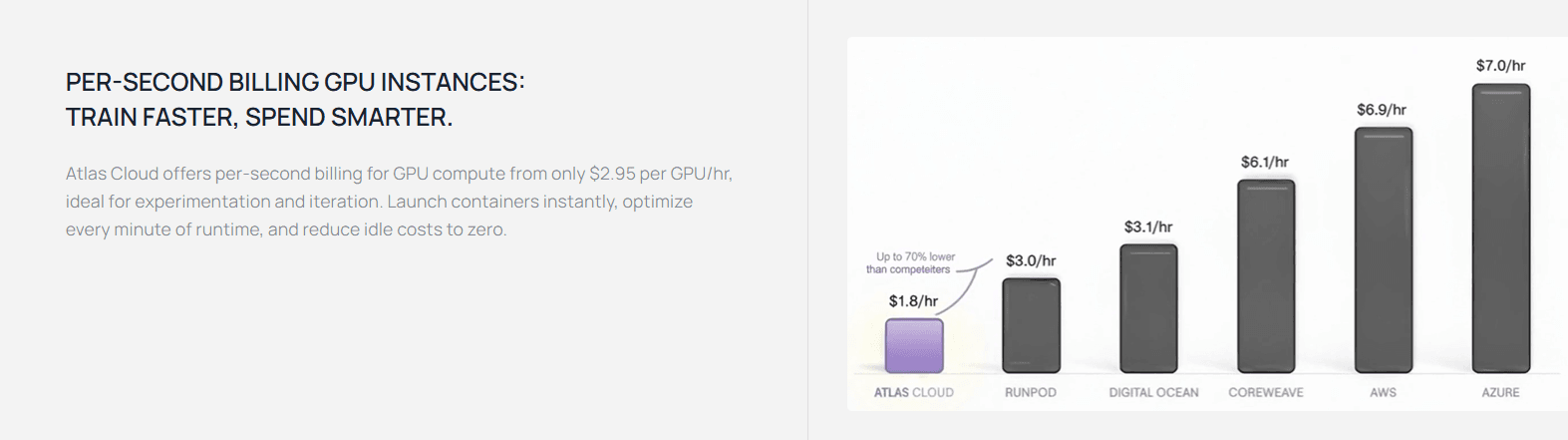
- Speed Advantage: A 15-second 4K video takes 90 minutes on a fast home PC. On Atlas, that same render finishes in less than 2 minutes.
- Throughput Advantage: A 15-second 4K render that might take 90 minutes on a high-end local PC is completed in under 2 minutes on Atlas.
- Persistent Training: Unlike closed-loop web interfaces, Atlas allows for native LoRA (Low-Rank Adaptation) integration, which is essential for maintaining Character Consistency AI across an entire series.
- Real-Time Proxying: Their "Instant Preview" feature allows remote teams to view a low-res physics simulation in real-time before committing to a full 4K render pass.
Editor’s Note: If you are working within the open-source ecosystem (Wan or Stable Video), offloading the latent pass to a specialized cloud environment like Atlas is no longer optional—it is the baseline for achieving "Identity Lock" without hardware-induced artifacts.
The Atlas Cloud Workflow: Deploying for Scale
Beyond simple deployment, professional workflows require a pre-configured environment to handle specialized video codecs and dependencies.
“Atlas provides DevPods, which are persistent, containerized environments. Instead of a bare-metal deploy, studios typically use atlas devpod create --image "wan-2.6-production-v1" to ensure that all custom CUDA kernels and LoRA weights are pre-loaded, reducing 'cold start' times from minutes to seconds.”
Elastic Auto-Scaling for Batch Renders
For a "Render Burst" scenario involving hundreds of shots, a single node deployment is insufficient.
“The CLI supports Horizontal Scaling groups. By defining a scaling-policy.yaml, the Atlas orchestrator can spin up a cluster of 8x H200 nodes during a 4K render pass and automatically spin them down once the latent diffusion process is complete, optimizing burn-rate and Opex.”
Distributed Storage & Checkpoint Syncing
High-fidelity 4K video generates massive temporary datasets during the denoising process.
“To maintain 'Identity Lock' across multiple nodes, Atlas utilizes a Global Namespace Storage (GNS). This ensures that when the CLI triggers a render, the LoRA checkpoints and character reference sheets are synchronized across all active GPU nodes via a high-speed InfiniBand fabric, preventing consistency drift between frames rendered on different hardware.”
Enhanced CLI Syntax for Production
A production-ready command typically includes output destination and telemetry flags:
Bash
plaintext1# Enhanced Production Command 2atlas deploy --model "alibaba/wan-2.6" \ 3 --gpu "h200-141gb" \ 4 --count 8 \ 5 --storage-mount "s3://studio-assets/project-alpha" \ 6 --webhook-url "https://api.studio.com/updates" \ 7 --priority "high-availability"
Conclusion: Which One Should You Choose?
As this guide shows, there is no longer one "best" AI video tool in 2026. Instead, choosing the right engine for your specific creative goal is crucial. The market has grown up and now offers specialized tools for different needs. To help you pick the right subscription for your budget this year, use the guide below to see the main strengths of each model.
| If your priority is... | Choose this Tool | Why? |
| Cohesive Storytelling | OpenAI Sora 2 | Leads in narrative logic and long-form (25s+) clips. |
| Physics & Motion Control | Runway Gen-4.5 | Top-tier physics accuracy and "Director's Language" adherence. |
| Human Realism & Lip-Sync | Kling AI 3.0 | Best-in-class facial micro-expressions and native dialogue sync. |
| Mobile-First Content | Google Veo 3.1 | Native 9:16 support and deep integration with YouTube Shorts. |
| Cinematic 4K Fidelity | Luma Dream Machine Ray 3 | Superior upscaling and 16-bit HDR lighting pipelines. |
| Commercially Safe Workflow | Adobe Firefly Video | Fully licensed training data and C2PA content credentials. |
FAQ
Can I legally copyright the cinematic videos I generate with AI?
As of March 2026, the U.S. Supreme Court (upholding Thaler v. Perlmutter) maintains that purely AI-generated works cannot be copyrighted because they lack a “human author.” However, the industry has shifted toward a "Human-in-the-Loop" standard.
To secure intellectual property (IP) protection, professionals now use "Recursive Refinement." This involves documenting a multi-step creative process: using your own photography as a Zero-Shot source, directing specific camera paths via Runway Gen-4.5, and performing manual "inpainting" for character consistency. By proving the AI was a "controlled tool" rather than an autonomous creator, you establish the necessary human authorship for legal protection.
Why does my 4K video render look "glitchy" on my local computer?
Generating 4K AI Video with realistic physics (like fluid dynamics in Kling 3.0) requires massive VRAM—often exceeding the 24GB found on standard consumer cards. If your video "melts" or exhibits "ghosting," your hardware is likely hitting a memory bottleneck.
In 2026, the professional solution is Cloud GPU Orchestration, such as Atlas Cloud. These platforms allow you to "burst" your rendering tasks to high-performance NVIDIA B200 clusters. By offloading the heavy lifting to the cloud, you can achieve 10x faster generation speeds and maintain perfect Temporal Coherence that local hardware simply can't process at 4K resolution.
How do I maintain "Identity Lock" across different scenes?
Keeping a character's appearance is not a luxury in 2026, but rather a basic rule. You may now handle this in your workflow in two main ways:
- Closed Models (Sora 2 / Veo 3.1): These tools use "Identity Blocks." You just upload a photo or video of yourself. The AI then builds a digital "actor" that stays the same for over 60 seconds of video.





