Happy Horse 1.0 is now on Atlas Cloud: Alibaba's AI video generator with 2–5 min generation, multi-modal input, and cinematic control
What is Happy Horse 1.0? Alibaba's new video generation and editing model, now on Atlas Cloud
Happy Horse 1.0, built by Alibaba ATH Innovation Unit, is live on Atlas Cloud. Including text-to-video, image-to-video, reference-to-video, video editing.
- What it is: Built by Alibaba ATH Innovation Unit. Covers generation, editing, and reference-guided output across text and image inputs.
- Key benefit: Cuts the gap between brief and deliverable for marketing teams, filmmakers, and developers who need production-ready video without coordinating a crew.
- Price: USD $0.14/sec
Happy Horse 1.0 key features: fast generation, prompt accuracy, camera control, and reference fidelity
Fast generation
Self-reported speeds of roughly 2 seconds for 5-second clips at 256p and roughly 38 seconds at 1080p on H100 hardware (unverified by third parties). These figures come from Alibaba's own testing and haven't been independently benchmarked yet. Atlas Cloud handles the infrastructure, so users get access to the generation speed without sourcing the hardware themselves.
- ~2 sec for 5-sec clip at 256p
- ~38 sec at 1080p on H100
Prompt accuracy on complex scenes
Multi-element prompts — lighting, character action, mood, composition, all at once — hold together without the model losing track of one instruction while following another. Three years ago, most video generators struggled to produce a convincing 3-second clip. Inconsistency under complex prompts is still the main pain point across the category. Happy Horse handles it, which cuts down the number of retries needed to get something usable.
- No prompt simplification required
- Stable across multi-element inputs
Camera control as a creative input
Pan, tilt, zoom, tracking shots — specified in the prompt the same way a director would brief a camera operator. Style and atmosphere directives apply consistently across multi-shot sequences without visual drift between cuts.
- Pan, tilt, zoom, tracking
- Consistent across multi-shot sequences
Reference-to-video: up to 9 images
Upload up to 9 reference images. The model reads them for character appearance, object design, location feel — whatever you flag in the prompt. Concept art, product shots, portraits: the visual logic carries through without manually correcting each frame. In the Artificial Analysis Video Arena, Happy Horse ranked first in image-to-video (without audio) with an Elo score of 1416, placing it ahead of every other model currently on the leaderboard.
- Elo 1416, ranked #1 image-to-video
- Up to 9 reference images per gen
Who is Happy Horse 1.0 for? Use cases across marketing, filmmaking, social media, and VFX
- Marketing and e-commerce: Product videos and ad creatives without a shoot. Reference mode handles brand consistency across a campaign so visual QA isn't a separate job.
- Narrative filmmaking: Run through multiple scene versions in a morning. Multi-shot storytelling keeps character identity stable across cuts — matters the moment you're working with more than one location.
- Social media: Short-form video gets 2.5x more engagement than long-form on average. The generation speed makes it realistic to test five versions of a Reel rather than committing to one.
- VFX and motion design: Rough out an action sequence with camera and atmosphere directives before touching a render pipeline. Faster to kill a bad idea at this stage than after a full build.
Why Use Happy Horse 1.0 on Atlas Cloud?
What is Atlas Cloud?
It’s a platform that simplifies AI by giving you access to 300+ top models in one place—text, images, video, and more.
Who’s it for?
• Developers who want easy, affordable AI access. • Teams handling projects that need AI across multiple areas. • Businesses needing reliable AI for important work. • People using tools like ComfyUI and n8n.
Why choose it?
• One API lets you use everything—just one key. • Clear pricing, no surprises, and low costs. • Built for enterprise: stable, secure, and supported by experts. • Works with the tools you already have. • Your data stays safe and meets compliance needs.
How does it compare?
• Fal.ai: Atlas has more models and better prices. • Wavespeed: Atlas costs less and includes enterprise support. • Kie.ai: Atlas is clearer on pricing and offers a bigger selection. • Replicate: Atlas has more models and better prices. • Other providers (like OpenAI): Atlas combines everything in one simple platform.
How to Use Happy Horse 1.0 on Atlas Cloud
Atlas Cloud lets you use models side by side — first in a playground, then via a single API.
Method 1: Use directly in the Atlas Cloud playground
Click the link below to use it in the playground.
Method 2: Access via API
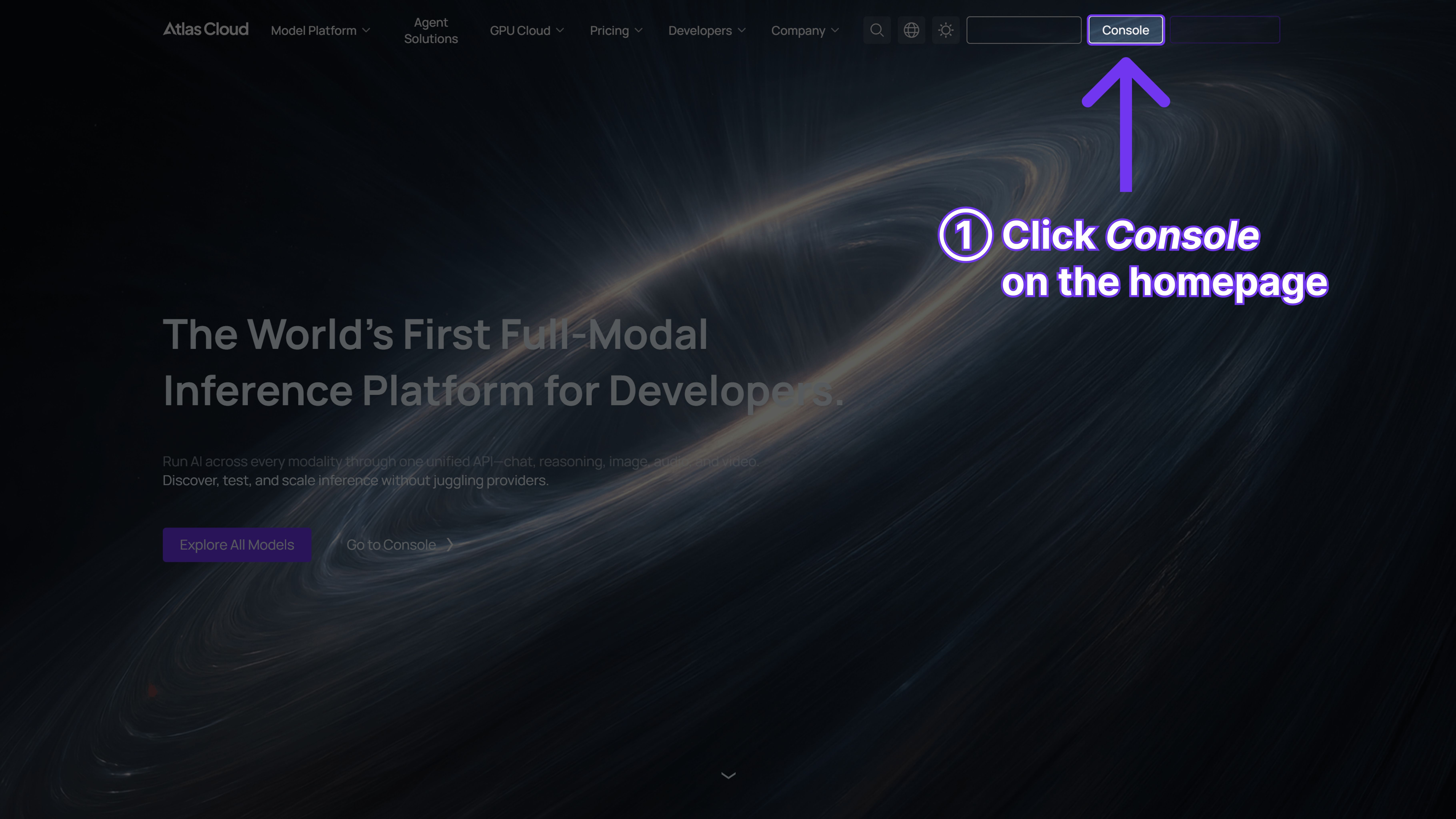
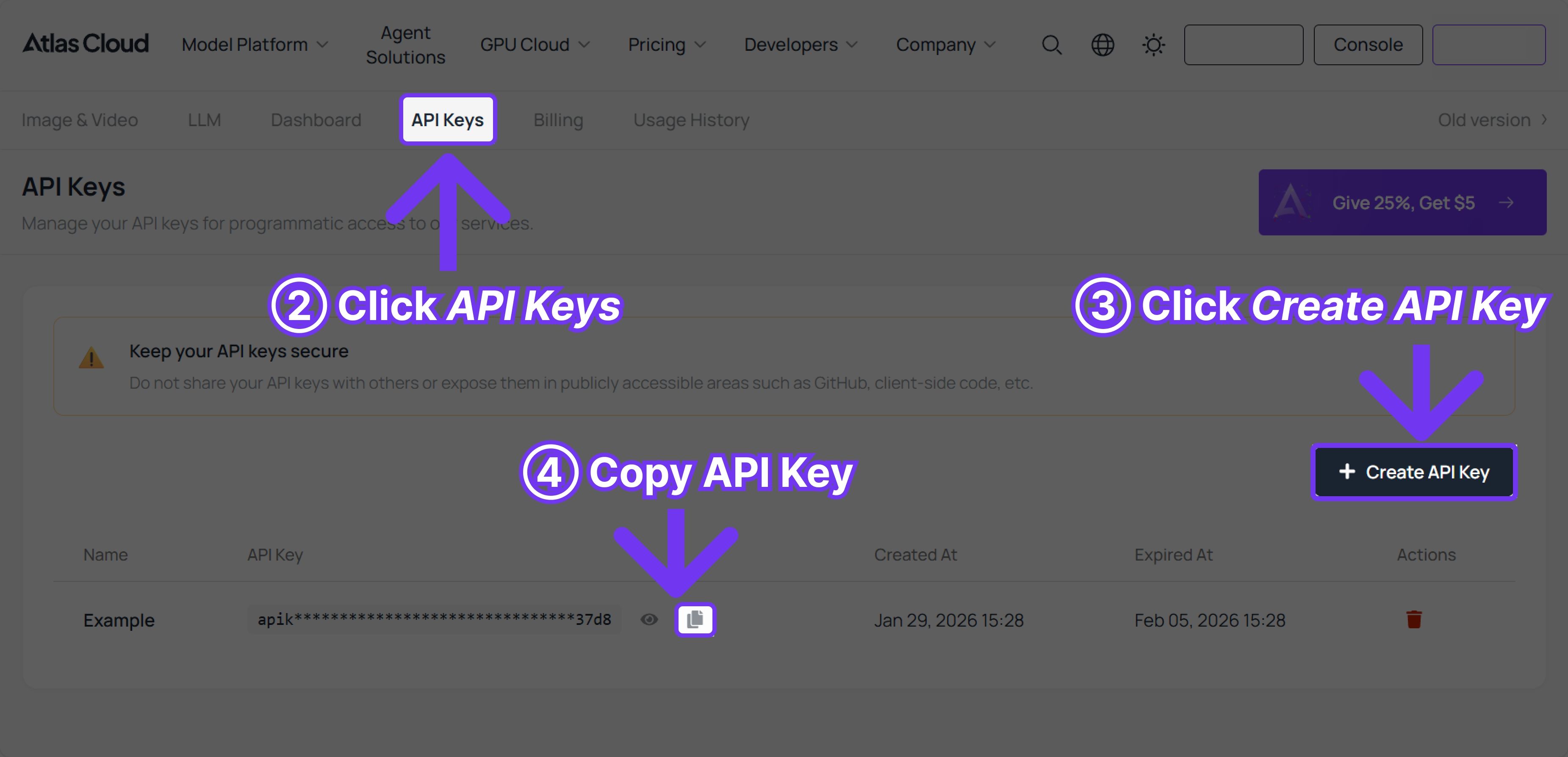
Step 1: Get your API key
Create an API key in your console and copy it for later use.
Step 2: Check the API documentation
Review the endpoint, request parameters, and authentication method in our API docs.
Step 3: Make your first request (Python example)
Example: generate a video with Happy Horse 1.0 (Text to Video)
plaintext1import requests 2import time 3 4# Step 1: Start video generation 5generate_url = "https://api.atlascloud.ai/api/v1/model/generateVideo" 6headers = { 7 "Content-Type": "application/json", 8 "Authorization": "Bearer $ATLASCLOUD_API_KEY" 9} 10data = { 11 "model": "alibaba/happyhorse-1.0/text-to-video", # Required. Model name. options: alibaba/happyhorse-1.0/text-to-video 12 "prompt": "A lone traveler walks slowly across a vast desert at sunset, golden light casting long shadows on the rippled sand dunes. The wind gently lifts fine grains of sand into the air, creating a soft, cinematic haze. The camera follows from behind at a low angle, gradually circling to reveal the traveler’s silhouette against the glowing horizon. Subtle lens flare, ultra-realistic lighting, shallow depth of field, 4K cinematic quality, slow motion, highly detailed textures, atmospheric, dramatic mood.", # Required. Text prompt describing the video content 13 "resolution": "1080P", # Output video resolution. options: 720P | 1080P 14 "ratio": "16:9", # Aspect ratio of the generated video. options: 16:9 | 9:16 | 1:1 | 4:3 | 3:4 15 "duration": 5, # Video duration in seconds. (min: 3, max: 15) 16 "seed": -1, # Random seed for video generation. (min: -1, max: 2147483647) 17} 18 19generate_response = requests.post(generate_url, headers=headers, json=data) 20generate_result = generate_response.json() 21prediction_id = generate_result["data"]["id"] 22 23# Step 2: Poll for result 24poll_url = f"https://api.atlascloud.ai/api/v1/model/prediction/{prediction_id}" 25 26def check_status(): 27 while True: 28 response = requests.get(poll_url, headers={"Authorization": "Bearer $ATLASCLOUD_API_KEY"}) 29 result = response.json() 30 31 if result["data"]["status"] in ["completed", "succeeded"]: 32 print("Generated video:", result["data"]["outputs"][0]) 33 return result["data"]["outputs"][0] 34 elif result["data"]["status"] == "failed": 35 raise Exception(result["data"]["error"] or "Generation failed") 36 else: 37 # Still processing, wait 2 seconds 38 time.sleep(2) 39 40video_url = check_status()
FAQ: Happy Horse 1.0 on Atlas Cloud
What is Happy Horse 1.0?
Developed by Alibaba ATH Innovation Unit. The four modes are text-to-video, image-to-video, reference-to-video, and video editing.
What video generation modes does it support?
Text to Video takes a prompt and outputs a clip. Image to Video uses your uploaded image as the opening frame. Reference to Video lets you load up to 9 images as visual anchors. Video Edit modifies existing footage. Pick whichever fits the job.
How long does generation take?
Self-reported speeds of ~2 seconds for 5-second clips at 256p and ~38 seconds at 1080p on H100 hardware (unverified by third parties).
How is it priced on Atlas Cloud?
USD $0.14 per second of generated video.
How does Reference to Video work?
Upload between 1 and 9 reference images. The model uses them as visual anchors, carrying through character appearance, object design, environment, or style. Specify in the prompt which elements to reference and how prominently.
Is it accessible to non-technical users?
Yes. The Atlas Cloud interface runs on simple text prompts and image uploads. Developers who want tighter control can use the API instead.
Can it handle multi-shot or narrative video?
Yes. Character identity and visual style stay consistent between cuts. Alibaba's Wan model family was among the first to introduce this level of cross-shot reliability — Happy Horse continues that.
Where can I access it?
Live on Atlas Cloud now. Run generations directly through the playground, compare outputs against other models, or connect via API.





