Image editing drives most production work. Teams start with a product shot, brand image, or character design. Then they need variations, background swaps, and new scenes.
Reference-image models handle that job well. You provide a prompt and an image; the model keeps the parts that matter and changes the rest. This guide compares the top-tier image editing models on Atlas Cloud and shows where each one fits.
Last Updated: April 29, 2026
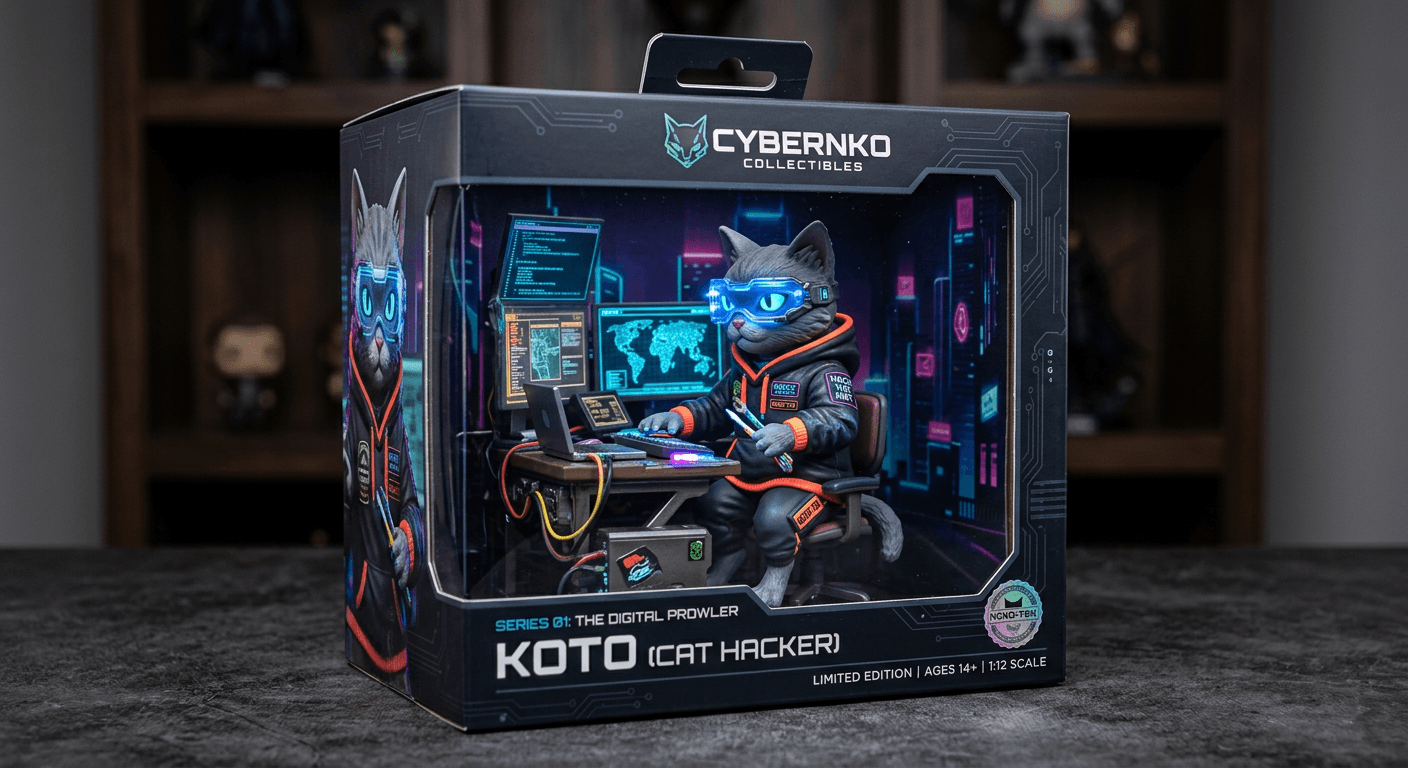
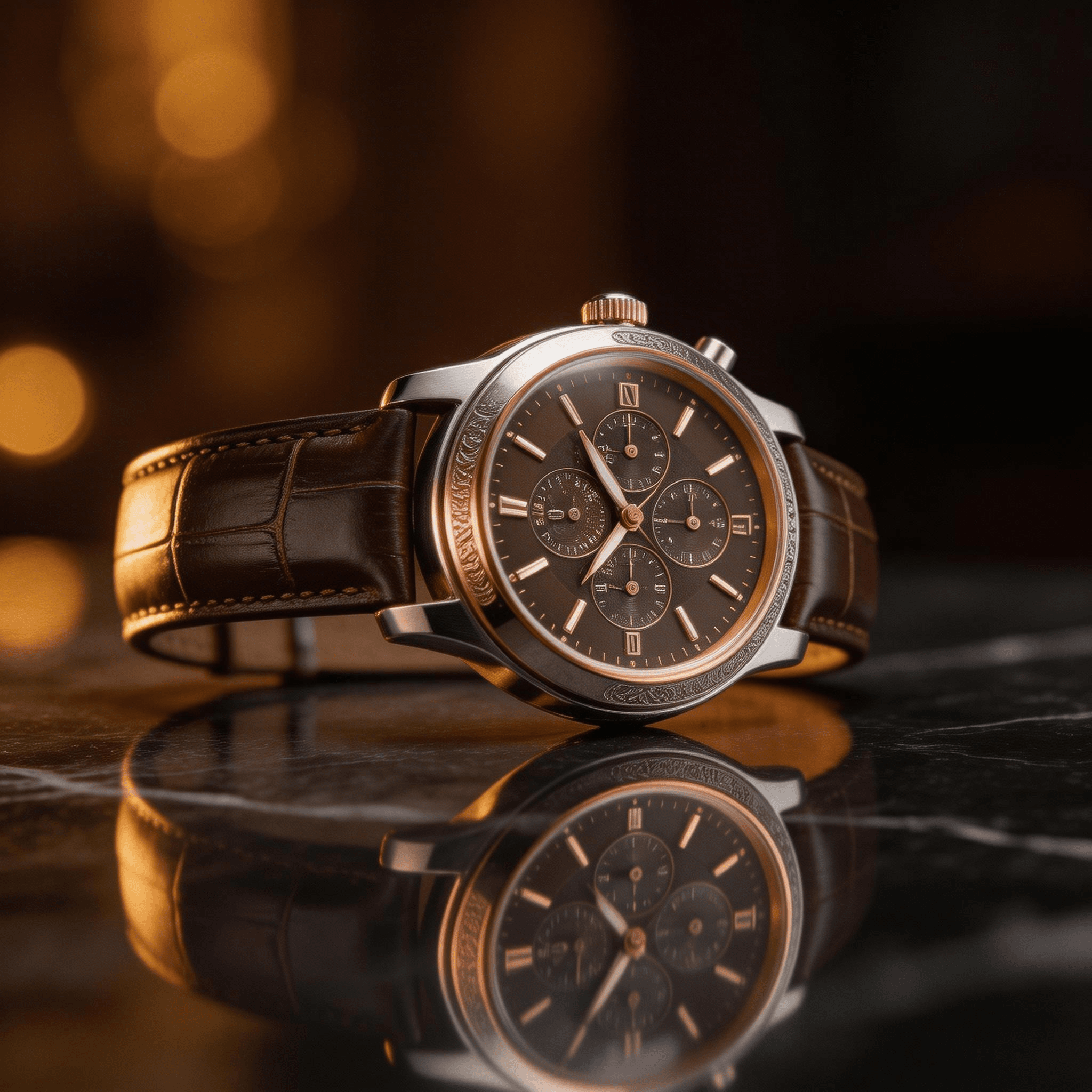
Here are examples of what reference-aware image models can produce:

What Counts as AI Image Editing (2026)
AI image editing now includes more than simple inpainting. Reference-image models (often called "Image-to-Image" or "Canny/Depth-guided generation") can restyle, reframe, and extend an image from one API call.
- Style transfer: Apply the look of one image to a new subject.
- Character consistency: Keep the same character across poses and scenes.
- Product variations: Show one product in new settings or lighting.
- Brand-consistent generation: Match one visual identity across a batch.
- Text Integration: Render precise, high-fidelity text directly onto images (Unique to GPT Image 2).
The API pattern is simple. Send a prompt and one reference image. Get back an image that follows both.
How Reference-Image Editing Works Under the Hood
The model takes two inputs. One is the prompt. The other is the reference image. It encodes both, then generates a new image with the reference acting as a conditioning signal. The prompt tells it what to change. The reference tells it what visual anchors to keep.
Adherence is not fixed. Some models stay close to facial features, silhouette, palette, or material cues. Others treat the reference more loosely and use it as guidance. The result depends on the model, the prompt, and how specific the source image is.
These systems do not copy pixels line by line. They preserve high-level structure and recognizable traits. They still regenerate texture, lighting, background detail, and small local shapes. That is why a clean reference helps. It gives the model a stable target.
The Complete Comparison Table
| Model | Developer | Price/Image | Max Refs | Consistency | Best For |
| GPT Image 2 | OpenAI | ~usd0.01-0.41/pic | 10 image | Elite | Complex logic, text rendering, spatial reasoning |
| Flux 2 Pro | Black Forest | USD0.03-0.05 | 1 image | Strong | Brand-consistent generation, product variants |
| Nano Banana 2 | USD0.08-0.16 | 14 image | Excellent | Character series, stylized variations, 4K detail | |
| Seedream v5.0 Lite | ByteDance | USD0.032 | 14 image | Good | High-volume variant production, speed |
| Imagen 4 Ultra | Google DeepMind | USD0.06 | Text only | N/A | Premium hero images (no reference input) |
| Z-Image Turbo | Z-AI | USD0.01 | Text only | N/A | Speed-first generation (no reference input) |
Atlas Cloud gives you one API key for all of them. You switch models by changing one parameter.
Rankings by Use Case
Best for Complex Reasoning & Text: GPT Image 2
GPT Image 2 is the most intelligent model in the lineup. Because it utilizes a "thinking" latent space, it can reason through complex spatial instructions and render perfect typography.
Scenario: You need to change a background but keep a specific perfume bottle intact while adding a legible "520 Limited Edition" label in a specific font.
Best for Character Consistency: Nano Banana 2
Nano Banana 2 is the best pick for recurring characters. It keeps facial features, clothing, and accessories stable across new scenes.
That makes it useful for story content, mascots, avatars, and merchandise mockups. Nano Banana 2 is priced as a premium editing model at USD0.08 per image at 1K, USD0.12 at 2K, and USD0.16 at 4K.
Best for Brand-Consistent Production: Flux 2 Pro
Flux 2 Pro is the safest default for brand work. Give it a strong reference image and it holds onto color, lighting, and visual tone across many outputs.
Best for High-Volume Variants: Seedream v5.0 Lite
Seedream v5.0 Lite fits large batches. It is fast enough for hundreds of variants and cheap enough to use at scale.
Seedream v5.0 Lite works well for product variations, lifestyle scenes, and A/B test assets.
Best for Maximum Quality (No Reference): Imagen 4 Ultra
Imagen 4 Ultra does not take a reference image. Use Imagen 4 Ultra when you need a hero image and do not need reference control.
Individual Model Breakdowns
GPT Image 2
Model ID: openai/gpt-image-2/edit
Price: Tiered (Low/High res)
Use it for: Precise instruction following.
Example Prompt: Same product as reference, but place it on a marble counter. Add the text "Maison Francis Kurkdjian" on the wall behind it in elegant gold letters.
Nano Banana 2
Model ID: google/nano-banana-2/edit
Price: USD0.08 per image at 1K, USD0.12 at 2K, USD0.16 at 4K
Reference image support: Yes, 1 image
Max resolution: 4K
Nano Banana 2 is built for identity consistency. It keeps the same character readable across many poses, outfits, and scenes.
Example prompt: `same fox mascot as the reference, waving in a school hallway, red backpack, clean children's book style`
Example prompt: `same anime barista from the reference, night cafe scene, pouring coffee, warm neon lighting, keep face and outfit design`
Use it for:
- Storytelling content: Reuse one character across many scenes
- Merchandise mockups: Place one character on shirts, mugs, posters, or packaging
- Avatar variations: Keep one avatar consistent across styles and expressions
- Game asset prototypes: Test poses, outfits, and stances from one concept image
A 100-image pack costs USD8 at the 1K tier. Use it when consistency matters more than lowest cost.
Read more in the Nano Banana 2 guide and the Nano Banana 2 prompts guide.
Seedream v5.0 Lite
Model ID: bytedance/seedream-v5.0-lite/edit
Price: USD0.032 per image
Reference image support: Yes, 1 image
Max resolution: 4704x2016
Seedream v5.0 Lite is a batch model. It works best when you need many useful outputs fast.
Example prompt: `same running shoe from the reference on a city sidewalk, athletic campaign look, hard daylight, sharp retail detail`
Example prompt: `same bottled drink in a picnic scene, summer palette, friends in soft focus background, ad-ready composition`
Use it for:
- Product photography variants -- same product, new settings or lighting
- Lifestyle scene variations -- same concept, different subjects or seasons
- Localized content batches -- same campaign idea, different regional styles
- A/B test asset generation -- many versions of one core image
Read more in the Seedream v5.0 Lite guide.
API Access: Editing with Reference Images
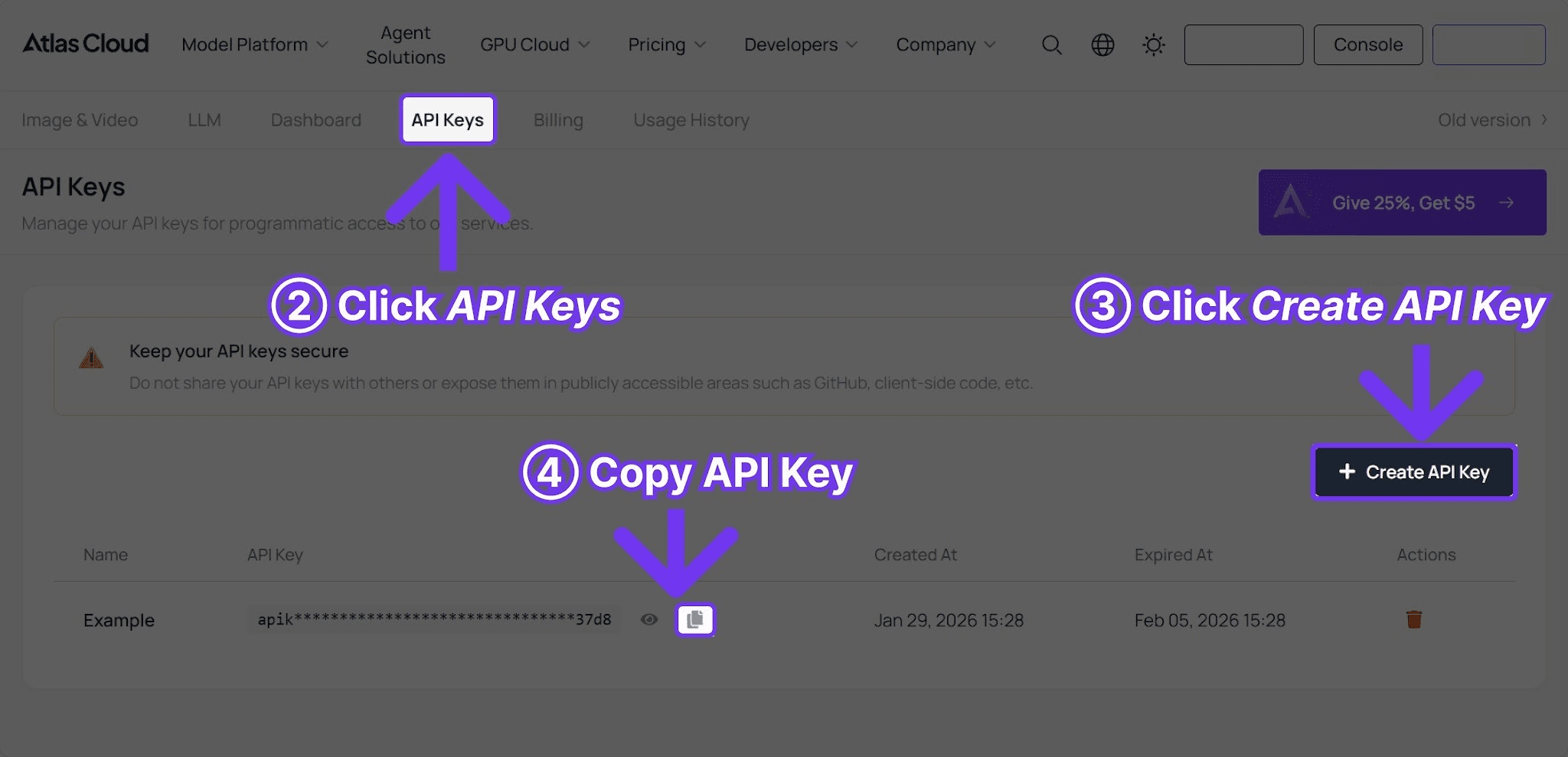
The workflow is the same across all three editing models. Sign up at Atlas Cloud and create an API key.
The Python pattern is the same across models:
plaintext1```python 2import requests 3import time 4 5 6API_KEY = "your-atlas-cloud-api-key" 7BASE_URL = "https://api.atlascloud.ai/api/v1" 8 9 10# Generate image with a reference -- works the same for Flux 2 Pro, 11# Nano Banana 2, and Seedream v5.0 Lite 12response = requests.post( 13 f"{BASE_URL}/model/generateImage", 14 headers={ 15 "Authorization": f"Bearer {API_KEY}", 16 "Content-Type": "application/json" 17 }, 18 json={ 19 "model": "black-forest-labs/flux-2-pro/text-to-image", 20 "prompt": "the same product photographed in a sunlit kitchen scene, morning light, cozy lifestyle aesthetic", 21 "reference_image_url": "https://your-cdn.com/product-hero.jpg", 22 "width": 1024, 23 "height": 1024 24 } 25) 26 27 28result = response.json() 29 30 31# Poll for results 32while True: 33 status = requests.get( 34 f"{BASE_URL}/model/prediction/{result['request_id']}/get", 35 headers={"Authorization": f"Bearer {API_KEY}"} 36 ).json() 37 if status["status"] == "completed": 38 print(f"Image: {status['output']['image_url']}") 39 break 40 time.sleep(3) 41```
To switch models, change the `model` field. The reference image parameter stays the same. The polling pattern stays the same. The response shape stays the same.
Practical Workflow Patterns
Pattern 1: The Brand Asset Pipeline (Flux 2 Pro)
A brand needs 50 social media images per week in one visual style.
- Solution: Use Flux 2 Pro. It holds onto color, lighting, and material textures (like glass or silk) across many outputs.
- Cost: 50 images x USD 0.05 = USD 2.50 per week.
Pattern 2: The Character Library (Nano Banana 2)
A creator needs one mascot in 100 different scenes for an app.
- Solution: Use Nano Banana 2. It keeps facial features and outfits stable across new poses better than any other public API.
- Cost: 100 images x USD 0.08 = USD 8.00 total.
Pattern 3: The Logical & Text-Heavy Edit (GPT Image 2)
A campaign requires specific text on a product or complex spatial logic (e.g., "Place the bottle behind the flowers, not in front").
- Solution: Use GPT Image 2. Its "Reasoning Engine" ensures text like "OUD velvet mood" is spelled correctly and placed logically in the scene.
- Cost: 100 images x USD 0.053 (Medium Tier) = USD 5.30 total.
Pattern 4: The Variant Batch (Seedream v5.0 Lite)
An e-commerce team needs 500 lifestyle variants of one product photo for A/B testing.
- Solution: Use Seedream v5.0 Lite. It is fast enough for massive batches and cheap enough to use at scale.
- Cost: 500 images x USD 0.032 = USD 16.00.
When NOT to Use Reference-Image Editing
- Pixel-perfect inpainting: Use dedicated inpainting tools if you only need to change a tiny local area (like a blemish) without touching the rest of the image.
- Single-pixel color matching: AI lighting can shift hex codes slightly. Use post-processing for strict brand color compliance.
- Simple background removal: If you just need a white background, use a background-removal tool. Using GPT Image 2 for this would be a waste of its reasoning power and budget.
Frequently Asked Questions
Which model has the best character consistency?
Nano Banana 2. It is purpose-built for identity preservation. However, GPT Image 2 is better if the character needs to interact with text or complex machinery.
Can I use multiple reference images at once?
Currently, most models on Atlas Cloud accept one reference image per request. For style mixing, it is best to generate a single "composite" reference first.
How does GPT Image 2 differ from the others?
It doesn't just "copy" the style; it understands the contents. It knows that a "perfume bottle" is made of glass and will adjust reflections logically when you change the background.
Verdict
- Choose GPT Image 2 if you need the AI to "understand" and "read/write" within the image.
- Choose Flux 2 Pro for the best aesthetic quality for luxury brand work.
- Choose Nano Banana 2 for character and IP consistency.
- Choose Seedream v5.0 Lite for mass-producing thousands of variants at the lowest cost.
Atlas Cloud makes it easy to test more than one model. Use one API key, keep one billing system, and switch models with a parameter change.
────────────────────────────────────────────────────────────





