Digital marketing success is no longer dependent on a "big idea." The real challenge is now execution. Previously, growing your video output meant spending more money. You had to hire extra editors, buy better gear, and lose more time.
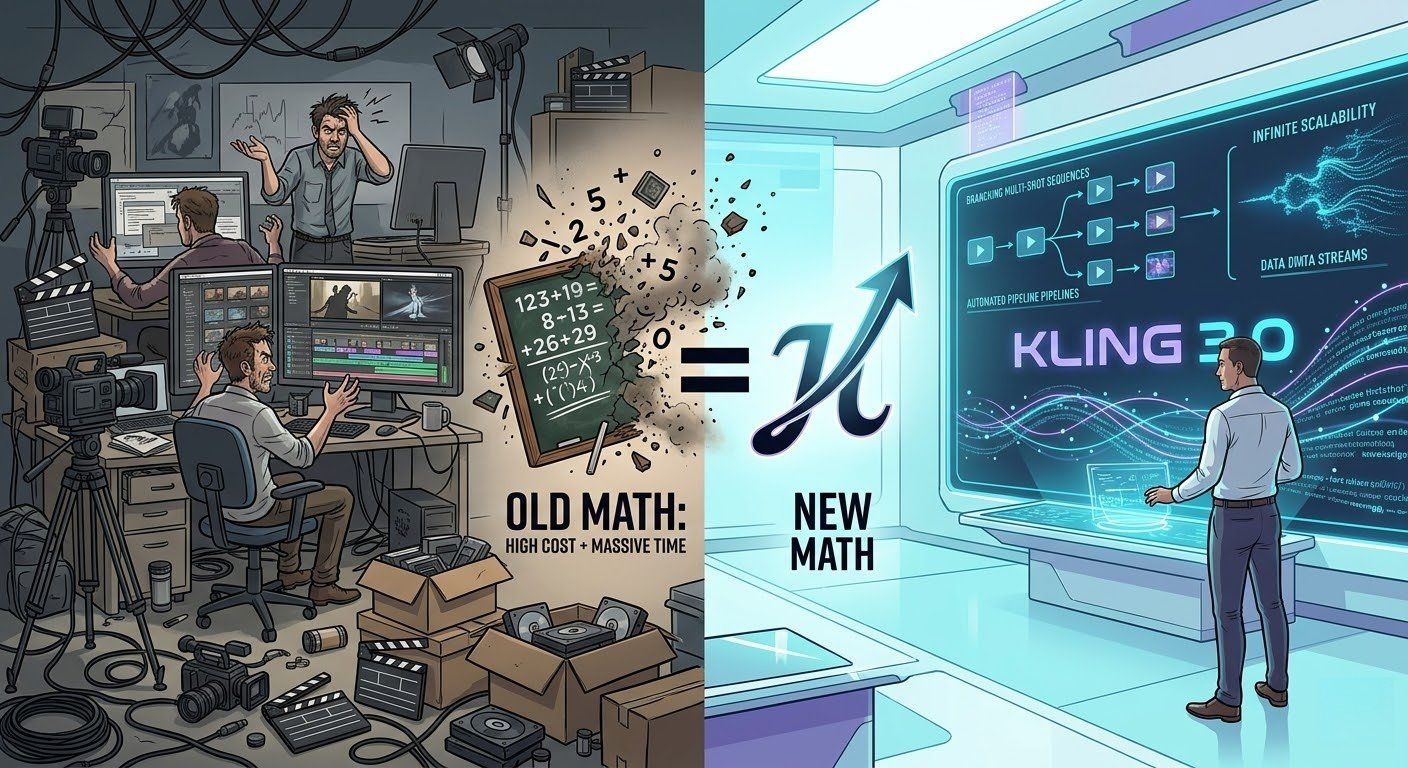
The release of Kling 3.0 has fundamentally shifted this math. By moving beyond "one-off clips" to a unified, multi-shot creative engine, Kling 3.0 allows enterprises to treat video production like software: automated, iterative, and infinitely scalable.
Designing for Growth: Creating AI Video Workflows
In today’s digital landscape, producing a single, high-quality AI video clip is no longer a technical feat. With the current generation of generative models, almost anyone can type a prompt and receive a usable ten-second visual. However, for growing companies and busy marketing teams, a single clip is just a drop in the ocean. The real challenge—the one that separates industry leaders from the rest—is shifting from manual "one-off" creations to building a robust system that can output hundreds of professional videos every single day.
The Shift from Creation to Systems
Managing a brand isn't just about finding one cool visual. You need assets you can actually rely on. To grow, you must have a workflow that handles the hard stuff for you. You don't want an editor spending hours on every single frame. Instead, use AI as a fast engine to power your work. The goal is to create a "content pipeline" where data goes in one end and finished, brand-ready video comes out the other.
Why Scaling is Harder Than It Looks
Moving from one video to one hundred requires solving three major problems:
- Brand Consistency: If the AI changes your logo colors or alters your spokesperson’s face between shots, the video is useless. High-growth systems use "identity-locking" to ensure every frame looks like it belongs to your company.
- Localization at Speed: To grow globally, you can’t just translate text. You need your videos to feel local. This means native-sounding audio, culturally relevant backgrounds, and accurate lip-syncing for different languages—all generated simultaneously.
- Personalization: People today just skip over boring ads. A good workflow lets you change products or names for different groups easily. You don't have to start the whole design over from zero every time.
Setting Up Your System
Companies are quitting web-browser tools to get this kind of output. Instead, they use API links to get the job done. By plugging video models right into their current CMS, teams can skip the boring parts of the work. This lets creative people stop acting like robots on an assembly line. They can finally act like real directors instead.
The real goal isn't just making a single clip anymore. It is about fixing the system that builds them. The price of a video reduces from hundreds of dollars to a few cents because to this change in focus. In the same time it used to take to finish one storyboard, you can test thousands of new creative ideas.
Key Tips for Scaling
- Automate the Routine: Use AI to take the boring parts. Let it handle minor color tweaks, subtitles, and resizing.
- Sync Your Assets: Put all your brand rules and "look-and-feel" locks in one spot. This stops the AI from guessing your style.
- Move Fast: Success these days is about how quickly you can test and ship. It isn't just about how polished one single file looks.
The Case Study: How Atlas Cloud Scaled Video Production by 10x
Atlas Cloud, a leader in high-performance AI infrastructure, recently integrated Kling 3.0 into their creative pipeline to solve a common enterprise problem: the need for hundreds of high-quality, localized product demos and social ads without a Hollywood budget. To achieve this, they leveraged their own position as a one-stop API platform, demonstrating how Enterprise AI video integration can be streamlined when all tools are centralized.
The Advantage of a One-Stop Platform
Setting up AI video systems is a mess because everything is so scattered. It's a huge pain for developers. You're stuck juggling a bunch of different API keys and billing accounts just to get one thing done. You end up jumping between GPT-4o for your scripts, Flux for the images, and then finally Kling for the video itself.
Atlas Cloud solves this by providing unified access to over 300 AI models through a single endpoint. This "one-stop" approach offers three critical advantages for businesses:
- Unified Billing & Keys: A single API key manages everything from text-to-video to high-end LLMs, simplifying financial auditing.
- OpenAI Compatibility: The platform's infrastructure is built on OpenAI-compatible patterns, meaning teams can switch from text models to video generation with minimal code changes.
- Elastic Scaling: Atlas Cloud’s infrastructure provides dedicated hardware resources, ensuring that Batch processing for AI videos doesn't experience "queue lag" during high-volume campaigns.
How to Use Kling 3.0 via Atlas Cloud
The transition from concept to a 10x production scale follows a clear, four-step workflow on the Atlas Cloud platform:
-
Go to the Console: To start, just log in to the Atlas Cloud Console. From there, you can look through all the Kling 3.0 models. You will see both the Standard (Std) and the Omni (O3) versions ready to use.
-
Obtain the API Key: Within the "API Keys" section, developers generate a unique key. This single key provides the authentication needed for the entire multimodal pipeline.
-
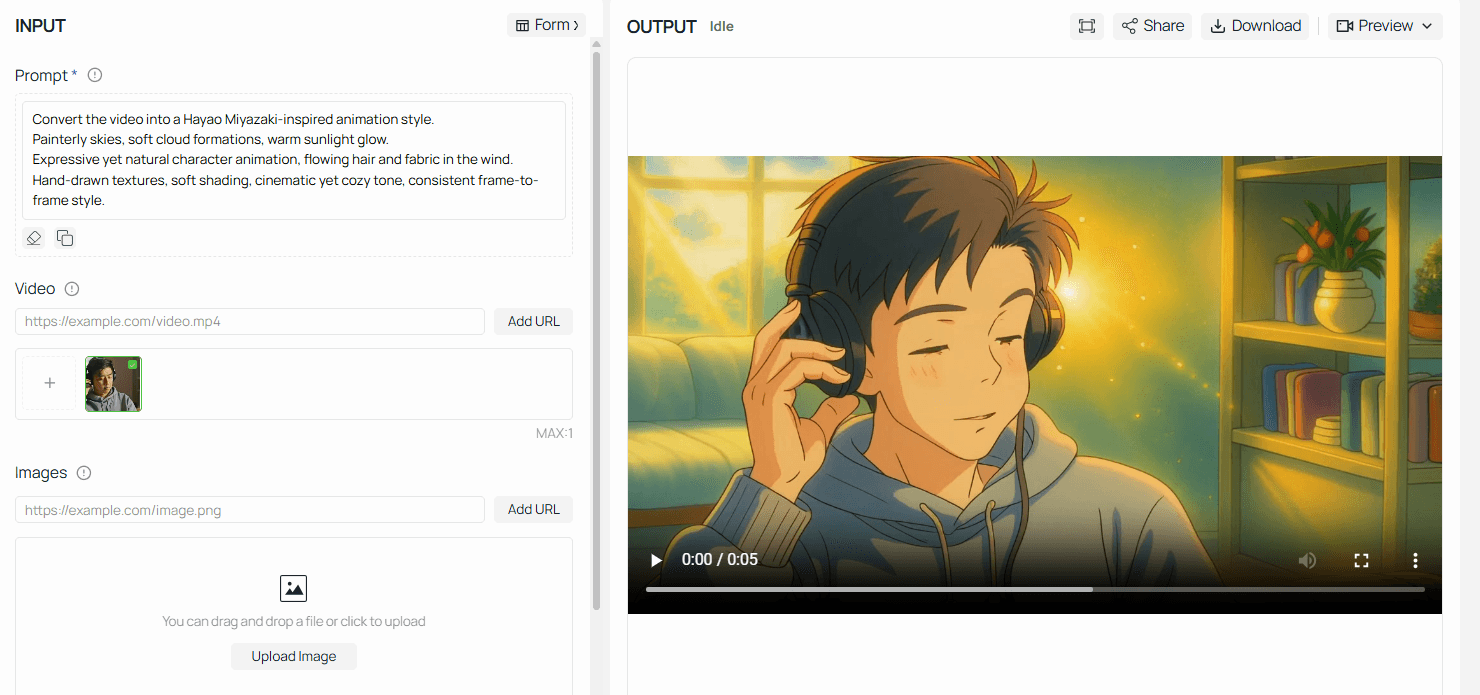
Prompt Testing in the Playground: Before writing a single line of code, creative teams use the Atlas Cloud Playground. This visual interface allows them to test Kling 3.0 parameters—such as resolution, frame rate, and "Motion Brush" settings—to ensure the visual output matches the brand’s aesthetic.
- Scaling with the "Guidances" Array: For mass production, developers use the API to send a guidances array. This powerful feature allows for a digital storyboard where up to 6 distinct shots (camera angles) can be defined in a single request, resulting in a continuous, 15-second cinematic sequence.
plaintext1import requests 2import time 3 4# Step 1: Start video generation 5generate_url = "https://api.atlascloud.ai/api/v1/model/generateVideo" 6headers = { 7 "Content-Type": "application/json", 8 "Authorization": "Bearer $ATLASCLOUD_API_KEY" 9} 10data = { 11 "model": "kwaivgi/kling-video-o3-std/reference-to-video", 12 "aspect_ratio": "16:9", 13 "duration": 5, 14 "images": [], 15 "keep_original_sound": True, 16 "prompt": "Convert the video into a Hayao Miyazaki-inspired animation style.\nPainterly skies, soft cloud formations, warm sunlight glow.\nExpressive yet natural character animation, flowing hair and fabric in the wind.\nHand-drawn textures, soft shading, cinematic yet cozy tone, consistent frame-to-frame style.", 17 "sound": False, 18 "video": "https://static.atlascloud.ai/media/videos/27a77b2e7267df7cd74810be4ee54357.mp4" 19} 20 21generate_response = requests.post(generate_url, headers=headers, json=data) 22generate_result = generate_response.json() 23prediction_id = generate_result["data"]["id"] 24 25# Step 2: Poll for result 26poll_url = f"https://api.atlascloud.ai/api/v1/model/prediction/{prediction_id}" 27 28def check_status(): 29 while True: 30 response = requests.get(poll_url, headers={"Authorization": "Bearer $ATLASCLOUD_API_KEY"}) 31 result = response.json() 32 33 if result["data"]["status"] in ["completed", "succeeded"]: 34 print("Generated video:", result["data"]["outputs"][0]) 35 return result["data"]["outputs"][0] 36 elif result["data"]["status"] == "failed": 37 raise Exception(result["data"]["error"] or "Generation failed") 38 else: 39 # Still processing, wait 2 seconds 40 time.sleep(2) 41 42video_url = check_status()
The Result: By consolidating these tools into a single pipeline, Atlas Cloud reduced their cost-per-video from roughly $45.00 (freelance editing) to approximately $0.085-$0.306 per second of output—a 90% reduction in production overhead while increasing total output by 1,000%.
Traditional Production vs. Kling 3.0 Integrated Pipeline
| Metric | Traditional Freelance/Studio | Kling 3.0 via Atlas Cloud |
| Cost per Video | ~$45.00 | ~$2.40 |
| Production Time | 3–5 Days | 15–30 Minutes |
| Scalability | Linear (Limited by Human Hours) | Exponential (Limited by GPU Parallelism) |
| Consistency | High (Manual) | High (Native Identity-Lock) |
Note: For the latest pricing, please visit the official Atlas Cloud website
Pro Tips: Key Parameter Reference
To maximize your ROI and ensure successful batch processing for AI videos, keep these technical constraints in mind:
| Parameter | Type | Description |
| mode | string | Use std for rapid testing or pro for 1080p/2K marketing assets. |
| multi_shot | boolean | Must be true to enable the multi_prompt array. |
| image_list | array | Supports up to 4 reference images (Front, Profile, Detail) to lock in character/product identity. |
| motion_has_audio | boolean | Enables Kling 3.0’s native audio engine for synchronized soundscapes and lip-syncing. |
| callback_url | string | Highly recommended. Prevents your server from needing to poll the API repeatedly. |
Planning for Your Business
Moving to automated video marketing takes more than just an API key. It really changes how your creative teams work every day.
- Directing vs. Hard Labor: The job of a video editor is changing. Instead of spending hours fixing colors, staff now act like creative directors. They focus on the data and images that guide the Kling 3.0 model to get the right look.
- Image-to-Video Precision: By using the Image-to-Video (I2V) capabilities, brands can upload high-resolution product photos as a "base." This ensures that the AI doesn't "hallucinate" product features, but rather animates the actual asset.
- Iterative Testing: Because the cost of production has dropped to cents, brands can now A/B test video ads with the same frequency they test search headlines, finding the highest-converting visuals in real-time.
Kling 3.0 vs. The Competition: A Commercial Comparison
Choosing the right model is critical for ROI. For businesses deciding where to invest their AI credits, the choice often comes down to the "Director's Mind" of Kling versus the open-source versatility of Wan 2.6.
Both models now support longer 15-second durations, but they prioritize different strengths in a professional workflow.
| Feature | Kling 3.0 | OpenAI Sora | Wan 2.6 |
| Max Duration | 15s (Multi-shot) | Up to 60s | 15s (Multi-shot) |
| Character Lock | Superior (Video Ref) | High | High (R2V Mode) |
| Visual Style | Hyper-Realistic | Cinematic/Artistic | Stylized / "Director" Logic |
| API / Deployment | Professional SaaS | Restricted / Enterprise | Open-Source / Self-Host |
| Best Use Case | End-to-End Ad Production | Brand Storytelling | Custom Dev Workflows |
You can use Kling 3.0 on cloud platforms like AtlasCloud. This makes it a smart pick for bigger businesses that need high-quality, real-looking videos at scale.
Pricing for Performance
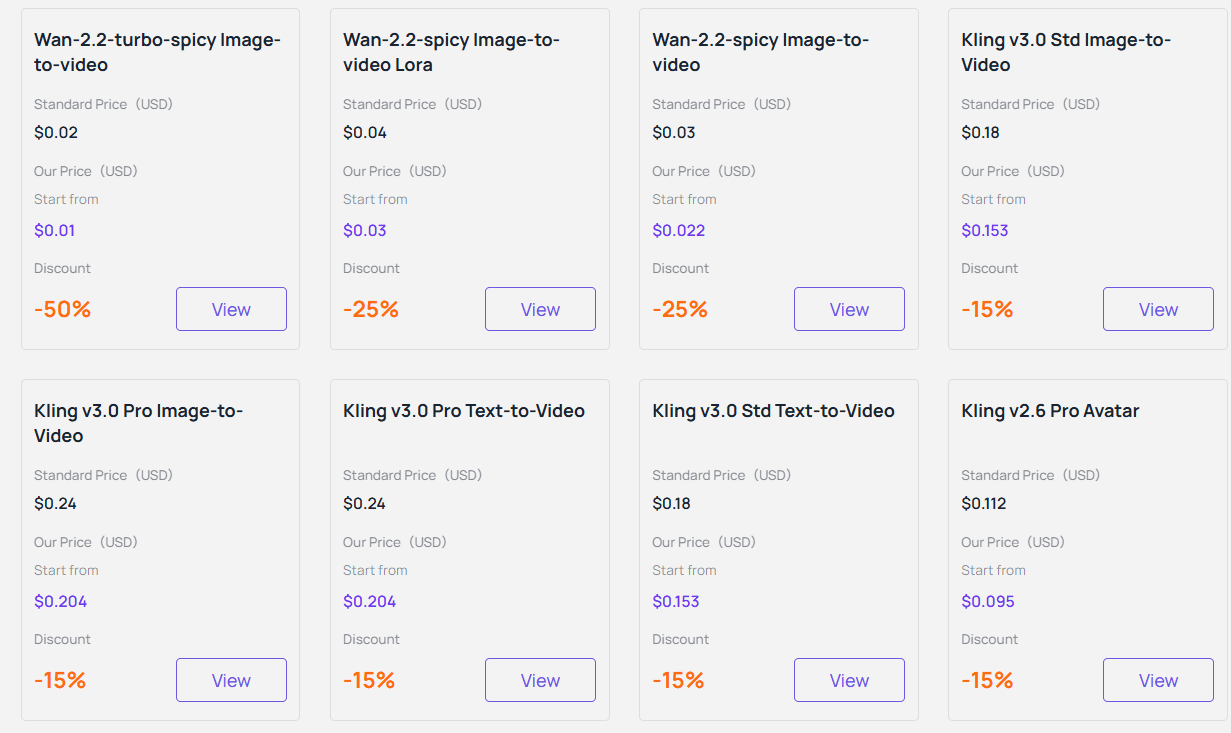
One of the most significant advantages for businesses is the predictability of the Kling 3.0 pricing model. While official API packages can sometimes require large upfront commitments or complex credit systems, third-party providers like Atlas Cloud offer a "no-brainer" alternative for companies building AI video pipelines.
Cloud AI video tools help companies skip the high cost of running their own GPU setups. Instead, businesses only pay for the exact seconds they use. This clear pricing is vital for marketing teams who automate video production. When creating thousands of clips, knowing the exact cost helps keep every project on budget.
Low-Barrier Entry for Enterprise
To facilitate enterprise-level AI video integration, many platforms offer incentives to technical teams, enabling them to benchmark their workflows.
The "pay-per-use" model ensures companies only spend money on videos that actually finish rendering. This makes Kling 3.0 a smart, low-risk option for planning long-term marketing goals.
Is Your Business Ready?
Kling 3.0 has evolved from a fun hobby tool into a serious engine for pro marketers. Today, people lose interest fast, so being able to test new visual hooks quickly is a huge win. If your brand needs to test many ads, create local content for global fans, or build massive product galleries, Kling 3.0 offers the best quality for your money right now.
Technical teams will find this new way of working very easy. By using an automated video API, developers can stop writing manual prompts and start generating videos through code. This change lets one strategist manage thousands of high-end clips. Every video stays on brand and keeps characters looking exactly the same across the board.
Is It Time to Scale?
Before you start a full rollout, check if your brand meets these three signs:
- Volume Needs: Are 10 or more high-quality video versions required every week as part of your social media plan?
- Global Growth: Do you need to make lip-synced, natural-looking videos in Spanish, Chinese, or English?
- Tech Readiness: Is your team prepared to stop using manual tools and start using an API for bulk video creation?
If you said "yes," then you have the right foundation. Kling 3.0 is more than just a way to get better visuals. It turns video production into a process that is as easy to scale as a line of code.
FAQ
How does Kling 3.0 maintain "Character Identity" across different marketing assets?
One of the primary friction points in AI video has been "visual drift"—where a brand mascot or actor’s face changes between clips. Kling 3.0 solves this through its Character Identity 3.0 (or "Subject Binding") engine. Unlike earlier models that interpreted prompts frame-by-frame, Kling 3.0 uses a Unified Spatial Anchor.
By using up to four reference photos—showing the front, side, and 45-degree angles—the model builds the subject as a steady 3D character. This method keeps character changes under 10%. This allows brands to produce hundreds of matching social media ads with the same digital spokesperson while avoiding the high cost of new film shoots.
Can Kling 3.0 handle multi-language video localization natively?
Yes. For businesses operating globally, the Kling 3.0 Omni model is a significant "all-in-one" solution. Traditionally, localization required a three-step process: generating video, translating audio, and using a third-party tool for lip-syncing.
Kling 3.0 combines these steps into one single flow. The automated AI video API now supports synced speech in more than 25 languages. This includes specific regional accents, such as British or American English. The lip-syncing matches the character's small facial movements since the sound and video are created together. This removes the strange, robotic look often found in older AI dubbing methods.
What is the difference between "Standard" and "Professional" API modes?
When building AI video pipelines, choosing the right mode is essential for balancing quality and budget:
- Standard Mode: Optimized for speed and high-volume batch processing. It is ideal for "faceless" YouTube automation, background B-roll, or rapid A/B testing of social media hooks.
- Professional Mode: Built for high-end brand projects. It uses Native 4K diffusion, so pixels are created at high resolution from the very beginning instead of being stretched later. This creates much sharper textures and is the best option for high-quality product videos and "Pro" storyboard scenes.
How do I prevent "hallucinations" in complex commercial motions?
To ensure accuracy in professional environments, Kling 3.0 introduced Motion Control and Negative Prompting. For example, if you are generating a video of a person pouring coffee, you can use "Negative Prompts" to explicitly forbid "extra limbs," "morphing cup," or "flickering steam."
Additionally, the API allows for Start and End Frame Logic. By defining exactly how a scene begins and how it must resolve, businesses can "steer" the AI toward a precise visual outcome, making it much easier to match generated footage with existing brand assets or specific storyboard requirements.





