By 2026, the novelty of "AI-generated video" has faded, replaced by a demand for total visual fidelity. The primary challenge remains the "uncanny valley"—where photo to video AI free tools often suffer from "spatial melting" or light flickering that breaks immersion. For creators, "realism" isn't just an aesthetic; it is the mechanical requirement for professional-grade content.
The "Quick-Pick" Comparison Table
| Tool Name | Realism Score /10 | Free Tier Access | Key Specialty | Best For |
|---|---|---|---|---|
| Wan 2.7 | 9.8 | 10 Credits Daily (1 video) | Kinetic Logic & Physics | Professional B-roll & Realism |
| Runway Gen-4 Turbo | 9.5 | Register to Get 125 Credits | Direct Manipulation | Precise Creative Control |
| Google Veo 3.1 | 9.3 | Daily Creative Lab Stipend | Deep Color & Environment | Cinematic Storytelling |
| Kling 3.0 | 9 | Register to Get 66 Credits | Anatomy Consistency | Fashion & Portraiture |
| Pika Labs | 8.8 | Register to Get 80 Credits | Atmospheric Realism | Weather & Lighting Effects |
| Vidu 2.0 | 8.7 | Register to Get 20 Credits | 3D Spatial Depth | Dolly Zooms & Camera Pans |
| WAN 2.6 | 8.5 | 10 Credits Daily (1 video) | Subtle Micro-Motion | Nature & Backgrounds |
| PixVerse | 8.4 | 60 free Credits Daily | Facial Mapping | Talking Photos & Lip Sync |
| Hailuo 2.3 | 8.2 | Register to receive 300 credits, valid for 3 days | Generation Speed | Rapid Social Prototyping |
| Van 2.6 | 8 | 10 Credits Daily (1 video) | Legacy Consistency | High-Volume Content |
The Big 3: The "Production-Grade" Leaders
The landscape of photo to video AI free tools has shifted toward "Kinetic Logic," where AI understands gravity and light before rendering pixels. These three models currently stand as the top ranked AI video models for professional-grade output.
Wan 2.7 Image-to-Video (The Physics King)
Wan 2.7 is now a top ranked AI video models in the Qwen lineup for 2026. It is the most lifelike AI video tool available right now. This version is a major step up from Wan 2.6. It offers much sharper details and smoother movement than previous models.
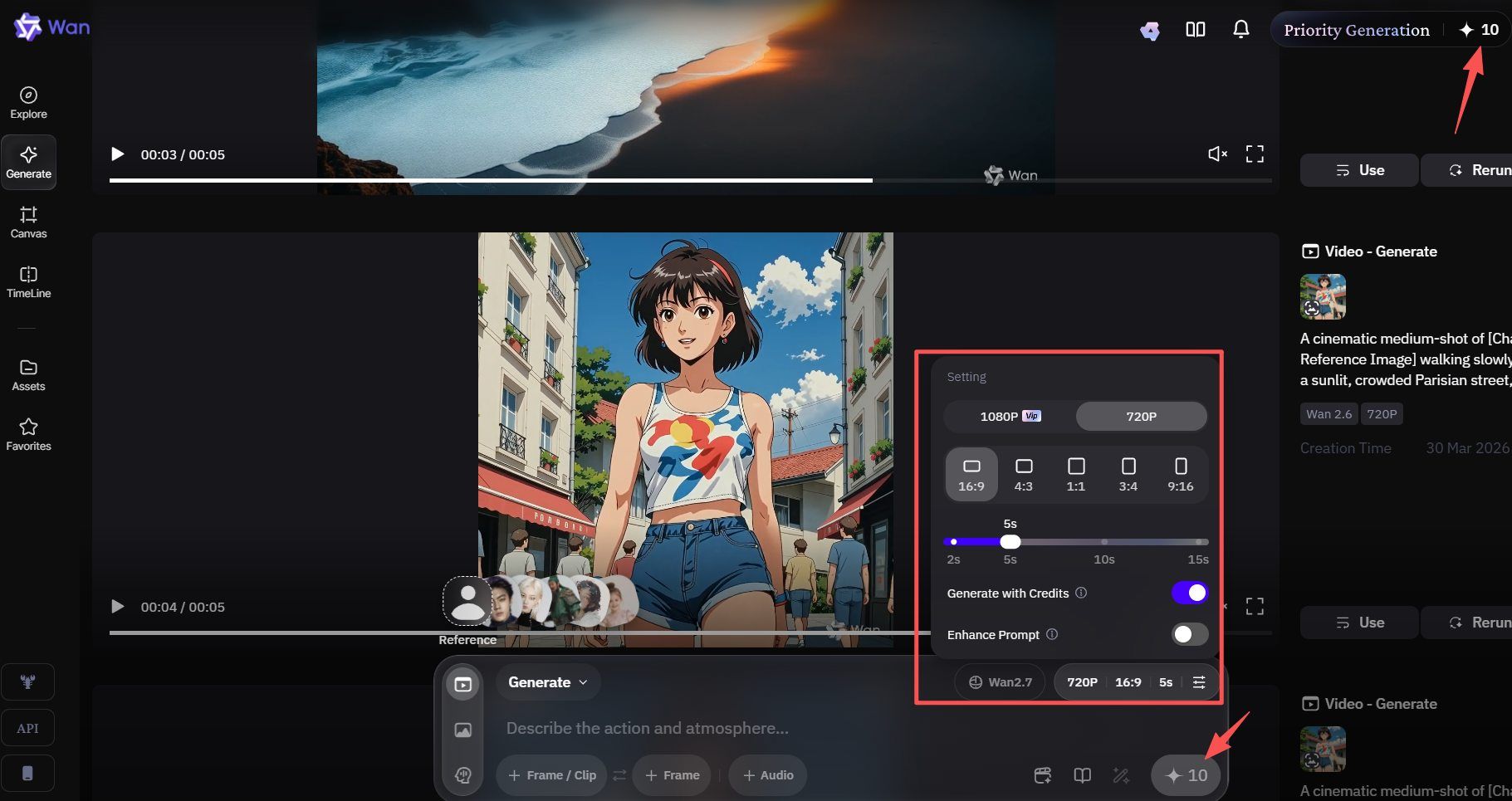
To save myself the trouble of removing watermarks, I used Atlas Cloud's WAN 2.7 to directly generate a 5-second video, which cost me $0.75.
The Edge: Advanced Synthesis and Control
Wan 2.7 stands out because it handles every part of video creation in one place. It turns still photos into movie-like scenes with ease. Clear 1080P clips with a length of 2 to 15 seconds can be created. However, this model stays sharp and keeps your vision looking exactly right.
Key technical advantages include:
- First-and-Last Frame Control: This allows creators to define the start and end points of a scene, ensuring a logical and fluid transition.
- Multi-Reference Support: This tool uses up to five clips at once. It helps keep your characters and style looking the same in every shot.
- Instruction-Based Editing: You can tweak your videos by just typing simple notes. It acts more like a creative buddy than a basic machine.
- 3x3 Grid Synthesis: Use this special mode to build quick prototypes. It lets you test many different versions of a scene side by side.
Performance Metrics
Wan 2.7 consistently outperforms comparable models like Jimeng in audio synchronization and environmental physics.
| Feature | Wan 2.7 Capability |
|---|---|
| Max Resolution | 1080P High-Definition |
| Clip Duration | 2 to 15 Seconds |
| Input Flexibility | Real-person images & multi-references |
| Consistency Engine | Physics-aware motion logic |
Accessibility and Free Tier
For those seeking a photo to video AI free solution, Wan 2.7 offers a predictable and sustainable entry point. This site uses a daily gift setup. You just log in and hit "Check In" to get 10 free credits. It usually takes 10 credits to make one high-end video. This means you can create one pro-level clip every single day for free. This model makes it the premier choice for digital storytellers and boutique marketing agencies looking to integrate high-end video into their content strategy without immediate overhead.
Runway Gen-4 Turbo (The Precision Tool)
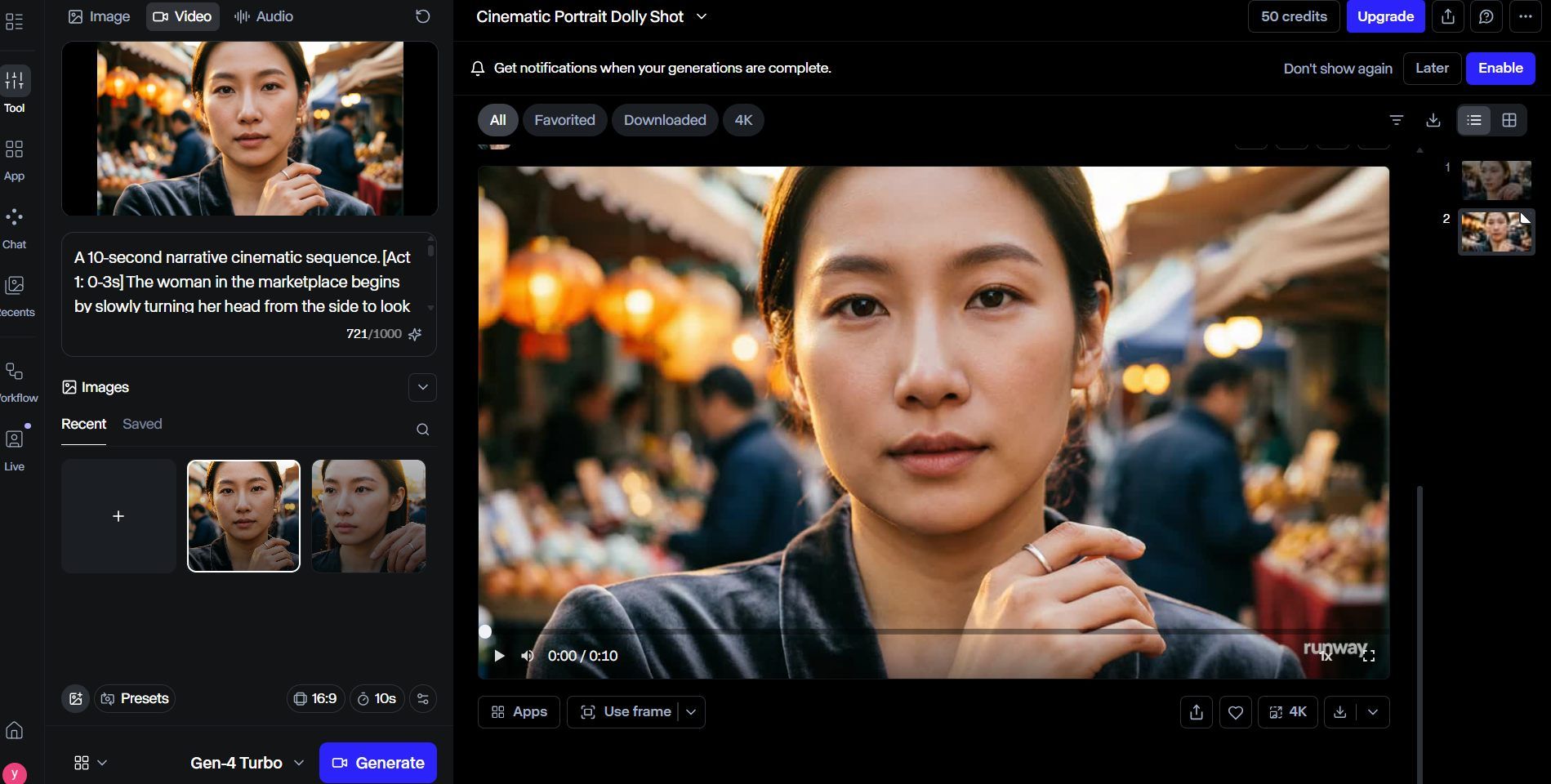
Runway Gen-4 Turbo is a great pick when you need fast results that still look amazing. People rank it as a leading video tool for 2026. It was built for pros who want to work quickly. You can make many versions of a project and still keep that high-end, polished look for every clip.
The Edge: Speed Meets Control
The "Turbo" model is built for speed. It turns your images into 10-second clips in roughly half a minute. Many free video tools lose quality when they speed things up, but not this one. It keeps the high-quality textures found in the standard Gen-4 version. The most useful tool here is Direct Manipulation. It gives you hands-on control over your photo. You simply drag areas of the image to tell the AI exactly how to move them. This turns basic pans, tilts, or zooms into deliberate, professional-looking camera work rather than just random motion.
Performance at a Glance
To help you understand how Gen-4 Turbo compares to other models, we have analyzed its key performance metrics based on our 2026 audit:
| Metric | Gen-4 Turbo Performance |
|---|---|
| Generation Speed | ~30 seconds (10s clip) |
| Realism Focus | High-fidelity texture retention |
| Motion Control | High (Direct Manipulation) |
| Best For | Social media ads, rapid prototyping |
Accessibility and Free Tier
Runway provides an accessible entry point for those looking to explore the most realistic AI video generator 2026 has to offer. New accounts typically receive 125 non-renewable credits, allowing for extensive testing of the model’s capabilities. While this operates at a lower priority during peak traffic hours, it remains a robust way to produce high-quality AI video content at zero cost.
Whether you are a social media creator needing to animate static product shots or a filmmaker testing narrative concepts, Gen-4 Turbo provides the essential "creative-first" workflow that defines modern video generation.![]
Google Veo 3.1 (The Cinematic Standard)
As the most capable creative model in the Google DeepMind ecosystem, Google Veo 3.1 has solidified its position as a top ranked AI video model by prioritizing artistic texture and narrative depth. Unlike tools that focus solely on pixel-matching, Veo 3.1 is engineered for filmmakers who require high-fidelity "Deep Color" rendering and a natural filmic grain that mimics traditional celluloid.
The Vibe: Environmental Storytelling
Veo 3.1 excels at complex camera movements—such as sweeping cinematic pans and tracking shots—that maintain consistent lighting and perspective. Many experts call this the top AI video tool of 2026 for nature scenes. Its custom "Physics-Aware" engine is the secret. This system manages lighting, shadows, and natural motion with incredible detail. It knows exactly how fabric moves in a breeze or how sunlight hits a lens.
The tool also builds in 48kHz audio during the creation process. You can export 1080p or 4K videos that feature crisp, perfectly matched soundscapes. It makes high-quality video production fast and simple.
Performance Analysis: Cinematic vs. Fast Modes
Based on the latest benchmarks from Google AI Studio, users can toggle between two distinct generation modes depending on their project needs:
| Feature | Veo 3.1 (Standard) | Veo 3.1 (Fast) |
|---|---|---|
| Max Quality | Ultra-High Fidelity / 4K | Optimized for Speed / 1080p |
| Primary Use | Final Cinematic Production | Rapid Prototyping & Iteration |
| Physics Accuracy | Maximum (Complex simulations) | Standard (Controlled motion) |
| Audio Quality | 48kHz Professional Grade | Standard Stereo |
Free Tier: The Google Creative Lab Stipend
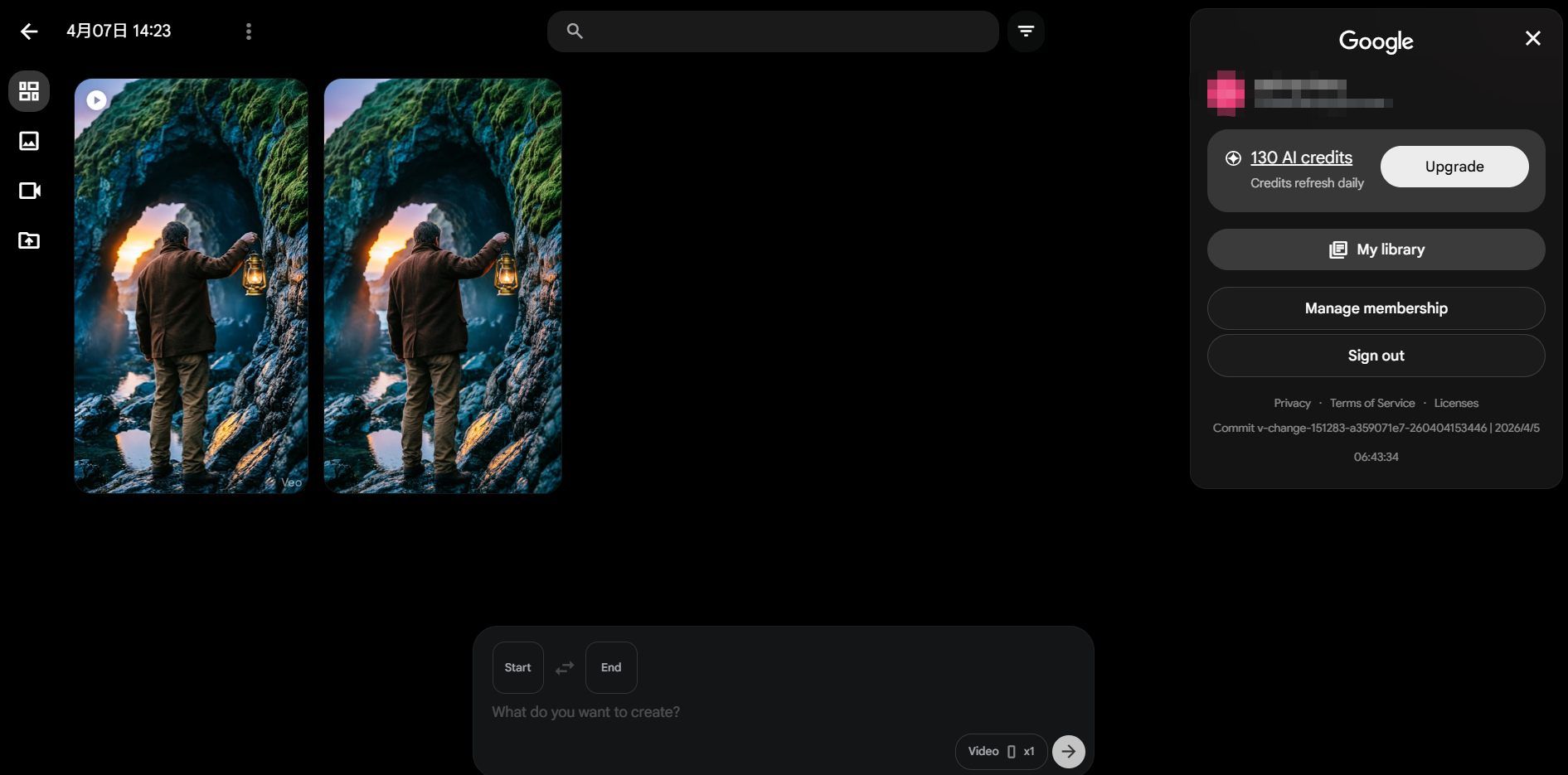
For those searching for a photo to video AI free entry point, Google has integrated Veo 3.1 into the Google Creative Lab and AI Studio. Every personal Google account receives a daily stipend of credits. While the exact quota can fluctuate based on regional demand, users typically receive enough credits to generate several "Fast" mode clips or one high-end "Quality" mode clip every 24 hours.
30 credits daily. The initial login grants a bonus of 100 credits, valid for one month.
The Specialized Contenders (Ranked 4-10)
While the "Big 3" dominate high-end production, several specialized tools have carved out niches by mastering specific visual challenges. These top ranked AI video models offer unique strengths that often surpass general models in their respective categories.
Key Features of Specialized AI Video Tools
| Rank | Tool Name | Core Specialization | Ideal Use Case |
|---|---|---|---|
| 4 | Kling 3.0 | Human Anatomy | Fashion & Portraiture |
| 5 | Pika Labs | Atmospheric Realism | Moody lighting, rain, & fog |
| 6 | Hailuo 2.3 | Generation Speed | Social media prototyping |
| 7 | WAN 2.6 | Subtle Motion | Backgrounds & gentle nature shots |
| 8 | PixVerse | Facial Mapping | Realistic talking photos |
| 9 | Vidu 2.0 | 3D Spatial Depth | Dolly zooms & 3D navigation |
| 10 | Van 2.6 | High-Volume Value | Consistent quality for bulk tasks |
Highlights of the Top Specialized Models
- Kling 3.0: The Anatomy Specialist: Kling 3.0 has gained fame for solving the persistent "extra finger" glitch. Its superior understanding of skeletal constraints makes it the most realistic AI video generator 2026 provides for complex human movements and high-fashion modeling.
- Pika Labs: Master of Atmosphere: For creators seeking "Atmospheric Realism," Pika remains the gold standard. It excels at simulating environmental textures like swirling fog or rain hitting a window, providing a depth of mood that many physics-heavy models miss.
- Hailuo 2.3: Built for Speed: If you need results quickly, this is your best option. It finishes 5-second clips in under half a minute. It is perfect for testing scenes before you spend time on a final render.
- Van 2.6 Image-to-Video: The Van series is a top choice for high-quality video. It uses 3D VAE visuals and Flow Matching for smooth motion. The system uses smart tech to keep costs low and speeds high. It is the best engine for making many high-end videos on a tight budget.
Pro-Tips: How to Squeeze Realism out of a Free Tier
Maximizing a photo to video AI free workflow requires more than just a good base image; it requires an understanding of how 2026’s top-tier engines interpret physics. Even with top ranked AI video models, the difference between a "plastic" look and true realism often lies in the settings.
The "Motion Slider" Secret
A common mistake among beginners is maxing out the motion intensity. In 2026, the most realistic AI video generator models utilize "Kinetic Overdrive" which can lead to warping at high values.
- The Sweet Spot: Setting your motion slider to "3" or "4" mimics natural human movement and subtle environmental shifts.
- Why it Works: Lower values allow the AI to prioritize "Temporal Consistency" over aggressive pixel displacement, preventing the "melting" effect.
Advanced Prompting for 2026
To achieve the title of the best AI for photorealistic humans, you must use technical camera terminology. By using specific cinematography keywords, you force the AI to simulate physical camera hardware.
| Technique | Recommended Keyword | Result |
|---|---|---|
| Motion Blur | "1/50 shutter speed blur" | Natural movement without AI "shimmer." |
| Depth of Field | "f/1.8 aperture bokeh" | Separates subjects from backgrounds realistically. |
| Lighting | "Subsurface scattering" | Ensures skin tones look organic, not like wax. |
Resolution Stacking
Free tiers often export at 720p to save on compute. To hide the "softness" of these exports, use Resolution Stacking. By running your final AI video through a secondary free upscaler like those found in the Google Creative Lab suite, you can reconstruct fine details such as skin pores and fabric textures that were lost in the initial generation.
Troubleshooting: Why Your Video Looks "Fake"
Even when using top ranked AI video models, many creators encounter the dreaded "fake" look, where the video feels like a distorted dream rather than a real-life recording.
The Common Culprit: Global Motion
The biggest problem is "Global Motion." This happens when the AI thinks you want the whole frame to move instead of just your subject. It causes the background to look like it is swimming or bending. That issue ruins the realistic feel right away.
The Fix: Regional Prompting
To ground your video, you must isolate the motion. Most professional workflows now utilize Regional Prompting or "Motion Brushes."
- Lock the Background: Define your background as "static" or "fixed" in your prompt.
- Isolate Subjects: Apply motion specifically to the subject, e.g., "subject walking, background remains static".
- Use Start Frames: Always provide a high-quality static image as a base to help the AI understand the fixed environment.
| Motion Type | Resulting AI Behavior | How to Correct |
|---|---|---|
| Global Motion | Entire scene shifts/warps | Use static base image & regional masks. |
| Subject Motion | Natural, localized movement | Describe subject action precisely. |
Conclusion: Picking Your Realistic Path
The tech behind the most realistic AI video models for 2026 has grown fast. These tools have jumped from simple experiments to real, professional-grade assets.
As you test these out, keep in mind that great results happen through trial and error. Which generator handled the lighting and movement in your photo best? Let me know your thoughts in the comments!
FAQ
Can I generate 4K resolution using "Photo to Video AI Free" tools?
4K will be standard for high-end video models by 2026. Yet, you rarely get it for free without limits. It takes massive computing power to run. To control server traffic, most of free plans limit output to 720p or 1080p.
| Resolution | Availability (Free Tier) | Recommended Use Case |
|---|---|---|
| 720p / 1080p | Standard (Van 2.7, Runway) | Social media, drafting, and prototyping. |
| 4K (Upscaled) | Via "Resolution Stacking" | Hiding free-tier "softness" with external tools. |
| Native 4K | Limited (Veo 3.1 Pro) | Professional cinematic production and large screens. |
Why does my 10-second video flicker more than the short ones?
Flickering, which people call "temporal jitter," happens when the model fails to keep objects consistent. Over a longer time, the AI loses track of its "Identity Anchoring."
- The Cause: AI models often "forget" the initial seed image after 5 seconds, causing textures and facial features to drift.
- The Solution: Use Wan 2.7 for longer sequences, as its architecture is designed for "Action Chaining." By prompting for specific "Temporal Beats" (e.g., Act 1: Look, Act 2: Blink), you provide the anchor points necessary to maintain a stable, flicker-free 10-second render.
How can I achieve the best AI for photorealistic humans in my videos?
Realism in human subjects often fails due to "texture crawling." To fix this, use Kling 3.0 or Van 2.7 with prompting: Include technical terms like "subsurface scattering" and "1/50 shutter blur" to force the AI to mimic real camera hardware.





