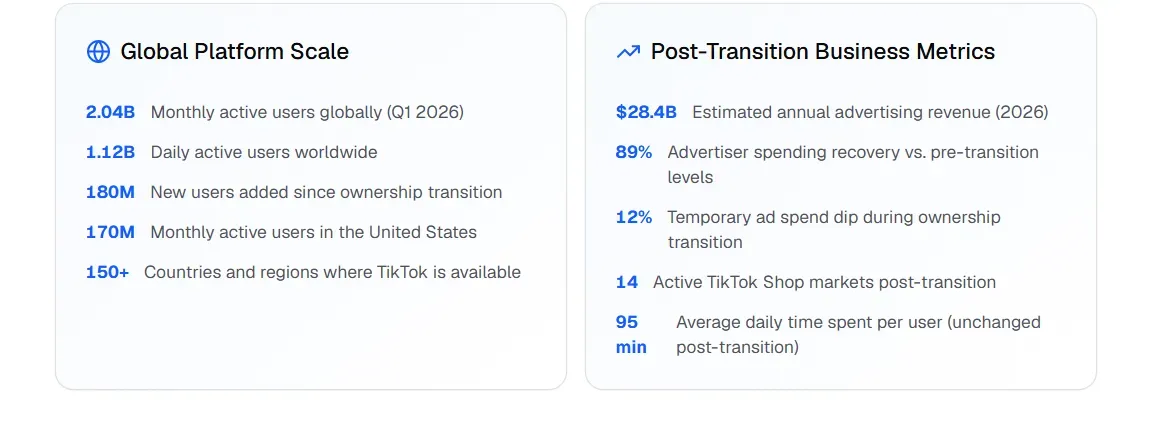
Short videos aren't going away—they are actually blowing up. TikTok now has over 2 billion monthly active users using it every month, and the brands that post the most are the ones making money. The app's system loves it when you share stuff often. It is simpler for the right people to find you if you post more video.
But producing 100+ videos a day manually? That's not a content strategy — it's a full-time staff.
That's where TikTok Video API automation and AI video generation change everything. Tools built on video generation APIs now allow creators and marketers to spin up high-quality short-forms at scale — complete with dynamic text overlays, AI voiceovers, and personalized hooks — without touching a timeline editor.
2026 Trend Alert: AI-driven video creation, auto-captioning, and personalized content variants are now table-stakes for viral video AI strategies.
This guide breaks down exactly how to build an automated TikTok workflow that outputs 100+ videos daily — saving hours while maximizing organic reach.
Your First 100-Video Run Checklist Overview
Before you launch, confirm every layer is operational:
| Layer | Checkpoint |
| Ideation | LLM connected to Creative Center API; 100 scripts generated and deduplicated |
| Generation | Video API configured with unique seed per script; 9:16, 1080×1920 output confirmed |
| Post-Production | Voiceover, dynamic captions, and VFX overlays rendering automatically |
| Audio | Symphony Commercial Audio Library integrated; trending tracks assigned |
| Deployment | Jitter timing active; HITL review dashboard live before publish |
| Safety | Dedicated IPs configured; duplicate proximity scores checked |
Everything on this list is buildable today. The creators who act on it now will have months of compounding algorithmic authority before the next wave of competition catches up.
Understanding TikTok Short-Form Video Structure
Before automating anything, you need to know what a well-built TikTok actually looks like — because scale only works if the template is solid.
Ideal Length and Format
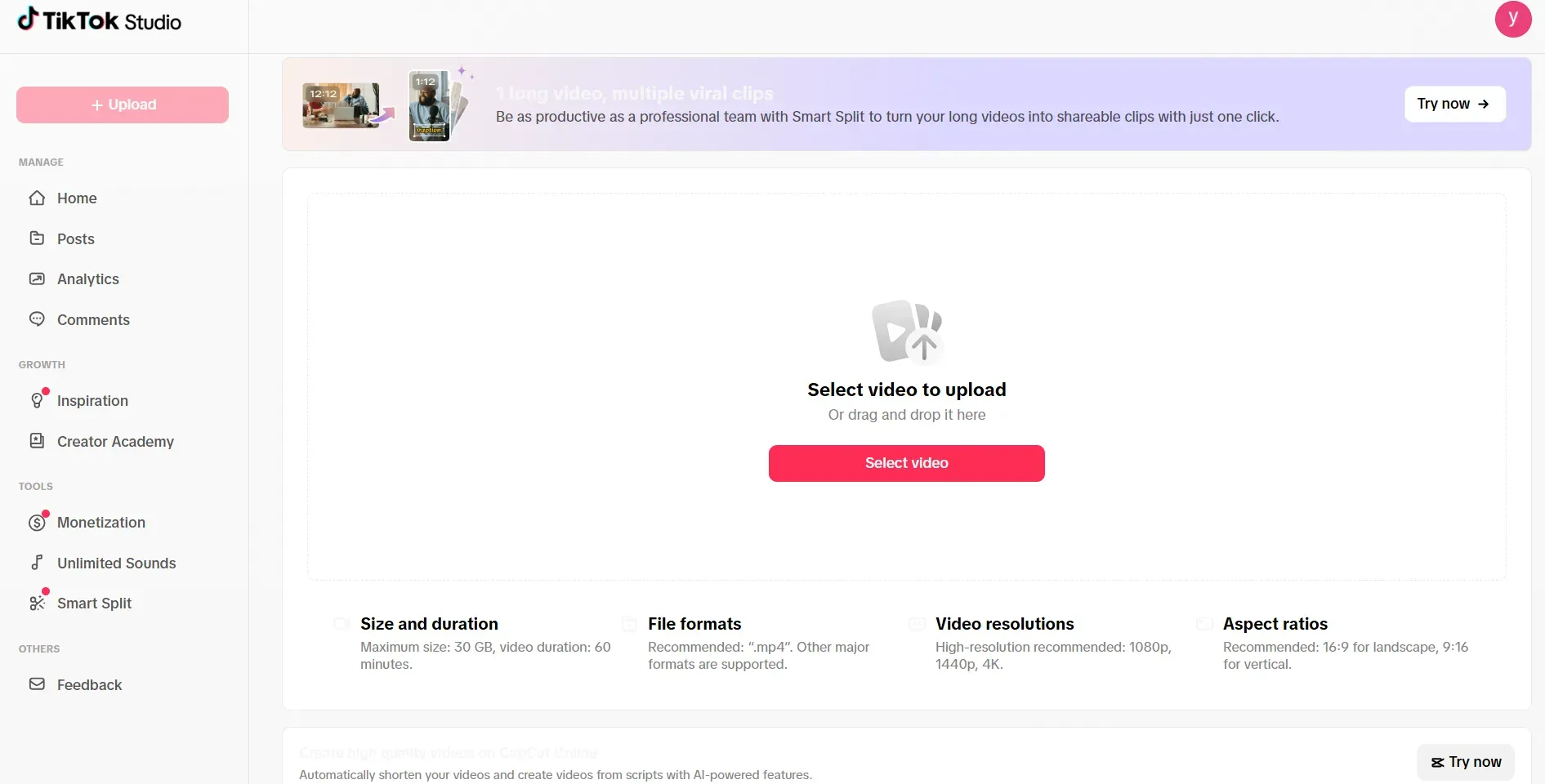
TikTok's creator guidelines and other tests show that 5 to 30 seconds is the best length for videos. Clips this short usually get watched all the way to the end. That is a huge deal because the app sees that people are finishing your video and then shows it to even more people.
The format is a must: 9:16 vertical at 1080×1920px. If you use anything else, you get black bars or parts get cut off. That makes your work look cheap to the viewers and the app. It tells everyone you didn't put in the effort.
2026 Format Trends Worth Building Into Your Templates
The most-watched TikTok formats in 2026 lean heavily on AI tooling:
| Trend | Why It Works |
| AI-generated voiceovers | Consistent delivery, scalable across 100s of videos |
| Dynamic auto-subtitles | Boosts watch time; most users watch without sound |
| Interactive elements (polls, stickers) | Drives comments and shares — key engagement signals |
| Personalized content variants | Increases relevance per audience segment |
These aren't just aesthetic choices — they directly influence distribution.
The Four Components of a High-CTR TikTok
Every video in your automated TikTok workflow should include these four elements:
- Hook 0–3 seconds — A bold statement, question, or visual that stops the scroll instantly.
- Captions — On-screen text keeps viewers engaged regardless of audio settings.
- Background music — Use popular songs to help the app's system find more fans for your video.
- Hashtags — Use 3–5 tags that fit your topic instead of a long list of random ones.
Do this every time, and your AI videos will have the right setup to actually reach people.
Architecture: The 4-Tier Automation Stack
Scaling to 100+ videos a day isn't a content problem — it's an engineering problem. The solution is a layered stack where each tier handles a distinct job, and nothing is done manually twice.
Layer 1: Ideation & Trend Mapping
This is where your pipeline starts — and where most manual workflows waste the most time.
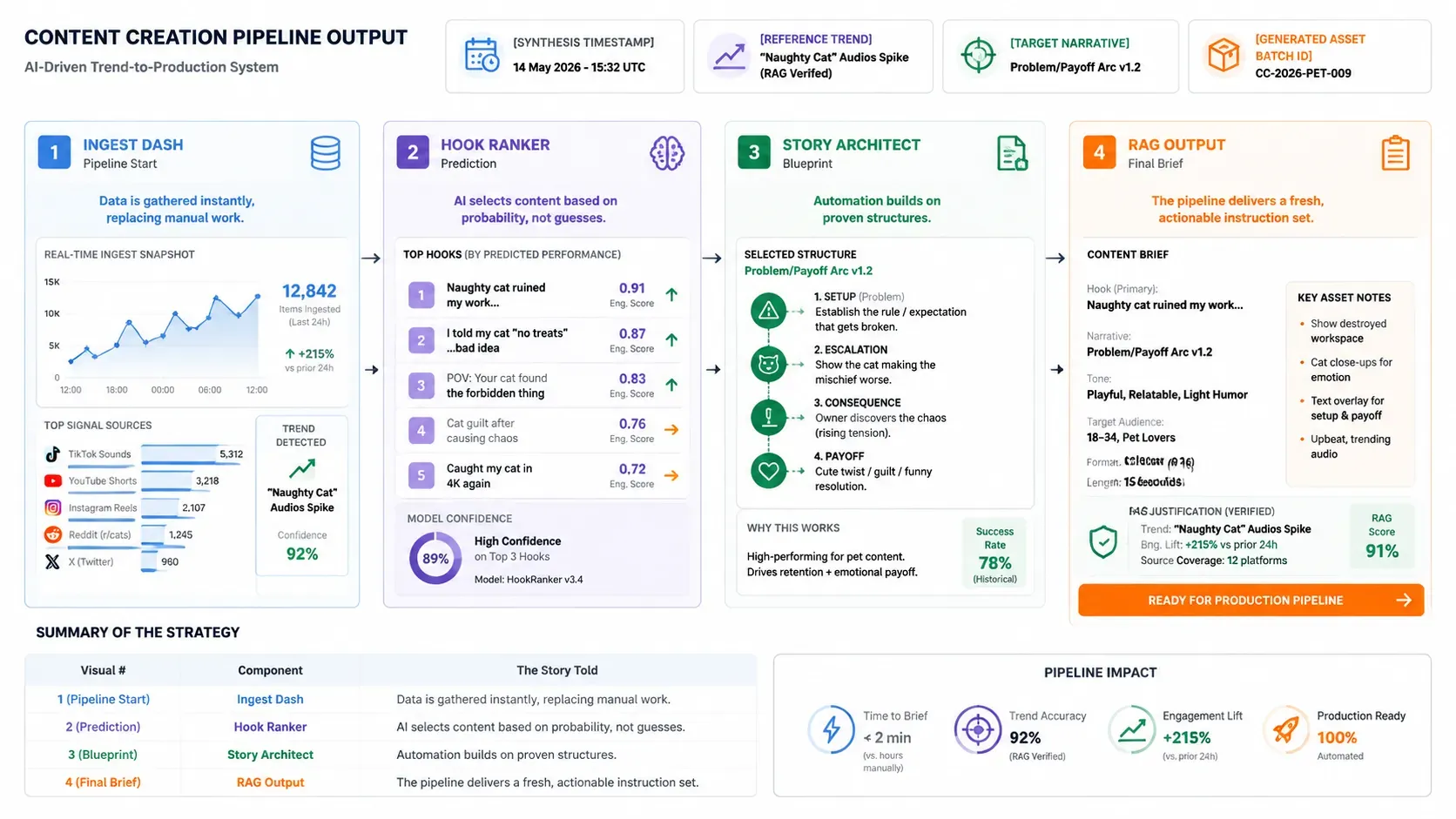
Advanced LLMs like Gemini 3 and GPT-5 can hook right into TikTok's Creative Center API. This lets them track hot songs, tags, and video styles as they happen. You don't need a person scrolling through the feed for hours. The AI just takes in all that data and gives you:
- High-engagement hook variants ranked by predicted scroll-stop probability
- Script blueprints structured around proven narrative arcs (problem → insight → payoff)
- Real-time RAG synthesis that grounds every script in what's actually trending now, not last week
The result: a fresh, contextually relevant content brief — generated automatically, at scale.
Layer 2: Video Generation & Rendering
This is the core engine of your TikTok Video API automation stack. In 2026, three platforms lead for production-grade AI video generation:
| Platform | Primary Strength | Best Use Case |
| Higgsfield.ai | Temporal consistency & character persistence | Brand storytelling, "Social Stylist" aesthetics |
| Fal.ai | High-speed, low-latency inference | Batch rendering, ComfyUI workflow automation |
| Atlas Cloud | Cinematic physics & spatial consistency | High-fidelity environments, scalable GPU rendering |
Each serves a different production need. Most serious automated TikTok workflows in 2026 use Fal.ai as the throughput backbone, with Higgsfield.ai handling brand-consistent character outputs and Atlas Cloud stepping in for premium cinematic renders.
Choose based on your volume, visual style, and budget — not hype.
Layer 3: Post-Production Automation Polish
Raw generated video isn't post-ready. Layer 3 is where your pipeline adds the finishing touches that separate scroll-stopping content from generic AI output — all without a human touching a timeline.
Multimodal Integration
Two capabilities define this layer:
| Component | Tool Example | Function |
| Audio synthesis & cloning | ElevenLabs via Runway API | Generates consistent branded voiceovers at scale; can clone a host voice across all 100+ daily videos |
| Automated subtitling | Vision-based captioning models | Transcribes and places dynamic subtitles frame-accurately, synced to speech |
| Dynamic VFX overlays | Compositing via API pipelines | Adds motion graphics, text animations, and transitions programmatically |
Each component runs via API call — no manual export, no drag-and-drop. The entire post layer is event-triggered and stateless, meaning it scales linearly with your render volume.
Headless Rendering
This is the big change that makes fully automated TikTok workflow actually happen. Old-school editing uses apps like Premiere or CapCut where you click around. Headless rendering swaps that for code. Tools like FFmpeg or Remotion put together the sound, clips, and text on a server. It all happens automatically without a person ever touching it.
Layer 4: The Deployment Layer
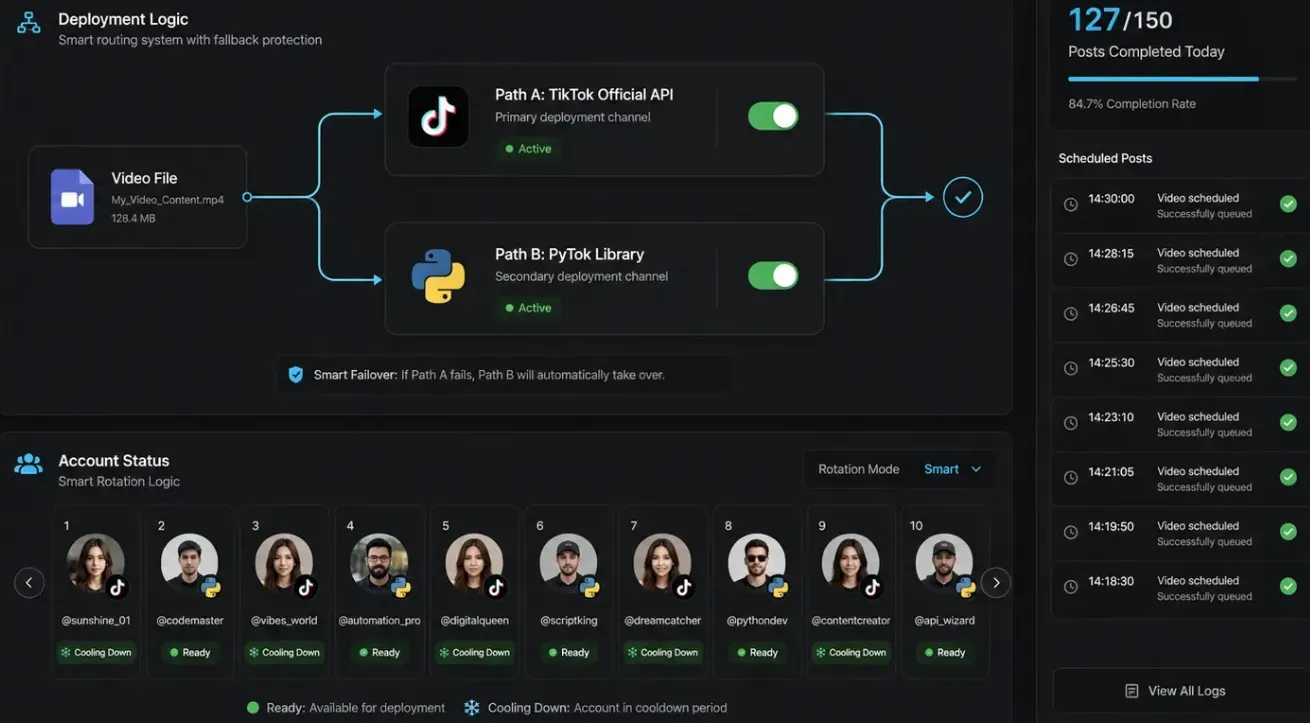
The final layer pushes finished videos to TikTok. Two primary approaches exist:
- TikTok Content Posting API — The official route. Supports scheduled publishing, multi-account management, and compliant bulk uploads. Best for agencies and brand accounts.
- PyTok — A Python-based library for TikTok interaction, useful for prototyping viral video AI pipelines before committing to official API access.
At 100+ posts per day, scheduling logic and account rotation need to be baked into this layer from day one — not retrofitted later.
Step-by-Step: Building Your 100-Clip Pipeline
The architecture is only useful once it's wired together. Here's how to move from zero to a fully operational automated TikTok workflow — step by step.
Step 1: Dynamic Scripting — 100 Unique "Pattern Interrupt" Scripts
Every video needs a script, and every script needs a framework. The one that consistently outperforms in short-form is Hook → Problem → Solution → CTA:
| Element | Purpose | Example |
| Hook | Stops the scroll in under 2 seconds | "Nobody talks about this TikTok growth trick…" |
| Problem | Establishes relevance fast | "Most creators post daily and still get zero reach." |
| Solution | Delivers the payoff | "Here's the 3-part structure that changed everything." |
| CTA | Drives a specific action | "Follow for part 2." |
To generate 100 unique variations without repetition, prompt your LLM to treat each script as a seed-varied instance — same framework, different angle, tone, and opening line. Batch this as a single structured prompt returning a JSON array of 100 script objects. Deduplicate before passing downstream.
Step 2: API Integration — Coding the Video Request
Once scripts are ready, fire them to your video generation API. Here's a clean Python snippet for a POST request:
plaintext1import requests 2 3API_URL = "https://api.your-video-platform.com/v1/generate" 4API_KEY = "your_api_key_here" 5 6def generate_video(script: str, seed: int) -> dict: 7 payload = { 8 "prompt": script, 9 "seed": seed, 10 "aspect_ratio": "9:16", 11 "duration_seconds": 15, 12 "resolution": "1080x1920" 13 } 14 headers = {"Authorization": f"Bearer {API_KEY}", "Content-Type": "application/json"} 15 response = requests.post(API_URL, json=payload, headers=headers) 16 response.raise_for_status() 17 return response.json()
Loop this across your 100 scripts, incrementing the seed value each time. Store returned video URLs or file paths for the next stage.
Step 3: Visual Differentiation via Seed-Level Variation
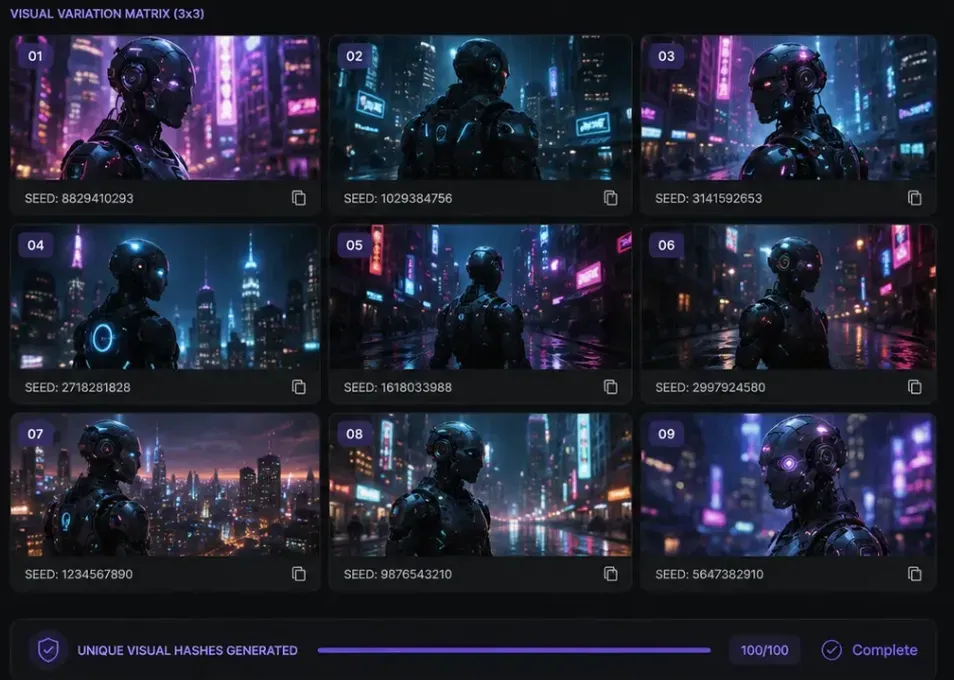
Duplicate or near identical content is flagged by TikTok's system, and its distribution is limited. You can fix this easily in your API settings. By changing the seed value, you make sure every clip looks unique. It will give you new lighting, camera angles, or movement each time, even if you use the same basic idea.
Think of seed variation as a fingerprint system. 100 videos, 100 unique fingerprints.
Step 4: Audio Syncing via Symphony Commercial Audio Library
The final production step is audio. TikTok's Symphony Creative Studio includes the Symphony Commercial Audio Library — a catalog of licensed tracks cleared for branded and commercial content. Integrate this via TikTok's API to:
- Pull currently trending tracks by category or mood
- Automatically overlay the selected audio onto your rendered video
- Ensure every clip uses compliant, monetization-safe music
This keeps your viral video AI pipeline fully licensed and distribution-ready — no manual music searches, no copyright strikes at scale.
At this point, you have 100 unique, post-ready TikToks — scripted, rendered, differentiated, and audio-synced — built entirely through code.
2026 Algorithm Secrets: Why Most Automations Fail
Generating 100 videos is the easy part. Getting them distributed is where most automated pipelines quietly fall apart. The issue isn't the content — it's the timing and retention mechanics that operators overlook.
The "First Hour" Rule
TikTok has a set way of testing new posts. Each video first goes out to a tiny group of maybe 200 to 500 people. What happens in that first hour is key. If people watch the whole thing, replay it, or share it, the app sends it to way more users. If not, the video just stops there.
For automated pipelines, this creates a structural problem: 100 posts going live simultaneously with no warm audience generates weak first-hour signals across all of them.
The fix is engagement triage — staggered scheduling logic built into your deployment layer:
| Triage Tactic | Implementation |
| Staggered publishing | Space posts 15–30 mins apart, not batch-simultaneous |
| Peak-window targeting | Schedule within your audience's active hours via analytics |
| Priority queuing | Push your highest-confidence scripts into peak slots first |
This isn't "simulated" engagement in any artificial sense — it's simply ensuring real viewers encounter your content when they're most likely to complete and share it.
Watch-Time Over Views: Programming Re-Watch Triggers
TikTok's algorithm weights watch time and replay rate more heavily than raw view count. The practical implication for video generation: build re-watch incentives directly into your prompt templates.
Concrete techniques to program into your generation layer:
- Mid-video visual Easter eggs — a subtle detail (hidden text, background motion) that rewards attentive viewers and triggers replays
- Unresolved visual loops — endings that feel slightly incomplete, prompting a second watch
- Rapid information density — packing the 15–30 second window tightly enough that one pass feels insufficient
Each of these is a prompt-level instruction, not a post-production edit — making them fully compatible with your automated batch pipeline.
2026 Case Study Examples
Surgical Breakdown: @itsaboutai1 on TikTok
Video: Watch here

Script Structure — Hook Dissection
AI creator accounts in this niche consistently open with a "belief-gap" hook: a statement that contradicts what the viewer assumes to be true, delivered within the first 2–3 seconds. This is the core pattern interrupt mechanic.
| Script Element | Observed Technique |
| Hook (0–3s) | Bold declarative claim or unexpected visual contrast |
| Problem | Relatable frustration stated plainly, no padding |
| Solution | Fast-cut reveal, usually under 10 seconds |
| CTA | Single action — follow, comment, or Part 2 tease |
Visual Technique & Prompt Reverse Engineering
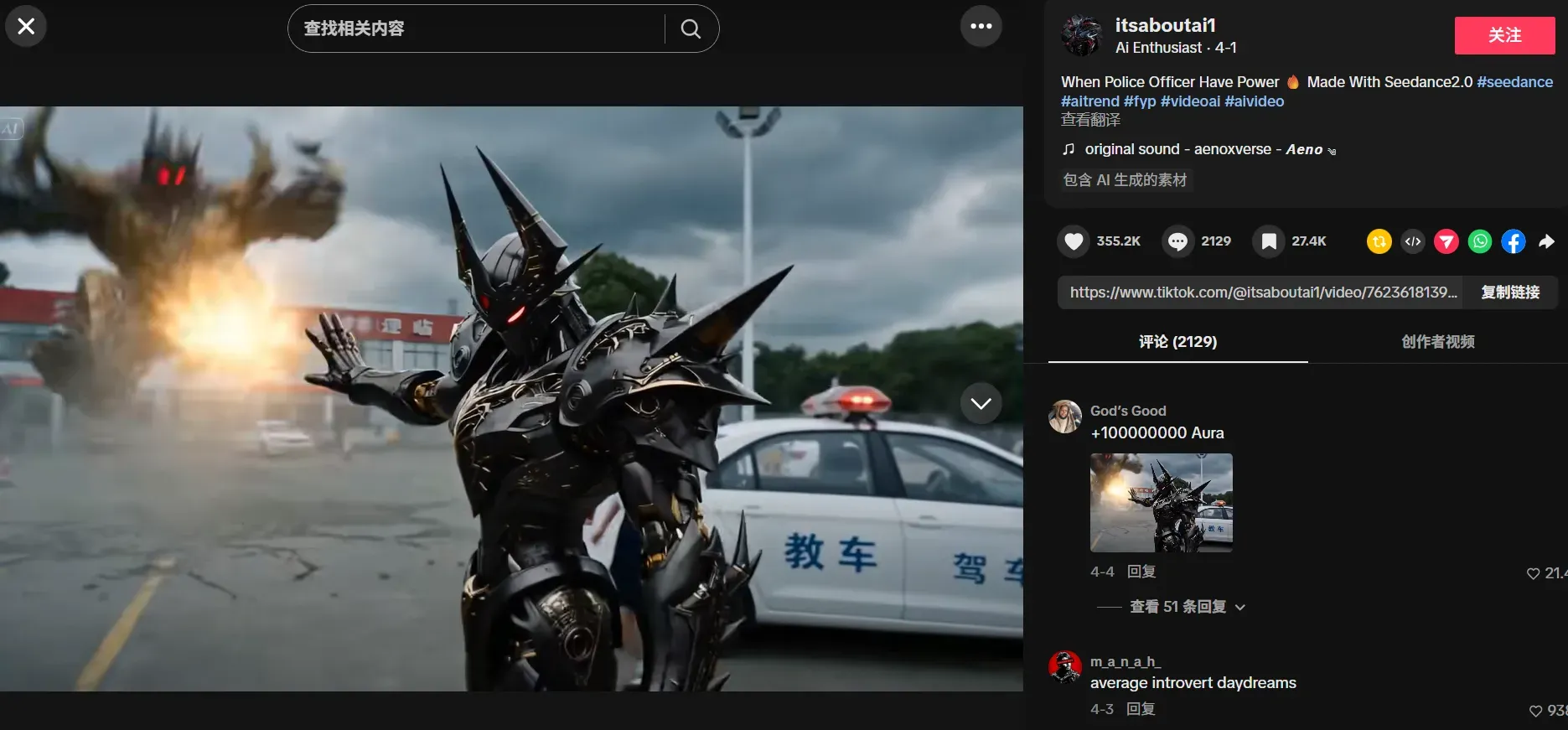
Looking at the style of this account, the prompts probably use words like:
soft movie lights, super real, high detail, smooth motion, blurred backgrounds, steady shots, natural skin looks
| Quality Dimension | Assessment |
| Rendering clarity | High — minimal artifacting, clean edge definition |
| Temporal stability | Strong — no frame-level flickering between cuts |
| Visual consistency | Consistent color grading and character framing |
| Physics engine | Natural motion blur; no uncanny movement artifacts |
Audio Analysis
The BGM in @itsaboutai1's content follows a beat-drop sync pattern — visuals cut or transition precisely on downbeats, which increases perceived production quality. Words pop up one by one right as the voice speaks. This shows they use live caption tools instead of just slapping text on top.
This is how viral video AI productions are made in 2026. The sound, the pictures, and the words all work together perfectly as one single unit.
Analyzing the @itsaboutai1 Pipeline
Content Matrix Strategy: One Idea, Many Variants
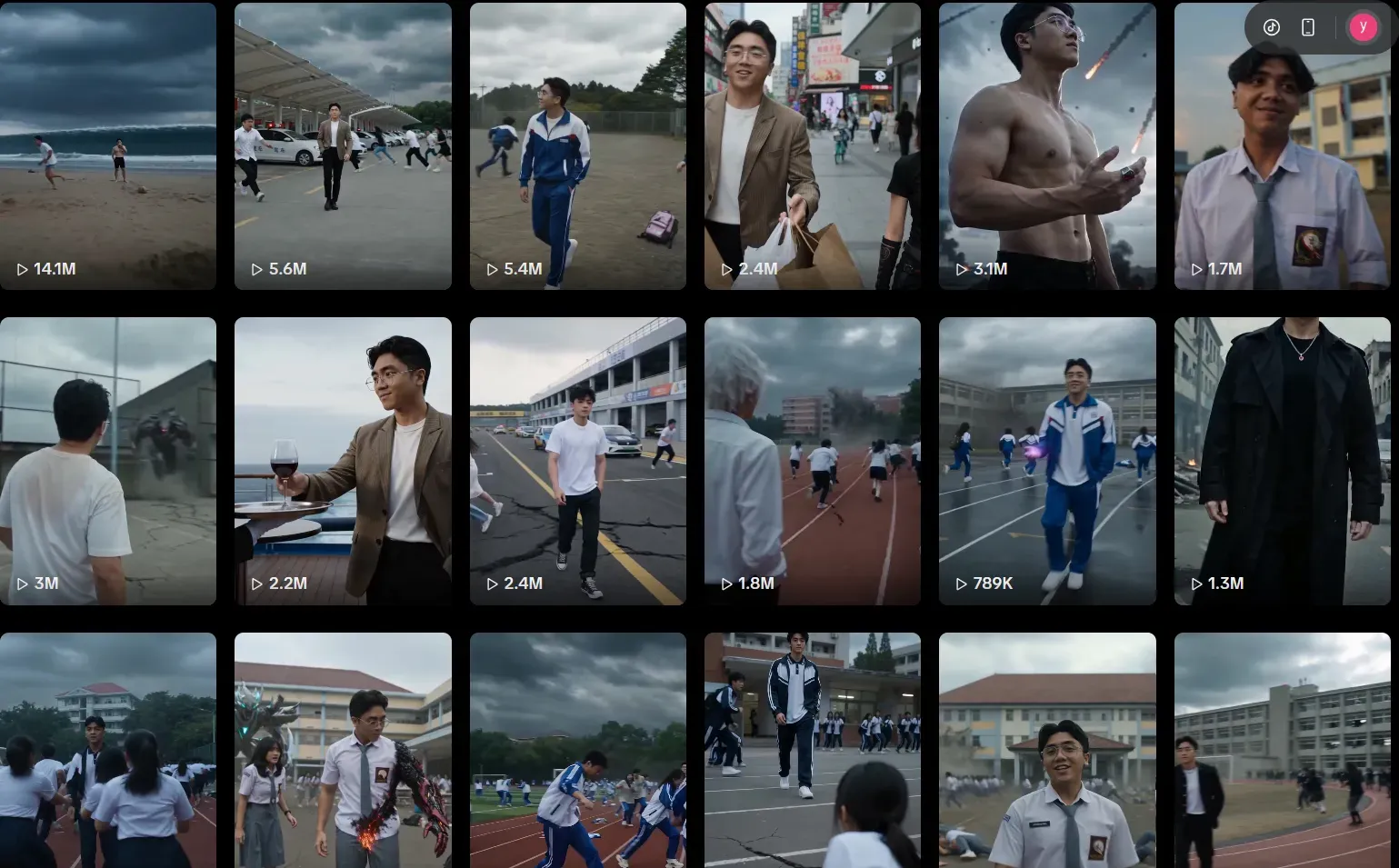
The hallmark of an automated content pipeline isn't volume alone — it's structured variation from a single core idea. Across @itsaboutai1's feed, the content matrix follows a clear pattern:
| Core Concept | Variant Type | Execution |
| AI protagonist scenario | Setting change | Same character, different environment |
| Psychological Pattern Interrupt | Format change | Hook-led vs. question-led entry |
| Trend reaction | Tone variation | Serious vs. playful delivery |
This is textbook Content Matrix Strategy: one core idea fanned out into multiple angles, each targeting a slightly different viewer intent while keeping niche authority tight. Accounts that cluster several videos around one theme give the audience more entry points and more reasons to stay after the first view.
Publishing Frequency: The Automation Signal
The account's output cadence — multiple posts per day across consistent topic lanes — would be physically unsustainable for a solo creator working manually. This level of output intensity is corroborating evidence for the Automated Batch Processing capabilities discussed in Layer 2. The optimal posting frequency on TikTok in 2026 is 1–3 times daily, and accounts operating at that ceiling reliably rely on pipeline tooling, not manual production.
With a current catalog of over 400 videos dating back to February, it’s estimated that the account is averaging about three uploads per day.
De-duplication via Seed-Level Variation
If you check several videos on the account, you will see small but real changes. The lights might look different, or the camera angle and background blur swap around, even if the topic is the same. This is just using different seeds for each clip. It creates a new look for every post so TikTok’s 2026 AI detectors don't flag them as copies. It is the same setup, but the results are fresh every time.
Staying Safe: Avoiding the Shadowban
Scaling output without a safety layer is the fastest way to lose everything you've built. TikTok's 2026 moderation systems are significantly more sophisticated than earlier iterations — and high-volume automated accounts are an explicit target. Here's how to operate responsibly and sustainably.
Human-in-the-Loop: The Quick-Review Dashboard
Even fully automated setups need a real person to check things before they post. A review screen sits between your video list and the app. It flags clips that have mistakes—like rule breaks, weird visual glitches, or things that just don't fit the brand. This stops bad videos from ever reaching TikTok.
A minimal HITL layer should surface:
| Review Signal | What to Check |
| Content policy flags | Automated scan output for prohibited content categories |
| Visual quality score | Rendering errors, frame drops, or artifact detection |
| Script compliance | Keyword blocklists, claims that require verification |
| Duplicate proximity | Similarity score vs. previously published videos |
Even a 2-minute human review per batch of 10 catches the edge cases that automated filters miss.
Dedicated IPs for Multi-Account Management
Agencies managing multiple brand accounts from one network risk triggering platform-level flags when those accounts share an IP footprint. Dedicated residential IPs — one per account or account cluster — are standard practice for legitimate multi-client operations. Tools like Octo Browser provide isolated browser environments per profile, preventing cross-account fingerprint leakage.
⚠️ Compliance note: Review TikTok's Terms of Service carefully before operating multiple accounts. Dedicated IPs are a technical best practice for agencies; they do not override platform policy obligations.
Variable Posting Cadence: Jitter Timing
Automated systems often post at perfect times, like right on the hour. This predictable pattern is a dead giveaway for a machine. To fix this, mix up your schedule with random "jitter." Instead of hitting 9:00 or 9:30, try 9:04 or 9:27. The account acts much more like a real person would due to this small change.
Conclusion & The Future
The automation stack described in this guide represents where short-form production stands today. But the next shift is already in motion.
Interactive AI Shorts are the new big thing on TikTok. These videos let viewers change what happens live using polls or by typing in ideas. It is no longer just a set video for people to watch. Instead, every person watching gets to help create the story themselves. For automated pipelines, this means the generation layer will need to produce not one video per script, but a decision tree of conditional clips — a significant but logical evolution of everything built here.





