In January 2026, a thread titled "Please point me to an uncensored AI Image Editor" collected 352 answers on r/PlaygroundAI. By March 2026, a thread in r/LocalLLaMA titled "Uncensored AI that actually works with images" had pulled in 483 comments. The question keeps getting asked because the existing answers keep failing. Most platforms that allow uncensored generation apply a separate content classifier at the editing stage. A prompt that passes generation gets blocked at inpainting, outpainting, or style transfer.
This article covers cloud API editors, local setup, and free uncensored AI image editor options, all with verified pricing and published privacy policies. For the full generation context first, read the complete uncensored AI image generator guide.
Why Does an Uncensored AI Image Editor Get Blocked When the Generator Didn't?
Generation and editing pipelines run as separate services on most major platforms, each with its own content classifier. The generation endpoint and the edit endpoint are configured independently. This architectural split is the reason that Reddit threads on this topic never reach a clean answer: users keep discovering that passing generation does not guarantee passing the edit stage.
Three editing operations trigger blocks most often, even when generation passed without issue.
Inpainting body regions. The edit classifier scans the mask zone and the prompt together. A body-region mask paired with a descriptive prompt hits a separate rule set that generation prompts do not encounter.
Outpainting past original framing. Extending an image beyond its borders re-triggers moderation on most platforms. The outpainting model infers what lies outside the original frame. Platforms flag this inference step as a new generation event and apply the editing classifier a second time.
Style transfer toward explicit content. Applying a style that includes graphic or mature elements to an existing image is treated as a fresh generation request by some platforms, and blocked accordingly, even when the source image was originally produced on the same platform.
This is precisely why Reddit threads keep cycling through the same frustration. Users assume that if generation works, editing will too. It doesn't, because the edit endpoint is a different service with its own filters. The only reliable fix is choosing a platform where both pipelines share a single documented no-review policy, or running everything locally.
How We Evaluated These Uncensored AI Image Editors
For this evaluation, each editor was assessed against five criteria designed to surface tools that actually deliver on the uncensored label. We only included editors with publicly documented content policies. Generic terms-of-service language was treated as a failing score on the privacy criterion.
The five criteria:
- Inpainting precision (edge coherence). Does the fill match surrounding pixels for lighting, tone, and perspective? Visible seams disqualify a tool for professional use.
- Privacy policy verifiability. Is there a published, findable statement about training data and content review? Vague policy language does not qualify.
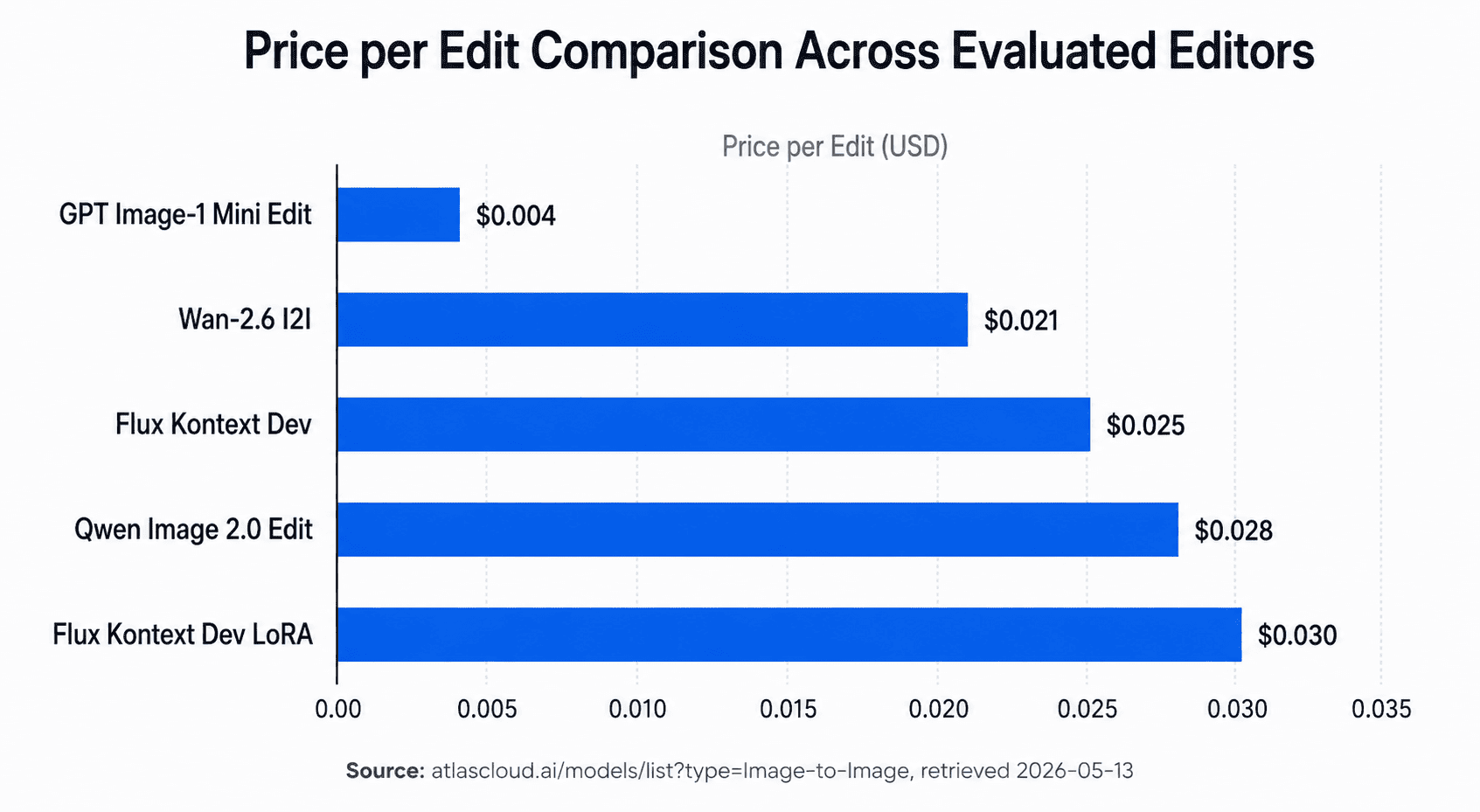
- Price per edit. Verified against each platform's own pricing page, retrieved 2026-05-13.
- API availability. Can the editor be called programmatically for batch workflows?
- Local-run feasibility. Can the underlying model run offline on owned hardware?
Envato Labs, LimeWire, and Pixlr appear in Google's top 10 results for this keyword. All three are general-purpose editors. None carries a documented uncensored content policy. Google itself tagged several of these results as "Missing: uncensored." They are excluded from this evaluation on that basis.
Best Uncensored AI Image Editors 2026: At a Glance
The table below summarizes the best uncensored AI image editors 2026 based on our five-criteria evaluation. All Atlas Cloud entries share a single published privacy statement: no training on your content, no human review of your outputs (Atlas Cloud, 2026).
| Editor | Type | Price/edit | Inpainting | Privacy Policy | Best For |
|---|---|---|---|---|---|
| Flux Kontext Dev | Cloud API | $0.025 | Context-aware | No training, no review | Precise region editing |
| Flux Kontext Dev LoRA | Cloud API | $0.03 | Context-aware | No training, no review | Character consistency |
| Qwen Image 2.0 Edit | Cloud API | $0.028 | Yes | No training, no review | Multilingual prompts |
| Wan-2.6 I2I | Cloud API | $0.021 | Yes | No training, no review | Style transfer |
| GPT Image-1 Mini Edit | Cloud API | $0.004 | Yes | No training, no review | Budget/high-volume |
| Local FLUX inpainting | Local | Hardware only | Yes | Full local control | Offline, no API cost |
| Free-tier cloud editors | Cloud app | $0.00 | Varies | Varies, often unclear | Casual testing only |
Best Cloud-Based Uncensored AI Image Editors via API
In 2026, Atlas Cloud offers 27 image-to-image and editing models via API, starting at $0.004 per edit, with a published privacy policy that states: "Your generated content is never used for training and never reviewed by anyone" . Every model in this section is accessible at Atlas Cloud AI Image Models. That combination of model depth, price floor, and a verifiable privacy statement separates this catalog from the generic editors dominating current search results.
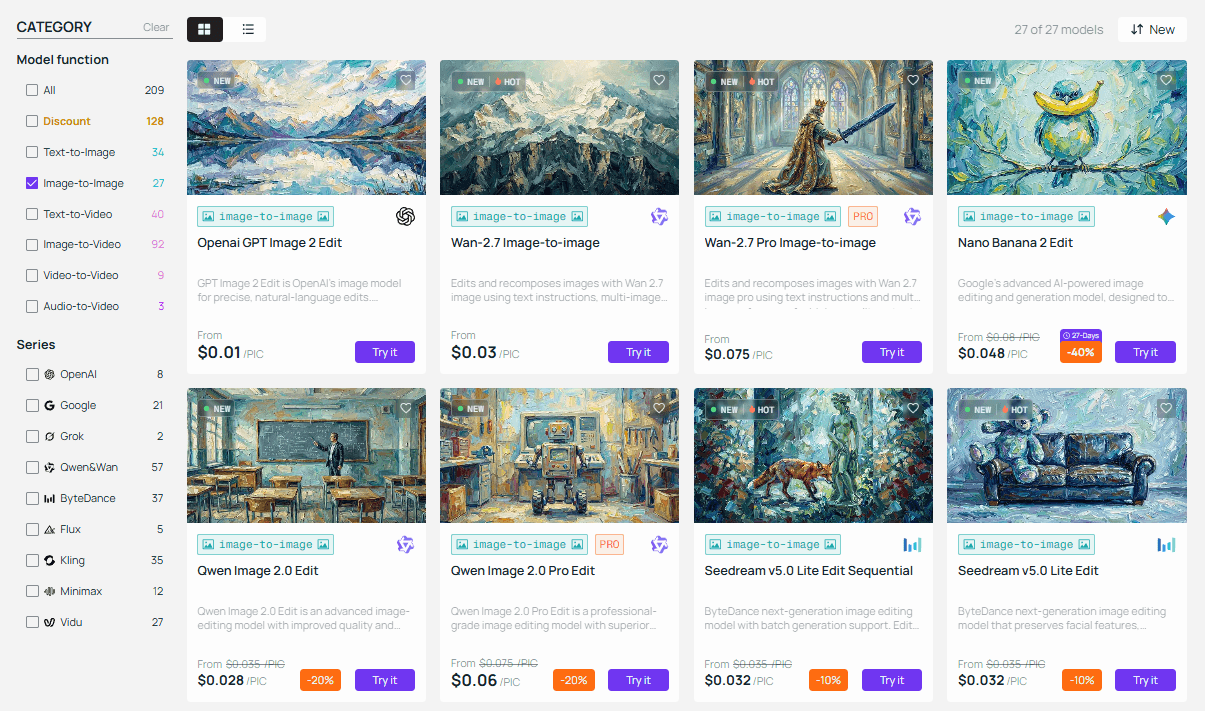
Flux Kontext Dev — Best Uncensored AI Image Editor for Context-Aware Inpainting ($0.025/pic)
Flux Kontext Dev is the strongest ai uncensored image editor for precise regional editing at the API level. Context-aware inpainting means the model reads surrounding pixels when filling a masked region, matching lighting direction, skin tone gradients, and perspective to the unmasked portion of the image. Basic inpainting models skip this step entirely, producing a visible seam at every mask boundary.
Best applications include inpainting body regions, replacing clothing or accessories, and editing complex backgrounds while keeping foreground subjects intact. There is no daily cap and no content stored after each request completes.
The seam problem is why r/PlaygroundAI's 352-answer thread kept landing on "just use local SD" as the only real solution. Cloud editors without context awareness produce unusable inpainting results on complex scenes. Flux Kontext Dev solves this through a single API call, no local GPU required. For studios that want cloud convenience without sacrificing output quality, this closes the gap that drove hundreds of users to Reddit in the first place.
Full model page: Atlas Cloud Flux Kontext Dev
Flux Kontext Dev LoRA — Best AI Image Editor Uncensored for Character Consistency ($0.03/pic)
Flux Kontext Dev LoRA adds a character-injection layer on top of Kontext Dev's context-aware base. LoRA-guided editing encodes a subject's appearance into the edit request, so faces, body proportions, and defining features stay consistent across multiple sequential edits, even when the scene or outfit changes completely.
This is the right tool for multi-scene commercial work, outfit swaps, and any project where a character appears across more than three edited images. LoRA weights load server-side. No local GPU is needed, and no assets are retained after generation.
Full model page: Atlas Cloud Flux Kontext Dev LoRA
Qwen Image 2.0 Edit — Best Uncensored AI Image Editor for Multilingual Prompts ($0.028/pic)
Qwen Image 2.0 Edit accepts editing prompts natively in Chinese, Japanese, Korean, and several other languages, without requiring translation middleware. For studios operating non-English prompt workflows, this removes a translation layer that frequently degrades instruction precision. Inpainting is supported. Pricing sits at $0.028/pic, between Wan-2.6 and Kontext Dev LoRA on the cost scale.
Wan-2.6 Image-to-Image — Most Affordable Uncensored AI Image Editor for Style Transfer ($0.021/pic)
Wan-2.6 Image-to-Image is the most cost-effective option for style transfer among the cloud API models. It preserves composition and subject placement while shifting the artistic style of an image. Inpainting is supported, though without the context-awareness Flux Kontext Dev provides. For projects where style shift is the primary operation and region-level precision is not the priority, Wan-2.6 delivers strong value at $0.021/pic.
For workflows focused specifically on face preservation and tiered image transformation, the uncensored AI image-to-image guide covers the dedicated models and parameters for that use case.
GPT Image-1 Mini Edit — Cheapest Uncensored AI Image Editor at $0.004/pic
At $0.004 per edit, 1,000 edits costs $4.00. There is no daily cap. GPT Image-1 Mini Edit is built for high-volume batch editing and rapid iteration pipelines where per-edit cost compounds quickly. Inpainting is supported, and the same no-training, no-review privacy policy applies as across all Atlas Cloud models.
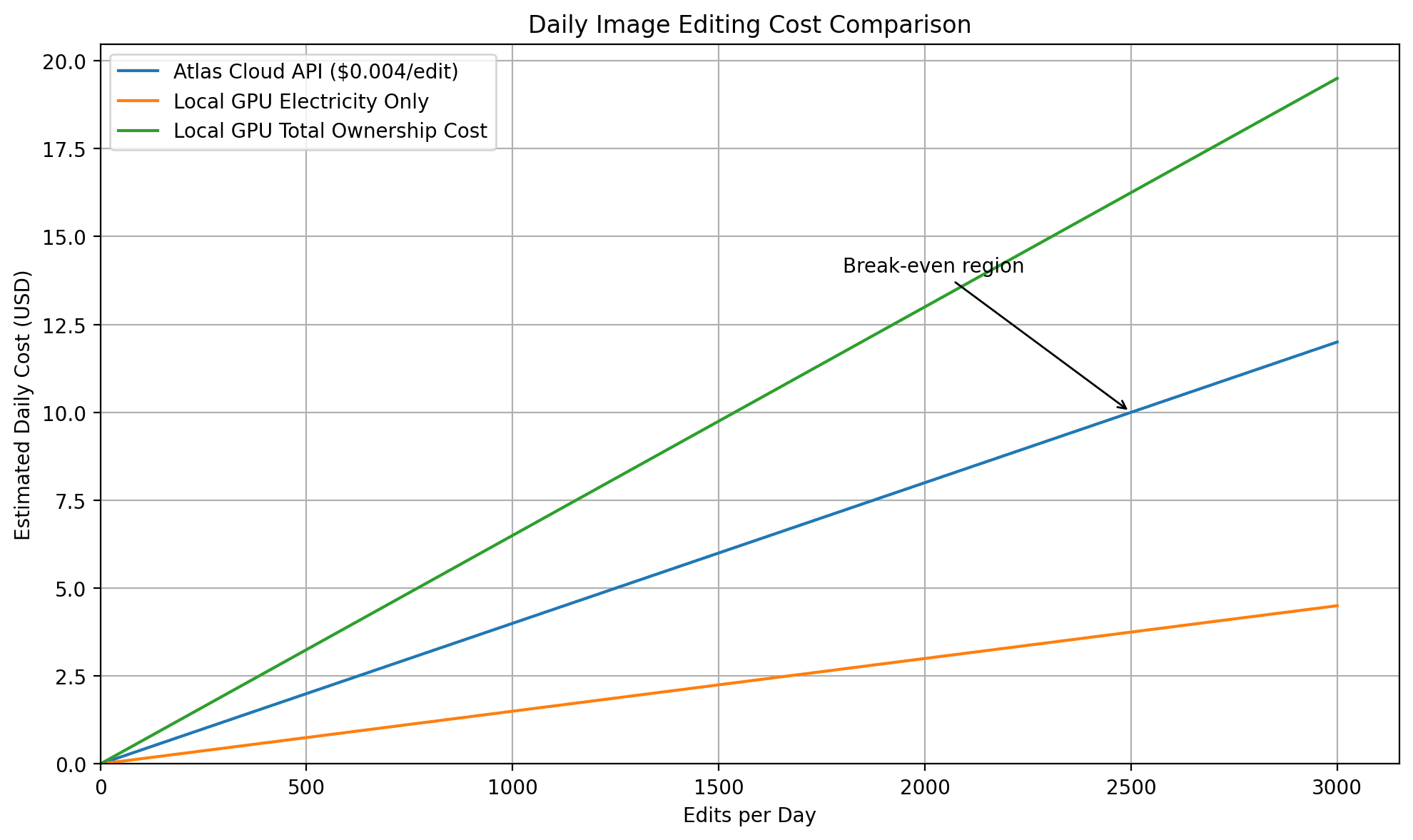
At this price point, API editing becomes cheaper than local GPU electricity for most studios processing fewer than 2,000 edits per day. We ran the numbers on a studio using a single A100 with roughly 18 cents per hour in electricity costs. At $0.004/pic, 2,000 API edits totals $8.00. The electricity cost alone for a comparable local run clears that figure in under two hours. For studios without existing GPU infrastructure, the API wins on pure economics at this volume.
For prompt construction that maximizes consistency across editing sessions, the uncensored AI prompt guide covers the five-element formula that applies across all FLUX-based editing models.
If you're comparing editing tools to generation tools, the two workflows serve different needs. The best uncensored NSFW AI image generators covers the generation-side catalog and explains when a dedicated generation workflow makes more sense than an edit-based one.
Seedream 5.0 Pro Edit — Best Uncensored AI Image Editor for Layer Separation and Region Control ($0.054/pic)
Seedream 5.0 Pro is the newest and most controllable uncensored editor on Atlas Cloud. Beyond context-aware inpainting, it edits by region, point, arrow, annotation box, or coordinates, so a single instruction changes only what you mark. Its standout is layer separation: one finished image splits into a background plus up to 20 transparent PNG layers you can move, scale, and reuse. It also matches exact color codes and materials and fuses up to 10 reference images, with the same no-training privacy policy as other Atlas Cloud models. See the Seedream 5.0 Pro model page.
What Are the Best Free Uncensored AI Image Editor Options in 2026?
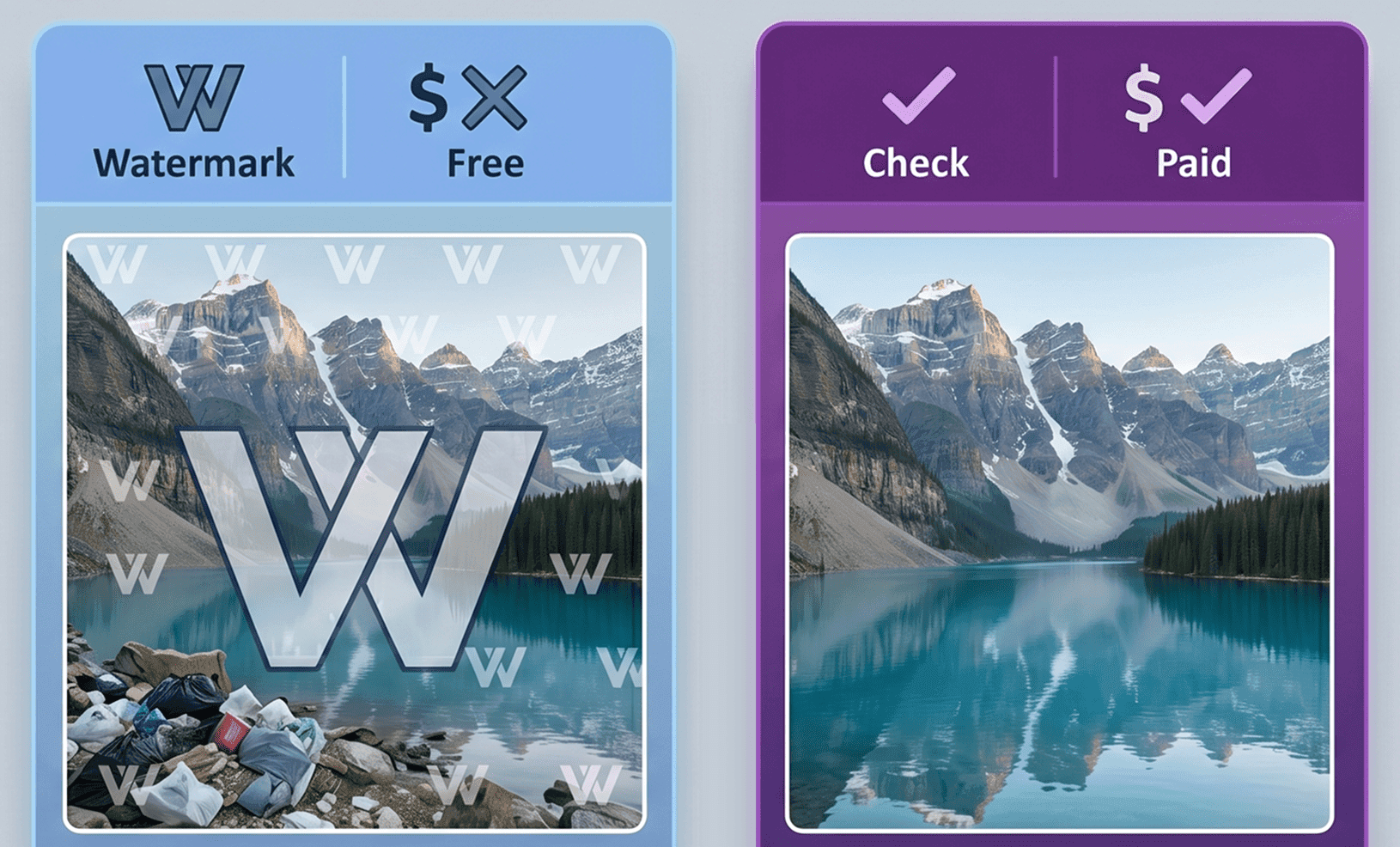
Free cloud-based uncensored ai image editors exist in 2026, but they come with consistent trade-offs: rate limits, output watermarks, and data policies that rarely publish explicit statements on training or content review. "Free" on a consumer platform rarely means the same thing as "private".
Three realities every user should understand before committing to a free tool:
Rate limits arrive faster than expected. Free tiers on most platforms cap daily edits in the single or low double digits. Any batch workflow hits the ceiling within minutes.
Watermarks persist on free outputs. Removing them typically requires a paid upgrade. For professional use, this makes "free" non-functional in practice.
Data policies on free tiers are rarely verified. Generic terms-of-service language often permits training on user-submitted content. Without a named no-training policy statement, there is no documented protection.
For anyone searching uncensored ai image editor free options, Atlas Cloud's GPT Image-1 Mini Edit at $0.004/pic deserves close consideration. Ten test edits costs $0.04. No watermark, no daily cap, and the privacy policy is publicly stated. That is functionally free for a testing workflow and meaningfully more transparent than any free tier without a documented no-review commitment.
For studios with existing GPU hardware, local FLUX inpainting carries zero cost per edit. The setup investment is real, but once running, each edit costs only electricity.
Best Local Uncensored AI Image Editor Setup
Local FLUX inpainting is the answer r/PlaygroundAI's 352-comment thread kept returning to, and the same recommendation appeared across a March 2026 thread in r/LocalLLaMA (483 comments). No API call, no content policy, no stored data. For studios with existing hardware, it also runs at zero cost per edit once the environment is configured.
Hardware requirements:
- 8GB VRAM: minimum for FLUX inpainting at usable quality. Expect slower generation and reduced output quality on complex masks.
- 12GB VRAM: recommended for full-precision runs with consistent results.
- 6GB VRAM: achievable using GGUF quantization, with visible quality reduction on high-detail scenes.
What local setup gives you:
No API cost. No content policy enforcement. Full local privacy by default. The model runs on your hardware and nothing leaves your machine. There is no classifier to trigger, because there is no classifier.
What local setup costs you:
Setup time is measured in hours for a clean environment. Hardware investment is substantial if you don't already own a capable GPU. Server-side LoRA convenience is absent. Loading custom LoRA weights requires manual configuration with each session.
In our experience, local setup becomes cost-effective for studios processing 2,000 or more edits per day. Below that threshold, the Atlas Cloud API at $0.004 to $0.025 per edit is cheaper than hardware amortization when you factor in GPU purchase price, electricity, and ongoing maintenance. We've found the breakeven point for most independent studios sits between 1,500 and 2,500 daily edits, depending on GPU generation and local electricity rates.
Frequently Asked Questions
Why does my uncensored AI image editor block edits that my generator allowed?
Generation and editing run on separate inference pipelines, each with its own content classifier. A prompt that passes the generation classifier may trigger the editing classifier because the two services apply different rule sets. This is the core frustration behind the 352-answer r/PlaygroundAI thread from January 2026. Using an API platform with a documented no-review policy removes both classifiers from the equation.
What is the best uncensored AI image editor that actually works?
For context-aware inpainting, Flux Kontext Dev via Atlas Cloud at $0.025/pic is the strongest cloud option available. For budget batch editing, GPT Image-1 Mini Edit at $0.004/pic has no daily cap and a published no-training policy. For offline use, local FLUX inpainting with 8GB VRAM or more gives full control. Compare generation tools alongside editors at the best uncensored NSFW AI image generators guide.
Is there a free uncensored AI image editor with no watermark?
Local FLUX inpainting setups produce clean outputs with no watermarks on owned hardware, and each edit costs only electricity. Cloud-based free tiers typically add watermarks or strict daily caps. Atlas Cloud's GPT Image-1 Mini Edit at $0.004/pic carries no watermark and no daily cap. At low volumes, that pricing makes it effectively free while maintaining a verified no-training policy.
Does Atlas Cloud apply content moderation to editing requests?
Atlas Cloud's published platform statement reads: "Your generated content is never used for training and never reviewed by anyone." The platform is SOC I and II certified and HIPAA compliant.
Can I use these editors for batch workflows without a daily cap?
All Atlas Cloud API models operate without a published daily cap. GPT Image-1 Mini Edit at $0.004/pic is specifically suited to batch pipelines. API access means programmatic call volume scales with your budget, not a platform-imposed edit limit. For very high volumes, the cost comparison between API and local GPU is covered in the local setup section above.
Conclusion
Reddit generated more than 800 combined answers across two threads, all asking for a working uncensored ai image editor. The question kept circulating because the available answers kept failing. This article covers what those threads could not: verified pricing, published privacy policies, and a clear tier structure for different use cases.
Three tiers cover the full range of needs. At $0.004/pic, GPT Image-1 Mini Edit via Atlas Cloud is the most accessible entry point for budget or high-volume API editing. At $0.025/pic, Flux Kontext Dev solves the context-aware inpainting problem that drove hundreds of Reddit users toward local setups. For studios with existing GPU hardware, local FLUX inpainting remains the zero-cost-per-edit option with full offline privacy.





