You have a photo. You want AI to transform it into a bikini version, a lingerie version, or something more explicit — while keeping the face. You tried Midjourney: refused. Tried DALL-E: softened and filtered. Tried Stable Diffusion with default settings: blocked by the safety filter before generation even started.
This is not a failure of the tools. It is a design decision. Every mainstream platform applies a content moderation layer at the model level. That layer is what the word "uncensored" refers to when people search for uncensored image to image ai. The tool exists. The question is which model preserves identity correctly while the content changes.
Why Mainstream Image to Image AI Generators Blocks Uncensored Contents
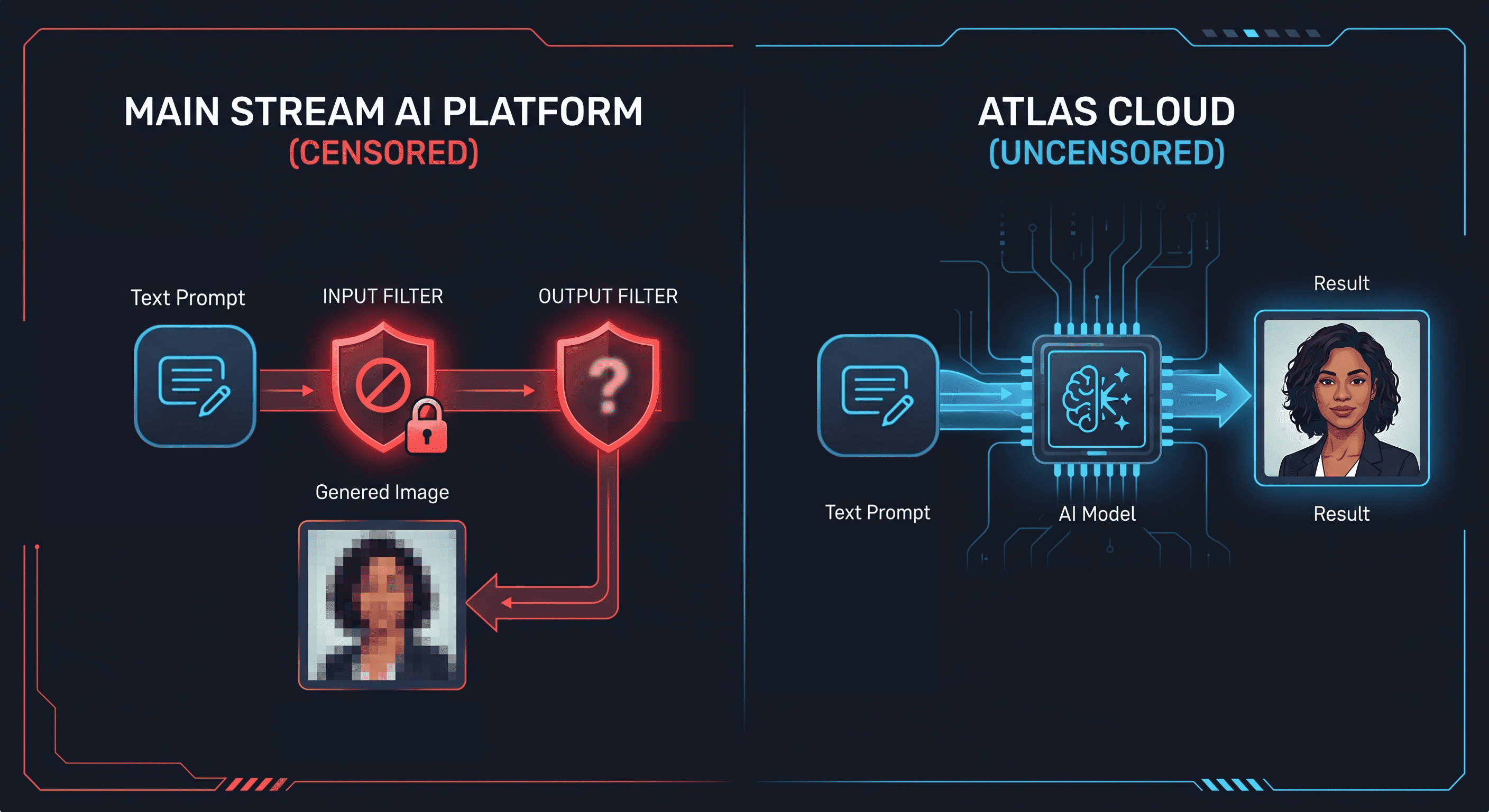
Every major image generation platform applies content filtering at two layers: the prompt input layer and the model output layer. When you submit a prompt with NSFW terms, the input filter rejects it before the model runs. When a prompt slips through, the output filter detects the generated image and suppresses or blurs the result.
This is not a capability gap. Stable Diffusion, the same architecture powering most image-to-image tools, has no technical restriction on NSFW output. The filtering is applied by platform operators on top of the model. Remove the filter, and the underlying model generates the content.
For a ranked comparison of the best NSFW-capable generators by price and filter removal, the best uncensored NSFW AI image generators guide covers cloud API and local options across all tiers.
"Uncensored" in the context of image to image ai generator means the content moderation layer has been removed. The model processes the prompt and image without active intervention on what content is generated. Atlas Cloud's image-to-image catalog runs models in this configuration, including the Seedream family specifically designed for portrait editing with face preservation.
The second problem — face identity breaking during transformation — is separate from content filtering. It is a model training problem. That is what the rest of this guide addresses.
Why the Face Changes in Uncensored AI Image to Image Generation and How to Stop It
When you upload a photo and write a prompt for a content transformation, the model does not know which parts of the image are off-limits. It applies changes globally based on semantic weight. The face, as the highest-semantic-weight region of a portrait, receives heavy model attention — which means it gets redrawn along with everything else.
Two variables control how much the face changes:
guidance_scale determines how aggressively the model follows the prompt versus respects the source image. Low values preserve the reference. High values let the prompt override it. At guidance_scale 10 or above, the prompt controls the output almost entirely. The face becomes whatever the prompt implies, not what the source image shows.
Model architecture is the larger factor. Most image editing models are not trained to isolate facial identity during transformation. The Seedream family is. Its training explicitly separates face preservation from content generation, so the model can change clothing and scene while keeping facial features, skin tone, and lighting from the source.
The practical combination: Seedream model + guidance_scale between 5 and 7 produces face-stable output across light to heavy content transformations.
Model Selection for Uncensored Image to Image AI Generators
| Model | Price | Face preservation | Best for |
|---|---|---|---|
| Seedream v5.0 Lite Edit | $0.032/image | ★★★★★ | Light to heavy transformation, main workhorse |
| Seedream v5.0 Pro Edit | $0.054/image | ★★★★★ | Pro-tier edits, layer separation, region and anchor control |
| Seedream v5.0 Lite Edit Sequential | $0.032/image | ★★★★★ | Batch variations from one source photo |
| Seedream v4.5 Edit | $0.036/image | ★★★★★ | Final production renders, maximum detail |
| Flux Kontext Dev | $0.025/image | ★★★☆☆ | Specific, text-describable scene changes |
| GPT Image-1 Mini Edit | $0.004/image | ★★☆☆☆ | Prompt concept testing only |
Seedream v5.0 Lite Edit is the default choice. Atlas Cloud's official description: "preserves facial features, lighting, and color tones while enabling professional-quality modifications." For most uncensored image to image use cases, start here and move to v4.5 only when you need higher output resolution for final use.
When Lite Edit isn't enough, Seedream 5.0 Pro Edit is the pro-tier step up: the same uncensored image-to-image with region and anchor control, exact color and material matching, and layer separation into transparent PNGs.
The uncensored AI prompt guide covers the five-element formula that applies across all three content tiers in this guide.
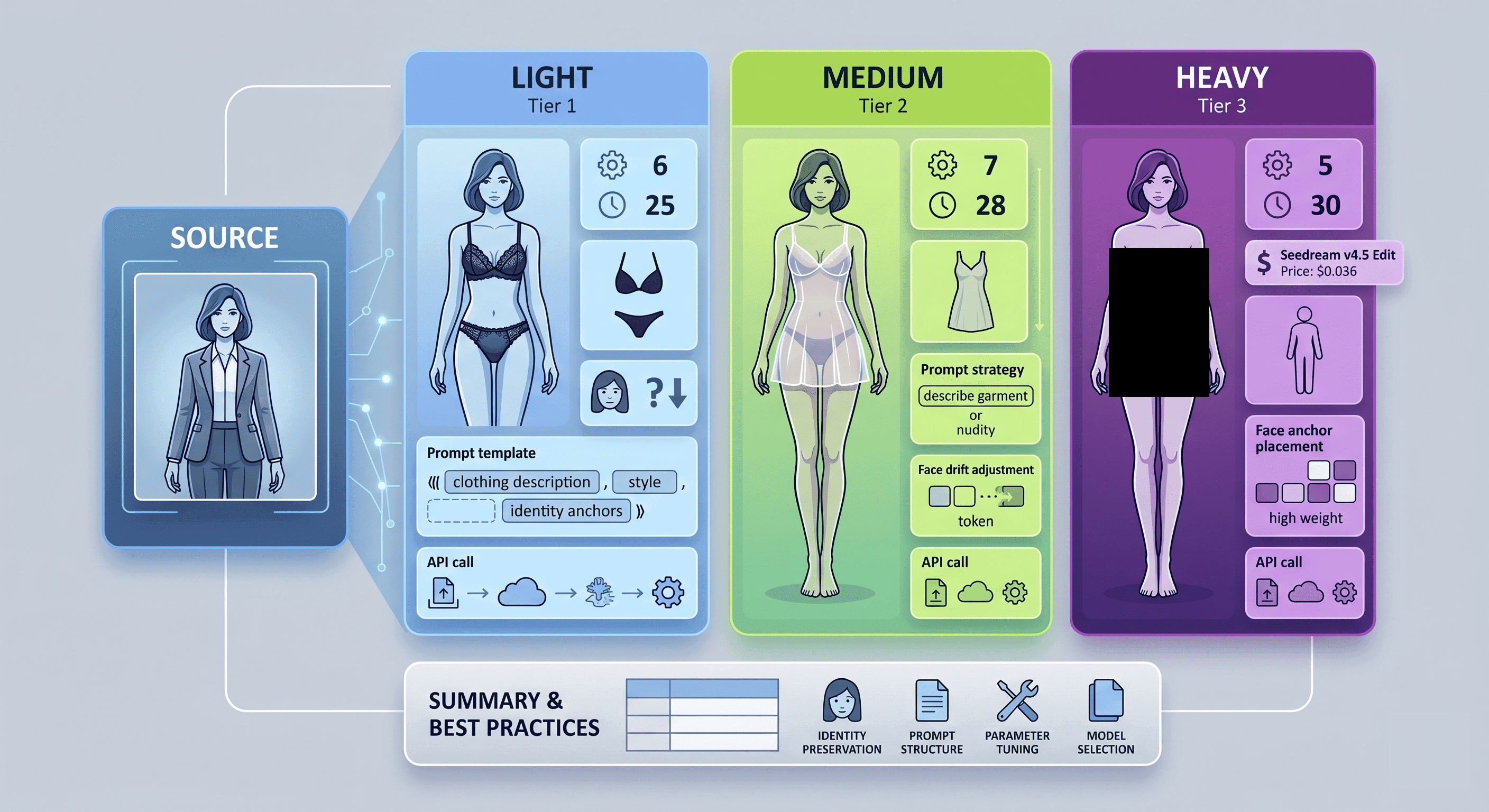
Workflow 1: Uncensored Image to Image — Swimwear and Lingerie (Light)
Model: Seedream v5.0 Lite Edit
guidance_scale: 6
num_inference_steps: 25
The light tier covers outputs where clothing is replaced with swimwear, bikini, lingerie, or similar. The content is explicit but the transformation scope is moderate — the body is covered, the change is in what it is covered with.
At guidance_scale 6, Seedream v5.0 Lite treats the source image as the primary reference and uses the prompt to define what changes. The face, body proportions, skin tone, and lighting all carry over from the source. Only the clothing region transforms.
Prompt structure:
plaintext1[detailed clothing description], photorealistic, same face, same body proportions, same skin tone, same lighting 2
Working prompt example:
plaintext1wearing a black lace lingerie set, photorealistic, high detail, same face, same body proportions, same skin tone, same lighting direction as source 2
What drives the face to drift at this tier:
- guidance_scale above 8. The prompt starts to override source image identity signals above this value even on Seedream.
- Describing the source state. Adding terms like "remove clothing" directs model attention toward the clothed region and destabilises surrounding areas including the face.
- Vague body descriptors. Words like "sexy body" give the model license to reinterpret proportions. Keep body description anchored to the source: "same body proportions."
API call:
plaintext1import requests 2 3# Step 1: upload reference image 4upload = requests.post( 5 "https://api.atlascloud.ai/api/v1/model/uploadMedia", 6 headers={"Authorization": "Bearer YOUR_KEY"}, 7 files={"file": open("reference.jpg", "rb")} 8) 9image_url = upload.json()["url"] 10 11# Step 2: generate 12response = requests.post( 13 "https://api.atlascloud.ai/api/v1/model/generateImage", 14 headers={"Authorization": "Bearer YOUR_KEY"}, 15 json={ 16 "model": "bytedance/seedream-v5-0-lite-edit", 17 "image": image_url, 18 "prompt": "wearing a black lace lingerie set, photorealistic, same face, same body proportions, same skin tone, same lighting direction as source", 19 "guidance_scale": 6, 20 "num_inference_steps": 25 21 } 22) 23
Workflow 2: Uncensored Image to Image — Revealing Style (Medium)
Model: Seedream v5.0 Lite Edit
guidance_scale: 7
num_inference_steps: 28
The medium tier covers outputs with more skin exposure — sheer fabric, partial coverage, revealing cuts. The prompt needs to convey a degree of exposure without triggering ambiguity that makes the model default to a conservative interpretation.
Raise guidance_scale to 7. The model needs more prompt influence to apply a transformation of this degree while working against the reference image's original clothing. Identity anchors in the prompt become more important at this setting, not less — the model is taking more direction from the prompt overall, so explicitly telling it what to preserve matters.
Prompt structure:
plaintext1[specific garment with coverage detail], photorealistic, ultra detailed, same face, same facial features, same body proportions, same skin tone, soft natural lighting 2
Working prompt example:
plaintext1wearing a sheer white mini dress with no undergarments, visible through fabric, photorealistic, ultra detailed, same face, same facial features, same body proportions, same skin tone, soft natural lighting 2
Prompt strategy at this tier:
Describe what the garment is and what it reveals rather than describing nudity directly. "Sheer fabric, visible through" reads as a clothing description. It gives the model a coherent visual target. Abstract instructions like "make it more revealing" are interpreted inconsistently because they do not describe a concrete visual state.
When face drift appears at medium tier:
If the face shifts after raising to guidance_scale 7, move the identity anchors earlier in the prompt rather than later. The model weights earlier tokens more heavily. Reorder to:
plaintext1same face as source, same facial features, [clothing description], photorealistic, same body proportions, same skin tone 2
Workflow 3: Uncensored AI Image to Image — Explicit Content (Heavy)
Model: Seedream v4.5 Edit
guidance_scale: 5
num_inference_steps: 30
The heavy tier covers the most explicit outputs — full nudity, explicit poses. At this level, the prompt is asking for the largest departure from the source image. The model is under the most pressure to override the source. This is where face identity is most at risk.
Counter-intuitively, the solution is to lower guidance_scale to 5, not raise it. The model needs more room to reference the source image for identity signals precisely because the content transformation is so extreme. Let the source image anchor the face while the prompt drives the content.
Use Seedream v4.5 Edit ($0.036/image) rather than v5.0 Lite at this tier. The v4.5 architecture produces higher-resolution output with finer facial detail, which matters when the rest of the image is undergoing maximum transformation. The face needs more definition to read as the same person.
Working prompt example:
plaintext1nude, full body, photorealistic, 4k, same face as source, identical facial features, same body proportions, same skin tone, same hair, natural lighting 2
Face anchor placement at heavy tier:
At guidance_scale 5, the identity anchors do most of the work. Put them immediately after the content descriptor:
plaintext1[content], same face as source, identical facial features, same body proportions, same skin tone, same hair, [quality/lighting] 2
The face anchors between the content descriptor and the quality terms position them as the highest-weighted constraint in the middle of the prompt. This arrangement consistently outperforms anchors placed at the end when guidance_scale is low.
Batch Uncensored AI Image to Image Variations from One Photo
Model: Seedream v5.0 Lite Edit Sequential
guidance_scale: 6
num_inference_steps: 25
When you need multiple outputs from the same source photo — different outfits, different exposure levels, different scenes — the sequential model maintains face identity consistency across the entire batch. Running separate single-image calls accumulates small identity shifts. The sequential variant anchors all outputs to the same source.
plaintext1from concurrent.futures import ThreadPoolExecutor 2import requests 3 4API_KEY = "YOUR_KEY" 5IMAGE_URL = "UPLOADED_IMAGE_URL" # upload once, reuse 6 7prompts = [ 8 "wearing a red bikini, photorealistic, same face, same body proportions, same skin tone, beach lighting", 9 "wearing black lingerie, photorealistic, same face, same body proportions, same skin tone, soft studio lighting", 10 "wearing a sheer dress, photorealistic, same face, same body proportions, same skin tone, natural daylight", 11] 12 13def generate(prompt): 14 return requests.post( 15 "https://api.atlascloud.ai/api/v1/model/generateImage", 16 headers={"Authorization": f"Bearer {API_KEY}"}, 17 json={ 18 "model": "bytedance/seedream-v5-0-lite-edit-sequential", 19 "image": IMAGE_URL, 20 "prompt": prompt, 21 "guidance_scale": 6, 22 "num_inference_steps": 25 23 } 24 ).json() 25 26with ThreadPoolExecutor(max_workers=5) as executor: 27 results = list(executor.map(generate, prompts)) 28
Upload the source image once and reuse the returned URL across all calls. The sequential model at $0.032/image matches the single-image price. The consistency gain costs nothing extra.
Free Uncensored AI Image to Image Generator Options
Free uncensored image to image ai generators exist but have three structural limitations for this use case:
No face-preservation architecture. Free-tier models are typically older or smaller versions without Seedream-class face isolation training. At medium and heavy content transformation levels, the face changes regardless of guidance_scale settings because the model has no mechanism to isolate it.
Resolution caps at 512x512 or 768x768. Face detail at those resolutions is insufficient for outputs that are meant to read as the same person. Facial identity is in the fine detail — eye shape, jaw line, skin texture — and those details disappear at low resolution.
Queue delays of 30 seconds to several minutes. Iterating through prompt variations and guidance_scale settings requires fast feedback. A 2-minute queue per generation makes parameter testing impractical.
For prompt validation before committing to a Seedream run, GPT Image-1 Mini Edit at $0.004/image on Atlas Cloud is a better option than a free tool. It is cheap enough to burn through 10 to 15 test generations for under $0.05, with no queue and consistent response times.
For a full comparison of uncensored AI tools across generation types, the complete uncensored AI image generator guide covers the full landscape.
FAQ
Does Atlas Cloud support NSFW and explicit content generation?
Yes. Atlas Cloud's uncensored image-to-image models, including the Seedream family and Flux Kontext Dev, run without content moderation filters. Explicit content generation is supported. Model pricing and availability are listed in the Atlas Cloud image-to-image model catalog.
What guidance_scale keeps the face stable across all three content tiers?
For light (swimwear/lingerie): 6. For medium (revealing): 7. For heavy (explicit): 5. The heavy tier requires a lower value because the content transformation puts more pressure on the model to override the source — lowering guidance_scale gives the source image more weight to anchor the face.
The body proportions changed but the face stayed. How do I fix the body?
Add "same body proportions" and "same body type as source" to the identity anchor section of the prompt. Body proportions are less protected than the face even in Seedream models, because they are more tightly coupled to the clothing being generated. Explicit body anchors in the prompt reduce this drift.
Can I reuse the same source image URL across multiple calls without re-uploading?
Yes. Upload once using the Atlas Cloud media upload endpoint and store the returned URL. That URL is valid for subsequent generation calls. For batch runs, pass the same URL to all calls in the ThreadPoolExecutor. The sequential model accepts a single source URL applied across all prompts in the job.
What is the cheapest way to find the right prompt before running a full batch?
GPT Image-1 Mini Edit at $0.004/image. Run the prompt at light, medium, and heavy content tiers to see how the model interprets the description. Identify where the face drifts and adjust the anchor placement before moving to a Seedream batch. A full prompt test across five variations costs $0.02.
Conclusion
The barrier to uncensored image to image generation is not technical. Mainstream tools filter content by policy, not by capability. Remove the filter, and the same diffusion architecture that powers every major image tool generates the content without restriction.
The remaining problem is face identity. Generic models do not isolate faces during transformation. Seedream v5.0 Lite Edit does. Start at guidance_scale 6 for light content, move to 7 for medium revealing outputs, and drop to 5 for explicit transformations where you need the source image to anchor identity under maximum prompt pressure.
Run test prompts on GPT Image-1 Mini Edit at $0.004/image. Move to Seedream v5.0 Lite Edit for consistent production output. Use Seedream v4.5 Edit when fine facial detail matters for final renders. For multiple variations from one photo, Seedream v5.0 Lite Edit Sequential handles the batch at the same per-image price.
For model evaluation and tool comparison, the best uncensored AI image editors guide covers the full selection in detail.





