The Magic of One Sentence: Building a Living, Breathing AI Sandbox from Scratch
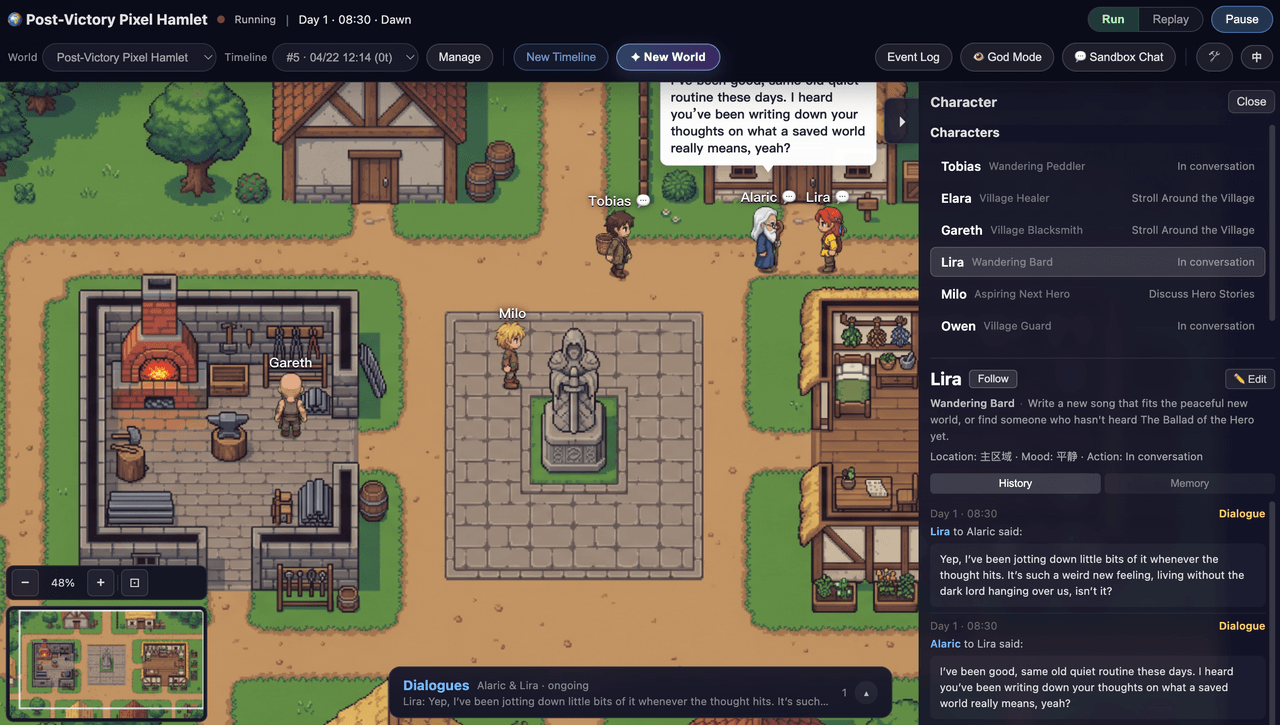
Imagine typing a single sentence and watching a massive, interactive 2D pixel-art world snap into existence. No tile mapping, no writing thousands of lines of NPC dialogue, and no complex state tracking.
With WorldX, an open-source AI-driven world generator and simulator, this is no longer a concept—it is a reality. By blending Generative AI with Computer Vision (CV) and Multi-Agent simulation, WorldX transforms raw text descriptions into functional, sandbox environments where autonomous characters live, communicate, and push forward their own narratives without any human intervention.
Inside WorldX: How a Single Prompt Spirals into an Autonomous Reality
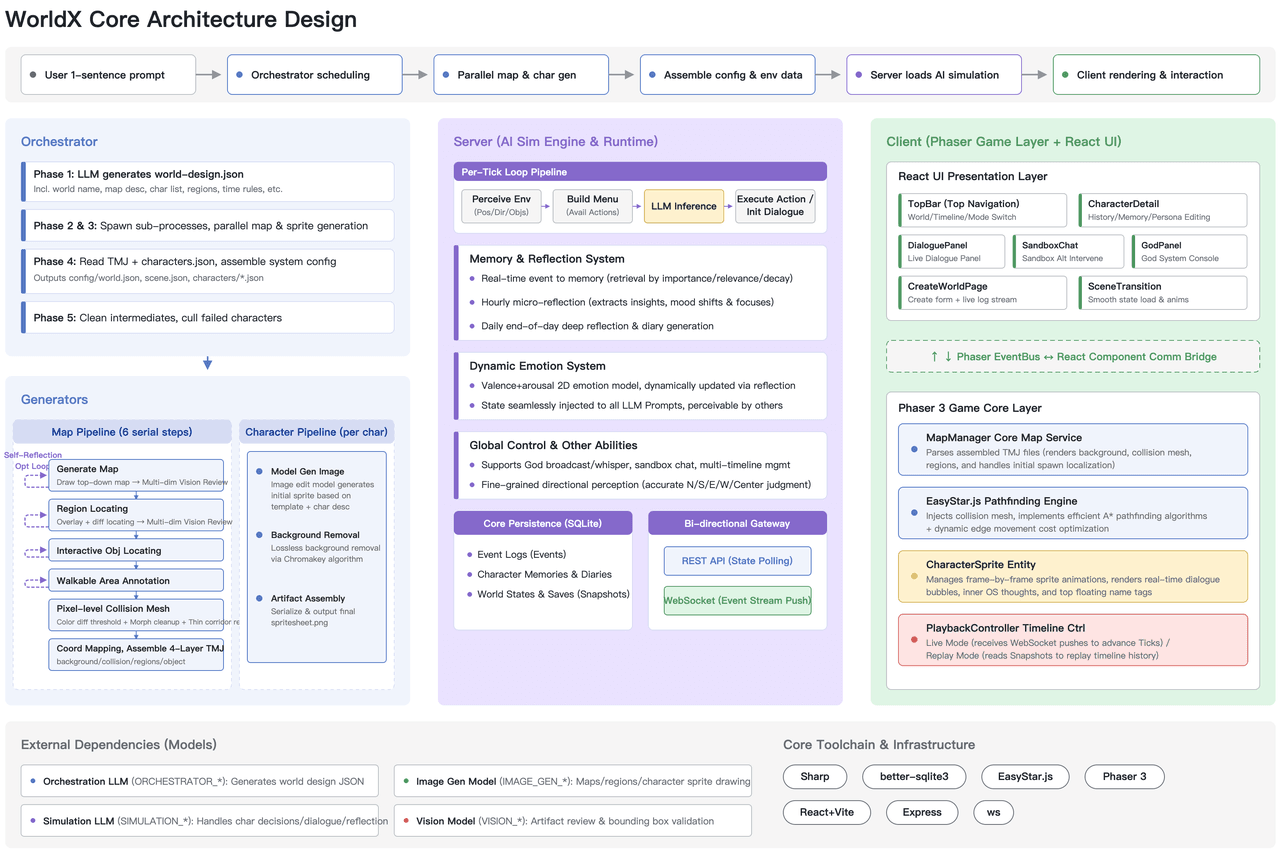
Traditional game development relies heavily on hardcoded scripts and rigid behavior trees. WorldX replaces this paradigm entirely through a two-part pipeline:
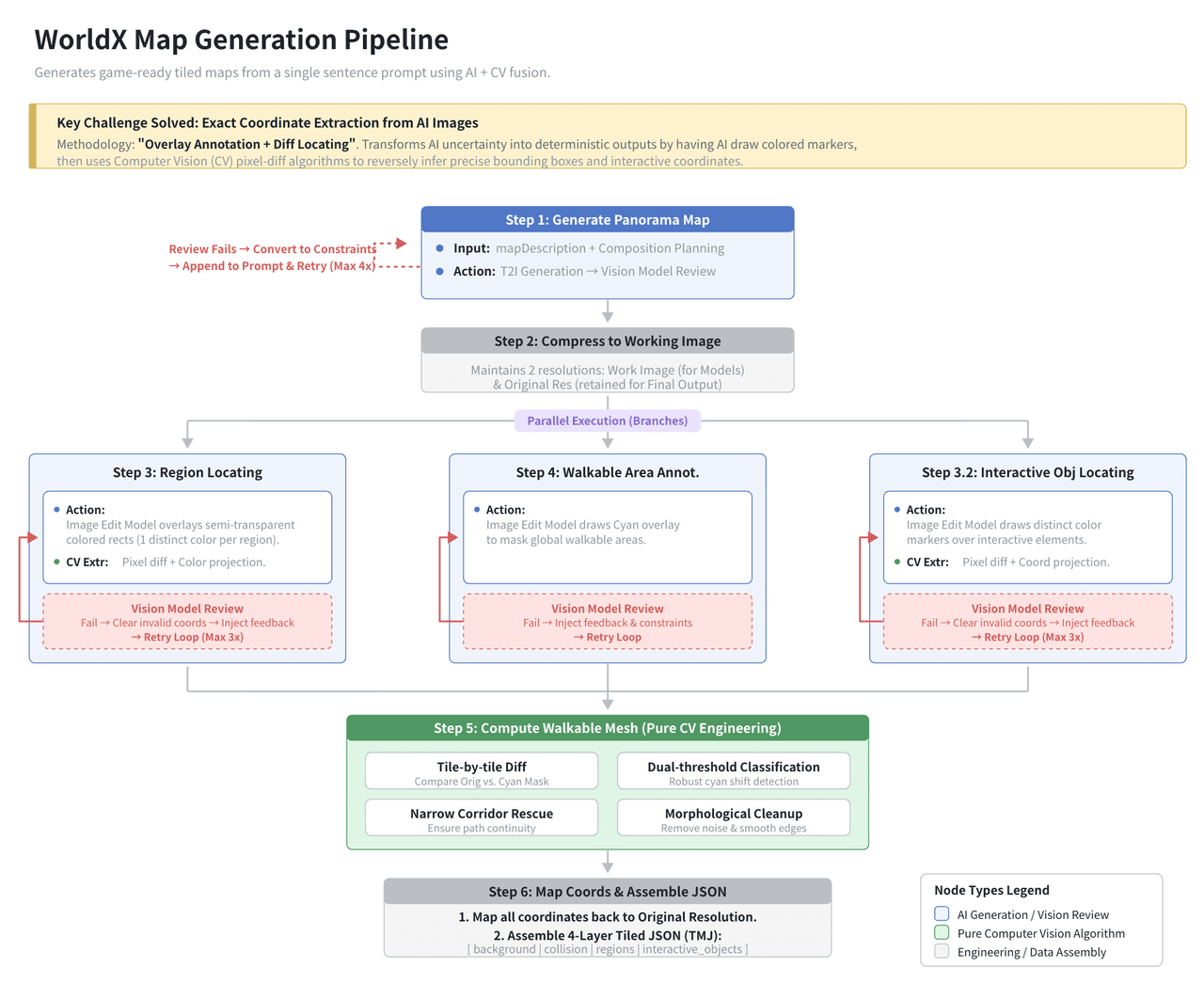
- Algorithmic Map Generation: When you feed a prompt into WorldX, an Orchestrator LLM translates the text into structured JSON layouts, while an Image Generation model crafts the global map. To bridge the gap between creative AI art and exact game mechanics, WorldX uses a smart "overlay annotation + differential vision" technique. It tags interactive zones and collision boundaries precisely, converting loose pixels into walkable, interactable game grids.
- Multi-Agent Orchestration: Once the map settles, characters (NPCs) are spawned with unique profiles, motivations, and memories. Driven by simulation LLMs, these characters do not just stand around. They actively perceive their environment, log events in their personal diaries, text each other via WebSockets, and dynamically adjust their goals based on what happens around them.
Showcase: From a Single Prompt to a Living Pirate Island in 5 Minutes
Let us look at how easily you can set up and run a live simulation from scratch.
Step 1: Environment Setup & API Key Configuration
First, clone the repository and install the dependencies:
Bash
plaintext1git clone https://github.com/YGYOOO/WorldX.git 2cd WorldX 3npm install
To run the simulation, you need access to an LLM and an Image Generation model.
💡 Developer Note: Instead of registering at four different AI platforms and managing separate API keys for orchestration, simulation, and image generation, this step uses an AtlasCloud unified API key. With a single key, we can effortlessly dispatch calls to different models (like DeepSeek for deep reasoning, or standard LLMs for quick agent chatter) without updating multiple environment variables.
Set up your .env file:
代码段
plaintext1PORT=3000 2ATLASCLOUD_API_KEY=your_atlascloud_key_here 3# Configure the unified gateway to route orchestrator and simulation queries seamlessly
Step 2: Feeding the Magic Prompt
Launch the server using npm run dev and open the local dashboard. In the creation console, input the following single-sentence prompt:
"A pirate island where the captain hid a cursed treasure, and a traitor among the crew is quietly trying to steal it before midnight."
Step 3: Watching the Simulation Evolve
Click Generate. Over the next 5 minutes, WorldX runs its background pipeline to output a full map and initialize three primary agents: Captain Blackwood, First Mate Thomas (the Traitor), and Quartermaster Elena.
Here is a timeline of how the autonomous simulation unfolded during a live 5-minute test:
- 01:15 (Map Settled): A coastal pixel island appears, complete with a tavern, a shoreline, and a hidden cave zone.
- 02:30 (First Interaction): Thomas moves toward the tavern and strikes up a conversation with Elena, trying to gauge if she knows where the key to the Captain’s chest is kept.
- 03:45 (Conflict Emerges): Captain Blackwood notices Thomas lingering near the restricted cave zone. The simulation LLM updates Blackwood's diary: "Thomas is acting strange near the shoreline. I must secure the perimeter."
- 05:00 (The Climax): Blackwood confronts Thomas near the cave. A tense dialogue exchange occurs over WebSockets, altering both agents' relationship status to "Hostile."
Performance & Cost Metrics for this Run:
- Total Time to Map Generation: 42 seconds
- Average Agent Decision Latency: 1.2 seconds
- Total Token Consumption (5-Min Run): ~24,500 tokens (across orchestration, diaries, and live chats)
Data & Architectural Breakdown: Under the Hood of WorldX
The efficiency of WorldX lies in how it minimizes manual configuration compared to classic game engines.
| Metric / Feature | Traditional Sandbox Setup | WorldX Pipeline |
| Map Creation Time | Hours/Days (Manual tiling or heavy procedural coding) | < 60 seconds (Prompt to map grid via AI & CV) |
| NPC Dialogue Paths | Fixed branching trees (Hundreds of lines of text) | Dynamic & Unbounded (Generated on-the-fly by LLM) |
| Collision Mapping | Manual boundary drawing in editors like Tiled | Automated (Via functional color masks & Sharp processing) |
| State Tracking | Centralized heavy database states | Decentralized Diaries (Stored as short-term & long-term memory snippets) |
FAQ: Everything You Need to Know About WorldX
How does WorldX handle character collision on an AI-generated map?
It uses a clever dual-layer approach. The AI first generates the visual map, and then a vision-based secondary loop applies a semi-transparent color mask over it to flag walkable versus non-walkable zones. The core engine translates these masks into a binary grid matrix that the built-in pathfinding library (EasyStar.js) uses to guide character movement smoothly.
Can I run WorldX entirely offline with local LLMs?
Yes, you can. Because the framework communicates via standard REST and WebSocket protocols, you can easily point your base URL to a local inference provider running Ollama or Llama.cpp. Keep in mind that map orchestration requires solid JSON-following capabilities, so larger quantized models are highly recommended for stable setups.
What happens when an agent's memory gets too long?
WorldX prevents context window bloat by using a structured snapshotting system. Instead of feeding the entire history into every turn, the simulation architecture compresses past events into compact diary entries and relationship status flags, keeping individual agent loops fast and cost-effective.





