The $10 to $20/month range has become the most contested bracket in developer tooling. GitHub Copilot, Cursor, and a growing list of API-based plans are all competing for the same budget. The problem is they're not really the same kind of product, and picking the wrong one can leave you hitting limits mid-session or paying far more per token than you need to.
This article breaks down what's actually available in that price range, what the daily limits and model access look like in practice, and where each plan fits based on how you actually code. The math is all here, and none of it is made up.
What Makes the Best AI Coding Subscription Under $20 Worth Paying For
Not all AI coding subscriptions measure the same thing. Some sell seats: you get access to suggestions and chat up to a monthly limit. Others sell compute: credits that translate directly into tokens, consumed per request. Knowing which type you're buying changes how you evaluate the value.
For IDE-native tools like GitHub Copilot, what you're paying for is access to an always-on suggestion engine inside your editor. The model choices are limited, and there's no raw API access. That's a reasonable trade for developers who want something that just works without any configuration overhead.
For API-based subscriptions, what you're paying for is daily compute at a discounted rate, usable across any tool that speaks OpenAI-compatible format. The value scales with how much you want to customize: which model you use, which tool you run it through, and whether you need to switch between models for different task types.
The best AI coding subscription under $20 depends almost entirely on which of these two profiles fits your workflow.
The Main Contenders for AI Coding Subscriptions Under $20
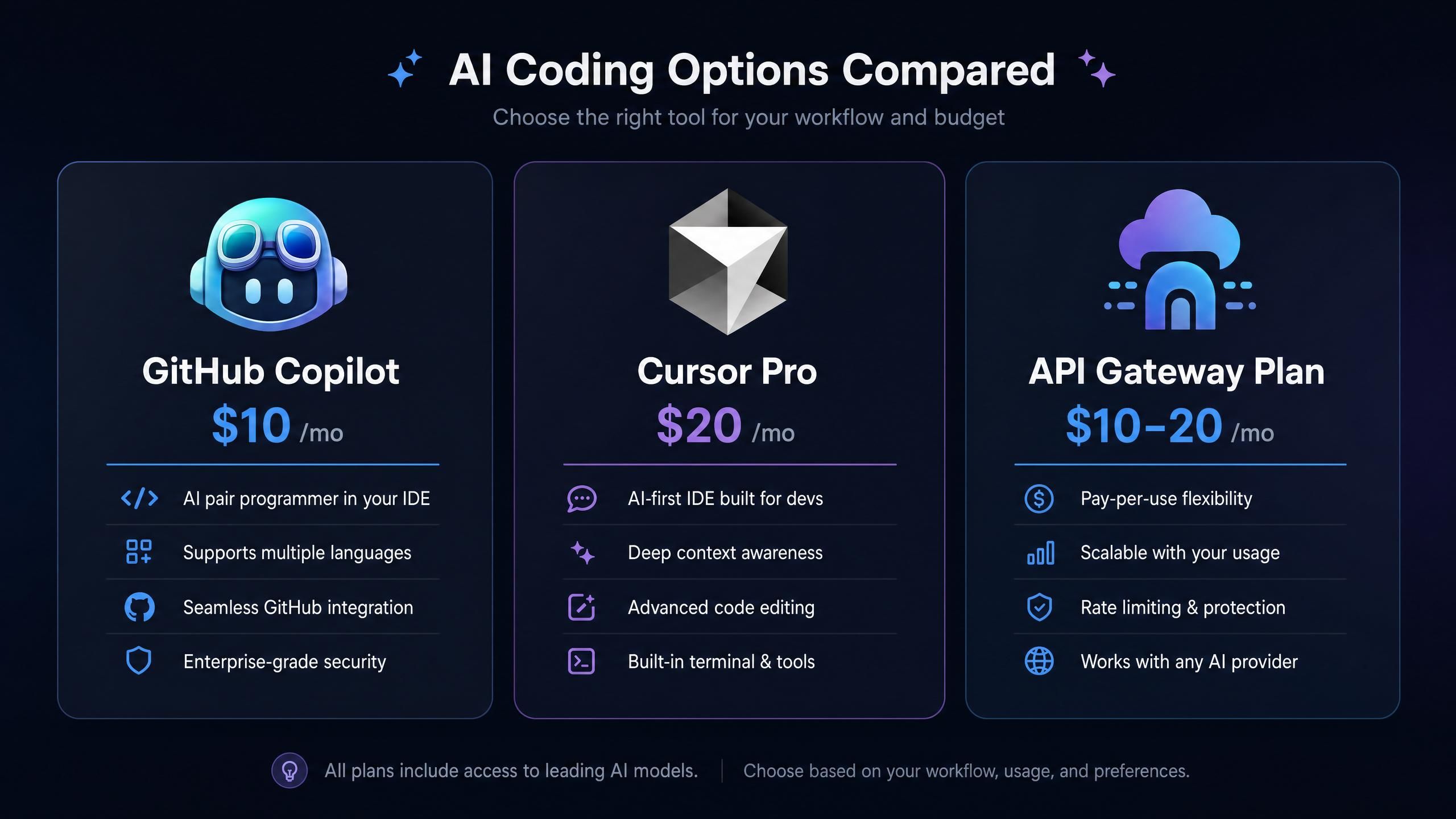
GitHub Copilot Individual ($10/month)
GitHub Copilot's individual plan is the most straightforward option at the low end of this range. You get inline code suggestions, a chat interface, and pull request summaries, all integrated into VS Code, JetBrains IDEs, and a few others. The models underlying these features are managed by GitHub (using models from OpenAI and increasingly Anthropic), so you don't pick them or configure them.
The plan works well if your primary use case is in-editor autocomplete and occasional chat-based debugging. What it doesn't offer is raw API access, multi-model switching, or support for tools like Claude Code or Codex that run outside the IDE as autonomous agents (GitHub Copilot Plans, May 2026).
Cursor Pro ($20/month)
Cursor Pro is a purpose-built AI IDE based on VS Code. At $20/month, you get 500 "fast" requests per month (using top-tier models like Claude Sonnet or GPT-4o) and unlimited "slow" requests. It's a full coding environment with a polished UX, so there's less configuration overhead than a raw API gateway.
The ceiling is those 500 fast requests. For a developer doing a week-long agentic refactoring project, 500 requests can disappear faster than expected. Cursor's slow request tier handles overflow, but the model quality difference is noticeable on complex tasks (Cursor Pricing, May 2026).
API Gateway Plans: Best AI Coding Subscription Under $20 for Agent Workflows
A third category has been growing: monthly subscription plans from API gateway providers that let you access multiple open-source models (DeepSeek, Kimi, GLM, MiniMax, Qwen) through a single endpoint. These plans work with whatever tool you're already using: Claude Code, Codex, OpenClaw, OpenCode, or direct API calls.
The appeal is straightforward. Instead of being locked to one model managed by the IDE vendor, you pick the model per task. You route lightweight completions to a cheap flash-tier model and complex reasoning to a pro-tier model. At $10 to $20/month, the daily compute budget is measurable and often much larger than you'd get with a seat-based plan.
Best AI Coding Subscription Under $20: The Points and Credits Math
This is where it gets concrete. API gateway plans price compute in credits, which are a simple multiplier of tokens:
Credits consumed = input tokens x input rate + output tokens x output rate
Using Atlas Cloud Coding Plan's Starter tier ($10/month) as a worked example. The plan gives 800,000 credits per day. Models available include DeepSeek V4 Pro (input rate: 2.87 per 1K tokens, output rate: 5.75) and DeepSeek V4 Flash (input rate: 0.23, output rate: 0.46).
For a typical medium-sized coding request (5,000 input tokens, 1,000 output tokens):
| Model | Input Cost | Output Cost | Total Credits | Daily Requests (800K budget) |
| DeepSeek V4 Flash | 1,150 | 460 | 1,610 | ~497 |
| GLM-5 | 9,100 | 5,810 | 14,910 | ~53 |
| DeepSeek V4 Pro | 14,350 | 5,750 | 20,100 | ~39 |
The gap is enormous. On DeepSeek V4 Flash, you can run nearly 500 medium requests in a day on a $10 plan. On V4 Pro, you're looking at about 39. This is why model routing exists: you don't need a pro-tier model for renaming a variable or writing a docstring. A sensible approach is routing simple edits and utility calls to Flash and multi-file reasoning or debugging to Pro.
The Lite plan ($20/month) bumps you to 1,800,000 credits per day, scaling these numbers up by 2.25x across all models. For a developer running Claude Code as a primary tool with long agentic sessions, the Lite plan covers a full active workday on V4 Pro without running short.
Model Variety and What It Actually Means for Your Workflow
One thing that doesn't show up in seat-based tool comparisons is model flexibility. Most IDE-integrated subscriptions lock you into whatever model the vendor has chosen. For the majority of casual coding tasks, that's fine. But for developers using tools like Claude Code or Codex as coding agents, model choice matters in a few specific ways.
Context window size determines how much code you can pass in one call. DeepSeek V4 Pro and V4 Flash both support a 1M token context window. That's enough to include an entire large codebase in a single request without any chunking logic.
Cost per request varies by up to 12x between the cheapest and most capable models. Routing simple tasks to a lower-cost model and reserving the pro tier for complex reasoning is the single most effective way to stretch a daily credit budget without paying for a higher plan tier.
Tool compatibility matters as well. Seat-based tools are self-contained: you use them through their own interface. API gateway plans work with whatever tool speaks OpenAI-compatible format, which covers Claude Code, Codex, OpenClaw, and a growing list of others.
Developers discussing this tradeoff on (r/LocalLLaMA) generally land in the same place: for casual daily suggestions, IDE-native tools win on convenience. For heavier agent usage, raw API access with model routing is usually cheaper per useful output, especially on long agentic sessions where context accumulates and per-request cost climbs fast.
How to Set Up Your AI Coding Subscription Under $20 in Under 10 Minutes
If you want to get an API gateway plan running with your preferred tools, the setup is more straightforward than it looks. Atlas Cloud Coding Plan supports Claude Code, Codex, OpenClaw, OpenCode, and others through a single base URL and API key. Each plan type (subscription vs pay-as-you-go) gets its own API key, which you create under Plan Management in the dashboard.
One thing to know before you start: Claude Code uses a base URL without the /v1 suffix. Every other tool uses the /v1 suffix. Getting this wrong is the most common setup mistake, and it produces confusing auth errors that don't point directly at the cause.
Claude Code (~/.claude/settings.json on macOS/Linux, %USERPROFILE%\.claude\settings.json on Windows):
plaintext1{ 2 "env": { 3 "ANTHROPIC_AUTH_TOKEN": "your-atlas-api-key", 4 "ANTHROPIC_BASE_URL": "https://api.atlascloud.ai", 5 "ANTHROPIC_MODEL": "deepseek-ai/deepseek-v4-pro", 6 "ANTHROPIC_DEFAULT_HAIKU_MODEL": "deepseek-ai/deepseek-v4-flash", 7 "ANTHROPIC_DEFAULT_SONNET_MODEL": "deepseek-ai/deepseek-v4-pro", 8 "CLAUDE_CODE_DISABLE_EXPERIMENTAL_BETAS": "1" 9 } 10}
The ANTHROPIC_DEFAULT_HAIKU_MODEL field maps to Claude Code's lightweight background task slot. Pointing it to DeepSeek V4 Flash means all the utility calls Claude Code makes automatically (file reads, quick checks, status updates) use the cheapest model available, while your main sessions use V4 Pro. You get automatic model routing without writing any routing logic.
Codex uses two files. First, ~/.codex/config.toml:
plaintext1model_provider = "atlas_coding_plan" 2model = "deepseek-ai/deepseek-v4-pro" 3 4[model_providers.atlas_coding_plan] 5name = "atlascloud" 6base_url = "https://api.atlascloud.ai/v1" 7wire_api = "chat" 8requires_openai_auth = true
Then ~/.codex/auth.json:
plaintext1{ 2 "OPENAI_API_KEY": "your-atlas-api-key" 3}
OpenClaw has a setup wizard: run openclaw onboard, pick QuickStart, then Custom Provider. Enter https://api.atlascloud.ai/v1 as the base URL, paste your Atlas key, then enter the model ID (e.g. deepseek-ai/deepseek-v4-pro) and choose OpenAI-compatible protocol.
To switch models, you change a single field in the config. If you want to test Kimi K2.5 instead of DeepSeek V4 Pro, replace deepseek-ai/deepseek-v4-pro with moonshotai/kimi-k2.5. Everything else stays the same.
Best AI Coding Subscription Under $20: Common Questions
Is the $10 Starter plan enough for daily vibe coding?
It depends on which model you use. On DeepSeek V4 Flash, 800K credits/day handles hundreds of small requests, which is more than most developers run through in a day. On V4 Pro with long agentic sessions, you'll hit the cap faster. If you run out, you can hold a pay-as-you-go pack alongside the subscription: the plan drains subscription credits first, then shifts to the PAYG balance automatically without interrupting your session.
What's actually different about the $20 Lite plan versus $10 Starter?
Only the daily credit allowance: 1.8M per day for Lite versus 800K for Starter. Model access and tool support are identical. Whether the $20 tier is worth it comes down to how consistently you hit the Starter cap. If you rarely approach 800K credits in a day, the Starter plan is the right starting point and you can upgrade anytime.
Can I upgrade mid-month without losing time?
Yes. Upgrades are pro-rated based on remaining days. If you bought the Starter plan on May 14 and upgrade to Lite on May 25, you have 19 days left in the period. The charge is ($20 - $10) x (19 / 30) = $6.33. Your expiry date stays the same. You're not paying double, just topping up the difference for the remaining time.
Does this work if I use Claude Code but want non-Anthropic models?
That's exactly what the config above does. Claude Code reads ANTHROPIC_AUTH_TOKEN and ANTHROPIC_BASE_URL from settings.json. Pointing those to a gateway that serves DeepSeek or Kimi in OpenAI-compatible format makes the connection work. The tool runs normally; the model on the other end just isn't a Claude model. Claude Code doesn't require Anthropic models, just Anthropic-compatible API behavior.
Do unused daily credits carry over to the next day?
No. Subscription credits reset at midnight each day. Unused credits don't accumulate. This is worth keeping in mind when choosing your plan tier: size it to your typical daily usage, not your peak. For peak days, pay-as-you-go packs are a cleaner way to handle overflow than upgrading your subscription tier permanently.
Can I mix models in the same session?
Yes. Since all models sit behind the same API key and base URL, you can change the model parameter per request. In practice, the Claude Code config above already does this automatically by routing Haiku-class tasks to Flash and Sonnet-class tasks to Pro. In other tools, you can set the model field dynamically per request or per session.
The Bottom Line on Finding the Best AI Coding Subscription Under $20
The honest answer is that the best option depends on how you work.
If you want inline suggestions in your IDE with no configuration, GitHub Copilot Individual at $10/month is a solid, low-friction choice. If you want a full AI IDE with a good UX and a polished product, Cursor Pro at $20/month is mature and well-maintained. Both are fair value for what they are.
If you're running coding agents (Claude Code, Codex, OpenClaw) as a core part of your workflow, or you want the flexibility to choose your model per task, an API gateway plan at $10 to $20/month gives you more raw compute and more control than a seat-based subscription at the same price point. The credit-based model is transparent: you can calculate exactly what each session costs before you run it.
For developers who haven't tried the API gateway approach, Atlas Cloud Coding Plan offers Starter ($10/month, 800K credits/day) and Lite ($20/month, 1.8M credits/day) tiers with access to models across the DeepSeek V4, Kimi K2, GLM-5, MiniMax M2, and Qwen3 families. Tool support covers Claude Code, Codex, OpenClaw, OpenCode, and any other tool that speaks OpenAI-compatible format. All models are priced at up to 50% below their official API rates through the gateway.
If you're unsure about your daily usage, the pay-as-you-go option lets you validate consumption before committing to a subscription tier. The two billing types can coexist: subscription for predictable daily usage, PAYG for the days when a long session runs over.
Plan pricing and model rates based on Atlas Cloud Coding Plan documentation as of May 2026. GitHub Copilot and Cursor pricing verified from their respective pricing pages as of the same date. Credit calculations are illustrative examples; actual session costs vary based on model choice, context size, and task mix.





