Most developers pick a billing model once and never revisit it. They either commit to a monthly subscription on autopilot or default to pay-as-you-go because it feels lower-risk. Neither instinct is wrong exactly, but both can cost you real money when you're running LLM agents through tools like Claude Code, Codex, or OpenClaw.
The math is different than it looks. Subscription plans front-load your cost in exchange for a lower per-credit rate and a predictable daily allowance. Pay-as-you-go gives you flexibility, but flexibility at scale compounds into a higher effective cost per token. The right choice depends almost entirely on one thing: how consistent your usage actually is.
This breakdown covers both models in concrete terms, works through the numbers for real developer workflows, and explains why a hybrid approach is often the answer nobody talks about.
Coding Plan Subscription vs Pay As You Go: The Basic Mechanics
Before comparing costs, it helps to understand what each model actually does.
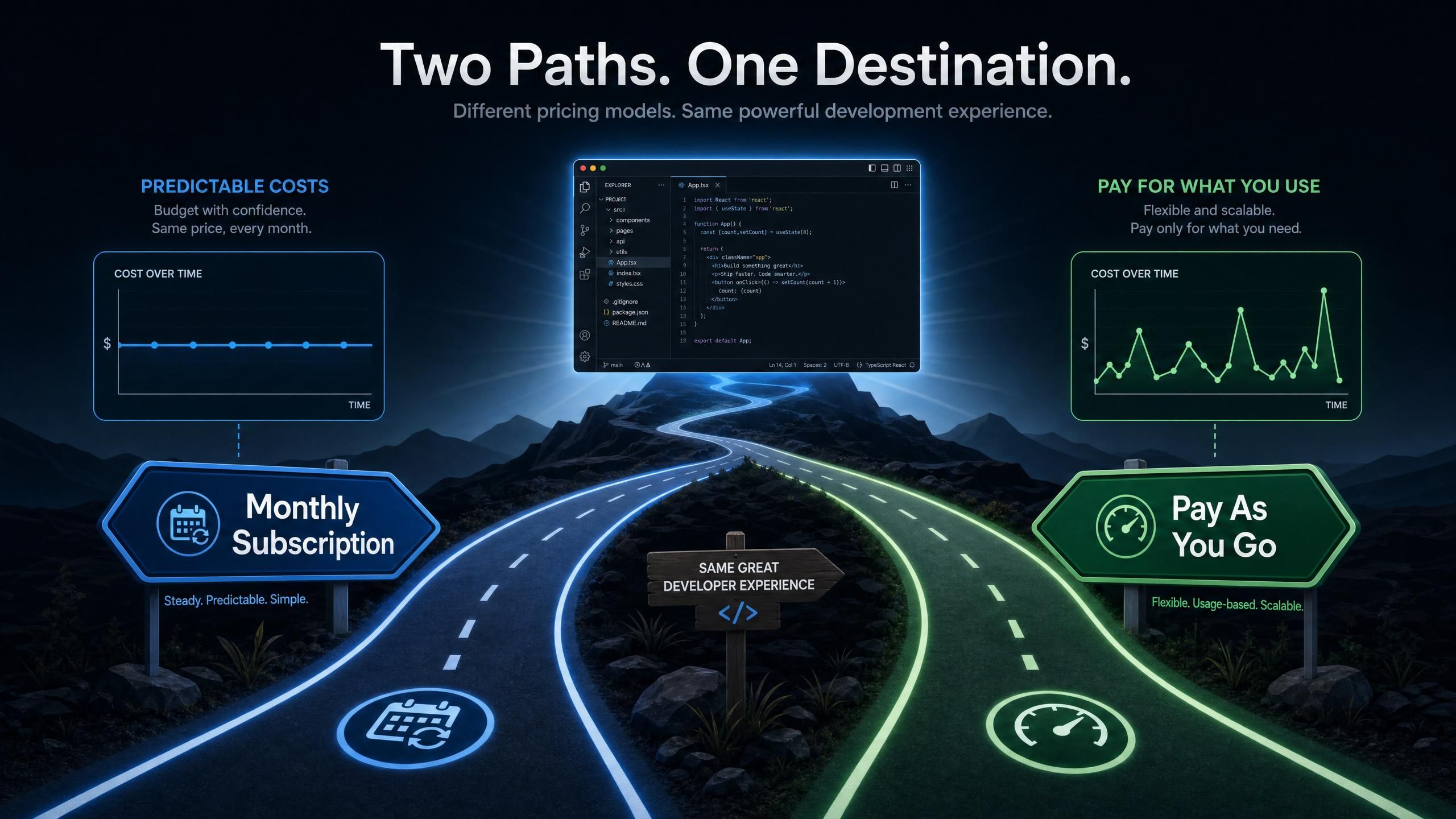
A monthly subscription gives you a pool of credits split into daily allowances over a 30-day period. Each day at midnight, your allowance resets. You can't carry unused credits from one day to the next, and you can only hold one subscription plan at a time. The upside is predictable cost and a consistent budget per day. You know exactly what you're spending before the month starts.
A pay-as-you-go pack is a one-time credit purchase that doesn't expire for 90 days. There's no daily cap: you can use all the credits in a single session or spread them across the full three months. You can also buy multiple packs simultaneously and stack them. Credits drain from the pack expiring soonest first, which protects you from losing credits to expiration on the wrong pack.
Neither model changes the underlying cost of each model call. The token rates are the same regardless of which billing structure you're using. What changes is how you access those credits and how your costs accumulate over time.
Why LLM Agent Usage Makes This Choice Complicated
Coding Plan Subscription vs Pay As You Go for Different Usage Patterns
Standard SaaS subscription vs PAYG comparisons assume relatively predictable usage. LLM agent workloads don't always cooperate.
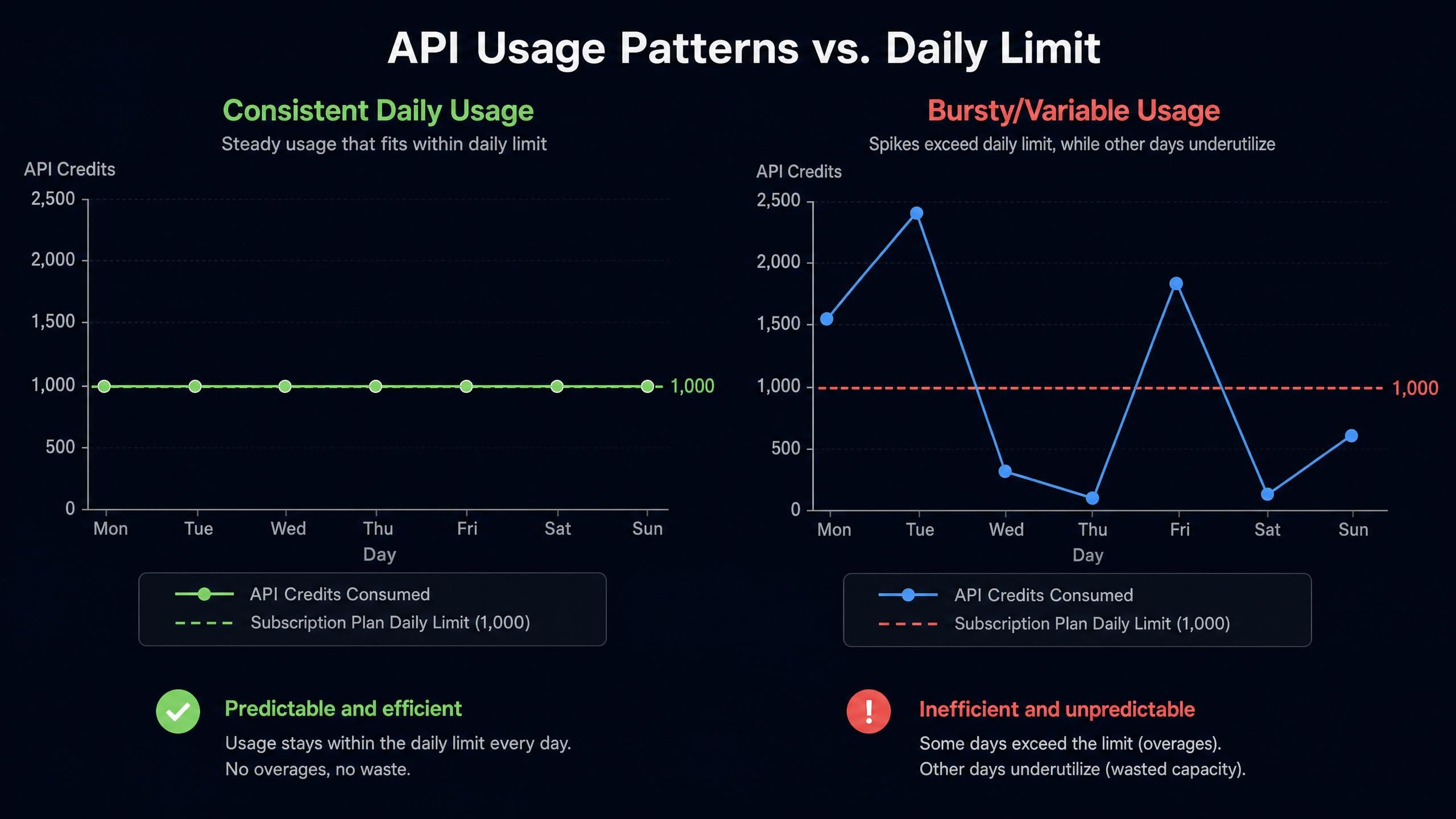
A developer using Claude Code for daily vibe coding generates a steady, consistent demand: several sessions per day, each with reasonably predictable token consumption. This profile fits a subscription plan well because the daily allowance covers the expected usage, the credits don't go to waste, and the total monthly cost is lower per credit than buying on demand.
But the same developer doing a large one-week refactoring project followed by two quiet weeks has a completely different profile. Subscription credits go unused during quiet periods, and the refactoring week might blow through the daily cap. Pay-as-you-go handles this better because there's no daily ceiling and no cost for days you don't use.
This is a point developers discuss frequently on forums like r/LocalLLaMA, where threads about LLM API cost management regularly show up. The consistent finding: subscribers who actively code every day come out ahead; developers with uneven workloads either hit daily caps at the wrong time or overpay for credits they don't use.
What Makes Agentic Workloads Unique
Regular chat-based LLM usage is relatively predictable. Agentic coding workflows are not. When Claude Code or Codex runs a multi-step task, it generates dozens of sequential API calls, each carrying the accumulated context from previous steps. A single "refactor this module" command might trigger 30 to 50 API calls before completion.
On a subscription plan with a daily credit limit, a long agentic session mid-afternoon can exhaust the day's allowance before the workday ends. This is one of the practical arguments for either running a pay-as-you-go overflow pack alongside your subscription, or sizing your subscription tier to cover worst-case days rather than average days.
Coding Plan Subscription vs Pay As You Go: The Math on Real Workloads
Let's make this concrete. Using Atlas Cloud Coding Plan's two-tier structure as a reference (Atlas Cloud Coding Plan, May 2026), the upgrade example in their documentation gives us the reference points:
- Starter plan: $10/month
- Lite plan: $20/month
Upgrade mid-period formula: (new price - old price) × (remaining days / 30)
If you bought Starter on April 28 (valid to May 28) and decide to upgrade to Lite on May 14, you have 14 days left. The upgrade cost is: ($20 - $10) × (14/30) = $4.67 to complete the Lite tier for those 14 days. Your expiry date stays May 28; you don't lose time or pay double.
This pro-rated structure matters for the subscription vs PAYG comparison. If you're on a smaller subscription and hit your daily cap regularly, upgrading is cost-efficient because you only pay for the remaining time. If you're on pay-as-you-go and have leftover credits at the end of a slow month, those credits roll into the next 30 days up to the 90-day window without penalty.
What Developers in the Community Are Saying
The subscription vs PAYG debate for AI APIs has been running in developer communities for a while. The consensus is nuanced but leans in a consistent direction based on usage type.
In discussions across Hacker News and r/LocalLLaMA, the common observation is that pay-as-you-go feels safer because there's no monthly commitment, but developers who switch to subscription plans for their daily coding tools tend to report lower total spend by the end of the month. The daily reset on subscription plans creates a forcing function: you're incentivized to use your full allowance each day, which in practice means getting more value out of the credits you've paid for.
One pattern that comes up repeatedly is the "ceiling problem" on subscription plans. Developers running long agentic sessions hit their daily cap partway through a task, then have to either pause, switch models, or switch to a pay-as-you-go overflow pack to finish. This is why the hybrid approach of holding both a subscription and a PAYG pack in parallel has become a popular setup for developers who use coding agents as a primary tool.
OpenRouter, which operates purely on pay-as-you-go pricing (OpenRouter, May 2026), has helped establish that PAYG works well for casual or variable use. But developers who run Codex, Claude Code, or OpenClaw as their primary development environment tend to benefit more from the predictability and per-credit value of subscription plans.
Coding Plan Subscription vs Pay As You Go: The Hybrid Strategy
The cleanest solution for most active developers isn't choosing one billing model. It's running both.
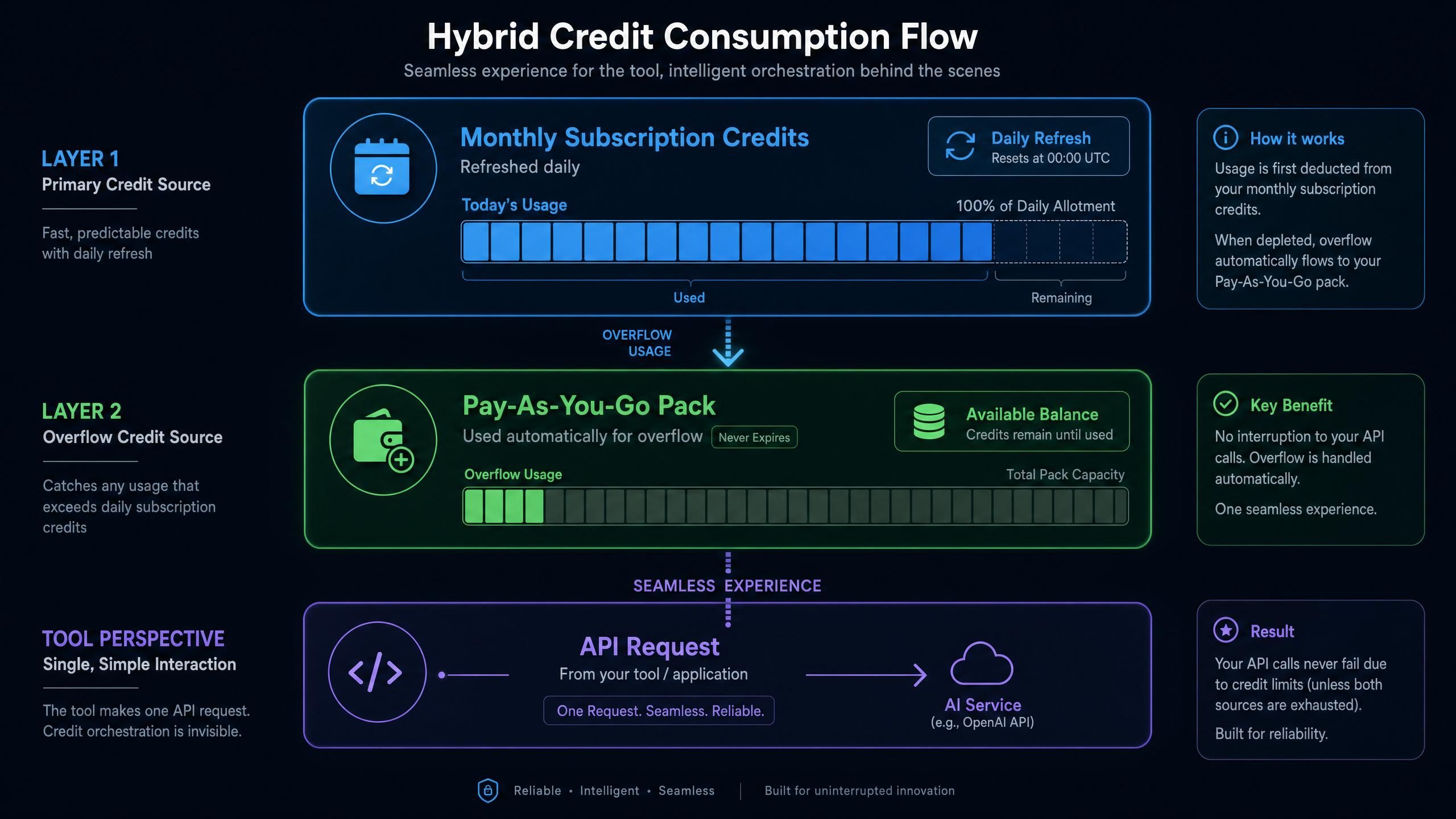
Here's how the layering works: when you hold both a monthly subscription and a pay-as-you-go pack, subscription credits are consumed first each day. If you exhaust your daily subscription allowance mid-session, billing automatically shifts to the pay-as-you-go balance. Your running session doesn't stop or reset; the credit source just changes underneath.
For a developer running Codex as their primary tool with occasional heavy agentic sessions, the practical setup looks like this: a subscription plan sized to cover typical daily usage, and one or two pay-as-you-go packs held in reserve for days when a long session pushes past the daily cap.
The 90-day validity on pay-as-you-go packs gives you real runway. If you buy a pack and don't need it for three weeks because your subscription plan covers everything, the credits are still there waiting. You're not paying for idle capacity the way you might with an oversized subscription tier.
Setting Up for Either Option
Coding Plan Subscription vs Pay As You Go: Mid-Cycle Plan Changes
A few things to know about managing plans in practice:
Subscription upgrades work on a pro-rated basis as shown above. You can upgrade at any time within the billing period. Downgrades are not supported mid-period; you'd need to wait for the current period to expire.
Multiple pay-as-you-go packs can be held simultaneously. If you have three packs active, credits drain from the one closest to expiring first. This means you don't have to worry about expiration order: the system handles it automatically.
Switching between subscription tiers only one subscription can exist at a time. If you're on Starter and want to move to Lite, the upgrade process charges the pro-rated difference and keeps your existing expiry date.
For the API side, your Atlas Cloud key and base URL stay the same regardless of which billing model you're using or how many packs you have stacked. The configuration for your tools doesn't change when you buy a new pack or upgrade your subscription.
For Claude Code, the setup in ~/.claude/settings.json looks like this (same configuration whether you're on subscription or PAYG):
plaintext1{ 2 "env": { 3 "ANTHROPIC_AUTH_TOKEN": "your-atlas-api-key", 4 "ANTHROPIC_BASE_URL": "https://api.atlascloud.ai", 5 "ANTHROPIC_MODEL": "deepseek-ai/deepseek-v4-pro", 6 "ANTHROPIC_DEFAULT_HAIKU_MODEL": "deepseek-ai/deepseek-v4-flash", 7 "ANTHROPIC_DEFAULT_SONNET_MODEL": "deepseek-ai/deepseek-v4-pro", 8 "CLAUDE_CODE_DISABLE_EXPERIMENTAL_BETAS": "1" 9 } 10}
For Codex, ~/.codex/config.toml and ~/.codex/auth.json:
plaintext1model_provider = "atlas_coding_plan" 2model = "deepseek-ai/deepseek-v4-pro" 3 4[model_providers.atlas_coding_plan] 5name = "atlascloud" 6base_url = "https://api.atlascloud.ai/v1" 7wire_api = "chat" 8requires_openai_auth = true
plaintext1{ 2 "OPENAI_API_KEY": "your-atlas-api-key" 3}
For OpenClaw, run openclaw onboard, choose QuickStart then Custom Provider, and enter https://api.atlascloud.ai/v1 as the base URL.
One configuration note worth repeating: Claude Code's base URL is https://api.atlascloud.ai without the /v1 suffix. Codex and other OpenAI-compatible tools use https://api.atlascloud.ai/v1 with the suffix. Getting this wrong is one of the most common setup errors.
Coding Plan Subscription vs Pay As You Go: Quick Q&A
I only code heavily a few days a week. Which should I use?
Pay-as-you-go. A monthly subscription front-loads cost for a daily allowance you'll only partially use most days. With PAYG, you spend credits only on active days and nothing on idle ones. The 90-day window gives you plenty of time to use what you buy without it expiring.
I use Claude Code or Codex every day for 4-8 hours. Which is better?
Monthly subscription. Daily coding with coding agents generates consistent, predictable credit consumption. Subscription plans are optimized for exactly this profile: they're priced to give you lower effective cost per credit in exchange for committing to regular usage. You'll likely hit your daily allowance most days, which means you're getting full value from what you paid.
What happens if I hit my daily subscription limit mid-session?
Your session doesn't stop. If you have a pay-as-you-go pack active, billing shifts automatically to that pack for the rest of the day. If you don't have a PAYG pack, you'll need to wait until midnight for your daily allowance to reset. This is the main reason active developers keep a pay-as-you-go pack as overflow, even when they primarily use a subscription.
Can I stack a subscription and multiple pay-as-you-go packs?
Yes. You can hold one active subscription and as many pay-as-you-go packs as you want simultaneously. The priority order is: subscription credits first each day, then PAYG packs starting with the one expiring soonest. You don't need to manually manage which pack is being used.
Do unused subscription credits roll over?
No. Subscription credits don't accumulate day to day. The daily allowance resets at midnight whether you've used it or not. If you consistently fail to use most of your daily allowance, that's a sign your current subscription tier is larger than your usage needs and you may be better off on a smaller subscription or on PAYG.
Is payment through Stripe required?
Yes, for both new purchases and renewals. Account balance and gift credits can't be used for plan purchases.
Coding Plan Subscription vs Pay As You Go: The Bottom Line
The coding plan subscription vs pay as you go question doesn't have a universal right answer. It has the right answer for your usage pattern.
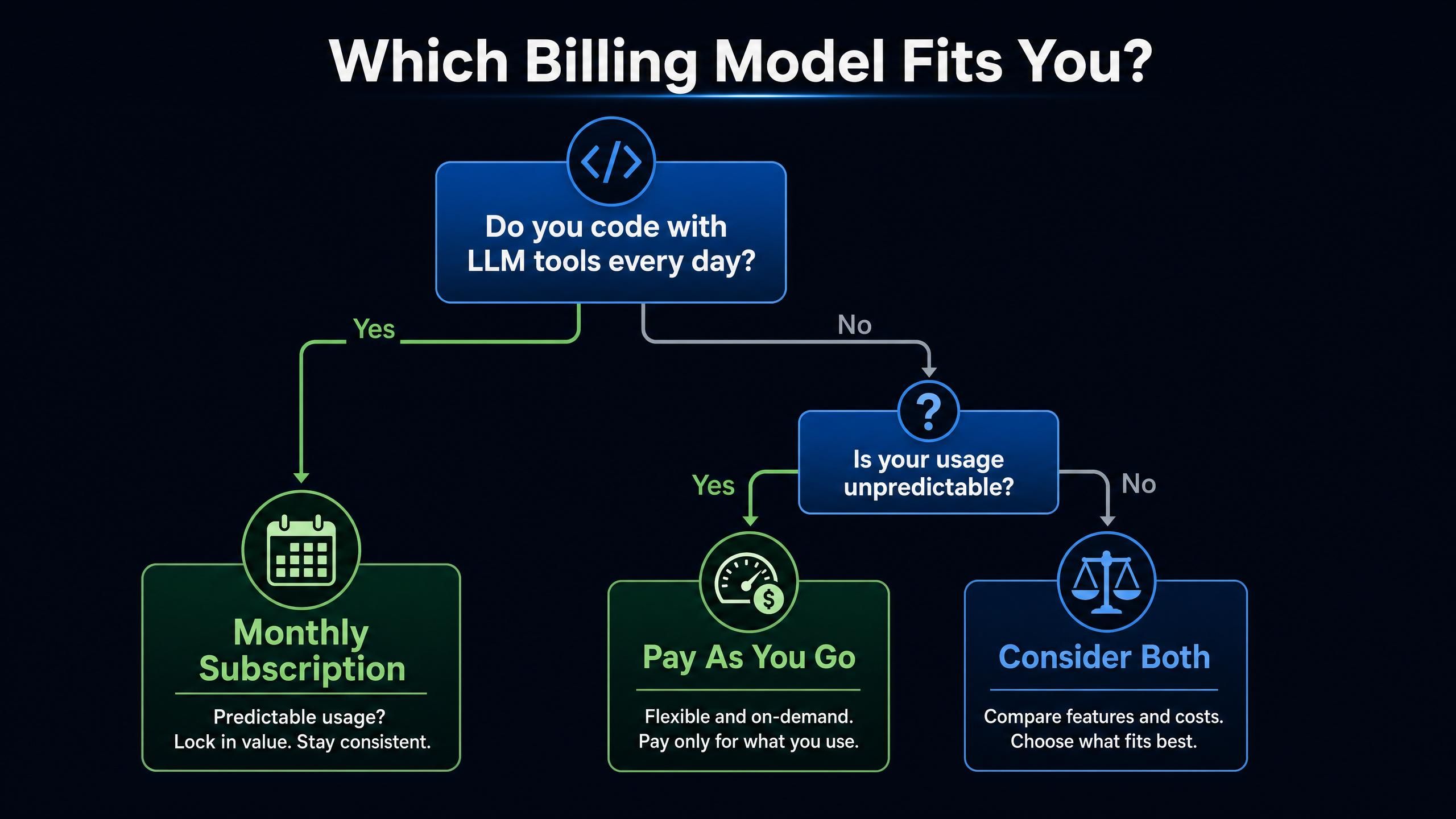
Daily active developers using coding agents as a primary tool: monthly subscription, sized to your typical daily usage. The lower effective cost per credit and predictable budget make it the better value for consistent demand.
Occasional or variable users, developers with burst workloads, or anyone experimenting with new tools: pay-as-you-go. No commitment, no daily cap, 90 days to use what you buy.
And for anyone who falls in the middle, which is most developers running real agentic workloads: a subscription plan as the base, with one or two pay-as-you-go packs held as overflow. The hybrid approach covers your average day cheaply and your heavy days without interruption.
If you're sorting this out for the first time, Atlas Cloud Coding Plan lets you hold both plan types simultaneously and switch models without changing your API configuration, which makes it easy to run the comparison on your actual usage before committing to one approach.
Pricing examples based on Atlas Cloud Coding Plan documentation as of May 2026. Plan structures and billing rules are subject to change; verify current details with the provider before purchasing.





