AI video generation APIs have a reputation for being temperamental — and for good reason. Text completions fail immediately with a 400 error when something goes wrong. Video rendering is different and more unpredictable. A job might sit forever in a GPU queue without warning. It may return only half of the requested clips. Sometimes, the render finishes perfectly but the final video looks physically impossible or distorted.
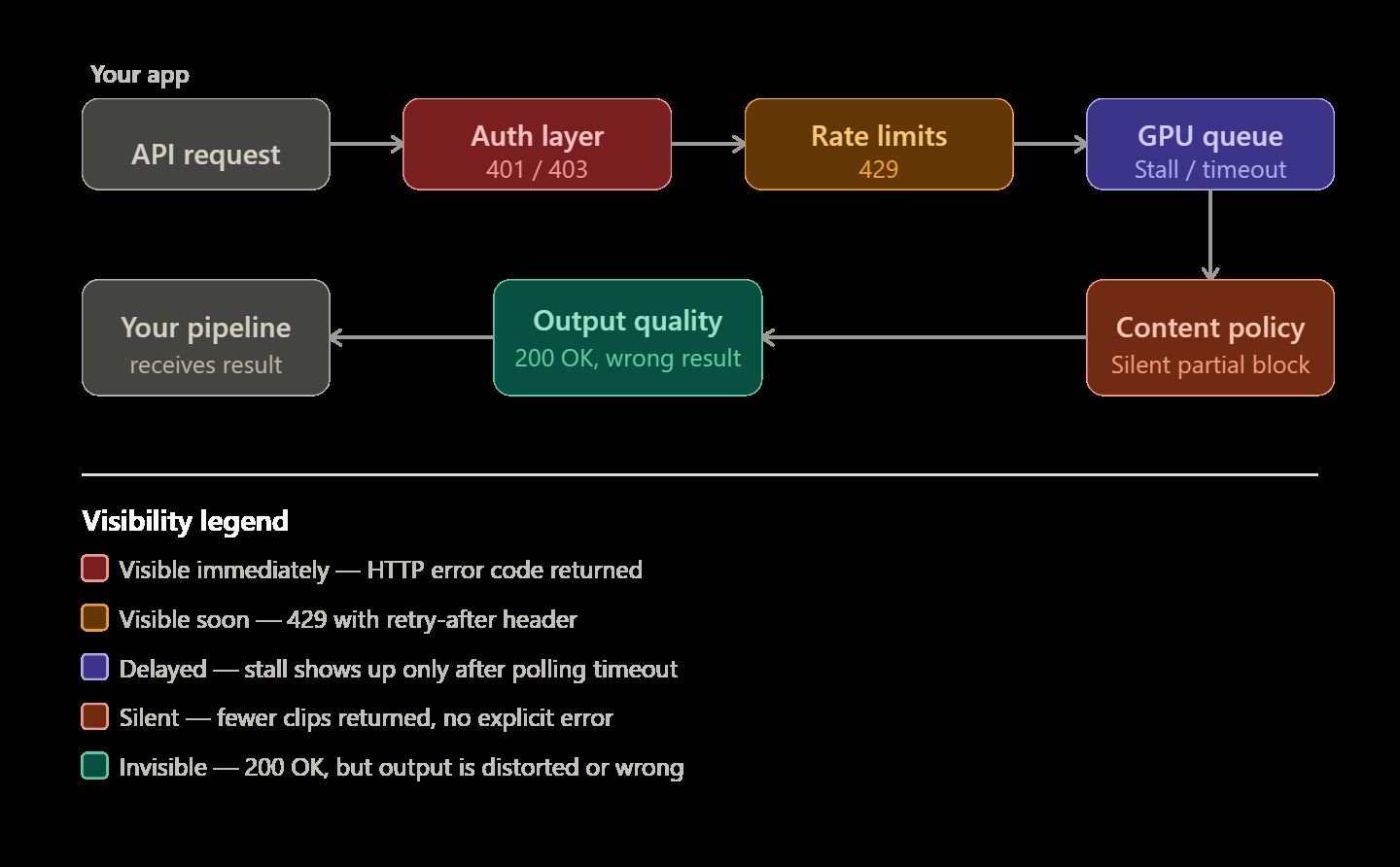
You need to know why these specific errors occur to build a reliable system. This knowledge is the main difference between a simple demo and a video pipeline that actually works for real users.
This guide walks through the most common failure modes, how to read API responses accurately, and concrete strategies for building a video rendering pipeline that costs less and breaks less often. Code examples use the Atlas Cloud API, a unified inference platform that provides access to 300+ video and multimodal models through a single endpoint — making it a useful reference for multi-model patterns.
The Five Categories of AI Video API Errors
AI video pipeline errors usually fit into five specific groups. Knowing the right category helps you solve problems faster, such as fix your code, rewrite your prompt, or simply wait.
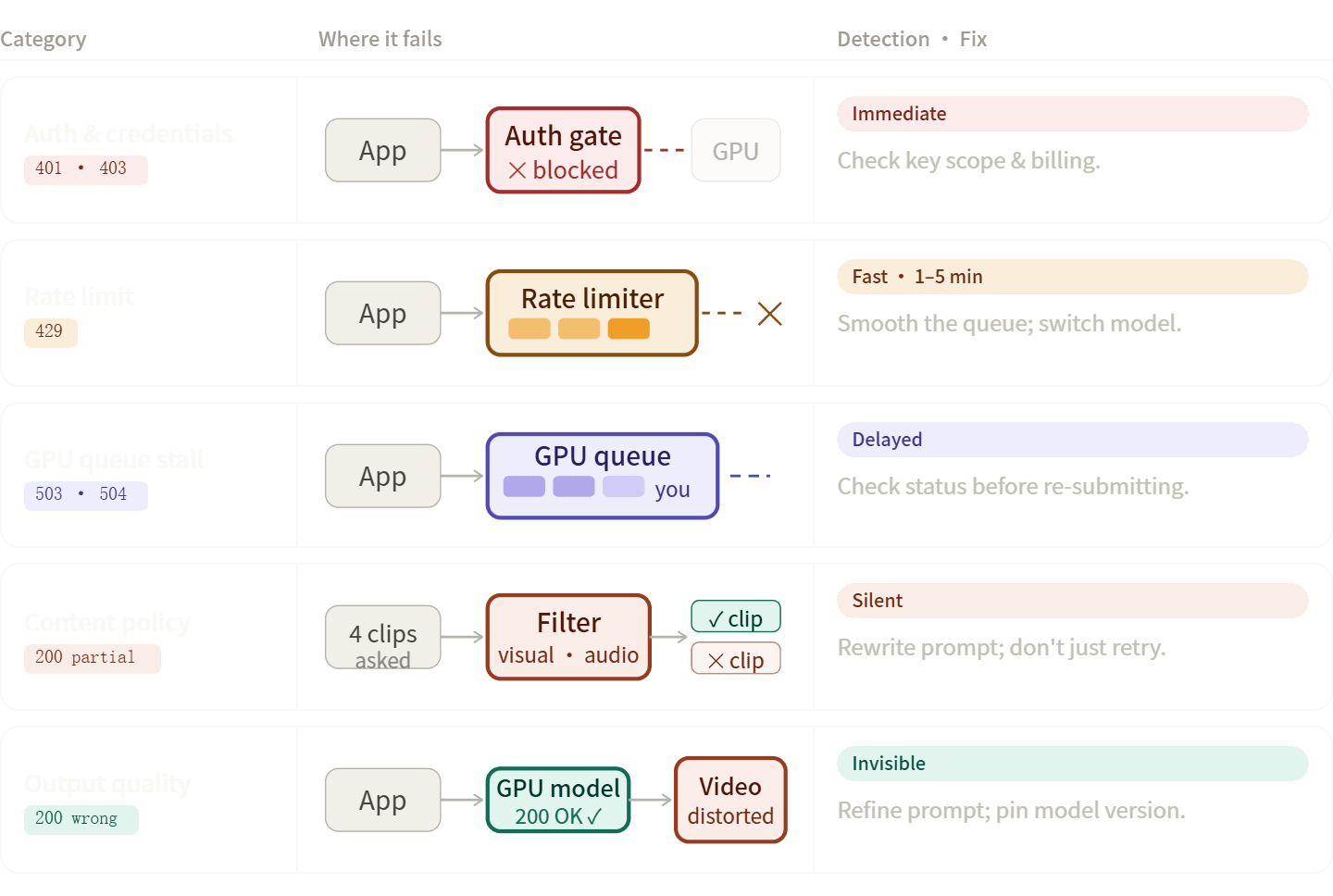
Auth and Credential Errors 401, 403
| Code | Typical Cause | Fix |
| 401 Unauthorized | Missing or malformed Authorization: Bearer header | Verify key is loaded from env vars, not hardcoded |
| 403 Forbidden (quota) | API credits exhausted | Add billing or upgrade plan |
| 403 Forbidden (permission) | Key lacks scope for the requested model | Regenerate key with correct permissions |
People often get confused here. A 403 for hitting a quota and a 403 for denied permissions use the same code but need different fixes. Don't just look at the status number. Always read the full error message in the body to see what went wrong.
On platforms like Atlas Cloud, a single API key covers all models — meaning auth drift, where keys for Provider A work but keys for Provider B have expired simply doesn't happen.
Rate Limit Errors (429)
Rate limits in video APIs are more punishing than in text APIs because each request holds a GPU slot for 30–90 seconds. A handful of concurrent requests can saturate a limit that looks generous on paper.
Key distinctions to check first:
- RPM: Production models on Google's Veo 3.1 API allow 50 RPM; preview models cap at 10 RPM with a maximum of 10 concurrent requests per project.
- Concurrent request limits: Even within your RPM budget, hitting the concurrency cap gives you a 429.
- TPM (tokens per minute): Less common for video, but relevant on platforms with unified billing across modalities.
What actually helps:
| Approach | When it works | When it doesn't |
|---|---|---|
| Exponential back-off + retry | 429s caused by momentary bursts | When concurrency is the real cap |
| Burst smoothing / request queuing | High-volume batch pipelines | Interactive, latency-sensitive UX |
| Off-peak scheduling (overnight batches) | Content pre-generation workflows | Real-time generation |
| Model routing to a less-loaded variant | Unified platforms with multiple equivalent models | Single-provider setups |
Content Policy and Safety Filter Rejections
These are easy to misdiagnose because the API response may not always be a clear error — it may just be fewer clips than you asked for. Google's Veo documentation explicitly notes that if fewer videos than requested are returned, some output may have been blocked by safety filters rather than the whole request failing at the transport layer.
Two distinct trigger surfaces:
- Visual prompts: Subject matter, scene context, or implied violence/explicit content.
- Audio/dialogue prompts: Speech content, song requests, and dense soundscapes trigger separate filter stacks.
If your clip fails only when audio is part of the prompt, debug audio separately from the visual scene. Retrying a policy-blocked prompt rarely resolves it — the prompt needs to change.
Transport and Infrastructure Errors (500, 503, 504)
| Code | Typical resolution time | What to do |
|---|---|---|
| 429 RESOURCE_EXHAUSTED | 1–5 minutes | Back-off and retry |
| 503 Service Unavailable | 30–120 minutes | Wait; check status dashboard |
| 504 Gateway Timeout | Variable | Check if render is still processing before re-submitting |
| 500 Internal Server Error | Depends | Log the prediction ID; do not auto-retry without checking status |
The critical rule with 500/504 errors: check whether your render is still processing before re-submitting. Blind retries on a 504 can result in duplicate renders and doubled costs.
Output Quality Failures
These aren't HTTP errors — the API returns 200, but the output is wrong. Common forms:
- Visual artifacts or geometric inaccuracies: AI video is probabilistic. The model interprets inputs rather than calculating them physically.
- Missing audio on models that support it: Usually a prompt or parameter issue, not an infrastructure failure.
- Wrong duration or resolution: Triggered by unsupported combinations — not all models support all duration/resolution pairs.
- Silent pipeline drops: Some encoding pipelines quietly discard videos under certain formats, surfacing only at QA.
Reading Asynchronous Responses: Prediction IDs and Status Polling
AI video generation is asynchronous by design. The request-response cycle has two phases:
- POST to the generation endpoint → receive a prediction_id
- GET the results endpoint with that ID → poll until terminal state
Atlas Cloud's response schema illustrates what a completed prediction looks like:
plaintext1{ 2 "id": "pred_abc123", 3 "status": "completed", 4 "model": "bytedance/seedance-2.0/text-to-video", 5 "outputs": ["https://storage.atlascloud.ai/outputs/result.mp4"], 6 "metrics": { "predict_time": 45.2 }, 7 "created_at": "2025-01-01T00:00:00Z", 8 "completed_at": "2025-01-01T00:00:45Z" 9}
The three terminal states:
| Status | Meaning | Action |
|---|---|---|
| completed | Render succeeded; outputs are available | Download within the expiry window |
| failed | Render failed; check error field | Log error message; decide on retry |
| expired | Outputs no longer available | Re-submit if still needed |
The Most Common Polling Mistake
Developers routinely check status === "failed" but never read the error field that follows. That field is where the actionable information lives — without it, you know a render failed but not whether to fix the prompt, check your quota, or wait out an infrastructure blip.
Production-Ready Polling Pattern
plaintext1import time 2import requests 3 4def poll_prediction(prediction_id: str, api_key: str, max_wait: int = 600) -> dict: 5 url = f"https://api.atlascloud.ai/api/v1/model/prediction/{prediction_id}" 6 headers = {"Authorization": f"Bearer {api_key}"} 7 terminal_states = {"completed", "failed", "expired"} 8 wait = 5 9 10 for _ in range(max_wait // wait): 11 resp = requests.get(url, headers=headers).json() 12 status = resp.get("status") 13 14 if status in terminal_states: 15 if status == "failed": 16 print(f"Render failed: {resp.get('error')}") 17 return resp 18 19 time.sleep(wait) 20 wait = min(wait * 1.5, 60) # cap back-off at 60s 21 22 raise TimeoutError(f"Prediction {prediction_id} did not complete within {max_wait}s")
Log metrics.predict_time on every completed render. Spikes in this value are a leading indicator of infrastructure degradation — useful signal before you start seeing outright failures.
Structuring a Resilient Rendering Pipeline
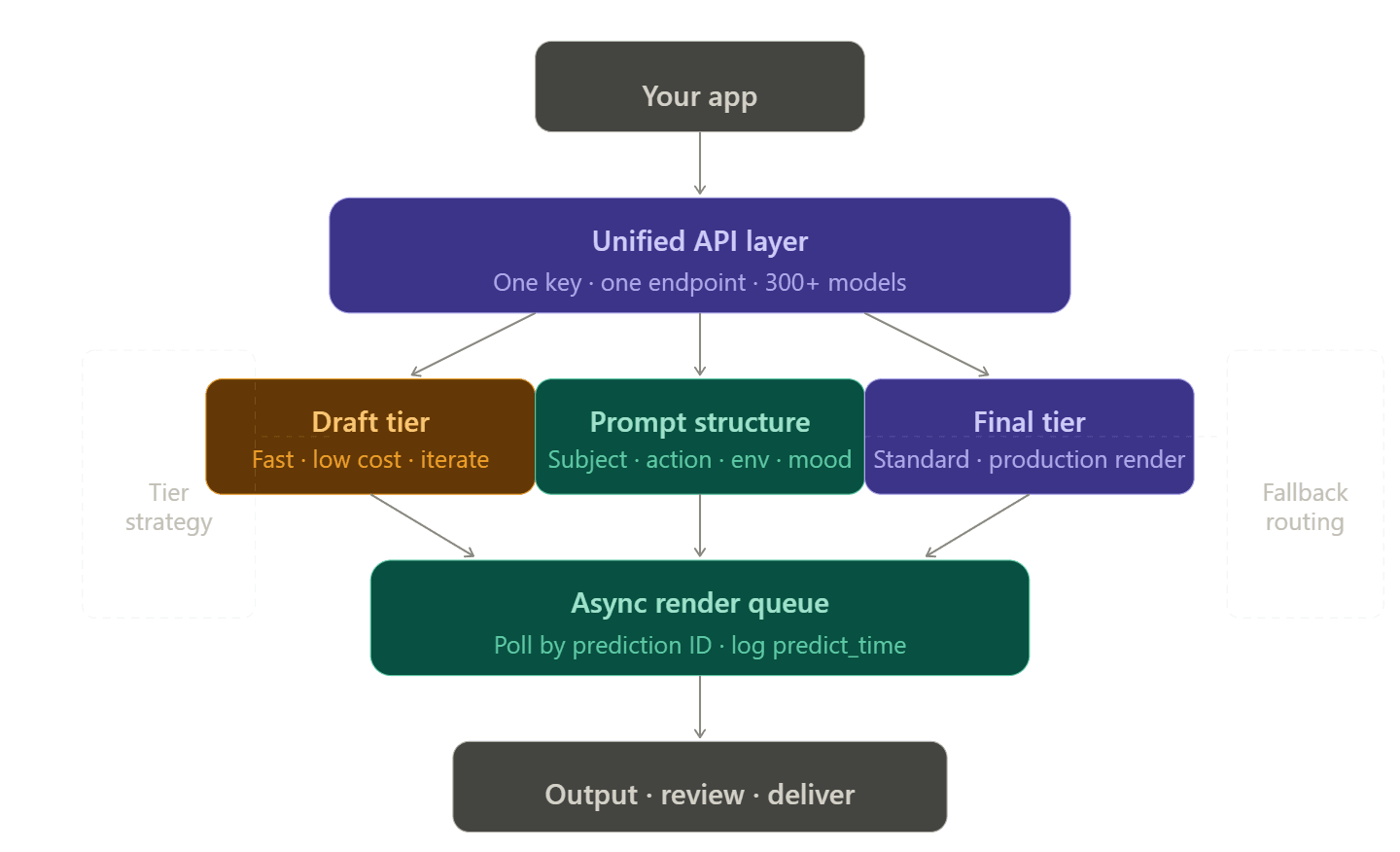
Single-Vendor vs. Unified API Architecture
Managing multiple accounts, tokens, and billing pages for every video provider is a real pain. Developers often call this the "integration tax." It gets worse quickly. If one model hits a limit, you need a backup. That backup then needs its own API key, billing setup, and custom code to handle errors.
Unified API platforms eliminate this by routing multiple providers through a single endpoint. On Atlas Cloud, switching from openai/sora-2/text-to-video to bytedance/seedance-2.0/text-to-video requires changing one string — the headers, authentication, and billing stay identical.
Draft-to-Final Tiering
One of the highest-leverage cost and reliability improvements available is simply choosing the right model tier for the right workflow stage:
| Stage | Recommended tier | Why |
|---|---|---|
| Prompt exploration / concept testing | Fast / budget tier | 78%+ cost saving vs Standard; errors surface cheaply |
| Internal review drafts | Fast tier | Good enough for stakeholder review |
| Final production renders | Standard / Pro tier | Quality difference justifies cost |
| Batch content (social media, marketing) | Fast tier | Volume makes cost delta significant |
On Atlas Cloud, Seedance 2.0's Fast tier runs at $0.081/sec versus $0.10/sec for Standard — a difference that adds up quickly at scale. A team generating 200 ten-second clips per month would spend $162 on Fast versus $200 on Standard for the same prompt set.
Prompt Engineering as Error Prevention
Vague prompts are an underappreciated source of pipeline failures. A prompt like "a person walking" forces the model to make too many arbitrary choices, producing inconsistent output that requires more retries.
A reliable 4-component prompt structure:
plaintext1[Subject + detail] + [Action + motion style] + [Environment + lighting] + [Camera + mood] 2 3Example: 4"A woman in a red coat walking briskly through a rain-slicked Tokyo street at night, 5neon reflections on wet pavement, medium tracking shot, cinematic and tense"
When using models that support multi-modal input — Seedance 2.0 accepts up to 12 reference files (images, video clips, and audio) — providing visual references reduces the ambiguity that leads to output-quality failures.
Choosing the Right Model
Not every AI video tool fails for the same reason. This is because they are built for different goals. Using the wrong model for your specific task is a big mistake. It leads to poor results that look like technical bugs, but usually, the model just isn't made to do that job.
Model Capability Reference
| Model | Strength | Watch out for | Pricing (Atlas Cloud) |
|---|---|---|---|
| wan 2.7 | Physics simulation, realistic object interaction | Single image reference only; higher cost | $0.1/sec |
| Kling 3.0 | High-resolution output; native lip-sync; free tier (66 daily credits) | Longer generation times at max resolution | $-0.071-0.143/sec |
| Veo 3.1 | Cinematic quality; strong safety compliance | Preview model rate limits (10 RPM) | $0.05–0.20/sec |
| Seedance 2.0 | Multi-reference input control; native audio | Requires more careful prompt construction | $0.081–0.10/sec |
| Wan 2.6 | Lowest cost; high-volume content | No native audio; max 1080p | $0.018-0.07/sec |
Pricing sourced from Atlas Cloud documentation, April 2026. For specific pricing, please consult the official website.
When to Switch Models vs. Fix the Request
Switch the model if:
- Clips consistently fail only when audio or dialogue is in the prompt, the model may lack audio capability
- Physics or object-interaction quality is the failure, not the prompt
- You're on a preview model hitting rate limits that a production model wouldn't
Fix the prompt if:
- Output is stylistically off but structurally correct
- Safety filters are triggering on specific language
- Duration or resolution parameters are being rejected
Pin to a specific version string (e.g., kling-v3.0-std not kling-latest). Silent model updates can introduce quality regressions that are nearly impossible to debug without version pinning.
Your Debugging Toolkit
What to Log at Every Stage
Logging is the fastest way to cut debugging time in half. A minimal effective log captures:
On request:
- Model ID and version
- Prompt hash, not full prompt — keeps logs compact
- Duration, resolution, and mode parameters
- Timestamp
On response:
- Prediction ID
- Initial status
- Any immediate error message
On poll completion:
- Final status
- predict_time from metrics
- Error field content (if failed)
- Output URL (if completed)
Reading Infrastructure vs. Application Errors
When a generation fails, a quick diagnostic sequence saves time:
- Check the API health dashboard first — if the platform is degraded, you're debugging the wrong thing.
- Read x-deny-reason response headers — egress proxy denials surface here and look like model errors without this header.
- Check for CORS errors if you're calling from a frontend — they produce the same symptom as auth failures in browser DevTools.
- Verify file constraints before assuming a model error — most platforms enforce a maximum input file size (often 16 MB) and a limited set of accepted formats.
Atlas Cloud's monitoring panel surfaces auto-scaling status and per-request usage data, which helps distinguish a slow infrastructure day from a prompt or code problem.
Cost Optimization
The Three Levers
Rendering cost is a product of three variables. Optimizing all three simultaneously — rather than just picking a cheaper model — produces the largest savings:
| Lever | Low-cost choice | High-cost choice | Typical multiplier |
|---|---|---|---|
| Model tier | Fast | Standard/Pro | 3–5× |
| Duration | 4–5 seconds | 12–15 seconds | 3× |
| Resolution | 720p | 4K | 2–4× |
A single 8-second 4K Standard render can cost 6–8× more than a Fast 720p equivalent at the same duration. If your distribution channel is social media or web, 720p or 1080p is usually indistinguishable to end users.
Usage-Based vs. Subscription Billing
Consumer AI plans, such as Google AI Pro at $19.99/month or AI Ultra at $249.99/month provide limited video generation through the Google AI interface but do not include API access. This is a common budget planning mistake for teams moving from consumer tools to production pipelines.
Atlas Cloud uses usage-based billing to match your costs with how much you actually build. This works best if your project needs change from week to week. You should track the cost per second of finished video. This is the best way to compare different models and price tiers fairly.
Reference Asset Reuse
If you're generating many clips featuring the same characters, scenes, or style references, pre-register those assets:
- Upload reference images or videos once; store the returned asset ID
- Pass asset://<ark_asset_id> in subsequent requests instead of re-uploading
- Reference file uploads are not metered on most platforms — only the generated output duration is billed
Production Readiness Checklist
Before shipping a video generation pipeline to production, verify each of the following:
Authentication
- [ ] API key loaded from environment variables, not hardcoded
- [ ] Key has correct scopes for all models in use
- [ ] Rotation policy in place
Rate limits and concurrency
- [ ] RPM and concurrent-request limits confirmed for each model tier
- [ ] Burst-smoothing or queue in place for batch workflows
- [ ] Fallback model configured for rate-limit scenarios
Error handling
- [ ] Terminal states (completed, failed, expired) all handled
- [ ] error field captured and logged on every failed status
- [ ] Subprocess/request timeout set to ≥ 10 minutes for long renders
- [ ] No blind auto-retry on 500/504 without status check first
Content and prompts
- [ ] Prompts pre-reviewed against platform content guidelines
- [ ] Audio and visual triggers isolated in testing
- [ ] 4-component prompt structure adopted as team standard
Model configuration
- [ ] Specific version string pinned (not latest)
- [ ] Model tier matched to workflow stage (Fast for drafts, Standard for finals)
- [ ] All required parameters confirmed for chosen model (duration, resolution, audio)
Cost controls
- [ ] Usage-based billing dashboard configured with alerts
- [ ] Fast tier default for all non-final renders
- [ ] Reference asset IDs used for recurring assets
Observability
- [ ] Prediction ID, status, and predict_time logged on every render
- [ ] API health dashboard bookmarked and checked before deep debugging
- [ ] Alerting on predict_time spikes configured
A video pipeline that handles errors isn't much harder to build than one that breaks. You just need to be smart about how you deal with failures at each step. Make sure your logging is solid and stick to specific model versions. Before you worry about anything else, set up a pipeline that moves from quick drafts to final renders. The rest follows naturally.
FAQ
The 429 Resource Exhausted errors on the premium plan are caused by what?
429 error just means you've hit your Rate Limits. To keep running smoothly, providers will limit your equests and tokens.
- The Fix: Add exponential backoff to your code. This helps the system wait and retry on its own. Check your "Usage Tier" in the dashboard too. You have to spend more money to unlock faster speeds.
How may "Content Moderation" false positives be avoided?
Safety filters often misinterpret technical prompts as policy violations.
- The Fix: Fix your prompt by swapping vague words for technical ones. Don't say "chaotic energy" when you mean "high-speed camera movement." You can also use an LLM to clean up your prompts. This turns them into clear descriptions that the machine understands and avoids mistakes.
How can my rendering pipeline's latency be decreased?
Latency usually comes from bad polling or large model sizes. Use Webhooks instead of manual polling to receive completion data. If self-hosting, apply FP8 Quantization to speed up inference. For API users, switch to Asynchronous Processing to handle multiple generations in parallel rather than sequentially.





