Black Forest Labs released Flux 2 Pro with 32 billion parameters -- a number that, for context, dwarfs most image generation models by an order of magnitude. The result is a model that doesn't just generate images; it understands visual concepts at a depth that smaller architectures structurally cannot match. Photorealism, text rendering, compositional accuracy, and style fidelity are all measurably improved when a model has this much capacity to encode the visual world.
Flux 2 Pro is available through the Atlas Cloud API at USD0.03-0.05 per image, with no subscription required. This guide is a deep dive into what makes the 32B architecture different, how it performs in practice across various use cases, and how to integrate it into production workflows through Atlas Cloud.
*Last Updated: February 28, 2026*
Flux 2 Pro Specifications
| Feature | Detail |
|---|---|
| Developer | Black Forest Labs |
| Model ID | `black-forest-labs/flux-2-pro/text-to-image` |
| Parameters | 32 billion |
| Max Resolution | 2048x2048 |
| Generation Speed | ~3 seconds (1024x1024) |
| Price per Image | USD0.03-0.05 |
| Reference Image Support | Yes |
| Text Rendering | Strong |
| API Endpoint | `/model/generateImage` |
Why 32 Billion Parameters Matter
Parameter count is not a vanity metric. In image generation, the number of parameters directly correlates with the model's ability to encode and reproduce visual concepts. Here is what 32 billion parameters practically mean for output quality.
Deeper Semantic Understanding
Larger models encode richer representations of concepts. When a prompt says "golden hour lighting on a rain-slicked cobblestone street in Paris," a 32B model doesn't just map keywords to visual patterns. It understands the interaction between golden hour light angles and wet surface reflections, the way cobblestone texture changes when wet, and the atmospheric haze that occurs at that time of day. Smaller models approximate these interactions. Flux 2 Pro captures them.
Compositional Accuracy
Complex prompts with multiple subjects, spatial relationships, and layered elements are where smaller models break down. "A chef plating a dish in a professional kitchen, with sous chefs working in the background, stainless steel equipment, and warm overhead lighting" requires the model to manage foreground/background relationships, realistic human poses, material properties (stainless steel reflections), and lighting interactions across the scene. The 32B architecture handles these multi-element compositions with significantly greater coherence.
Style Versatility
With 32 billion parameters, Flux 2 Pro has been trained on a sufficiently large and diverse dataset to handle an extensive range of visual styles -- photographic, illustration, concept art, watercolor, oil painting, flat design, 3D rendering, and more. The model doesn't merely apply a style filter; it generates images that are structurally consistent with the chosen aesthetic. A watercolor-style output actually shows paint bleeding and paper texture, not just a color palette shift.
Text Rendering
Text in images has historically been one of the hardest problems in image generation. Models need to understand letterforms, spacing, alignment, and how text interacts with backgrounds and surfaces. The capacity of a 32B model allows it to dedicate sufficient parameters to this specific sub-task, resulting in text that is legible, correctly spelled, and naturally integrated into scenes. Flux 2 Pro's text rendering is among the best available -- not quite at Ideogram v3's specialist level, but superior to most competing models.
Key Features in Detail
Reference Image Support
One of Flux 2 Pro's most powerful capabilities is reference image input. Rather than relying solely on text prompts, users can provide a reference image that guides the model's output. This is transformative for several workflows:
- Brand consistency: Provide a reference image of your brand's visual style, and Flux 2 Pro generates new images that match the color palette, composition style, and aesthetic
- Product variations: Upload a product photo and generate it in different settings, angles, or contexts while maintaining product fidelity
- Style transfer: Use an artwork or photograph as a style reference for entirely new subjects
- Character consistency: Maintain visual consistency of characters across multiple generated images
Reference image support turns Flux 2 Pro from a pure generative tool into a controllable creative tool, which is a critical distinction for production workflows where output consistency matters.
Photorealism
Flux 2 Pro's photorealism is its headline feature, and it delivers. In direct comparison testing:
- Skin textures: Pores, subtle color variations, and subsurface scattering are rendered with naturalistic accuracy
- Material properties: Metal reflections, fabric draping, glass transparency, and wood grain are physically plausible
- Lighting: The model handles complex lighting scenarios -- rim lighting, bounce light, mixed color temperatures -- with proper shadow behavior
- Depth of field: Bokeh effects and depth falloff are optically accurate, not just blurred backgrounds
For teams producing content that needs to look indistinguishable from photography -- product shots, architectural visualizations, lifestyle imagery -- Flux 2 Pro is among the top choices available through any API.
Multiple Aspect Ratios
Flux 2 Pro supports a wide range of aspect ratios up to 2048x2048:
- 1:1 (1024x1024, 2048x2048) -- Social media, thumbnails
- 4:3 (1024x768, 2048x1536) -- Product photography, web content
- 3:4 (768x1024, 1536x2048) -- Portrait, mobile-first content
- 16:9 (1024x576, 2048x1152) -- Headers, presentations, video thumbnails
- 9:16 (576x1024, 1152x2048) -- Stories, vertical content
- Custom -- Any dimensions within the 2048x2048 pixel budget
The ability to generate at 2048x2048 means Flux 2 Pro output is suitable for large-format digital displays, print applications (at standard print DPI for moderate sizes), and any context where resolution matters.
Generation Speed
At approximately 3 seconds per image at 1024x1024, Flux 2 Pro is one of the fastest high-quality models available. This speed makes it viable for:
- Interactive applications: Users waiting for results get a response fast enough to maintain engagement
- Iterative workflows: Designers can test prompt variations rapidly without long wait times
- Production pipelines: Batch processing thousands of images completes in hours rather than days
- Real-time features: Near-real-time image generation for user-facing product features
Pricing and Cost Analysis
Per-Image Pricing
| Resolution | Price per Image |
|---|---|
| Standard (1024x1024) | USD0.03 |
| High (up to 2048x2048) | USD0.05 |
Comparison with Competing Models
| Model | Price Range | Parameters | Max Resolution | Speed |
|---|---|---|---|---|
| Flux 2 Pro | USD0.03-0.05 | 32B | 2048x2048 | ~3s |
| Imagen 4 Ultra | USD0.04-0.08 | Undisclosed | 2048x2048 | ~8s |
| Nano Banana 2 | USD0.056-0.072 | Undisclosed | 2048x2048 | ~5s |
| Ideogram v3 | USD0.03-0.05 | Undisclosed | 2048x2048 | ~4s |
| Seedream v5.0 Lite | USD0.026 | Undisclosed | 1024x1024 | ~2s |
| Z-Image Turbo | USD0.01 | Undisclosed | 1024x1024 | ~1s |
Flux 2 Pro offers an excellent price-to-quality ratio. It is less expensive than Imagen 4 Ultra while delivering comparable photorealism. It costs the same as Ideogram v3 but offers superior photorealistic output (though Ideogram v3 wins on text rendering). For teams that need premium quality at a competitive price, Flux 2 Pro hits the sweet spot.
Cost at Scale
- 1,000 images/month (standard): USD30
- 5,000 images/month (standard): USD150
- 10,000 images/month (mixed resolution): USD350-500
- 50,000 images/month (standard): USD1,500
These numbers are competitive with or below the direct pricing from Black Forest Labs, with the added benefit of consolidated billing through Atlas Cloud and access to 300+ other AI models under the same API key.
How to Use Flux 2 Pro on Atlas Cloud
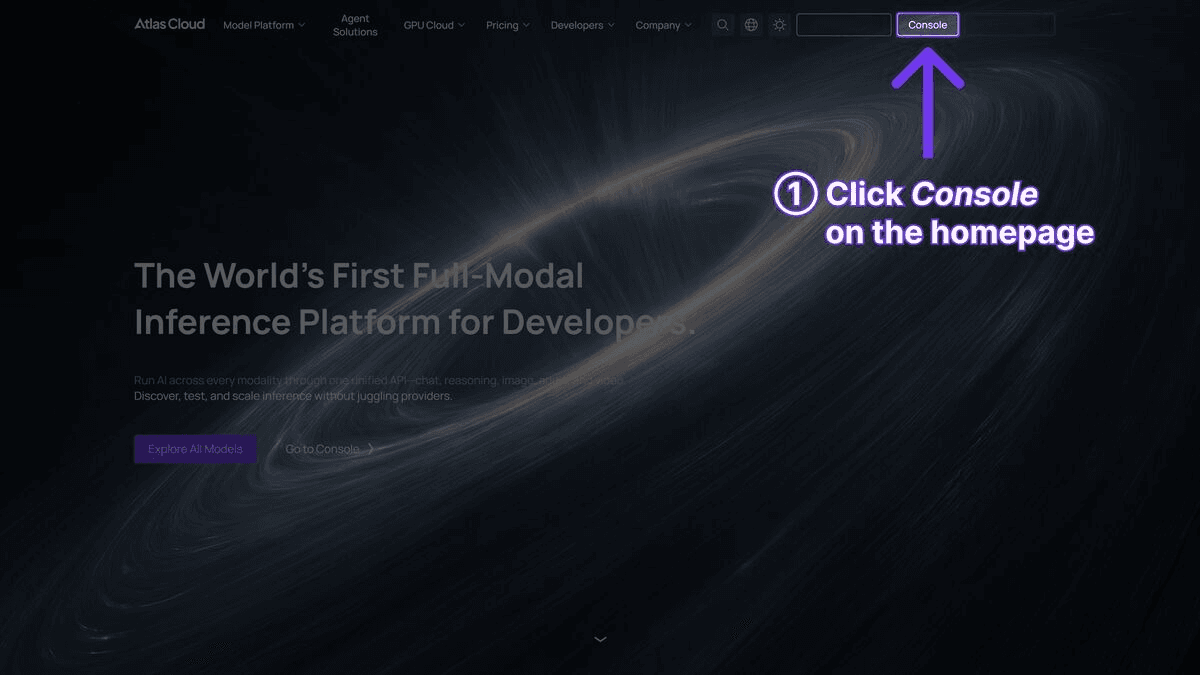
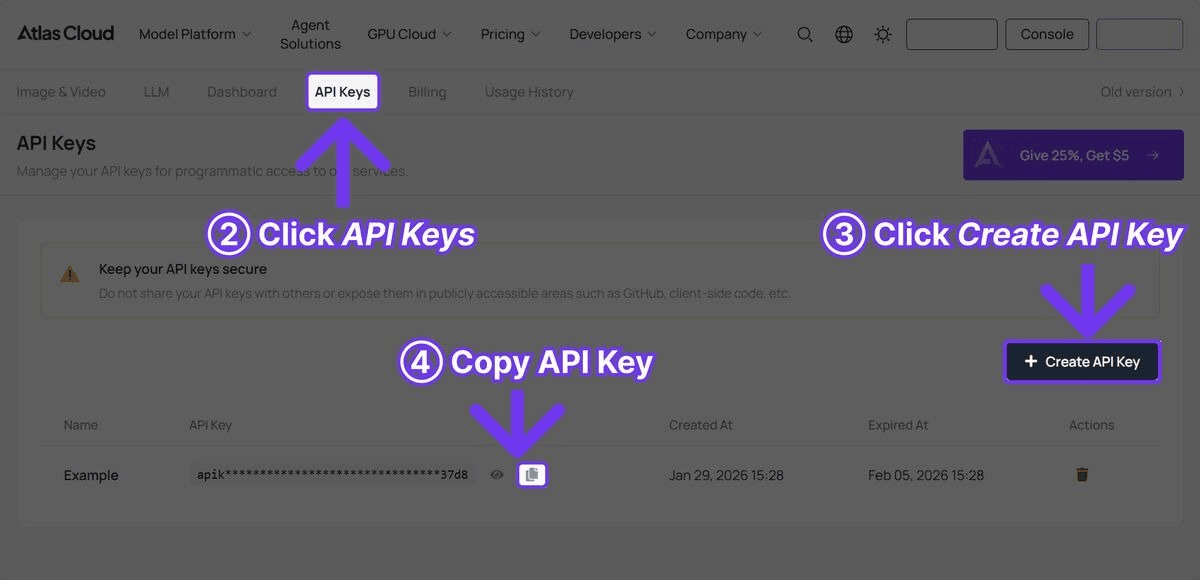
Step 1: Get Your API Key
Sign up at Atlas Cloud and generate an API key from your console.
Step 2: Basic Image Generation
plaintext1```python 2import requests 3 4API_KEY = "your-atlas-cloud-api-key" 5BASE_URL = "https://api.atlascloud.ai/api/v1" 6HEADERS = { 7 "Authorization": f"Bearer {API_KEY}", 8 "Content-Type": "application/json" 9} 10 11# Generate a photorealistic image with Flux 2 Pro 12response = requests.post( 13 f"{BASE_URL}/model/generateImage", 14 headers=HEADERS, 15 json={ 16 "model": "black-forest-labs/flux-2-pro/text-to-image", 17 "prompt": "Professional product photograph of a luxury mechanical watch on dark slate surface, dramatic side lighting creating long shadows, bokeh background with warm amber tones, commercial photography style", 18 "width": 1024, 19 "height": 1024 20 } 21) 22 23result = response.json() 24print(f"Image URL: {result['output']['image_url']}") 25```
Step 3: High-Resolution Generation
plaintext1```python 2# Generate at maximum resolution for print-quality output 3response = requests.post( 4 f"{BASE_URL}/model/generateImage", 5 headers=HEADERS, 6 json={ 7 "model": "black-forest-labs/flux-2-pro/text-to-image", 8 "prompt": "Aerial photograph of terraced rice paddies in Bali at sunrise, morning mist in valleys, lush green vegetation, dramatic natural lighting, National Geographic quality", 9 "width": 2048, 10 "height": 1152 11 } 12) 13 14result = response.json() 15print(f"High-res image: {result['output']['image_url']}") 16```
Step 4: Text Rendering
plaintext1```python 2# Flux 2 Pro handles text in images well 3response = requests.post( 4 f"{BASE_URL}/model/generateImage", 5 headers=HEADERS, 6 json={ 7 "model": "black-forest-labs/flux-2-pro/text-to-image", 8 "prompt": "Modern coffee shop storefront with neon sign reading 'ATLAS COFFEE CO' above the entrance, warm interior lighting visible through large windows, evening atmosphere, urban street photography style", 9 "width": 1024, 10 "height": 768 11 } 12) 13 14result = response.json() 15print(f"Text rendering result: {result['output']['image_url']}") 16```
Step 5: Polling for Async Results
plaintext1```python 2import time 3 4request_id = result["request_id"] 5 6while True: 7 status = requests.get( 8 f"{BASE_URL}/model/prediction/{request_id}/get", 9 headers={"Authorization": f"Bearer {API_KEY}"} 10 ).json() 11 12 if status["status"] == "completed": 13 print(f"Image URL: {status['output']['image_url']}") 14 break 15 elif status["status"] == "failed": 16 print(f"Generation failed: {status.get('error', 'Unknown error')}") 17 break 18 19 time.sleep(2) 20```
Best Use Cases for Flux 2 Pro
Product Photography
Flux 2 Pro's photorealism makes it exceptionally suited for product photography. The model understands studio lighting setups, reflective surfaces, material properties, and commercial composition conventions. For e-commerce teams, this means generating product images that look professional enough for catalog pages, social media ads, and marketing materials.
Effective product photography prompts:
plaintext1``` 2Premium wireless headphones floating against gradient background, 3studio lighting with soft rim light, product photography, 4ultra-detailed, commercial quality 5``` 6 7``` 8Artisan coffee beans spilling from a burlap sack onto rustic wood table, 9shallow depth of field, warm side lighting, food photography style, 10high-end restaurant menu quality 11```
Architectural Visualization
The model's ability to handle complex spatial relationships, material properties, and lighting makes it valuable for architectural visualization. Interior designers, real estate marketers, and architects can generate realistic room visualizations, exterior renders, and spatial concepts.
Editorial and Marketing Content
Blog headers, social media content, newsletter imagery, and marketing collateral all benefit from Flux 2 Pro's combination of quality and speed. The 3-second generation time allows marketing teams to produce custom visuals for every piece of content without bottlenecking on image production.
Brand Asset Generation
With reference image support, Flux 2 Pro can generate new assets that maintain visual consistency with an existing brand identity. This is particularly valuable for brands that need a high volume of on-brand visual content across multiple channels and campaigns.
Creative Exploration and Concept Art
The 32B parameter capacity allows Flux 2 Pro to handle creative and imaginative prompts with sophistication. Concept artists, game designers, and creative directors can use the model for rapid visualization of ideas that would take hours to sketch or render manually.
Prompt Engineering for Flux 2 Pro
Photorealistic Prompts
For maximum photorealism, include specific photography terminology:
plaintext1``` 2Portrait of a middle-aged architect in their studio, natural window light, 3shallow depth of field, shot on medium format camera, 85mm lens equivalent, 4editorial portrait style, muted earth tones 5```
Key elements: specify camera type, lens, lighting setup, and photographic style.
Product and Commercial Prompts
plaintext1``` 2Luxury skincare bottle on polished marble surface, three-point lighting setup, 3clean white background, product photography, sharp focus on label text 4'RENEWAL SERUM', high-end cosmetics advertising style 5```
Key elements: describe the surface, lighting setup, background, and explicitly state text content.
Illustration and Concept Art Prompts
plaintext1``` 2Futuristic underwater research station, bioluminescent coral structures, 3transparent domed habitats, marine life swimming past observation windows, 4concept art style, detailed environment design, cool blue-green palette 5```
Key elements: describe the environment in detail, specify the artistic style, and include palette guidance.
Tips for Consistent Results
- Be specific about lighting: "soft diffused natural light from a north-facing window" produces more consistent results than "good lighting"
- Include style references: "editorial fashion photography style" or "National Geographic documentary photography" anchors the model's interpretation
- Describe materials explicitly: "brushed aluminum" rather than "metal," "raw linen" rather than "fabric"
- Control composition: "centered subject," "rule of thirds composition," "negative space on the left" guide layout
- Specify what to avoid: Negative prompts can help steer away from unwanted elements
Flux 2 Pro vs. Competitors: Detailed Comparison
Flux 2 Pro vs. Imagen 4 Ultra
Imagen 4 Ultra edges out Flux 2 Pro on raw photorealistic quality, particularly in natural scenes, landscapes, and complex lighting scenarios. However, Flux 2 Pro is faster (3s vs. 8s), less expensive (USD0.03-0.05 vs. USD0.04-0.08), and offers reference image support. For most production workflows, Flux 2 Pro provides 90-95% of Imagen 4 Ultra's quality at lower cost and higher throughput. Reserve Imagen 4 Ultra for hero images where maximum fidelity is non-negotiable.
Flux 2 Pro vs. Ideogram v3
These models occupy different specialization zones. Ideogram v3 is the superior choice when text rendering is the primary requirement -- logos, posters, signage, and typography-heavy designs. Flux 2 Pro is the better choice for photorealistic content, product photography, and any image where visual realism matters more than text accuracy. Both are priced similarly, so the decision comes down to the specific use case.
Flux 2 Pro vs. Nano Banana 2
Nano Banana 2 is a strong general-purpose model, but it costs more (USD0.056-0.072 vs. USD0.03-0.05) and doesn't match Flux 2 Pro's photorealistic capabilities. Flux 2 Pro's 32B parameter advantage is most apparent in complex compositions, material rendering, and fine detail preservation. Nano Banana 2 may offer advantages in specific stylistic domains, but for general-purpose, high-quality image generation, Flux 2 Pro is the more cost-effective choice.
Flux 2 Pro vs. Seedream v5.0 Lite
Seedream v5.0 Lite is cheaper (USD0.026 vs. USD0.03-0.05) and faster, but its output quality is a tier below Flux 2 Pro's -- particularly in photorealism, fine detail, and complex compositions. Seedream v5.0 Lite is a good mid-tier option; Flux 2 Pro is the premium choice for teams that need the highest quality at competitive pricing.
Who Should Use Flux 2 Pro?
Choose Flux 2 Pro if you need:
- Best-in-class photorealism with a 32B parameter architecture that captures fine detail, material properties, and lighting with unmatched fidelity
- Reference image support for brand consistency, product variations, and style transfer across production workflows
- Large-scale production at competitive pricing (USD0.03-0.05/image) with fast 3-second generation times
Consider alternatives if you need:
- The lowest possible cost per image -- Z-Image Turbo (USD0.01) or Seedream v5.0 Lite (USD0.026) are more budget-friendly
- Maximum generation speed as the top priority -- Z-Image Turbo generates in approximately 1 second
- 3D rendering or figurine-style output -- specialized models like Nano Banana 2 may better suit stylized and non-photorealistic workflows
Frequently Asked Questions
What makes Flux 2 Pro different from Flux 1?
Flux 2 Pro represents a generational leap over Flux 1. The 32 billion parameter architecture delivers significantly improved photorealism, text rendering, compositional accuracy, and style versatility. The model also adds reference image support, which Flux 1 did not have. In practice, the quality improvement is immediately visible in side-by-side comparisons.
Is 32B parameters really better than smaller models?
In image generation, yes -- with caveats. More parameters enable richer visual representations, better handling of complex prompts, and superior fine detail. The tradeoff is typically speed, but Black Forest Labs has optimized Flux 2 Pro to generate images in approximately 3 seconds despite its size, which is competitive with much smaller models.
Do I need separate API access for Flux 2 Pro?
No. Your Atlas Cloud API key provides access to Flux 2 Pro and all other models on the platform. Switch between models by changing the `model` parameter in your API call. No additional setup, authentication, or billing configuration is required.
Can I use reference images with the API?
Yes. Flux 2 Pro supports reference image input through the API. This allows you to guide the model's output using an existing image as a style or content reference -- useful for maintaining brand consistency, generating product variations, and style transfer.
What resolution should I use?
For web and social media, 1024x1024 offers the best balance of quality, speed, and cost. For print, editorial, or large-format display, use 2048x2048. Higher resolution increases generation time and cost proportionally.
How does Flux 2 Pro pricing on Atlas Cloud compare to direct access?
Atlas Cloud pricing for Flux 2 Pro (USD0.03-0.05/image) is at or below the direct pricing from Black Forest Labs, with the added benefit of consolidated billing, a unified API, and access to 300+ other models under the same account.
Verdict
- Atlas Cloud Models Page: Test Flux 2 Pro interactively in your browser
- API Access: Sign up, get your API key, and start generating 32B-powered images
────────────────────────────────────────────────────────────





