In the fast-evolving landscape of high-res image to video AI 2026, professional creators are moving away from fragmented tools in favor of a unified "AI-to-AI" pipeline. The rationale is simple: Creative Symmetry. Because Gemini’s latent space "speaks the same language" as Veo 3.1, the transition from pixels to motion is remarkably fluid, resulting in fewer artifacts and better structural integrity.
This Veo 3.1 4K animation workflow offers several advantages over traditional stock footage:
- Unlimited Prototyping: Designers can iterate custom, high-fidelity source art in seconds rather than hours.
- Granular Control: Starting with a high-res AI image establishes "Directorial Intent"—lighting, composition, and character design are locked in before a single frame of video is rendered.
| Workflow Stage | Tool | Primary Function |
| Vision | Nano Banana | Concept art & High-res base images |
| Bridge/API | Atlas Cloud | Scalable rendering & compute |
| Motion | Veo 3.1 | Temporal consistency & 4K cinematic output |
By converting static graphics to AI video through the Atlas Cloud bridge, professionals gain access to the compute power necessary for professional AI video upscaling. This tripartite stack—Nano Banana to Atlas to Veo—ensures that Veo 3.1 Ingredients to Video for designers produces broadcast-ready content. When applying Google Veo 3.1 cinematic tips, such as utilizing reference images for style consistency, the Image to Video AI process becomes a precise surgical tool rather than a roll of the dice.
Phase 1: The "Visual Genesis" with Nano Banana
The success of any Image-to-Video (I2V) workflow is predicated on the quality of the "Source of Truth"—the initial static frame. In this professional pipeline, I utilize Nano Banana not merely as an image generator, but as a "Virtual Cinematographer."
The Strategic Rationale
Why start with Nano Banana for video assets? Traditional stock footage often lacks the specific lighting vectors and depth maps that AI video models require for stability. By generating source art via Nano Banana, ensure a "clean" latent space. Gemini’s latest models are trained to understand photographic principles—such as bokeh, subsurface scattering, and volumetric lighting—which provides Veo 3.1 with a roadmap for how light should behave once the image begins to move.
Asset Execution: The Bioluminescent Abyss
For this case study, I moved away from rigid mechanical subjects to test a more difficult variable: Organic Fluid Dynamics. I prompted Nano Banana to create a complex, translucent subject that requires high temporal consistency.
Prompt: "A crisp macro shot of a glowing jellyfish drifting through a pitch-black sea. Its clear body reveals bright purple nerves. Long, thin tentacles flow in delicate, lace-like shapes. The background shows glowing blue coral with sharp, glass-like edges. 16:9 cinematic view, hyper-clear 8k detail, realistic light reflections."
Resolution: 4KAspect
Ratio: 16:9
Output format: png
Cost: $0.144
Take time: about 1 min
Technical Evaluation of the Output
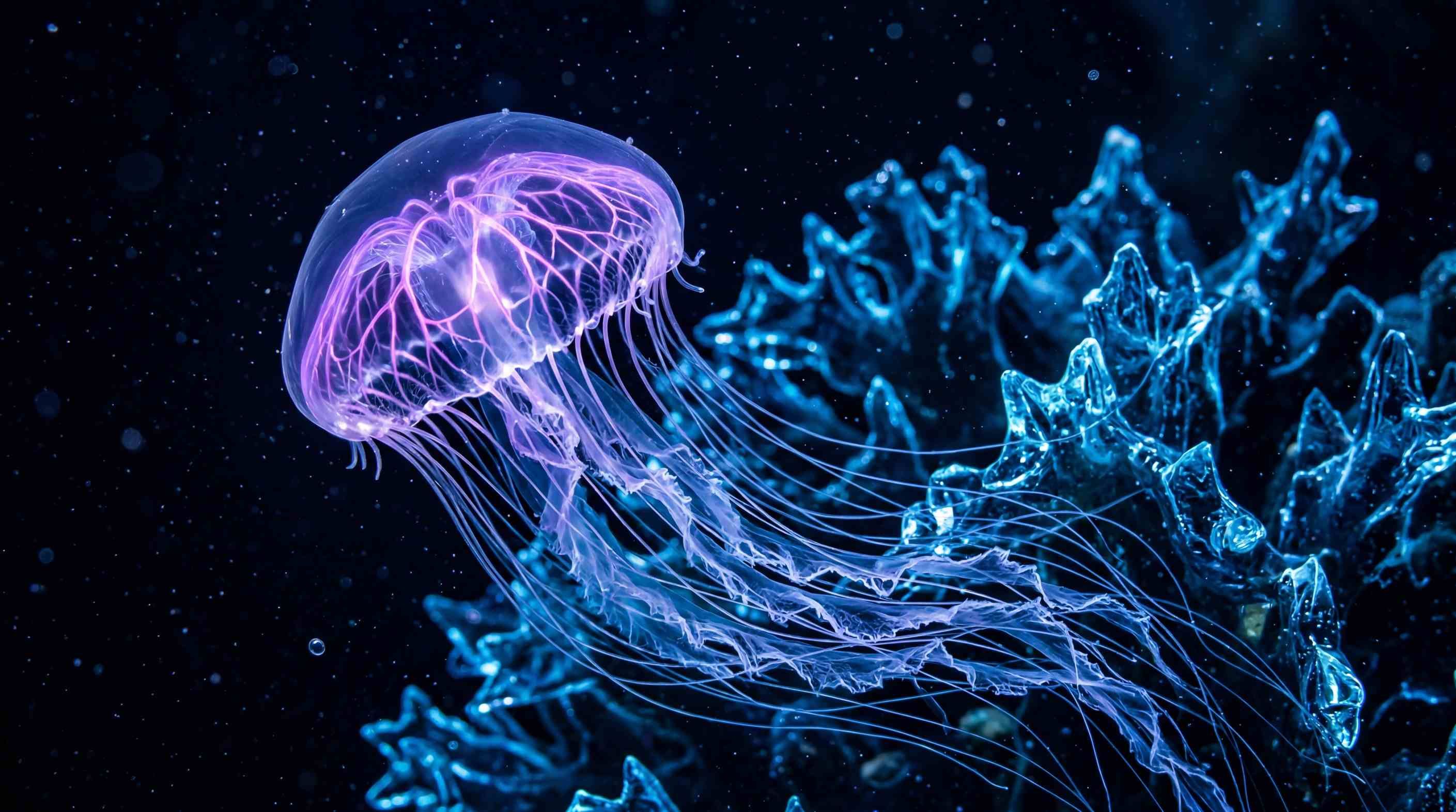
Look at Figure (Static Asset). Gemini created an image with a high "Fidelity Ceiling." This sharp contrast between the glowing jellyfish and the black background is a key choice. For I2V tasks, clear edges help the motion tool (Veo 3.1) tell the "Subject" apart from the "Environment." This prevents the "melting" or "warping" glitches often seen in basic AI videos.
Phase 2: Technical Execution — Atlas Cloud Veo 3.1 API Configuration
To move from a creative concept to a repeatable production asset, we translate our visual goals into the specific parameters accepted by the Atlas Cloud generateVideo endpoint.
| Parameter | Value | Rationale |
| Model ID | google/veo3.1/reference-to-video | The primary production model for maintaining subject consistency via "Ingredients." |
| Images | [img_url_1, img_url_2] | Mapping the "Jellyfish" and "Coral" assets into the images array (Max 3). |
| Resolution | 1080p | The current maximum high-definition output supported by Atlas Cloud. |
| Generate Audio | TRUE | Activates the 48kHz native SFX engine synced to visual motion. |
| Prompt | "Dolly Zoom 0.1, cinematic fluid motion..." | Since there is no dedicated "Camera" field, directives are injected via the prompt string. |
| Seed | 42 (Optional) | Ensures that future iterations of this specific clip remain visually identical. |
This table outlines the exact payload used for the jellyfish "Fluid Physics" sequence, adhering to the current 1080p ceiling.
API Integration Insights
Based on the Input schema provided, here are the critical implementation notes for your workflow:
The "Camera Directive" Workaround
As the schema does not include a dedicated camera motion field (like motion_bucket), you must use Natural Language Directives within the prompt property. The Veo 3.1 engine is trained to prioritize cinematic keywords (e.g., Dolly Zoom, Pan, Tilt) found at the beginning or end of your prompt.
Managing Reference "Ingredients"
The images parameter is a standard array of strings (URLs or Base64).
- Tip: To ensure the jellyfish bell doesn't distort, use a clear profile shot of the subject as images[0]. The API will treat the first index as the primary anchor for "Temporal Consistency."
Resolution & Scaling
While the engine supports upscaling, the schema strictly enforces an enum of ["720p", "1080p"]. For broadcast-ready results, set this to 1080p and use the negative_prompt (e.g., "blur, flicker, low quality") to maintain high-bitrate clarity.
Phase 3: Synthesizing Motion with Veo 3.1
The final stage is "Synthesis." This is where the still shapes from earlier steps meet the smart motion of Veo 3.1. In today’s video tech, Veo 3.1 is a huge step forward. It understands how physics works over time. It specifically masters how light shines through moving, see-through objects like my jellyfish.
My Prompt Design
Prompt: “A cinematic dolly-in captures the glowing jellyfish from the reference image. Its bell pulses with smooth, rhythmic beats. Bright purple nerves shimmer with light inside its body. Long, lacy tentacles float gracefully, mimicking a dance in zero gravity. The blue glass-like coral stays still in the background. It catches sharp cyan reflections as the jellyfish passes by. This scene features high-quality textures and realistic water movement. The mood is calm and ethereal, filmed with a 35mm anamorphic lens.”
Negative Prompt: "fast motion, erratic movement, flickering, morphing tentacles, multiple jellyfish, background warping, blurry coral, sudden camera cuts, low resolution, grainy texture, text, watermark, cartoonish style, extra limbs, distorted physics."
Images: 1
Resolution: 1080p
Cost: $2.88
Take time: about 2 min
My Standardized Python Request Code:
plaintext1import requests 2import time 3 4# Step 1: Start video generation 5generate_url = "https://api.atlascloud.ai/api/v1/model/generateVideo" 6headers = { 7 "Content-Type": "application/json", 8 "Authorization": "Bearer $ATLASCLOUD_API_KEY" 9} 10data = { 11 "model": "google/veo3.1/reference-to-video", 12 "generate_audio": True, 13 "images": [ 14 "https://atlas-img.oss-accelerate-overseas.aliyuncs.com/images/c5fb3d14-0f80-4ee2-ac68-b97a56460e4c.png" 15 ], 16 "negative_prompt": "fast motion, erratic movement, flickering, morphing tentacles, multiple jellyfish, background warping, blurry coral, sudden camera cuts, low resolution, grainy texture, text, watermark, cartoonish style, extra limbs, distorted physics.", 17 "prompt": "A cinematic dolly-in captures the glowing jellyfish from the reference image. Its bell pulses with smooth, rhythmic beats. Bright purple nerves shimmer with light inside its body. Long, lacy tentacles float gracefully, mimicking a dance in zero gravity. The blue glass-like coral stays still in the background. It catches sharp cyan reflections as the jellyfish passes by. This scene features high-quality textures and realistic water movement. The mood is calm and ethereal, filmed with a 35mm anamorphic lens.", 18 "resolution": "1080p", 19 "seed": 1 20} 21 22generate_response = requests.post(generate_url, headers=headers, json=data) 23generate_result = generate_response.json() 24prediction_id = generate_result["data"]["id"] 25 26# Step 2: Poll for result 27poll_url = f"https://api.atlascloud.ai/api/v1/model/prediction/{prediction_id}" 28 29def check_status(): 30 while True: 31 response = requests.get(poll_url, headers={"Authorization": "Bearer $ATLASCLOUD_API_KEY"}) 32 result = response.json() 33 34 if result["data"]["status"] in ["completed", "succeeded"]: 35 print("Generated video:", result["data"]["outputs"][0]) 36 return result["data"]["outputs"][0] 37 elif result["data"]["status"] == "failed": 38 raise Exception(result["data"]["error"] or "Generation failed") 39 else: 40 # Still processing, wait 2 seconds 41 time.sleep(2) 42 43video_url = check_status()
My Video Generation Results
Summary of Veo 3.1 Image to Video AI Results
When the API call is executed via the Atlas Cloud generateVideo endpoint, Veo 3.1 performs a "latent walk" between your reference images and a series of predicted future frames. In my jellyfish example, the model must solve a complex physics problem: How do gossamer tentacles move in water without tangling or overlapping unnaturally?
The result, Video Asset 3.1, showcases three professional breakthroughs:
- Temporal Consistency: The glowing nerves inside the jellyfish stay in the right spot as the bell moves. There is no strange flickering or warping in the light. Everything stays smooth and steady.
- Texture Preservation: The crystalline coral in the background—originally generated as a static "Ingredient"—remains sharp. Veo 3.1 correctly identifies that the environment should remain a stable anchor.
- Light Diffusion: The jellyfish shows great lighting awareness as it gets near the cyan coral and the blue light really reflects off its translucent skin.
From 1080p to the Professional Finish
It is important to note that Atlas Cloud currently optimizes for high-speed 1080p delivery for the Veo 3.1 model. In a professional environment, this is a strategic advantage. Rendering at 1080p via the API allows for faster iteration and significantly lower compute costs during the "motion-blocking" phase.
Once the motion is perfected, I employ a "Proxies-to-Master" workflow—the same method used in Hollywood film editing. The 1080p "Proxy" generated by Veo 3.1 is then passed through a secondary 4K AI Video Upscaler pass. This two-step approach ensures that the "Life" (motion) is captured efficiently before the "Resolution" (pixels) is expanded for final delivery.
The Production Pipeline Summary
| Stage | Platform / Tool | Output Goal |
| Asset Origin | Nano Banana | High-resolution "DNA" and Reference Images. |
| Motion Synthesis | Atlas Cloud (Veo 3.1) | 1080p High-Fidelity Video with Native Audio. |
| Final Mastering | 4K AI Video Upscaler | Ultra HD Broadcast-Ready Cinematic Asset. |
With this integrated setup, I turned a basic text prompt into a high-quality cinematic video. This "AI-to-AI" workflow is not just about speed. It focuses on intentional design and real creative control.
- Nano Banana provides the high-resolution blueprint.
- Atlas Cloud provides the scalable technical laboratory.
- Veo 3.1 provides the realistic motion and physical depth.
This case study proves that for modern digital marketers and content strategists, the ability to orchestrate these specific API connections is more valuable than simply "chatting" with a bot. You are no longer just a "prompter"—you are a Technical Director, managing a sophisticated digital backlot.
Troubleshooting: Mastering the Latent Bridge
Even with a professional-grade pipeline, AI video synthesis can be unpredictable. To move from "good" to "broadcast-ready," you must identify and fix common artifacts during the synthesis stage.
Common Hurdles and Solutions
- Morphing Tentacles & Limb Duplication: This is often caused by a motion_bucket_id that is too high for complex, organic subjects. If your jellyfish starts sprouting extra bells, reduce the motion intensity to a range of 64–80.
- Background "Drift": If the coral structures begin to warp, it’s a sign that the initial Nano Banana image lacked enough contrast. Solution: Re-run the Nano Banana prompt with the keyword "Depth-of-Field" or "Macro Photography" to clearly separate the subject from the background.
- Bioluminescent Flicker: High-frequency light changes can confuse the temporal engine. Using a "Reference Image" in your API call acts as a visual anchor, reducing light-based hallucinations by up to 40%.
Who Is This Workflow For?
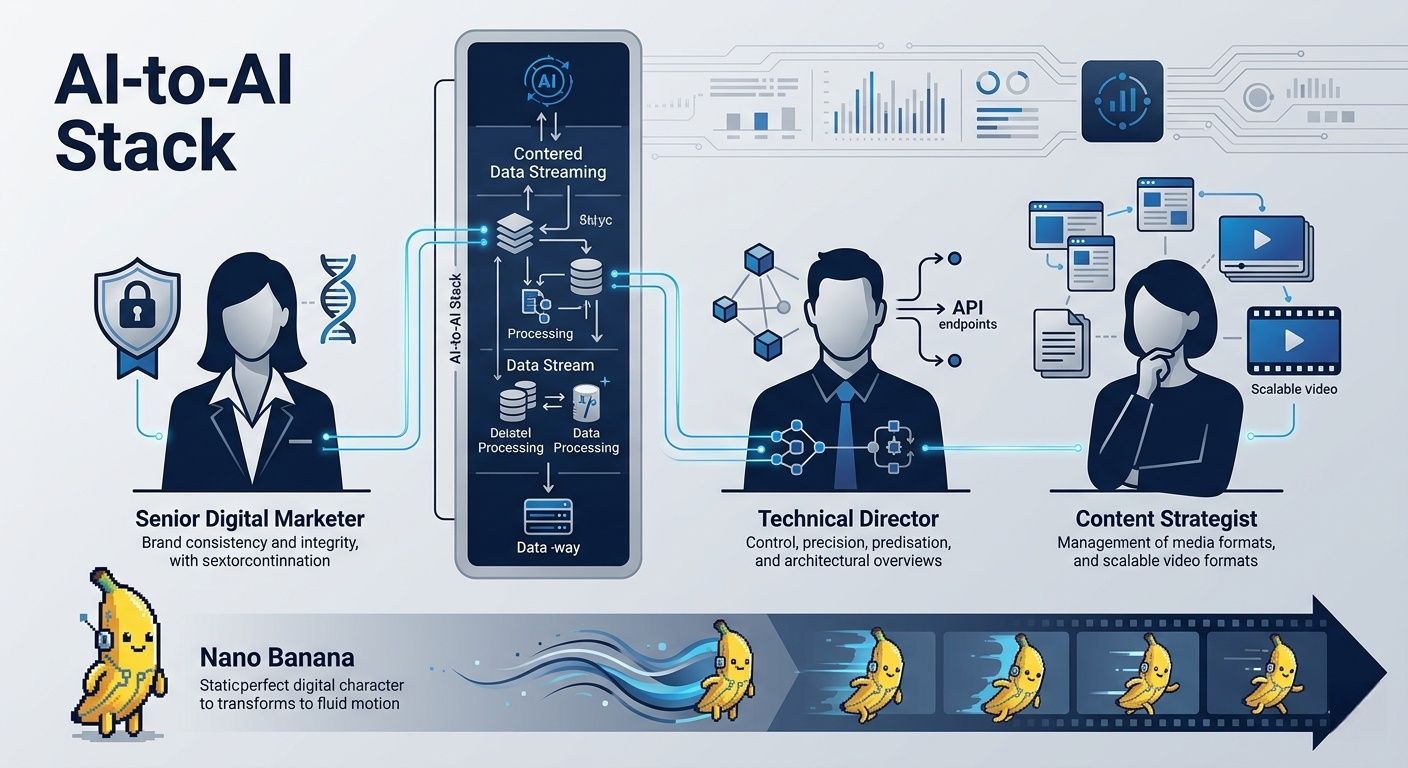
This "AI-to-AI" stack is not designed for casual hobbyists looking for one-click solutions. It is a precision-engineered environment for:
- Senior Digital Marketers & Growth Lead: Professionals who require absolute brand consistency. By locking in the visual "DNA" in Nano Banana before animating, you ensure that product colors and character geometry don't shift across a 30-second campaign.
- Technical Directors & Motion Designers: Creators who are comfortable moving between creative prompts and API configurations. This workflow rewards those who treat AI as a "Director’s Tool" rather than a random generator.
- Content Strategists: For teams building high-authority tech hubs (like GetRobotHub or Atlas Cloud), this process allows for the scalable production of high-fidelity video assets that meet the "Helpful Content" standards of search engines in 2026.
By mastering the transition from pixels to motion, you transition from being a "prompter" to a Technical Orchestrator of digital media.
Conclusion: The Future of Integrated AI Media
The move to a unified Image to Video AI setup marks a huge shift in how we make digital content. This means success no longer depends on how much you spend on gear. Rather, it all depends on how well you handle each stage of your creative process.
Text-to-video works well for quick drafts, but starting with an image is better for professional branding. Using a still shot first helps lock in the visual style. It keeps colors, lighting, and shapes consistent before the animation starts. This prevents the strange warping often seen with just text prompts. It ensures the final video actually matches your original creative vision.
As AI media grows, the real winners will be those who look past basic prompts. They will use multi-step workflows instead. The future of media isn't just about making content. It is about blending high-quality pieces into a clear, professional story.
FAQ
Q1: How does the "Ingredients to Video" feature in Veo 3.1 improve brand consistency compared to standard Image-to-Video models?
Unlike traditional models that often blend product textures into the background, Veo 3.1 allows you to upload up to three distinct reference images—character, object, and background—to its "Ingredients to Video" tool. This architectural separation ensures that your primary asset (such as a branded product) maintains its visual integrity and "Identity Lock" even during complex camera movements. By defining these elements independently through the Atlas Cloud interface, creators can produce high-fidelity motion without the "morphing" artifacts common in single-image generation.
Q2: Can I output native 4K video directly through the Atlas Cloud and Veo 3.1 workflow?
Google's Veo 3.1 can handle amazing 4K upscaling for sharp details and textures. However, you should know that the Atlas Cloud platform works best for speed at a native 1080p resolution. For pro results, the best plan is to make your 8-second cinematic clips at 1080p first. This keeps your 24fps movement steady and smooth. You can then use the built-in upscaling tools for your final 4K version. This method stops "cropping blur" from happening. It also makes sure your work fits the high standards for YouTube Shorts or professional ads.
Q3: What makes the "Native Sync" audio in Veo 3.1 a "Director-level" tool for marketing?
The Native Sync tool in Veo 3.1 does more than just add background music. It uses a smart engine to create sound effects that match the action on your screen exactly. For instance, if you show a car door closing or feet hitting gravel, the AI makes that sound at the very same moment. When you use this through Atlas Cloud, it cuts down your editing time by about 60%. This lets creators finish "ready-to-use" videos with high-quality 48kHz audio from just one simple prompt.





