Traditional video production can cost anywhere between USD500 and USD5,000 per finished minute. But even at USD500 a minute, 100 short marketing videos per week would cost a team USD50,000 or more per month -- if they could even find that many video editors and motion designers to keep up the pace. It's just not feasible for most businesses.
AI video generation changes the math entirely. With powerful models like Seedance v1.5 Pro, Kling 3.0, and Veo 3.1 all available through a single bulk video API, the price of a marketing-quality 8-second video is now under USD0.60. 100 videos per week no longer requires an enterprise-scale budget. It is a line item that comfortably sits under USD60.
This walkthrough will cover an exact cost breakdown, model selection strategy and marketing video automation code to create an Atlas Cloud video generation pipeline churning out 100+ clips a week.
*Last Updated: February 20, 2026*
See what AI video generation can produce:
The Math: 100 Videos/Week Cost Breakdown
The first question any team exploring cheap AI video production will ask is an obvious one: how much does this actually cost? It all depends on the model you use and how long each clip has to be. Here’s a complete breakdown, based on current Atlas Cloud API pricing.
Cost Per Video by Model (8-Second Clips)
The Strategy That Keeps Costs Low
The secret to delivering AI video generation at scale is not every video should run on the most expensive model. The optimal ratio of cost to quality is achieved with the right mix of models on the bulk video API:
- 60 videos on Wan 2.6 (product shots, simple demos): 60 x USD0.56 = USD33.60
- 20 videos on Seedance v1.5 Pro (brand storytelling, polished clips): 20 x USD0.376 = USD7.52
- 15 videos on Kling 3.0 Std (text-heavy social content): 15 x USD0.568 = USD8.52
- 5 videos on Veo 3.1 Fast (cinematic hero content): 5 x USD0.72 = USD3.60
Total: USD53.24/week for 100 videos. Just over USD50 -- and still a fraction of traditional production costs.
A standardized workflow using only Seedance v1.5 Pro costs USD37.60 per week for 100 eight-sec clips. That is less than what most teams pay for stock footage subscriptions.
Sample Videos Generated via Atlas Cloud API
For the purpose of showing you the type of videos each model generates, here are actual videos created using the Atlas Cloud API, with the prompts directly from this tutorial:
Seedance v1.5 Pro -- Product Showcase
Image description: promotional image, lighting on product a little top left, angle top down, neutral lighting on product a little bottom right, angle bottom up
Cost: 8 seconds x USD0.047/sec = USD0.376
Seedance v1.5 Pro -- Recreating the Severance Intro
A creative example showing what Seedance can do with stylized, cinematic content.
Cost: 8 seconds x USD0.047/sec = USD0.376
Kling 3.0 Standard -- Social Media Hook
Captivating hook for a social media post, steaming coffee cup on wooden desk, morning sunlight coming through window, cozy warm atmosphere, in the style of an Instagram Reel
Cost: 6 seconds x USD0.071/sec = USD0.426
*Video sample available with Atlas Cloud API -- create your own using the prompt above.*
USD1.18 total for all 3 sample videos -- just how cheap AI video generation at scale really is.
────────────────────────────────────────────────────────────
Which Model for Which Content Type?
Different models have different strengths, and they’re better at different kinds of marketing video automation. The right model for the right task is how teams ensure quality without inflating cheap AI video prices.
Product Demos and Showcases -- Wan 2.6
- Best for: Product rotation shots, unboxing animations, feature highlights
- Why: Wan 2.6 is an affordable video model with good output quality for product showcases and simple demos.
- Cost: USD0.07/sec for text-to-video
- Tip: Supply a high-quality product image as the input frame for best results.
Social Media Hooks -- Kling 3.0
- Best for: Instagram Reels, TikTok ads, YouTube Shorts with text overlays
- Why: Kling 3.0 leads the competition in text rendering fidelity. Brand names, prices, and CTAs remain legible in the generated video.
- Cost: USD0.071/sec (Standard) or USD0.095/sec (Pro)
- Tip: Use Kling when the video requires readable text or specific motion paths.
Brand Storytelling -- Veo 3.1 Fast
- Best for: Brand awareness clips, cinematic intros, atmospheric content
- Why: Veo 3.1 produces output with a distinctly cinematic quality -- natural lighting transitions, smooth camera movements, and a polished aesthetic that feels closer to traditional footage than AI-generated content.
- Cost: USD0.09/sec (Fast) -- cinematic quality at an accessible price
- Tip: Veo works best with descriptive, scene-setting prompts rather than action-heavy instructions.
Physics and Realism -- Veo 3.1
- Best for: Realistic demonstrations, liquid simulations, mechanical motion, nature scenes
- Why: Veo 3.1 produces cinematic output with natural physics -- water flow, fabric draping, and object interactions look convincingly real, with native audio generation as a bonus.
- Cost: USD0.09/sec (Fast) -- reserve for hero content
- Tip: Use Veo 3.1 selectively for content where physical accuracy and cinematic quality matter most.
Quick Reference: Model Selection Matrix
| Content Type | Recommended Model | Cost/8s | Priority |
| Product rotation | Wan 2.6 | USD0.56 | High volume |
| Social media ads | Kling 3.0 Std | USD0.568 | Text-heavy |
| Brand story clips | Veo 3.1 Fast | USD0.72 | Cinematic |
| Physics demos | Veo 3.1 Fast | USD0.72 | Hero content |
| Polished promos | Seedance v1.5 Pro | USD0.376 | Mid-range |
| Draft iterations | Seedance v1.5 Pro Fast | USD0.144 | Cost savings |
Automation: Python Batch Generation Script
Generating 100 videos manually using the web UI is not feasible for marketing video automation at this volume. The following Python script reads the prompts from a list and uses the bulk video API to generate videos in batch through Atlas Cloud video generation endpoints. It supports multiple models, polling and logging.
plaintext1```python 2import requests 3import time 4import json 5from datetime import datetime 6 7API_KEY = "your-atlas-cloud-api-key" 8BASE_URL = "https://api.atlascloud.ai/api/v1" 9 10# Define video generation tasks 11videos = [ 12 { 13 "model": "alibaba/wan-2.6/text-to-video", 14 "prompt": "Product showcase: wireless earbuds rotating on black surface, studio lighting, premium feel", 15 "duration": 8 16 }, 17 { 18 "model": "kwaivgi/kling-v3.0-std/text-to-video", 19 "prompt": "Social media hook: coffee cup with brand name ATLAS, steam rising, warm morning light", 20 "duration": 6 21 }, 22 { 23 "model": "google/veo3.1/text-to-video", 24 "prompt": "Brand story: sunrise over city skyline, cinematic aerial, golden hour colors", 25 "duration": 8 26 } 27] 28 29def generate_video(video_config): 30 """Submit a video generation request to Atlas Cloud API.""" 31 response = requests.post( 32 f"{BASE_URL}/model/generateVideo", 33 headers={ 34 "Authorization": f"Bearer {API_KEY}", 35 "Content-Type": "application/json" 36 }, 37 json={ 38 "model": video_config["model"], 39 "prompt": video_config["prompt"], 40 "duration": video_config["duration"], 41 "resolution": "1080p" 42 } 43 ) 44 return response.json() 45 46def poll_result(request_id, timeout=300): 47 """Poll for video completion with timeout.""" 48 start = time.time() 49 while time.time() - start < timeout: 50 result = requests.get( 51 f"{BASE_URL}/model/prediction/{request_id}/get", 52 headers={"Authorization": f"Bearer {API_KEY}"} 53 ).json() 54 if result["status"] == "completed": 55 return result["output"]["video_url"] 56 elif result["status"] == "failed": 57 return None 58 time.sleep(5) 59 return None 60 61def batch_generate(video_list): 62 """Generate all videos and collect results.""" 63 results = [] 64 total = len(video_list) 65 66 for i, video in enumerate(video_list): 67 print(f"[{datetime.now().strftime('%H:%M:%S')}] " 68 f"Generating video {i+1}/{total} -- {video['model'].split('/')[1]}") 69 70 result = generate_video(video) 71 72 if "request_id" not in result: 73 print(f" Error: {result.get('error', 'Unknown error')}") 74 results.append({"status": "error", "prompt": video["prompt"]}) 75 continue 76 77 url = poll_result(result["request_id"]) 78 79 if url: 80 print(f" Done: {url}") 81 results.append({ 82 "status": "completed", 83 "prompt": video["prompt"], 84 "model": video["model"], 85 "url": url 86 }) 87 else: 88 print(f" Failed or timed out") 89 results.append({"status": "failed", "prompt": video["prompt"]}) 90 91 return results 92 93# Run the batch 94if __name__ == "__main__": 95 print(f"Starting batch generation of {len(videos)} videos...\n") 96 results = batch_generate(videos) 97 98 # Summary 99 completed = sum(1 for r in results if r["status"] == "completed") 100 print(f"\nComplete: {completed}/{len(videos)} videos generated successfully") 101 102 # Save results to JSON 103 with open("batch_results.json", "w") as f: 104 json.dump(results, f, indent=2) 105 print("Results saved to batch_results.json") 106```
Scaling the Script
Teams looking to scale to 100 videos per week with AI generation typically curate a CSV or JSON file with all of the week's prompts, and schedule the batch script to run. A few tips:
- Rate limits: Atlas Cloud supports concurrent requests, but spacing them 2-3 seconds apart avoids hitting any burst limits.
- Error handling: The script above retries on failure. For production use, add exponential backoff and logging to a database.
- Scheduling: Run via cron job or a task scheduler. A Monday/Wednesday/Friday split of ~33 videos per run keeps the pipeline manageable.
- Prompt templates: Store reusable prompt templates with placeholder variables (product name, color, tagline) to maintain consistency across large batches.
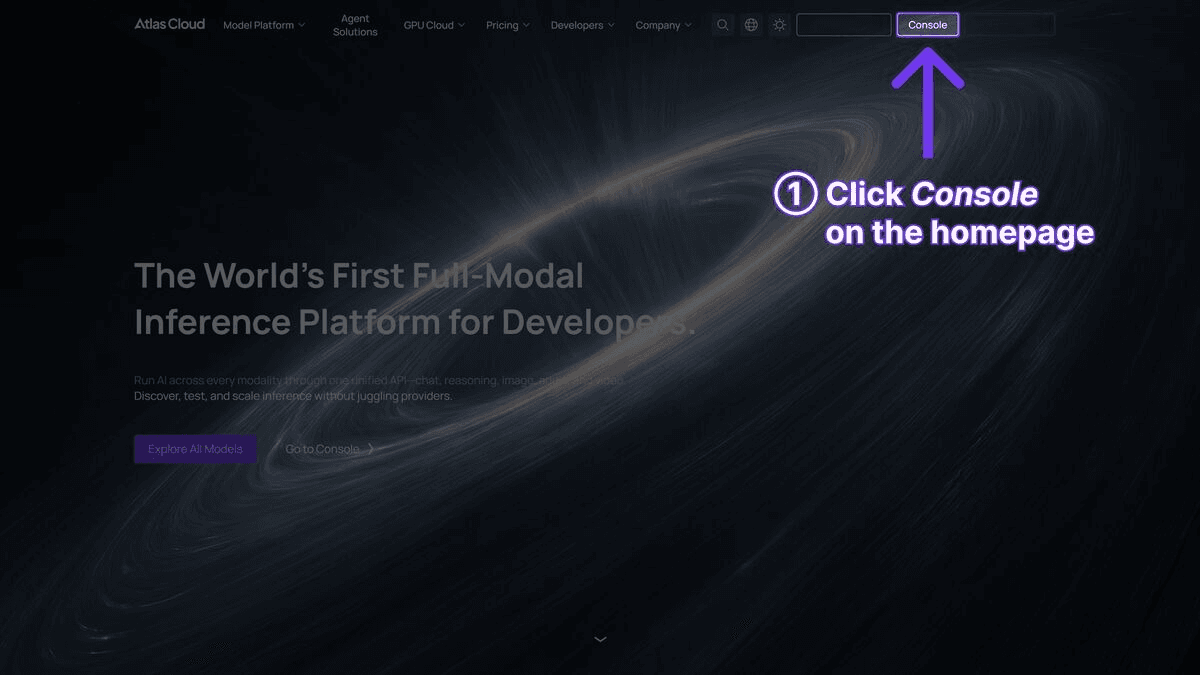
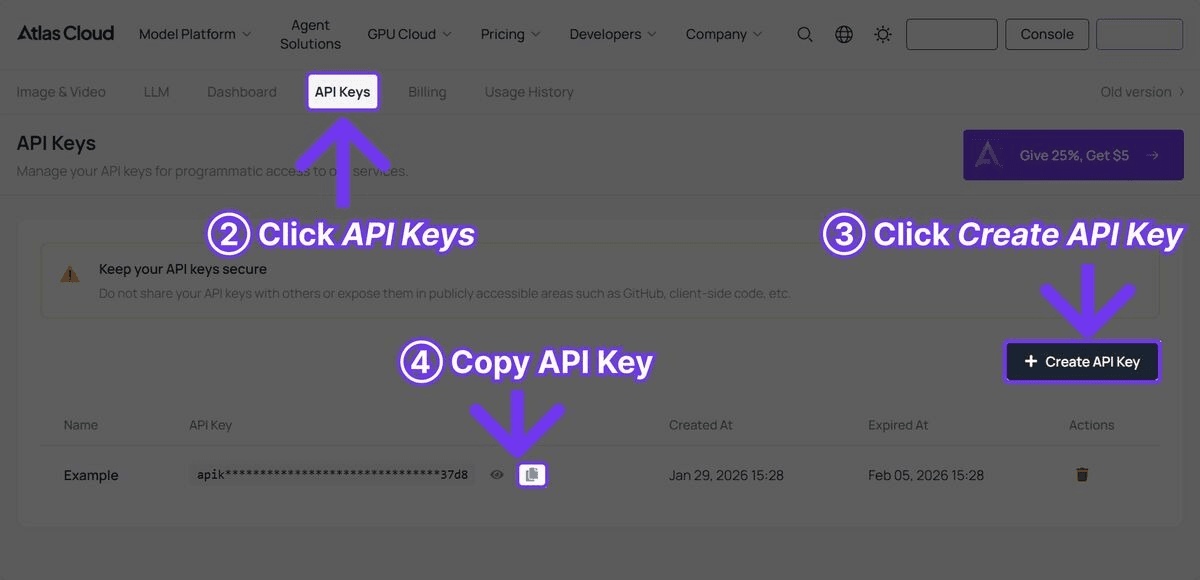
API keys can be obtained right away from the console.
Quality Optimization Tips
Generating video at scale in Atlas Cloud presents quality issues that are not present when generating one or two clips at a time. Here are some strategies to keep output quality predictable and costs in check.
Use the Fast Tier for Drafts, Pro for Finals
The single best money-saving hack. Use Seedance v1.5 Pro Fast at USD0.018/second for all your prompt iterations in the beginning. When you have fine-tuned your prompt, framing and style, use a more expensive model for final generation. Groups that have implemented this process see on average a 70-85% reduction of their total generation costs vs running everything at Pro tiers.
Start with 4-6 Second Clips
Longer doesn't mean better. On social media platforms, 4-6 second clips perform much better than longer video clips on engagement metrics. Plus, they cost 25-50% less to produce. A 4-second Seedance v1.5 Pro clip costs only USD0.188 -- or 100 short clips for only USD18.80 per week.
Template Your Prompts for Consistency
Creating dozens of product videos requires consistency. Construct prompt templates with unchanging structural elements and replace product-specific details:
plaintext1``` 2Product showcase: [PRODUCT_NAME] rotating slowly on [SURFACE], 3[LIGHTING_STYLE] lighting, [BRAND_ADJECTIVE] feel, 4K detail 4```
This method allows for a consistent visual aesthetic across a whole product library without having to create prompts manually for each clip.
Match Resolution to Distribution Channel
Not all videos need 1080p. Videos destined for Instagram Stories or TikTok will do just fine at 720p. That will generate quicker, cost you the same per second, and reduce failed generations. Save 1080p for YouTube, hero sections on your website, and paid ad placements.
Review and Iterate in Small Batches
Do not send all 100 prompts in one request. Instead, send them in batches of 10-15. Then check the output. Replace the ones that don't do so well, and repeat. This allows you to have fewer wasted generations.
Real Cost Scenarios
Okay, so the theory is all good and well, but what are some real-life usage patterns? Here are three, based on common team profiles:
Small Business: 25 Videos/Week
A neighborhood business making social media content and product shows.
| Parameter | Detail |
| Videos per week | 25 |
| Average duration | 8 seconds |
| Primary model | Seedance v1.5 Pro |
| Weekly cost | 25 x 8 x USD0.047 = USD9.40 |
| Monthly cost | USD37.60 |
For under USD10 per week, your small business can have a thriving social media presence, with daily fresh video content. That's less than one stock video download on most sites.
Agency: 100 Videos/Week (Mixed Models)
A multi-client marketing agency with a variety of content requirements.
| Parameter | Detail |
| Videos per week | 100 |
| Average duration | 8 seconds |
| Model mix | 60% Wan 2.6, 20% Seedance v1.5 Pro, 15% Kling 3.0 Std, 5% Veo 3.1 Fast |
| Weekly breakdown | USD33.60 + USD7.52 + USD8.52 + USD3.60 |
| Weekly cost | USD53.24 |
| Monthly cost | USD212.96 |
Even with a mix of models, the total is just over USD50 per week -- a fraction of traditional production costs. The agency that bills clients USD500 to USD2,000 for a video package is enjoying margins over 90%.
Enterprise: 500 Videos/Week
Mass-scale e-commerce business producing product videos, ad variations and A/B test content.
| Parameter | Detail |
| Videos per week | 500 |
| Average duration | 6 seconds |
| Model mix | 70% Seedance v1.5 Pro, 20% Kling 3.0 Std, 10% Veo 3.1 Fast |
| Seedance v1.5 Pro | 350 x 6 x USD0.047 = USD98.70 |
| Kling 3.0 Std | 100 x 6 x USD0.071 = USD42.60 |
| Veo 3.1 Fast | 50 x 6 x USD0.09 = USD27.00 |
| Weekly cost | USD168.30 |
| Monthly cost | USD673.20 |
Five hundred videos per week for under USD700 per month -- this is the real deal of cheap AI video at enterprise scale. Contrast that with the USD100,000+ per month budget needed by a traditional production team to produce the same volume of marketing videos. We’re not even in the same ballpark when it comes to the economics of this form of marketing video automation.
Contact Atlas Cloud for volume pricing for enterprise scale needs -- additional discounts are available for large volume commitments.
Frequently Asked Questions
What is the cheapest way to generate 100 AI videos per week?
Seedance v1.5 Pro over the Atlas Cloud video generation API offers strong quality at USD0.047/second. At 8 seconds per video that comes out to USD37.60 per week for 100 videos. For teams that want to mix models, combining Seedance v1.5 Pro with Kling 3.0 Std (USD0.071/sec) or Veo 3.1 Fast (USD0.09/sec) for hero content keeps the total well under USD100.
Do I need a subscription to use Atlas Cloud for bulk video generation?
No. Atlas Cloud has no subscription fees or memberships. Users only pay for the videos they create.
Can I use different AI models through the same API key?
Yes. Atlas Cloud gives you access to over 300 AI models -- including Seedance v1.5 Pro, Kling 3.0, Veo 3.1, and Wan 2.6 -- all through a single API key and endpoint. You can switch between models on a per-request basis with no separate accounts or credentials to manage.
How long does it take to generate 100 videos?
Generation time is different for each model. Seedance v1.5 Pro generates an 8-second video in 1-2 minutes. Kling 3.0 and Veo 3.1 can take 2-5 minutes for each clip. Processing requests one at a time, a batch of 100 videos takes 2-4 hours. Using parallel requests shortens that duration considerably.
Are AI-generated videos suitable for commercial use?
Yes. Videos created through the Atlas Cloud API are ready for commercial use, including social media ads, product pages, email marketing, and other paid media. Licensing varies by underlying model provider, so each team will want to review the terms of service for the specific models used for production.
Get Started
The quickest way to determine if this bulk video API method for AI video generation at scale works for a specific use case is to simply give it a try. Sign up to Atlas Cloud to test several models, compare output, and run the batch script above with actual prompts.
If your team is ready to discover the complete model catalog and API documentation:
Start Free on Atlas Cloud | Browse All Video Models | API Documentation
────────────────────────────────────────────────────────────





