
Grok Imagine Video Generation is xAI's frontier multimodal AI video system, and it has already redefined what creators can expect from a single API call. Built on the xAI Aurora engine, this model uses an autoregressive mixture-of-experts network. It processes text, image, video, and audio tokens all together. This approach completely replaces the diffusion-transformer methods found in systems like Sora and Veo.
The main benefit is natural audio and video sync created during a single generation step. You do not need a separate dubbing tool afterward.
At a Glance: Key Specs
| Feature | Detail |
| Duration | 1–15 seconds |
| Frame rate | 24 FPS |
| Resolution | 480p / 720p |
| Audio | Native lip-sync, SFX, dialogue, ambient music |
| Leaderboard | #1 on Artificial Analysis Video Arena (Elo 1404 ±6) |
Released in late May 2026, Grok imagine video generation debuted atop the Artificial Analysis Video Arena Image-to-Video leaderboard, displacing ByteDance Seedance 2.0. For any modern digital workflow demanding rapid, production-ready video with built-in sound, this is the benchmark to beat.
Understanding xAI's Grok Imagine Video Generation Architecture
To fully exploit Grok's features, we must first look under the hood. Unlike traditional video models that stitch sound and light together after the fact, Grok treats them as a single entity. Understanding this core shift explains why its prompt behavior and rendering speeds differ so drastically from market alternatives.
What Is Grok Imagine and How Does It Work?
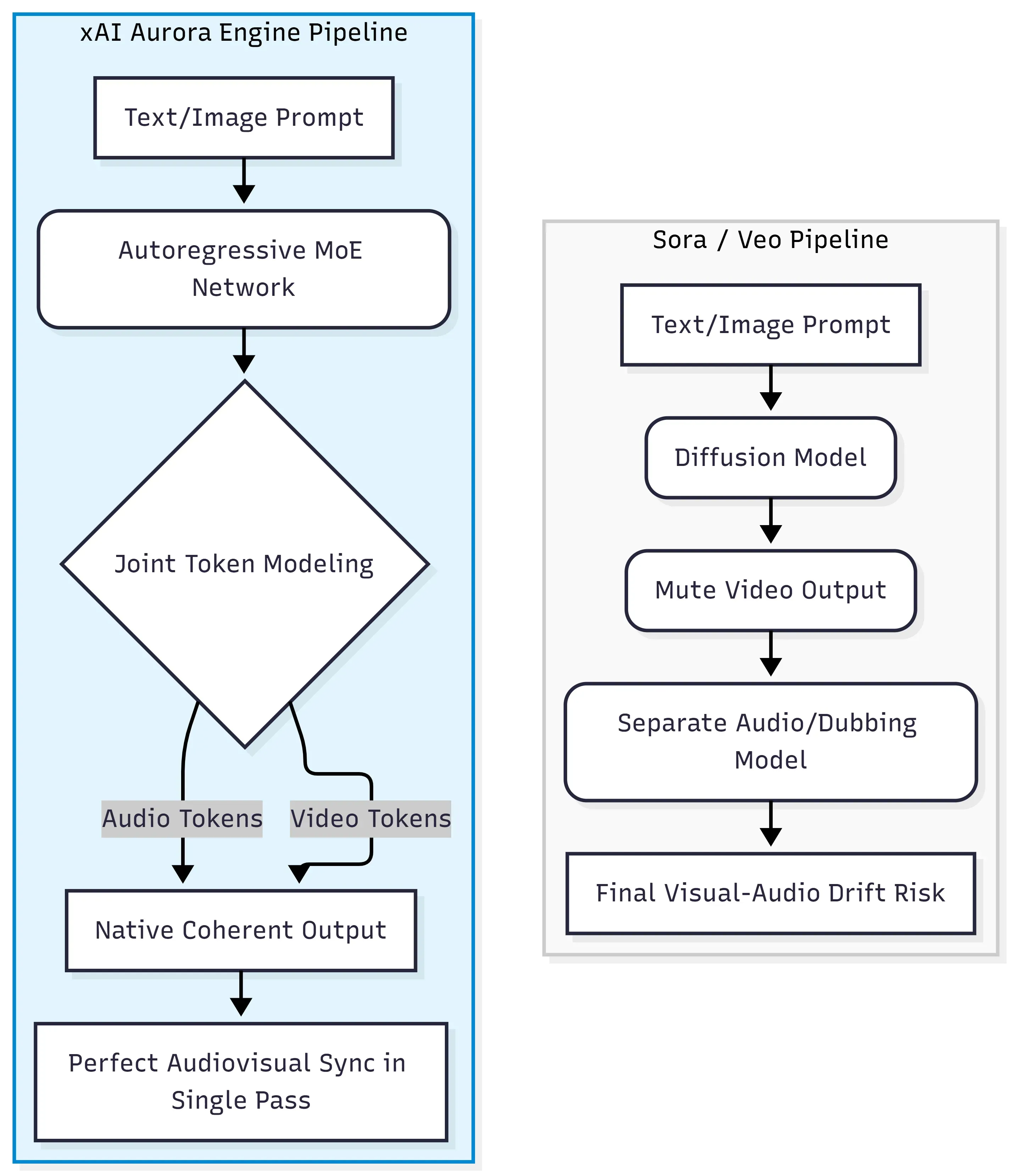
At its core, Grok Imagine Video Generation runs on the xAI Aurora engine, an autoregressive mixture-of-experts (MoE network) that predicts the next token across a unified stream of text, image, video, and audio data. This is architecturally distinct from the diffusion-transformer paradigm used by OpenAI's Sora and Google's Veo, where video and audio are typically generated or aligned in separate stages.
The Shift Away from Diffusion-Transformers
Traditional diffusion models work by gradually denoising random noise into coherent frames. They excel at visual quality but treat audio as an afterthought, requiring external tools or post-production pipelines to add sound. Aurora takes a different path entirely.
| Approach | Architecture | Audio Method |
| Sora / Veo | Diffusion-Transformer | Post-production / separate model |
| Grok Imagine Video | Autoregressive MoE | Native single-pass generation |
Interleaved Multimodal Token Processing
Rather than handling modalities sequentially, Aurora processes interleaved multimodal data — meaning audiovisual tokens (dialogue, sound effects, ambient music) are generated alongside video frames within the same forward pass. This joint token modeling is precisely what allows lip-sync and event-aligned sound effects to emerge from the model itself, rather than from separate alignment systems.
This production sample demonstrating Aurora's single-pass execution, where the acoustic frequency of the roaring engine perfectly phases with visual acceleration and tire friction physics.
Training at Scale: Colossus
They trained this model on the Colossus supercomputer from xAI. The giant site uses around 555,000 NVIDIA GPUs and eats up about 2 gigawatts of power. It is officially the largest single-site AI training cluster anywhere. This massive setup is the secret behind how Aurora mixes four different media types without lowering the quality.
Key Capabilities: Image-to-Video, Format Settings, and Quality Modes
While Grok supports text-to-video, its true enterprise utility shines in Image-to-Video (I2V) workflows. By feeding the model a static reference image, you lock down character features instantly, shifting the heavy lifting from descriptive text to precise mechanical controls. Before diving into styling modes, you need to configure the core pipeline constraints.
What Are the Video Limits, Aspect Ratios, and Resolutions for Grok Imagine?
Turning images into videos is one of the most useful features in Grok Imagine. You just upload a still photo and type a simple prompt to describe the motion. The model then animates the image and adds matching audio all at the same time. You can fully control the final format using four settings: length, frame rate, resolution, and shape.
Duration and Frame Rate
Granular duration control lets you request any integer second from 1 to 15. This extends the prior 10-second cap by 50% while maintaining temporal consistency across the longer window. All outputs render at a fixed 24 FPS baseline.
Resolution Options
| Resolution | Quality | Processing Speed |
| 480p | Standard definition | Faster (default) |
| 720p | HD (720p resolution) | Slower |
For final deliverables or social distribution, 720p is the practical choice. Use 480p for rapid iteration and prompt testing.
Aspect Ratio Variations
Seven aspect ratio variations are supported:
| Ratio | Best Use Case |
| 16:09 | Widescreen / YouTube (default) |
| 9:16 | TikTok / Instagram Reels / Stories |
| 1:01 | Social thumbnails |
| 4:3 / 3:4 | Presentations / portraits |
| 3:2 / 2:3 | Photography formats |
For image-to-video generation, output defaults to the input image's native aspect ratio unless overridden.
Prompt Engineering Guidelines for Cinematic Motion and Zero-Shot Identity
Because the xAI Aurora engine relies on joint token modeling, your prompting strategy must shift. You no longer need to spend tokens describing a character's physical appearance—the input image handles that via zero-shot identity preservation. Instead, your prompt should focus strictly on directional motion, camera behavior, and crucially, the acoustic environment you want the engine to generate in tandem.
How Do You Prompt Grok Imagine Video for the Best Results?
The most important principle: because Grok Imagine supports zero-shot identity preservation, the model carries subject appearance directly from the input image. You do not need to re-describe hair color, clothing, or facial features. Spend every word on motion dynamics, environment, and camera direction instead.
The Optimal Prompt Syntax
Mix and match these optimized token blocks to build highly controlled cinematic environments:
| Action & Motion | Camera Dynamics | Acoustic & Environment |
| ...strides confidently forward, coat billowing | Dolly zoom pulls back slowly | ...neon reflections rippling on wet pavement. SFX: Heavy rain splashing on asphalt |
| ...sprints through a dense crowd, looking back | Low-angle tracking shot, fast pacing | ...under flickering overhead fluorescent lights. SFX: Muffled crowd murmurs and panting |
| ...turns around slowly, opening eyes | Macro pan tracking from left to right | ...shallow depth of field, dust motes floating. SFX: Deep cinematic bass drop |
Scenario A: Cyberpunk Chase Sequence High-Dynamic, Heavy Audio Sync
Prompt:
Action & Subject: A guy runs fast down a wet alley lit by neon signs.
Camera Dynamics: The camera stays low and follows him closely. The background blurs past, and bright lights streak across the screen.
SFX: Fast electronic music mixes with stepping in puddles and distant sirens. The beats match the flashing neon lights perfectly.
Testing Objective: This test checks how well the Aurora engine handles shapes during fast motion. It also evaluates how perfectly the engine syncs sounds with visuals, like matching synth beats with flashing neon lights.
The Wins (What Grok Nailed):
- Zero-Shot Identity Retention: The transition from the static seed image is flawless. The wrinkled leather texture of the trench coat and the character's messy dark hair remain perfectly stable without any identity morphing.
- Physical Coherence: Grok handles the high-velocity sprint with zero limb duplication or clothing clipping—a notorious failure point for diffusion rivals.
- Dynamic Lighting Physics: The pink and blue neon reflections on the wet pavement shift accurately in sync with the camera’s forward tracking angle.
The Flaws (Where It Bottlenecks):
- Audio Token Bias: While the native single-pass audio sync is impressive, the engine heavily prioritized the “synthwave music” token, completely drowning out the localized “puddle splashes” SFX.
- Motion Compression: At 720p, rapid camera movement causes slight edge-blurring and digital artifacts around distant background text like "MIDNIGHT DINER".
Scenario B: Cinematic Dialogue & Emotional Surge
Prompt:
Action & Subject: She delivers a tense movie speech, whispering "It ends tonight" with total conviction.
Camera Dynamics: The camera pushes in slowly on her face just as a sharp blast of wind messes up her hair.
SFX: Her quiet voice matches her lip movements perfectly, mixed with a sudden, loud gust of wind blowing into the mic and rustling her clothes.
Testing Objective: This serves as a definitive stress test for the xAI Aurora engine's multi-token integration. It forces the model to execute flawless native lip-sync and dynamic facial muscle mechanics while simultaneously calculating the chaotic physical interaction of hair/clothing motion, all matched with true-to-life environmental sound effects in a single inference pass.
The Wins (What Grok Nailed):
- Flawless Native Lip-Sync: The spoken words "It ends tonight" match the character's lip and jaw movements perfectly. This happens naturally without any extra editing.
- Micro-Expression Retention: Her facial freckles, small blinks, and sharp stare stay exactly in place. This shows the engine keeps her identity steady even during close-up macro shots.
- Wind Physics Simulation: Right as she finishes speaking, a sudden breeze blows through her dark hair. The strands move realistically and keep their natural volume.
The Flaws (Where It Bottlenecks):
- Audio Artifacting: The generated voice, while well-timed, exhibits a slightly compressed, synthetic robotic timbre, missing the raw, breathy texture requested in the prompt.
- Temporal Micro-Morphing: During the wind-rustling sequence, some minor texture blending occurs around the ear and hairline, where the engine struggles slightly to separate moving hair from static skin background.
Pitfall Mitigation: The Counter-Example Matrix
Because Grok Imagine does not support a dedicated negative prompt parameter in the current public endpoint, pipeline engineers must pivot from traditional diffusion-based prompting heuristics:
- ❌ The Incorrect Approach (Diffusion Mindset):"A man running, highly detailed, 4k, no blur, no distortion, cinematic lighting."
- Editorial Analysis: This fills the context window with fluff tokens and introduces negative phrases like no blur. An autoregressive MoE network like Aurora can misinterpret these terms as semantic anchors, accidentally generating the very distortion you want to avoid.
- ✅ The Correct Approach (Aurora Native Mindset):"Strides forward dynamically. Sharp focus throughout, pristine cinematic textures, volumetric god rays piercing through dust."
- Editorial Analysis: This replaces exclusions with affirmative, deterministic spatial and physical descriptions, cleanly directing the engine's token-prediction path toward sharp rendering.
Pro tips:
Temporal coherence degrades when prompts introduce conflicting spatial instructions, such as simultaneous zoom-in and pan-right commands. Keep camera movements singular and directional. For clips longer than 8 seconds, anchor the prompt around one continuous motion arc rather than multiple scene cuts.
Grok Imagine Video Generation API Integration: Python and REST Quick Start
Transitioning from creative conceptualization to production scaling requires pushing these parameters through the official xAI API gateway. Depending on your current infrastructure and whether you prefer automated background lifting or a lightweight custom loop, xAI provides two distinct implementation pathways.
How Do I Call the Grok Imagine API for Video?
There are two supported pathways for calling the Grok Imagine API: the native xai_sdk Client (which handles polling automatically) and the OpenAI-compatible base_url REST approach via https://api.x.ai/v1. Both require API key authentication set as an environment variable.
Prerequisites
Before writing any code, complete these steps:
- Generate an API key at console.x.ai
- Export it in your shell: export XAI_API_KEY="your-key-here"
- Install the SDK: pip install xai-sdk
Path 1: Native xai_sdk (Recommended)
The xai_sdk Client wraps the full asynchronous polling loop internally, so you receive a completed video object with a single call to the video.generate endpoint:
plaintext1import os 2import xai_sdk 3 4client = xai_sdk.Client(api_key=os.getenv("XAI_API_KEY")) 5 6# Ensure you pass the reference image for Image-to-Video workflows 7response = client.video.generate( 8 model="grok-imagine-video", 9 image="your image", # Required URL or base64 10 prompt="your prompt", 11 duration=5, 12 aspect_ratio="16:9", 13 resolution="720p", 14) 15 16# FIXED: Aligned with standard xai_sdk response schema 17print(f"Generation Successful. Video URL: {response.video.url}")
No manual polling required. The SDK submits the request, waits for completion, and returns the URL.
Path 2: Standard REST API (Custom Asynchronous Loop)
For environments where the native SDK is unavailable, use the underlying HTTP endpoints. Because video generation is asynchronous, you must manually implement a polling sequence to track the execution status:
plaintext1import os 2import time 3import requests 4 5headers = { 6 "Authorization": f"Bearer {os.environ['XAI_API_KEY']}", 7 "Content-Type": "application/json", 8} 9 10payload = { 11 "model": "grok-imagine-video", 12 "image": "your image", 13 "prompt": "prompt", 14 "duration": 5, 15 "aspect_ratio": "16:9", 16 "resolution": "720p" 17} 18 19# 1. Submit the Video Generation Request 20res = requests.post("https://api.x.ai/v1/videos/generations", headers=headers, json=payload) 21res.raise_for_status() 22request_id = res.json()["request_id"] 23 24# 2. Poll the Status Endpoint Until Ready 25while True: 26 poll = requests.get(f"https://api.x.ai/v1/videos/{request_id}", headers=headers) 27 data = poll.json() 28 29 if data["status"] == "done": 30 # FIXED: Aligned with the official xAI JSON schema return 31 print(f"Success! Asset Available At: {data['video']['url']}") 32 break 33 elif data["status"] in ["expired", "failed"]: 34 print(f"Generation failed with status: {data['status']}") 35 break 36 37 time.sleep(5) # Safe rate-limiting interval
Polling Status Reference
The API returns one of four status values during generation:
| Status | Meaning |
| pending | Still processing |
| done | Video ready, URL available |
| expired | Request timed out |
| failed | Generation error |
Poll every 5 seconds to stay within reasonable rate limits. The SDK defaults to 100ms intervals but 5 seconds is practical for production workflows.
Production Alternative: Streamlining via Atlas Cloud API Gateway
For enterprise pipelines requiring advanced concurrency, unified billing, or high-availability routing, integrating via a third-party managed gateway like Atlas Cloud is a viable production alternative. Instead of managing your own complex asynchronous polling loops and status checks locally, Atlas Cloud’s unified wrapper handles server-side queueing and state persistence automatically.
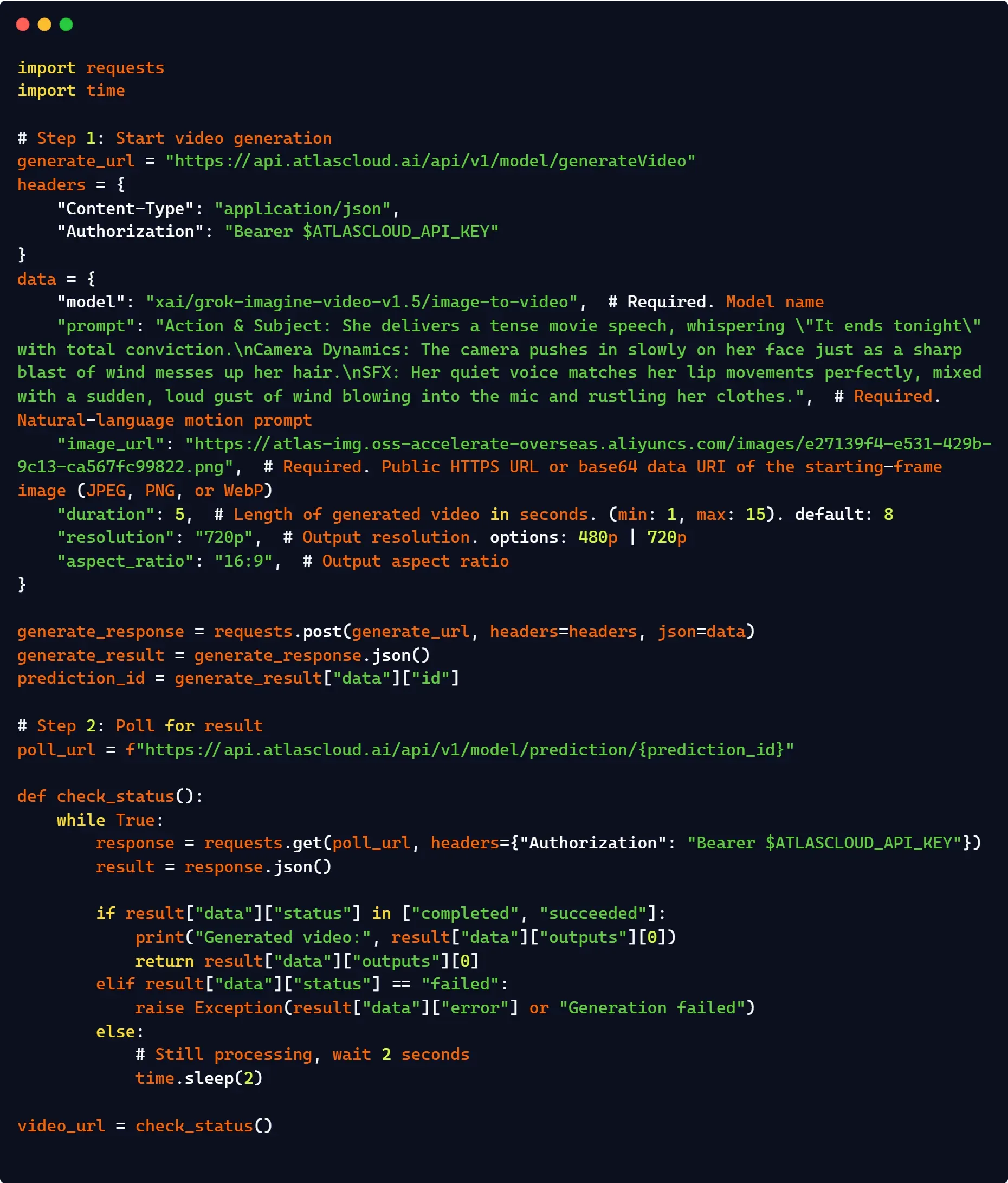
Furthermore, it offers a seamless drop-in replacement by routing requests through a unified base URL, minimizing code changes while unlocking enterprise-grade rate limits that typically exceed standard xAI public tier thresholds.
Benchmark Performance: Cost, Latency, and Competitor Comparisons
High-fidelity audiovisual outputs are only viable for enterprise pipelines if they align with strict computing budgets and latency requirements. To see where Grok stands in the market, third-party stress tests map its generation speeds and per-second costs directly against established industry giants.
Is Grok Imagine Video Faster and Cheaper Than Other AI Video Tools?
On independent benchmarks, the answer is largely yes. Grok Imagine Video debuted at number one on the Artificial Analysis Video Arena Image-to-Video leaderboard with a leaderboard Elo rating of 1404 ±6, displacing ByteDance Seedance 2.0 from the top position.
Head-to-Head Competitor Comparison
| Model | Developer | Max Duration | Max Resolution | Native Audio |
| Grok Imagine V1.5 | xAI | 15s | 720p | Yes |
| Seedance 2.0 comparison | ByteDance | 4–12s | 720p | Yes |
| Veo 3.1 | 8s | 1080p | Yes | |
| Sora 2 | OpenAI | 20s | 1080p | Yes |
| Runway Gen-4 | Runway | 10s | 1080p | Partial |
Inference Speed and Latency
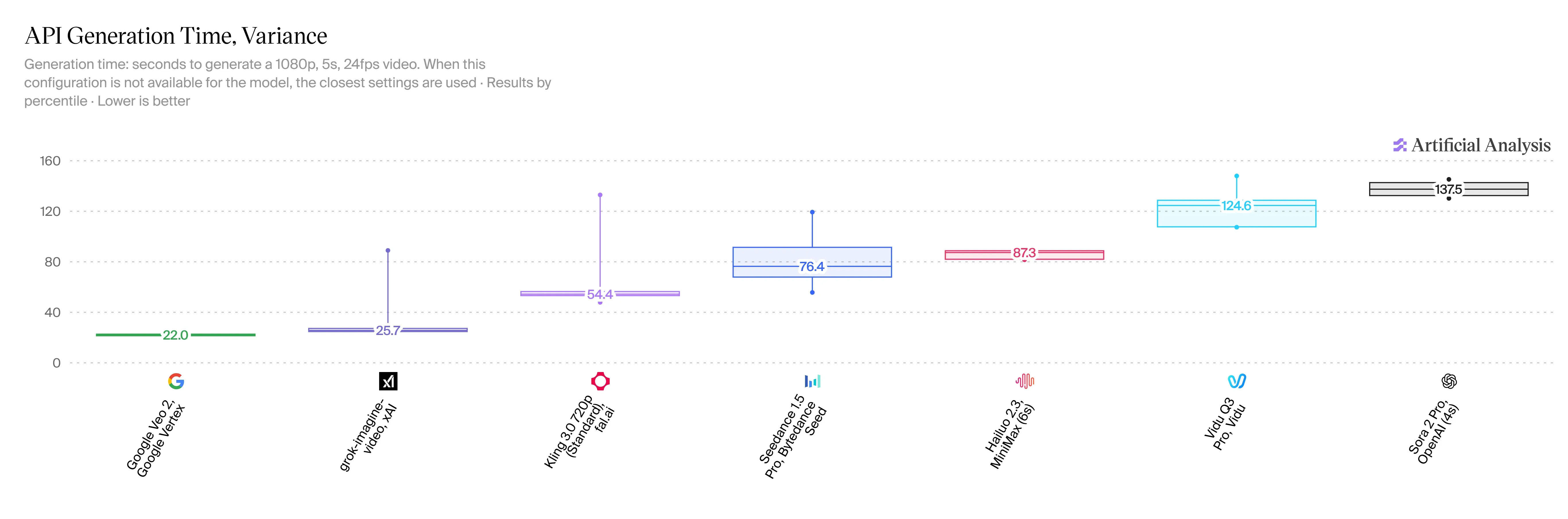
V1.5 is incredibly fast, and that is a massive win for users. You can make a 5-second, 720p clip in just 20 to 30 seconds flats. Compared to HappyHorse 2.3, that cuts your waiting time down by 2 or 3 times. We still do not have official speed stats for Veo 3.1, but people online say it takes more than a full minute for a similar clip.
Pricing Structure
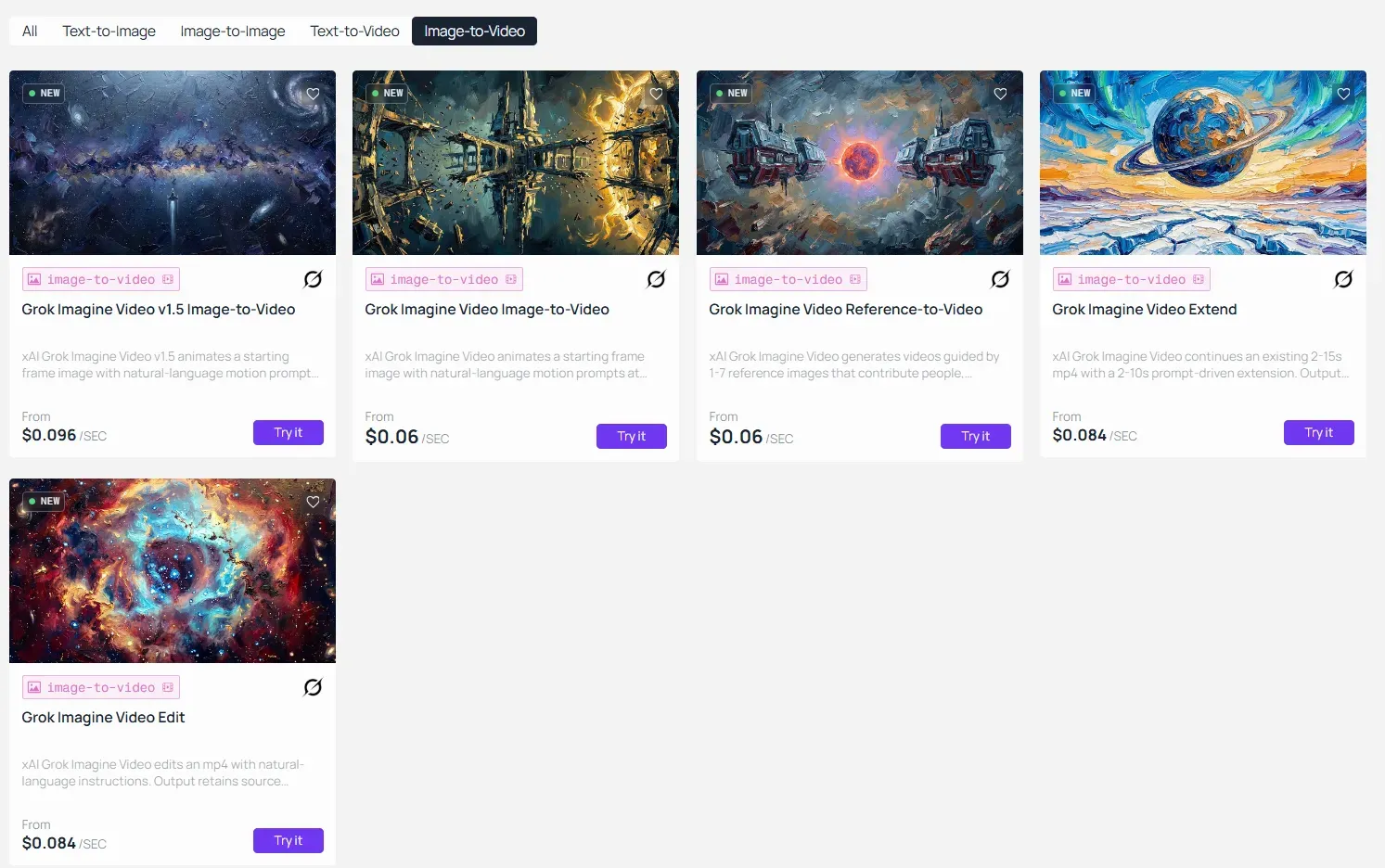
The per-second pricing structure via third-party API gateways such as Atlas Cloud starts at approximately $0.096 per second of generated video. At that rate, a 10-second clip costs roughly $0.96, making cost-effective experimentation genuinely accessible for independent creators and small teams iterating on multiple prompt variants before committing to a final production run.
Enterprise Security, Data Privacy, and Content Compliance
Deploying proprietary media assets or client-facing content into any cloud-based AI system introduces necessary legal questions. For commercial production houses, knowing where your generative inputs land—and how they are isolated—is just as important as the final output quality.
Does xAI Use My API Data or Generated Videos to Train Its Models?
This is one of the most common questions from enterprise adopters, and it deserves a direct answer. According to xAI's developer terms, API inputs and outputs processed through the platform are subject to content policy review for safety filtering, but are handled under Data Privacy by Design principles that separate inference data from public training pipelines.
Compliance Framework Overview
Third-party API gateway providers offering access to Grok Imagine, such as Atlas Cloud, publish their own independent compliance certifications:
| Compliance Standard | Status |
| SOC 2 Type II compliance | Certified |
| GDPR data residency | Aligned |
| HIPAA | Eligible |
Key Privacy Boundaries for Professional Users
Professionals evaluating Grok Imagine for commercial workflows should note the following:
- Generated video outputs are returned as temporary hosted URLs and are not permanently stored by default.
- Content policy review filters outputs for safety violations before delivery, but does not retain content for reuse.
- Model training exclusions apply to API users: your prompts and generated media are not fed back into public model training loops.
- GDPR data residency alignment means data handling practices meet European processing standards for teams operating across jurisdictions.
For enterprise deployments requiring formal data processing agreements or custom retention policies, direct engagement with xAI's enterprise team via x.ai is the appropriate next step.





