AI image generators usually butcher text and layout, especially with bilingual content. Qwen Image 2.0 completely fixes this. You get perfect Chinese and English text, crisp professional typography, and ready-to-use infographics instantly. No Photoshop tweaks needed. If you're tired of garbled AI words, this AI infographic generator with text is your perfect solution.
Qwen Image 2.0 Benchmark – Feature Overview
| Evaluation Capability | Qwen Image 2.0 Capability performance | Layer Type |
| Readable English text | High accuracy, few spelling errors | Language Model |
| Readable Chinese text | Excellent, supports complex characters | Language Model |
| Bilingual mixing (Chinese + English) | Natural integration, consistent font & spacing | Language Model + Layout Engine |
| Spelling accuracy | Very high for both CN & EN | Language Model |
| Multi-line paragraphs | Stable rendering, preserves semantic flow | Layout Engine |
| Infographic layout control | Grid, sections, hierarchy reliably implemented | Layout Engine |
| Column/grid structure | Supports 2–3 columns, clean alignment | Layout Engine |
| UI/slide-style design | Visually coherent, elements readable and structured | Layout Engine + Image Generator |
| Editing existing layout/text | Native support for text/layer editing | Layout Engine + Image Generator |
| "No Photoshop needed" output | Output is directly usable for presentations, posters, social media | Image Generator |
As the benchmark illustrates, Qwen Image 2.0 succeeds where other models fail because of its dual-engine approach. By separating the cognitive tasks (Language Model) from the spatial formatting (Layout Engine), it ensures flawless rendering across multiple layers. How do these technical specs translate into real-world performance?
What Makes Qwen Image 2.0 the Ultimate Visual Document Renderer?
-
Unmatched Text Accuracy and Seamless Bilingual Mixing
Qwen Image 2.0 text rendering is honestly on another level. It handles English and Chinese in the exact same prompt without breaking a sweat. It is an AI infographic generator with text that actually works for global teams.
-
Professional Layout Control and Structural Precision
Qwen Image 2.0 understands grid structures and negative space. It aligns headers cleanly and keeps body text within invisible boundaries. It feels like it has a built-in graphic designer checking the margins.
-
Advanced Long Prompt Adherence and Editing Capabilities
Qwen Image 2.0 text-to-image listens to complex instructions. You don't have to re-roll the entire image and lose your perfect layout, and unifies generation and editing in one architecture.
-
The Technical Foundation That Drives Results
Qwen Image 2.0 uses a highly advanced 7B parameter Multimodal Large Language Model (MLLM) architecture. It literally "reads" your text before it draws it.
Demonstration: Qwen Image 2.0 Prompt Performance in Action
Prompt:
A photorealistic 2K image of a large modern conference room screen displaying a complete bilingual presentation slide titled “Qwen-Image-2.0 核心能力演示 / Core Capabilities Demo”. Dark blue professional theme.
A photorealistic 2K image of a large modern conference room screen displaying a complete bilingual presentation slide titled "Qwen-Image-2.0 Core Capabilities Demo". Dark blue professional theme.
Top: English + Chinese title.
Three columns demonstrating the three strengths:
Left (Text): “复杂文字渲染 / Complex Text Rendering” with a full legible paragraph of technical specs.
Left (Text): "Complex Text Rendering" with a full readable paragraph of technical specifications.
Center (Layout): “智能布局控制 / Smart Layout Control” showing a mini infographic with arrows and icons perfectly placed.
Center (Layout): "Smart Layout Control" showing a mini infographic with arrows and icons perfectly placed.
Right (Bilingual): “中英双语支持 / Bilingual Support” with mixed sentences rendered flawlessly.
Right (Bilingual): "Bilingual Support" with mixed sentences rendered flawlessly.
Audience silhouettes in foreground, soft office lighting, text razor-sharp even when viewed from distance. Ultra-detailed, no artifacts.
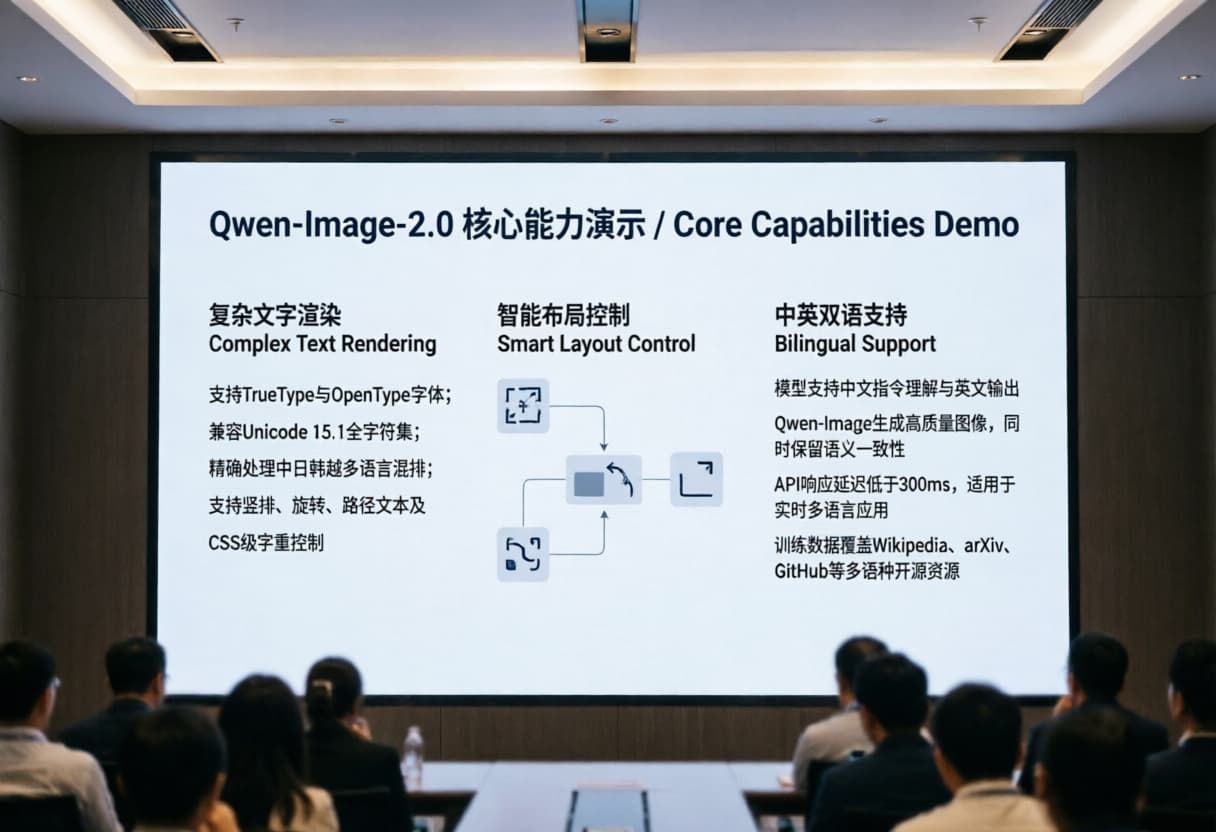
Overall Score: 9.2 / 10
This is an excellent result that strongly demonstrates Qwen Image 2.0's three core capabilities (complex text rendering, smart layout control, and bilingual support). It looks highly professional and realistic.
Text Rendering (Excellent):All Chinese and English text is sharp, legible, and pixel-perfect.
Bilingual Support (Very Strong):Seamless mixing of Chinese and English. Font styles feel culturally appropriate and balanced.
Layout Control (Strong):The three-column layout (复杂文字渲染 / Complex Text Rendering, 智能布局控制 / Smart Layout Control, 中英双语支持 / Bilingual Support) is well-balanced with good whitespace and visual flow.
Layout Control (Strong): The three-column layout (Complex Text Rendering, Smart Layout Control, Bilingual Support) is well-balanced with good whitespace and visual flow.
Minor Areas for Improvement
The central “Smart Layout Control” diagram is a bit simplified/abstract compared to the prompt’s intent for a “mini infographic with arrows and icons.” It works well but could feel more detailed/rich in future iterations.
Real-World Industry Use Cases for Qwen Image 2.0
Marketing & Advertising Design
You type your sales copy into the prompt, and it perfectly places the text right on the ad.
Data Visualization
You just fed it the core stats. It built a clean, readable layout in seconds. No more tweaking text boxes for hours.
E-commerce Design
Qwen Image 2.0 lets you whip up flash sale graphics with bold, punchy typography instantly. It actually understands exactly where to put the "50% OFF" text so it doesn't accidentally cover the product itself.
Game & Content Development
Game developers always need UI mockups, splash screens, or item cards with readable text. Instead of sketching everything out manually, you can just prompt the exact layout, and you'll get a hand-drawn final result that looks like it was made by a professional studio.
Education & Knowledge Content Generation
You can generate bilingual flashcards or complex diagram explainers in seconds. Getting professional typography the text is actually crisp and clear enough for students to read easily on a small phone screen.
Cross-Border & Localization Marketing
If you run ads in the US and China, you don't need two separate design teams anymore. Qwen’s seamless bilingual mixing means you just prompt both languages at once. The localization happens right inside the rendering process.
Scaling Visual Content – Improving Workflow Efficiency Through API Integration
-
From "Design Tool" to "Design Infrastructure"
When you connect a model via an API, it stops being just another design tool. It becomes your entire visual infrastructure. You plug it right into your existing software. Instead of humans manually driving the tool, your data drives the design.
-
Batch Generation and Automated Content Pipelines
Imagine needing 500 different social graphics by tomorrow. Doing that manually would take weeks. But with API integration, you just set up a simple script. You feed your spreadsheets and ai prompts directly into the system. The API spits out hundreds of banners overnight. It turns an AI infographic generator with text into a 24/7 automated factory.
-
Ensuring Consistency and Controllability
It is always annoying when AI randomly changes your brand colors or messes up fonts. Using the API gives you strict parameter control. You can lock in specific seed numbers and layout coordinates. This ensures professional typography in AI generation every single time. Your outputs actually look like they belong to the same brand.
-
Cost and Efficiency: API Design vs. Manual Design
Hiring a team to do basic layout work gets expensive fast. Manual design might cost you $50 or more per simple poster. API calls? They cost literal pennies. The Qwen Image 2.0 text rendering engine handles the heavy lifting effortlessly, the repetitive, boring layout work? Let the API handle it.
Summary – Why Do Developers Choose to Use Qwen Image 2.0 Through an Aggregator API?
One unified API → Multiple visual use cases
Instead of writing custom backend code for every new tool, an Atlas Cloud aggregator API puts everything behind one single door. You might need an AI infographic generator with text today, and a standard photo generator tomorrow. You get access to the best AI poster design tools 2026 has to offer without rewriting your codebase. It just saves so much development time.
Pay-as-you-go flexibility, lower production costs
Using an aggregator API means you only pay for the exact images you create. It makes high-end AI image generation completely affordable, even for solo developers.
Faster iteration speed and better user experience
When you do not have to worry about server crashes or scaling up nodes, you can actually focus on building a great product. You can quickly tweak your ai prompts, test new layouts, and give your users their graphics instantly.
To put it simply, an Atlas Cloud API aggregator platform unlocks the full potential of Qwen Image 2.0. It takes a powerful standalone model and turns it into a globally scalable visual production infrastructure.
FAQ
How much does Qwen Image 2.0 cost?
The cost of Qwen Image 2.0 depends on your access method. If you use an API aggregator, it runs on a flexible pay-as-you-go model. This typically costs just fractions of a cent per generated image. It is vastly cheaper than pay monthly software subscriptions.
💰 Qwen Image 2.0 Price Comparison Table
| Comparison Dimension | Qwen Image 2.0 Official (Alibaba / official ecosystem) | Atlas Cloud Platform |
| Pricing model | Subscription + credit-based (monthly plans or prepaid credits) | Pure pay-as-you-go API (per image billing, no subscription required) |
| Base price per image (Standard version) | ~$0.035–$0.04 per image (depending on credit pack) | ~$0.028 per image |
| Base price per image (Professional version) | ~$0.075 per image | ~$0.060 per image |
| Suitable usage volume | Low to medium volume (hundreds–thousands/month) | Medium to very high volume (thousands–millions/month) |
| Target audience | Designers, creators, marketing teams, individuals needing UI tools | Developers, startups, SaaS platforms, enterprise production systems |
Is Qwen Image 2 open source?
No, Qwen Image 2.0 (Qwen-Image-2.0) is not open source. Its announcement blog tag changed from "Open-Source" to "Release," confirming it's closed-source and API-only.
The Qwen Image 2.0 text rendering can be accessed through the Atlas Cloud hosted API, enjoy professional typography in AI generation, get affordable, high-quality 2K image generation with strong text rendering, .
Ready to stop fighting with messy AI text? Sign up for Atlas Cloud aggregator API today. Plug it into your workflow and start generating flawless, ready-to-use visual documents in seconds!







