
Most teams start with AI video generation by making one-off API calls -- generate a single video, download it, move on. That works for experimentation.
*Last Updated: February 28, 2026*
See these models in action:
Pipeline Architecture
Before writing code, here is the high-level architecture of what we are building:
plaintext1``` 2+-------------------+ +--------------------+ +------------------+ 3| Prompt Config | | Atlas Cloud API | | Output Storage | 4| (JSON/YAML) | | | | | 5| - prompts +---->+ /generateImage +---->+ /images/ | 6| - models | | /generateVideo | | /videos/ | 7| - parameters | | /prediction/get | | /manifest.json | 8+-------------------+ +--------------------+ +------------------+ 9 | | | 10 v v v 11+-------------------+ +--------------------+ +------------------+ 12| Pipeline Engine | | Polling & Retry | | Cost Tracker | 13| | | | | | 14| - batch_generate | | - exponential | | - per-request | 15| - concurrency | | backoff | | - cumulative | 16| - model routing | | - max retries | | - per-model | 17+-------------------+ +--------------------+ +------------------+ 18```
The pipeline follows a simple flow:
- Read prompt configurations from a structured input file.
- Route each prompt to the appropriate model and endpoint (image or video).
- Submit all requests to the Atlas Cloud API with controlled concurrency.
- Poll for results with exponential backoff and retry logic.
- Download completed outputs and save to organized directories.
- Track costs and generate a summary manifest.
Getting Started: API Access
Step 1: Get Your API Key
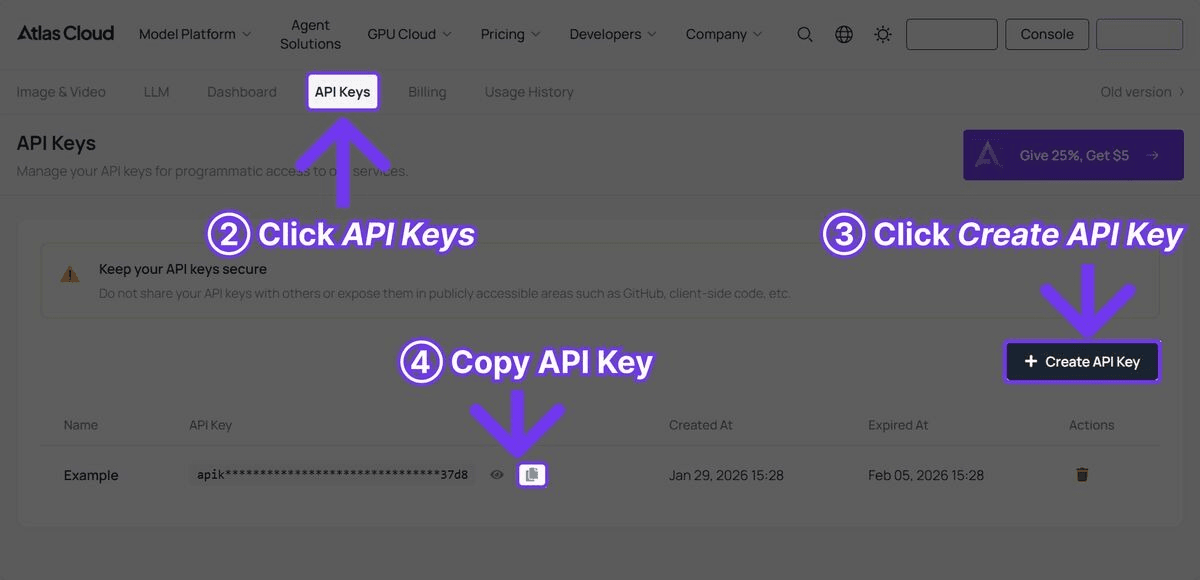
Sign up at Atlas Cloud and create an API key from the dashboard.

Step 2: Install Dependencies
plaintext1```bash 2pip install requests pyyaml 3```
No heavy frameworks required. The pipeline uses only `requests` for HTTP calls, `pyyaml` for configuration files, and Python standard library modules for concurrency and file handling.
The Complete Pipeline Code
The following is the full working pipeline. Each section is explained after the code block.
plaintext1 2```python 3import requests 4import time 5import json 6import os 7import logging 8from concurrent.futures import ThreadPoolExecutor, as_completed 9from dataclasses import dataclass, field 10from typing import Optional 11from datetime import datetime 12 13# Configure logging 14logging.basicConfig( 15 level=logging.INFO, 16 format="%(asctime)s [%(levelname)s] %(message)s", 17 datefmt="%Y-%m-%d %H:%M:%S" 18) 19logger = logging.getLogger("atlas_pipeline") 20 21@dataclass 22class GenerationResult: 23 """Stores the result of a single generation request.""" 24 name: str 25 model: str 26 media_type: str # "image" or "video" 27 status: str # "success", "failed", "error" 28 output_url: Optional[str] = None 29 local_path: Optional[str] = None 30 cost_estimate: float = 0.0 31 duration_seconds: float = 0.0 32 error_message: Optional[str] = None 33 34class AtlasCloudClient: 35 """Client wrapper for the Atlas Cloud API.""" 36 37 BASE_URL = "https://api.atlascloud.ai/api/v1" 38 39 # Pricing per model (approximate) 40 PRICING = { 41 "black-forest-labs/flux-2-pro/text-to-image": 0.04, # per image 42 "google/imagen4-ultra/text-to-image": 0.06, # per image 43 "bytedance/seedance-v1.5-pro/text-to-video": 0.022, # per second 44 "google/veo3.1/text-to-video": 0.03, # per second 45 "openai/sora-v2/text-to-video": 0.15, # per second 46 } 47 48 def __init__(self, api_key: str): 49 self.api_key = api_key 50 self.session = requests.Session() 51 self.session.headers.update({ 52 "Authorization": f"Bearer {api_key}", 53 "Content-Type": "application/json" 54 }) 55 56 def generate_image( 57 self, 58 model: str, 59 prompt: str, 60 width: int = 1024, 61 height: int = 1024 62 ) -> dict: 63 """Submit an image generation request. 64 65 Args: 66 model: Model ID (e.g., 'black-forest-labs/flux-2-pro/text-to-image') 67 prompt: Text prompt describing the desired image 68 width: Image width in pixels 69 height: Image height in pixels 70 71 Returns: 72 API response dict containing request_id 73 """ 74 response = self.session.post( 75 f"{self.BASE_URL}/model/generateImage", 76 json={ 77 "model": model, 78 "prompt": prompt, 79 "width": width, 80 "height": height 81 } 82 ) 83 response.raise_for_status() 84 return response.json() 85 86 def generate_video( 87 self, 88 model: str, 89 prompt: str, 90 duration: int = 5, 91 resolution: str = "1080p" 92 ) -> dict: 93 """Submit a video generation request. 94 95 Args: 96 model: Model ID (e.g., 'bytedance/seedance-v1.5-pro/text-to-video') 97 prompt: Text prompt describing the desired video 98 duration: Video duration in seconds 99 resolution: Output resolution 100 101 Returns: 102 API response dict containing request_id 103 """ 104 response = self.session.post( 105 f"{self.BASE_URL}/model/generateVideo", 106 json={ 107 "model": model, 108 "prompt": prompt, 109 "duration": duration, 110 "resolution": resolution 111 } 112 ) 113 response.raise_for_status() 114 return response.json() 115 116 def poll_result( 117 self, 118 request_id: str, 119 max_wait: int = 300, 120 initial_interval: int = 5, 121 max_interval: int = 30 122 ) -> Optional[dict]: 123 """Poll for generation result with exponential backoff. 124 125 Args: 126 request_id: The request ID returned from generation call 127 max_wait: Maximum seconds to wait before giving up 128 initial_interval: Starting poll interval in seconds 129 max_interval: Maximum poll interval in seconds 130 131 Returns: 132 Result dict with output URLs, or None on failure/timeout 133 """ 134 start_time = time.time() 135 interval = initial_interval 136 137 while time.time() - start_time < max_wait: 138 try: 139 response = self.session.get( 140 f"{self.BASE_URL}/model/prediction/{request_id}/get" 141 ) 142 data = response.json() 143 144 if data["status"] == "completed": 145 return data 146 elif data["status"] == "failed": 147 logger.error(f"Generation failed: {data.get('error', 'Unknown error')}") 148 return None 149 150 logger.debug(f"Status: {data['status']}, waiting {interval}s...") 151 time.sleep(interval) 152 interval = min(interval * 1.5, max_interval) 153 154 except requests.RequestException as e: 155 logger.warning(f"Poll request failed: {e}, retrying in {interval}s") 156 time.sleep(interval) 157 158 logger.error(f"Timeout after {max_wait}s waiting for {request_id}") 159 return None 160 161 def estimate_cost(self, model: str, duration: int = 0) -> float: 162 """Estimate the cost of a generation request.""" 163 base_price = self.PRICING.get(model, 0.05) 164 if "text-to-video" in model and duration > 0: 165 return base_price * duration 166 return base_price 167 168class VideoPipeline: 169 """Orchestrates batch generation of images and videos.""" 170 171 def __init__(self, api_key: str, output_dir: str = "pipeline_output"): 172 self.client = AtlasCloudClient(api_key) 173 self.output_dir = output_dir 174 self.results: list[GenerationResult] = [] 175 self.total_cost = 0.0 176 177 # Create output directories 178 os.makedirs(os.path.join(output_dir, "images"), exist_ok=True) 179 os.makedirs(os.path.join(output_dir, "videos"), exist_ok=True) 180 181 def _download_file(self, url: str, filepath: str) -> bool: 182 """Download a file from URL to local path.""" 183 try: 184 response = requests.get(url, timeout=60) 185 response.raise_for_status() 186 with open(filepath, "wb") as f: 187 f.write(response.content) 188 return True 189 except Exception as e: 190 logger.error(f"Download failed for {url}: {e}") 191 return False 192 193 def _safe_filename(self, name: str, extension: str) -> str: 194 """Convert a name to a safe filename.""" 195 safe = name.lower().replace(" ", "_") 196 safe = "".join(c for c in safe if c.isalnum() or c == "_") 197 return f"{safe}.{extension}" 198 199 def _process_image(self, name: str, model: str, prompt: str, 200 width: int = 1024, height: int = 1024, 201 retries: int = 2) -> GenerationResult: 202 """Generate a single image with retry logic.""" 203 start = time.time() 204 cost = self.client.estimate_cost(model) 205 206 for attempt in range(retries + 1): 207 try: 208 logger.info(f"[Image] Generating '{name}' (attempt {attempt + 1})") 209 result = self.client.generate_image(model, prompt, width, height) 210 request_id = result["request_id"] 211 212 data = self.client.poll_result(request_id) 213 if data and data["status"] == "completed": 214 image_url = data["output"]["image_url"] 215 filename = self._safe_filename(name, "png") 216 filepath = os.path.join(self.output_dir, "images", filename) 217 self._download_file(image_url, filepath) 218 219 return GenerationResult( 220 name=name, model=model, media_type="image", 221 status="success", output_url=image_url, 222 local_path=filepath, cost_estimate=cost, 223 duration_seconds=time.time() - start 224 ) 225 except requests.HTTPError as e: 226 if e.response.status_code == 429: 227 wait = 2 ** (attempt + 2) 228 logger.warning(f"Rate limited, waiting {wait}s") 229 time.sleep(wait) 230 continue 231 logger.error(f"HTTP error generating '{name}': {e}") 232 except Exception as e: 233 logger.error(f"Error generating '{name}': {e}") 234 235 if attempt < retries: 236 time.sleep(2 ** attempt) 237 238 return GenerationResult( 239 name=name, model=model, media_type="image", 240 status="failed", cost_estimate=0, 241 duration_seconds=time.time() - start, 242 error_message="Max retries exceeded" 243 ) 244 245 def _process_video(self, name: str, model: str, prompt: str, 246 duration: int = 5, resolution: str = "1080p", 247 retries: int = 2) -> GenerationResult: 248 """Generate a single video with retry logic.""" 249 start = time.time() 250 cost = self.client.estimate_cost(model, duration) 251 252 for attempt in range(retries + 1): 253 try: 254 logger.info(f"[Video] Generating '{name}' (attempt {attempt + 1})") 255 result = self.client.generate_video(model, prompt, duration, resolution) 256 request_id = result["request_id"] 257 258 data = self.client.poll_result(request_id, max_wait=600) 259 if data and data["status"] == "completed": 260 video_url = data["output"]["video_url"] 261 filename = self._safe_filename(name, "mp4") 262 filepath = os.path.join(self.output_dir, "videos", filename) 263 self._download_file(video_url, filepath) 264 265 return GenerationResult( 266 name=name, model=model, media_type="video", 267 status="success", output_url=video_url, 268 local_path=filepath, cost_estimate=cost, 269 duration_seconds=time.time() - start 270 ) 271 except requests.HTTPError as e: 272 if e.response.status_code == 429: 273 wait = 2 ** (attempt + 2) 274 logger.warning(f"Rate limited, waiting {wait}s") 275 time.sleep(wait) 276 continue 277 logger.error(f"HTTP error generating '{name}': {e}") 278 except Exception as e: 279 logger.error(f"Error generating '{name}': {e}") 280 281 if attempt < retries: 282 time.sleep(2 ** (attempt + 1)) 283 284 return GenerationResult( 285 name=name, model=model, media_type="video", 286 status="failed", cost_estimate=0, 287 duration_seconds=time.time() - start, 288 error_message="Max retries exceeded" 289 ) 290 291 def batch_generate(self, jobs: list[dict], max_workers: int = 3): 292 """Process a batch of generation jobs concurrently. 293 294 Args: 295 jobs: List of job dicts with keys: name, type, model, prompt, 296 and optional: width, height, duration, resolution 297 max_workers: Maximum concurrent API requests 298 """ 299 logger.info(f"Starting batch of {len(jobs)} jobs with {max_workers} workers") 300 start_time = time.time() 301 302 with ThreadPoolExecutor(max_workers=max_workers) as executor: 303 futures = {} 304 for job in jobs: 305 if job["type"] == "image": 306 future = executor.submit( 307 self._process_image, 308 name=job["name"], 309 model=job["model"], 310 prompt=job["prompt"], 311 width=job.get("width", 1024), 312 height=job.get("height", 1024) 313 ) 314 elif job["type"] == "video": 315 future = executor.submit( 316 self._process_video, 317 name=job["name"], 318 model=job["model"], 319 prompt=job["prompt"], 320 duration=job.get("duration", 5), 321 resolution=job.get("resolution", "1080p") 322 ) 323 else: 324 logger.warning(f"Unknown job type: {job['type']}") 325 continue 326 futures[future] = job["name"] 327 328 for future in as_completed(futures): 329 result = future.result() 330 self.results.append(result) 331 self.total_cost += result.cost_estimate 332 status_icon = "OK" if result.status == "success" else "FAIL" 333 logger.info( 334 f"[{status_icon}] {result.name} -- " 335 f"USD{result.cost_estimate:.3f} -- " 336 f"{result.duration_seconds:.1f}s" 337 ) 338 339 elapsed = time.time() - start_time 340 self._save_manifest() 341 self._print_summary(elapsed) 342 343 def _save_manifest(self): 344 """Save results manifest to JSON.""" 345 manifest = { 346 "generated_at": datetime.now().isoformat(), 347 "total_cost": round(self.total_cost, 4), 348 "total_jobs": len(self.results), 349 "successful": sum(1 for r in self.results if r.status == "success"), 350 "failed": sum(1 for r in self.results if r.status != "success"), 351 "results": [ 352 { 353 "name": r.name, 354 "model": r.model, 355 "type": r.media_type, 356 "status": r.status, 357 "output_url": r.output_url, 358 "local_path": r.local_path, 359 "cost": round(r.cost_estimate, 4), 360 "generation_time": round(r.duration_seconds, 1), 361 "error": r.error_message 362 } 363 for r in self.results 364 ] 365 } 366 manifest_path = os.path.join(self.output_dir, "manifest.json") 367 with open(manifest_path, "w") as f: 368 json.dump(manifest, f, indent=2) 369 logger.info(f"Manifest saved to {manifest_path}") 370 371 def _print_summary(self, elapsed: float): 372 """Print a summary of the batch run.""" 373 success = sum(1 for r in self.results if r.status == "success") 374 failed = len(self.results) - success 375 cost_by_model = {} 376 for r in self.results: 377 cost_by_model[r.model] = cost_by_model.get(r.model, 0) + r.cost_estimate 378 379 print("\n" + "=" * 60) 380 print("PIPELINE SUMMARY") 381 print("=" * 60) 382 print(f"Total jobs: {len(self.results)}") 383 print(f"Successful: {success}") 384 print(f"Failed: {failed}") 385 print(f"Total cost: USD{self.total_cost:.4f}") 386 print(f"Total time: {elapsed:.1f}s") 387 print(f"\nCost by model:") 388 for model, cost in sorted(cost_by_model.items()): 389 short_name = model.split("/")[1] 390 print(f" {short_name}: USD{cost:.4f}") 391 print("=" * 60) 392```
Using the Pipeline
With the `AtlasCloudClient` and `VideoPipeline` classes defined, here is how to use them for a typical content production workflow.
Basic Usage: Thumbnails + Videos
plaintext1```python 2API_KEY = "your-atlas-cloud-api-key" 3 4pipeline = VideoPipeline(api_key=API_KEY, output_dir="weekly_content") 5 6jobs = [ 7 # Generate thumbnails with Flux 2 Pro 8 { 9 "name": "Product Launch Thumbnail", 10 "type": "image", 11 "model": "black-forest-labs/flux-2-pro/text-to-image", 12 "prompt": "Eye-catching YouTube thumbnail, bold text 'NEW LAUNCH', " 13 "product spotlight on dark gradient background, vibrant " 14 "accent colors, professional design, 4K" 15 }, 16 { 17 "name": "Tutorial Thumbnail", 18 "type": "image", 19 "model": "black-forest-labs/flux-2-pro/text-to-image", 20 "prompt": "YouTube thumbnail for coding tutorial, split screen " 21 "showing code editor and final result, tech aesthetic, " 22 "clean modern design, bold readable text" 23 }, 24 25 # Generate videos with Seedance 2.0 (cost-effective) 26 { 27 "name": "Product Showcase Seedance", 28 "type": "video", 29 "model": "bytedance/seedance-v1.5-pro/text-to-video", 30 "prompt": "Sleek product reveal animation, modern gadget emerging " 31 "from soft light, rotating slowly to show all angles, " 32 "minimalist white background, cinematic lighting", 33 "duration": 10 34 }, 35 { 36 "name": "Brand Intro Seedance", 37 "type": "video", 38 "model": "bytedance/seedance-v1.5-pro/text-to-video", 39 "prompt": "Dynamic brand introduction sequence, abstract geometric " 40 "shapes assembling into a logo, particles and light trails, " 41 "professional motion graphics style, dark background", 42 "duration": 5 43 }, 44 45 # Generate cinematic video with Veo 3.1 (with audio) 46 { 47 "name": "Hero Video Veo", 48 "type": "video", 49 "model": "google/veo3.1/text-to-video", 50 "prompt": "Cinematic aerial shot of a modern city skyline at golden " 51 "hour, camera slowly pushing forward, lens flare from " 52 "setting sun, ambient city sounds, film grain, " 53 "professional color grading", 54 "duration": 8 55 }, 56] 57 58pipeline.batch_generate(jobs, max_workers=3) 59```
Configuration-Driven Approach
For recurring pipelines, define jobs in a YAML configuration file:
plaintext1```yaml 2# pipeline_config.yaml 3output_dir: weekly_content 4max_workers: 3 5 6jobs: 7 - name: Product Hero Image 8 type: image 9 model: google/imagen4-ultra/text-to-image 10 prompt: > 11 Premium product photography of wireless earbuds in charging case, 12 dark reflective surface, dramatic lighting, luxury tech aesthetic, 13 8K resolution, commercial quality 14 width: 2048 15 height: 2048 16 17 - name: Social Media Video 18 type: video 19 model: bytedance/seedance-v1.5-pro/text-to-video 20 prompt: > 21 Trendy social media content, hands unboxing a premium tech product, 22 satisfying reveal moment, close-up details, bright natural lighting, 23 vertical format 24 duration: 10 25 resolution: 1080p 26 27 - name: Cinematic Ad 28 type: video 29 model: google/veo3.1/text-to-video 30 prompt: > 31 Cinematic commercial for premium headphones, person putting on 32 headphones in a busy coffee shop, world goes quiet, shallow depth 33 of field, warm color palette, ambient cafe sounds fading to silence 34 duration: 8 35 resolution: 1080p 36```
Load and run:
plaintext1```python 2import yaml 3 4with open("pipeline_config.yaml") as f: 5 config = yaml.safe_load(f) 6 7pipeline = VideoPipeline( 8 api_key=API_KEY, 9 output_dir=config["output_dir"] 10) 11pipeline.batch_generate( 12 config["jobs"], 13 max_workers=config.get("max_workers", 3) 14) 15```
Key Implementation Details
Exponential Backoff Polling
Video generation takes anywhere from 30 seconds to 5 minutes depending on the model and duration. The pipeline uses exponential backoff to poll efficiently without hammering the API:
plaintext1```python 2interval = initial_interval # starts at 5s 3while time.time() - start_time < max_wait: 4 # ... check status ... 5 time.sleep(interval) 6 interval = min(interval * 1.5, max_interval) # grows to max 30s 7```
This means the first few polls happen at 5-second intervals (when quick completions are possible), then gradually space out to 30-second intervals for longer generations. This reduces unnecessary API calls by roughly 60% compared to fixed-interval polling.
Rate Limit Handling
When the API returns a 429 (rate limited) status, the pipeline backs off exponentially rather than failing immediately:
plaintext1```python 2except requests.HTTPError as e: 3 if e.response.status_code == 429: 4 wait = 2 ** (attempt + 2) # 4s, 8s, 16s 5 logger.warning(f"Rate limited, waiting {wait}s") 6 time.sleep(wait) 7 continue 8```
This is essential for batch operations where many concurrent requests might temporarily exceed rate limits.
Concurrency Control
The `ThreadPoolExecutor` limits concurrent API requests to prevent overwhelming the API or your network connection:
plaintext1```python 2with ThreadPoolExecutor(max_workers=3) as executor: 3 futures = {executor.submit(process, job): job for job in jobs} 4```
Start with `max_workers=3` and increase to 5-8 if your Atlas Cloud account supports higher concurrency. Going above 10 concurrent requests typically provides diminishing returns and increases the risk of rate limiting.
Cost Tracking
Every generation request gets a cost estimate based on the model pricing table:
plaintext1```python 2PRICING = { 3 "black-forest-labs/flux-2-pro/text-to-image": 0.04, 4 "bytedance/seedance-v1.5-pro/text-to-video": 0.022, # per second 5 "google/veo3.1/text-to-video": 0.03, # per second 6} 7```
For video models, cost scales with duration: a 10-second Seedance 2.0 video costs USD0.22, while a 10-second Veo 3.1 video costs USD0.30. The manifest file tracks per-request and cumulative costs for budget monitoring.
Cost Estimation for Pipeline Runs
Here is what typical pipeline runs cost:
| Pipeline Scenario | Jobs | Models Used | Est. Cost | Est. Time |
| Weekly social media pack | 10 images + 5 videos (5s each) | Flux 2 Pro + Seedance 2.0 | USD0.95 | ~10 min |
| Product launch campaign | 20 images + 10 videos (10s each) | Flux 2 Pro + Imagen 4 Ultra + Seedance 2.0 | USD3.80 | ~25 min |
| Monthly content library | 50 images + 20 videos (8s each) | Mixed | USD7.50 | ~45 min |
| E-commerce catalog (500 SKUs) | 500 images | Flux 2 Pro | USD20.00 | ~30 min |
| Cinematic ad series | 5 images + 5 videos (8s each) | Imagen 4 Ultra + Veo 3.1 | USD1.50 | ~20 min |
Cost comparison with Seedance 2.0 vs Veo 3.1 for the same video:
| Model | 5s Video | 10s Video | 15s Video |
| Seedance 2.0 (Fast) | USD0.11 | USD0.22 | USD0.33 |
| Veo 3.1 | USD0.45 | USD0.30 | N/A (8s max) |
| Sora 2 | USD0.5 | USD1.50 | USD2.25 |
Seedance 2.0 is the most cost-effective option for high-volume video generation. Veo 3.1 offers a good balance of quality and cost for shorter cinematic clips. Sora 2 costs significantly more but delivers unmatched physics simulation.
Deployment Tips
Cron Jobs for Scheduled Generation
Run the pipeline on a schedule using cron:
plaintext1```bash 2# Generate weekly content every Monday at 6 AM 30 6 * * 1 cd /path/to/project && python run_pipeline.py --config weekly.yaml 4```
Create a simple entry point script:
plaintext1```python 2# run_pipeline.py 3import os 4import argparse 5import yaml 6from pipeline import VideoPipeline 7 8parser = argparse.ArgumentParser() 9parser.add_argument("--config", required=True) 10args = parser.parse_args() 11 12with open(args.config) as f: 13 config = yaml.safe_load(f) 14 15API_KEY = os.environ["ATLAS_CLOUD_API_KEY"] 16pipeline = VideoPipeline(api_key=API_KEY, output_dir=config["output_dir"]) 17pipeline.batch_generate(config["jobs"], max_workers=config.get("max_workers", 3)) 18```
Queue-Based Architecture
For larger deployments, use a task queue like Celery or Redis Queue to decouple job submission from processing:
plaintext1```python 2# tasks.py (Celery example) 3import os 4from celery import Celery 5from pipeline import AtlasCloudClient 6 7app = Celery("video_tasks", broker="redis://localhost:6379") 8client = AtlasCloudClient(os.environ["ATLAS_CLOUD_API_KEY"]) 9 10@app.task(bind=True, max_retries=3) 11def generate_video_task(self, prompt, model, duration): 12 try: 13 result = client.generate_video(model, prompt, duration) 14 data = client.poll_result(result["request_id"]) 15 if data and data["status"] == "completed": 16 return {"url": data["output"]["video_url"], "status": "success"} 17 return {"status": "failed"} 18 except Exception as e: 19 self.retry(countdown=60, exc=e) 20```
This architecture is suitable for production systems where video generation requests come from a web application or API, and results need to be delivered asynchronously via webhooks or polling.
Environment Variable Management
Never hard-code API keys. Use environment variables:
plaintext1```python 2import os 3 4API_KEY = os.environ.get("ATLAS_CLOUD_API_KEY") 5if not API_KEY: 6 raise ValueError("ATLAS_CLOUD_API_KEY environment variable not set") 7```
For local development, use a `.env` file with `python-dotenv`:
plaintext1```bash 2# .env 3ATLAS_CLOUD_API_KEY=your-key-here 4```
plaintext1```python 2from dotenv import load_dotenv 3load_dotenv() 4```
Error Monitoring
For production pipelines, integrate with error monitoring services. The pipeline's logging output is structured for easy parsing by log aggregation tools:
plaintext1```python 2logger.info(f"[OK] {result.name} -- USD{result.cost_estimate:.3f} -- {result.duration_seconds:.1f}s") 3logger.error(f"[FAIL] {result.name} -- {result.error_message}") 4```
Route these logs to your monitoring stack (Datadog, CloudWatch, Grafana) to track success rates, costs, and generation times over time.
Extending the Pipeline
Adding Image-to-Video Generation
Some models support using a generated image as input for video creation. Extend the pipeline to chain image and video generation:
plaintext1```python 2def generate_image_then_video(self, name, image_prompt, video_prompt, 3 image_model, video_model, duration=5): 4 """Generate an image, then use it as input for video generation.""" 5 # Step 1: Generate the base image 6 image_result = self._process_image( 7 f"{name}_base", image_model, image_prompt 8 ) 9 if image_result.status != "success": 10 return image_result 11 12 # Step 2: Use the image URL as input for video generation 13 response = self.client.session.post( 14 f"{self.client.BASE_URL}/model/generateVideo", 15 json={ 16 "model": video_model, 17 "prompt": video_prompt, 18 "image_url": image_result.output_url, 19 "duration": duration 20 } 21 ) 22 # ... poll and download as usual 23```
Adding Webhook Notifications
For long-running batches, add webhook notifications when jobs complete:
plaintext1```python 2def _notify_webhook(self, result: GenerationResult, webhook_url: str): 3 """Send completion notification to a webhook.""" 4 requests.post(webhook_url, json={ 5 "name": result.name, 6 "status": result.status, 7 "url": result.output_url, 8 "cost": result.cost_estimate 9 }) 10```
Frequently Asked Questions
How many concurrent requests can I make?
Atlas Cloud supports multiple concurrent requests per API key. Start with 3 workers and increase to 5-8 based on your account tier. The pipeline handles rate limiting automatically with exponential backoff if you exceed limits.
Can I mix image and video jobs in the same batch?
Yes. The pipeline routes each job to the correct endpoint (`/generateImage` or `/generateVideo`) based on the `type` field. Image and video jobs run concurrently within the same thread pool.
How long do video generation requests take?
Generation time varies by model: Seedance 2.0 typically completes in 30-90 seconds, Veo 3.1 in 60-120 seconds, and Sora 2 in 60-180 seconds. The pipeline's polling mechanism handles these differences automatically.
What happens if a generation fails mid-batch?
Failed jobs are logged and included in the manifest with their error messages. The pipeline continues processing remaining jobs. Review the manifest after each run to identify and retry failures.
How do I add a new model to the pipeline?
Add the model ID and pricing to the `PRICING` dict in `AtlasCloudClient`, then reference it in your job configuration. No other code changes are needed -- the pipeline handles all models through the same API endpoints.
Verdict
Building an AI video pipeline is not about writing clever code -- it is about having reliable infrastructure that handles the messy realities of API integration: rate limits, timeouts, failures, cost tracking, and concurrent execution. The pipeline in this guide addresses all of these. Copy it, customize the prompts and models for your use case, and deploy it on a schedule or behind a queue.
The combination of Flux 2 Pro for fast image generation, Seedance 2.0 for cost-effective video at USD0.022/sec, and Veo 3.1 for cinematic clips with native audio at USD0.03/sec gives you coverage across the full spectrum of content production needs. All three models are accessible through a single Atlas Cloud API key, which means one integration, one billing relationship, and one set of credentials to manage.
────────────────────────────────────────────────────────────





