Kling Video O3 is Kuaishou's omni multimodal variant of the Kling video generation family. Where Kling 3.0 standard focuses on text-to-video and image-to-video workflows, Kling Video O3 expands the input palette to include Video-to-Video (V2V) transformation and Reference-to-Video (Ref2V) generation. These are not incremental features -- they represent a fundamentally different creative paradigm. Instead of generating video from scratch based on text descriptions, V2V and Ref2V allow creators to transform existing footage and use reference materials as creative anchors.
The practical implications are significant. A product video can be restyled to match a brand aesthetic without re-shooting. Existing footage can be transformed into entirely different visual styles -- live action to anime, day to night, summer to winter -- while preserving the original motion, timing, and composition. Reference images can guide character appearance, environmental design, and artistic direction in generated videos. Kling Video O3 is available through the Atlas Cloud API at $0.15/second.
*Last Updated: February 28, 2026*
See Kling Video O3 in action:
Kling Video O3 at a Glance
| Feature | Detail |
| Developer | Kuaishou |
| Model ID | `kwaivgi/kling-video-o3-pro/text-to-video` |
| Price | $0.15/second |
| Max Resolution | 1080p to 4K |
| Max Duration | Up to 10 seconds |
| Input Modes | Text-to-Video, Image-to-Video, Video-to-Video (V2V), Reference-to-Video (Ref2V) |
| Key Features | V2V transformation, Ref2V generation, style transfer, multimodal input |
| API Endpoint | `/model/generateVideo` (async) |
What Makes Kling Video O3 Different
Video-to-Video (V2V) Transformation
Video-to-Video is the headline capability. V2V takes an existing video as input and transforms it according to text prompts while preserving the original motion, timing, and spatial composition. This is fundamentally different from generating a new video from scratch -- the source video provides the motion skeleton, and the model re-renders the visual content.
Practical V2V applications include:
- Style transfer: Transform live-action footage into animation, oil painting, cyberpunk aesthetic, vintage film, or any other visual style
- Season and time changes: Convert a daytime street scene to nighttime, summer to winter, clear weather to rain
- Environmental transformation: Change the setting while keeping the same camera motion and subject movement
- Brand restyling: Apply a consistent brand visual language to diverse source footage
- Content repurposing: Transform a single source video into multiple visual variants for different platforms or audiences
The key advantage of V2V over text-to-video is control. When generating from text, the model decides on motion, timing, camera movement, and spatial composition. With V2V, all of that comes from the source video. The creator retains directorial control over the fundamentals while the model handles the visual transformation.
Reference-to-Video (Ref2V) Generation
Reference-to-Video generation uses one or more reference images to guide the visual characteristics of generated video. Unlike simple image-to-video (which animates a single image), Ref2V uses the reference material as a creative anchor -- influencing style, character appearance, color palette, and environmental design -- while generating entirely new motion and composition.
Practical Ref2V applications include:
- Character consistency: Provide a character reference image and generate multiple videos featuring that character in different scenarios
- Brand visual consistency: Use brand imagery as references to ensure generated videos match established visual guidelines
- Concept visualization: Use concept art or mood board images as references to guide video generation toward a specific aesthetic
- Product integration: Reference product images to generate contextual videos that accurately depict the product
Multimodal Input Processing
Kling Video O3's "omni" designation reflects its ability to process multiple input types simultaneously. A single generation request can combine:
- Text prompts describing the desired output
- Source video for V2V transformation
- Reference images for style and content guidance
This multimodal approach gives creators a level of specification that text-only models cannot match. Instead of trying to describe a visual style in words -- which is inherently imprecise -- creators can show the model exactly what they want through reference materials.
Key Features in Detail
Style Transfer
Style transfer is one of the most immediately useful applications of V2V. The process works by feeding a source video and a style description (or style reference image) to the model, which then re-renders the video in the target style while preserving motion and composition.
Common style transfer use cases:
- Live action to anime/cartoon: Marketing teams can create animated versions of product videos or testimonials
- Photorealistic to painterly: Transform footage into oil painting, watercolor, or illustration styles for editorial content
- Modern to vintage: Apply film grain, color grading, and aesthetic characteristics of specific film eras
- Day to night / weather changes: Environmental transformations that would be impossible or expensive to reshoot
The quality of style transfer depends on the complexity of the source footage and the target style. Simple scenes with clear subjects transfer cleanly. Complex scenes with many elements, rapid motion, or intricate details may show artifacts at the boundaries between transformed elements.
Resolution and Quality
Kling Video O3 supports resolutions from 1080p up to 4K, placing it in the upper tier of video generation models for output quality. At 1080p, the model produces broadcast-ready output suitable for social media, web content, and standard digital distribution. At 4K, output is viable for large-screen display, production workflows requiring high-resolution source material, and premium content distribution.
The resolution choice affects both generation time and cost. A 10-second clip at 1080p costs $1.50 ($0.15/second x 10 seconds). Higher resolution increases processing time proportionally.
Duration and Timing
Kling Video O3 supports video generation up to 10 seconds. While this may seem brief compared to Seedance 2.0's 15 seconds, the V2V and Ref2V capabilities change the equation. A 10-second V2V transformation of existing footage is often more valuable than a 15-second text-to-video generation, because the motion quality and composition are grounded in real footage rather than synthesized from scratch.
For longer content, multiple 10-second clips can be generated and assembled in post-production. When using V2V, longer source videos can be processed in segments to maintain consistency.
Pricing and Cost Analysis
Per-Second Pricing
| Duration | Cost |
| 5 seconds | $0.75 |
| 8 seconds | $1.20 |
| 10 seconds | $1.50 |
Comparison with Other Video Models
| Model | Price/Second | Max Duration | Max Resolution | V2V Support |
| Kling Video O3 | $0.15/sec | 10s | 4K | Yes |
| Kling 3.0 Standard | $0.126/sec | 10s | Ultra HD | No |
| Seedance 2.0 | $0.022/sec | 15s | HD | No |
| Sora 2 | $0.15/sec | 12s | HD | No |
| Veo 3.1 | $0.03/sec | 8s | Cinematic | No |
Kling Video O3 is priced at a premium relative to standard text-to-video models, which reflects its expanded capabilities. The V2V and Ref2V features provide value that text-to-video models simply cannot replicate. For teams that need video transformation, style transfer, or reference-guided generation, the $0.15/second price point includes capabilities that would otherwise require multiple tools or manual post-production work.
Cost at Scale
- 10 clips/week (10s each): $15/week, $60/month
- 50 clips/week (mixed 5-10s): $56/week, $225/month
- Production pipeline (200 clips/month, 8s avg): $240/month
For teams comparing the cost of AI video transformation versus traditional video production or manual post-production, the economics are strongly favorable. A single hour of professional video editing to achieve a style transfer effect costs $50-200. Kling Video O3 achieves a comparable result for $0.75-1.50 per clip.
How to Use Kling Video O3 via Atlas Cloud API
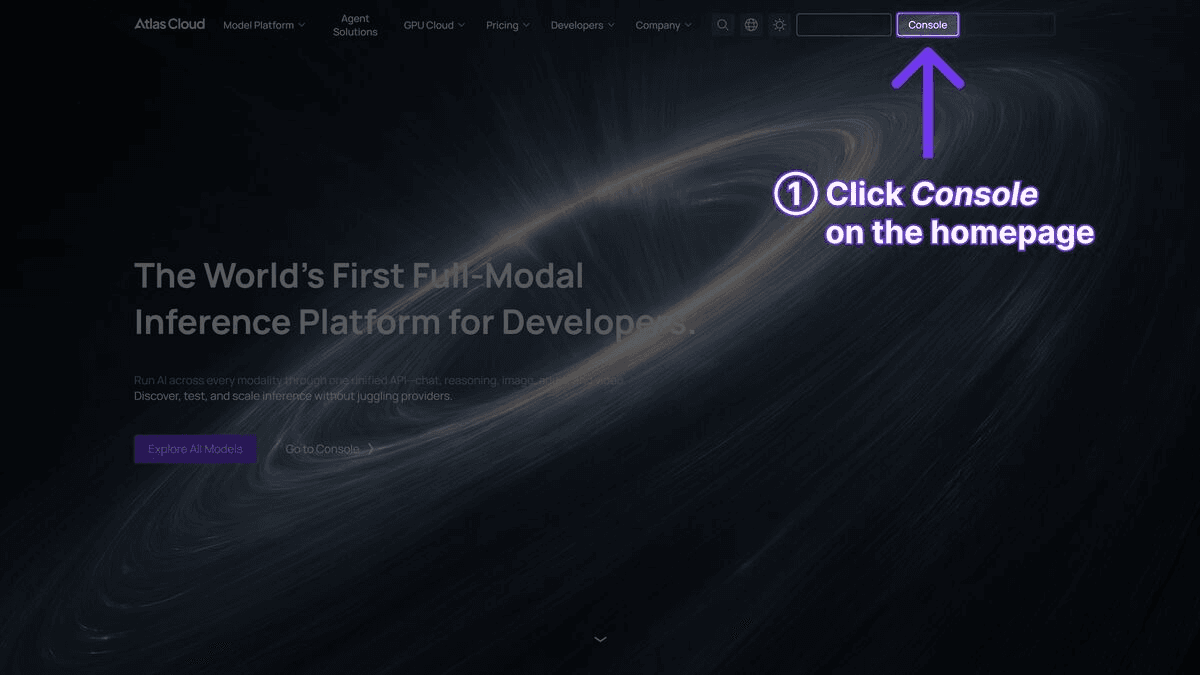
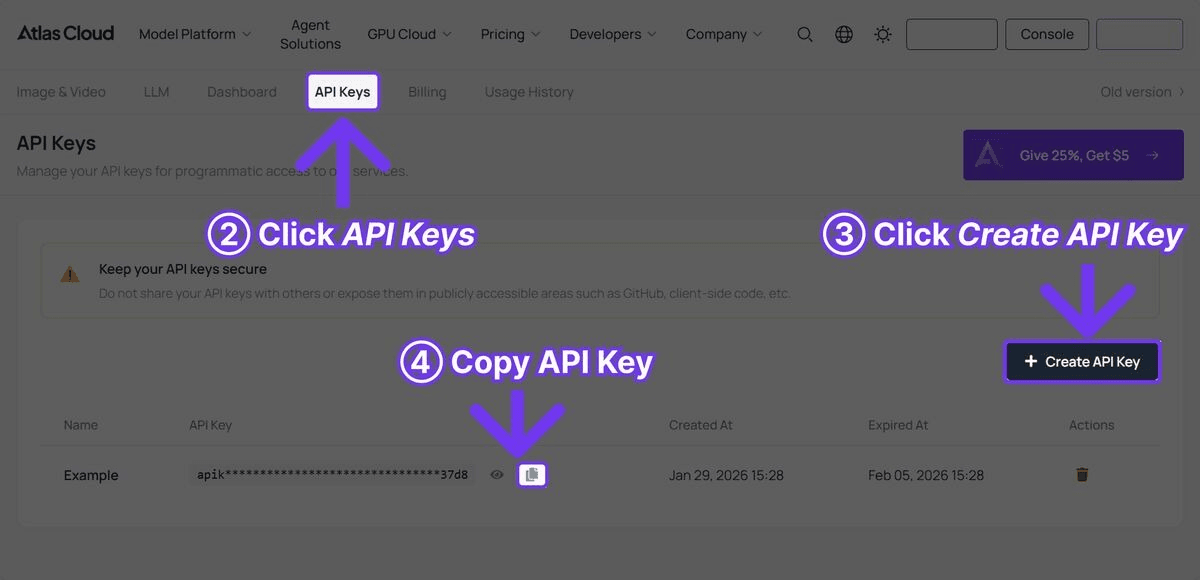
Step 1: Get Your API Key
Register at Atlas Cloud and create an API key from the console.
Step 2: Text-to-Video Generation
plaintext1```python 2import requests 3import time 4 5API_KEY = "your-atlas-cloud-api-key" 6BASE_URL = "https://api.atlascloud.ai/api/v1" 7HEADERS = { 8 "Authorization": f"Bearer {API_KEY}", 9 "Content-Type": "application/json" 10} 11 12# Generate video with Kling Video O3 13response = requests.post( 14 f"{BASE_URL}/model/generateVideo", 15 headers=HEADERS, 16 json={ 17 "model": "kwaivgi/kling-video-o3-pro/text-to-video", 18 "prompt": "A ceramic artist shaping a vase on a pottery wheel, close-up of hands covered in wet clay, warm studio lighting, shallow depth of field, documentary style", 19 "duration": 10, 20 "resolution": "1080p" 21 } 22) 23 24result = response.json() 25request_id = result["request_id"] 26 27# Poll for results 28while True: 29 status = requests.get( 30 f"{BASE_URL}/model/prediction/{request_id}/get", 31 headers={"Authorization": f"Bearer {API_KEY}"} 32 ).json() 33 34 if status["status"] == "completed": 35 print(f"Video URL: {status['output']['video_url']}") 36 break 37 elif status["status"] == "failed": 38 print(f"Generation failed: {status.get('error', 'Unknown error')}") 39 break 40 41 time.sleep(5) 42```
Step 3: Video-to-Video (V2V) Transformation
plaintext1```python 2# Transform existing video with style transfer 3response = requests.post( 4 f"{BASE_URL}/model/generateVideo", 5 headers=HEADERS, 6 json={ 7 "model": "kwaivgi/kling-video-o3-pro/text-to-video", 8 "prompt": "Transform into Studio Ghibli anime style, vibrant colors, hand-drawn aesthetic, soft watercolor backgrounds, whimsical atmosphere", 9 "video_url": "https://example.com/your-source-video.mp4", 10 "duration": 10, 11 "resolution": "1080p" 12 } 13) 14 15result = response.json() 16request_id = result["request_id"] 17 18# Poll for results 19while True: 20 status = requests.get( 21 f"{BASE_URL}/model/prediction/{request_id}/get", 22 headers={"Authorization": f"Bearer {API_KEY}"} 23 ).json() 24 25 if status["status"] == "completed": 26 print(f"Transformed video: {status['output']['video_url']}") 27 break 28 elif status["status"] == "failed": 29 print(f"Transformation failed: {status.get('error', 'Unknown error')}") 30 break 31 32 time.sleep(5) 33```
Step 4: Reference-to-Video (Ref2V) Generation
plaintext1```python 2# Generate video guided by reference images 3response = requests.post( 4 f"{BASE_URL}/model/generateVideo", 5 headers=HEADERS, 6 json={ 7 "model": "kwaivgi/kling-video-o3-pro/text-to-video", 8 "prompt": "A woman walking through a futuristic city at night, neon lights reflecting on wet streets, cinematic atmosphere, slow tracking shot", 9 "image_url": "https://example.com/character-reference.jpg", 10 "duration": 10, 11 "resolution": "1080p" 12 } 13) 14 15result = response.json() 16request_id = result["request_id"] 17 18# Poll for results 19while True: 20 status = requests.get( 21 f"{BASE_URL}/model/prediction/{request_id}/get", 22 headers={"Authorization": f"Bearer {API_KEY}"} 23 ).json() 24 25 if status["status"] == "completed": 26 print(f"Ref2V video: {status['output']['video_url']}") 27 break 28 elif status["status"] == "failed": 29 print(f"Generation failed: {status.get('error', 'Unknown error')}") 30 break 31 32 time.sleep(5) 33```
Step 5: Batch Style Transfer Pipeline
plaintext1```python 2# Process multiple videos with the same style transformation 3source_videos = [ 4 "https://example.com/product-demo-1.mp4", 5 "https://example.com/product-demo-2.mp4", 6 "https://example.com/product-demo-3.mp4" 7] 8 9style_prompt = "Transform into cinematic film style with teal and orange color grading, anamorphic lens flare, shallow depth of field, premium commercial look" 10 11request_ids = [] 12 13# Submit all transformations 14for video_url in source_videos: 15 response = requests.post( 16 f"{BASE_URL}/model/generateVideo", 17 headers=HEADERS, 18 json={ 19 "model": "kwaivgi/kling-video-o3-pro/text-to-video", 20 "prompt": style_prompt, 21 "video_url": video_url, 22 "duration": 10, 23 "resolution": "1080p" 24 } 25 ) 26 result = response.json() 27 request_ids.append(result["request_id"]) 28 print(f"Submitted: {video_url}") 29 30# Poll for all results 31for i, request_id in enumerate(request_ids): 32 while True: 33 status = requests.get( 34 f"{BASE_URL}/model/prediction/{request_id}/get", 35 headers={"Authorization": f"Bearer {API_KEY}"} 36 ).json() 37 38 if status["status"] == "completed": 39 print(f"Video {i+1} complete: {status['output']['video_url']}") 40 break 41 elif status["status"] == "failed": 42 print(f"Video {i+1} failed: {status.get('error', 'Unknown error')}") 43 break 44 45 time.sleep(5) 46```
Practical Use Cases
Brand Content Restyling
Marketing teams often need to adapt existing video content for different campaigns, seasons, or brand refreshes. Traditional approaches require re-shooting or extensive post-production. With Kling Video O3's V2V capability, a single source video can be transformed into multiple visual variants:
- Holiday versions with winter/festive styling
- Campaign-specific color grading and visual treatments
- Platform-specific aesthetic adaptations (LinkedIn professional vs. TikTok creative)
- Regional market adaptations with culturally appropriate visual styles
Product Video Variations
E-commerce teams can take a single product video and create multiple visual treatments:
- Different background environments (studio, outdoor, lifestyle settings)
- Seasonal variations (spring freshness, summer vibrancy, autumn warmth, winter elegance)
- Artistic styles for different marketing channels
- Mood variations (energetic, calm, luxurious, playful)
Content Creator Workflows
Independent creators and small studios can leverage V2V to punch above their weight class in production quality:
- Transform smartphone footage into cinematic-looking content
- Apply consistent visual styles across a content series without expensive color grading tools
- Create animated or stylized versions of live-action content for variety
- Experiment with visual aesthetics quickly and cheaply before committing to a production approach
Advertising and Social Media
Ad teams can use Ref2V to maintain character and brand consistency across multiple ad variants while testing different scenarios, settings, and narratives. The reference image anchors the visual identity while the text prompt controls the creative direction of each variant.
Film and Animation Pre-Visualization
Filmmakers and animators can use V2V to quickly visualize how existing footage would look in different visual treatments. This is valuable during pre-production and post-production planning, allowing directors to explore creative options before committing to expensive post-production processes.
Kling Video O3 vs. Kling 3.0 Standard
| Feature | Kling Video O3 | Kling 3.0 Standard |
| Price | $0.15/sec | $0.126/sec |
| Text-to-Video | Yes | Yes |
| Image-to-Video | Yes | Yes |
| Video-to-Video | Yes | No |
| Reference-to-Video | Yes | No |
| Style Transfer | Yes | No |
| Max Resolution | 4K | Ultra HD |
| Max Duration | 10s | 10s |
| Best For | Transformation, restyling | Original generation |
The choice between Kling Video O3 and Kling 3.0 Standard depends on the workflow. If the primary need is generating new videos from text or image prompts, Kling 3.0 Standard offers strong quality at a lower price point. If the workflow involves transforming existing footage, maintaining visual consistency with reference materials, or applying style transfers, Kling Video O3's expanded capabilities justify the premium.
Kling Video O3 vs. Other Video Models
vs. Seedance 2.0
Seedance 2.0 ($0.022/sec) is significantly cheaper and supports longer durations (15s), but it does not offer true V2V transformation or style transfer. Seedance 2.0's strength lies in its multimodal reference input (up to 12 files) for original generation. Teams needing V2V should use Kling Video O3; teams needing cost-effective original generation should use Seedance 2.0.
vs. Sora 2
Sora 2 ($0.15/sec) matches Kling Video O3's pricing and offers superior physics simulation, but lacks V2V capabilities. For text-to-video with realistic physical interactions, Sora 2 is the stronger choice. For video transformation and style transfer, Kling Video O3 is the clear winner.
vs. Veo 3.1
Veo 3.1 ($0.03/sec) excels at cinematic polish and film-grade output at a lower price point, but is focused on original generation rather than transformation. For cinematic text-to-video, Veo 3.1 offers better value. For V2V and Ref2V workflows, Kling Video O3 is the only option among the four.
Prompt Tips for Kling Video O3
Text-to-Video Prompts
Follow the same principles as standard video generation -- be specific about camera movement, lighting, subject action, and mood:
plaintext1``` 2Slow dolly shot through a Japanese zen garden at dawn, 3morning mist rising from a koi pond, cherry blossom petals 4falling gently, birds singing in the background, 5peaceful and meditative atmosphere 6```
V2V Style Transfer Prompts
When using V2V, the prompt should describe the target style, not the content (the content comes from the source video):
plaintext1``` 2Transform into cyberpunk anime style with neon lighting, 3rain-slicked surfaces, holographic advertisements, 4high contrast with deep shadows and vivid highlights 5```
plaintext1``` 2Convert to vintage 1970s Super 8 film aesthetic, warm color cast, 3film grain, slight vignetting, nostalgic atmosphere, 4faded colors with emphasis on orange and teal tones 5```
Ref2V Prompts
When using reference images, the prompt should describe the desired action and scenario while the reference image handles visual style:
plaintext1``` 2The character walks confidently through a bustling marketplace, 3examining handmade crafts at various stalls, 4dynamic tracking shot, warm afternoon sunlight 5```
Tips for Best Results
- V2V source quality matters: Higher quality source video produces better transformations. Clean, well-lit footage with stable camera movement transforms more reliably than shaky, low-resolution source material.
- Style descriptions should be specific: "Anime style" is too vague. "Studio Ghibli watercolor anime style with soft edges, pastel colors, and hand-drawn textures" is much more effective.
- Keep V2V motion simple: Source videos with moderate, predictable motion transform better than footage with rapid, complex movement. Smooth camera moves and deliberate subject motion produce the cleanest results.
- Use high-quality reference images: For Ref2V, reference images should be clear, well-composed, and representative of the desired visual style. Multiple reference images from the same aesthetic produce more consistent results.
- Match duration to content: Not every clip needs to be 10 seconds. Shorter durations (5-8 seconds) often produce higher quality per frame and cost less.
Who Should Use Kling Video O3?
Choose Kling Video O3 if you need:
- Video-to-Video (V2V) transformation to restyle, recolor, or visually transform existing footage while preserving original motion and composition
- Reference-based video generation (Ref2V) for maintaining character consistency, brand visual identity, or concept art direction across multiple clips
- Style transfer capabilities -- converting live action to anime, changing day to night, or applying brand-specific visual treatments to source footage
Consider alternatives if you need:
- Budget-friendly video generation -- Seedance 2.0 ($0.022/sec) or Veo 3.1 ($0.03/sec) are significantly cheaper for standard text-to-video workflows
- Simple text-to-video without transformation features -- Kling 3.0 Standard ($0.126/sec) offers strong original generation at a lower price point
- Native audio generation -- Veo 3.1 or Kling 3.0 Standard include synchronized audio, which Kling Video O3 does not emphasize
Frequently Asked Questions
What is the difference between V2V and I2V?
Image-to-Video (I2V) animates a single static image, creating motion from a still frame. Video-to-Video (V2V) transforms an entire video -- re-rendering the visual content while preserving the original motion, timing, and composition. V2V is fundamentally a transformation tool; I2V is a generation tool.
What video formats are supported for V2V input?
Standard video formats including MP4 are supported for V2V input. Source videos should be accessible via URL for API submissions. For best results, source videos should be clean, well-lit, and have stable motion.
Can I use V2V for commercial content?
Commercial use rights follow the same policies as standard Kling video generation. Atlas Cloud imposes no additional restrictions beyond the model provider's terms. Ensure your source video rights permit derivative works if the source is not your own original footage.
How does Kling Video O3 handle complex V2V transformations?
The model performs best with moderate-complexity transformations -- style changes, environmental adjustments, and aesthetic shifts. Extremely dramatic transformations (e.g., converting a talking head to a completely different character) may produce inconsistent results. The closer the target style is to a coherent visual language, the better the output.
Is 4K output available for all generation types?
4K resolution is supported across text-to-video, image-to-video, V2V, and Ref2V generation modes. Higher resolution increases processing time and cost proportionally.
Can I combine V2V and Ref2V in a single request?
Kling Video O3 supports multimodal input, meaning you can provide a source video, reference images, and text prompts in a single request. This allows for highly controlled transformations where the source video provides motion, the reference images provide visual style guidance, and the text prompt provides additional creative direction.
Verdict
Kling Video O3 is available now on Atlas Cloud. Its V2V and Ref2V capabilities make it uniquely suited for video transformation workflows that no other model in its class currently supports.
- Atlas Cloud Models Page: Explore Kling Video O3 capabilities interactively
- API Access: Sign up and get your API key to start transforming video with AI
────────────────────────────────────────────────────────────





