Luma Labs' Ray 3 introduces something that no other AI video model has attempted at this level: reasoning capabilities applied to video generation. Where traditional video models generate output based on pattern matching and learned visual distributions, Ray 3 applies a reasoning layer that evaluates the logical coherence of scenes before and during generation. The result is video output that handles complex spatial relationships, physical interactions, and multi-element compositions with noticeably better accuracy than models that rely solely on learned priors.
This is not a minor incremental improvement. Complex prompts -- "a glass of water tipping over the edge of a table and shattering on a tile floor" -- expose the limitations of non-reasoning models quickly. Objects clip through each other, physics breaks down, spatial relationships become incoherent. Ray 3's reasoning architecture addresses these problems directly, producing output where cause and effect, spatial logic, and physical plausibility are maintained with greater consistency.
This guide provides everything you need to evaluate and integrate Luma Ray 3 through the Atlas Cloud API: technical specifications, pricing analysis, Python code examples, prompt optimization strategies, and head-to-head comparisons with Veo 3.1, Kling 3.0, Seedance 2.0, and Sora 2.
*Last Updated: February 28, 2026*
See how Ray 3 compares to other leading AI video models:
The Luma Ray 3 API is available through Atlas Cloud at 0.10persecondofgeneratedvideo.Newusersget0.10 per second of generated video. New users get 0.10persecondofgeneratedvideo.Newusersget1 in free credits to start experimenting immediately.
Luma Ray 3 at a Glance
| Spec | Detail |
| Developer | Luma Labs |
| API Model ID | `luma/ray-3/text-to-video` |
| Max Resolution | 1080p |
| Max Duration | 10 seconds |
| Reasoning | Yes -- logical scene coherence evaluation |
| HDR Pipeline | Yes -- high dynamic range output |
| Atlas Cloud Price | USD0.10/sec |
| Best Strength | Complex scene reasoning, physics understanding |
| Input Modes | Text-to-video |
Key Features of Luma Ray 3
Reasoning-Based Video Generation
The defining feature of Ray 3 is its reasoning architecture. Unlike conventional video models that generate frames based on statistical correlations from training data, Ray 3 incorporates a reasoning step that evaluates the logical consistency of the scene being generated. This manifests in several concrete ways:
Spatial reasoning: Objects maintain correct spatial relationships throughout the video. A cup on a table stays on the table. A person walking behind a column becomes occluded and re-emerges on the other side. Depth layering between foreground, midground, and background elements remains consistent.
Causal reasoning: Actions lead to logically expected outcomes. Pouring liquid into a container fills it. Wind affects lightweight objects more than heavy ones. Shadows move consistently with light source changes. These cause-and-effect relationships that non-reasoning models frequently get wrong are handled more reliably by Ray 3.
Compositional reasoning: When multiple elements interact in a scene, Ray 3 maintains coherence across the interactions. A person reaching for an object, grasping it, and lifting it -- each phase of this action sequence is generated with logical continuity rather than the disjoint frame-to-frame transitions that sometimes appear in other models.
The reasoning capability is not perfect. Extremely complex scenes with many interacting elements can still produce artifacts. But the baseline level of logical coherence is meaningfully higher than competing models, and for prompts that describe complex physical scenarios, the improvement is immediately visible.
HDR Pipeline
Ray 3 includes a native HDR (High Dynamic Range) pipeline that produces output with an extended luminance range. Bright highlights -- sun reflections on water, neon signs at night, fire and sparks -- retain detail instead of clipping to white. Dark shadows maintain visible texture and detail. The overall dynamic range of the output approaches what professional cameras capture in HDR modes.
For teams working on content destined for HDR-capable displays (modern smartphones, HDR monitors, HDR-enabled streaming platforms), Ray 3's native HDR output eliminates the need for post-production HDR grading. The footage is generated with the appropriate luminance metadata from the start.
Even for standard dynamic range delivery, the HDR pipeline benefits the output. The model's internal processing of a wider luminance range means that the tone-mapped SDR output has better highlight and shadow detail than models that work natively in SDR.
Cinematic Output Quality
Ray 3 produces noticeably cinematic output. Color grading leans toward the kind of look that professional colorists spend hours creating in DaVinci Resolve -- balanced tonal ranges, natural color separation, and film-like tonal curves. Lighting in generated scenes follows photographic principles: key, fill, and rim lights interact realistically with subjects and environments.
Camera motion in Ray 3 output feels deliberately crafted rather than algorithmically generated. Pans are smooth with realistic acceleration and deceleration. Dolly movements maintain correct parallax. Crane shots exhibit appropriate vertical perspective shifts. This attention to camera physics contributes to the professional quality of the output.
Better Physics Understanding
Beyond the general reasoning capabilities, Ray 3 demonstrates specific improvements in physics simulation. Fluid dynamics -- water pouring, smoke dispersing, fabric flowing in wind -- are rendered with greater physical accuracy. Object weight and mass are visually communicated through motion dynamics: heavy objects move with appropriate momentum and inertia, light objects respond to forces proportionally.
Gravity is consistently applied. Thrown objects follow parabolic trajectories. Falling objects accelerate. Bouncing objects lose energy on each bounce. These details, which seem obvious but are frequently botched by other AI video models, are handled reliably by Ray 3's physics-aware generation.
Temporal Consistency
Across the full 10-second generation window, Ray 3 maintains strong temporal consistency. Flickering, morphing, and the frame-to-frame inconsistencies that plague many AI video models are minimized. Objects that appear in the first frame maintain their shape, color, and texture through the last frame. Lighting conditions evolve naturally rather than jumping between states.
This consistency is particularly important for professional use cases where even subtle visual artifacts break the illusion of real footage. For film pre-visualization, advertising concepts, and brand content, Ray 3's temporal stability supports deliverables that can be presented to clients without disclaimers about AI artifacts.
Luma Ray 3 Pricing
Atlas Cloud API Pricing
Atlas Cloud provides clear per-second pricing for Luma Ray 3.
| Model | Atlas Cloud Price | Per 10s Video |
| Luma Ray 3 (Text-to-Video) | USD0.10/sec | USD1.00 |
A full 10-second Luma Ray 3 generation costs exactly USD1.00. The pricing is straightforward -- multiply the clip duration by USD0.10.
Why developers choose Atlas Cloud for Luma Ray 3:
- USD1 free credit on signup -- enough for one full 10-second Ray 3 clip or two 5-second clips, no credit card required.
- Single API key for Ray 3 alongside 300+ other AI models -- video, image, text, and multimodal. One integration, one bill.
- No queue delays -- production-grade infrastructure with consistent generation times.
- Transparent pricing -- USD0.10 per second, calculated precisely. No credit packs, no subscription tiers, no expiring tokens.
Cost Comparison: Luma Ray 3 at Scale
| Volume | Monthly Videos | Total Seconds | Atlas Cloud Cost |
| Light | 50 videos | 500s | USD50.00 |
| Medium | 200 videos | 2,000s | USD200.00 |
| Heavy | 500 videos | 5,000s | USD500.00 |
| Enterprise | 2,000 videos | 20,000s | USD2,000.00 |
Ray 3 is positioned at the premium end of the pricing spectrum, comparable to Sora 2 (USD0.15/sec) and Kling 3.0 (USD0.126/sec). The pricing reflects the computational overhead of the reasoning architecture -- maintaining logical coherence during generation requires more processing than standard pattern-matching approaches.
For teams where scene accuracy and physical plausibility are worth the premium, the cost is justified. For high-volume social media content where perfect physics is not critical, more affordable models like Seedance 2.0 (USD0.022/sec) or Veo 3.1 (USD0.03/sec) may be the better economic choice.
Price-Performance Context
| Model | Price/sec | Reasoning | HDR | Max Duration | Physics |
| Luma Ray 3 | USD0.10 | Yes | Yes | 10s | Excellent |
| Sora 2 | USD0.15 | No | No | 12s | Excellent |
| Kling 3.0 | USD0.126 | No | No | 10s | Good |
| Veo 3.1 | USD0.03 | No | No | 8s | Good |
| Seedance 2.0 | USD0.022 | No | No | 15s | Good |
Ray 3 delivers the reasoning and HDR capabilities at a lower per-second cost than Sora 2, while offering comparable or better physics accuracy. For teams that previously relied on Sora 2 for complex physics scenes, Ray 3 provides a 33% cost reduction with the added benefits of reasoning and HDR.
How to Access Luma Ray 3 API
Getting started with the Luma Ray 3 API through Atlas Cloud is straightforward. This tutorial provides a complete working Python example.
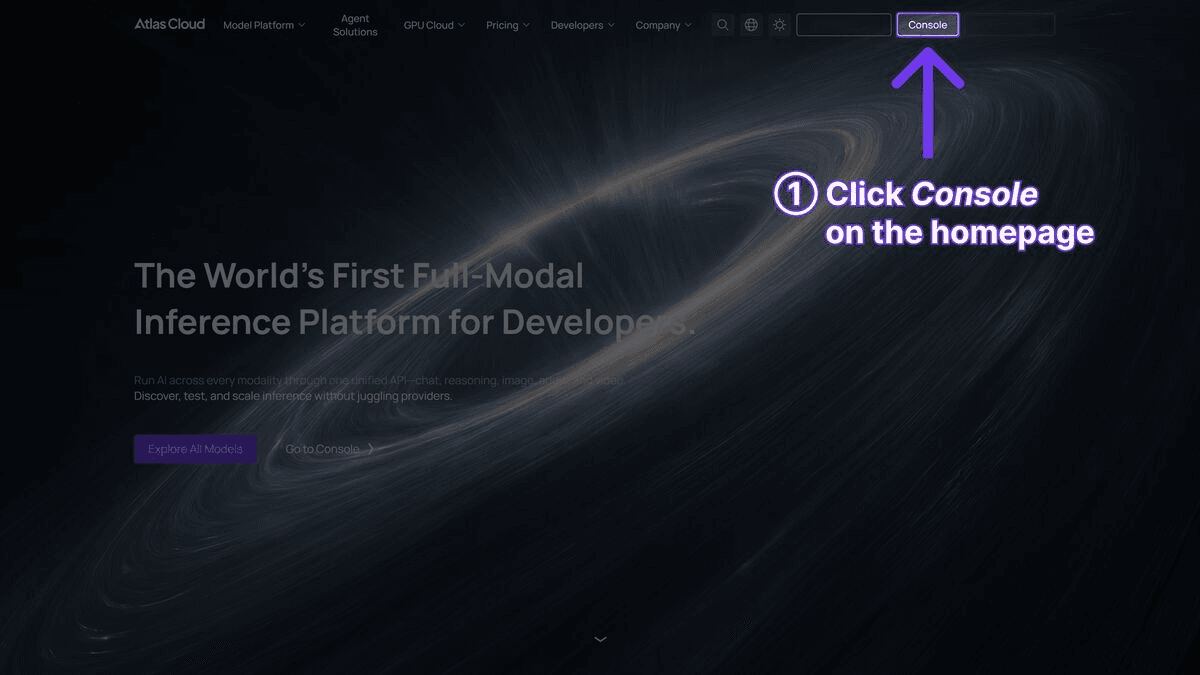
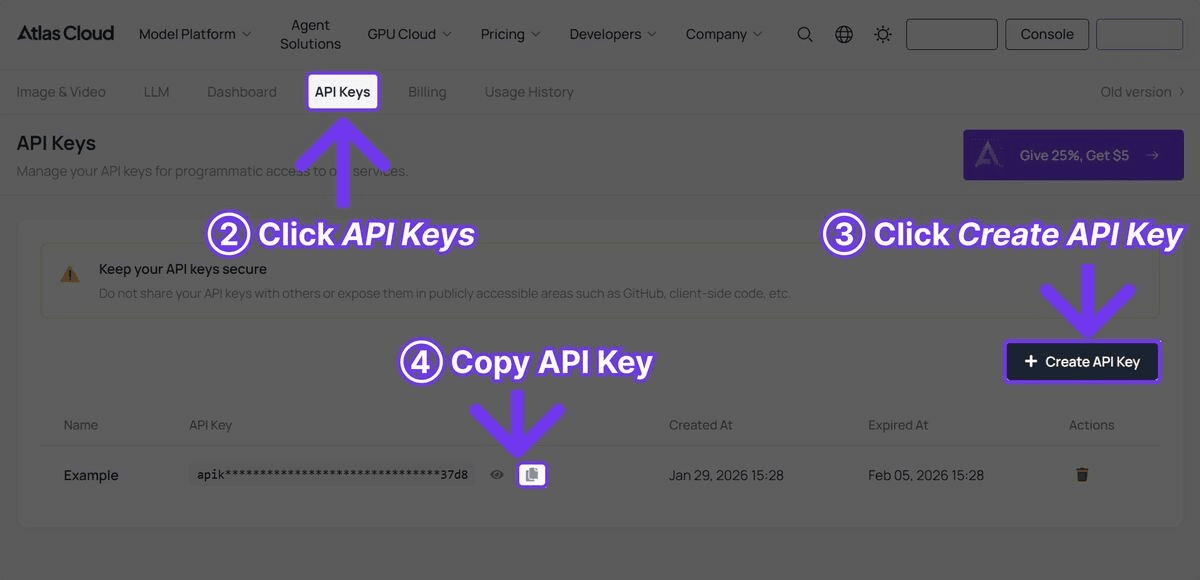
Step 1: Get Your API Key
Register an account at Atlas Cloud and go to the API Keys tab in the console. The USD1 free credit will be automatically added to your account after registration.
Step 2: Generate Video
plaintext1```python 2import requests 3import time 4 5 6API_KEY = "your-atlas-cloud-api-key" 7BASE_URL = "https://api.atlascloud.ai/api/v1" 8 9 10response = requests.post( 11 f"{BASE_URL}/model/generateVideo", 12 headers={ 13 "Authorization": f"Bearer {API_KEY}", 14 "Content-Type": "application/json" 15 }, 16 json={ 17 "model": "luma/ray-3/text-to-video", 18 "prompt": "A glass marble rolls along a wooden ramp, drops off the edge onto a stone floor, bounces twice with decreasing height, and rolls to a stop against a wall, warm afternoon light from a nearby window casting long shadows", 19 "duration": 10, 20 "resolution": "1080p" 21 } 22) 23 24 25result = response.json() 26 27 28while True: 29 status = requests.get( 30 f"{BASE_URL}/model/prediction/{result['request_id']}/get", 31 headers={"Authorization": f"Bearer {API_KEY}"} 32 ).json() 33 if status["status"] == "completed": 34 print(f"Video: {status['output']['video_url']}") 35 break 36 elif status["status"] == "failed": 37 print(f"Generation failed: {status.get('error', 'Unknown error')}") 38 break 39 time.sleep(5) 40```
Step 3: Retrieve and Use
The response includes a `video_url` linking to the generated video file. Ray 3 output is delivered in HDR-compatible format. The video can be used directly for HDR displays or tone-mapped for standard dynamic range delivery in your post-production pipeline.
Luma Ray 3 Prompt Tips
Ray 3's reasoning capabilities mean that it responds to a different class of prompts than conventional models. Where other models work best with simple, visually descriptive prompts, Ray 3 can handle prompts that describe logical sequences, physical interactions, and cause-and-effect relationships.
1. Describe Cause and Effect
Ray 3 excels when prompts describe events that have logical consequences. Instead of describing a static scene, describe what happens and what results from it.
- Effective: "A gust of wind blows through an open window, scattering papers off a desk, a coffee cup wobbles but stays upright, curtains billow inward"
- Less effective: "Papers and curtains blowing in a room"
2. Leverage Spatial Relationships
Be explicit about where objects are relative to each other and how they interact spatially. Ray 3's spatial reasoning can handle precise positioning.
- "A cat walks along the top of a narrow fence, carefully placing each paw, pausing to look down at a dog on the other side"
- "A red ball rolls behind a white column, disappears from view, and re-emerges on the other side"
3. Include Physical Properties
Describing the physical properties of objects helps Ray 3's physics engine produce more accurate results.
- "A heavy iron pendulum swings slowly with visible momentum" vs. "A light paper lantern sways gently in the breeze"
- "Thick honey pouring slowly from a spoon" vs. "Water splashing quickly from a faucet"
4. Use the HDR Dynamic Range
Prompts that include high-contrast lighting scenarios will showcase Ray 3's HDR pipeline.
- "Neon signs reflecting on a rain-soaked street at night, bright pinks and blues against deep shadows in alleyways"
- "A welding torch throwing intense sparks in a dim workshop, bright white arc against dark metal surfaces"
5. Design for 10 Seconds
Ray 3's 10-second window is best used for a single coherent sequence. Describe one action or one progression -- not multiple disconnected events.
Example Prompts That Perform Well
Physics demonstration:
plaintext1``` 2A Newton's cradle on a polished wooden desk, one ball pulled back 3and released, transferring momentum through the line, the last ball 4swinging out, steady rhythm, close-up macro lens perspective, 5soft overhead lighting 6```
Complex interaction:
plaintext1``` 2A barista pours steamed milk into a latte, the white milk stream 3cutting through dark espresso, forming a rosetta pattern on the 4surface, steam rising from the cup, warm cafe lighting 5```
HDR showcase:
plaintext1``` 2A fireworks display over a calm lake at night, bright explosions 3of color reflecting on the dark water surface, silhouettes of 4spectators in the foreground, high dynamic range from bright 5sparks to deep night sky 6```
Luma Ray 3 vs Competitors
Here is a comprehensive comparison of Luma Ray 3 against the leading AI video models. All models listed are accessible through a single Atlas Cloud API key.
| Feature | Luma Ray 3 | Veo 3.1 | Kling 3.0 | Seedance 2.0 | Sora 2 |
| Max Resolution | 1080p | Cinematic | Ultra HD | High Definition | High Definition |
| Max Duration | 10s | 8s | 10s | 15s | 12s |
| API Cost (Atlas Cloud) | USD0.10/sec | USD0.03/sec | USD0.126/sec | USD0.022/sec | USD0.15/sec |
| Reasoning | Yes | No | No | No | No |
| HDR | Yes | No | No | No | No |
| Native Audio | No | Yes | Yes (5 languages) | Yes | Yes |
| Physics Accuracy | Excellent | Good | Good | Good | Excellent |
| Best Strength | Reasoning + physics | Cinematic polish | Resolution | Multimodal control | Physics realism |
Where Luma Ray 3 Wins
- Reasoning capabilities: Ray 3 is the only model in this comparison with explicit reasoning architecture. For prompts involving complex spatial relationships, multi-step physical interactions, and cause-and-effect sequences, the quality gap is significant.
- HDR output: Native HDR pipeline produces output with extended dynamic range. No other model in this comparison generates native HDR content.
- Physics accuracy: Ray 3 and Sora 2 are the two strongest models for physics simulation. Ray 3 achieves comparable physics accuracy at a 33% lower price point (USD0.10/sec vs. USD0.15/sec).
- Complex scene coherence: Multi-element scenes with interacting objects maintain better logical consistency than competing models, a direct benefit of the reasoning architecture.
Where Competitors Have the Edge
- Native audio: Ray 3 does not generate audio. Veo 3.1, Kling 3.0, Seedance 2.0, and Sora 2 all offer native audio generation. Teams needing synchronized audio will need to add a separate audio step with Ray 3.
- Price: At USD0.10/sec, Ray 3 is 3-4.5x more expensive than Veo 3.1 (USD0.03/sec) and Seedance 2.0 (USD0.022/sec). For high-volume content where reasoning is not critical, cheaper models offer better economics.
- Duration: Ray 3's 10-second maximum matches Kling 3.0 but falls behind Seedance 2.0 (15s) and Sora 2 (12s).
- Resolution: Kling 3.0's ultra-high-definition output exceeds Ray 3's 1080p ceiling.
- Multimodal input: Seedance 2.0 accepts up to 12 reference files. Ray 3 currently supports text-to-video only.
- Cinematic polish: Veo 3.1's color grading and depth of field remain the benchmark for broadcast-quality visual output.
Best Model for Each Scenario
- Complex physics and reasoning: Luma Ray 3
- Cinematic brand content on a budget: Veo 3.1
- Highest resolution: Kling 3.0
- Longest clips at lowest cost: Seedance 2.0
- Physics realism with native audio: Sora 2
Who Should Use Luma Ray 3?
Choose Luma Ray 3 If:
- Your content involves complex physical interactions. Product demonstrations showing objects interacting, educational content explaining physical processes, or any scenario where physics accuracy directly impacts content quality.
- Scene coherence is critical. Film pre-visualization, advertising concepts, and professional presentations where spatial inconsistencies or logical errors would be immediately noticed by viewers.
- You need HDR output. Content destined for HDR-capable platforms and displays benefits from Ray 3's native HDR pipeline without requiring post-production HDR grading.
- You produce high-value, low-volume content. The USD0.10/sec price is justified when each clip needs to be as physically accurate and logically coherent as possible, and you are not generating thousands of clips per month.
- You are working on technical or scientific visualization. Demonstrations of mechanical systems, fluid dynamics, or physical processes where accuracy matters more than stylistic flair.
Consider Alternatives If:
- You need native audio. Ray 3 does not generate audio. If audio-visual synchronization is a requirement, consider Veo 3.1, Sora 2, or Vidu Q3.
- Budget is the primary constraint. Seedance 2.0 (USD0.022/sec) and Veo 3.1 (USD0.03/sec) offer significantly lower per-second costs for teams prioritizing volume over reasoning capabilities.
- You need ultra-high resolution. Kling 3.0 is the clear choice for maximum resolution output.
- You need multi-reference input. Seedance 2.0's support for multiple reference images, videos, and audio files provides creative control that Ray 3 does not offer.
Ideal Use Cases for Luma Ray 3
- Film pre-visualization -- directors and cinematographers generating concept footage with accurate physics
- Product demonstrations -- showing products in use with realistic physical interactions
- Advertising concepts -- high-quality pitch materials where scene coherence matters
- Educational content -- visualizing physical processes, scientific phenomena, and mechanical systems
- HDR showcase content -- material for HDR-capable displays and streaming platforms
- Technical visualization -- engineering, architecture, and design concepts requiring spatial accuracy
Frequently Asked Questions
How much does Luma Ray 3 cost on Atlas Cloud?
Luma Ray 3 costs USD0.10 per second on Atlas Cloud. A full 10-second generation costs USD1.00. New users receive USD1 in free credit at signup -- enough for one full-length clip to evaluate the model's reasoning and HDR capabilities.
What makes Luma Ray 3 a "reasoning" model?
Ray 3 incorporates a reasoning layer that evaluates the logical consistency of scenes during generation. This means it considers spatial relationships between objects, cause-and-effect sequences, and physical plausibility -- not just visual appearance. The result is more coherent output for complex scenes involving multiple interacting elements.
Does Luma Ray 3 generate audio?
No. Unlike Veo 3.1, Kling 3.0, and Seedance 2.0, Ray 3 does not generate native audio. Teams requiring synchronized audio will need to use a separate audio generation tool or add audio in post-production.
What resolution does Luma Ray 3 output?
Ray 3 outputs at 1080p resolution with native HDR (High Dynamic Range). The HDR pipeline produces output with extended luminance range, better highlight and shadow detail, and professional-grade tonal curves.
How does Luma Ray 3 compare to Sora 2 for physics?
Both Ray 3 and Sora 2 are among the best models for physics simulation. Ray 3 adds reasoning capabilities on top of its physics engine, which improves spatial coherence and cause-and-effect logic. Ray 3 is also 33% cheaper (USD0.10/sec vs. USD0.15/sec). Sora 2 offers native audio and slightly longer maximum duration (12s vs. 10s).
Can I use Ray 3 output commercially?
Yes. Video generated through the Atlas Cloud API can be used for commercial purposes. Review the applicable terms of service for your specific use case and comply with regulations regarding AI-generated media disclosure.
Verdict
Luma Ray 3 represents a genuine architectural advancement in AI video generation. The reasoning layer translates directly into visible output quality -- it produces measurably better results for complex scenes involving physical interactions, spatial relationships, and cause-and-effect sequences. Combined with the native HDR pipeline, Ray 3 delivers output that is both logically coherent and visually rich in ways that other models do not currently match.
The tradeoff is price and feature scope. At USD0.10/sec, Ray 3 is 3-4x more expensive than budget-friendly alternatives like Veo 3.1 and Seedance 2.0. It also lacks native audio generation, which several competitors now offer. These limitations mean Ray 3 is best suited for use cases where scene accuracy and physical plausibility are worth the premium -- not for high-volume social media content where "good enough" physics is perfectly acceptable.
For teams working on film pre-visualization, product demonstrations, advertising concepts, or any content where viewers will scrutinize physical accuracy, Luma Ray 3 is the strongest option available today. Use the USD1 free credit on Atlas Cloud to evaluate it alongside competing models and determine where reasoning-based generation fits into your workflow.
Get Started Free on Atlas Cloud | View All Video Models | Read the API Docs
────────────────────────────────────────────────────────────





