For years, creators had a really boring job. They had to make silent videos first and then spend hours trying to add sounds later. This usually caused big problems with the timing. A person’s mouth would move, but the words came a second later. It felt weird and fake, which made it hard for people to stay focused on the video.
Vidu Q3 fixes these old problems by making AI video with built-in sound. Unlike other tools, it creates 16-second clips with the audio and video all at once. This smart method makes sure every word matches the person's lip movements perfectly. It also means every bang or click in the sound happens at the exact same time as the action on the screen.
AI lip-sync 2026 standards now prioritize "One-Pass" generation to reduce latency and improve realism. By integrating dialogue and background music directly into the generation process, Vidu Q3 eliminates the "uncanny valley" of misaligned speech, significantly increasing viewer retention for social media and marketing content.
What Makes Vidu Q3 "Native Audio" Different?
Unlike traditional models that generate visuals first and "layer" sound later, Vidu Q3 utilizes a One-Pass generation architecture. This means the model synthesizes:
- SFX: Environmental sounds like footsteps or rustling leaves.
- BGM: Background music tailored to the scene's emotional arc.
- Dialogue: Precisely timed speech patterns.
By generating these elements simultaneously, the timing between a physical action and its sound is mathematically locked, eliminating the "uncanny valley" effect of late audio.
The 16-Second Milestone
Vidu Q3 now supports video clips up to 16 seconds long. This duration is a great middle ground for a few main reasons:
- Social Media Ads: It gives you enough time to grab attention, explain the value, and add a call to action.
- Narrative Flow: This length allows for natural breaks in AI lip-syncing, making 2026 video projects look smooth instead of choppy.
Performance Comparison
To understand how Vidu Q3 stands against its peers, we look at audio-visual latency—the delay between a visual action and its corresponding sound.
| Feature | Vidu Q3 (Top Choice) | Kling 2.6 | Veo 3.1 |
| Sync Architecture | Native One-Pass (Unified) | Native One-Pass | Native One-Pass |
| Max Duration | 16 Seconds (Industry Lead) | 10 Seconds | 8 Seconds |
| Long-Script Alignment | Exceptional (100+ chars) | Moderate (Drift-prone) | High (Visual-heavy) |
| Physical SFX Fidelity | High (Material-based) | Balanced | Atmospheric |
| Shot-to-Shot Continuity | Seamless Audio Switching | Basic | Advanced |
| Latency / Audio Drift | < 30ms | < 15ms | ~10ms |
While competitors might offer slightly lower latency, Vidu is the only model providing a full 16-second creative. Its ability to generate synchronized environments makes it a premier choice for creators demanding cinematic realism without the technical headache of manual alignment.
The "Director’s Prompt" Formula for Perfect Audio
Achieving high-fidelity AI lip-sync 2026 standards requires moving beyond simple descriptions. To fully leverage native audio AI video, creators must bridge the gap between visual action and auditory reaction within a single prompt.
Subject-Audio Bridge Mastery of One-Pass Generation
In Vidu Q3, the "Subject-Audio Bridge" is the technique of anchoring specific sounds to visual cues. Because the model uses "One-Pass" generation, it looks for semantic links—align the native audio AI video data within your prompt. For example, if you describe a "glass shattering," the bridge triggers a specific workflow:
- Temporal Precision: The AI identifies the exact frame of impact.
- Acoustic Mapping: It prepares a high-frequency audio peak (the "clink" or "crash") to occupy that specific timestamp.
- Environmental Context: It adjusts the reverb based on whether the visual scene is a small room or a large hall.
this integrated approach results in significantly lower drift compared to modular AI systems.
The Prompt Recipe: A Three-Layer Approach
To ensure the model captures every layer of the scene, follow this structural hierarchy:
[Visual Description] + [Camera Move] + [Audio Layer: Dialogue/SFX/BGM]
Prompt Component Breakdown
| Component | Function | Example |
| Visual Description | Defines subjects, textures, and actions | A blacksmith striking a red-hot iron sword |
| Camera Move | Sets the perspective and depth | Extreme close-up, sparks flying toward lens |
| Audio Layer | Specifies sound types and intensity | SFX: Sharp metallic rings, hissing steam |
Case Study: High-Sync Execution
Let’s break down a prompt designed for maximum synchronization:
This is my reference image:
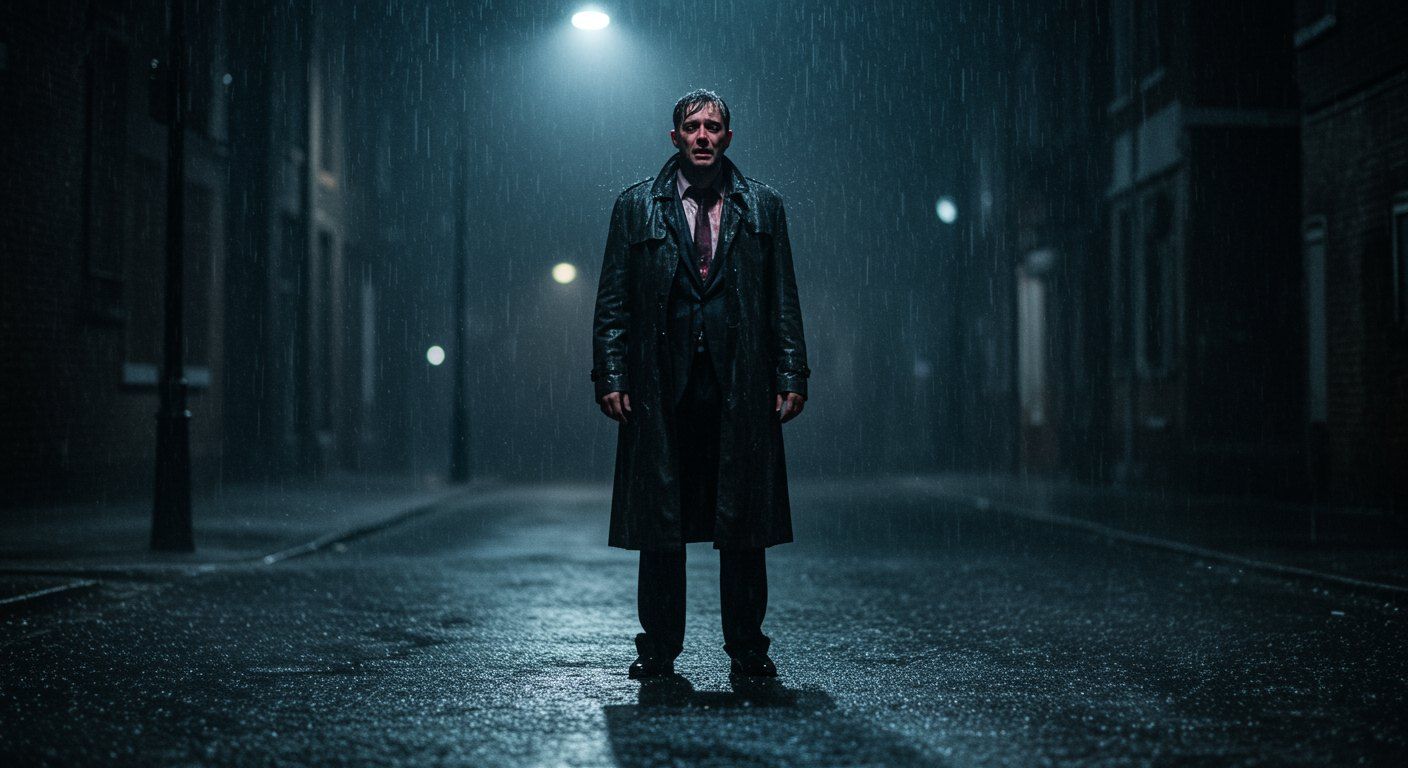
This is my video prompt:
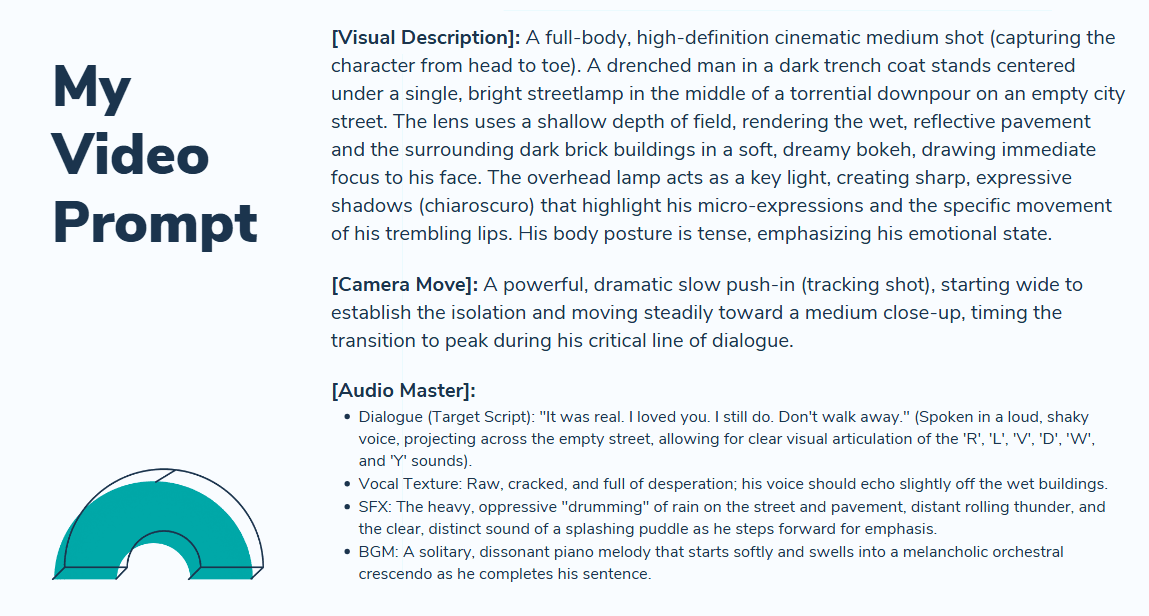
Next, let's look at the video generation results:
Video information: 1080p, H264, Flash
- The fact that the phoneme-based lip-sync remains this precise in Flash mode is remarkable. Usually, "fast" or "lite" models sacrifice micro-expressions to save compute time. However, the alignment on words like "Loved" and "Real" remains stable, proving that Vidu Q3’s Native Audio architecture is robust even when stripped of high-end iterative sampling.
- H.264 is a lossy format that usually fails to capture tiny details like rain or film grain. It often leaves "macro-blocking" or ugly pixelated boxes in dark, grainy spots. Despite these limits, the "Chiaroscuro" lighting looks great. The shadows stay sharp instead of turning into a muddy blur, showing how well the model handles color grading.
- The wet textures and sharp rain in the background are where you will notice the most blur from compression. These details looks lot clearer if you used a Pro or High-Res output, such as ProRes or a higher bitrate.
The free plan is perfect if you have simple projects or just want to play around. But if you want a true movie look—beating the 'Uncanny Valley' with high bitrates and sharp quality—you should switch your work over to Atlas Cloud.
By utilizing the Vidu Q3 Turbo on Atlas Cloud, you can bypass local compute bottlenecks and generate watermark-free, high-fidelity content that preserves every micro.
Pro Secrets for Flawless Lip-Sync: "Mastery" Section
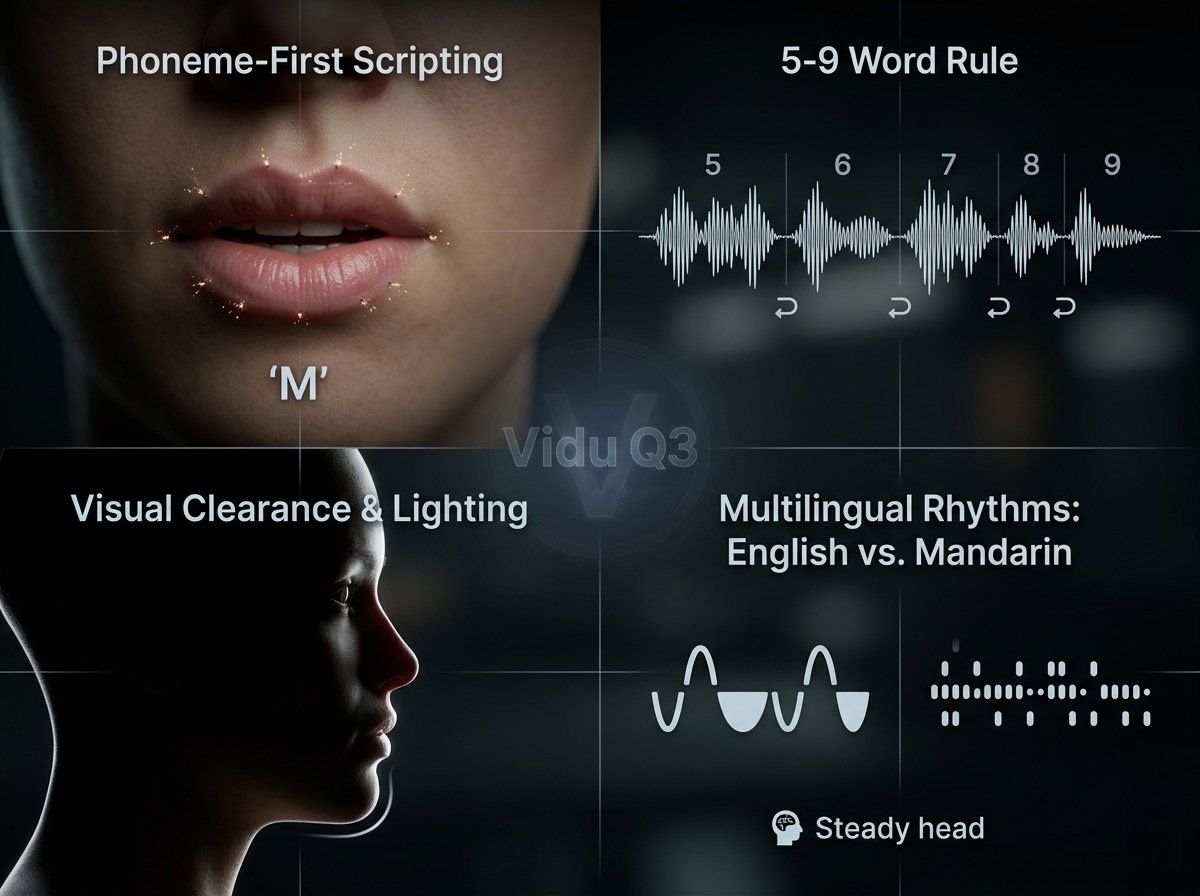
Achieving cinematic realism in AI lip-sync 2026 requires more than just a good prompt; it requires a technical understanding of how the engine interprets human speech. By optimizing your scripts and visual environment, you can maximize the precision of native audio AI video generation.
Phoneme-First Scripting
The secret to "locking in" the Vidu Q3 tracking engine lies in phonemes. Specifically, beginning your sentences with "plosives"—sounds created by stopping airflow, such as M, B, and P. These sounds require distinct, visible lip closure. When the model detects a plosive at the start of a sequence, it establishes a high-confidence anchor point for the mouth’s geometry, significantly reducing the chance of initial "mumble" or misaligned frames.
The 5-9 Word Rule
To maintain consistency, professional creators follow the 5-9 Word Rule. While Vidu Q3 supports longer durations, "AI drift"—where mouth movements slowly lose synchronization with the audio—tends to increase during long, uninterrupted strings of dialogue. Breaking speech into segments of 5 to 9 words allows the model to "reset" its tracking parameters at each natural pause.
| Feature | Segment Length | Result |
| Ideal | 5-9 Words | Frame-perfect alignment and natural pacing. |
| Sub-optimal | 15+ Words | Increased risk of "drifting" or blurred lip edges. |
Visual Clearance and Lighting
The lip-sync engine requires a clear, unobstructed view of the lower face to map phonemes to pixels. To ensure high-fidelity tracking:
- Avoid Obstructions: Ensure hands, microphones, or stray hair do not cross the mouth area, as these "visual noise" elements can confuse the latent space mapping.
- High-Contrast Lighting: Ensure the chin and lips are well-defined. Flat lighting can cause the AI to struggle with the depth of the mouth's interior.
Multilingual Rhythms: English vs. Mandarin
Vidu Q3 uses different logic for various speech rhythms. English follows a stress-timed beat, so the engine focuses on wide vowel shapes. Mandarin is syllable-timed and tonal, which needs quicker, more precise lip moves. To get natural Mandarin speech, use prompts that keep the "head position steady." This helps the engine focus better on those small, fast mouth adjustments.
Following these visual and layout rules keeps your video and audio steady for the entire 16-second clip.
Multi-Shot Stories and Audio Design
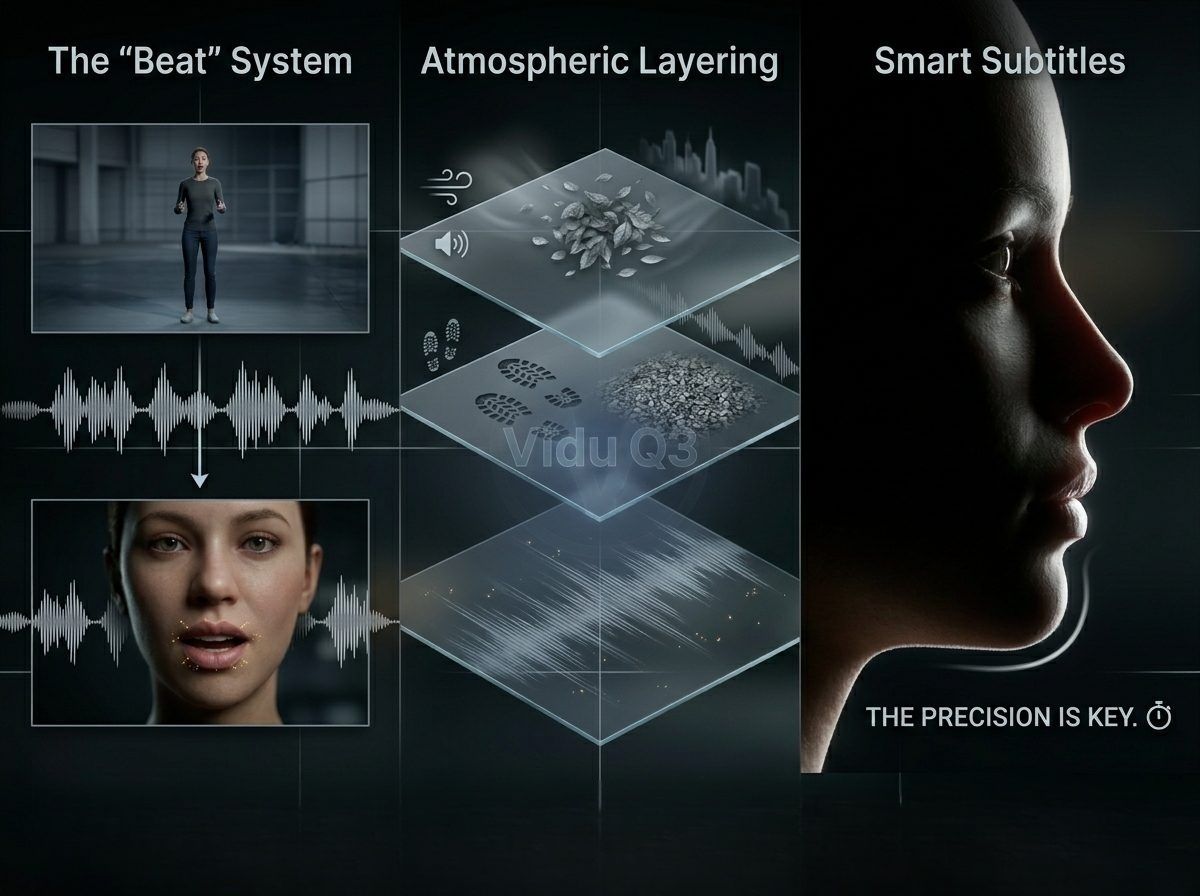
Keeping a story moving across various angles is what makes a creator look like a pro. Vidu Q3 makes this easy with smart multi-shot tools. These features keep your AI video and audio perfectly synced even when the camera view changes.
The "Beat" System: Orchestrating Audio Continuity
Vidu Q3 introduces the "Beat" system, allowing users to define specific camera transitions without interrupting the audio stream. By scripting "beats," you can command a transition from a wide establishing shot to a tight close-up while the dialogue or background music (BGM) continues seamlessly. This continuity prevents the jarring "audio resets" common in modular AI tools.
Managing Multi-Shot Transitions:
| Shot Type | Purpose | Audio Behavior |
| Wide Shot | Establishes environment | High reverb, ambient emphasis |
| Medium Shot | Focuses on action | Balanced dialogue and SFX |
| Close-Up | Enhances emotion | Dry audio, prioritized lip-sync |
Atmospheric Layering: Grounding the Visuals
To make AI-generated footage feel grounded in reality, creators must look beyond dialogue and incorporate "Texture." Atmospheric layering involves prompting for secondary and tertiary sounds that interact with the environment.
- Environmental Texture: Specify wind whistling through trees or the hum of a distant city.
- Physical Texture: Include the "rustle of silk" or "crunch of gravel" under footsteps.
- Acoustic Depth: Vidu Q3’s one-pass generation calculates the distance of the subject from the camera, automatically adjusting the volume and "air" around these sounds to match the visual depth.
Smart Subtitles: Accurate Text Sync
A big problem in automatic video making is when the subtitles do not match the speech. Vidu Q3 addresses this by triggering its internal text-rendering engine directly from the generated dialogue tracks. Because the text is rendered in the same pass as the native audio AI video, the timing is frame-accurate. This ensures that the viewer's eye and ear receive the same information at the exact same millisecond, a requirement for high-accessibility standards in AI lip-sync 2026.
Utilizing these integrated features reduces post-production time by approximately 60%, allowing for a "direct-to-social" workflow that maintains cinematic quality.
Common Pitfalls And How to Fix Them
Creators often encounter technical friction when first utilizing Vidu Q3. Achieving a flawless native audio AI video requires troubleshooting the subtle interactions between text prompts and acoustic output.
Issue: Mouth is moving, but it’s gibberish
This is a frequent hurdle where the visual lip-sync appears active but the vocalization is unintelligible.
- The Fix: Transcript Hygiene. The Vidu Q3 engine is highly sensitive to the formatting of the dialogue block. Ensure your transcript is free of non-verbal fillers (like "um" or "uh") unless they are specifically intended for a "naturalistic" character trait. Use standard punctuation to signal the AI when to pause for breath, which resets the lip-tracking alignment.
Issue: Sound is too loud or fuzzy
Noise cracks and distortion happen when the video's energy does not fit the set volume levels.
-
The Fix: Adjusting Emotion Keywords. Instead of simply increasing "volume" in a prompt—which the AI may interpret as a gain boost—use descriptive vocal styles.
- Low Intensity: Use "hushed whisper" or "muttered tone" to reduce peak levels.
- High Intensity: Use "projected shout" or "booming announcement" to ensure the AI balances the audio headroom.
Issue: The music doesn't match the mood
Since Vidu Q3 generates BGM in the same pass as the video, generic prompts like "happy music" often result in tonal diconnects.
- The Fix: BPM and Genre-Specific Anchors. Treat the AI like a composer. Providing a specific Tempo or a sub-genre helps the model anchor the BGM to the visual frame rate.
Troubleshooting Quick-Reference Table
| Symptom | Primary Cause | Recommended Adjustment |
| Garbled Speech | Dirty transcript/slang | Use clean, punctuated text strings |
| Audio Clipping | Tonal mismatch | Use "whisper" or "shout" descriptors |
| Mood Drift | Vague BGM prompt | Add BPM (e.g., 120 BPM) or Genre (e.g., Lofi) |
These tweaks change how the model maps sound. They keep your audio levels safe for professional broadcasting. When you master these fixes, you stop just playing with AI. You start making content that looks and sounds professional.
Conclusion: The Future of AI Content is "Full-Stack"
Mastering Vidu Q3 means evolving into a "Full-Stack" creator—one who understands that a truly immersive native audio AI video is built on the synergy of synchronized pixels and sound waves.
Creators who prioritize audio architecture gain a significant edge in a crowded digital market. By utilizing "One-Pass" generation, you benefit from:
- Reduced Production Time: Eliminating the need for external dubbing tools.
- Increased Retention: Precise lip-sync and environmental textures drive higher viewer engagement.
- Platform Versatility: Content is ready for high-fidelity broadcast without additional mastering.
Ready to lead the "talkie" revolution? Share your first Vidu Q3 creation with us in the comments, or stay tuned for our next deep dive into advanced Vidu video-to-video editing techniques!
FAQ
How does "One-Pass" generation differ from traditional AI video workflows?
In traditional workflows, creators generated silent visuals and used third-party tools like ElevenLabs or SyncLabs for post-production dubbing. One-Pass generation, utilized by models like Vidu Q3 and Veo 3.1, synthesizes audio and video in a single inference cycle. This multimodal approach ensures that environmental sounds and speech patterns are mathematically locked to the visual frames, reducing the manual "stitching" time by approximately 60% according to 2026 industry benchmarks.
Which AI video models currently lead in native audio synchronization?
By mid-2026, the market split into two paths. Some models focus on high-end visuals, while others work on realistic "talkie" features.
| Model | Max Duration | Audio Integration | Best For |
| Vidu Q3 | 16 Seconds | Native (One-Pass) | Narrative & Social Ads |
| Kling 3.0 | 15 Seconds | Native (Bilingual) | Cinematic Storytelling |
| Veo 3.1 | 8-10 Seconds | Native (High-Fidelity) | Commercial Brand Content |
What technical factors cause AI "Lip-Sync Drift"?
"Drift" occurs when the latent space mapping for mouth geometry loses alignment with the audio signal over time. Key factors include:
- Clip Length: If a character speaks for over 10 seconds without a break, the mouth movements start to lose track.
- Light and Shadow: When lighting is too flat on the chin and lips, the system cannot see the mouth shapes clearly.
- Screen Detail: Videos made at 720p often miss tiny facial movements that you would see in a sharp 1080p video.
Can AI create natural sound effects without prompts?
While modern models like Vidu Q3 utilize Acoustic Environment Mapping to automatically generate ambient sounds, e.g., rain or footsteps, professional results still require "Anchor Prompts." By explicitly defining the [Audio Layer] in your prompt—specifying the intensity of the BGM or the texture of the SFX—you guide the model's "Acoustic Mapping" layer to prevent the audio from feeling disconnected or generic.





