An AI video model that takes direction. That was the promise when PixVerse 4.5 arrived on May 13, 2025. Pick a camera move from a menu, hand the model several reference images, and get footage that behaves like someone planned the shot.
More than a year on, it is still the version people ask about by name. This guide covers what the update contained, how it differs from the original PixVerse V4, what the free tier looked like then and looks like now, and what it costs to run the model or its successors in 2026.
Key Takeaways
- PixVerse 4.5 launched May 13, 2025, with 20+ cinematic camera controls, multi-element reference through Fusion mode, and smoother handling of complex motion.
- Free access opened to global users on day one. Clips ran 5 or 8 seconds at up to 1080p; the official price table lists no 8-second tier at 1080p.
- The model is still callable in 2026: PixVerse's official API lists v4.5 among its supported versions, at 60 credits for a 5-second 720p clip.
- Fusion matured into today's reference-to-video endpoints, which accept up to 7 tagged reference images on the V6 generation.
- Atlas Cloud hosts the successor V6 series on a per-second API from $0.025 per second without audio, no subscription required.
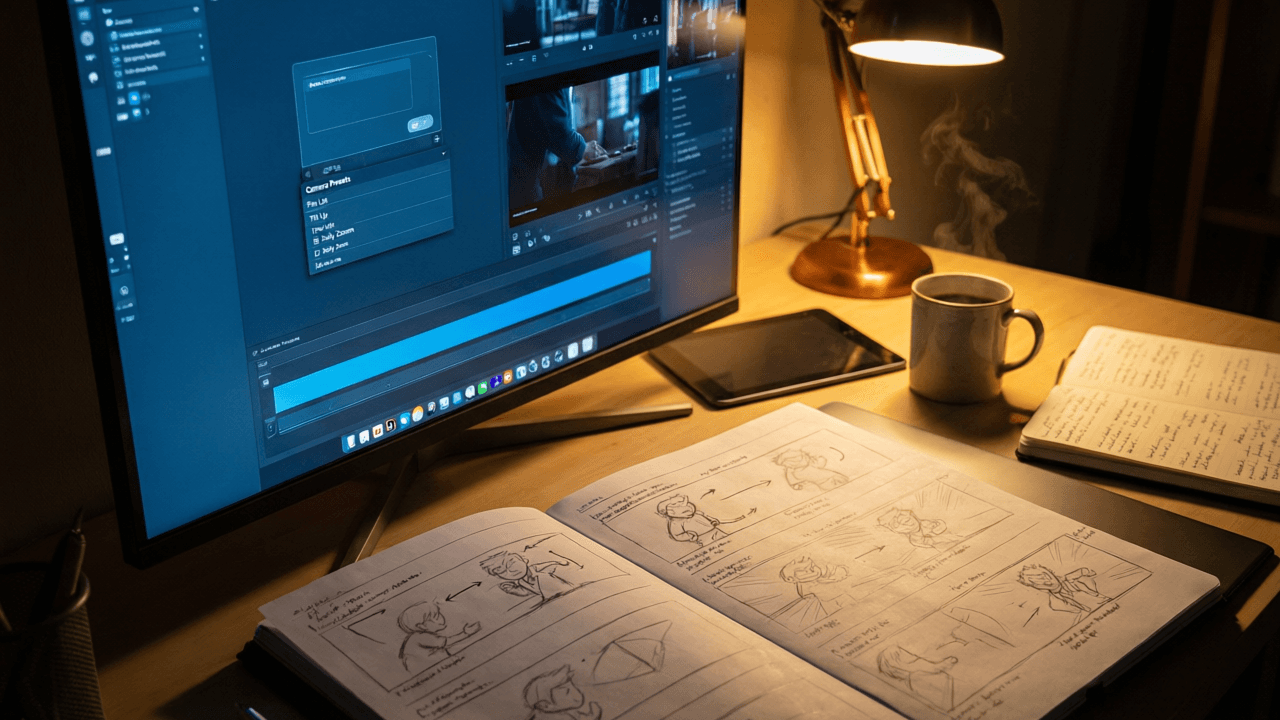
What PixVerse 4.5 Changed for AI Video Generation
The official announcement on May 13, 2025 was three bullet points long: "20+ Cinematic Camera Control," "Multi-Element Reference and Fusion," and "Smoother and better handling of complex movements." The post opened with "Whoa, that was FAST," a nod to the pace. PixVerse V4 had shipped in late February, less than three months earlier.
Launch-day trade coverage from AIbase filled in the numbers: motion fluidity improved by roughly 30%, with fewer artifacts in dance, sports, and multi-person scenes, and the free version opened to global users immediately rather than sitting behind a paywall.
| Launch fact | Detail |
|---|---|
| Announced | May 13, 2025, on the official PixVerse X account |
| Clip length | 5 or 8 seconds |
| Resolution | Up to 1080p |
| Access at launch | Free for global users, advanced features on subscription |
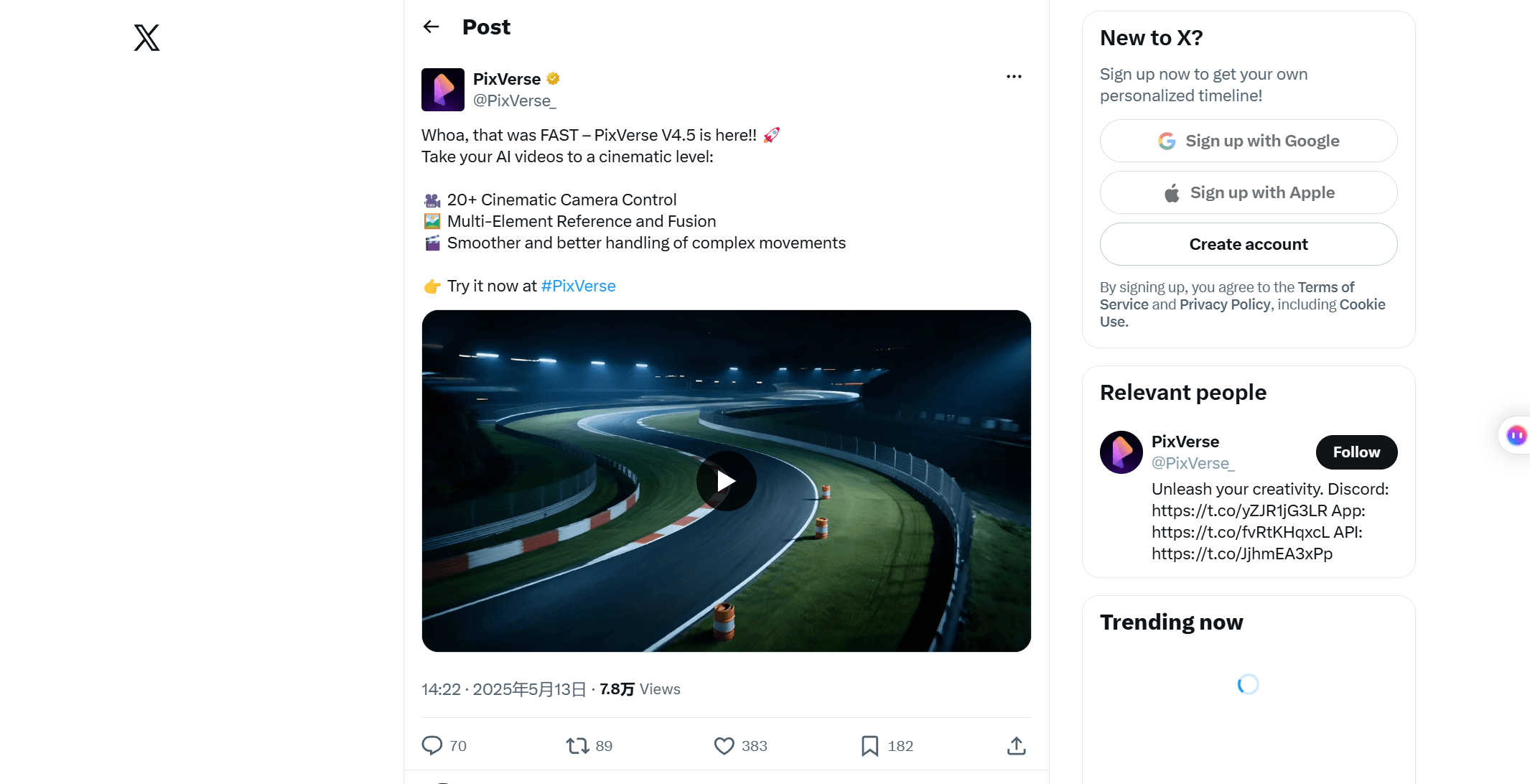
The 8-second ceiling frustrated some users at the time. The bet behind the release was that controllability matters more than duration, and later releases kept building on the control features first.
Run PixVerse Models Through the Atlas Cloud API
The 4.5 feature set lives on in the current generation, and that generation is callable without a subscription. Atlas Cloud hosts the active PixVerse model family: V6, the flagship that inherited the camera language and reference-driven generation, and C1, built for multi-shot continuity. Billing is per second of output. The V6 text-to-video playground quotes the exact price before each run, so you can test prompts in the browser before writing any code.
V6 rates as of July 2026, taken from the model page, with no discount currently active:
| Quality | Without audio | With audio |
|---|---|---|
| 360p | $0.025 / sec | $0.035 / sec |
| 540p | $0.035 / sec | $0.045 / sec |
| 720p | $0.045 / sec | $0.060 / sec |
| 1080p | $0.090 / sec | $0.115 / sec |
A 5-second 720p clip with audio comes to $0.30, so $10 covers about 33 runs at those settings. C1 prices slightly higher, from $0.030 per second at 360p without audio. Durations run 1 to 15 seconds on both models, nearly double the ceiling PixVerse 4.5 worked within; the [duration rules by generation](pixverse-video-length-limit.md) are their own small topic.
Method 1: PixVerse in the Atlas Cloud Playground
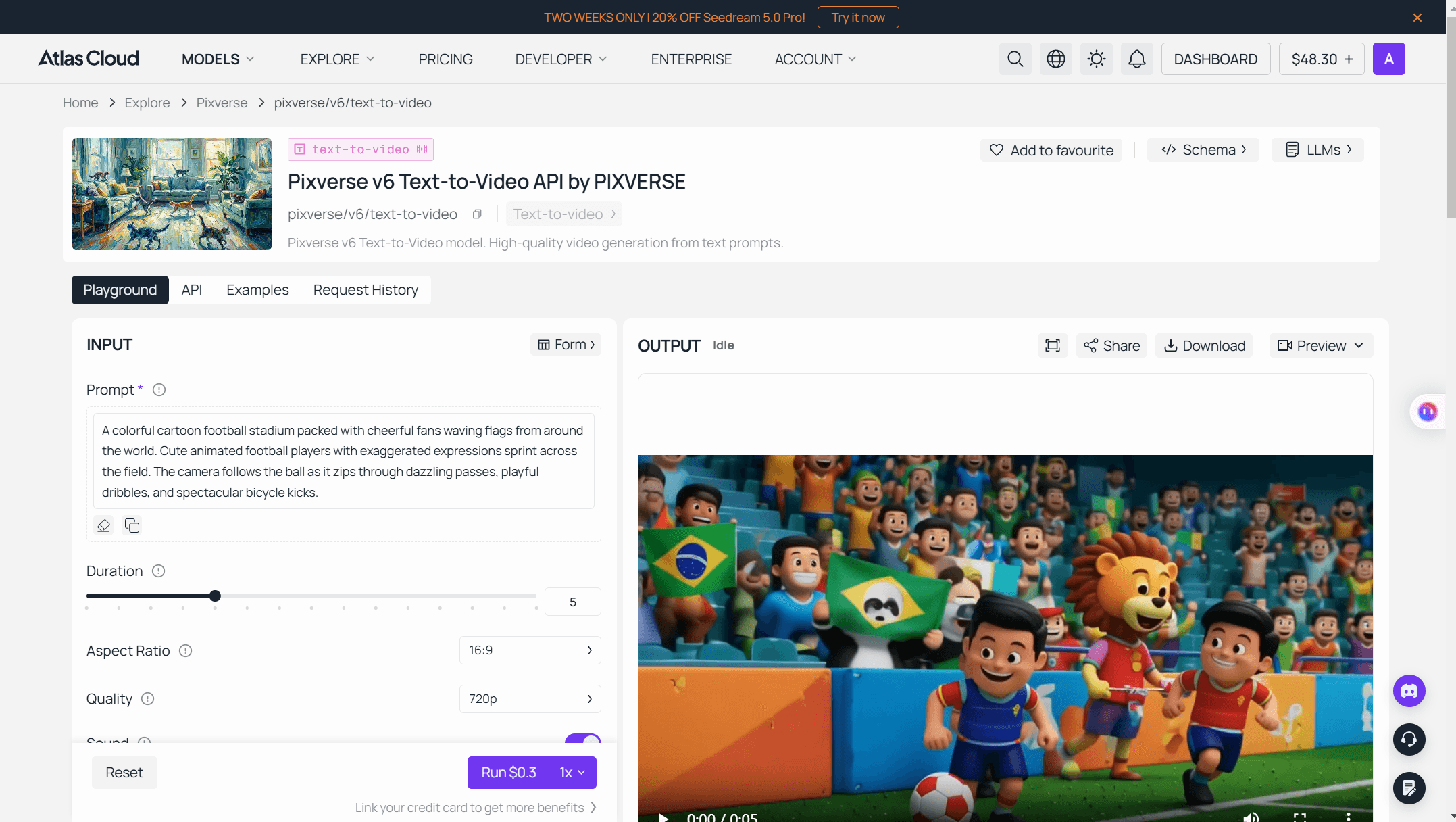
Log in, open the playground, and the form is ready. Only the prompt is required.
- Write the prompt. Subject, action, camera, light, in plain sentences.
- Pick duration and quality. Defaults are 5 seconds, 720p, 16:9.
- Toggle audio. Sound is on by default and raises the per-second rate.
- Check the Run button. It shows the exact cost before you commit.
- Run and download. The finished clip lands in the output panel.
Method 2: Call the PixVerse API From Code
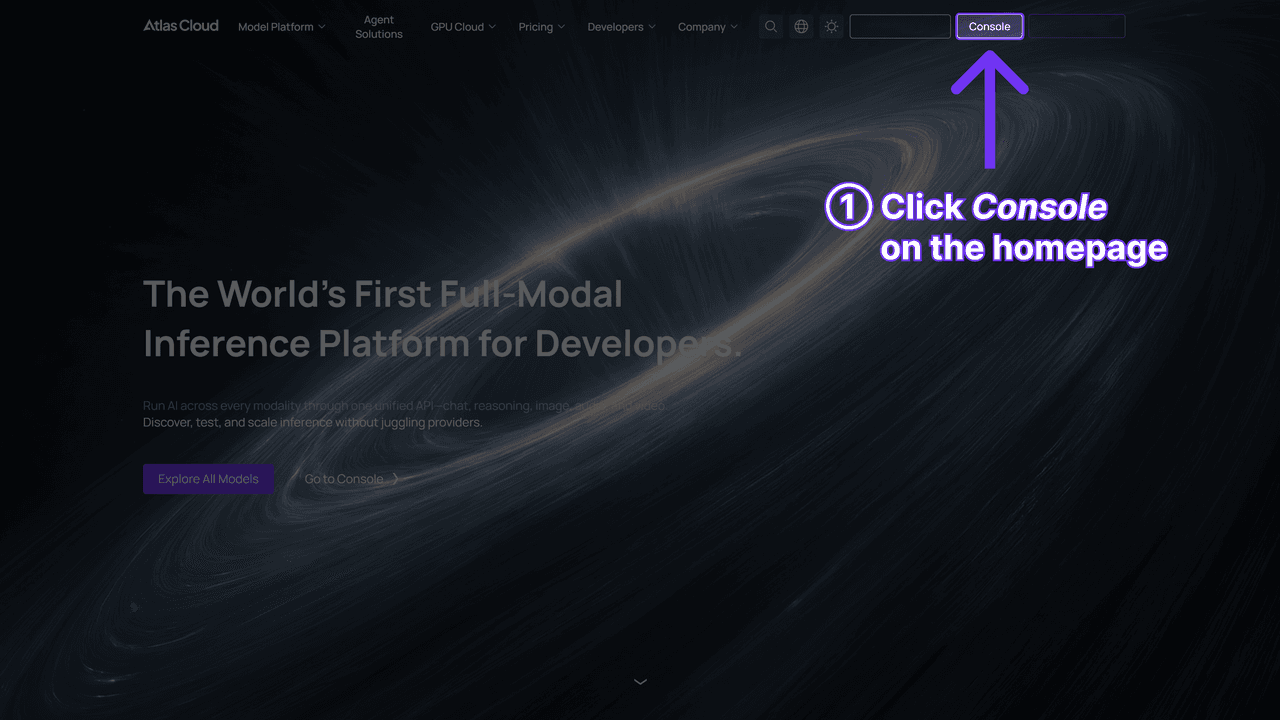
Step 1: Get your API key. Create a key in the Atlas Cloud console and store it as an environment variable, never in client-side code.
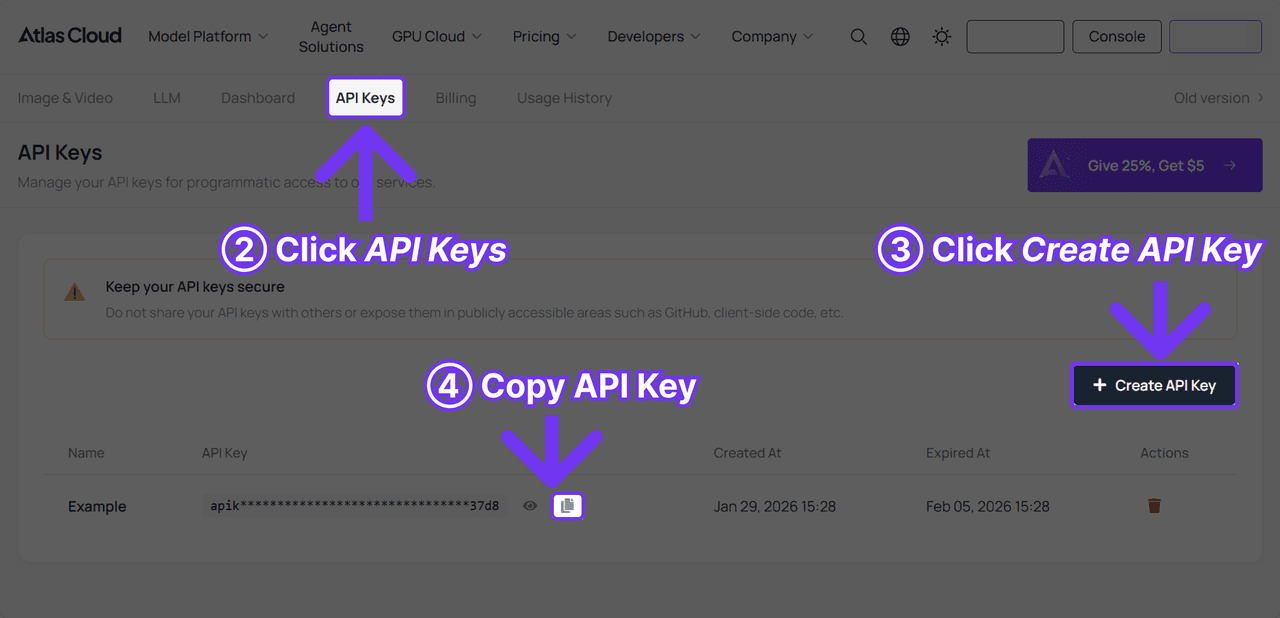
Step 2: Check the API docs. Endpoints, parameters, and authentication live in the API documentation.
Step 3: Make your first request. Submit the job:
Bash1curl -X POST https://api.atlascloud.ai/api/v1/model/generateVideo \ 2 -H "Content-Type: application/json" \ 3 -H "Authorization: Bearer $ATLASCLOUD_API_KEY" \ 4 -d '{ 5 "model": "pixverse/v6/text-to-video", 6 "prompt": "A lighthouse keeper climbs a spiral staircase at dusk, slow push-in toward the lantern room as the beam sweeps past", 7 "duration": 5, 8 "quality": "720p", 9 "aspect_ratio": "16:9", 10 "sound": true 11 }'
The response returns a prediction ID. Poll it until the status reads completed:
Bash1curl https://api.atlascloud.ai/api/v1/model/prediction/<prediction_id> \ 2 -H "Authorization: Bearer $ATLASCLOUD_API_KEY"
The completed response carries the hosted video URL. Atlas Cloud runs one API across the platform: one key, one auth header, one submit-and-poll loop for every model it hosts. When the next PixVerse version ships, you swap the model string and keep the rest untouched.
PixVerse 4.5 Camera Controls in Practice
Before this release, getting a specific camera move out of PixVerse meant writing hopeful prompt text and regenerating until something stuck. PixVerse 4.5 turned camera work into a parameter. You pick the move, the model executes it, and the same prompt with a different movement produces a recognizably different shot. The current official API reference still exposes this as a camera_movement field, with values like zoom_in.
The presets group into a few families, matching the categories launch coverage described:
| Movement family | Typical presets | Example use |
|---|---|---|
| Horizontal | pan left, pan right | Reveal a landscape, follow a subject across frame |
| Vertical | tilt up, tilt down, crane moves | Establish scale, move from ground to sky |
| Depth | push in, pull out, zoom | Build tension on a face, open up a scene |
| Rotation | clockwise, counterclockwise | Stylized transitions, music-video energy |
| Combined | pairs of the above | Approximate dolly-style cinematic shots |
The lasting effect shows up in prompt culture. Terms like slow push-in or crane up became standard vocabulary in PixVerse prompts, and the same wording keeps working on V6, where camera direction written in plain text does the same job.
Multi-Image Fusion in PixVerse V4.5
Fusion addressed the consistency problem that made AI video hard to use commercially. Upload a product photo, a character shot, and a background plate, and PixVerse V4.5 composites them into one scene where each element keeps its identity. The announcement called the capability "Multi-Element Reference and Fusion." E-commerce teams picked it up quickly, because it meant a real product could appear in a generated ad without the model inventing a slightly wrong version of it.
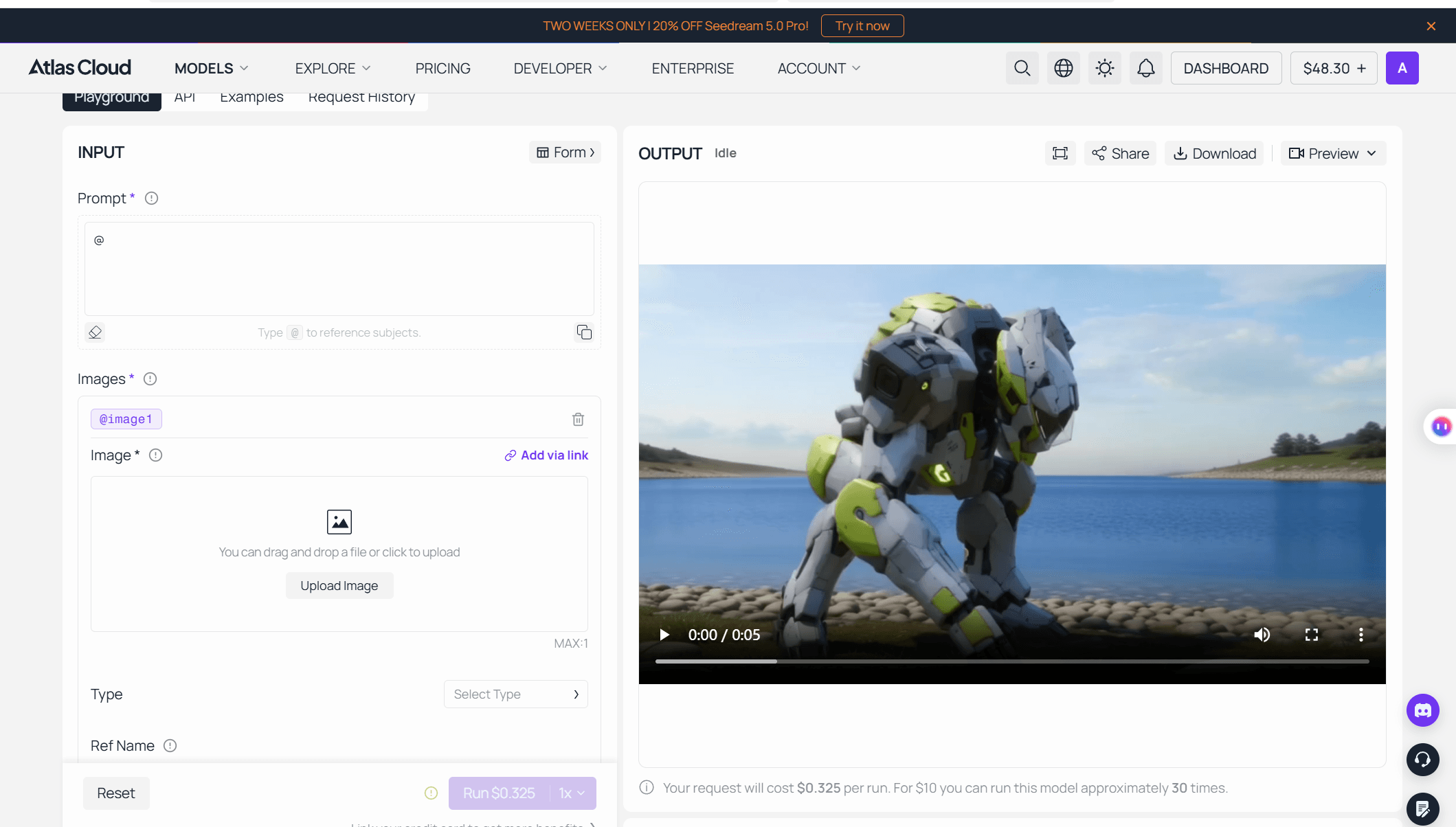
The idea grew into a dedicated endpoint in later generations. The V6 reference-to-video API accepts up to 7 images, each tagged as subject or background and addressable by name inside the prompt. Production teams get per-element control that the original Fusion mode only hinted at, billed on the same per-second grid as text-to-video.
PixVerse V4 vs the 4.5 Upgrade
PixVerse V4 arrived in late February 2025 and solved a different problem: making output feel finished. Trade coverage at the time highlighted a jump in realism, faster generation, and Restyle, a style-transfer feature that could turn live-action footage into watercolor anime. The same release wave brought a synchronized sound-effect feature and, in the same era, the Speech lip sync tool. Worth being precise here: those ran as separate passes on top of a silent generated clip, since audio generated inside the model call only reached the line with V5.5 in December 2025. Still, for anyone evaluating pixverse v4 ai video output at the time, one-click audiovisual results stood out in an era when video models generally rendered silent output.
The 4.5 update kept all of that and layered direction on top:
| Dimension | PixVerse V4 | PixVerse 4.5 |
|---|---|---|
| Released | Late February 2025 | May 13, 2025 |
| Camera work | Prompt guesswork | 20+ selectable cinematic presets |
| Reference input | Single image | Multi-image Fusion mode |
| Complex motion | Improved over V3.5 | Reported roughly 30% smoother |
| Signature extras | Restyle, sound-effect pass | Carried over from V4 |
A useful way to read the pair: pixverse v4 ai made clips complete, and 4.5 made them directable. Searches for pixverse ai v4 today usually come from people deciding whether the current lineup still fits a workflow built in that era. Prompts written for either version behave sensibly on [the V5 generation](pixverse-v5.md) and on V6, because the vocabulary carried forward.
PixVerse V4 Free Tier vs Paid Credits in 2026
Free access has been part of the growth strategy since the pixverse v4 free tier era. In 2026 the free plan works like this: new accounts get 90 signup credits plus a daily allowance of 60, outputs carry a watermark, and resolution caps at 540p. With a typical clip priced around 35 to 60 credits, the daily allowance covers roughly one video. Fine for testing prompts, unusable for a campaign.
Paid usage of the old model is still on the table, which surprises people. The official API reference quoted earlier lists v4.5 among currently supported versions, alongside v3.5 through v6 and c1. The platform pricing page prices it in credits, and two rules decide most of the bill: fast motion mode doubles the cost, and so does choosing 8 seconds over 5.
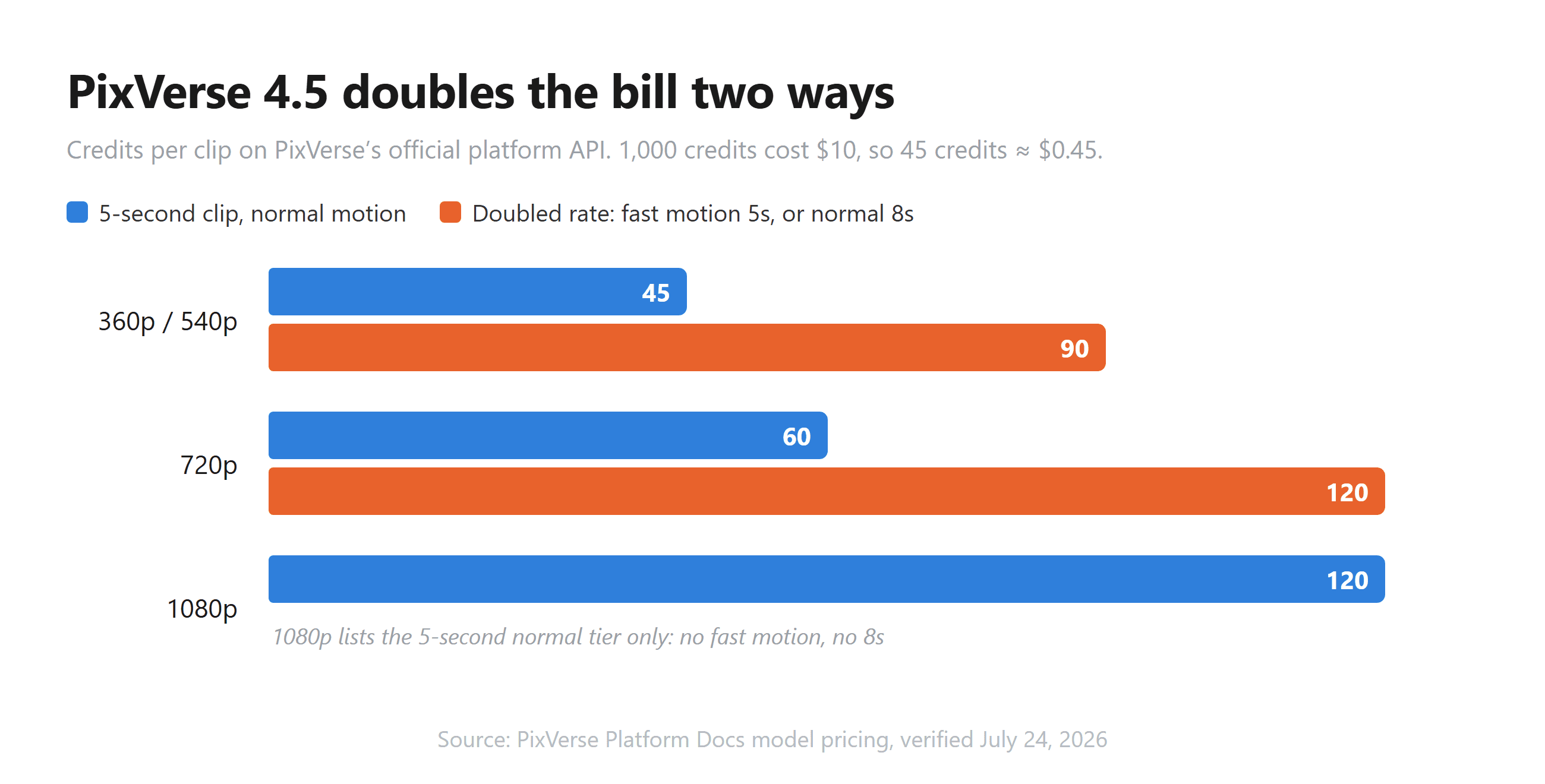
At the $10-per-1,000-credits pack rate, a 5-second 720p PixVerse 4.5 clip costs $0.60. The V6 equivalent meters at $0.225 on Atlas Cloud, silent in both cases, less than half the price for a newer model.
Frequently Asked Questions
Is PixVerse 4.5 still available in 2026?
Yes, for API users. PixVerse's official API reference lists v4.5 among its supported model versions, alongside v3.5, v4, v5, v5.5, v5.6, v6, and c1. The web app steers everyone to the newest generation by default. Atlas Cloud hosts only the current V6 and C1 series, so 4.5 access specifically runs through PixVerse's own platform.
What is the difference between PixVerse V4 and PixVerse 4.5?
V4, from late February 2025, focused on realism, generation speed, Restyle style transfer, and companion audio features. PixVerse 4.5 added the 20+ cinematic camera presets, multi-image Fusion, and noticeably smoother complex motion. Everything V4 introduced carried over.
Is PixVerse V4.5 free to use?
It launched free for global users, and PixVerse still runs a free tier: 90 signup credits, 60 daily credits, a watermark, and a 540p cap. A 5-second clip costs 45 credits at 360p or 540p, so free covers about one clip a day. Watermark-free, higher-resolution output needs a subscription or per-second API billing.
How many credits does a PixVerse 4.5 video cost?
On the official platform: 45 credits for a 5-second clip at 360p or 540p, 60 at 720p, and 120 at 1080p. Choosing 8 seconds doubles the cost, and fast motion mode doubles it too. Credit packs start at $10 for 1,000 credits, putting a 720p 5-second clip at $0.60.
Does PixVerse 4.5 support 1080p output?
Yes, with limits. On the official price table, 1080p lists only the 5-second, normal-motion tier, with no 8-second or fast-motion variant. Launch coverage also reported 4K upscaling working for some scene types, though 1080p remained the native ceiling.
Can PixVerse 4.5 generate audio?
Not inside the generation call. V4-era clips render silent, with sound effects and lip sync available as separate features applied afterward. Audio generated in the same pass arrived with V5.5 in December 2025 and is standard on V6 and C1, where it changes the per-second rate, for example $0.045 versus $0.060 at 720p for V6 on Atlas Cloud.
Conclusion
PixVerse 4.5 was the release where the platform stopped competing on raw output quality alone and started giving creators the controls a director would recognize. Camera presets became a parameter, multi-image reference became a workflow, and both ideas are still visible in today's V6 generation.
The practical path in 2026 is straightforward. The free tier remains the cheapest way to learn the prompt style, the official API keeps v4.5 itself callable for workflows pinned to that era, and the V6 generation carries the same feature set forward with longer clips at per-second rates.





