

Upload two photos, wait about a minute, and you get a video of two people hugging. That's the PixVerse AI Hug effect that's been flooding TikTok and YouTube feeds lately. Does it cost anything? Short answer: it's free! But free accounts have limits on output quality and generation credits.
This guide breaks down exactly how far PixVerse AI Hug Free actually stretches, how the credit math works, what separates the free tier from paid plans, and what to do when a hug video comes out looking stiff or warped. Everything here traces back to PixVerse's own documentation and site pages, not a recycled list of tips from somewhere else.
Key Takeaways
- PixVerse AI Hug is one of the trending effects PixVerse lists directly on its own homepage, alongside AI Kiss and Muscle.
- New accounts get 90 one-time signup credits plus 60 daily refreshing credits, and a single 5-second video costs at least 25 credits, enough for about one free clip per day.
- Free-tier videos ship with a watermark and capped resolution. Removing the watermark and unlocking higher resolution requires a paid plan.
- Developers building a hug-style effect into their own product are better off going through a pay-per-second video API than trying to scale a consumer app's credit system.
What Is the PixVerse AI Hug Effect?
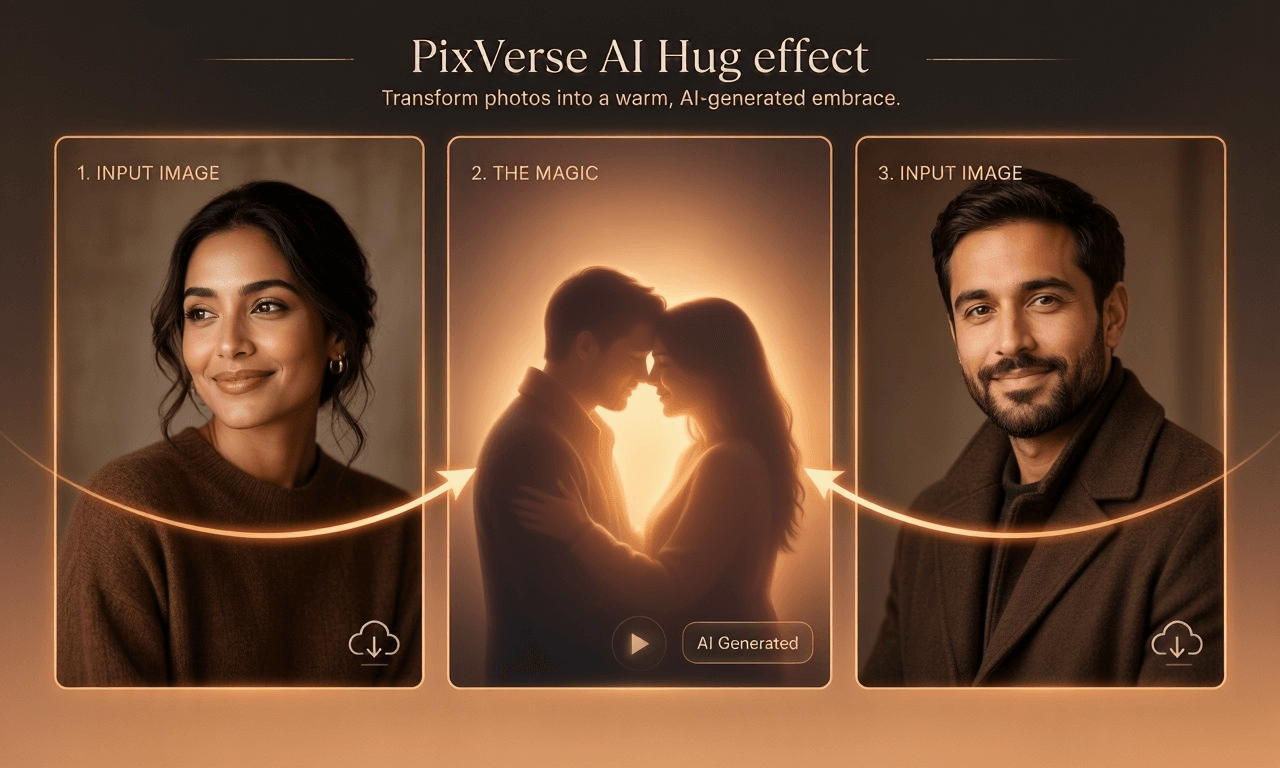
PixVerse AI Hug is one of the "trending effects" PixVerse names directly on its own site, which advertises AI Kiss, Hug, and Muscle effects for turning photos into shareable short videos. This isn't a feature invented by a third-party wrapper site. It's something PixVerse itself is actively promoting.
Under the hood, it's image-to-video generation. A user uploads one or two portrait photos, the model reads the pose and facial features in each, and it renders a short clip that moves from two people standing apart to embracing. The effect travels fast on social media because it manufactures an emotionally loaded moment, a reunion hug, without needing anyone physically present. That's exactly why it gets used for nostalgic content involving deceased relatives, long-distance partners, or pets being "reunited."
It's worth noting that the Hug effect draws from the same credit pool and model infrastructure as PixVerse's general image-to-video tool. It isn't billed separately as some kind of bonus feature. That means its free allowance and watermark rules follow PixVerse's overall free-tier policy rather than some limited-time promotion tied to the effect itself.
How Do You Use PixVerse AI Hug Free to Generate a Hug Video?
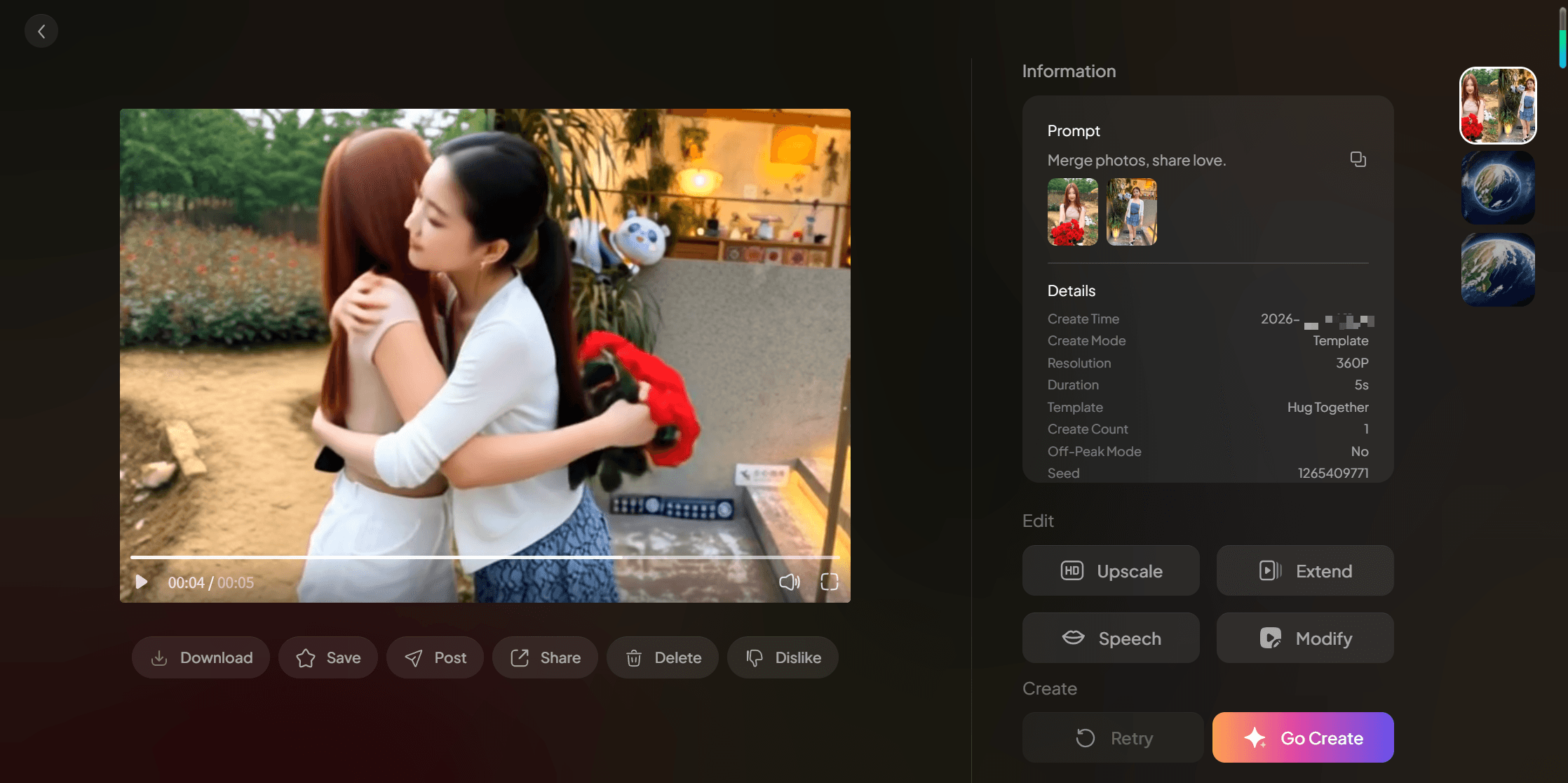
Using PixVerse AI Hug Free only requires an account, no credit card needed. Sign in to the PixVerse web app, find the image-to-video tool, upload the photos of the people you want hugging, describe the action in the prompt field (something like "make them hug"), pick a lower resolution tier to save credits, and hit generate. If you'd rather skip writing a prompt entirely, use the "Hug Together" template instead: pick it from the effect templates, upload your photos, and the preset handles the hugging motion for you.
Generation usually takes around a minute, depending on server load. If the first result has clipped arms or a stiff pose, there's no need to re-upload the photos. Adjust the prompt instead, adding detail like "hug slowly and naturally," and regenerate. The free allowance covers two or three attempts before it runs dry for the day.
How to Build and Scale a PixVerse AI Hug Effect With an API
If the goal isn't a one-off personal video but a product that generates hug-style effects at scale, a consumer app's credit system stops making sense fast. Sixty credits a day is one clip. A product needs thousands, watermark-free, on demand. That's an API problem, not a subscription problem.
Here's the part most people miss: the same PixVerse models behind the Hug effect are available as direct API calls on Atlas Cloud, without going through PixVerse's own API plans. PixVerse's own platform documentation prices its cheapest published API plan, Essential, at $100/month for 15,000 credits. At 18–23 credits per second for 1080p output, that works out to roughly $0.12–$0.15 per second. Atlas Cloud hosts PixVerse V6 at a flat $0.025 per second and PixVerse C1 at $0.03 per second, pay-as-you-go, with no monthly minimum, no watermark, and native audio included in the rate.
Run the numbers on a hug-effect feature generating 1,000 five-second clips a month. Through PixVerse's Essential plan, that volume alone would exhaust several months of credits. Through Atlas Cloud's PixVerse V6 endpoint, it's 5,000 seconds at $0.025 each, about $125, with no subscription attached and nothing wasted on unused allotment.
PixVerse V6 is a strong fit for exactly this use case: it takes image input, renders 1 to 15 second clips at up to 1080p, and generates audio in the same pass, so a "make them hug" pipeline needs just one API call per video. Teams that want tighter shot-by-shot control can use PixVerse C1, the storyboard-oriented variant, at $0.03 per second on the same billing model.
Getting from zero to a first hug clip takes two routes, and neither involves a waitlist.
Option 1: Use it directly on the platform. No code required. Open the PixVerse V6 image-to-video page on Atlas Cloud, upload your reference photo, select the "Hug Together" template, pick a resolution from 360p up to 1080p, and generate. The output comes back watermark-free, with optional synchronized audio.
Option 2: Integrate through the API. Three steps:
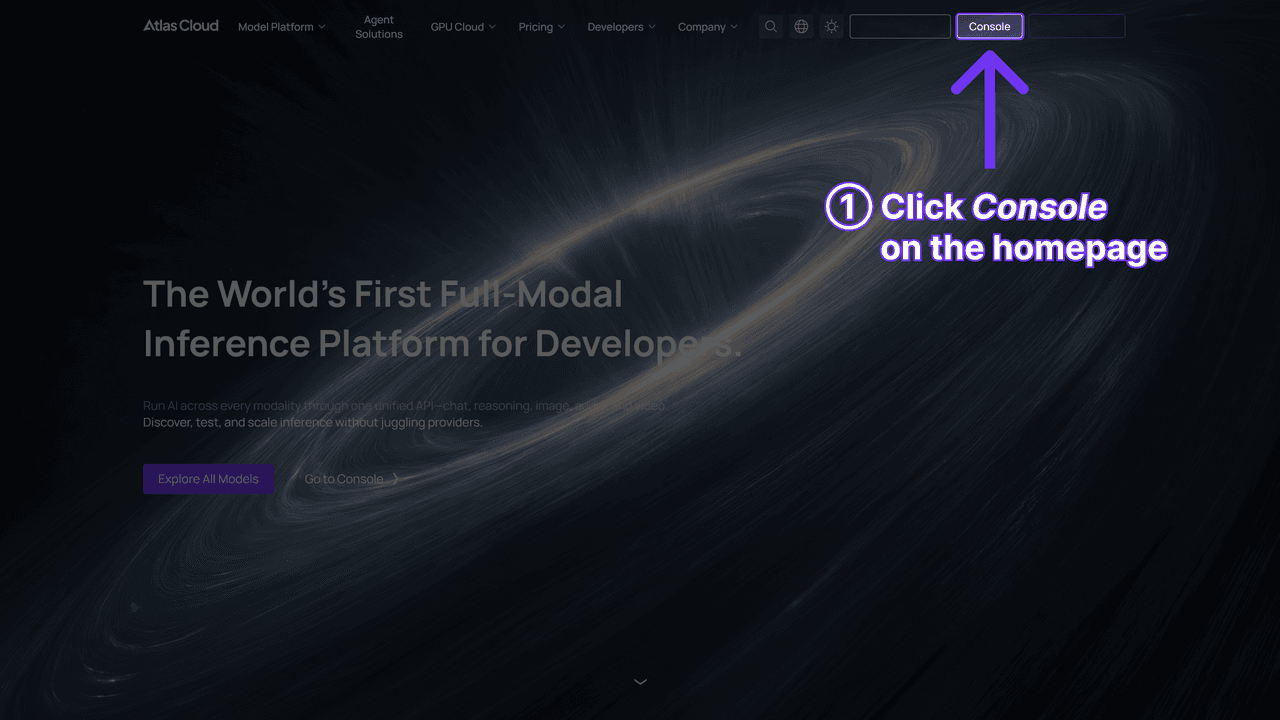
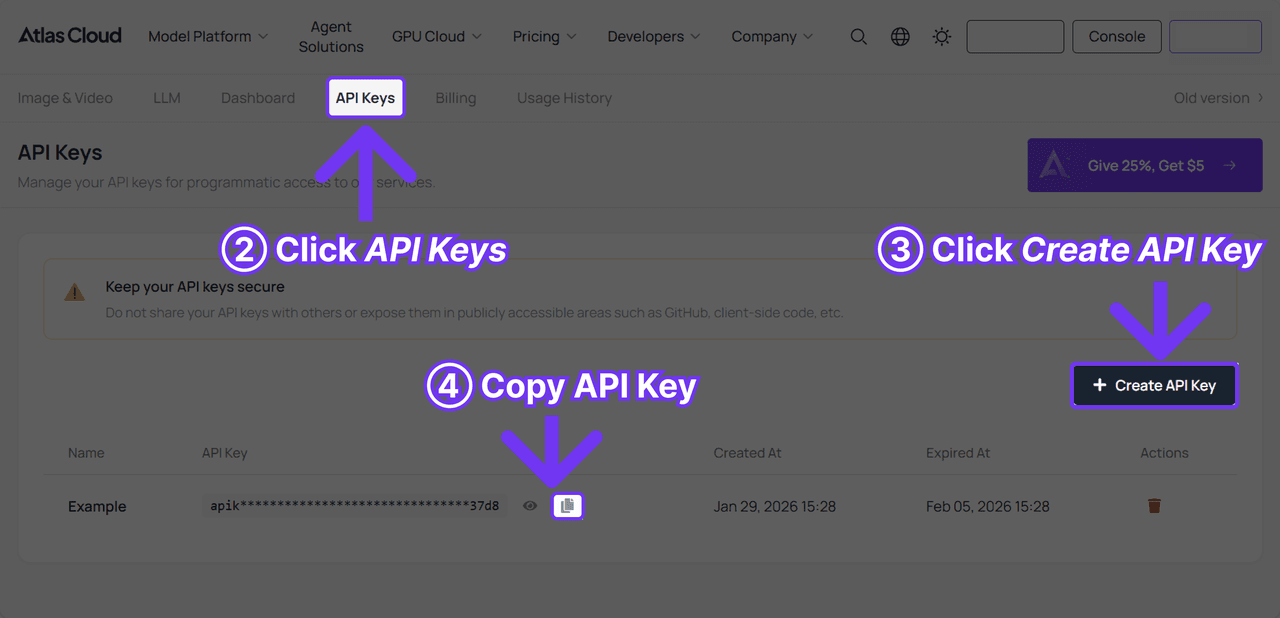
- Grab an API key. Sign in at the Atlas Cloud console and create a key from the dashboard. It takes under a minute.
- Check the docs. The Atlas Cloud API documentation covers endpoints, request parameters, and authentication, with a quick-start that gets you to a first call in about two minutes.
- Make your first request. Call the video generation endpoint with pixverse/v6/image-to-video as the model, your image, and a motion prompt. That's the whole pipeline for one hug video.
The part that pays off later: Atlas Cloud runs everything through one unified API across 400+ models, so the calling convention never changes. Want to A/B test hug motion quality against alternatives? The image-to-video model catalog on Atlas Cloud includes Seedance 2.0 Mini at $0.045 per second, Grok Imagine Video at $0.05 per second, and Vidu Q3-Turbo at $0.034 per second. Swap the model name in the request and keep every other line of code exactly as it is. No re-integration, no second vendor contract, no new billing account. Current per-second rates for every model are listed on the Atlas Cloud pricing page.
What Should You Watch for When Uploading Photos for PixVerse AI Hug?
Clear front-facing or half-body shots with even lighting and a clean background produce the most consistent results. When the two source photos are shot from very different angles, say one taken from above and the other from below, the model is more likely to get limb proportions wrong when it blends the two into a hugging pose.
How Do You Make a PixVerse AI Hug Video Look More Natural?
The fix for a stiff-looking hug almost always comes down to prompt specificity. Instead of just typing "hug," describe who initiates, how long the embrace lasts, and where the arms land. Models respond more consistently to concrete action cues than to vague ones.
Several third-party reviews and community discussions mention complaints about credits burning through quickly and failed generations still deducting credits, though none of that has been individually confirmed by PixVerse itself, so treat it as community reporting rather than verified fact. If two consecutive generations both come out with visibly warped limbs, switching to a pair of photos with more even lighting and closer-to-frontal poses tends to help more than endlessly tweaking the wording of the prompt.

Is the PixVerse AI Hug Free Allowance Enough? How Do the Credits Work?
It's enough for one clip a day, not for anything close to batch production. According to PixVerse's own documentation, new accounts receive 90 one-time signup credits plus 60 credits that refresh daily, and a 5-second video costs at least 25 credits. Run the math and that works out to roughly one free PixVerse AI Hug video per day, or about 30 a month if you show up every day.
One catch worth flagging: credits get deducted per generation attempt, not per finished result you're happy with. A disappointing first take still costs the same 25 credits as a good 5-second one, so the real number of usable clips tends to run lower than the theoretical daily cap suggests. That gap is a common source of frustration people bring up when free credits "look generous but disappear fast."
Free vs. Paid: Watermark and Resolution Differences
The clearest split between tiers is the watermark and output resolution. Free accounts get videos with a visible PixVerse watermark at a lower resolution ceiling, while paid plans strip the watermark and unlock higher resolution output. For a personal share with friends, the free tier is fine. For a branded or commercial account, the watermark and resolution cap become real dealbreakers.
The free tier gives you 60 daily credits plus the 90 you get on signup, always with a watermark, capped at a lower resolution, and generally not recommended for commercial use. Paid plans swap that for a higher, plan-dependent credit allowance, no watermark, access to higher resolution tiers, and commercial rights that vary by plan terms.
For a deeper breakdown of how the free credit system resets and where people misread the rules, see our full walkthrough of PixVerse's free plan, which covers the daily reset logic in more detail.
Frequently Asked Questions
Is PixVerse AI Hug Free actually free?
Free, with limits. New accounts get 90 one-time credits plus 60 daily refreshing credits, and a 5-second video costs at least 25 credits, enough for roughly one free clip a day before you need to upgrade.
Does PixVerse AI Hug add a watermark to the video?
Yes. Free-tier exports carry a visible PixVerse watermark and a lower resolution ceiling. Upgrading to a paid plan removes the watermark and unlocks higher resolution.
Why do the arms look distorted in my hug video?
This usually traces back to mismatched photo angles. When the two source photos differ significantly in angle or lighting, the model is more prone to getting limb proportions wrong. Try a pair of more evenly lit, front-facing photos instead.
Can I use PixVerse AI Hug videos commercially?
Free-tier output generally isn't recommended for commercial use, and the specifics depend on PixVerse's official terms of service. For commercial rights or bulk generation, check the paid plan terms directly, or consider a pay-as-you-go API for image-to-video generation instead.
What other trending effects does PixVerse offer besides Hug?
PixVerse's own homepage lists other trending effects, including AI Kiss and Muscle, all built on the same underlying image-to-video model with different preset action templates.
Conclusion
PixVerse AI Hug Free is a low-friction way to try the effect. Ninety signup credits plus 60 a day is enough for the occasional watermarked hug clip. But once you want higher resolution, watermark-free output, or you're trying to turn this into an actual product, the free allowance and the consumer app's credit system stop being enough pretty quickly.
The practical move is to run a few free generations first and see if the effect actually fits your content, then decide whether a paid plan makes sense or whether a pay-as-you-go API is the better foundation for building your own image-to-video feature.





