La plupart des gens traitent la génération de vidéos par IA comme un second emploi à temps plein. Vous choisissez un nouveau modèle à la mode, vous lisez sa documentation API dense, vous déterminez les paramètres JSON exacts pour la résolution et la durée, vous gérez les jetons de tâches asynchrones, puis vous rafraîchissez manuellement votre tableau de bord.
Si vous essayez de gérer une chaîne YouTube automatisée sans visage ou de déployer une armée de vidéos TikTok pour capitaliser sur le trafic lié à l'IA, ce processus manuel détruit vos marges. Le principal goulot d'étranglement dans la production vidéo par IA n'est pas le coût de calcul brut, c'est le temps que vous passez à « faire du baby-sitting ».
Lorsque vous passez la moitié de votre journée à regarder une roue de chargement, vous n'êtes pas un entrepreneur, vous êtes un surveillant de file d'attente.
Le véritable raccourci pour industrialiser la production de contenu est d'éliminer les intermédiaires. En combinant l'espace de travail d'agent conversationnel de VM0 avec l'infrastructure unifiée d' AtlasCloud, vous pouvez fusionner entièrement la génération vidéo dans une seule fenêtre de chat. Voici précisément comment configurer un pipeline vidéo automatisé et autonome qui gère les tâches lourdes pendant que vous vous concentrez sur la stratégie créative.
Le problème fondamental : pourquoi les rendus asynchrones vous font perdre du temps
Les API multimodales traditionnelles sont conçues pour les ingénieurs logiciels, pas pour les créateurs agiles. Lorsque vous demandez un clip vidéo haute fidélité à des modèles de premier plan comme Seedance 2.0 de ByteDance, Veo 3.1 de Google ou Kling v2.5 Turbo Pro de Kuaishou, la génération est asynchrone. Cela signifie que le serveur ne vous donne pas la vidéo immédiatement ; il vous donne un « ID de tâche ».
Pour obtenir le fichier, votre système doit interroger le serveur de manière répétée — un processus appelé « polling » — jusqu'à ce que le rendu soit terminé. Si un script échoue ou qu'un jeton expire en cours de route, vous devez tout recommencer.
Au lieu de faire face à ce casse-tête technique, la combinaison de VM0 et AtlasCloud gère tout le cycle de vie pour vous. VM0 fournit l'agent intelligent (« Zero ») qui comprend ce que vous voulez, tandis qu'AtlasCloud agit comme le pipeline unique offrant un accès instantané et unifié à plus de 300 modèles sélectionnés, couvrant toutes les modalités majeures, sans avoir besoin de comptes séparés.
Guide étape par étape : générer un clip cinématographique de 8 secondes sans aucune surveillance
Ce flux de travail prend moins de cinq minutes à configurer initialement et, une fois terminé, fonctionne entièrement via des commandes textuelles automatisées.
Étape 1 — Lier votre infrastructure multimodale
Vous devez d'abord accorder à votre agent IA la permission d'appeler les modèles. Ouvrez le menu Connectors dans la barre latérale gauche de VM0. Naviguez vers l'onglet Built-in et faites défiler jusqu'à la section AI → General Models and Reasoning. Trouvez la tuile AtlasCloud et cliquez sur l'icône +.
Collez votre clé API AtlasCloud dans le champ d'autorisation. Une fois enregistrée, le statut passe à un indicateur vert Connected. Vos identifiants sont totalement isolés et stockés en toute sécurité dans l'espace de travail de la plateforme. L'agent IA peut extraire des modèles en votre nom, mais ne pourra jamais voir ou exposer la clé elle-même.
Étape 2 — Dictez votre vision en langage clair
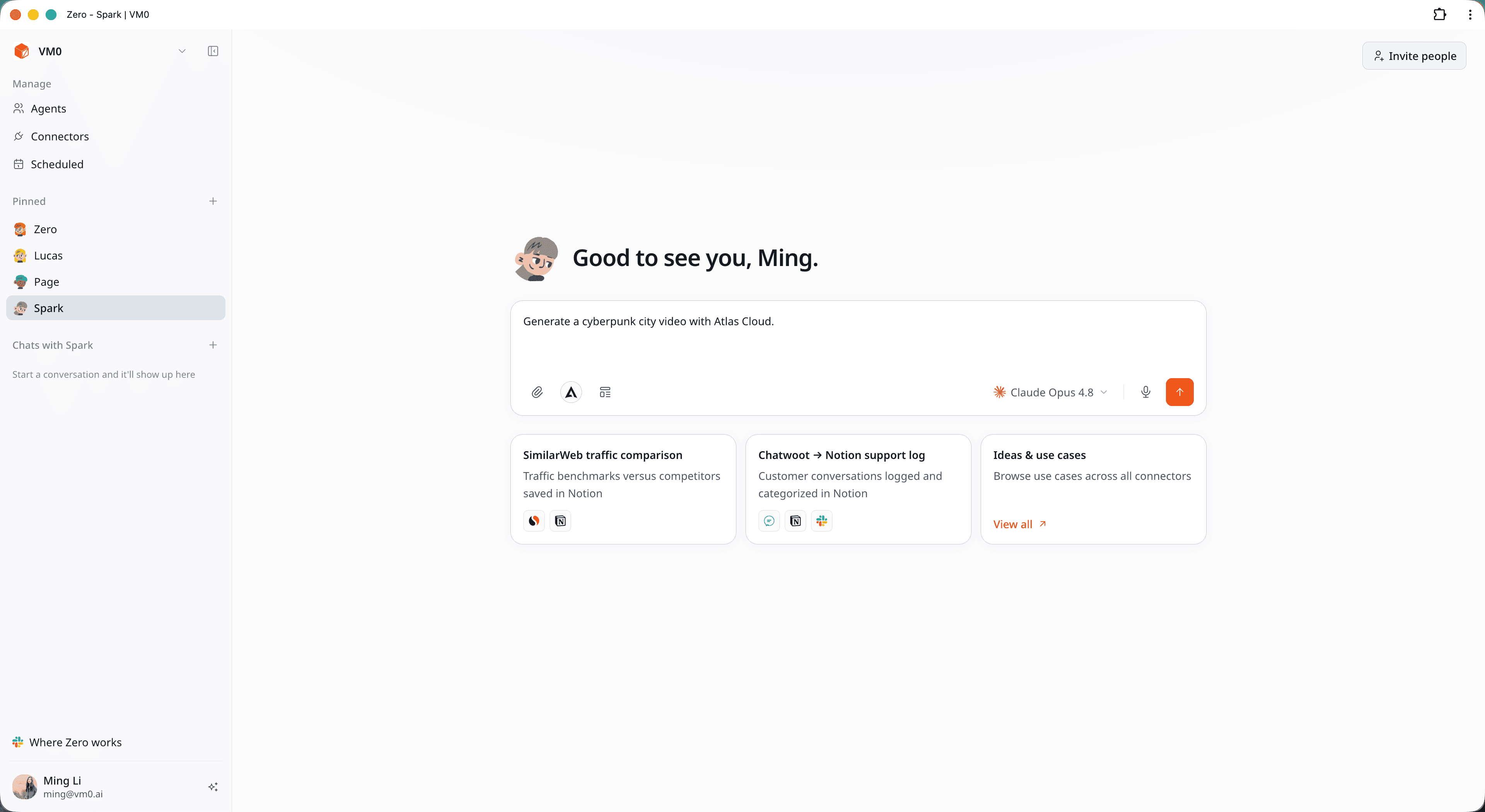
Oubliez le formatage des schémas JSON ou la recherche des règles d'espace de noms des modèles. Ouvrez une nouvelle fenêtre de chat avec votre agent et dites-lui exactement quel type de séquence vous avez besoin.
Par exemple, tapez une consigne très descriptive comme celle-ci :
"Génère un survol cinématographique de 8 secondes d'une mégalopole néon de nuit — gratte-ciels roses et cyan, panneaux publicitaires holographiques, voitures volantes, rues mouillées par la pluie, ambiance blade-runner. 1080p, 16:9, avec audio synchronisé. Utilise AtlasCloud."
Étape 3 — Laissez l'agent gérer la file d'attente
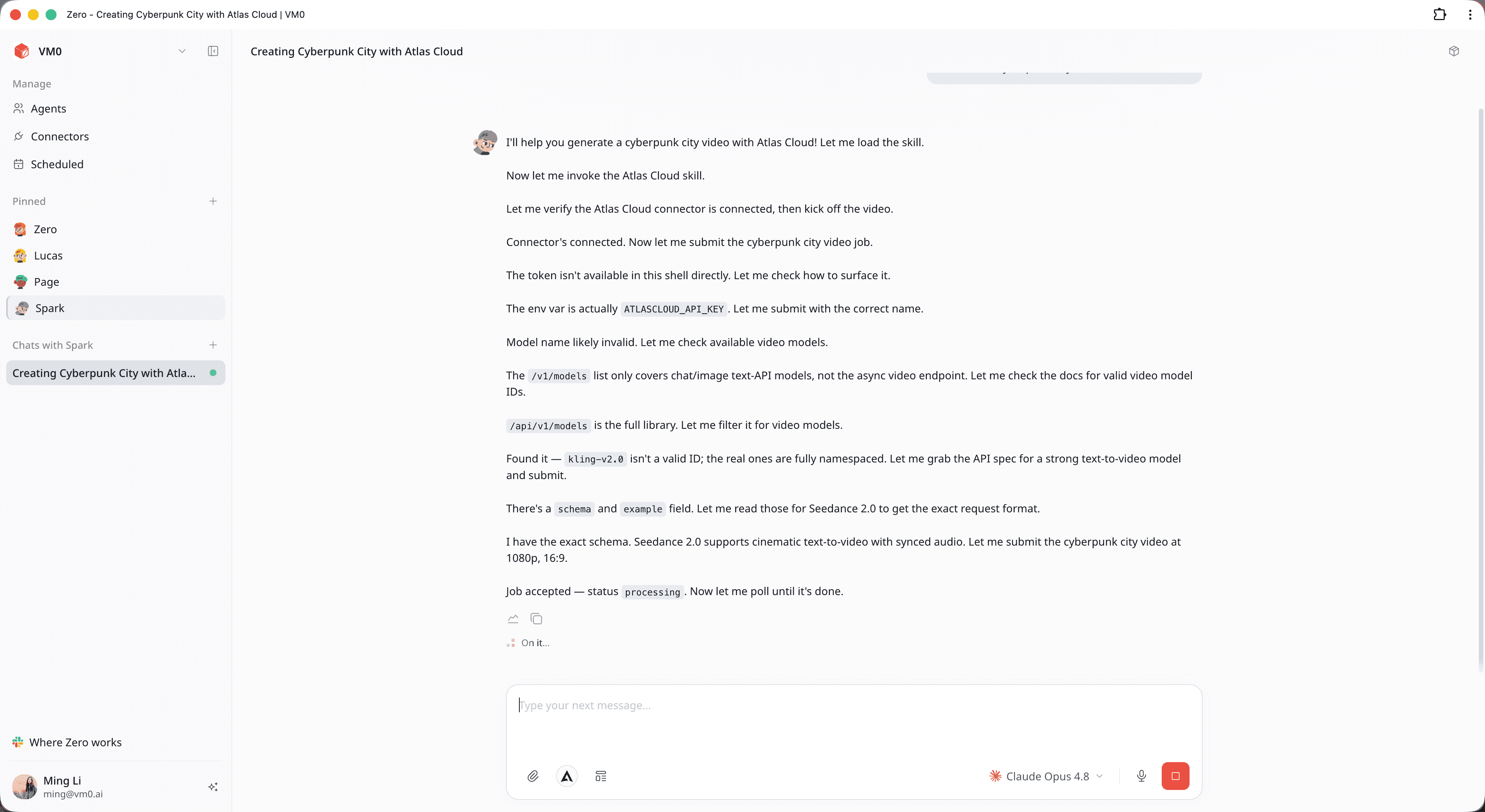
Une fois que vous avez soumis la demande, votre travail est terminé. Vous n'avez pas besoin de garder l'onglet actif ou de surveiller les logs réseau. En arrière-plan, l'agent gère l'orchestration multimodale :
- Résolution de schéma : L'agent consulte le catalogue d'AtlasCloud, mappe automatiquement l'ID requis (comme bytedance/seedance-2.0/text-to-video) et formate la structure technique.
- Polling asynchrone : Comme la génération vidéo prend du temps, l'appel API initial renvoie un statut « en cours ». L'agent exécute automatiquement une boucle de vérification interne, interrogeant AtlasCloud à des intervalles optimaux jusqu'à ce que le fichier de sortie soit prêt.
Étape 4 — Examinez, ajustez et changez de modèle instantanément
Lorsque le rendu est terminé, le fichier MP4 haute définition apparaît directement dans votre fil de discussion, accompagné d'une analyse structurée des métadonnées de génération :
- Modèle utilisé : Seedance 2.0 (via AtlasCloud)
- Attributs : 8 secondes, résolution 1080p, format 16:9, audio synchronisé natif, sans filigrane.
Si le style visuel ne correspond pas exactement à ce que vous attendiez, vous n'avez pas besoin de réécrire un script complexe. Parlez-lui comme à un monteur humain. Tapez : "Change le format en une coupe verticale 9:16 pour les réseaux sociaux et bascule le moteur vers Kling v2.5 Turbo Pro pour voir comment l'éclairage change." L'agent interprète l'ajustement, atteint le point de terminaison AtlasCloud approprié et gère automatiquement la file d'attente suivante.
Pourquoi « Agent + API unifiée » surpasse l'ancienne méthode
Pour les créateurs sérieux, gérer plusieurs comptes et coder des scripts personnalisés est un gouffre financier et temporel. Voici comment l'approche unifiée se compare aux flux de travail traditionnels :
| Caractéristique / Métrique | Tableaux de bord Web manuels | Scripts API Python personnalisés | Espace de travail VM0 + AtlasCloud |
|---|---|---|---|
| Temps de configuration | Élevé (5+ sites à enregistrer) | Élevé (heures d'écriture de boucles) | Moins de 2 minutes |
| Compétences en codage | Aucune | Avancées | Aucune (Langage naturel) |
| Gestion des files d'attente | Rafraîchissement manuel | Gestion d'erreurs complexe | Polling automatique en arrière-plan |
| Sélection de modèles | Fragmentée entre les plateformes | Verrouillée sur des points finaux | 300+ modèles via une seule clé |
| Friction de flux de travail | Coûts de changement élevés | Frais de maintenance élevés | Zéro friction |
Foire aux questions (FAQ)
La vidéo reste bloquée sur « Processing » pendant plus d'une minute. L'API a-t-elle planté ?
Non, c'est un comportement tout à fait normal pour les rendus vidéo de haute qualité. Comme les ressources multimodales avancées nécessitent un traitement serveur intensif, la tâche reste dans une file d'attente temporaire. L'agent vérifie activement le code de statut en arrière-plan et affichera le fichier vidéo dès que le serveur l'aura libéré.
Quel modèle dois-je utiliser pour les réseaux sociaux : Seedance 2.0 ou Veo 3.1 ?
Cela dépend entièrement de votre style de contenu. Seedance 2.0 excelle dans les mouvements rapides, les esthétiques néon fluides et les effets atmosphériques très détaillés comme la pluie et la fumée cinématographique. Veo 3.1 a tendance à offrir une stabilité structurelle supérieure pour les environnements photoréalistes et les visites architecturales. Avec une plateforme unifiée, la meilleure stratégie consiste à tester la même consigne sur les deux moteurs pour voir quelle esthétique correspond le mieux à votre marque.
Comment gérer le paiement et les jetons sur toutes ces plateformes vidéo ?
C'est l'avantage principal de l'utilisation d'une plateforme d'inférence consolidée. Au lieu d'enregistrer des cartes bancaires sur cinq portails de fournisseurs IA internationaux différents et de gérer plusieurs limites de dépenses mensuelles minimales, vous financez uniquement votre compte unique. La clé unifiée gère les conversions de jetons entre toutes les familles de modèles de manière transparente en arrière-plan.







